DeveloPassion's Newsletter #166 - Obsidian Plugins
Edition 166 of my newsletter, discussing Knowledge Management, Knowledge Work, Zen Productivity, Personal Organization, and more!


Welcome
Another week, another newsletter! I hope that you all had a great one 🤩
Finally, back to normal life, after having gone through INTENSE emotions recently! First, my upcoming wedding, then a scary bike crash this week-end (first one for me in 25 years)...
I've been cooking really cool stuff this week. Come along to The Lab with me, and I'll tell you everything! 🚀
BTW, please consider becoming a paid subscriber. It's THE ONE WAY to support my work and help me be free to help you all day ❤️
The lab 🧪
This week, I continued coding. It felt really refreshing to get back into the programmer's mindset, analyzing a problem, thinking about potential solutions, and implementing those. For those who are eagerly waiting for my upcoming course, please be patient. I will deliver ❤️
I've worked on three main things in the last few days:
- A template for building Obsidian plugins
- An Obsidian plugin to serialize Dataview queries
- An Obsidian plugin to integrate Typefully
Template for building Obsidian plugins
I didn't like the official Obsidian plugin boiletplate. I found it too basic for my taste. The template I have created is intended to help me (and others) create Obsidian plugins more efficiently, and with more support. And since I'm a huge fan of Nrwl NX, I've used that as a starting point.
My template includes:
- A clean structure with proper separation of concerns (i.e., not everything in a single file)
- A set of scripts to build, watch, copy to Obsidian, release, format the code, etc
- GitHub workflows for CI and release
- Creating a release is as simple as running `npm version patch|minor|major && git push && git push --tags`
- ...
The code is available on GitHub:
 dsebastien
Obsidian plugin to serialize Dataview queries
Next, I developed a plugin that can "burn" dataview queries:
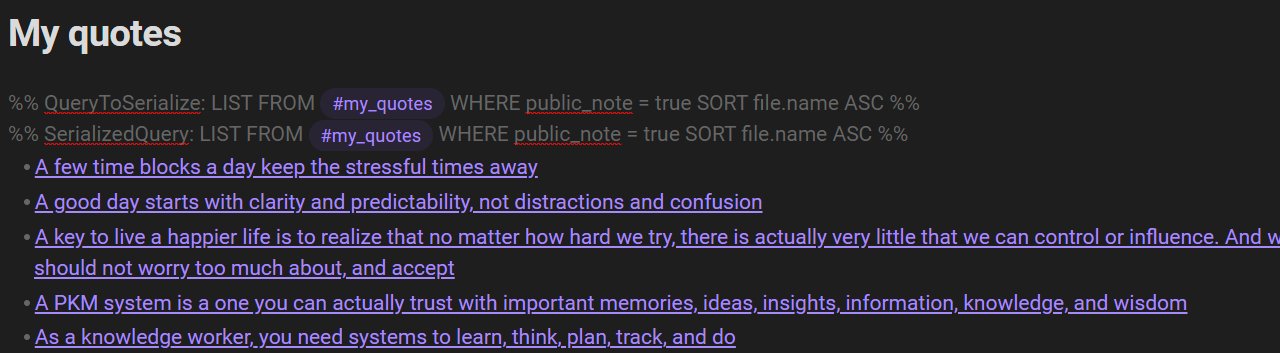
Above, you can see an example of what this plugin does. The first line defines a Dataview query to serialize. The following lines are added automatically by the plugin, and correspond to the result of executing that query.
You might wonder: "But what's the point if I can just write a normal Dataview query?". There are actually multiple benefits!
- First, the lines added by the plugin are actual Markdown, which means that those links above do appear in the Graph view. Hence, the queries I add enrich the knowledge graph
- Second, since it's all actual Markdown, it's compatible with Obsidian Publish, which is not the case with normal Dataview queries.
- Last but not least, the output is stable, and part of the note forever. If you don't edit the note again, the content will remain the same.
The idea came to me when I started publishing my notes using Obsidian Publish. I realized that Dataview queries were not compatible with it. They just disappear once published. And it makes sense. Dataview is an Obsidian plugin that modifies what you see when you look at a note within Obsidian. If you look at the Markdown file with another text editor, all you see is the Dataview query, not its output. When a note is published, Obsidian converts the Markdown to HTML, but Dataview is not involved in the process, and nothing gets generated.
Another "problem" is that Dataview queries are always "LIVE". That is, when you add a Dataview query to a note, the result will always be fresh when you look at the note. And it's not always what you want, hence this proposal to allow "burning out" dataviews:
blacksmithguFrom those observations, I started thinking about how I could convert Dataview queries to Markdown, and keep the output as part of the note...
I then thought about the Waypoint plugin, which actually does something like that for folder notes. Basically, what that plugin does is detect placeholders such as this in folder notes: %% Waypoint %%. When it detects one, it automatically adds a list of notes contained in that folder. I realized that I could basically do the same, but include a Dataview query in the comment:
%% QueryToSerialize: LIST FROM #my_quotes WHERE public_note = true SORT file.name ASC %%
And THAT is pretty powerful, since you can do tons of interesting things with Dataview queries. This de-facto makes this plugin valuable. For instance, with the query above, I can generate a list of links for my folder notes and Maps of Content (MoCs) that remain valid once published, since I only include notes that have been marked as public (i.e., published). I couldn't do the same with the Waypoint plugin.
The plugin that I've built automatically detects those queries, and automatically serializes each to actual Markdown. To ensure the stability of my notes, the plugin only serializes queries in the current note (meaning that old notes with serialized queries will not be touched unless I edit those).
I now use it for my maps of content, person/contact notes, folder notes, and more!
Also, I refresh the queries present in the notes I publish online:
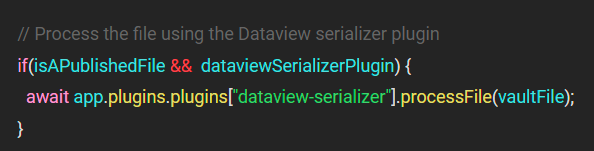
Here's an example:

For now, the plugin is only available on GitHub, but I'm going to propose it to become part of the community plugins:
dsebastienObsidian plugin to integrate Typefully
Next, I created a plugin to integrate Obsidian with Typefully. My goal was to publish social media posts to Typefully right from Obsidian. After hacking at it for a few hours, I managed to achieve my goal:
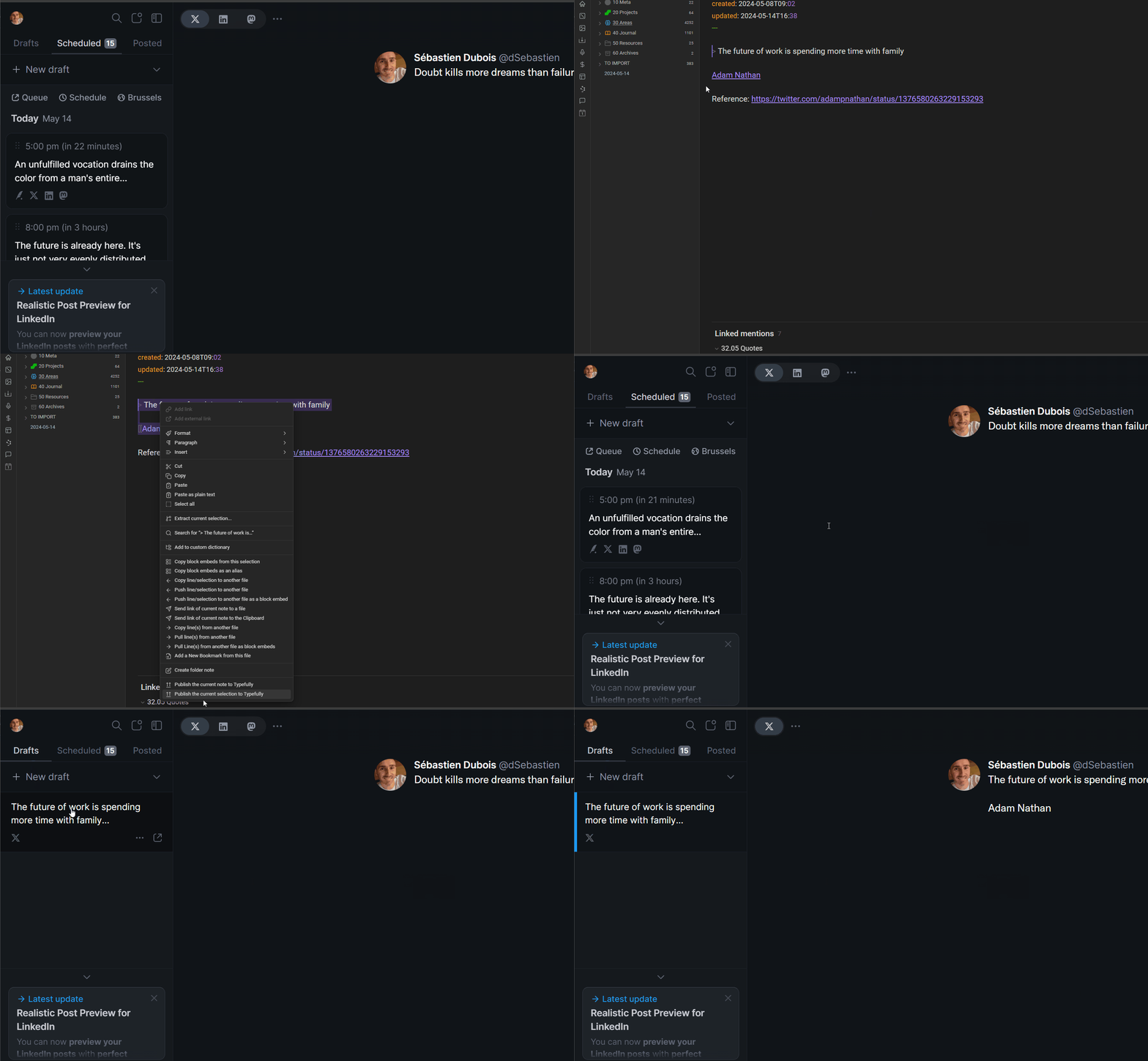
My plugin adds a command and context menu entries to publish the current note, or the current selection to Typefully.
For now, it's possible to configure the following:
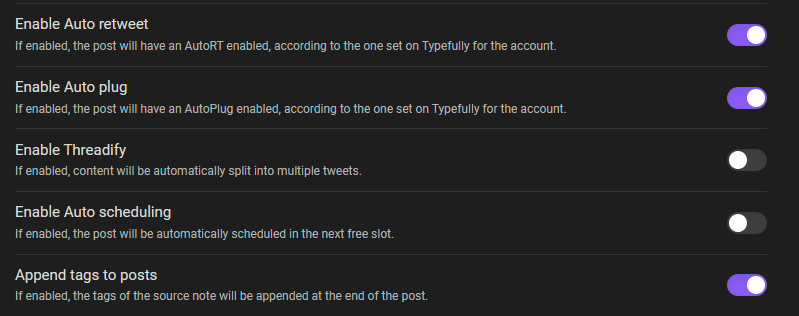
Due to the current limitations of the Typefully API, it's not very advanced, but it's still going to help me a ton to schedule social media posts.
I also like the last option I've added: "Append tags to posts". With it, whenever I publish something, the tags of the note are automatically appended.
This plugin is only available from GitHub at this point, but I'll also try to get it added to the official list of community plugins:
dsebastienNew articles
No new articles this week.
New published notes
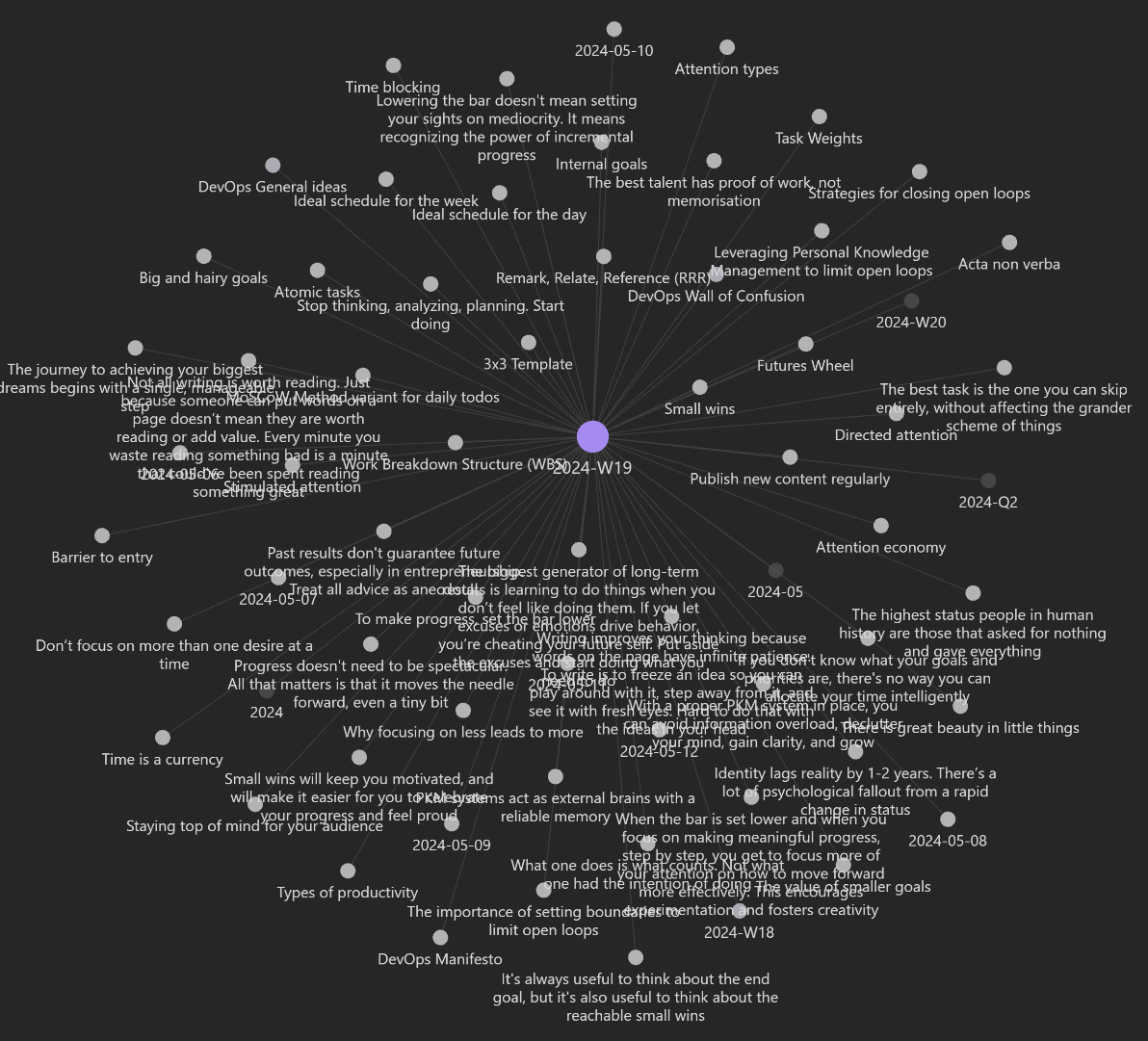
I've published a ton more notes to my Website this week:
I really did publish many notes to my Website: pic.twitter.com/st2Z0238ax
— Sébastien Dubois (@dSebastien) May 15, 2024
I enjoy sharing small bits of the various ideas I explore:
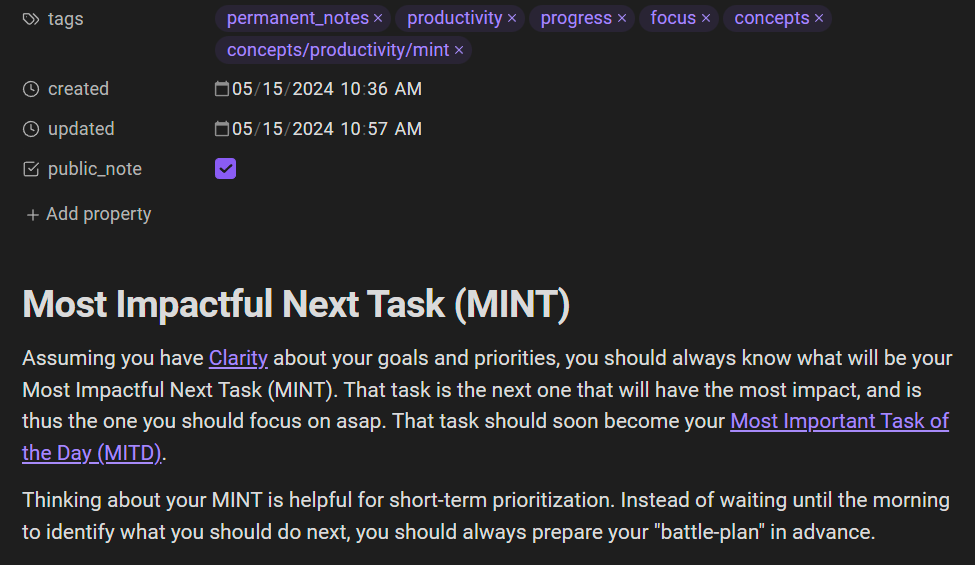
Note of the week
Quotes of the week
- Doubt kills more dreams than failure ever will
- The universe is pure chaos. It's up to us to make things happen. Setbacks are just random events
- We're always fighting in some way. Either against entropy, or inertia
Thinking and learning
I've recently discovered and used this cool script to download an Obsidian publish Website. Works like a charm! Go grab a copy of my notes while they're available 😂
Saghetti0Converting handwritten notes is one of the things I'm currently frustrated about. I'm going to give it a try using GPT4o. Meanwhile, others are also working on solutions:
Want to take handwritten notes that convert into @obsdmd or markdown—complete with formatting and links?
— Jeremy Nguyen ✍🏼 🚢 (@JeremyNguyenPhD) April 14, 2024
Open up ChatGPT on your phone. Take a photo. Ask GPT to give you well-formatted markdown. (h/t: @rodrigoabreu56 for the inspiration).
Link to a custom GPT in reply below: pic.twitter.com/cFKtnLByNK
I've started using Voicenotes recently, and really love the UX, transcriptions it generates, and the possibility to ask questions and brainstorm:

BTW, the current ~$50 lifetime subscription is a real bargain.
How bookmarks became the backbone of Vlad Campos' system. I might explore the possibilities for the Obsidian Starter Kit
Adding flashcards in Obsidian? For sure:
How do you categorize "special" notes in your PKM system? Personally, I use a "Meta" folder for those:
How do you categorize these notes in your PKM?
by u/KernicPanel in PKMS
Could we identify a set of universal Knowledge Management "rules"? I think so, and I'll actually give it a try:
Universal Knowledge Management Rules
by u/Pristine-Adeptness-1 in PKMS
Ready to get to the next level?
If so, then check out the Knowledge Worker Kit, the Obsidian Starter Kit, the Obsidian Starter Course, the Knowledge Management for Beginners course, the PKM Library, a PKM coaching session with me, my collection of books about software development and the IT Concepts Wall 🔥.
If you want to discuss, then don't hesitate to join the Personal Knowledge Management community or the Software Crafters community.
About Sébastien
Hello everyone! I'm Sébastien Dubois (you can follow me on Twitter 🐦).
I'm an author, founder, and CTO. I write books and articles about software development & IT, personal knowledge management, personal organization, and productivity. I also craft lovely digital products 🚀
If you've enjoyed this article and want to read more like this, then become a member.
About Sébastien
I'm Sébastien Dubois, and I'm on a mission to help knowledge workers escape information overload. After 20+ years in IT and seeing too many brilliant minds drowning in digital chaos, I've decided to help people build systems that actually work. Through the Knowii Community, my courses, products & services and my Website, I share practical and battle-tested systems. You can follow me on X 🐦 and on BlueSky 🦋.
I am an author, founder, and coach. I write books and articles about Knowledge Work, Personal Knowledge Management, Note-taking, Lifelong Learning, Personal Organization, and Zen Productivity. I also craft lovely digital products.
If you want to follow my work, then become a member and join our community.
Ready to get to the next level?
If you're tired of information overwhelm and ready to build a reliable knowledge system:
- 🎯 Join Knowii and get access to my complete knowledge transformation system
- 📚 Take the Course and Master Knowledge Management
- 🚀 Start with a Rock-solid System: the Obsidian Starter Kit
- 🦉 Get Personal Coaching: Work with me 1-on-1
- 🛒 Check out my other products and services. These will give you a rock-solid starting point for your note-taking and Knowledge Management efforts