
Kanban Action Planner - column triage, focus mode, time tracking, and the end of the freeze

Canonical version: Kanban Action Planner - column triage, focus mode, time tracking, and the end of the freeze.
Five releases of the Kanban Action Planner landed today, from 1.18.0 to 1.19.2. They add column triage, focus mode, time tracking, new filter aliases, and a performance fix for large boards.
Column triage
Triage mode already existed for clarifying a whole backlog. Column triage applies it to a single column: every column header now carries a small triage button that turns THAT column into a deck of cards you go through one at a time.
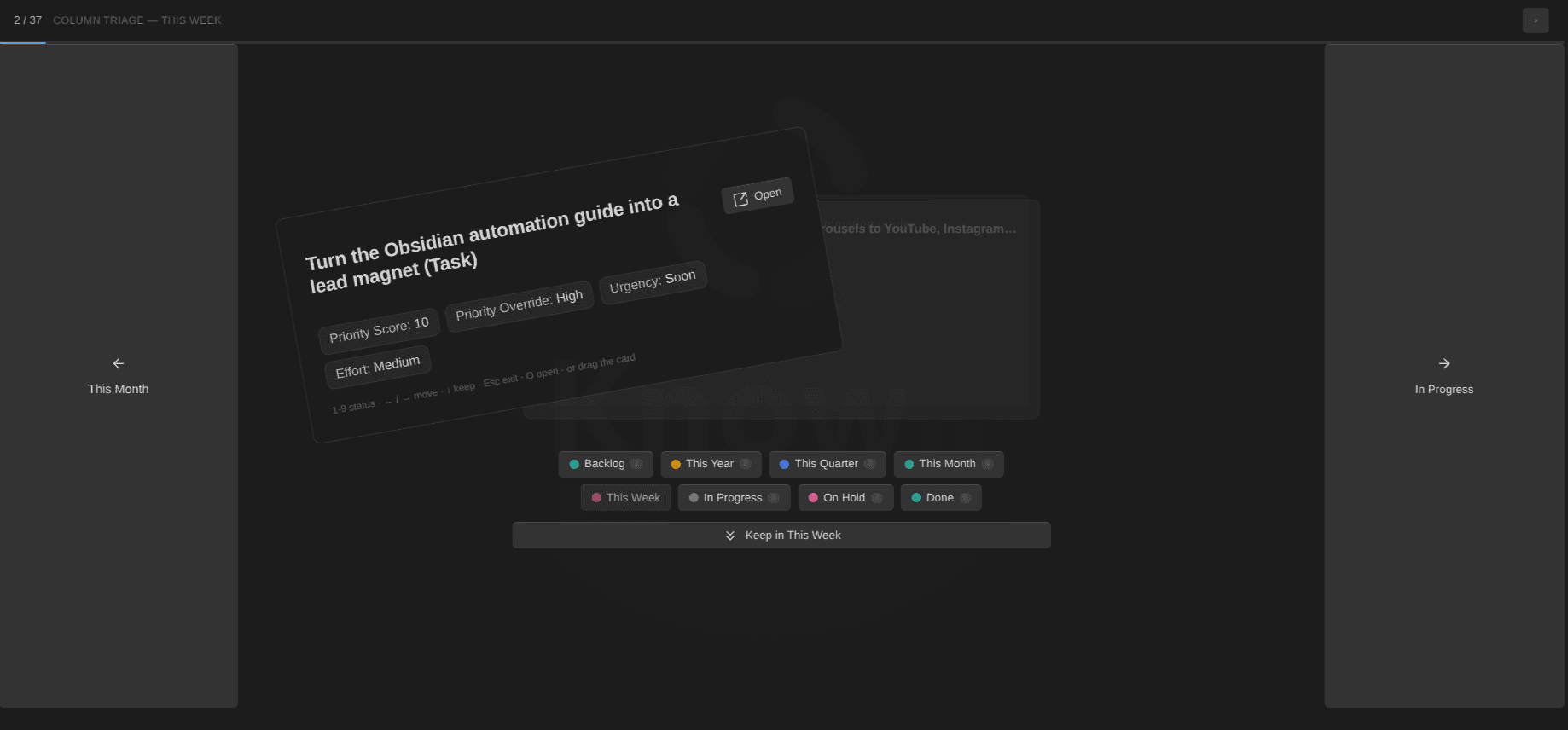
The card sits in the middle, the next ones peeking behind it. Under it, a tray shows every status of the card's own type as a color-dotted chip, plus a Keep button. Tall rails hug the edges of the pane, labelled with the previous and next status. To decide, you can swipe the card left or right, drag it onto a chip or a rail, press 1 to 9 to jump straight to a status, arrow keys for the carousel, ↓ or Space to keep. Each decision stamps the destination status onto the card and the card flies off toward its new column. Reaching a done state shows confetti.
Two more behaviors:
↑is undo. It steps back to the card you just decided and cancels that decision, including the file write. Fast triage leads to mistakes, and this gives you a one-key way back.- Decisions are optimistic: the next card is on screen the instant you decide; the write settles in the background, and a failed write puts the card back into the pass. Your automations fire exactly as if you had dragged the card on the board.
Focus mode
When the triage is done and it's time to actually work, right-click any card, on any view, and pick Enter focus mode. It shows one card in the full pane: title, status, the properties from your Bases view, its subtasks (checked off as they reach their done state), and its related notes.
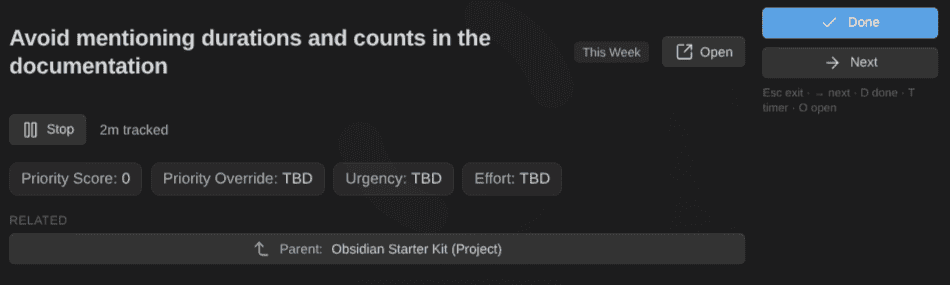
A timer button starts a time-tracking session for the card, and the elapsed time ticks live next to the estimate. Done marks the card done per its note type's definition, automations included, and offers the next card from the same queue. → skips, Esc leaves.
Time tracking
The timer is part of a full time-tracking loop. Start or stop a session from any card's menu; one session runs at a time, starting a second card stops the first, and the session survives an Obsidian restart. Stopping writes the elapsed minutes to a duration property on the note. It's plain frontmatter that any other tool can read, like everything this plugin writes.
The tracked time also shows up in the WBS:
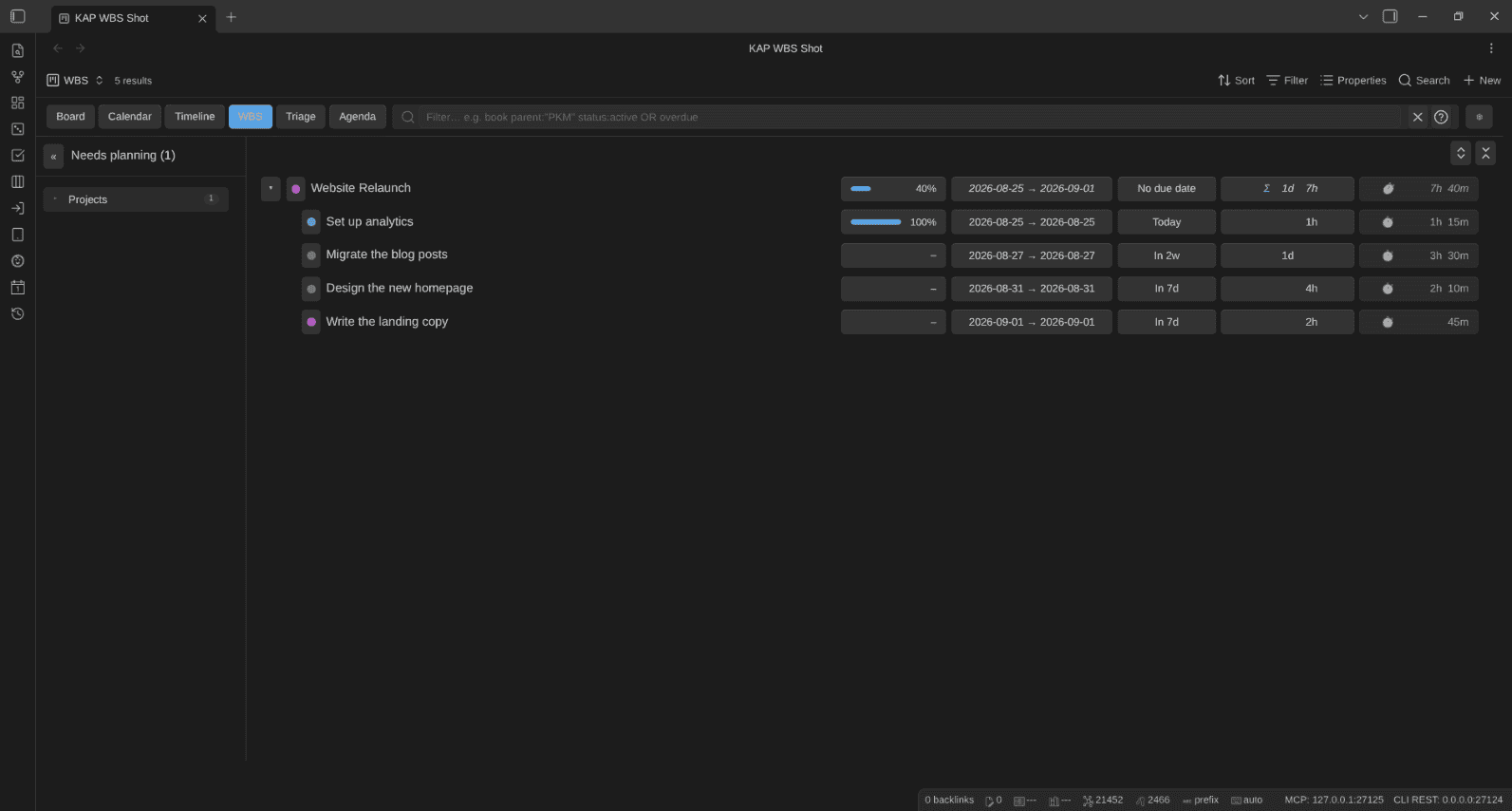
Every row carries a ⏱ chip with the subtree's tracked total: the note's own minutes plus every descendant's. Actuals sit right next to the estimates, in the same d / h / m format. A row menu action persists the subtree total to a total_duration property when you want the number in the note itself.
Sharper filters
The filter box gained aliases for the configured properties: scheduled:today, scheduled:week, estimate:>4h, estimate:<=30m, progress:<50, order: comparisons. Estimates are unit-aware; a task estimated in minutes still matches estimate:4h and estimate:0.5 alike, converted through your minutes-per-day setting.
The freeze is gone
The last release of the day, 1.19.2, adds no visible feature; it's a performance fix. On a 200-card column in my own vault, every column-triage decision froze Obsidian for up to a second, and moving any card on the board took a sixth of one.
Profiling showed that the plugin's code was fast, and the board of 200 cards is fewer than 800 DOM elements. Most of the time went into style recalculation: my vault runs a theme, CSS snippets, and around 80 plugins, which stacks up to 64 stylesheets, and every style invalidation makes the browser re-check elements against that entire pile. That costs roughly a tenth of a millisecond per element, whichever code triggered it. A plugin can't reduce that cost per element; it can only trigger the recalculation less often.
1.19.2 triggers it less often. A triage decision no longer re-renders the board hidden behind the overlay, the overlay updates in place instead of being rebuilt, and card heights are only re-measured when something that can change a height actually changed. A decision went from up to 900 milliseconds to 1 or 2. A board move went from about 160 to about 10. Keep in mind that the stylesheet cost applies to every plugin you run; if your vault feels sluggish everywhere, your snippet and theme pile is part of the answer.
The first version of that fix had three bugs, and I found none of them myself. A second AI model reviewed the change adversarially before release and caught all three. I'll write about that workflow separately.
Get it
Update from Community plugins in Obsidian, open a board, and look for the new triage button in any column header. Nothing to migrate; your boards and settings carry over untouched.
And if you want the whole system this plugin belongs to, that is what the Obsidian Starter Kit and the Knowii Community are for.
That's it for today! ✨
References
- Releases: https://github.com/dsebastien/obsidian-kanban-action-planner/releases
- Documentation: https://dsebastien.github.io/obsidian-kanban-action-planner
- Community: https://community.obsidian.md/plugins/kanban-action-planner
- Column triage issue: https://github.com/dsebastien/obsidian-kanban-action-planner/issues/170
- Focus mode issue: https://github.com/dsebastien/obsidian-kanban-action-planner/issues/160
Related
About Sébastien
Ready to get to the next level?
Found this valuable? Share it with someone who needs it.