
Music Notation library

Canonical version: Music Notation library.
An open-source library I built to turn small text blocks into music notation: chord diagrams for guitar and piano, keyboards, fretboards, chord charts, tabs and scores, strumming patterns, progressions and the circle of fifths, drawn as SVG and HTML. Every diagram plays, and copies as an image. You write a fenced code block in a note, and the library draws it, in Obsidian, on Obsidian Publish or on any web page.
The npm package is @dsebastien/music-notation. It's written in TypeScript, built with Bun, uses no framework, and is MIT licensed.
Why I built it
I'm learning guitar and piano again, and I keep my chords, scales and songs as notes in Obsidian. I wanted the diagrams right next to those notes, rendered both in Obsidian and on my public notes site. And I wanted them to come from plain text that stays readable and diffable.
The Music Practice plugin for Obsidian tracks my practice; this library draws the music. I kept it as a separate library (not inside the plugin) so that Obsidian Publish and other projects can use it too.
What it does
chord: guitar chord diagrams with frets, fingers, barres, the position up the neck and the root of the chord marked, in any tuning. You can pick from about 1,800 voicings by chord symbol alone. It also draws piano chords from a symbol or from exact pitches, with fingering.- Every way to play a chord:
voicings: allin achordblock draws one diagram per shape, the easiest shapes, in a row up the neck (open chords, E- and A-shape barres, the other CAGED shapes, and jazz grips such as the Hendrix grip for C7#9, x3234x), each one fingered and named. A shape with its highest strings muted counts as the same shape, so it's left out. You can narrow them down by neck area, by the string the root is on, to three strings (triads), or to inversions, on any tuning up to 8 strings (the ukulele too). Since 0.4.0; one diagram per shape since 0.10.0. keyboard: a piano keyboard showing the notes of a scale, a chord or a list, labeled as note names, degrees or intervals (R, b3, 5…).fretboard: a guitar neck showing the notes of a scale, a chord or a list, in any tuning (standard, Drop D, DADGAD…).chords: ChordPro chord charts (ChordPro is a plain-text format for songs), with the chords above the lyrics, verse and chorus sections, and comments. Add{transpose: 2}to transpose the chart, with every chord spelled for the new key.strum: strumming patterns on a beat grid (the counts, an arrow per strum, accents, muted and ghost strums, chord changes), written the way you find them on the web (D DU UDU), straight or swung, in 4/4, 3/4, 6/8 or 12/8.picking: fingerpicking patterns as a small tab with the fingers and the counts, written as PIMA letters, string numbers or a named pattern (Travis, alternate bass), played over a chord or one chord a bar.progression: a progression written once, as roman numerals, Nashville numbers or chord names, and drawn in any key with each chord's numeral, its function and a diagram, on guitar or piano.circle: the circle of fifths, with the chosen key's chords tinted and numbered, in any mode.tabandscore: tablature and standard notation from alphaTex, Guitar Pro or MusicXML, drawn and played by alphaTab.- On top of that: capo, arpeggios (CAGED shapes), piano voicings (inversions, open, shell and rootless, both hands, automatic fingering), the scale that fits a song's chords, and notes that light up as they play.
- Captions under a diagram:
caption: fingeringsays how to play it in plain words, andcaption: formulasays what it's made of (its notes, its formula, the other ways to write it, and a scale's steps). - Copy as image: a picture button on the bar under each block copies a diagram, or the whole block, as a PNG to paste in a chat, a slide or a document.
- Note names in letters, solfège (Do Ré Mi) or German (H for B).
- For apps: a pick layer that turns a fretboard or a keyboard into something you click to answer (drills, quizzes), and an export of any diagram or block to SVG or PNG.
Colors follow the Obsidian theme, light and dark. For readers who don't tell colors apart, root-mark: shape draws the root as a square too, and screen readers get a description of every diagram. If a block contains a mistake, you get a short message telling you what to write instead, and the source stays visible.
Examples
These are live: plain-text blocks in this note, drawn on this site by the library itself. Click a diagram to hear it, or press play on the bar under a block. The picture button at the end of each bar copies the diagram as an image.
A guitar chord: the name, the frets, the fingers.
A x02220 x01230
Am7 with its formula written under it, and its root (the open A string) drawn as a square ring, which you can spot without telling the colors apart.
Am7
caption: formula
root-mark: shape
D dorian on a keyboard, with the degrees (the 6 is what makes it dorian).
D dorian
labels: degrees
The first A minor pentatonic box, with the intervals.
scale: A minor pentatonic
frets: 5-8
labels: intervals
A ii-V-I on piano with rootless voicings, the way jazz pianists play it: each chord moves as little as it can.
ii7 V7 Imaj7
key: C
instrument: piano
voicing: rootless
Which scale fits a song's chords? For Dm, C and G, it's D dorian.
scales-for: Dm C G
frets: 0-5
A strumming pattern with accents, ghost strums and muted chucks.
D> (U) X U D> U X U
chord: Am
tempo: 100
title: Backbeat chuck
A chord chart moved up two half steps, with its chord diagrams (A, A7 and D).
{title: Amazing Grace}
{transpose: 2}
{diagrams}
[G]Amazing [G7]grace, how [C]sweet the [G]sound
The guide has every option and a gallery: https://dsebastien.github.io/music-notation/
The playground has examples for every block (tabs and scores too) and a Surprise me button, a play bar on every diagram, the note names in letters, solfège or German, Copy link to share a block, Copy as Markdown to paste it into a note, and Download SVG and Download PNG to keep it as an image: https://dsebastien.github.io/music-notation/playground.html
Where it runs
- In Obsidian, through the Music Practice plugin, from version 0.2.0. It draws the blocks in reading view and live preview, and new chord notes get their voicing and diagram.
- On Obsidian Publish, through a small script in
publish.js. It loads a browser bundle from jsDelivr, and only on pages that contain notation blocks. The guide has the script and the setup steps: https://dsebastien.github.io/music-notation/publish.html - On any web page or JavaScript project, through npm.
How it's built
The music theory comes from tonal and the guitar voicings from chords-db, both MIT licensed. I wrote my own ChordPro parser, because the existing ones are GPL and I wanted the library to stay MIT.
Before the first release, a separate AI agent reviewed the code adversarially (i.e., it looked for ways to break it). It reported 20 findings, and I fixed all of them. One example: a malformed ChordPro line could freeze the page. There are 1,023 automated tests (0.14.0), and every build now imports its own output the way a real project would, after a Bun bug slipped a broken module into two releases.
Status
Version 0.19.0 (2026-11-10). The library draws chord, keyboard, fretboard, chords, strum, picking, progression, circle, tab and score blocks, in Obsidian through the Music Practice plugin (0.21.0 bundles 0.19.0) and on Obsidian Publish through two browser bundles. The guide and its Publish loader are on 0.19.
Release history
Version 0.4.0 (October 2026) shipped the chord, keyboard, fretboard and chords blocks, plus the Publish bundle. Every common chord spelling draws (CΔ7, Cmin6, C7b9…), and modes work as scales (C lydian, A blues). Several diagrams fit in one block, separated by --- (a song's chords in a row or a grid), and every diagram can be vertical or horizontal, or mirrored for left-handed players. The guide has live examples and a playground where you type a block and see it drawn.
Chords can be written in words (F Sharp Minor 7) or just as frets, and the library names them. Scales show the notes that make a mode what it is, compare with another scale, and draw one position on the neck at a time (pentatonic boxes, CAGED shapes, three notes per string) or all of them, and every mode of a key in a row. An empty block can draw what a note's properties say, so a chord note never repeats its frets.
Since 0.4.0, the library also works out every way to play a chord: voicings: all draws them, one diagram per shape since 0.10, each fingered and named (open, E- or A-shape barre, the CAGED shapes…). It finds them from the chord's notes, not from a list, so it works for any chord and any tuning, the ukulele included. A second adversarial review found 11 issues in the generator (the ukulele's usual chords missing, shapes that need a barre with another finger than the index); all fixed before the release.
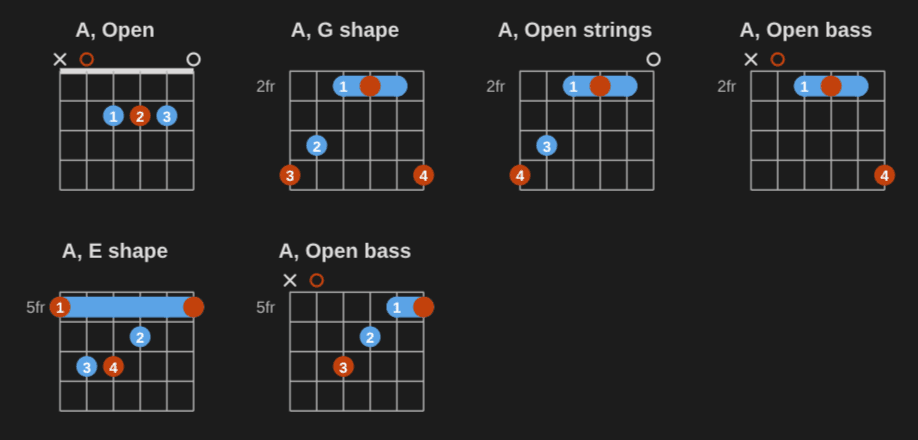
Voicings: voicings: 6 of A, each shape named (Open, G shape, Open strings, Open bass, E shape).
Since 0.5: triads on string sets (a chord's three inversions, or a key's seven triads, with R, 3 and 5 in the dots), chord transitions (the easiest way from one chord to the next, with the fingers that stay or slide marked and tips in plain words, and the smoothest voicings for a whole progression), a play bar on every diagram (chords strum, scales go up and down, a click plays a note), and tabs and scores drawn and played by alphaTab, with imports from Guitar Pro, MusicXML and pasted text tabs.
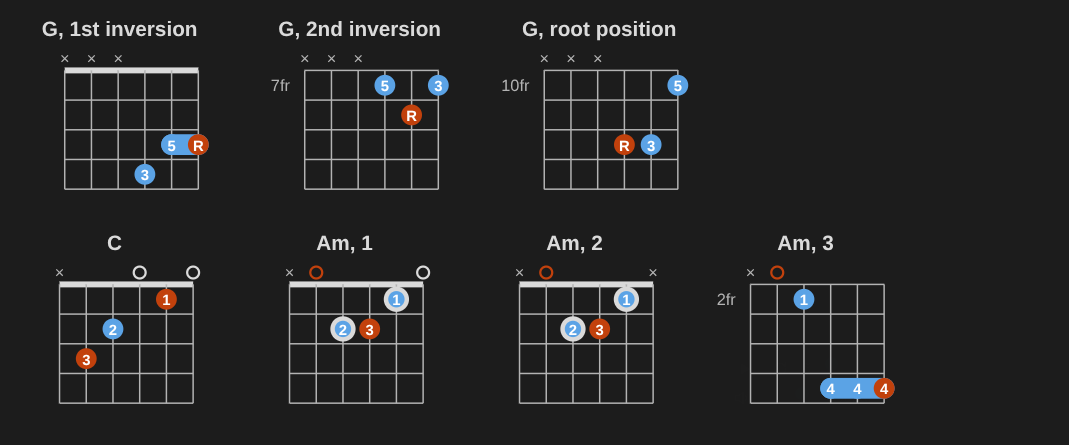
Triads and transitions: the three G triads on strings 1-3, and the easiest ways from C to Am.
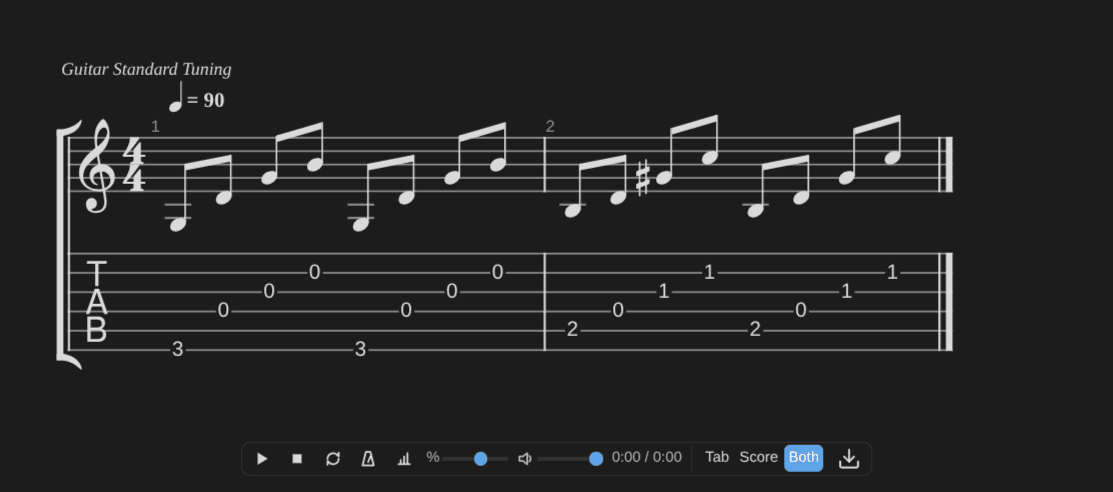
Tabs and scores: two bars of tab and standard notation, drawn by alphaTab, with the player bar.
Since 0.8: strumming patterns, progressions in any key, the circle of fifths, capo, arpeggios, piano voicings (inversions, open, shell, rootless, both hands), the scale that fits a song's chords, chord diagrams in chord charts, and notes that light up as they play.
Since 0.9: diagrams that sound like the instrument (guitar chords strum, piano chords sound together), swing and shuffle strumming, keyboard arpeggios, automatic scale fingering, and piano voice leading closer to a pianist's.
Since 0.10: voicing lists with one diagram per shape, up the neck; the first voicing of a chord in the database is one you can strum (Bdim starts with x2343x, not x20x01; the jazz grips that mute the A string are the exception); jazz grips (the Hendrix grip, m7b5, dim7 and 13 from the low E); frets written without fingers show their barre; a single scale position gets a title ("G major, E shape"); more tunings (Drop C, B and A, Double Drop D, Open C and A, Whole step down, Modal C6); and text tabs that land in the right bars, with plain-text tabs pasted in a tab block now drawn. With 0.10.1, arpeggio and strumming pattern notes draw from their properties on Obsidian Publish too, the same as in Music Practice.
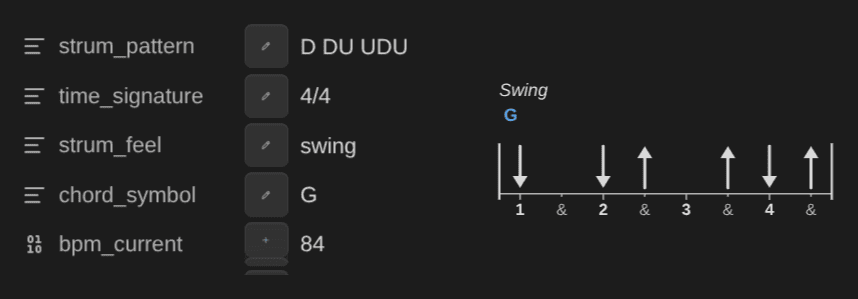
From properties: a strumming pattern note's properties, and the empty strum block they draw.
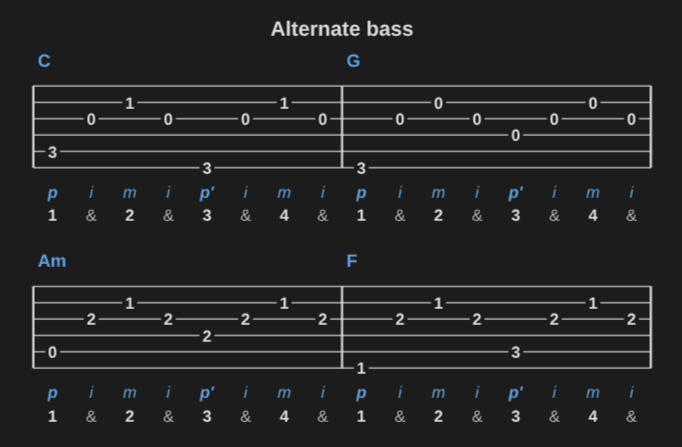
Since 0.11, the music plays in time. A progression block and a ChordPro chart get a bar that plays one chord a bar, with a click, a count-in and a loop, so you can practice the changes at tempo or solo over them. Each chord is strummed on the beats, once a bar, as an arpeggio, or to a strumming pattern, and the chord that plays lights up. A fretboard with one position and exercise: up-down (or up, down) draws the run as a tab under the diagram, in 8ths, triplets or 16ths. The new picking block draws a fingerpicking pattern as a small tab and plays it over a chord, or one chord a bar: PIMA letters (p the bass, p' the alternate bass on the chord's fifth, i m a on strings 3, 2 and 1), string numbers, or a named pattern (travis, alternate bass, 1-2-3-4). And every diagram of a voicings: list now has a name ("Open", "E shape", "Drop 2", "Hendrix chord"…); C7#9 lists show the Hendrix grip x3234x (0.10.0 drew it with its top string sounding, x32340).
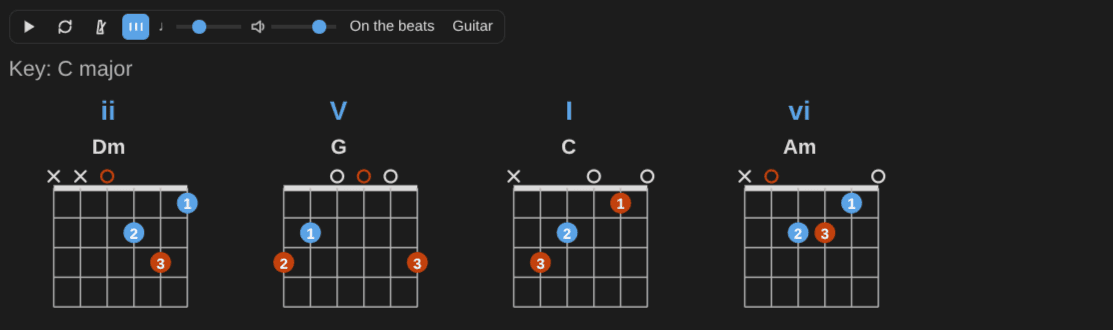
Progression in time: ii V I vi in C, with the numerals, the diagrams and the bar that plays it.
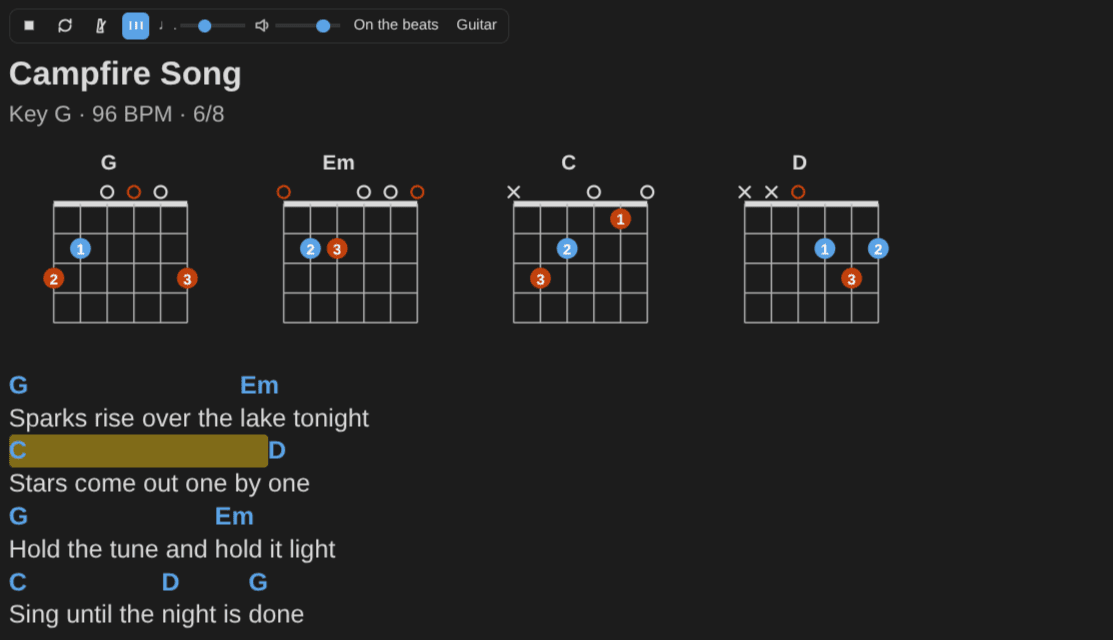
A chord chart playing: one chord a bar, the chord that plays lit.
Picking pattern: alternate bass over C, G, Am and F, with the fingers and the counts under the tab.
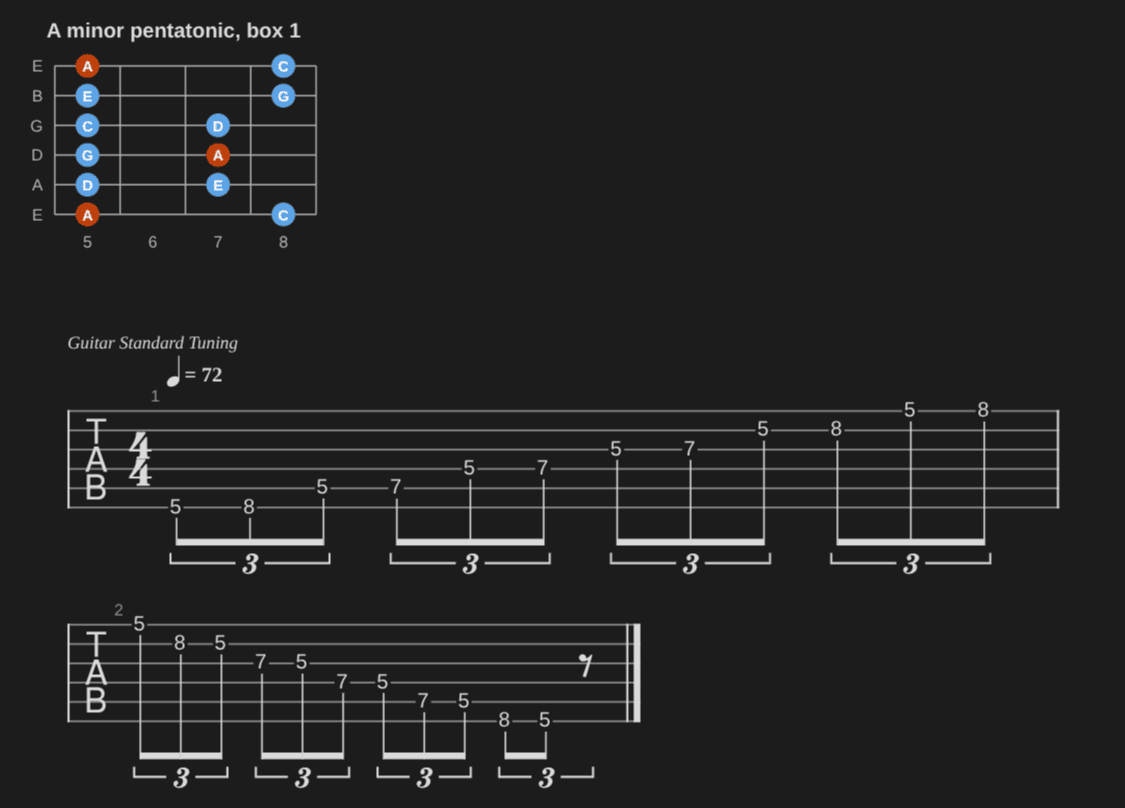
Tab exercise: the first A minor pentatonic box, up and down in triplets.
Since 0.12, chord charts play bar by bar. Bar lines | in a chart line say how long its chords last: the chords between two bar lines share the bar, and dots or slashes give each chord its beats (| [G5]. . [D5]. [A5]. | is two beats of G5, then one of D5 and one of A5). A bar with no chord holds the chord before it, and a bar of N.C. is a bar of silence. A line without bar lines still plays one chord a bar, but a chart that already has them, such as a 12-bar blues grid, now plays with those lengths. Tab exercises work with a capo: the tab counts the frets from the capo, or from the nut with frets-from: nut. Long titles ("F#m7b5, Drop 3 (strings 2-4, 6)") wrap onto two or three lines instead of making the diagram wider, so the necks of a row stay in line. And on phones and tablets, chord diagrams and fretboards are a third larger, so each string is easier to tap.
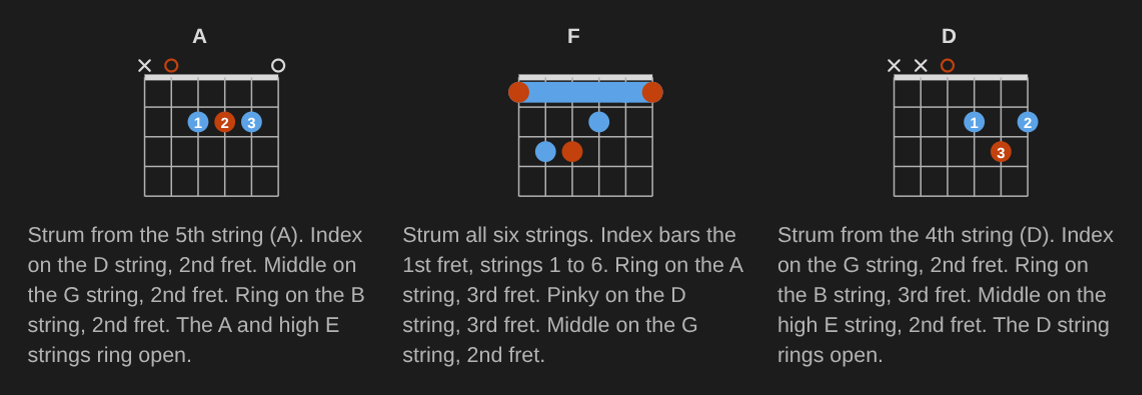
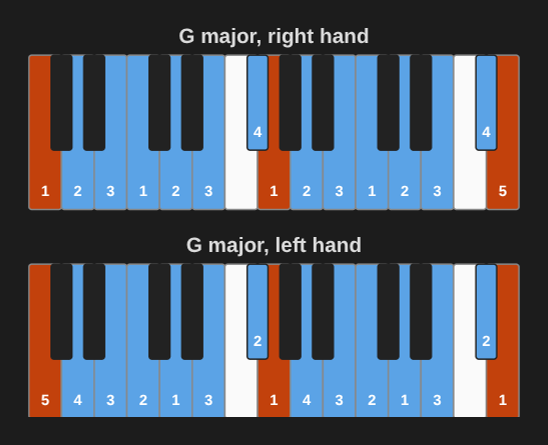
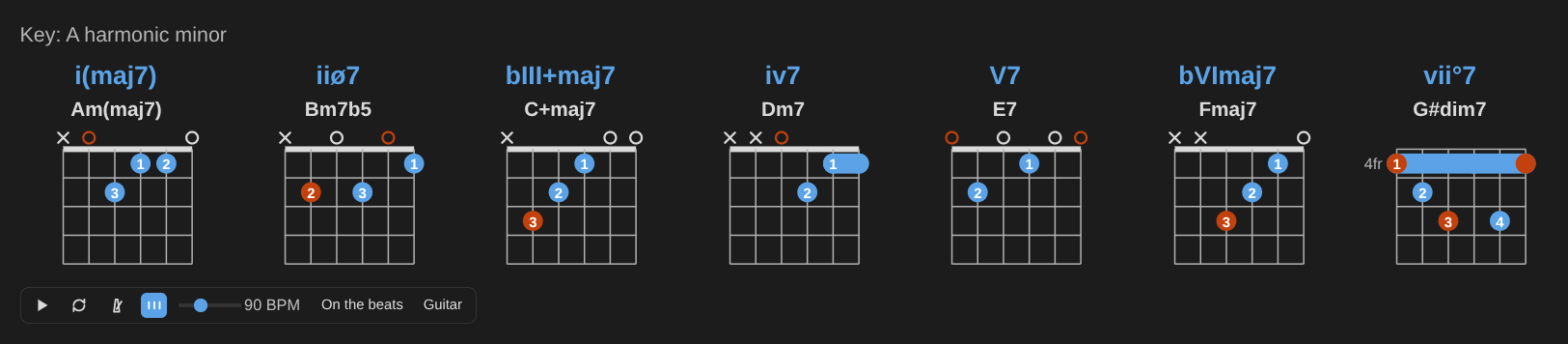
Since 0.13, caption: fingering on a chord block writes how to play the chord under its diagram, in plain words: "Strum from the 5th string (A). Index on the D string, 2nd fret. Middle on the G string, 2nd fret." It names barres, the thumb, muted and open strings and the capo. In drop D or DADGAD, where two strings share a name, strings go by number and note ("the 4th string (D)"), and piano chords say each hand's fingers on their keys. The words are text, not part of the drawing, so they wrap, and screen readers and search read them. fingering: auto both on a keyboard scale draws the right hand's standard fingering, then the left hand's an octave lower, for major, natural minor, harmonic minor and melodic minor scales. And a progression block with key: and harmonize: triads (or sevenths, sus, power) and no chords draws the chord on each degree of the scale, with its numeral, diagrams and the play bar. It works for any 7-note scale (the modes, harmonic and melodic minor too); a degree with no chord of that kind is left out, and the block says so (D dorian has no sus chord on B).
Fingering in words: A, F and D with caption: fingering, each with how to play it under the diagram ("Index bars the 1st fret, strings 1 to 6.").
Both hands' scale fingering: fingering: auto both on G major, the right hand (1 2 3 1 2 3 4 1…), then the left hand an octave lower (5 4 3 2 1 3 2 1…).
The chords of a scale: A harmonic minor with harmonize: sevenths, from i(maj7) Am(maj7) to vii°7 G#dim7 (iiø7 Bm7b5, bIII+maj7 C+maj7, iv7 Dm7, V7 E7, bVImaj7 Fmaj7 in between), each with its guitar diagram, and the play bar under them.
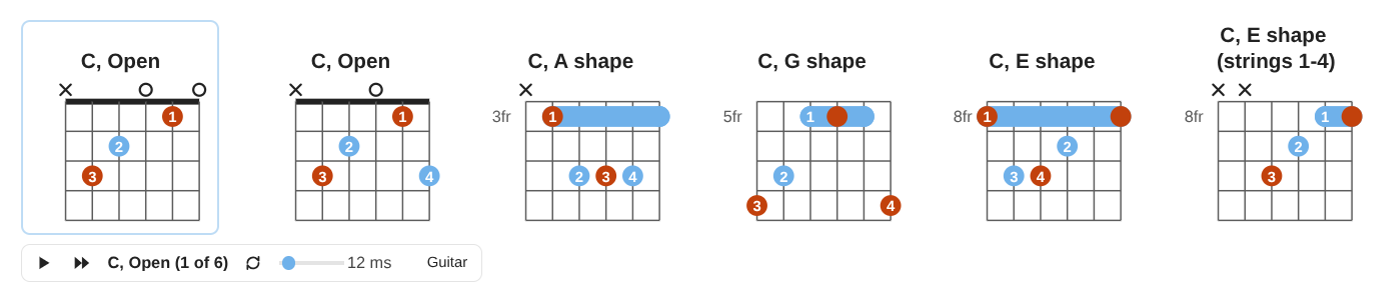
Since 0.14, every block has one play bar, under it, a single diagram too. Before, a bar floated over each diagram on hover and covered the dots and keys you were trying to read. In a row of voicings or the positions of a scale, the bar plays the diagram you clicked last (it's outlined, and its name is on the bar), and Play all in turn plays every diagram once, with a beat of silence between two, and again after the last when loop is on. The guitar/piano switch on the bar redraws every diagram of the block for the other instrument. You can also skip the bar: click a diagram to hear it, click again to stop, or click a dot or a key to hear only that note. On a focused diagram, Space or Enter plays it and Escape stops. Strumming, picking, progression and chord chart bars now sit under what they play, always shown, and in a progression, a click on a chord diagram plays that chord. Sliders show their value ("90 BPM", "12 ms") instead of a tiny music sign. There's no volume slider on any bar anymore: the volume is a setting (in Music Practice, Settings → Playback; on Publish, play: { volume } in window.musicNotationOptions). And everything you can click (diagrams, dots, keys, bar buttons) shows the hand cursor. The design came out of prototypes of five variants, and it closes issues #58 and #81.
One play bar per block: six C voicings, the first one selected (outlined, and named on the bar: "C, Open (1 of 6)"), with Play all in turn on the bar under them.
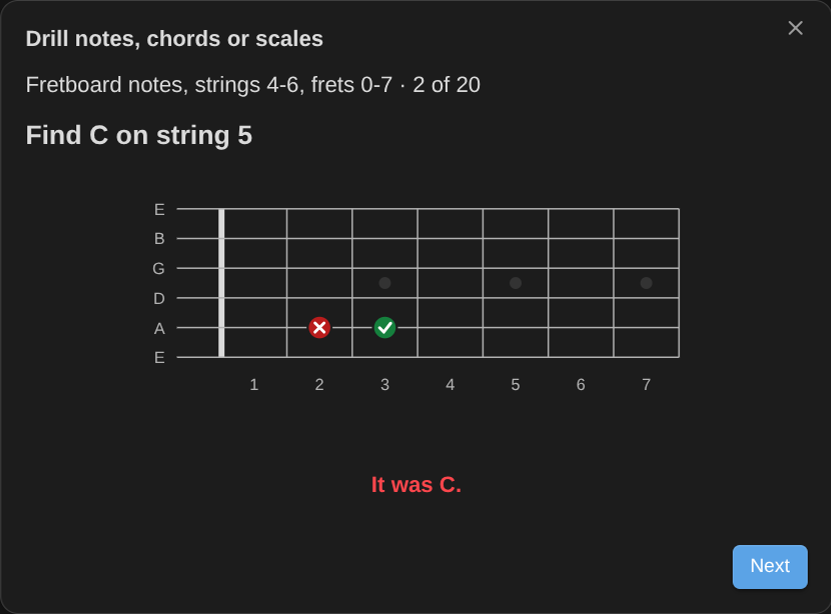
Since 0.15, an app can turn a fretboard or a keyboard into something you answer on, for drills and quizzes ("find every G on string 5"). Drawn with pick: true (renderFretboard or renderKeyboard, then attachPick), every string at every fret, the open strings too, and every piano key becomes a target. A click picks it, and so does the keyboard: Tab goes to the drawing, the arrows move, Home and End go to the ends, and Space or Enter picks. The app gets the string, the fret, the note and the pitch, and marks the pick right (a check) or wrong (a cross) on the drawing. Screen readers hear each target by its place ("String 5, fret 3"), never by its note, so a drill doesn't give the answer away. With sound on, each pick plays its note for 1.5 s, on guitar for a fretboard and on piano for a keyboard. It's off by default, so the blocks in your notes don't change. The Music Practice plugin uses it for its note, chord and scale drills, and to enter a chord by clicking its frets or keys.
Pick layer: a fretboard drill in Music Practice, "Find C on string 5". The wrong pick on fret 2 is crossed, and the right fret (3) is checked.
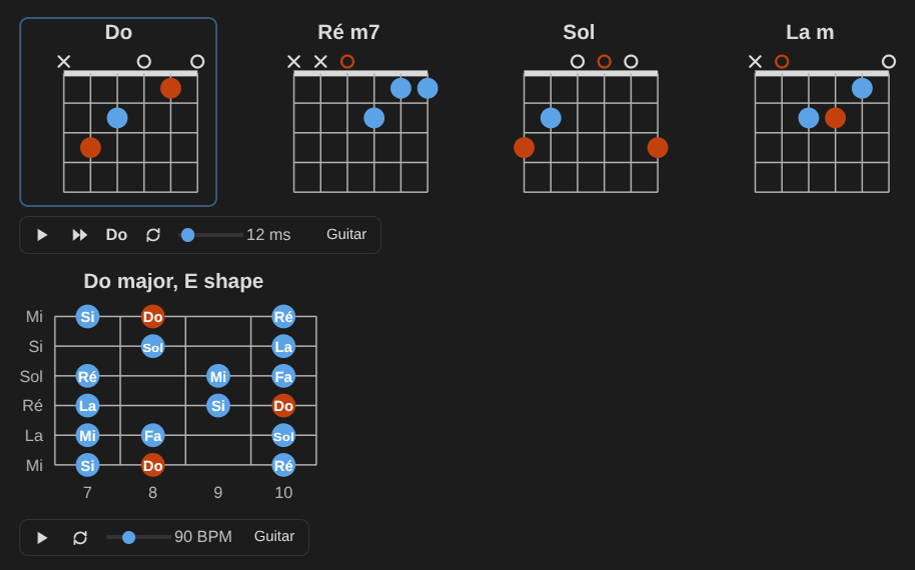
Since 0.16, the notes can show in solfège or in German (#12). naming: solfege in a block ({naming: solfege} in a ChordPro chart) shows Do Ré Mi Fa Sol La Si, with ♯ and ♭, and a chord gets a space before its quality: Ré m7, Sol 7/Si. naming: german writes H for B natural and B for B♭. It covers the labels on dots and keys, the string names, the titles the library makes, chart chords, progressions, the circle of fifths, capo captions and what screen readers hear. Titles you write stay as you wrote them. You can also write the notes in any of the three: chord: Rém, scale: La mineur, notes: Do Mi Sol, H7. Letters are read first, so the notes you already wrote keep their meaning: Do7 is still D°7, except in a block with naming: solfege or on a line with other solfège names. An app (or Obsidian Publish, with window.musicNotationOptions.naming) can set a default naming, but that only changes how names show, never how a block is read; letters stay the default. Tabs and scores and caption: fingering sentences stay in letters, and German note words (Fis, Es, Dur, Moll) aren't read.
Solfège note names: naming: solfege on a row of chords (Do, Ré m7, Sol, La m) and on a C major scale in its E shape, with the dots and the string names in solfège too.
Since 0.17, sounds: title names a capo chord by the chord you hear, then the shape you play: an Em shape with capo: 3 is titled "Gm (Em shape)", and the caption says "Capo 3" (#88). It came from a player who asked whether the capo was only there for information, since the title stayed Em. A title: you write stays, and it works in a row of diagrams too. When an app changes its volume, what plays takes it at once (diagrams, Play all in turn, strumming and picking patterns, progressions and chord charts); apps call volumeChanged(), and a PlayHandle has setVolume (#85). On touch screens, a tap on a clickable fretboard or keyboard no longer reaches the page around it, and keyboards with a pick layer are drawn larger, so a black key is at least 24 px wide (#86). With naming: solfege, "Do major" now draws the C major scale (it drew an arpeggio) and scale: Ré minor works (#87). Play on a tab or score bar no longer scrolls the page (#89). And the guide has a new playground (#90): the link is under the examples above.
Since 0.18, the tab and score bar looks and works like the other bars (#82): the same buttons and icons (Play, Stop, Loop, Metronome, Count-in), Speed with its value ("100 %"), always shown below the score. Its volume slider is gone: the volume is the app's, as for every bar (in Music Practice, Settings → Playback; on Publish, play: { volume }). Apps pass volume to renderTab, and volumeChanged() applies a new one at once. caption: fingering works in a progression block too (#80): it writes how to play each chord under its diagram, in the voicing the progression picked (voice-led piano voicings included); put it before the first --- for every section. The minor-major seventh is now written Am(maj7) and i(maj7), and the augmented-major seventh C+maj7 and bIII+maj7, as method books write them, in harmonize, numerals and Nashville numbers (#78). Progressions still read the old spellings (imaj7, imMaj7, bIIImaj7#5), but blocks that showed AmMaj7 or Cmaj7#5 now show the new names. Chord change tips name strings as the fingering captions do (#79): in drop D, where two strings share a name, a tip says "the 4th string (D)", and a tuning written with flats keeps them ("the Gb string"). And 0.18.1 fixes the volume of tabs and scores: a change didn't reach one that was playing, because the /tab entry is a bundle of its own. Every copy of the library on a page now shares one list of live plays.
Since 0.19, you can copy or export any diagram as an image, and the diagrams say more about what they show:
- Copy as image (#11): a picture button at the right end of the bar under each block copies a PNG of the selected diagram, with its title and captions, to paste in a chat, a slide or a document. Shift+click copies the whole block (a row, a progression, a chart's diagrams, a strumming or picking pattern), and so does a click on a block with one diagram. It uses the page's colors, at twice the size, and says "Copied". With playback off, each block gets a small bar with only that button. Apps and Publish leave it out with
copy: false. Tabs and scores don't have it yet. - Export for developers (#11):
toSvgString(el)gives a standalone SVG of a diagram or a whole block, every style inlined and laid out as on the page, andtoPng(el)gives a PNG. Both taketheme: 'light' | 'dark'. The playground has Download SVG and Download PNG. - Formula captions (#52):
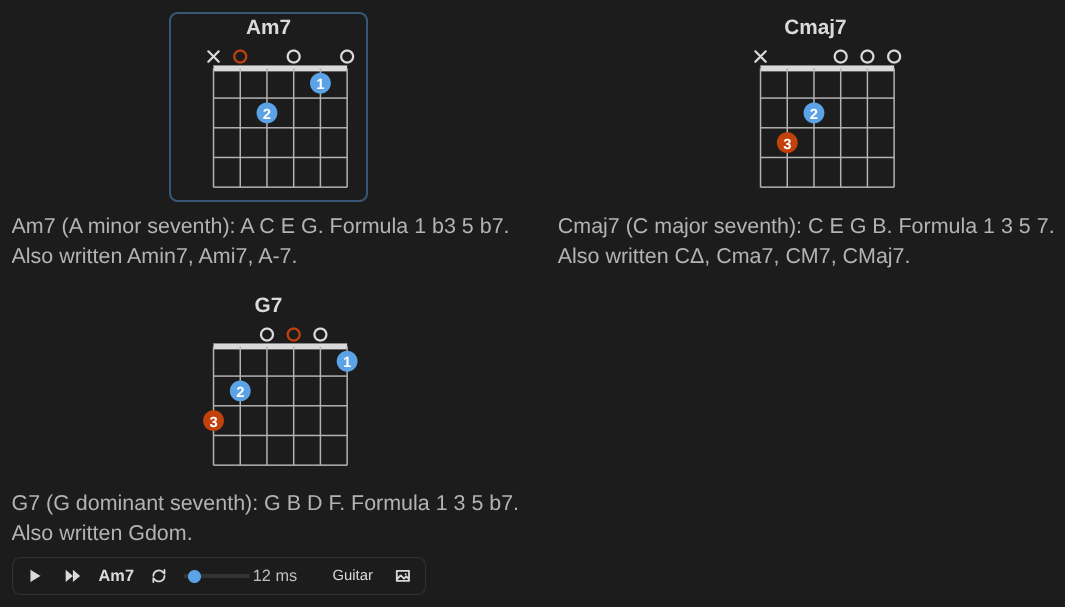
caption: formulaunder a chord, a keyboard or a fretboard writes what it is: "Am7 (A minor seventh): A C E G. Formula 1 b3 5 b7. Also written Amin7, Ami7, A-7." A scale adds its steps: W+H W W W+H W for the minor pentatonic.caption: fingering, formulagives both, progressions take it too, and the names follownaming. - Root marks you can tell without colors (#14):
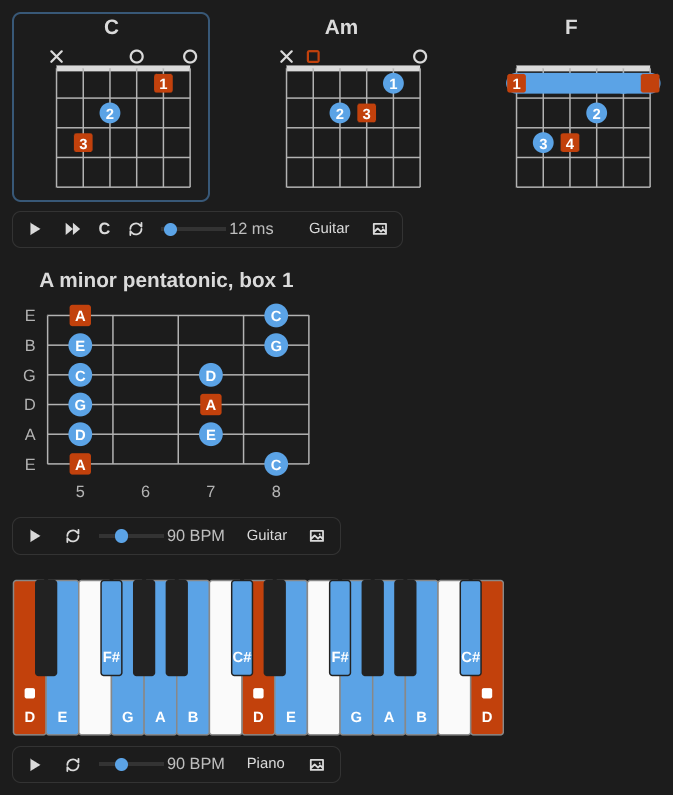
root-mark: shapedraws the root as a square dot with its finger or label still inside, a square ring on an open string, and a small square on its key. Color stays the default. Apps set it for every block with therootMarkoption, and Publish withwindow.musicNotationOptions.rootMark. - Descriptions for screen readers (#14): every chord diagram, keyboard and fretboard has a description that screen readers read after its name: the fingering in words and where the root is, the keys and the root, or the notes string by string.
- Contrast: two fallback colors, the accent and the wrong-answer red, are darker, so they pass on dark pages too. Themes that set their own colors don't change.
Formula captions: Am7, Cmaj7 and G7 with caption: formula, and the play bar with the Copy as image button at its right end.
Root marks as shapes: root-mark: shape on C, Am and F (square roots, fingers inside), on the first A minor pentatonic box, and on a D major keyboard (a small square on each D). Each bar ends with the Copy as image button.
Next ideas
Importing MIDI files (#84), bass support, a web component for any website.
References
- Source code: https://github.com/dsebastien/music-notation
- Guide: https://dsebastien.github.io/music-notation/
- Live examples: https://dsebastien.github.io/music-notation/examples.html
- Playground: https://dsebastien.github.io/music-notation/playground.html
- npm: https://www.npmjs.com/package/@dsebastien/music-notation
Related
- Music Practice plugin for Obsidian
- Guitar (MoC)
- Piano (MoC)
- Music Theory (MoC)
- Accessibility (a11y)
- Obsidian Publish
About Sébastien
Ready to get to the next level?
Found this valuable? Share it with someone who needs it.