
The Complete Guide to Obsidian Properties


In this article, I want to convince you that properties are the single most underrated feature of Obsidian, and show you how to use them properly: what they are, which types to pick, how to design a property schema that survives past 100 notes, and how to keep everything clean "without lifting a finger". I'll use real examples from my own vault: 20,000+ notes, 48 note types, all heavily relying on properties.
When I published my complete guide to Obsidian Bases, I wrote that clean properties are the whole game. Several readers asked the obvious follow-up: "Fine. But how do I get clean properties?"
This is that article. Let's get started 🚀
TL;DR
- Properties turn notes into data. Every property you add is a field your future self (and your tools, and your AI) can query, filter, sort, and compute on.
- Properties are a schema, not decoration. The goal is not to have tons of properties, but to have the right ones and to leverage those.
- Types matter more than you think. A date stored as text is a date you can never sort. Pick the right type from day one.
- Add a property only when a question needs it. No query, no view, no automation? Then no property. This rule alone prevents most metadata sprawl.
- Never type metadata by hand. Templates (e.g. using the Templater plugin for Obsidian) fill properties in when a note is created; the Linter keeps them ordered and clean
- Properties are what Bases query. Every dashboard, reading tracker, and Kanban Board in my vault is "just" a view over properties.
- Properties can carry entire applications. My whole action system (goals, plans, projects, tasks, complete with prioritization, estimates, and progress tracking) is nothing but typed properties, one Base, and one plugin (and that one is optional).
- AI changed the economics. Maintaining metadata used to be a tax. Now AI agents fill, fix, and validate properties for me, and clean metadata is actually what makes AI way more useful/effective in a vault.
What properties actually are
Properties (also called metadata or frontmatter) are structured fields attached to a note. They live at the very top of the file, between two --- lines, in a data format called Yet Another Markup Language (YAML). Here's an example:
---
title: Atomic Habits
authors:
  - James Clear
status: Reading
rating: ★★★★☆
pages: 320
---
This block at the top of the file is what's called YAML front matter, and here's something worth knowing: it is NOT an Obsidian invention. The convention was popularized by Jekyll, the static site generator behind GitHub Pages back in 2008, and it has since become a de-facto standard across the Markdown world. Hugo, Astro, Eleventy, and Quartz build entire websites from it. Logseq and Zettlr read it. Pandoc understands it. GitHub even renders it as a neat table at the top of your files. Obsidian adopted an existing standard rather than inventing its own, and it's a great decision. Your metadata is portable across an entire ecosystem of tools, today and tomorrow.
The format itself has three rules worth knowing: each property is a name: value pair with a colon and a space, each name must be unique within the note, and the order doesn't matter. Fun fact: you can even write the block as JavaScript Object Notation (JSON), and Obsidian will quietly convert it to YAML when saving.
The note's content is what the note says. Properties are like a bag of information about that note: its type, its status, its dates, its relationships to other notes, pointers to other notes, links to Web pages, etc. With the support for properties, you get the bag, and it's up to you to fill it with information.
In practice, you rarely need to touch the YAML directly, though. Obsidian ships a visual property editor that sits at the top of every note through its Properties view core plugin. Click, type, done.

What I love about properties is that they live INSIDE your notes, as plain text in your Markdown files, respecting the File over app principle. There's no lock-in, no proprietary format, nothing holding your data hostage. If Obsidian disappeared tomorrow, every property you've ever filled in would still be there, safe and sound, readable by any text editor and any tool that understands YAML front matter (and there are thousands).
The six property types
Obsidian supports six property types:
- Text: the default. Names, descriptions, links, etc.
- List: multiple values. Tags, aliases, and cssclasses are lists under the hood.
- Number: integers and decimals. Page counts, scores, priorities.
- Checkbox: true or false. Published? Reviewed? Done?
- Date: a calendar date with a date picker. Bonus: with the Daily notes plugin enabled, date values become clickable links to the corresponding daily note.
- Date & time: same, plus the time.

There's technically a seventh: Tags, a special list type reserved for the tags property alone. You can't assign it to anything else. In addition, the aliases and cssclasses property names are also reserved for a special purpose. The aliases are alternative names for your notes, that you can use through the | in Obsidian links. For example: <strong>This is an alias of that note</strong>. When you write links like that and look at the rendered note in Obsidian, you will see This is an alias of that note instead of the actual note name. And that's super useful to include links in notes without breaking the flow of the sentences they appear into.
To change a property's type, click the type icon to the left of the property name and pick the new type. You can also manage types from the All properties pane.
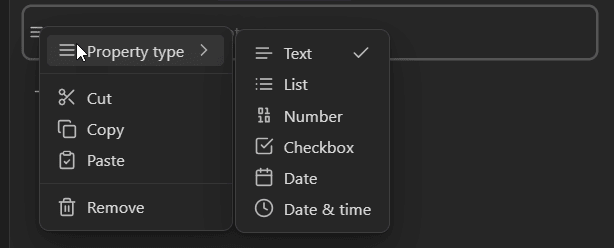
The type you pick determines what you can DO with the value later within Obsidian. A date stored as text can't be sorted chronologically. A number stored as text can't be summed or averaged in a Base. A checkbox stored as the text "yes" can't be filtered as a boolean.
Pick the right type the first time. Changing it later, once hundreds of notes carry the old format, is painful (I've been there, and it wasn't fun 😅).
One warning while we're here: property names are case sensitive under the hood. Status and status are two DIFFERENT properties, even though the editor displays them alike. Pick a casing convention (I use snake_case, all lowercase) and try to remain consistent across notes.
Property types are vault-wide
When you assign a type to a property, that assignment applies to the WHOLE vault. It isn't stored in the note; it's stored in a "hidden" file called types.json inside the .obsidian folder in your vault, mapping each property name to exactly one type:
{
  "types": {
    "pages": "number",
    "rating": "text",
    "date_published": "date"
  }
}
One name, one type, everywhere. Forever. Or at least until you change it, for the whole vault at once.
Note that only explicit type assignments are stored there. Properties absent from types.json get their type inferred from the YAML value (e.g., string is considered as text, true or false is considered as a checkbox, ...).
Importantly, the type you pick for a property changes the widget that Obsidian's property view shows. The actual YAML value in the note can still disagree (e.g., a text string in a property typed as date). When there's a mismatch, Obsidian shows a "type mismatch" warning.
In practice, Obsidian has NO notion of note types. To Obsidian, there's no such thing as a "book note" or a "meeting note". There are only notes, and a single global list of property names. So if pages means "page count" (a number) on your book notes, and one day you use pages on a website note to list its sub-pages (a list of links), the two collide. Obsidian will treat one of them as invalid. To be honest, this is an area where I feel like Obsidian could/should do better. This is a big limitation of Obsidian. That's why I stay away from the "New" button in Obsidian bases. I just don't trust it to do the right thing. There's an open feature request about this in the official forum. I contributed some ideas to it, but nothing has evolved since.
Knowing all this, keep in mind that:
- Property names are a global namespace. Name properties as if every note in your vault could carry them one day, because as far as Obsidian is concerned, it can.
- If you want real note types, you need to build them yourself, with conventions and/or with templates/tooling, etc.
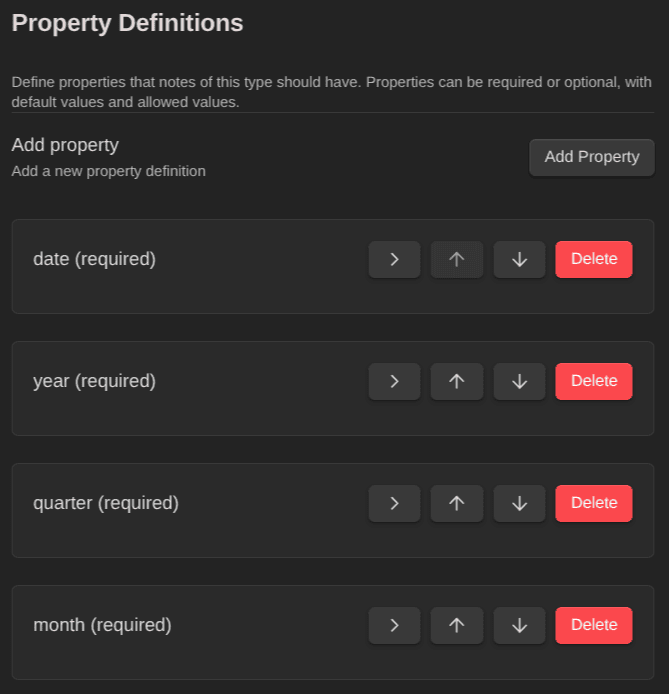
This is actually why I built a plugin called Obsidian Starter Kit plugin for my Obsidian Starter Kit. I needed what Obsidian doesn't provide: actual note types, each with its own schema. Which properties a book note must have, which values status may take on a task, what's required and what's optional. The plugin recognizes each note's type, validates notes against their schema, files them in the right folder, and exports the whole type registry to files that scripts and AI agents can read. Obsidian gives you a flat, global property list; the Obsidian Starter Kit plugin actually provides a full-blown typed system.
Note types REALLY matter, and I wish that at some point the Obsidian team will invest some time in adding first-class support for those! Wait and see...
Day-to-day features you should know
Before we get to schema design, let's cover the essentials. These are the features I use daily:
- Add a property from anywhere: hit
Ctrl+;(orCmd+;on macOS) in any note.- For more like this one: Obsidian Keyboard Shortcuts
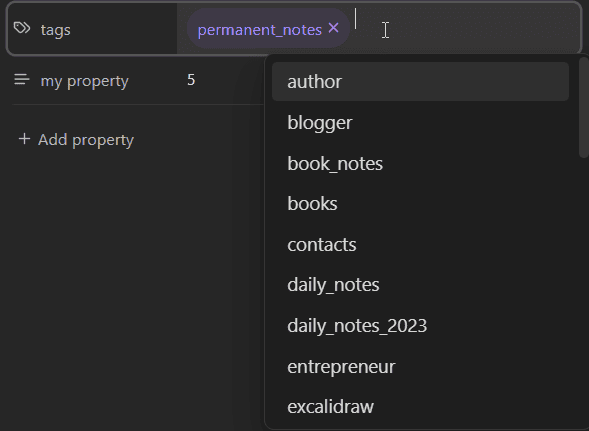
- Autocompletion: Obsidian suggests existing property names and values as you type. Use the suggestions. Every time you accept one instead of inventing a variant, your vault gets more consistent.
- Links inside properties: properties can hold
<strong>wikilinks</strong>. This is how I connect tasks to projects (via myrelated_projectsproperty), books to authors (via myauthorsproperty), etc. Those links show up in the Local and Global graph view and in backlinks, just like links in the body. External URLs work too: paste one into a Text property and it becomes clickable. One gotcha: in raw YAML, wikilinks must be wrapped in quotes ("<strong>Some Note</strong>"). The visual editor quotes them for you, but if you write templates or scripts, you must pay attention to that. - The File properties pane: shows all properties of the current note in the sidebar. Handy when you keep properties hidden in the editor.
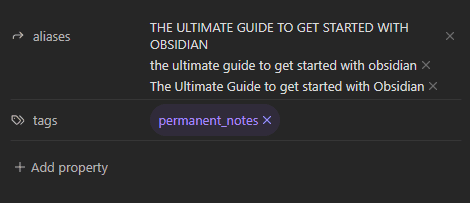
- The All properties pane: lists every property used across your entire vault. It's a useful audit tool.
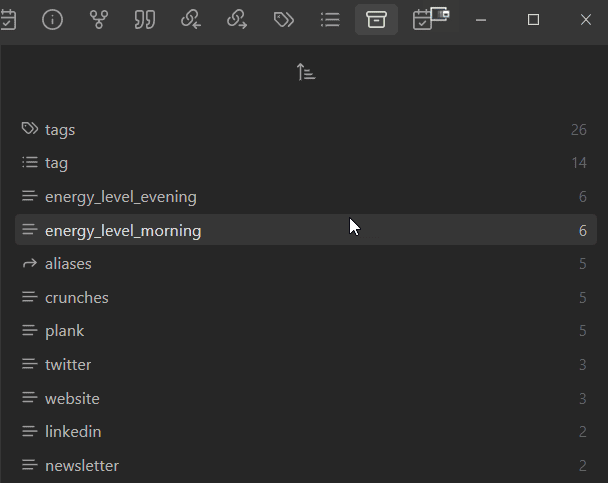
Both panes are one command away:

- Search by property: Obsidian's search supports
[property]to find notes having a property, and[property:value]to match values. For example,[status:60 - In Progress]finds everything I'm currently working on. - Properties work on mobile too: same editor, same types, same data. Your schema follows you everywhere.
Tips, tricks, and sharp edges
A collection of the small things that save time daily, and traps to avoid.
Seeing the raw YAML (Source mode)
Sooner or later, you'll want to see the actual front matter behind the visual editor. Two ways:
- Per note: open the command palette and run "Toggle Live Preview/Source mode". The property editor turns back into plain YAML text.
- Globally: Settings → Editor → "Properties in document". Three options: Visible (the visual editor, the default), Hidden (properties only show in the sidebar pane), and Source (raw YAML everywhere, always).
When is this useful? Whenever a property turns orange. Obsidian highlights values that don't match the property's assigned type or that contain malformed YAML, and the visual editor often refuses to edit those broken fields. Source mode lets you fix the text directly. (The alternative: delete the property and recreate it.)
One more silent failure to know about: the opening --- must be the very FIRST line of the file. Put so much as a blank line above it, and Obsidian treats the whole block as plain text. When that happens, your properties just stop being properties.
Also, a frequent problem is when you add the same property name twice; this isn't allowed, and you'll have to remove the duplicate entry to fix the properties.
Reserved property names
As I mentioned earlier, Obsidian ships a few property names with built-in behavior:
tags: the note's tags (the special Tags type).aliases: alternative names for the note. Underused and powerful: aliases show up in the quick switcher and in link autocompletion, so a note about "Personal Knowledge Management" with the alias "PKM" gets found either way.cssclasses: CSS classes applied to that note only. Per-note styling, straight from a property.- For Obsidian Publish users:
publish,permalink,description,image, andcovercontrol publishing and social previews.
And a heads-up if you have an old vault: the singular forms (tag, alias, cssclass) were deprecated in 1.4 and dropped entirely in 1.9. If your vault is old enough to contain them, rename them now.
Small moves, big time savings
- Reorder properties by dragging the icon next to their name (or configure the Linter to enforce one order everywhere, as we'll see).
- Rename a property across the vault: right-click it in the All properties pane and rename once. Obsidian updates every note that carries it. This is THE tool for merging synonym properties.
- Navigate with the keyboard:
Tab/Shift+Tabmove between fields, arrow keys move through the list,Ctrl/Cmd+Backspacedeletes a property,Escapereturns focus to the editor. - Insert multiple templates into one note and Obsidian merges their properties: list properties (like
tags) combine their values; single-value properties keep the LAST value inserted. Handy, but know the rule before you stack templates.
What properties won't do
Knowing the limits saves you from fighting them:
- No Markdown rendering inside property values. No bold, no formatting. Properties are data, and that's intentional.
- No computed values. A Number property stores literal numbers;
3 + 4won't evaluate. Calculations belong in Bases formulas. - No nested properties. YAML supports nesting; Obsidian's editor doesn't. Keep your schema flat.
- No native bulk editing. For mass changes, use the Linter, a script, or an AI agent (more on that soon).
That's the mechanics. Now for the part that actually determines whether properties help you or drown you.
Tip: If you want computed properties or value projections/interpolations based on the properties of other notes, then take a look at my Expander plugin for Obsidian. It's for advanced use cases, but it can be very powerful :)
Avoid metadata sprawl
You discover properties. You get excited. You start adding fields to everything: mood, weather, energy, source, origin, from, etc. Six months later you open the All properties pane and find 200 property names, half of them used exactly once, four of them meaning the same thing, two of them differing only by capitalization.
I know people who abandoned their metadata entirely at that point. And it's quite sad. To avoid this pitfall you have to treat properties as a schema. Nick Milo warns about becoming "a janitor of metadata", and it's the right framing. It's easy to add properties, but at the end of the day what you need is consistency..
A property is a promise. It says: "this field means the same thing on every note (of the same type!) that carries it." Break that promise often enough, and no query, no dashboard, and no AI will ever be able to rely on your vault.
Example issues:
- Synonyms:
finished,date_completed, anddone_onall meaning "when I finished this". Pick one. Merge the rest (right-click → rename in the All properties pane does it across the whole vault in one move). - Case inconsistency:
Statusvsstatus. As we saw, these are different properties. One convention, forever. - Lack of a clear naming convention:
date_addedvsdateModified. Again, highly problematic if you want to leverage those properties. Consistency is really key - Orphans: properties added "just in case" that no query ever reads. Dead weight. Every one of them adds friction when creating notes and noise when reading them.
- Lack of clarity about data types:
estimatevsestimate_minutes. This is a tough one, but naming matters a lot here, and a lack of clarity will clearly lead to inconsistencies in the values
The fix is not just discipline. Discipline doesn't scale easily. What you actually need is a schema, careful design, plus automation (e.g., through templates, AI skills, ...).
Design your properties like a schema
Whether you realize it or not, your Obsidian vault IS a database. Every note is a record. Properties are its fields. And databases live or die by their schema.
Here are the rules I follow after years of running a very large vault. They're pretty simple:
1. One property, one meaning
rating means my personal star rating. Everywhere. On books, on articles, on courses. It never means "difficulty" or "priority" on some other note type. When a field means something different, it gets a different name.
One nuance: shared names work when something scopes them. My status carries different value sets on tasks, articles, and books, and that's fine because each note TYPE defines its own ladder. If you don't have note types, split the name instead (newsletter_status, video_status) rather than overloading one property with mixed vocabularies. Overloaded properties also poison autocomplete: you'll get suggestions from the wrong workflow every time (unless if you're using something like the Obsidian Starter Kit plugin for Obsidian).
2. Add a property only when a question needs it
Before adding a field, I ask: what query, view, or automation will read this? If I can't name one, I don't add the property. This is the single most effective rule against sprawl. Metadata is an interface: something has to read/use it, or it's clutter; digital dust accumulating.
3. Name properties like you'll have a thousand of them
My naming rules, all visible in the examples throughout this article:
snake_case, always lowercase.date_published,related_projects,review_count. Boring, consistent.- Prefix families. All my dates start with
date_(date_started,date_due,date_published), all my platform links withurl_(url_medium,url_substack), all my health fields withhealth_(almost 100 of them!). Prefixed families sort together, autocomplete together, and scan as a group in the All properties pane. With 120+ properties on my daily notes alone, this is what keeps the list navigable. - Plural for lists, singular for single values.
authors,topics,related_goalshold multiple values;status,rating,priorityhold one. The name tells you the shape before you even look. - Descriptive beats short.
health_sleep_total_minutesis a mouthful, and I'd pick it again oversleepevery time: the name carries the unit and the meaning, so no query ever guesses.
Many of those ideas/principles are used by software developers to keep code easy to read, easy to scan, easy to understand, homogeneous and most importantly, maintainable. And that's exactly what you also want for your metadata properties, tags, note names, etc.
4. Prefix ordered values with numbers
This is one of my favorite tricks, and I use it A LOT. Status values in my vault generally look like this:
status: 10 - BacklogThe full ladder for my tasks: 10 - Backlog, 20 - This Year, 30 - This Quarter, 40 - This Month, 50 - This Week, 60 - In Progress, 70 - On Hold, 80 - Done.
Why the numbers? Because plain text sorts alphabetically, and "Backlog, Done, In Progress" is a useless order. With numeric prefixes, every Base, every query, every Kanban column sorts by actual workflow position. The gaps between numbers (10, 20, 30...) let me insert new states later without renumbering. Old file system and database design habits die hard, and this one is worth keeping.
5. Define universal properties once
Some fields belong on EVERY note. Some examples from my knowledge base: created, updated, contexts, notes, description, title, topics, review_count, review_interval, last_reviewed, etc. Universal properties give the whole vault a common backbone, whatever the note type.
6. Give each note type its own contract
Every note in my vault has a type: task, book note, person, project, daily note, article, quote... 48 types in total so far. Each type declares which properties it carries.
A book note carries authors, isbn, pages, rating, date_started, date_finished, status. A task carries necessity, urgency, impact, effort, priority, status, date_due, related_projects, related_goals. A person carries contact info and relationship fields.
Thanks to this, I can rely on a note's structure without opening it. Every book note answers the same questions. Every task can be prioritized the same way.
Each note type you define needs to be consistent.
The best practices I teach beginners
Here are a few habits I teach in my Knowledge Management for Beginners course. Those matter at ANY vault size:
- Metadata goes way beyond tags. Tags classify; properties carry values. The moment you want to store a date, a number, a status, or a link, you need to use properties. Properties and tags have different jobs. In my vault, tags answer "what kind of note is this and what topics does it touch?" (I use type tags like
type/taskand taxonomy tags for topics), while properties hold everything with a VALUE. Think of tags as breadcrumbs: leave enough to find your way back, and rarely more than ten per note. And remember that tags ARE a property (tags, the special type I covered earlier in this article), so everything in this article applies to them too. I've written about tagging in depth in Why and How to Tag Your Notes and The Tag System That Finally Made Sense for Me. - Name your tags and list values consistently. Plural form (
#challenges, not#challenge), underscores between words, lowercase only, and hierarchies (psychology/positive_psychology) when names start clashing (don't overthink it at first!). - Nested tags roll up to their parents. Don't forget that Obsidian considers that a note tagged
#obsidian/pluginsALSO has the parent tag#obsidian. Search fortag:#obsidianand the plugin-tagged notes show up too; the same applies in Dataview queries and Base filters. So a hierarchy gives you two query levels for the price of one tag: filter broad on the parent, or narrow on the child. - Associate every note with time.
createdandupdatedon each note give your knowledge base a timeline. You'll know when an idea entered your system and when it last evolved. I also like to link new or updated notes to my daily notes. Another reason for these properties is that file system creation dates rarely survive syncs, migrations, and restores from backups. - Never maintain lists by hand. Any list of notes you curate manually (reading lists, project overviews, indexes) will rot. Store the information as properties, and let queries build the lists for you. Write once, query forever. For instance using the Dataview Serializer plugin for Obsidian; that's what I recommend for Maps of Content (MoCs).
- Keep the why, the context, and the sources. A
descriptionfield, asourcelink, anauthorslist, ... - Don't overthink it. You don't need the perfect schema on day one. You need
created,updated, and onestatusfield on the notes you touch most. Everything else can grow from there.
Oh and statuses do matter. Consider the lifecycle of each note type, and evaluate if it makes sense to keep track of the state. I use this for my actions (goals, plans, projects, tasks), my articles, my videos, ... Mega useful.
If you're at the beginning of your PKM path and want the full foundation (note-taking techniques, organization methods, and the concepts behind everything in this article), that's what Knowledge Management for Beginners teaches, step by step.
 Olivier Larue
Never type metadata by hand: templates
Manual metadata entry fails for two reasons: you forget, and you improvise. Not reliable, nor scalable!
I use the Templater plugin. Every note type in my vault has a template that fills in the frontmatter at creation time: the right properties, the right defaults, the current timestamp, even the right folder (with automated filing!). Creating a book note takes one command, and the note is born with a complete, valid set of properties.
A minimal example of what a template inserts:
---
created: 2026-07-15T10:00
updated: 2026-07-15T10:00
status: 10 - Backlog
tags:
  - type/task
---
I never type created by hand. Ever. The template does it, gets the format right (ISO 8601, sortable), and never forgets. And it's automatically updated using my Update time plugin for Obsidian.
Templates cover the notes you CREATE. The Obsidian Web Clipper covers the ones you CAPTURE/CURATE. When I clip an article from the Web, the official clipper fills in the properties for me: source URL, author, publication date, title. My literature notes are born with full provenance, and I never typed any of it. If you want to set that up, I wrote a full guide to the Obsidian Web Clipper.
Keep it clean automatically: the Linter
The Linter plugin for Obsidian is a community plugin that enforces rules on your notes automatically. For properties, three of its rules do most of the work:
- YAML Key Sort: keeps properties in the same order on every note. Small thing? Try scanning 50 notes where every one lists its fields in a different order. Consistent ordering makes missing data jump out instantly.
- YAML Timestamp: maintains
createdandupdatedfields for you, updatingupdatedwhenever the note changes. Or you can use the Update time plugin for Obsidian to do the same even when you don't edit notes yourself or do it outside of Obsidian - Format Tags in YAML: fixes common syntax mistakes before they poison your queries.
The Linter automatically runs on file change, so every note I touch gets tidied the moment I close it. One less thing to worry about!
Two practical warnings. First, the Linter can modify every file in your vault, so configure your backups before you configure the Linter (you have backups, right? 👀). Second, exclude your archive folders; there's no need to rewrite five-year-old notes.
The payoff: your vault becomes a database
Obsidian Bases is the core plugin that turns any set of notes into live views: tables, card galleries, calendars, kanban boards, etc. A Base doesn't store anything. It READS your notes' properties. Which means the quality of your Bases depends fully on the quality of your metadata.
Properties plug into Bases at three levels:
- Filters decide which notes are in. Every condition is a test on metadata:
statusis "Reading",ratingis at least four stars,date_dueis before next Friday. Clean enumerated values make filters trivial to write; messy ones make them impossible. - Columns display properties. Every column in a Base table IS a property (and you can edit values right there in the view, which writes them back into the note).
- Formulas create VIRTUAL properties: computed columns that live in no note but combine the real ones on the fly. Sum numbers, convert formats, bucket dates. One real example from my own "Actions" Base:
days_until_due = (date(date_due) - today()) / duration("1d")No note stores days_until_due; it exists only in the view, always current, computed from one real property. A second formula buckets it into "🔴 Overdue / 🔥 Today / 📅 This Week", and my dashboard sorts itself by urgency every time I open it. Store the raw facts in properties, and let formulas derive everything else.
Two more things worth knowing. Embedded Bases can reference the current note through the this keyword, so a single saved view adapts to wherever you embed it: put a Base in an author's note, filter on this, and it lists that author's books. And performance holds up: my Bases filter and compute across more than 20,000 notes (almost) without a hiccup.
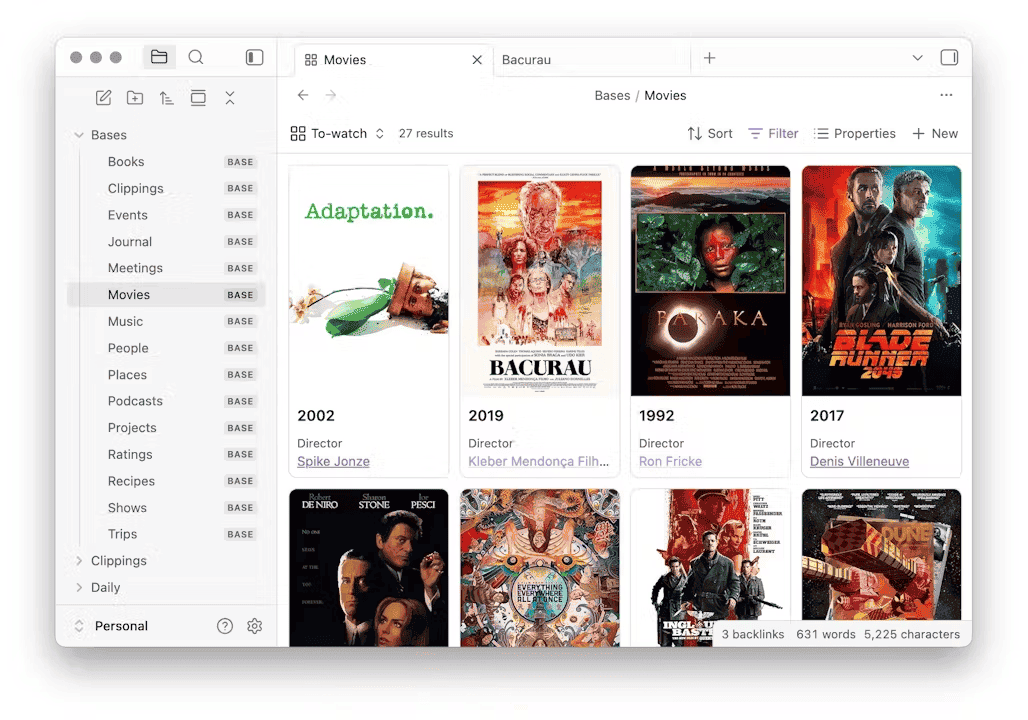
With the schema above in place, I get, for free:
- A reading dashboard: every book note, filtered by
status, sorted byrating, with covers. When I finish a book, I flip two properties and every view updates itself. - A life tracking system: my daily notes carry health properties (sleep, energy, activity), and Bases turn them into trend views.
- Kanban boards: dragging a card writes the new
statusstraight back into the note's properties. More on this in a minute, because it deserves its own section.
Notice the direction of the dependency. The dashboards are the easy part. The properties underneath are the real system. This is why I keep saying: clean properties are the whole game.
I've covered this more in detail in my articles about Bases and the Kanban Action Planner plugin for Obsidian.
Querying properties: Dataview, DataviewJS, and Templater
Bases isn't the only consumer of your properties. Long before Bases existed, the Dataview plugin was the reason power users obsessed over clean metadata, and it's still everywhere. Dataview gives you a query language over your properties, right inside a note:
TABLE authors, rating, date_finished
FROM #type/book
WHERE status = "Read" AND date_finished >= date(2026-01-01)
SORT date_finished DESC
Drop that block into any note and you get a live table of every book you finished this year. Change the WHERE clause and you get overdue tasks, stale notes (updated older than a year), drafts waiting for review... The right notes, at the right time, based on whatever conditions you define. This is the "never maintain lists by hand" principle with an engine behind it.
Two Dataview specifics that will save you headaches. First, an EMPTY property is not the same as a missing one: WHERE rating != null still matches notes with a blank rating: line, so write WHERE rating AND rating != null when you want actual values. Second, Dataview also supports inline fields in the note body (key:: value). They work, but ONLY Dataview sees them: the property editor ignores them, Bases can't query them, and every other tool skips them. I keep everything in the front matter, where the whole ecosystem can read it.
One catch: Dataview results are rendered on the fly. They only exist inside Obsidian, which means they're invisible to the graph, to backlinks, and to anything you publish. That's why I built the Dataview Serializer plugin: it takes a Dataview query and writes the RESULTS into the note as real Markdown. My Maps of Content maintain themselves this way; the links are real, so they show up in the graph, and they survive publishing.
 dsebastien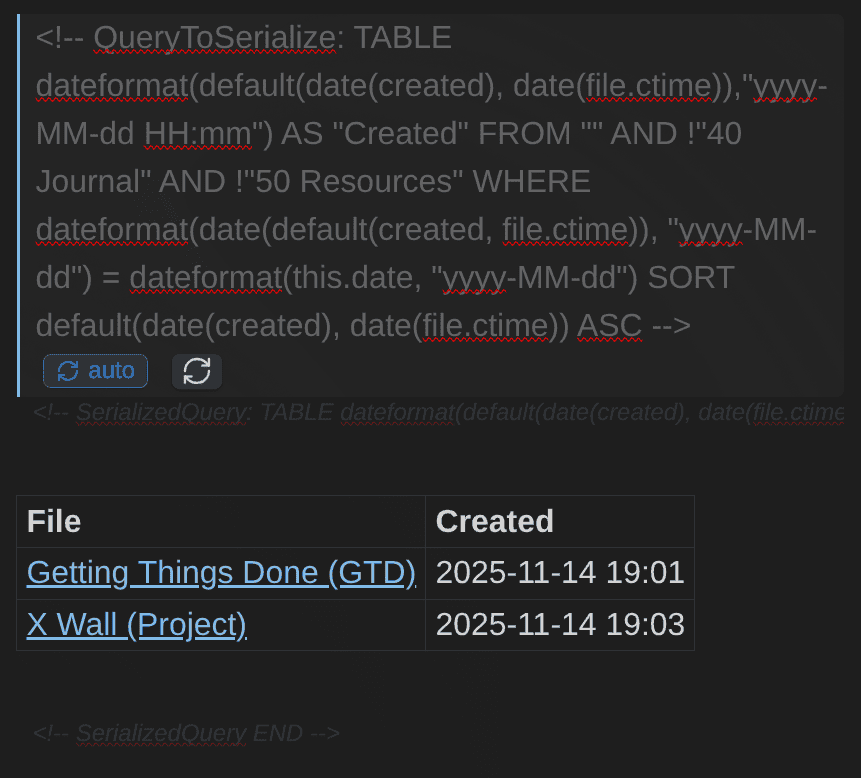
And when queries aren't enough, you can go fully programmatic. DataviewJS blocks give you JavaScript over your properties (compute, aggregate, render anything). Templater scripts can READ and WRITE frontmatter through Obsidian's API. My favorite example: my publish template. I share more than 10,000 notes publicly through Obsidian Publish, and each public note carries a public_note: true property. One Templater command compares the actual list of published files against every note's frontmatter, fixes any public_note value that drifted out of sync, and runs the Dataview Serializer on the published notes.
In short: your vault can ACT on its own properties.
From properties to applications: my action system
Here's another example. Everything I plan and execute lives in my vault as four note types: goals, plans, projects, and tasks. Plain Markdown notes. What makes them a SYSTEM is that all four carry the same prioritization properties:
necessity: 10 - MUST       # MoSCoW: MUST / SHOULD / COULD / WONT
urgency: 20 - Soon         # Now / Soon / This Year / Next Year / Future
impact: 10 - High          # High / Medium / Low
effort: 20 - Medium        # Small / Medium / Large / Huge
priority: 99 - TBD         # manual override when I disagree with the math
status: 60 - In Progress
progress: 40
time_estimate: 90          # minutes for tasks; goals and projects use time_estimate_days
A few details worth stealing:
99 - TBDas the default for every scoring field. Unscored items sort last and stay visibly unscored, instead of silently pretending to be low priority.- The status ladder IS the workflow. Tasks flow
10 - Backlog→50 - This Week→60 - In Progress→80 - Done. Goals and projects have their own lifecycle:99 - Idea→20 - Planned→30 - Active→60 - Completed(or70 - Abandoned; be honest with yourself 😉). Because the values are enumerated and typed, every tool that touches these notes honors the same lifecycle. The workflow is defined ONCE, in the schema. - Relationship properties create the chain of purpose. Tasks carry
related_projects, projects carryrelated_goals, plans tie into both. Any task in my vault can answer the question "which goal does this serve?" by following two links.
On top of these properties sits ONE file: my Actions Base. It filters on the four action types and exposes around twenty views: tables for goals, plans, and projects, a "Current Focus" view, calendar and list views from the TaskNotes plugin, and Kanban views. TaskNotes deserves its own mention here, because it's built on the very idea this article defends: every task is a full note, and its status, priority, due date, and time tracking are all properties. I covered it in a dedicated article and in this video:
 Sebastien Dubois
Back to the Actions Base. Its most useful column is one no note stores:
priority_score = necessity × urgency + impact − effortThat's a Base formula (the real one maps each enumerated value to a numeric weight). Fill in four honest fields per item, and the ranking computes itself, live, across hundreds of actions. When the ranking feels wrong, I don't reshuffle a list. I fix the inputs.
And then there's the Kanban Action Planner, the plugin I built and wrote about in my Kanban article. It renders any Base view as a full planning application: Kanban columns generated from the status values, swimlanes, due dates, filtering, and a triage mode.
 Sebastien Dubois
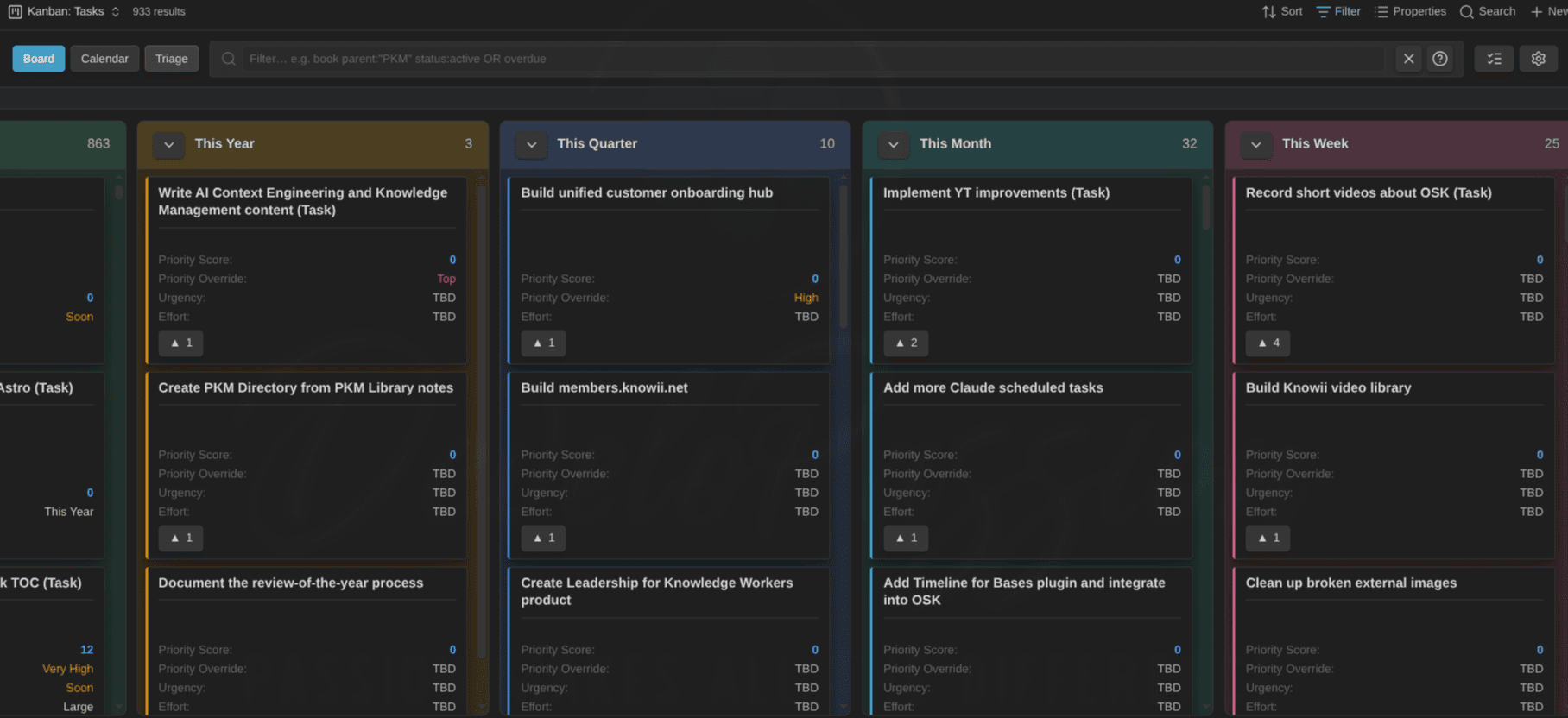
Drag a card from "This Week" to "In Progress", and the plugin writes status: 60 - In Progress into the note's frontmatter. The board doesn't have its own database. Your properties ARE the database.
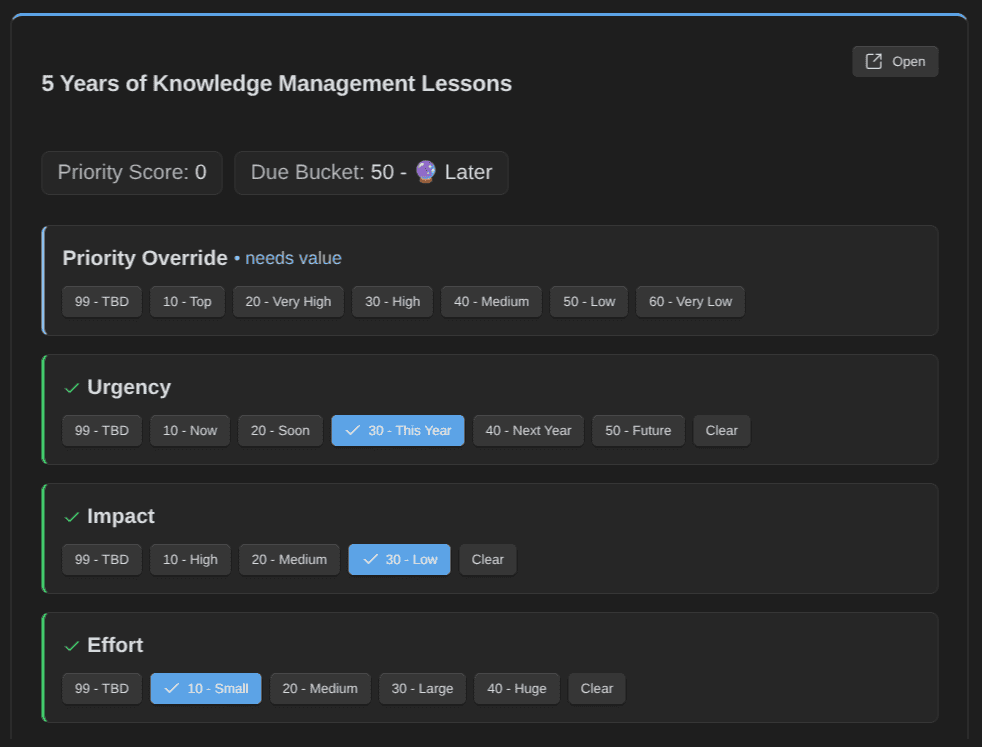
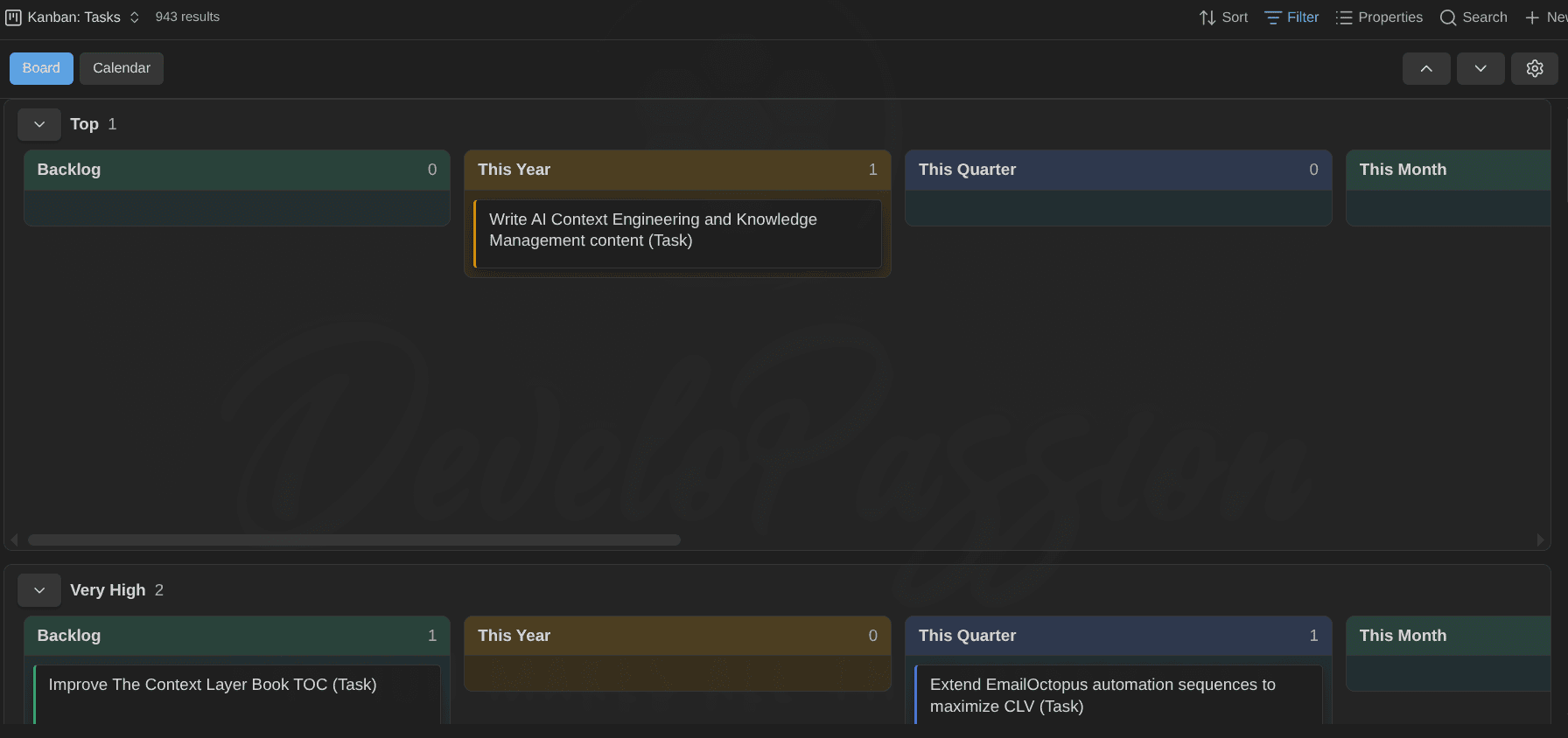
Step back and look at what this actually is. Typed properties with enumerated values: that's a database schema. Status ladders and computed scores: that's business logic. Base views and a Kanban plugin: that's the user interface. An entire application, with clearly-defined workflows, built on top of plain Markdown files. No matter what happens with Obsidian in the future, that data will always be there in my Markdown files!
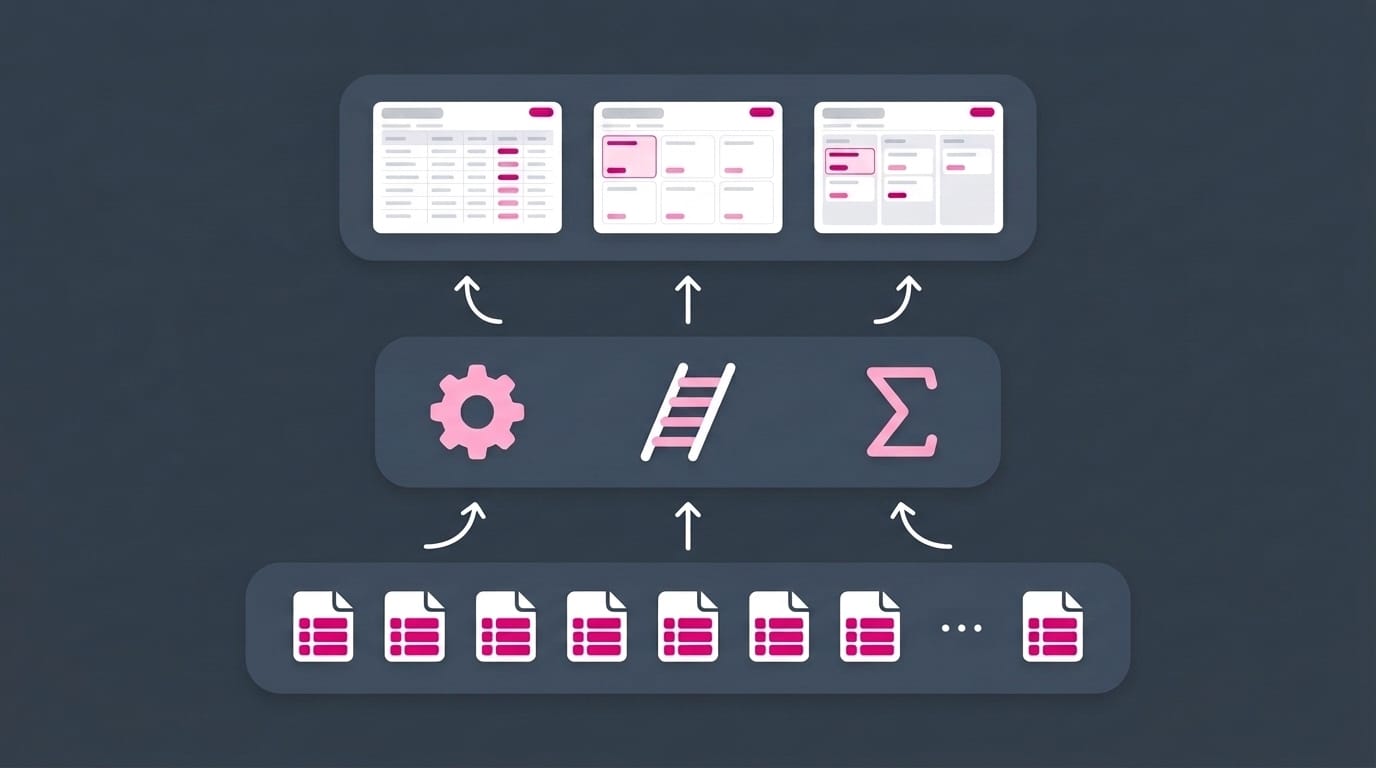
Same pattern, more domains: publishing, reading, and life tracking
Here are three more examples from my vault, showing how far this can go.
My publishing pipeline
Every article I write is a note of type "article", and its properties ARE my publishing workflow. The note behind the article you're reading right now carries (among others):
status: 70 - Draft Ready
published: false
date_published:
date_updated:
excerpt: Properties are the difference between a pile of Markdown files and...
slug: the-complete-guide-to-obsidian-properties
url:
url_medium:
url_substack:
url_linked_in:
url_podcast:
url_x:
Look at what each field does:
statusis the editorial ladder:99 - Idea→10 - Backlog→60 - In Progress→70 - Draft Ready→80 - Edited→90 - Published. My content pipeline dashboard is a Base filtered on these values. "What's ready to edit?" is a saved query, not a mental checklist.published,date_published, anddate_updatedtrack the publication state and feed my "published this year" reviews.- **The
url_*family is my cross-posting checklist.** One field per platform: my blog, Medium, Substack, LinkedIn, the podcast. When the article goes live somewhere, the link goes in. An EMPTYurl_mediumliterally means "not cross-posted to Medium yet". The metadata records what's done AND shows me what remains. excerptandslugfeed the publishing automation, so titles, previews, and URLs stay consistent between the vault and the blog.
My reading library
My book notes might be my favorite example, because reading is where many of us FEEL the mess first ("what was that book I wanted to read again?"). Each book in my vault is one note of type "book", carrying:
title: Atomic Habits
subtitle: An Easy & Proven Way to Build Good Habits & Break Bad Ones
authors:
  - "[[James Clear]]"
status: Read
rating: ★★★★★
pages: 320
isbn: 9780735211292
publisher: Avery
published_on: 2018-10-16
date_started: 2023-01-05
date_finished: 2023-02-11
cover: https://...
categories:
  - Self-help
Notice two things. First, authors holds LINKS to person notes, so every book connects to its author, and every author's page lists their books through backlinks. Second, the reading statuses (To Read, Reading, On Hold, Read, To Read Again, Abandoned, Reference) have no numeric prefixes, unlike my task statuses. Why? Because I never SORT by reading status; I only filter on it. Prefix the values that need an order, and leave the rest human-readable. Schema design is full of small decisions like this one.
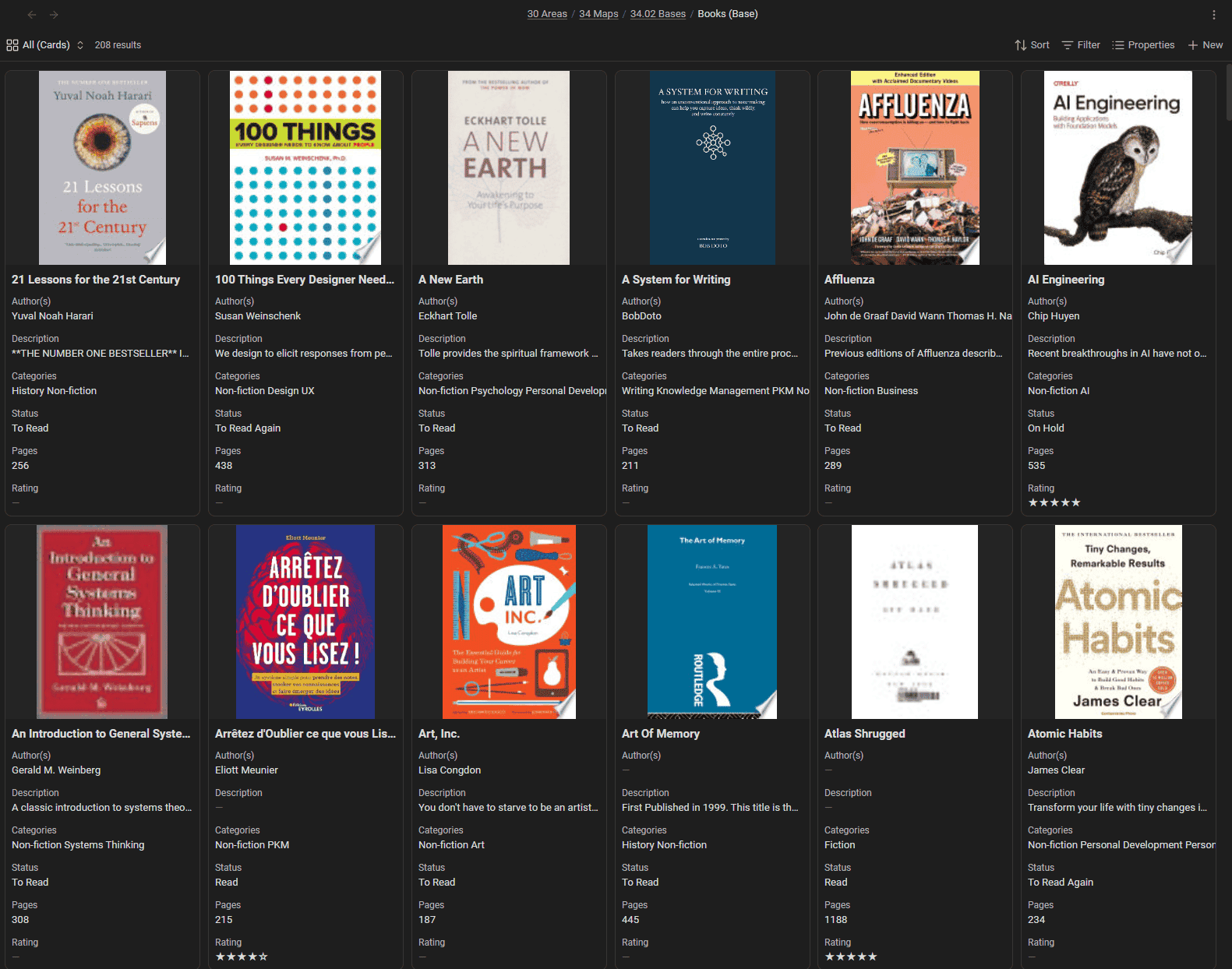
With those properties in place, my whole library manages itself through my Books Base:
- A Reading view: everything with
status: Reading, my current stack. - To Read queries: my anti-library, sorted and filtered by category, so "what should I read next?" takes seconds.
- Read This Year: filtered on
date_finished, my reading stats with zero bookkeeping. - Fiction and non-fiction card galleries, with covers pulled straight from the
coverproperty.
And because it's quite easy to build custom Base views using AI, I built the Bookshelf plugin: a Base view that renders those same book notes as an actual bookshelf, covers and all.
 dsebastien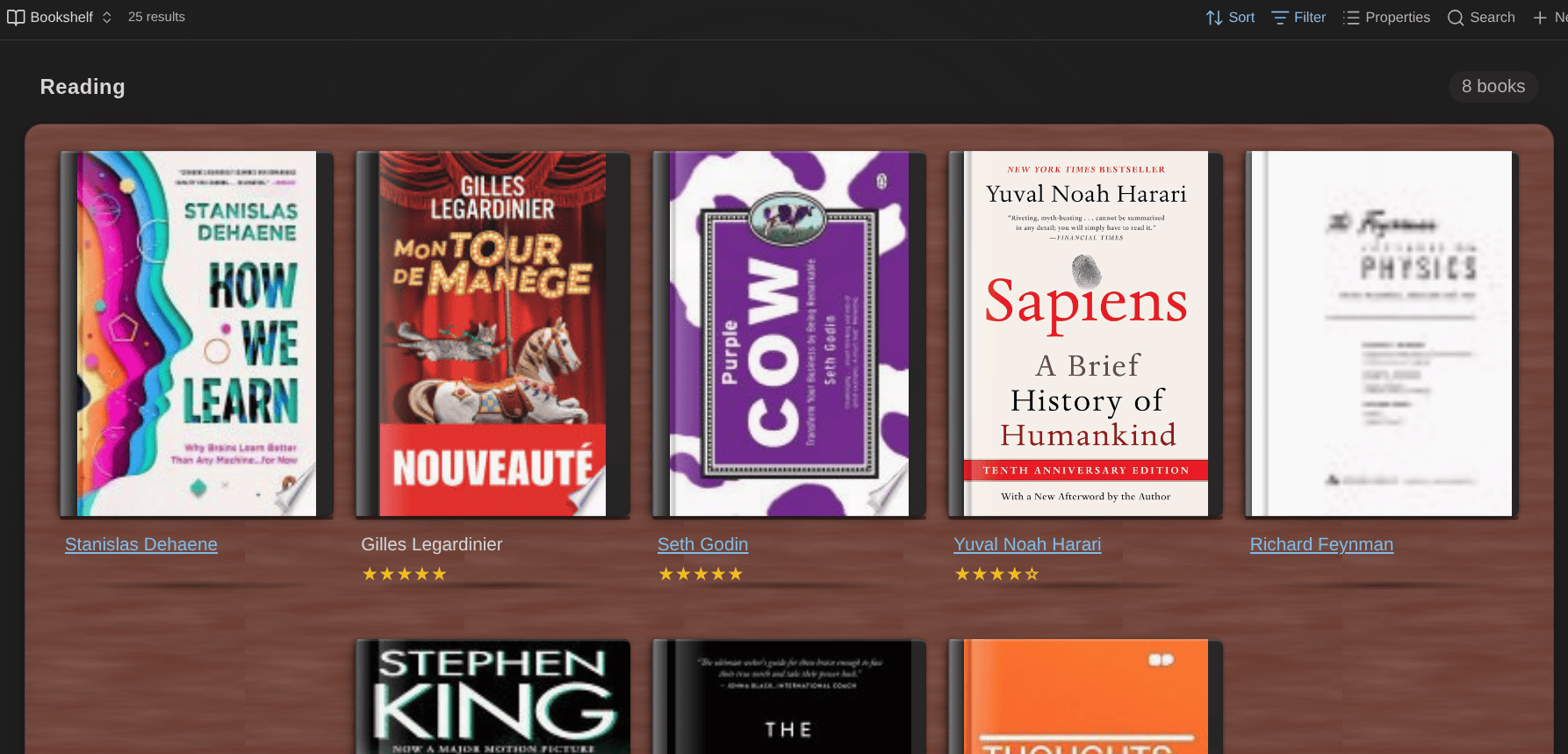
Hundreds of books, one schema, zero spreadsheets. When I finish a book, I set status: Read, fill in date_finished, add a rating, and every view above updates itself. That's the entire maintenance burden of my reading system.
My life and health tracking
My daily-note type carries 122 properties, and 93 of them start with health_. A small sample:
health_sleep_total_minutes: 432
health_sleep_score: 82
health_resting_heart_rate: 52
health_heart_rate_variability_overnight_average: 58
health_stress_average: 27
health_body_battery_at_wake: 88
health_training_readiness: 74
health_exercise_steps: 11250
health_exercise_runs:
  - 8.2km in 44:10, avg HR 148
health_nutrition_meals:
  - ...
health_medications:
  -
health_symptoms:
  -
Sleep duration and quality, heart rate and HRV, stress, body battery, training readiness and load, VO2 max, steps, runs, gym sessions, meals, water and caffeine intake, medications, symptoms, etc. Every day gets one note, and every note carries the same typed fields. My watch data syncs into these properties automatically, so most days I don't type a single value.
Alongside the health fields sit the life ones: wins, gratitude, decisions, key_events, anecdotes, reflections. Same idea. The day's story in queryable form.
Why store all of this in note properties instead of a health app? Because here, the data is mine, it compounds, and I can actually leverage it. A Health Base turns those properties into trend views ("which days did I sleep badly, and what did those days have in common?"). And I built the Life Tracker plugin to visualize all of it: a year-at-a-glance grid, with trends, powered ENTIRELY by daily-note properties. I introduced it in a dedicated article and recorded a walkthrough:
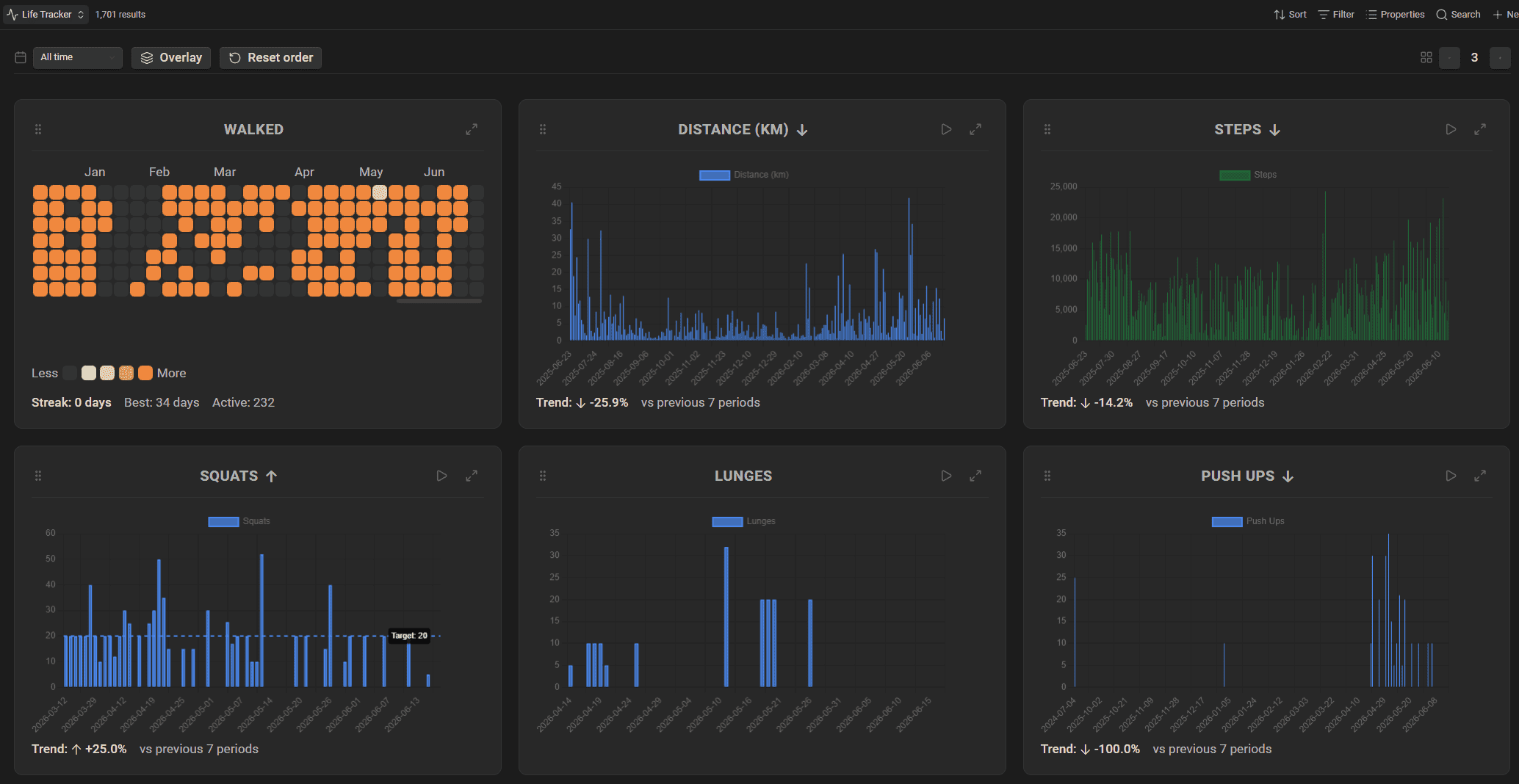
Sleep, running sessions, symptoms, energy: I can correlate any of it with anything else in my vault, because it all lives in the same system, as properties on plain Markdown files that I own forever. Try asking your proprietary fitness app to do that.
It's always the same pattern: define the the schema once for a note type, define a template, fill the properties consistently (or let automation fill them), and create queries and/or Bases to leverage the information.
What this looks like at 20,000 notes (and where AI comes in)
For years, my vault ran on tags and a handful of properties. Tags for topics, tags for status, tags for everything. It worked, up to a point. Tags can classify notes, but they can't hold values. You can't sort tags by date, sum them, or put them in a column. As my vault grew, I kept moving semantic weight out of tags and into properties, because properties are typed, queryable data. Today my tags do exactly one job (routing notes by type and zone), and properties do everything else.
Obsidian Bases is what made me invest more time & energy into my schemas. Dataview was great, but Bases are a thousand times more powerful and versatile.
I used to consider metadata upkeep the price of the system. A tax. Worth paying, but a tax. AI changed the economics a lot. My vault now runs with AI agents inside it (Claude, working directly on my Markdown files), and adding/updating metadata is easier than ever:
- The cost collapsed. Agents fill in missing properties, fix malformed ones, and validate notes against each type's schema. Remember the Obsidian Starter Kit plugin from the vault-wide types section? It exports every note type definition to files a CLI (and AI) can read, so an agent can check "does this book note carry everything a book note must carry?" and repair it when the answer is no. The metadata maintenance I used to do by hand now happens while I make coffee.
- The payoff exploded. Properties are how AI understands your vault. An agent that reads
status: 60 - In Progresson a task,rating: ★★★★★on a book,related_goalson a project doesn't have to guess what your notes mean. The schema tells it. My agents plan my week from task properties, pull my reading stats from book properties, analyze my exercise & running sessions, build new Bases on request, etc. All in plain English. None of that works well at scale with an untyped pile of Markdown.
This even extends to my software development work. My project notes carry a repositories property listing the source code repositories behind each project:
repositories:
  - https://github.com/DeveloPassion/knowii-voice-ai
  - https://github.com/DeveloPassion/knowii-voice-ai-docs
So when I tell my AI assistant "Let's work on Knowii Voice AI; update the repository, then implement ticket #123", it opens the project note, follows the repositories property to the right codebase, pulls the latest changes, and gets to work, with the project's goals, status, and open tasks as context. One property turned my vault into the front door of my entire development workflow.
And none of this requires Obsidian to be open, by the way. The Obsidian CLI reads and writes properties and runs searches straight from the terminal, which is what my scripts and agents use when the app isn't even running. Properties as an interface, all the way down.
If you want to see the whole typed, AI-assisted system in motion, I gave a full tour in this video:
So the loop closes: schema makes metadata reliable, reliable metadata makes AI useful, and AI keeps the metadata reliable.

Start here
You don't need my 48 note types to get started. You need this:
- Enable the Properties core plugin (Settings → Core plugins).
- Pick ONE note type you create often. Books, meetings, projects, whatever.
- Give it 3 to 5 properties. A
status, a date or two, maybe arating. Right types.snake_case. Numeric prefixes on ordered values. - Make a template so new notes include the properties at creation time.
- Install the Linter plugin with YAML Key Sort and YAML Timestamp or the update time plugin
- Build one Base on top. One filter, one table. Watch your notes become a database.
Then live with it for a month, and only add a property when a question demands it. Start simple. Structure can grow later; consistency can't be retrofitted, so start consistent instead.
Conclusion
Properties look like a small feature. A few fields at the top of a note. But they're incredibly powerful and empowering.
Treat each property as a promise: one name, one meaning, one type, everywhere. Let templates and the Linter enforce the promise so you don't have to. Then point Bases, boards, and AI agents at the result. Also try out some of my plugins, and let me know how it feels to build a powerful system on a top of a collection of Markdown files. Never gets old! :)
 Sebastien Dubois
And remember the long game: this data lives alongside your notes, in files you own. My task statuses, my reading history, my years of sleep data; none of it depends on Obsidian existing. That's what makes metadata worth investing in: you're building an asset that outlives the tools.
If you want all of this pre-designed rather than built from scratch, take a look at the Obsidian Starter Kit: a complete vault with the property schema, note types, templates, automation, and Bases already wired together, plus a user guide explaining the why behind every choice. It's a 1:1 copy of the system I rely on daily and demonstrated in this article. And there's a TON more in there.
 Dwayne Appleby
If you enjoyed this piece, subscribe to my newsletter for more on Obsidian, Knowledge Management, and AI-augmented knowledge work.
 By
By
Oh, and consider joining the Knowii Community. I share information like this all the time with the community!
That's it for today! ✨
 Sebastien Dubois
Go further
This guide is part of my Obsidian deep dives series. Each piece stands on its own, but together they build one system. Here are the others:
 Sébastien Dubois
 Sébastien DuboisSébastien Dubois
 Sébastien Dubois
About Sébastien
Ready to get to the next level?
Found this valuable? Share it with someone who needs it.