
The Obsidian Search Handbook

Canonical version: The Obsidian Search Handbook.
 Knowledge Forge
The method comes from the vault I run my business from every day (about 30,000 notes). With that many notes, I had to solve this problem for real, and this book is how I did it. It starts with the notes themselves and only then moves to the search box, because that's where I'm convinced findability is decided.
Launch offer: until Thursday 29 October 2026 at 23:59 CET, the code LAUNCH takes €10 off both editions. The Complete edition is €39 instead of €49, and the Book is €19 instead of €29 (one code per order).
Important: updates are free for the whole 2026 edition (every 1.x version). The book is written and checked against Obsidian 1.14.
The Complete edition is also included in the Everything Knowledge Bundle.
Links
- Buy now: https://www.store.dsebastien.net/product/obsidian-search-handbook
- On Gumroad: https://developassion.gumroad.com/l/obsidian-search-handbook
- Free online series: The Complete Guide to Obsidian Search
- Free cheat sheet: Free Obsidian Search Cheat Sheet
What changes when you use it
- You stop losing notes you know you wrote. You get a naming, alias and metadata routine that takes seconds at capture time, and a checklist to run each time you create a note.
- You pick the right tool for what you remember. The title, a phrase, a date, a property, a related note, or only the idea: each one has its tool. The book gives you the escalation ladder, from the cheapest tool to the most powerful.
- You fix the vault you already have. No need to start over. A 30-day makeover at 15 minutes a day, with two scores to compare, plus a findability pass for imported notes.
- You search beyond Obsidian. ripgrep, fzf, your OS search, git history and the Obsidian CLI work on your files, with or without the app.
- AI finds things for you, with rules. Keyword, semantic, hybrid and agentic search explained, a 20-query test to measure any tool (instead of trusting its marketing), and a working setup with qmd and MCP servers.
- Old notes come back to you. Random notes, on-this-day views, review queues and a resurfacing routine you can copy.
🎯 The problem
You know the note exists. You wrote it! But you can't remember its name, and searching for what you think was in it returns far more results than you can scan.
And it gets worse over time. The more you write, the more of your vault you can't reach, and the less you trust it. So you rewrite notes you already have, or you stop writing things down at all. Installing yet another plugin rarely fixes that. Search tools (AI agents included) can only work with what you put in the note.
🔍 Where findability comes from
A 2004 diary study at MIT looked at how people re-find their own information. They used keyword search in only 39% of their searches, even when they knew key details about what they were looking for. Most of the time, they navigated first (a folder, a link, a note they remembered) and searched when that failed. A 2008 study found the same pattern.
My take: whether you'll find a note again is mostly decided when you WRITE it. Its name, its aliases, its type, a few properties and a couple of links do most of the work. Every search tool, from the quick switcher to an AI agent, gets better when those are in place.
That's why the book starts with the notes. Then it covers the tools in order, from the cheapest to the most powerful, and tells you when to reach for each one.
📖 What the book is (and what's free)
I'll be upfront about this one. All the text of this book is free on my blog, as the series The Complete Guide to Obsidian Search. It's released one part per weekday, from 23 October to 9 November 2026, and it stays free.
The book is that same text, assembled into one book you can read today, plus:
- A foreword
- A "Try this" exercise at the end of every chapter
- The merged FAQ (38 questions from the whole series)
- The cheat sheet appendix
- Offline files: a 254-page PDF and an EPUB
The Complete edition adds the files that put the method to work in your own vault: the Findability Starter Pack and six printable worksheets.
If the free articles give you what you need, you don't need the book. I mean it.
| Free series | Book | Complete | |
|---|---|---|---|
| The full text | Yes, as a series of articles | Yes, in one book | Yes, in one book |
| Foreword | No | Yes | Yes |
| "Try this" exercises | No | In every chapter | In every chapter |
| FAQ | Spread across the articles | Merged (38 questions) | Merged (38 questions) |
| Cheat sheets | Spread across the articles | Together in one appendix | Together in one appendix |
| PDF and EPUB | No | Yes | Yes |
| Findability Starter Pack | No | No | Yes |
| 6 printable worksheets | No | No | Yes |
| Price | Free | €29 | €49 |
📦 What's inside
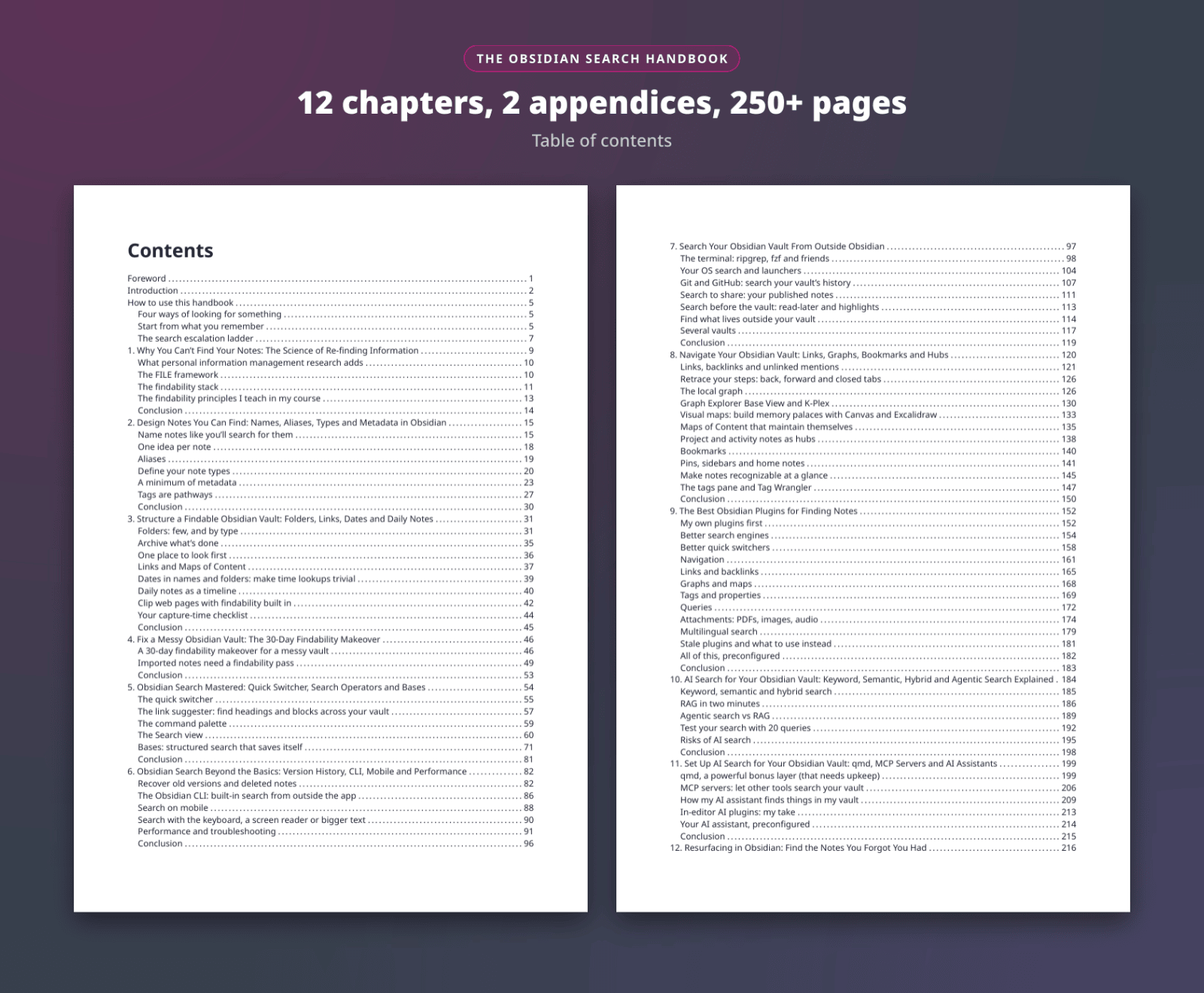
Caption: 12 chapters and 2 appendices, across 254 pages
The book has a foreword, an introduction, a "How to use this handbook" chapter (it maps what you remember about a note to the tool that finds it), twelve chapters, a merged FAQ, a "where to go next" list, a conclusion and two appendices. Each chapter ends with a "Try this" exercise.
- Why you can't find your notes. The research on re-finding information, the FILE framework, the findability stack and LATCH. (online version)
- Design notes you can find. Names, the acronym trick, aliases, note types, a minimum of metadata, and tags as pathways. (online version)
- Structure a findable vault. Folders by type, the archive, links and Maps of Content, dates, daily notes, web clipping and a capture-time checklist. (online version)
- Fix a messy vault. A 30-day makeover at 15 minutes a day, and a findability pass for imported notes. (online version)
- Obsidian search mastered. The quick switcher, the link suggester, the command palette, the Search operators, and Obsidian Bases. (online version)
- Beyond the basics. Version history, the Obsidian CLI, mobile, accessibility, and what to do when search misses a note. (online version)
- Search from outside Obsidian. ripgrep, fzf, OS search and launchers, git history, published notes, read-later tools, and files outside your vault. (online version)
- Navigate your vault. Backlinks, unlinked mentions, the local graph, K-Plex, Canvas, self-maintaining MoCs, hub notes, bookmarks and pins. (online version)
- The best plugins for finding notes. What's worth installing for search, switching, navigation, links, graphs, tags, queries, attachments and languages. (online version)
- AI search explained. Keyword, semantic and hybrid search, RAG, agentic search, a 20-query test, and the risks. (online version)
- Set up AI search. qmd, MCP servers, how my AI assistant finds things in 30,000 notes, and in-editor AI plugins. (online version)
- Resurfacing. Random notes, on-this-day views, reviews, review queues, related notes, AI, and a routine you can copy. (online version)
And at the end:
- Appendix A: Cheat sheet. The cheat sheets of the chapters on built-in search, the CLI, outside search, plugins and AI search, in one place.
- Appendix B: Which tool for which job. A comparison of every tool in the book, and the order in which I search myself.
- One reference list with the research and the tools mentioned in the book.
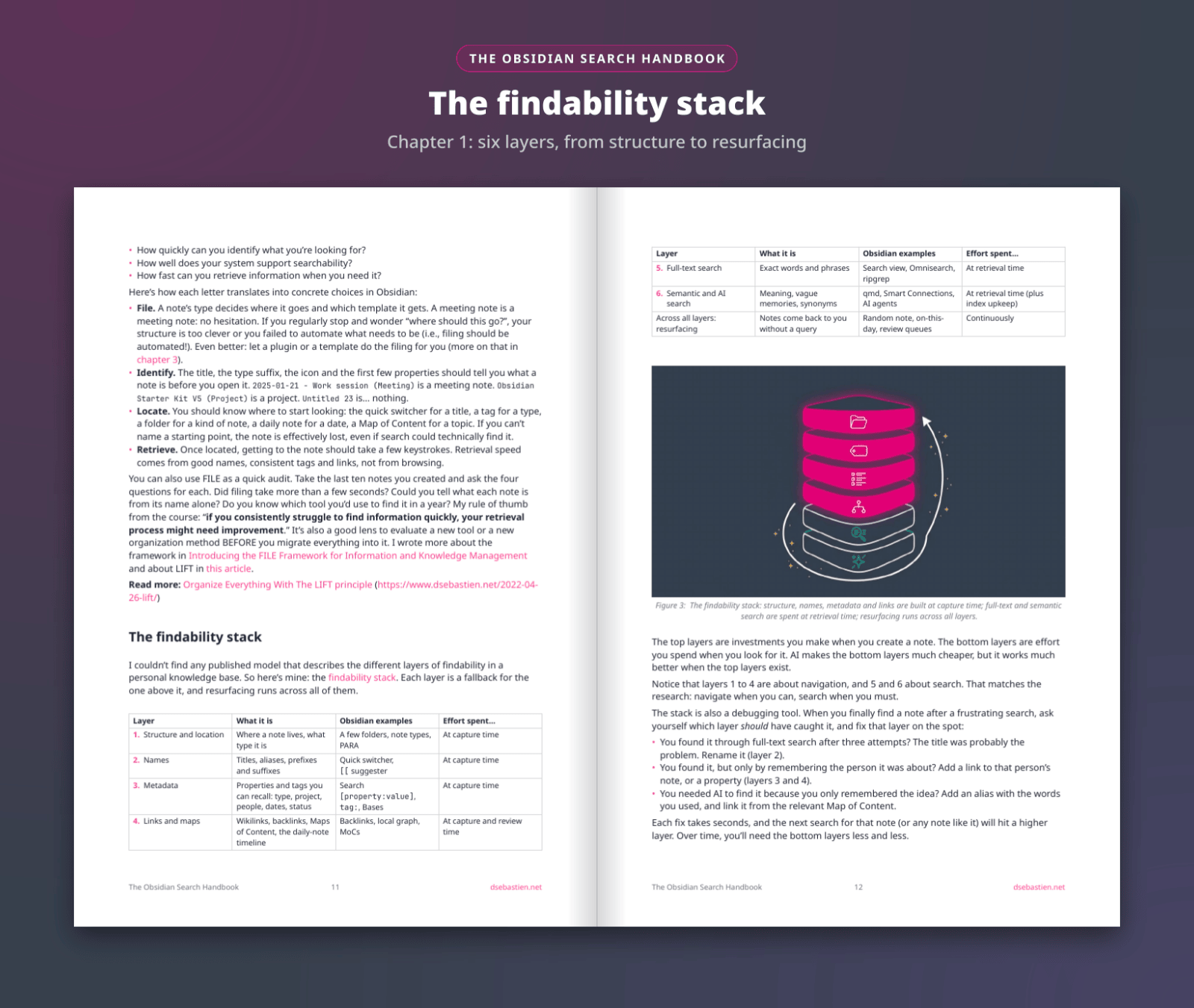
Caption: Chapter 1 introduces the findability stack: six layers, from structure to resurfacing
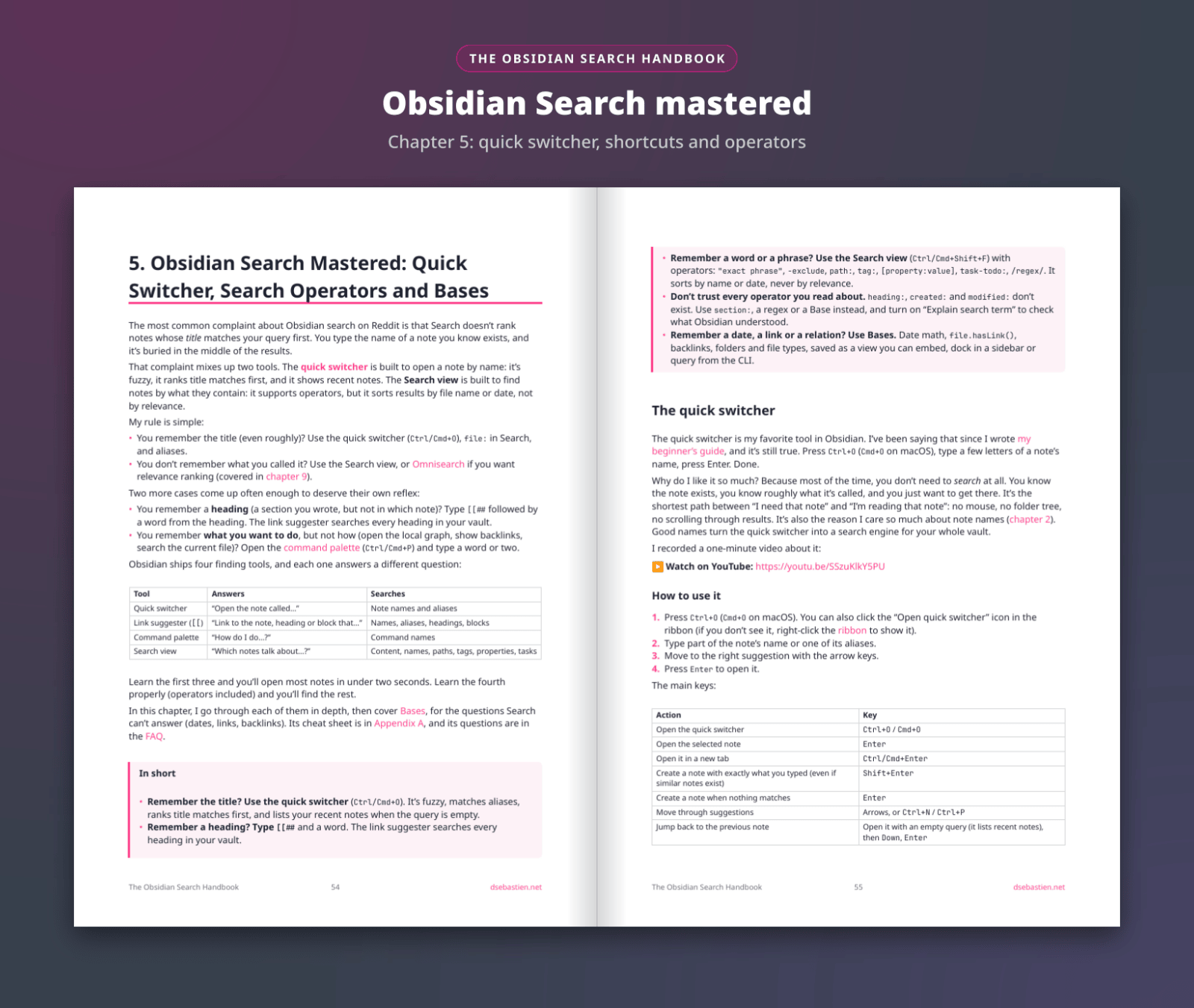
Caption: Chapter 5 covers the quick switcher, the link suggester, the command palette and the Search operators
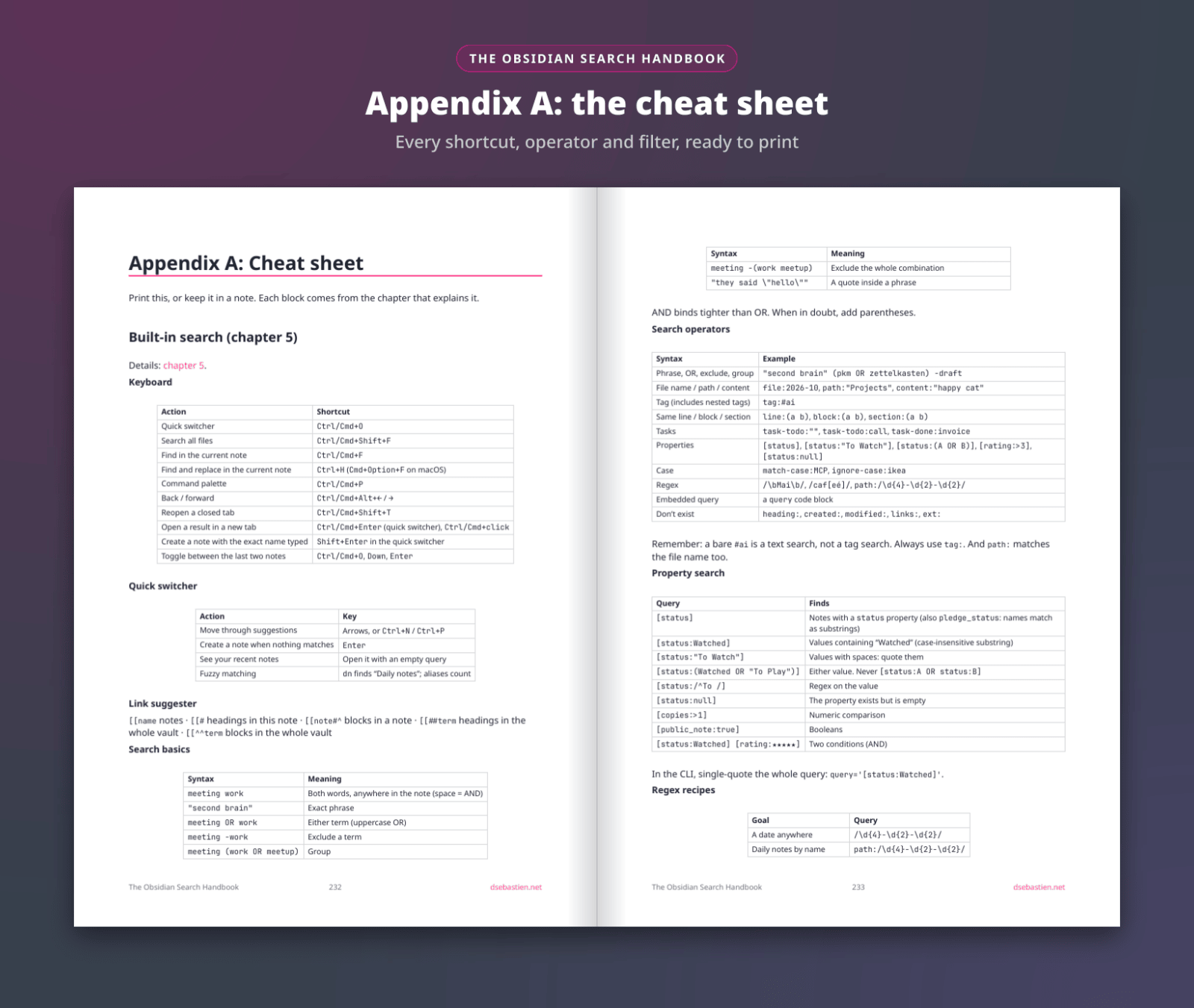
Caption: Appendix A puts every shortcut, operator and filter in one place, ready to print
🧰 The Complete edition
The Complete edition is the book plus the files you need to apply it in your own vault, for €20 more. It's the edition I recommend.
The Findability Starter Pack
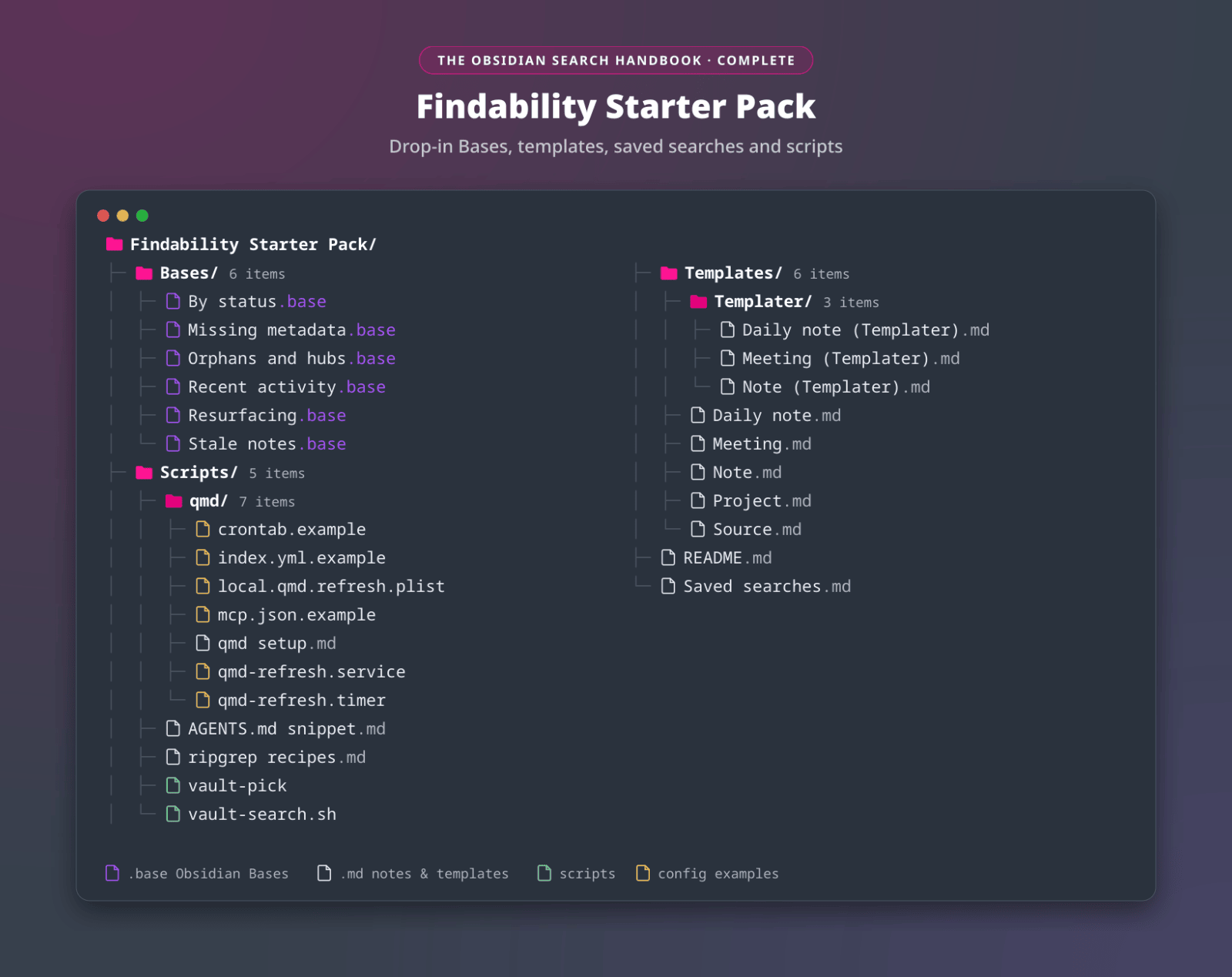
Caption: The Findability Starter Pack: Bases, templates, saved searches and scripts you drop into your vault
- 5 note templates (daily note, meeting, note, project and source), three of them also in a Templater version
- 6 Bases: by status, missing metadata, orphans and hubs, recent activity, resurfacing and stale notes
- 35 saved searches, grouped by what you remember, ready to bookmark in the Search view
- ripgrep and fzf scripts to search and open notes from the terminal
- A qmd configuration, with examples to keep its index fresh
- An AGENTS.md snippet that tells your AI assistant how to search your vault (instead of guessing paths and names)
It's a small starter set taken from my own vault. (The Obsidian Starter Kit is a separate, much bigger product: a complete vault with its own documentation.)
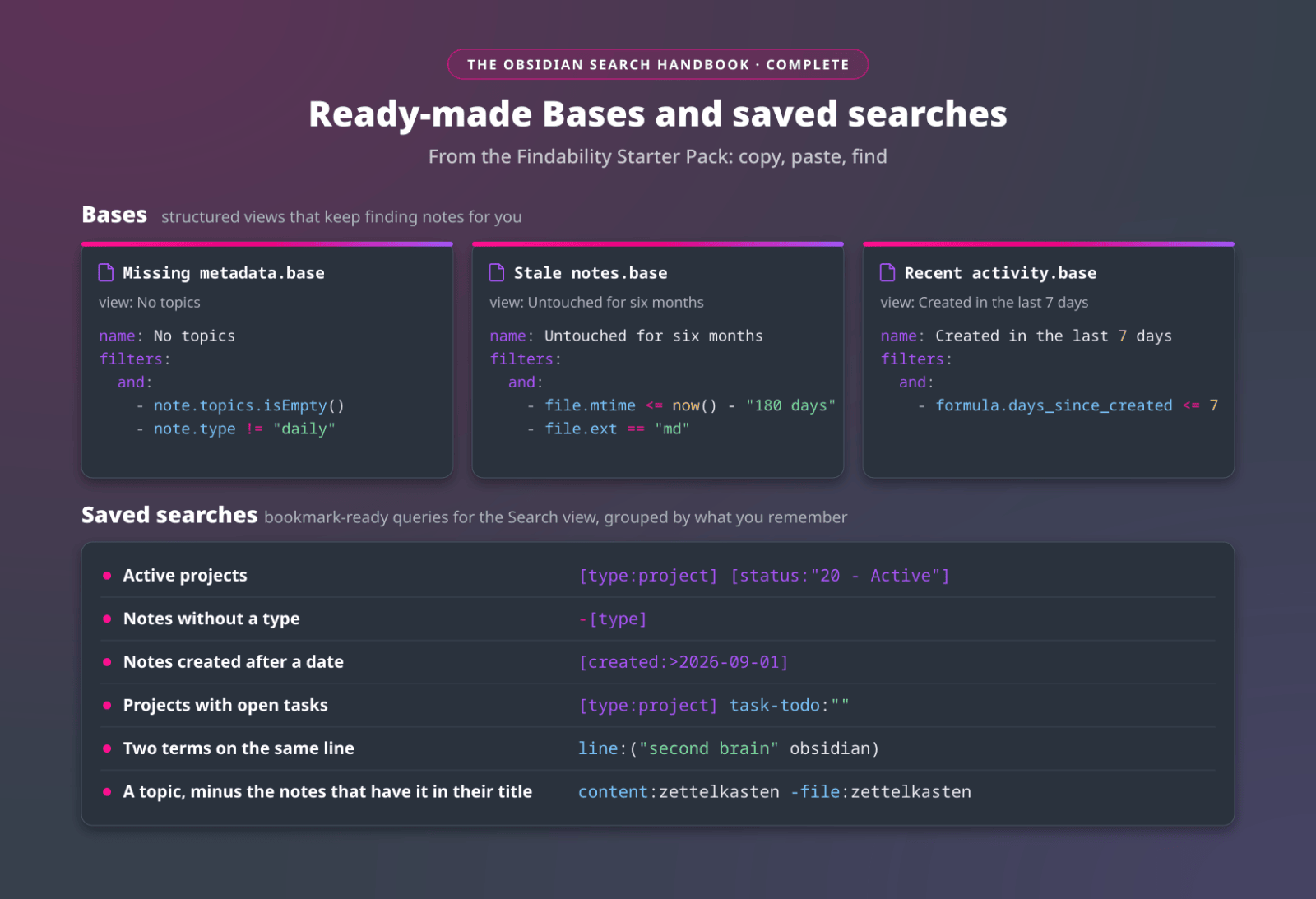
Caption: Ready-made Bases and saved searches from the Findability Starter Pack
Six printable worksheets
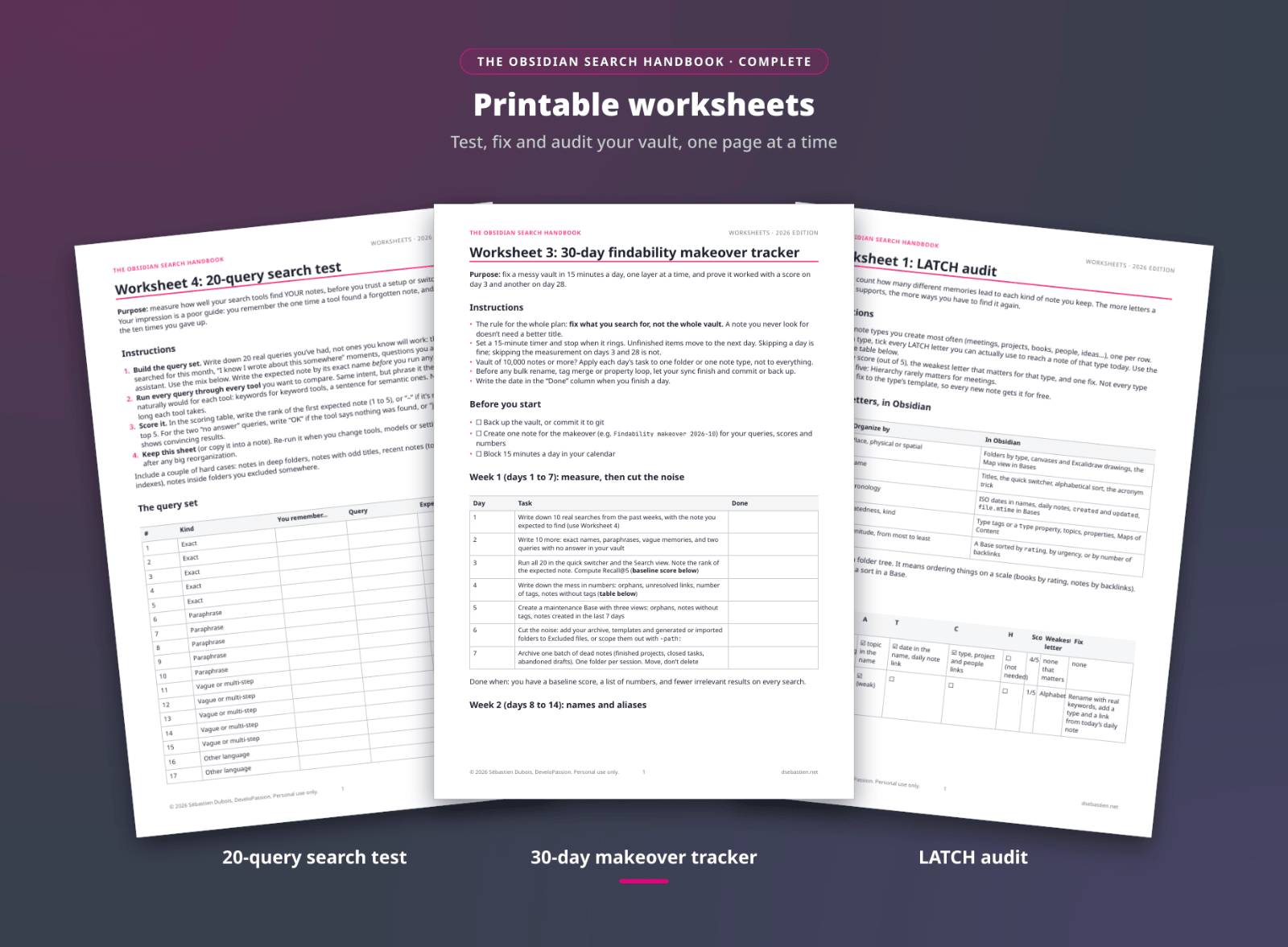
Caption: The worksheets help you test, fix and audit your vault, one page at a time
- The 20-query test: measure how well your search tools find YOUR notes before you trust a setup (or switch to a new one)
- The 30-day makeover tracker: one layer at a time, 15 minutes a day, with a score on day 3 and another on day 28
- The LATCH audit: count how many different memories lead to each kind of note you keep. The more of them a note type supports, the more ways you have to find it again
- The capture-time checklist: seven checks that take seconds when you create a note (and most of them can be automated with a template)
- A search log: your failed searches tell you which notes are hard to find, and with which words you looked for them. Log them, then fix the patterns
- A resurfacing routine: the routine that brings back the notes you forgot you had, so they get linked, improved or let go
✍️ What a "Try this" exercise looks like
Every chapter ends with a short exercise, so you apply what you read right away. Three of them, as they appear in the book:
- Chapter 2: Take your last failed search and rename the note you were looking for with the words you actually typed. Keep the old name as an alias, so both versions find it.
- Chapter 5: Take a search you run often, rewrite it with
path:,tag:or[property:value], check it with "Explain search term", and bookmark it. - Chapter 10: Score your current setup on your 20 test queries with Recall@5 before you install anything new.
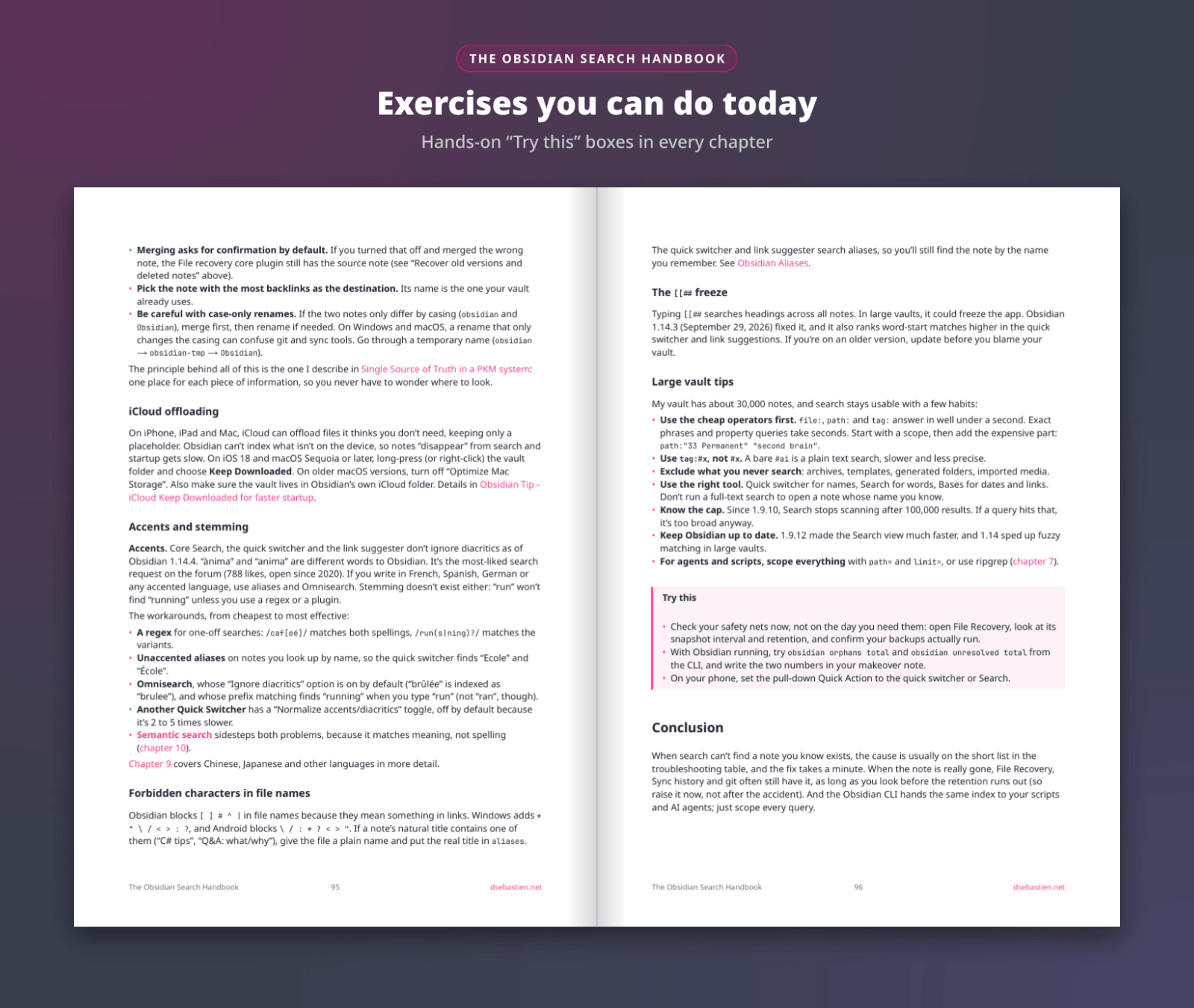
Caption: A "Try this" box closes every chapter
👥 Who is this for?
- ✅ Your vault has grown to the point where notes get lost. The note exists, but its name is gone, or Search returns too many results to scan
- ✅ You write a lot (articles, research, meeting notes, a work vault) and re-find your own material every day
- ✅ You want AI search on your vault and want to know what works, what to configure and how to measure it
- ✅ You're a beginner. Trust me, the first chapters will save you a lot of trouble later: findability is decided when a note is created, long before you search for it
❌ Not for you if:
- You want a list of plugins to install. In this book, the system (names, types, metadata, links) comes first and the tools come second
- The free series already gave you what you needed. The book is the same text, in one place, with the exercises and the extras. You don't need it, really
- You don't use Obsidian. Some chapters apply to any Markdown vault, but the examples are Obsidian
⚙️ Requirements
- Obsidian. The book is written and checked against Obsidian 1.14
- A PDF or EPUB reader: a computer, a tablet or an e-reader
- AI tools are optional. Chapters 10 and 11 cover AI search; the rest of the book works without it
💶 Editions and pricing
One-time purchase, in two editions:
| Complete (recommended) | Book | |
|---|---|---|
| The ebook (254-page PDF and EPUB) | Yes | Yes |
| A "Try this" exercise in every chapter | Yes | Yes |
| Free updates for the 2026 edition (1.x) | Yes | Yes |
| Findability Starter Pack | Yes | No |
| 6 printable worksheets | Yes | No |
| Price | €49 | €29 |
| Launch price with the code LAUNCH, until Thursday 29 October 2026, 23:59 CET | €39 | €19 |
The code LAUNCH takes €10 off either edition. One code per order.
Prices are shown before VAT. For EU buyers, VAT is added at checkout based on your country.
Get the book: https://www.store.dsebastien.net/product/obsidian-search-handbook
💰 30-day money-back guarantee
If the book isn't for you, reply to your receipt email within 30 days and I'll refund you. No hard feelings.
💡 Frequently asked questions
Q: I read the free series. Is the book worth it? A: All the text is free on my blog. The book is the same text assembled into one book, available today, plus a foreword, a "Try this" exercise in every chapter, the merged FAQ (38 questions), the cheat sheet appendix, and offline PDF and EPUB files. The Complete edition adds the Starter Pack and the worksheets, which the series doesn't have. If the series gave you what you needed, skip the book. I mean it.
Q: What's the difference between Book and Complete? A: Complete is the book plus the Findability Starter Pack and the six worksheets, for €20 more. Both include the PDF, the EPUB and the free updates.
Q: Which formats do I get? A: A 254-page PDF and an EPUB, so you can read it on a computer, a tablet or an e-reader.
Q: Do I need the Obsidian Starter Kit? A: No. The book works with any vault. That being said, if you'd rather start from a finished system, the Obsidian Starter Kit ships the note types, templates, properties and Bases the book describes.
Q: Do I need AI tools? A: No. Two chapters cover AI search. The rest of the book works without it.
Q: How do updates work? A: Updates are free for the whole 2026 edition (all 1.x versions). The book is written and checked against Obsidian 1.14. New versions show up in your Gumroad library.
Q: Is there a discount? A: During the launch, the code LAUNCH gives €10 off either edition, until Thursday 29 October 2026, 23:59 CET. The Complete edition is also included in the Everything Knowledge Bundle.
Q: Can I combine discount codes? A: No. One code per order.
Q: Is VAT included? A: Prices are shown before VAT. For EU buyers, VAT is added at checkout based on your country.

Q: What if it's not for me? A: There's a 30-day money-back guarantee: reply to your receipt email within 30 days and I'll refund you.
👋 About the author
I'm Sébastien Dubois. I've worked in IT for over 20 years, and I've been passionate about knowledge management for just as long. I run my business from an Obsidian vault of about 30,000 notes, I write about knowledge management, Obsidian and AI every week, and I built the Obsidian Starter Kit, which more than 1,000 customers use as the base of their own system.
This book is how I find things in that vault. I'm biased, of course, but I think it'll help you find things in yours too.
🚀 Get started
Get the Complete edition (recommended) or the Book. With the code LAUNCH, you save €10 until Thursday 29 October 2026, 23:59 CET.
🔗 https://www.store.dsebastien.net/product/obsidian-search-handbook
You can also buy it directly on Gumroad:
 Sébastien Dubois
Not sure yet? Start with the free cheat sheet, or read the free series:
Screenshots
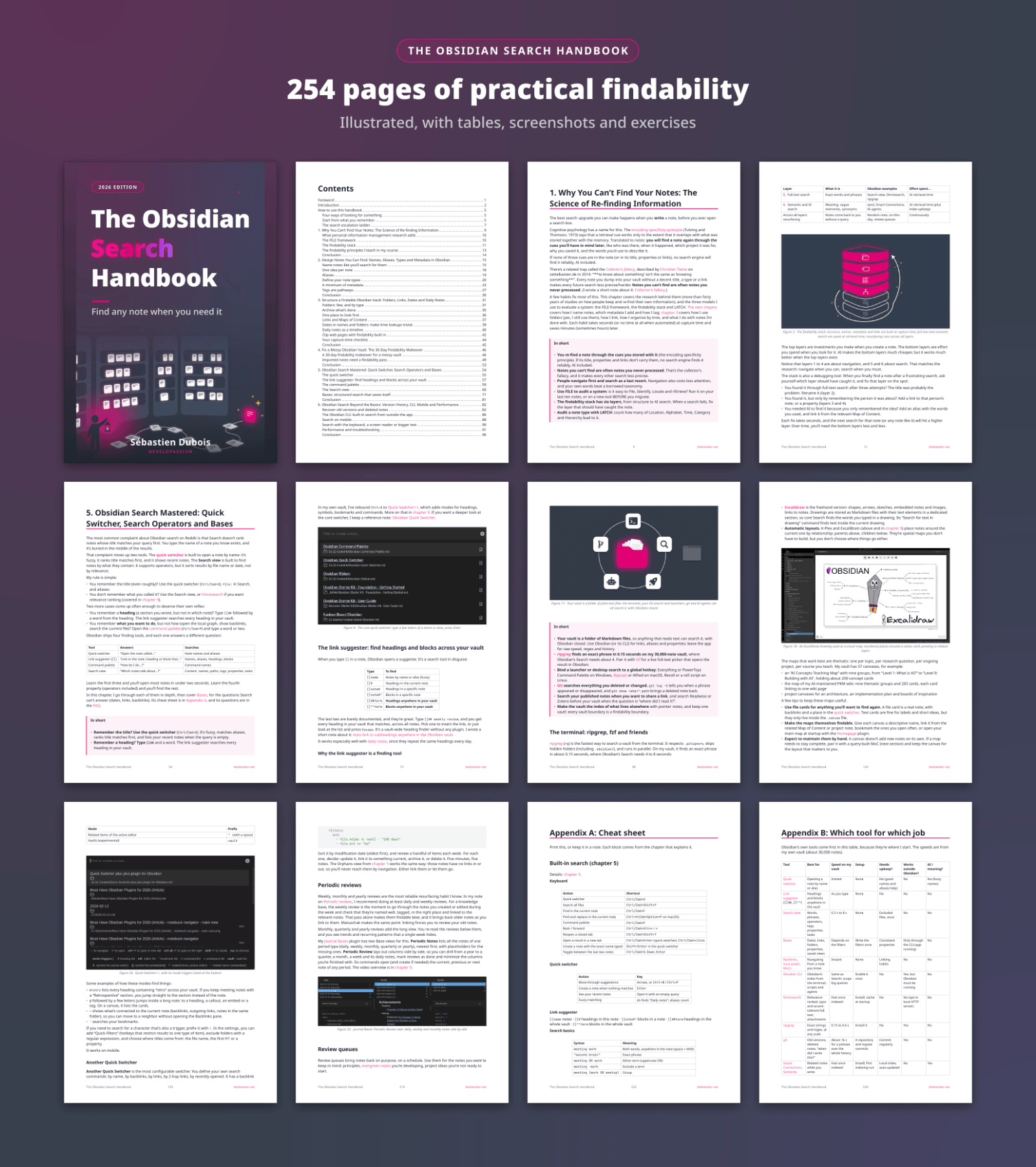
Caption: 254 pages, illustrated with tables, screenshots and exercises
References
- Product page: https://www.store.dsebastien.net/product/obsidian-search-handbook
- Gumroad: https://developassion.gumroad.com/l/obsidian-search-handbook
- Free online series: The Complete Guide to Obsidian Search - Find Any Note When You Need It (Article)
- Free cheat sheet: Free Obsidian Search Cheat Sheet
Related
- Obsidian Search
- Findability
- Obsidian Starter Kit
- Knowledge Management for Beginners
- Knowii Community
- DeveloPassion - Products and Services
- The Obsidian Search Handbook Is Out, and Its Ideas Are Free (Article)
About Sébastien
Ready to get to the next level?
Found this valuable? Share it with someone who needs it.