
The Complete Guide to Obsidian Automation - From Templates to an AI Operating System


Introduction
Most articles about Obsidian automation are lists of plugins. Install Templater, install QuickAdd, here are five templates, good luck. I've written some of those lists myself. In this article, I want to give you something else; the whole map. Go make a ton of coffee first, because this is a LONG read!
Thanks to the File over app principle that Steph Ango described, Obsidian is not just a note-taking app that happens to be scriptable. An Obsidian vault is a folder containing Markdown (i.e., plain text) files. Obsidian can manage it all, but it's not the only app that can use your files. Any text editor can read or edit the files in your Obsidian vault. And it's not just text editors. Endless tools and systems can easily interact with your files: command line programs, scripts, Git, cron jobs, etc. And that is really valuable.
It is also trivial for AI Agents to access your vault, read it, reason about it, and write back to it. That's the reason why an Obsidian vault can be used as the base layer of an AI Assistant or personal AI "Operating System".
Very little of everything I'm going to cover in this article would be possible in a tool that keeps your notes/data in someone else's database. While Obsidian isn't open source, it doesn't hold your data hostage. Your data stays yours, and it always stays on your machine; fully under your control.
I've been using Obsidian daily for multiple years now. My vault has more than 20,000 notes. I've been working on it for a long time, slowly refining my approach, the structure and plugins I use, fine-tuning configurations, and of course automating the boring parts. And it's all that practical experience that I want to share with you here.
I'm also heavily using Large Language Models (LLMs) at work and on a personal level. In my vault, I have around 400 AI Agent Skills, as well as various agents that read and write notes, properties, help me configure plugins, store/retrieve memories, and help me do a ton of things with ease.
In this guide, I'll explain the different layers of automation you can implement in your own system, going from the most basic to the most advanced:
- Layer 1: automation inside Obsidian. Templates, capture, filing, formatting, queries, boards. Everything that happens without leaving the app.
- Layer 2: automation around the vault. Git, the CLI, REST, URIs, sync, backups, cron, publishing pipelines, integration platforms, mobile.
- Layer 3: AI agents on the vault. AI agents with access to your vault (or using your vault as their working directory), skills, hooks, MCP, multi-agent workflows, safety practices, ...
Each layer builds on the one below.
Hopefully, you can stop reading at the end of any layer and still walk away with something useful. Layer 1 needs no scripting at all. Layer 2 assumes you're comfortable in a terminal (or are willing to learn). Layer 3 assumes you're curious about AI agents and want to get to the next level.
Let's get started 🚀
TL;DR
- Obsidian automation has three layers: inside the app (plugins), around the vault (files, CLI, REST, scripts, services), and on top of it (AI agents). The layers stack; each one needs the one below it.
- The biggest mistake is automating too early. Automation multiplies whatever exists: value if there's value, overhead if there's nothing. Build a valuable collection of notes first. Automate an action only when it happens often, is worth too little per instance to do by hand, and is too costly to do consistently at scale.
- There are different stages: manual, macro (you record the steps), declarative (you write the rules), agentic (you describe the expected outcome). Each stage opens new possibilities.
- Plain text is the reason any of this works. A Markdown file in a folder on your disk is a universal interface.
- Obsidian Properties stored in the notes' frontmatter turn your vault into a database. Once you realize how powerful properties are, you will be able to create much cooler automations.
- Start with three things: Templater for note creation, automatic filing so you never have to think about folders, and a Linter pass so your notes stay clean/consistent. That covers 80% of daily friction.
- The official Obsidian CLI changed Layer 2. Your vault now has a command line, and it's easy to script it and control it from anywhere else on your computer.
- AI agents are not a chatbot in your sidebar. The pattern that matters is a coding agent with your vault as its working directory, guided by an
AGENTS.mdfile and a library of AI Agent Skills. - Automate the plumbing, not the thinking. AI should file, format, cross-link, summarize, fetch, clean, maintain. You still write the notes. You must not delegate your own thinking.
- Put git under everything before you let anything write to your vault. Your vault is a sort of codebase, so treat it as such. Git enables easily creating/restoring "snapshots" of your work, but also versioning everything.
- Use exactly one sync mechanism. Two sync tools plus an agent writing files equals conflicts and lost work.
- Complexity is a tax. Every automation you add is something that can break silently. Add one at a time, and only after the manual version annoyed you three times.
Want this guide as a PDF? Get the full 62-page version to read offline and keep. Enter your email below and I will send it right away. You will also join my newsletter (unsubscribe anytime).
Part I: the mental model you need
Your vault is an operating system for knowledge
An operating system does a few boring things extremely well. It stores files. It gives programs a way to reach those files. It schedules work. It manages permissions. It provides a shell so you can compose small tools into bigger ones.
Similarly, a mature Obsidian setup is an enabler. It stores your notes as files. It gives dozens of programs a way to reach those files, through plugins, through the Obsidian CLI, directly through the filesystem, through REST or MCP, etc. It schedules work through cron, systemd timers, startup templates (e.g., via the Templater). It manages permissions through API keys, command blocklists, etc. And the list goes on! The sky's the limit.
The reason this matters right now is that AI Agents need exactly that. An agent is a program that reads information/state, reasons about it, and often writes things back. It needs a place to store what it learned, a place to look things up, and a way to act. Give an agent a chat window and it forgets everything the moment the conversation ends, or it has to rely on a flaky proprietary memory system. Give it a directory of Markdown files with a clear structure, history and your actual thinking in it, and it becomes something else entirely: an assistant that knows you. Obsidian is not a must in that story, BUT it enables many powerful scenarios.
The symptom of the first case is familiar to everyone: you ask for help with something and get advice that would suit any person on the planet. The problem isn't the model. It simply has nothing of yours to work with, and no clever prompt can compensate for missing context.
I made this argument at length in a previous article called "Your AI Doesn't Know You", so I won't repeat all of it. The short version: context is the most valuable resource when working with AI, and a knowledge base is a treasure trove of valuable/high-signal context.
 Sebastien Dubois
Automation is the thing that keeps the system trustworthy
People get excited about agents and forget what the agents stand on.
An AI Assistant or AI Operating System built on a messy collection of Markdown files produces messy results. If half your notes have no properties, if your tags are inconsistent, if your project notes and your task notes disagree about what's in progress, then everything sitting on top of that inherits the mess. Garbage in, Garbage out (GIGO) translated to the AI world becomes: "Garbage in, confidently-worded garbage out".
Classic automation is what keeps the base layer clean. Templates guarantee that every note of a given type has the same shape. Filing rules guarantee that notes end up where queries expect them. Linters guarantee consistent formatting. Property enforcement guarantees the fields are there.
When I say "Layer 1 is boring templating stuff", understand that it's the foundation the rest stands on. Every hour you spend making note creation reliable/deterministic pays off twice: once for you, once for every system or automation you build on top of your vault later.
The biggest mistake: automating too early
Before we go any further, I need to tell you the thing that will actually determine whether this guide helps you or wastes three weeks of your life.
Most people automate too early.
I see it constantly. Someone discovers Obsidian, gets excited, and within days, they have Templater scripts, a folder taxonomy three levels deep, complex schemas, tons of plugins, custom themes, a dashboard, and a vault containing ten notes, of which maybe two say anything they couldn't have remembered anyway. I've discussed these pitfalls at length in a previous article:
 Sebastien Dubois
Keep in mind that automation multiplies whatever is already there. If there's value, you get more value, cheaply, repeatedly. If there's nothing, you get overhead. You've added maintenance, breakage, and cognitive load to a system that wasn't producing anything yet. Multiplying zero is still zero, and now you have a factory to maintain. That's just a waste of time (or procrastination in disguise, depending).
My key recommendation here: first focus on leveraging your knowledge, giving yourself time to feel actual friction while using your system before even thinking about introducing complexity or automation.
Building a large and genuinely valuable collection of notes matters more than automating it. It also matters more than organizing it, fine-tuning it, and perfecting it. Your knowledge base has to serve a concrete goal and contain real value first. Structure, templates, strictness and automation only start paying off once there's enough content and that content actually benefits from more structure. Introducing them before that point is nothing but procrastination.
This is NOT about using tools for the sake of using tools. I've been guilty of that. It feels like progress, but it rarely is.
So when is something worth automating?
I use three criteria. An action or process earns automation when all three hold:
- It happens frequently. Not "it would be cool if". Frequently. If you do it twice a year, do it by hand and move on.
- Its per-instance value is low enough that doing it manually is a waste of your time. Filing a note is worth about four seconds of thought. Writing the note is worth an hour. Automate the first, never the second.
- It's too costly to do consistently at scale. Anyone can format ten notes by hand. Nobody formats ten thousand by hand, which means at scale the manual version doesn't just cost more, it silently stops happening. Past that point, automation is the only way the thing gets done at all.
Everything else follows from three questions:
- what's the leverage
- what's the long-term value
- can I maintain it?
If an automation gives you leverage once, saves you nothing over a year, or breaks every time you reorganize, it fails on the lens that matters.
Apply the test honestly and most of the automation people build in their first month disappears. What survives is the boring stuff: creating notes, filing them, formatting them, backing them up. Which happens to be exactly what I recommend starting with, and exactly the order the adoption path at the end of this guide follows: capture value first, structure second, automate third, agents last.
Among other things, I cover this and the rest of the beginner traps (perfectionism, hoarding, the collector's fallacy, chasing tools instead of outcomes) in much more depth in my Knowledge Management for Beginners course, which is where I'd send you if any of the above stung a little.
 Olivier Larue
Four stages, one direction
There's a second way to look at this. Obsidian automation has gone through four stages, and each one moves your intent further away from the mechanism.

Stage 1: manual. You do the thing. Create the note, pick the folder, type the properties, format the headings. Nothing wrong with it; it's where everyone starts and it's still the right answer for anything you do twice a year.
Stage 2: macro. You record the steps once and replay them. Templater scripts, QuickAdd macros, shell one-liners. You're still describing how, step by step, but you only describe it once. This is already a huge win.
Stage 3: declarative. You stop describing steps and start describing conditions. "Notes tagged like this live there." "Tasks in this state get those properties." "This type requires these fields." Auto Note Mover rules, Conditional Properties, Triggers, Frontmatter Operator, or actual note types & rules such as what I include in my Obsidian Starter Kit all live here. You've stopped writing procedures and started writing policy, and the system figures out the steps.
Stage 4: Agentic Knowledge Management (AKM). You describe the outcome and something else works out both the policy and the steps. "File my inbox." "Draft the weekly review from this week's notes." "Find the notes that contradict each other." MCP servers, agent skills, and tools like Note Companion sit here.
Manual is all mechanism, no intent. Agentic is all intent, no mechanism. Each stage subtracts a layer of "how" and leaves more room for "what".
Operating systems made the same climb: you don't tell the OS which disk sectors to write; you say "save this file" by clicking on a button.
One warning: the later stages depend on the earlier ones being solid. Declarative rules need consistent structure to match against. Agents need a schema to write into. Jump straight to stage 4 on a chaotic vault and you get confident nonsense, quickly, at scale. It looks super cool when people show it on TikTok, but I wish you luck. One year from now, you'll probably feel quite bad with the mess you're in.
Why plain text wins
Every technique in this guide exists because of one design decision Obsidian made early on: your notes are (plain text) Markdown files in a normal folder on your computer.
Dries Buytaert put it well: "One of the things I appreciate most about Obsidian is that it stores notes as plain text Markdown files on my local filesystem. Plain text files give you full control. I sync them with iCloud, back them up myself, and track changes using Git."
Files are the API. You don't need Obsidian's permission or some third-party service, application or extension to work with your notes. grep, sed, ripgrep, Python, Node, git, rsync, Restic, Pandoc, and every text manipulation tool written in the last forty years already work. Text is the most universal format. Thus integration possibilities are infinite.
Local-first means automation is both possible and straightforward. SaaS/Cloud tools/platforms decide what they give you access to. They choose whatever endpoints they expose, at whatever rate limit they chose, for as long as they decide to maintain those. With files, there is no rate limit and no deprecation to fear.
Diffs are meaningful. Because notes are text, it's easy to compare versions. Tools such as Git can show you exactly what changed, line by line. That single property is what makes it safe to let an AI agent write to your vault. Try that with a proprietary database or binary format.
No vendor lock-in. At the end of the day, all your important information is stored in Markdown files that you will always be able to read. Even if you lock yourself in through Obsidian plugins, you will still have the data, so that's mostly fine.
Text is what LLMs consume most easily. The native format of your Obsidian knowledge base happens to be the native input format of current-generation AI. You don't need to export your data. You don't need a connector. You don't need a third-party solution or subscription to access it. It's all there, and AI is perfectly able to read and process it. All you have to do is point your AI agent at the folder where your vault is located (or even just ask it to find it :p).
Part II: Layer 1, automation inside Obsidian
This layer is what most people mean by "Obsidian automation". It's plugins and built-in features doing work for you without you leaving the app. No terminal, no scripting required (though scripting is available if you want it).
I'll organize it by the Jobs To Be Done (JTBD), not by plugin name, because plugins come and go while jobs don't.
The built-in features
Before installing anything, learn more about what Obsidian gives you out of the box. The full set is in my Obsidian Core Plugins note; these are the ones that enable some automation work.
Core Templates. Simple find-and-replace on {{date}}, {{title}}, {{time}}. No logic. It's genuinely fine for a first template, and I'd rather you use that today than plan a killer system for six months.
Daily notes. Auto-create a note per day with a template applied. This is the single highest-value automation in Obsidian, and it just takes one checkbox to enable it. Your daily note becomes the place everything lands before it gets sorted. I've written a lot about why daily notes matter, and about how to structure them. IMHO, Journaling is the number one practice that people miss out on (in particular, Interstitial Journaling). It's awesome for clarity of mind, productivity, and also for people suffering from ADHD.
 Sebastien Dubois
 Sebastien Dubois
Hotkeys, the command palette and slash commands. Every command in Obsidian can be bound to a key, found by name, or triggered inline while typing. Each shortcut removes a bit of friction, and that makes you more productive and effective every single day. This might sound trivial, but friction is also what kills capture habits: if saving an idea takes fifteen seconds instead of two, you'll start skipping it, and the habit never forms.
Workspaces. Save a pane layout and restore it with one command. A "writing" workspace, a "review" workspace, a "planning" workspace. Free context switching. I don't use this feature much, but it's something I want to invest more time into later on. Not automation-related per se, but still a good productivity boost when you want to switch between different thinking space organizations/contexts.
File recovery. Automatic local snapshots of every note. Your first and cheapest undo, and the layer my own history tooling builds on (cfr Time Machine plugin for Obsidian). I wrote an article about this one:
 Sebastien Dubois
The obsidian:// URI scheme. Built in, and the bridge to everything outside the app. Any other program on your machine can open a note, create a note, or run a search by opening a URL. I don't use this anymore since the Obsidian CLI was released, but still useful to know about.
Obsidian Bases (the Bases core plugin). The official database feature: define a view over your notes' properties, filter, sort, group, render as a table, cards, list or map. Bases matter enormously for automation because they make adding/updating/leveraging properties across all your notes a breeze. I covered them in the following article:
 Sebastien Dubois
Obsidian Web Clipper and the web viewer. The official browser extension captures pages as Markdown with templates per site; the web viewer lets you read them without leaving the app. Your content curation & reading pipeline starts here. More in my Web Clipper guide.
 Sebastien Dubois
Obsidian Sync and Obsidian Publish (the Sync and Publish core plugins). Both are automation surfaces, and I'll come back to them in Layer 2.
That's a lot before a single community plugin enters the picture.
When you do start adding community plugins, two pointers. My current picks are in the article linked below. Also check out my own plugins: My Obsidian Plugins (MoC). And if you want to test plugins before they hit the community directory, BRAT installs them straight from a repository.
 Sebastien Dubois
Extending your daily notes
The first community plugins I'd point you at extend the daily notes idea. The Periodic Notes plugin applies the same one-checkbox automation to other time scales: weekly, monthly, quarterly and yearly notes, each with its own template. The Journals plugin is the newer and more powerful option in that space, but at this point I'm still using Periodic Notes because it perfectly suits my needs. My own Journal Bases is also worth knowing if you want your periodic notes rendered through Bases and if you want an actual battle-tested process for performing Periodic reviews.
Around that core, a small ecosystem exists purely to remove daily friction: Rollover Daily Todos carries yesterday's unfinished checkboxes into today. Tomorrow's Daily Note lets you write ahead when you already know what's coming, List Modified shows what you touched today so your daily note doubles as a work log, and Homepage decides what Obsidian opens on.
There's a lot more, but we have other topics to dive into!
Job 1: creating notes that are already correct
The most common friction in a knowledge base is the blank note. Where does it go? What properties does it need? What sections? Answer those questions once, in a template, and never answer them again.
Templater is the best plugin out there for this. It replaces Obsidian's core Templates with a real templating engine:
- Dynamic values:
tp.date.now(),tp.file.title,tp.file.folder(), and date math liketp.date.now("YYYY-MM-DD", -1)for yesterday's note link. - Prompts:
tp.system.prompt("Project name?")andtp.system.suggester()for a picker. Your template can interview you while creating new notes. - JavaScript: anything you can express in JS, inside the template. Loops, conditionals, API calls.
- User scripts: put functions in a folder, call them as
tp.user.myFunction(). This is where templates stop being templates and become tiny applications. - Folder templates: automatically apply a given template to any note created in a given folder. This is the automation half of Templater.
- Startup templates: run a template when Obsidian launches. Useful for a "make sure today's note exists and is populated" routine.
I wrote the full reference separately, so I won't duplicate it here:
 Sebastien Dubois
What I do want to give you is the pattern that made the biggest difference in my own vault.
The dispatcher pattern
In my vault, a note's type is decided by what it is, not where it sits, and the folder is a consequence of the type rather than the cause. That's why I have one template at the root that decides which template to apply. I call it the TPL Dispatcher.
Here's what it does when any new note is created:
- Check if the file already has content. If yes, exit immediately. This idempotency guard is what stops the dispatcher from clobbering a note you're editing.
- Recognize the note type (in my case using the Obsidian Starter Kit) (e.g., using the full file name, the file name pattern, the location, tags, etc)
- If the note is a periodic note (daily, weekly, monthly, yearly), use the template configured in the Periodic Notes settings.
- If nothing matched, show a suggester so I can pick a type by hand.
- Apply the resolved template with
write_template_to_file().
There's also a rename watcher, because Obsidian creates files named Untitled and the real name only arrives when you type it.
The result: I create a note called 2026-08-13 - Foo (Meeting).md and it arrives fully formed, with the right frontmatter, the right mandatory tags, the right sections, in the right folder. I rarely have to pick a template from a list. That's about thirty seconds saved per note, several times a day, for years.
Every daily note in my vault has navigation links at the top: previous day, next day, plus the week, month, quarter and year it belongs to. When I click one that doesn't exist yet, I don't create the note. I don't apply a template. Obsidian creates the file because a link was followed, the dispatcher recognizes it as a periodic note, and the right template lands before I've finished the click. Navigation and creation are the same gesture. The friction it removes used to interrupt a thought several times a day, and now it simply doesn't exist. I save a ton of time thanks to this.
Job 2: capture that takes under three seconds
QuickAdd is a glue plugin. It gives you four building blocks:
- Capture: append or prepend text to a target note, optionally with a template, optionally opening it. The classic use is "add a line to today's note from anywhere".
- Template: create a new note from a template, with a name format you define.
- Macro: chain several actions in sequence, including arbitrary JavaScript and other QuickAdd choices. This is where the automation lives.
- Multi: group choices into a menu.
Everything can be bound to a hotkey or triggered by URI (which is how it connects to the outside world).
A macro I'd recommend to anyone: capture an idea. One hotkey, one prompt, and the text lands in today's note under a specific heading with a timestamp. No app switching, no "where should this go", no lost thought.
A more advanced one: new project. Prompt for a name, create the project note from a template, create three linked task notes, add the project to an index, and open the project note.
QuickAdd also ships an AI module that can call an LLM inside a macro. Useful, though I now do that kind of work in Layer 3 instead, where I have more control.
If you want typed forms rather than a sequence of prompts, Modal Forms gives you real multi-field dialogs with validation that Templater and QuickAdd can both call into. Meta Bind goes the other way: it puts input fields and buttons inside your notes, bound directly to frontmatter. A checkbox in the body of a note that flips a property. A button that runs a command. It's the closest thing Obsidian has to a UI builder.
Two smaller helpers that cut typing rather than clicks: Text Snippets expands short triggers into blocks of Markdown inside the editor. I like that one, but I prefer a system-wide text expander like espanso; the benefit is that those work in all apps; not just Obsidian.
Another plugin I highly recommend (one of my favorites actually!) is Various Complements; that one autocompletes from words and note titles already in your vault, which keeps your terminology consistent as a side effect. And it saves me an incredible amount of time when typing note names!
Job 3: filing, so you never think about folders
This is the kind of simple automation that removes a ton of friction. For years I used Auto Note Mover: define rules like "any note tagged #archived moves to the archive folder", and it watches for tag changes and moves files. Simple, effective, still a good choice.
I now use the Obsidian Starter Kit plugin for Obsidian, which I built for my Obsidian Starter Kit because I wanted to define actual note types, and note filing to be a consequence of choosing the type of a note rather than a separate rule set. In the Obsidian Starter Kit, the OSK plugin holds a registry of note types (~50 in my vault), and for each type it knows:
- how to recognize it (tag, folder, filename prefix or suffix, regex, ...),
- which folder it belongs in,
- which template to use,
- which properties are required, with types and defaults,
- which values are allowed for certain properties (e.g.,
status) - which tags are mandatory,
- which icon to show in the file explorer,
- ...
Create a note whose name ends in (Task), and it gets recognized as a task, filed into the tasks folder, given its mandatory tags, given its required properties, and shown with a task icon. Nothing to remember. And the plugin I've built also customizes the property editors in notes and Bases to let you autocomplete and select correct values for enums. This doesn't exist anywhere else, as far as I know.
Filing has a maintenance side too. Tag Wrangler helps manage tags. For instance, it makes it a breeze to rename a tag everywhere it appears, which is the only sane way to fix a taxonomy that grew organically (apart from using AI, but that's generally less reliable). Note Refactor splits an overgrown note into atomic ones by heading, with links back to the source, and pairs well with the built-in note composer plugin.
Index notes go stale the same way: folder listings and Maps of Content (MoCs) you have to re-edit every time something moves or gets renamed. My answer is the Dataview Serializer, which I cover properly in the querying section further below. With it, you define the index once as a query, and the results get written into the note as real Markdown that automatically keeps itself up to date. The index maintains itself, and it stays readable even outside of Obsidian (File over app principle for the win!).
On the value of clearly-defined note types
A note type registry is a schema. Once your vault has a schema, you can validate against it, generate against it, and hand it to an AI agent so it writes notes that fit. The OSK plugin ships a static binary called osk-cli, that resolves paths and templates and validates notes from the command line, plus an MCP server so agents can query the same registry. That schema can be represented in many ways. For instance, it can be a simple Markdown note in your vault (note ideal), or a mdbase collection (what OSK currently generates underneath the hood), etc.
The general principle for you, whatever tooling you pick: make the structure machine-readable. Conventions in your head do not automate. This topic is rather advanced, but IMHO, it's something I NEVER see mentioned online when people discuss using Obsidian or simply a collection of Markdown notes as a second brain for/with AI.
IMHO, a schema is the foundation under everything in Layers 2 and 3. Typed notes are what make reliable automation possible. A script can only act confidently on a note if it knows what kind of note it is and which fields it must have. An agent can only write a note that fits your system if the system declares what fitting means. Without types you get automation that works on the notes you tested it against and mangles the rest. Without one, your system is bound to be messier and messier. Use it for a few years, and you'll tell me if your vault is still reliable and maintainable without a ton of effort (hint: I doubt it!).
I've been generalizing this beyond my own vault. TypedMark is an open specification I'm (slowly) developing for typed Markdown note systems: schemas, field definitions, property sets, note-type inheritance and validation, with everything still living in plain Markdown files with YAML frontmatter. The goal is a standard any tool can implement rather than another product. It's far from ready for primetime, but I strongly believe this is something direly needed by the community, and should enable building much more solid Markdown-based systems.
My thinking is that without explicit types, Markdown systems decay as they scale. Misplaced notes, inconsistent metadata, queries you can't trust, etc.
Job 4: consistent formatting without thinking about it
The Linter applies formatting rules on save (or on command): heading levels, spacing, list style, YAML property order, escaped characters, trailing whitespace, footnote layout, and dozens more. It can also insert and maintain created and updated timestamps.
This is highly valuable. Consistent formatting is what makes bulk operations safe later. The Linter plugin helps ensure notes have the same shape. When scripting against Markdown files, this helps a ton.
For timestamps specifically, I use my own Update Time plugin instead of the Linter's version. It syncs created and updated in frontmatter with the file's real creation and modification times, in the background, debounced so a ten-minute editing session writes one update rather than fifty. It respects folder exclusions, and has a one-shot backfill command for notes that predate it. It answers the question "when was this note actually last touched?", which turns out to be the input to half of my review automation.
One more worth mentioning is my Expander plugin. It handles another kind of consistency: values repeated across many notes. I still have to write a proper article about what this one does and how it works, but here's the gist of it. You define key-value pairs in the plugin's configuration, and you mention the keys wherever you want in your notes. Then, the value you associated with that key gets added/updated automatically in all the notes where the key is mentioned. This is a powerful automatic replacement mechanism. Values can be static or computed (now().format("YYYY-MM-DD")), and each expansion has an update mode: auto, manual, once, or once-and-eject. I really have to record a video showcasing it!
Job 5: turning your notes into data you can query
Your note properties are a real database. Before you query them, make sure they're worth querying: property naming, types and consistency matter and determine whether any of this works. I explained this at length here:
 Sebastien Dubois
Assuming you leverage properties and use those correctly/consistently, you can do very cool things.
The Dataview plugin indexes every property, tag, link and task, and enables querying those SQL-like language. It's frozen in terms of development but still widely used and still does things nothing else does: inline queries inside a sentence, task-level queries, arbitrary JavaScript, etc. It's successor is Datacore, but IMHO it's not ready for primetime yet. To learn more about Dataview, go check my article; it contains tons of examples of what you can achieve with it:
 Sebastien Dubois
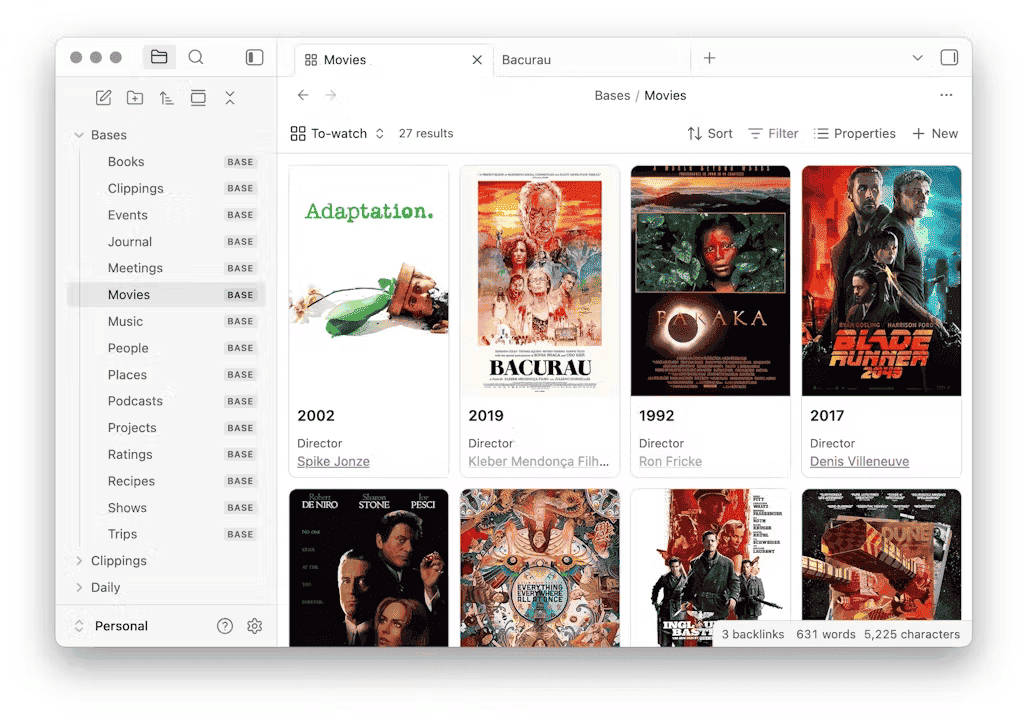
Obsidian Bases is one of the most powerful features of Obsidian. Comparable, but in my opinion far superior to Notion databases. Create as many databases as you want, each with 1-n views. In each base and/or view, filter the notes in your vault to see the ones you care about (e.g., books, permanent notes, meeting notes, tasks, whatever). In each base view, you can filter, sort, group, and edit properties directly in a table.
Out of the box, Obsidian supports multiple types of view. But community plugins add many more. For instance, you can use the Maps plugin for Obsidian to map your notes in the world (e.g., tracking the locations you visited or plan to visit). The TaskNotes plugin for Obsidian adds multiple ones as well: Kanban, task list, calendar, ... I've also built the Kanban Action Planner (Kanban boards, timelines, WBS, triage, etc), Life Tracker (life/health tracking + visualizations), Journal Bases (adds another way to view daily notes and yet another for performing periodic reviews) and Graph Explorer (a more interesting graph view that you can use to explore the notes in your vault). There are tons already, and many more are coming!
One point I've made in my article about Dataview that I want to insist upon:
> A query result that only exists at render time is not in your files.
If the queries you create don't materialize the results as Markdown in your notes, then those only exist within Obsidian. It's the case with Dataview, and it's also true with Obsidian Bases. It means that the results of those queries can't be leveraged by code, scripts, command-line tools such as grep, git, or AI agents. And that's an issue!
That's why I built the Dataview Serializer: it runs queries and writes the results into the notes as real Markdown, between HTML comment markers, refreshed when the source data changes. With this plugin, query results become part of the files. I leverage this for many things in my knowledge base. For instance, my Maps of Content (MoCs) are all built this way. They maintain themselves and they still work if every plugin I use disappeared tomorrow.
Automation should leave portable artifacts behind, not just live views.
You can learn more here:
Sebastien DuboisJob 6: state machines in your frontmatter
One more idea I find valuable for your knowledge base: define a state machine for each type of note. Your meetings have a state (e.g., scheduled, canceled, done, ...). Your tasks as well (e.g., backlog, planned, in progress, on hold, done, ...). Your book notes as well (e.g., to read, reading, read, ...). And most other note types do too.
Having a clearly defined set of possible states for each note type is an enabler for smart automation. If the state of a note changes, then things can happen automatically when that happens. For instance: "IF a task is set to done THEN move it to the archive folder".
Multiple plugins supports note types. For instance, Metadata Menu defines field types, allowed values and per-type templates for your frontmatter, then enables editing those through menus instead of raw YAML. MetaEdit does the lightweight version: bump a property from the command palette or a hotkey, with automation hooks when a value changes. For changing many notes at once without dropping to a script, Multi Properties adds or removes properties across a folder or a selection, and Frontmatter Operator does rule-based property edits in bulk. If you're building state machines, these are the switches.
Tasks does this for inline checkboxes, with recurrence, due dates, priorities, and vault-wide queries. Complete a recurring task and the next occurrence is created automatically.
TaskNotes does it with one note per task, all state in frontmatter, with list, calendar, kanban and agenda views plus time tracking. I use it as my task system.
I personally let go of most of those plugins in favor of my own Obsidian Starter Kit plugin for Obsidian, part of my Obsidian Starter Kit. It goes further in many directions, but I don't want to dive into too much detail here. I've also added support for note types in multiple plugins I've created.
Kanban Action Planner is my own take, built as a Bases view. The same notes render as a Kanban board, a calendar, a Gantt-style timeline, a work breakdown tree, or a triage queue. The state machine of each note type drives the UI too; each column corresponds to one of the possible states. Dragging a card writes to frontmatter. And it has automation rules per note type: when a note enters status X, set these properties, add or remove these tags, move it to this folder, with date placeholders.
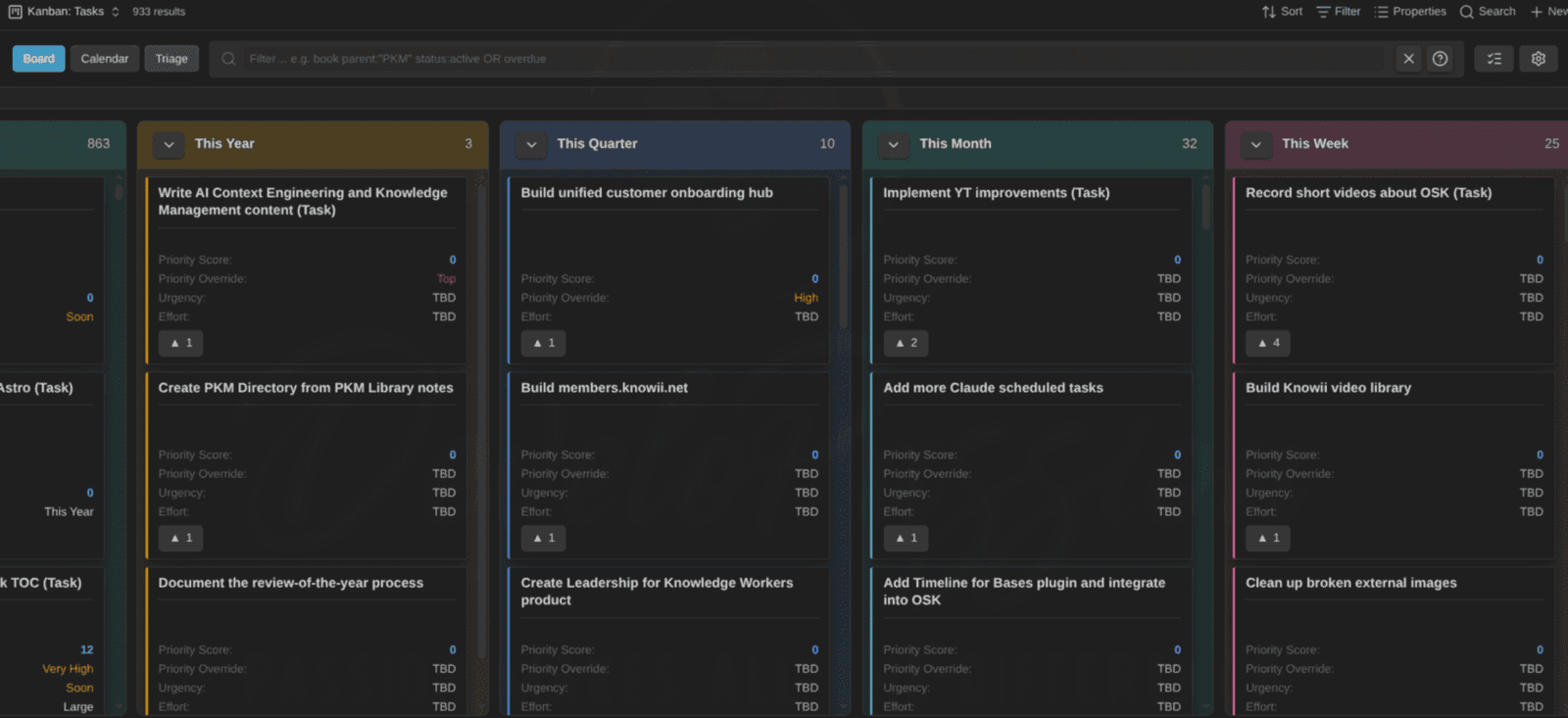
As an example, if I drag a task to the "Done" column, the status property value is updated automatically. In addition, the automation rules I've configured also archive the task for me. One more thing I don't need to manage manually. Without automation, that's four time-consuming actions I could forget to take: set progress to 100, clear the due date, stamp the completion date, move it to the archive. With one rule, the drag does all four. Atomically. Every time.
Multiply that by every possible state transition in your system and you've removed a TON of tedious bookkeeping "work".
For "quantified-self" data, the same pattern shows up again in my Life Tracker plugin: properties in your daily notes become visualizations in an Obsidian Base view. And since this plugin also understands note types, there's no need to re-define your note properties if you've already defined them, and the plugin can create more appropriate visualizations (e.g., understanding the min-max value for things like mood, sleep quality, etc).
Commands: every action in your vault has a name
Many of the things you can do in Obsidian is also available as a command you can execute. Opening today's daily note, splitting a pane, toggling a checkbox, linting a file, changing the state of a task note: each one is always at your fingertips. The Obsidian Command Palette (Ctrl/Cmd+P) provides a search box to help you quickly find and invoke a command. Out of the box, Obsidian includes a ton of commands. But in addition, every community plugin you install adds its own commands. In my vault, I currently have over 500 commands at my disposal.
What's awesome is that commands are not only executable through the command palette. You can also...
- Bind commands to key combinations through the Hotkeys settings.
- Put any command on any UI surface in obsidian using the Commander plugin (more on this below).
- Use commands as part of QuickAdd macros, chaining them into workflows.
- Trigger commands from outside Obsidian via a URI, thanks to the Advanced URI plugin.
- Execute commands from anywhere outside Obsidian through the Obsidian CLI:
obsidian command id=periodic-notes:open-daily-note. That single line creates today's daily note from my template if it doesn't exist yet.
As I mentioned, certain community plugins also add their own commands. Here are some examples:
tasknotes:cycle-current-task-statusandtasknotes:rollover-overdue-scheduled-tasks(TaskNotes): advance a task through its state machine, or sweep every overdue task forward to today. The second one removes a daily triage chore entirely.dataview-serializer:serialize-all-dataview-queries(Dataview Serializer): refresh every serialized query in the vault, turning live queries into durable Markdown in one shot.typefully:publish-note(Typefully): the note you're looking at becomes a scheduled social media post. Publishing as a command means publishing from anywhere: palette, hotkey, script.life-tracker:capture-today(Life Tracker): log today's health and habit properties through a quick form instead of editing frontmatter by hand.time-machine:force-snapshot(Time Machine): snapshot the vault before risky operations. I run this one before performing bulk operations.
The habit to build: whenever you notice a repeated action, check whether it's available as a command. If it is, you can stop doing it the hard way. Invoke it using the command palette, bind it to a keyboard combination, create a button for it, chain it into a macro, or script it.
Job 7: buttons, commands, and escape hatches
- Commander lets you put any command on any UI surface: ribbon, toolbar, status bar, tab bar, page header, right-click menu. Good for the commands you run constantly but never remember the hotkey for.
- Meta Bind puts clickable actions and input fields inside note bodies. A "log a win" button in your daily note. A "mark reviewed" button in a permanent note. If you find an older tutorial recommending the Buttons plugin, Meta Bind is the current answer; it does the same job and it's the one being maintained.
- Shell Commands runs terminal commands from Obsidian, with variables for the current file path, selection, and vault path, and can pipe output back into a note. This is the bridge from Layer 1 to Layer 2, and it's the plugin I'd call the most dangerous in this guide. Anything it can run, it can run wrong.
- Terminal and its lighter cousin embed an actual shell in a pane, which matters more than it sounds once Layer 2 exists: you stop alt-tabbing between your vault and your scripts.
- RunJS and CustomJS let you write JavaScript against the Obsidian API without building a plugin. Great for one-off vault surgery, and better than that for the repeat kind: CustomJS in particular lets you keep a shared library of functions in the vault that Templater, DataviewJS and QuickAdd macros can all call. Write
formatProjectTitle()once, use it in six places, fix it in one. That's the difference between a pile of scripts and a scripted vault. - Excalidraw has a full automation API (
ExcalidrawAutomate) and a script engine, so diagrams can be generated from note data rather than drawn by hand.
Orchestration
Here's a complete content pipeline built only from Layer 1 pieces:
- QuickAdd macro "New article" prompts for a working title.
- It calls Templater, which creates the note from the article template with
status: 99 - Idea, today's date, and standard sections (as codified in the template). - The Templater template includes code that automatically files the note where it belongs
- A Bases view shows every article grouped by status, supported by my Kanban Action Planner.
- Moving the status property to
70 - Draft Readyin the Kanban view triggers an automation rule defined in the plugin that stamps the date and moves the card to another column.
Here's another example; a research pipeline:
- You capture an article using the Obsidian Web Clipper.
- Obsidian Web Clipper uses a specific template based on the site (e.g., YouTube, Reddit, etc). It captures the page title, the author, the URL, and other details. It also uses AI to generate a summary of the article.
- The resulting note lands with a
literature_notetype; and gets filed automatically. - Linter normalizes the formatting on save.
- A Dataview Serializer query in the reading MoC picks it up and writes it into the index as real Markdown.
- The article is also listed in a curated content Obsidian Base.
You can build as many chains like these. Once again, imagination is the limit.
The design rule to keep in mind is that each step should communicate "through the file" (e.g., using properties). Step 3 doesn't need to know that step 1 was the Web Clipper. Heck it doesn't even need to know about the existence of other steps. Loose coupling through frontmatter is very powerful for automation.
Debugging Layer 1
Practical habits to save time:
- Backup your vault. Whatever you do, make sure you have a solid backup/restore system in place!
- Test templates in a scratch vault. Not in your real one. A broken Templater script can wreck havok in your vault.
- Add logging.
console.log()in a Templater user script or QuickAdd macro shows up in the developer console (Ctrl+Shift+I). This helps understand and troubleshoot issues. - Check the obvious toggles first. DataviewJS is off by default. Templater's folder templates need the folder configured exactly. Auto-filing is usually off by default on purpose.
- Suspect plugin conflicts when things get weird. Two plugins that both apply templates on creation will fight. Two plugins that both move files on tag change will ping-pong. When something behaves non-deterministically, disable half your plugins and see if the issue is still there.
- Watch startup time. Every plugin slows things down. If your Obsidian is too slow, take a look at the startup time.
Part III: Layer 2, automation around the vault
Time to dive into even more powerful automations; the ones you can create outside of your vault. Everything in this layer is possible because your vault is "just" a folder, and it keeps working whether Obsidian is open or not.
I discussed about my vision that Obsidian is not just a note-taking tool, but an actual platform in the following newsletter:
 Sebastien Dubois
Git: version control as an additional safety net
If you take one thing from this entire guide, take this: Seriously consider putting your vault in Git. Add everything but large/binary files! Not primarily for backup (you should have real backups too), but because git gives you an easy way to diff/undo every single change happening in your vault. Clicked on the wrong button? Deleted a file you didn't intend to? Lost something? No worries, your safety net is there.
And once AI agents enter the picture in the next layer, this actually becomes a must. A script does what you wrote. An agent does what it decided, across however many files it judged relevant. Without version control that can be quite risky. But if your vault is also a Git repository, then you can see exactly what changed, line by line, before accepting any of it; and you can undo all of it easily.
My backup solution and the fact that my vault is a Git repository are the main reasons I'm comfortable letting AI agents write to my vault. Not because I trust the models, but because I'm always able to revert unwanted changes.
Two ways to run it:
- The Git plugin for Obsidian does auto commit-and-sync on a timer, pull on startup, and gives you a history view inside the app. It also works on mobile.
- Native git plus manual actions, a hook or a timer is what I'd recommend on desktop for anything serious. My preference is to handle Git commits manually (so I can review everything). But you can also setup a scheduled task (e.g., cron) or service (e.g., Windows or systemd) with a timer that runs a command such as
git add -A && git commit -m "auto: $(date -Iseconds)" && git pushon a schedule. That way, everything is saved regularly without any manual intervention.
Two practical notes. First, decide what you're versioning: I include .obsidian/ because plugin configuration is part of my setup and I want its history, but if you sync across machines with different plugin sets, exclude it. Second, expect noisy history. Automated commits produce a lot of them (nothing to worry about).
Note that my Time Machine plugin puts Git commits and File Recovery snapshots on one timeline inside Obsidian, with a colored diff and selective restore, so recovering the paragraph you deleted an hour ago doesn't mean dropping into a "scary" terminal.
You can learn more about it here:
 Sebastien Dubois
I also recorded a video about that plugin:
The command line: your vault gets a shell
The official Obsidian CLI shipped in 2026, and I think it's the most significant automation change in the recent history Obsidian'. It gives you dozens of commands covering files, search, properties, daily notes, tags, tasks, links, templates, bookmarks, plugins, themes, Bases and more.
You can think of it as a remote control for a running Obsidian instance. It doesn't work headlessly. This means that it doesn't work if Obsidian is not running. If you execute the Obsidian CLI while the app is closed, the CLI will start the app. The Obsidian CLI talks to the app. It's a design choice with both pros and cons. The pros include the fact that you can do almost anything you can do through the user interface via the CLI, including controlling, building and debugging plugins.
The Obsidian CLI is fantastic for scripting Obsidian on the computer where you're using Obsidian, but less so if you want to control Obsidian from a remote machine. More on this below...
I wrote an exhaustive guide about the CLI; go check it out:
 Sebastien Dubois
Once you enable the Obsidian CLI, you can do tons of fun things such as...
- Write scripts: a shell file that creates a note, appends to today's note, or runs a query
- Create scheduled tasks or service that interact with Obsidian: anything you can run, you can run on a schedule
- Implement automated workflows: pipe the output of the CLI into a tool like jq, then into another program or script, and back into Obsidian (e.g., creating or updating a note)
- Let AI agent interact with your vault at a higher level: AI agents are extremely good at using command-line tools, which is exactly how Layer 3 works. With the help of the Obsidian CLI, those agents can fully control Obsidian, including helping you to install and configure plugins.
Here's a basic example:
obsidian daily append --content "- Hello world!"That's an easy way to add content to your current daily note from anywhere: a script, a git hook, a keyboard shortcut, etc.
There's also Yakitrak's 0 , a Go tool that predates the official Obsidian CLI and works directly on the files, which makes it usable in contexts where the app isn't running. Just note that it's less powerful because it can't (AFAIK) directly interact with a running Obsidian instance.
One tip in case you decide to build you own Obsidian plugins: rather than inventing a private API, expose your plugin's features as CLI commands. Everything downstream (e.g., scripts, HTTP, MCP servers, agents, ...) can then easily invoke those. I wrote that up as a reusable recipe in Pattern for exposing Obsidian plugin features via the Obsidian CLI, inspired by the work of other plugin developers. You might not care if you're not a developer, but it's useful to know if you ever ask AI to build a plugin for you (you should try!).
REST and MCP: your vault as a service
The Obsidian CLI is great when you're interacting with your vault and/or Obsidian locally. For anything running elsewhere, you want HTTP.
The first option is Local REST API. It's a plugin that's been around for a while already. It exposes various things over HTTP: full CRUD on notes (create, retrieve, update, delete), patching notes (e.g., append under a specific heading without rewriting the whole file), search, executing commands, etc. This plugin also exposes a MCP server that AI agents can leverage.
Besides that one, there's another plugin I've created: Obsidian CLI REST MCP. I created that one because I wanted every Obsidian CLI command available over HTTP and MCP. My plugin exposes all the commands at http://127.0.0.1:27124/api/v1/cli/* and an MCP server at /mcp using a discovery pattern: two tools, search and execute, so an agent asks "what can I do here?" and then runs what it found.
In both cases, you can (and should!) protect access using an API key. By default, they only expose the API to the local machine, but you can adapt the configuration to make it available remotely. Be very careful with what you expose and how, because if you do that on an untrusted network (e.g., your laptop connected to a public WiFi), you could quickly regret it. You've been warned! ;-)
With the above, it becomes possible to automate actions in your vault from anywhere using basically any programming/scripting language. Here's a basic example:
curl -s -H "Authorization: Bearer $OBSIDIAN_API_KEY" \
  http://127.0.0.1:27124/api/v1/cli/daily/read
Read today's note from a shell script, an n8n node, a Raycast extension, etc.
URIs: the oldest integration, still the most portable
The obsidian:// scheme has been around for a while too. It's yet another way to interact with a running Obsidian instance. With it, you can do things such as open or create notes, trigger actions, etc. It works on every platform including mobile, needs no server, and is understood by every app that can open a URL (e.g., your Web browser!).
Advanced URI extends it substantially: append or prepend to a note, write into a specific heading, create notes with frontmatter, run any command, and daily-note targeting.
I personally let go of these two in favor of the Obsidian CLI, but it's still useful to know about, simple-enough to use, and enables some scenarios that aren't possible otherwise (e.g., clicking on a link in a Web page that does something in your vault).
Backup and Synchronization (do not skip!)
I mentioned it a few times already. But I need to do it once more because people who skip this end up losing their data (which is quite sad). If you, your automations or AI make mistakes, you'll be happy to have a way to "go back in time". So whatever you do, please take time to setup a serious backup system in place for your vault. With time, your vault will be more and more valuable, thus it's a worthy investment of your time to protect it seriously.
I keep versioned backups with a scheduled job (on multiple machines!), plus File Recovery snapshots, plus git history. If you want a zero-headaches starting point, the Local backup plugin for Obsidian zips your vault to a configured folder on a schedule. I don't consider that nearly enough as a backup strategy, but it's better than nothing.
Please do me a pleasure, and go check out my article about how to setup a proper backup system in place. That article also discussed options for synchronizing your notes across devices:
 Sebastien Dubois
Also, very importantly, you need to understand that backups are a separate concern from synchronization. People conflate them all the time, and it's really risky. Synchronization also propagates your mistakes while a backup lets you undo them.
Last but not least, pick ONE synchronization mechanism; not any more. And avoid editing things from multiple devices simultaneously if you can avoid it. I've read many horror stories about synchronization storms, conflicts, lost changes/files, etc. When file synchronization goes wrong, hair loss accelerates drastically ;-)
I personally use Syncthing because I also use it for other purposes, but generally speaking I would recommend the official Obsidian Sync service. It's officially supported, it's rock-solid, it works on desktop and mobile, and it supports the Obsidian team.
Scheduled and headless automation
Let's explore different options for scheduling automations (headlessly or otherwise).
If you want scheduling without leaving the app, the Cron plugin runs any Obsidian command on a cron expression while Obsidian is open. It's the most accessible way to schedule actions: "run my daily-note template at 6am". No terminal involved. The limitation of course is that this only runs while Obsidian itself is running. Another option is the Shell Commands, which lets Obsidian trigger scripts from a hotkey and send their output back into a note.
Outside the app, there are different ways to schedule tasks:
On your own machine, with the OS scheduler. For instance, a cron job or a systemd timer on Linux, launchd on macOS, Task Scheduler on Windows. Write a script, schedule it, done. This is the right home for anything that touches your local vault or needs to interact with the Obsidian CLI and/or a running Obsidian instance. Systemd timers are worth the extra syntax over cron if you're on Linux: they log properly, they survive a missed window when your laptop was asleep, and systemctl status tells you what actually happened, which is more than cron will ever do for you.
In a Continuous Integration (CI) environment, against the vault's Git repository. If your vault is a Git repository, then you can create a pipeline (depending on the hosting platform you're using for the repository). For instance, GitHub (the most popular Git repository hosting platform) has GitHub Actions, and GitLab also supports pipelines. Simply put, a CI/CD pipeline (as those are called) is an automated process containing a set of stages & jobs, that each automate certain steps. And those steps can be pretty much anything. Pipelines have triggers, and can be executed for instance when you push a new commit, when you create a Pull Request (PR), on a schedule, etc. Pipelines are a great way to automate entire workflows. Software developers use those to automate code verifications (e.g., does the code compile, do the tests succeed, etc), but they can also be used in a Knowledge Management (KM) context. For instance, you could use a pipeline to validate your notes, make sure they're stored in the correct location, that they include the expected metadata, that there are no broken links, etc. You can get very creative with these. You could build/publish/update websites, execute AI agents to do anything you fancy based on the information in your knowledge base, ... My recommendation if you want to go in that direction is to keep your repository private to avoid leaking personal/sensitive information, unless your knowledge base is something you want to put out there for others to explore.
In a long-running service. You can also use a small Virtual Private Server (VPS) on a cloud platform like Hetzner, Digital Ocean, Microsoft Azure, AWS, OVH, etc. If you synchronize your notes to that server (e.g., using Obsidian Sync or Syncthing), or clone the Git repository, then you can also schedule jobs on that machine, considering that it may be running 24/7, which might not be the case with your personal computer. I personally use a copy of my vault on my AI Agent's server, where it can fully leverage/improve/react to the information in my knowledge base.
Some ideas:
- Nightly: commit and push the vault, prune old backups, run a link check, report broken links into tomorrow's daily note.
- Weekly: aggregate the week's daily notes into a summary note, list unfinished tasks, compute stats.
- Monthly: archive completed projects, validate every note against its type schema, report drift.
You can have tons of fun with all this.
One drawback if you want to use a VPS is that the official Obsidian CLI needs a running instance of Obsidian. On a desktop computer, that's fine. But on a server it isn't, because a VPS does not necessarily have a desktop/window manager, meaning that you can't start graphical applications such as Obsidian. In most cases, you only have access to a terminal from which you can run commands, not launch applications like you're used to on your computer. If that's the case, then all you can do is interact with the vault's files directly.
Publishing pipelines
For creators like me, writing in your vault and publishing from your vault is one of the highest-leverage things you can do. Your vault is your Single Source of Truth (SSOT), and everything flows from there to other places. Being able to directly publish from Obsidian is a real time saver.
My own stack:
- Obsidian Publish makes it a breeze for me to publish notes online over at https://notes.dsebastien.net. I've published over 12K notes this way so far.
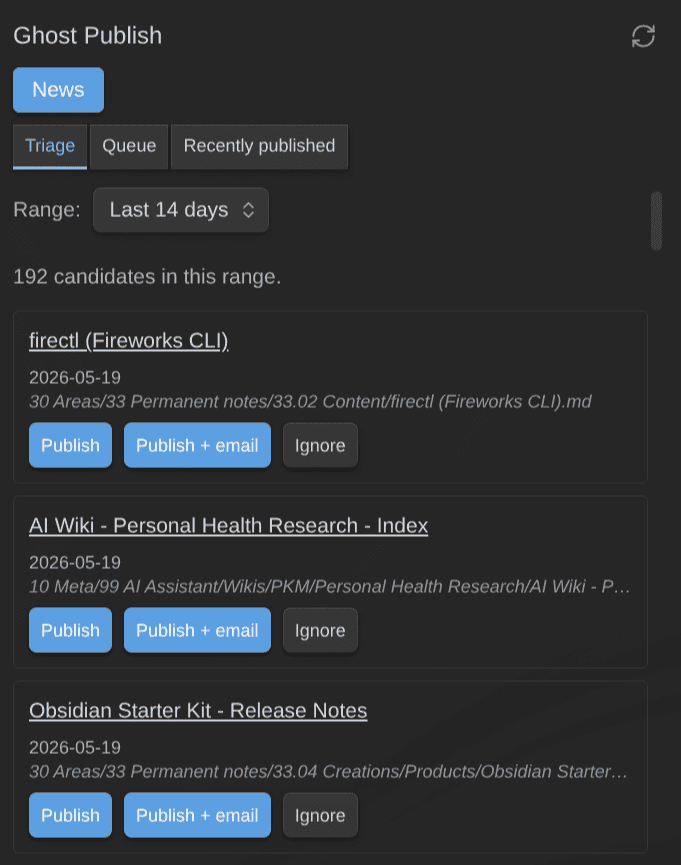
- My Ghost Publish plugin makes it easy for me to publish notes as posts on my Ghost blog. I use this for my news section: https://dsebastien.net/news. This plugin also uploads embedded images, resolves wikilinks to published URLs (with a graceful fallback when the target isn't published yet), converts YouTube links to embeds, and handles footnotes. It also handles updating posts based on changes in my notes, which saves me a ton of time.
- My Typefully plugin helps me publish notes or text selections to X, LinkedIn, Threads, Bluesky, Mastodon, etc. Thanks to it, I don't have to copy/paste content from my knowledge base to many websites. I can publish on all platforms at once directly from within Obsidian. This plugin also lets me schedule everything, create threads, publish images and videos, etc.
- I've also created the Book Exporter plugin to help me export entire sets of notes to EPUB, and PDF through Pandoc. I've written & published a few books before through other means, but in the future I'll be using and improving this to avoid having to duplicate my content. For one-off conversions rather than whole books, the Pandoc plugin exports the current note to Word, PDF, LaTeX or HTML from the command palette.
Other routes worth knowing:
- Quartz: an alternative to Obsidian Publish. It's a free and open source static site generator built for Obsidian vaults, with wikilinks, backlinks and graph view. Push to a repo, build in CI, deploy to GitHub Pages. Quartz Syncer handles the "which notes go public" half from inside Obsidian.
- Enveloppe (formerly Github Publisher) and Digital Garden: both push selected notes to a repository that a static site builds from, with per-note frontmatter deciding what ships.
- There are many more, and I'm thinking about using Astro to rebuild/refresh my public notes website, but that's a topic for another day ;-)
If you want to automate at least a part of your publishing pipeline, you need to leverage note properties. For example, you should have a clearly defined state machine, so that your automation can identify notes that are ready to be published. Also, you should track whether notes are already published or not (e.g., published: true). Armed with such properties, you'll be able to create useful Obsidian base views, write scripts that either publish or update, and also leverage plugins such as my Kanban Action Planner (Project) to track/drive the entire publishing workflow for your creations.
Integration platforms and webhooks
Supposing you want your automation to integrate with third-party services, while a Virtual Private Server (VPS) with scheduled jobs can go a long way, there are actually solutions out there that can simplify things for you without necessarily having to know about programming.
One option I've been using for a while is n8n. It's an option I recommend for anything involving several external services. I have installed it on a dedicated VPS. No rate limits, no per-task pricing, full control and most importantly full ownership. With n8n, you can create as many automated workflows as you want, each with one or more triggers (e.g., a Webhook, an HTTP call, a schedule, an event sent by another platform, etc).
Connecting n8n to Obsidian goes one of three ways:
- n8n calls the vault: HTTP nodes in a workflow hitting the Local REST API or my Obsidian CLI REST MCP plugin. Cleanest.
- Obsidian calls n8n: For instance using the Post Webhook plugin to send the current note to a URL, or using the Webhooks plugin to automatically trigger events when notes are created, edited or deleted. The first is deliberate publishing; the second is an event stream. Pick based on whether you want a button or a trigger.
- Neither: n8n writes Markdown files directly to a synced folder.
Some ideas you can implement with this:
- RSS or newsletter arrives → summarize → create a literature note with source metadata
- YouTube video → fetch transcript → create a note with timestamps
- Meeting recording added to your vault → send it to a speech-to-text service → get the transcript back → add it to the vault
- Note tagged for review → send it to a text-to-speech service → get an audio file back
- Form submission on your Website→ create a CRM note
SaaS platforms such as Zapier or Make work too. They're easier to get started with, but quickly get very expensive.
Ingestion: getting the world into your vault
There are endless pieces of information you might want to capture and add to your vault. And also endless platforms you might want to fetch that information from. Let's discuss some examples.
- Readwise has an official plugin that you can use to get the curated content and your highlights into Obsidian. If you don't use Readwise, but Raindrop, then know there's a plugin called Raindrop Highlights to do the same. The Kindle plugin cover the same job for their respective sources.
- RSS feeds: The RSS Dashboard plugin pulls subscriptions into the vault so reading and note-taking happen in one place, which removes the "read it there, note it here" gap.
- Zotero integrations (Zotero Integration, ZotLit, BibLib) pull citations, PDFs and annotations for academic work. Be aware that Zotero Integration, the most popular of the three, has been slow-moving for a while (its last release was in August 2024), so check that it still works with your Zotero version before you build a dissertation workflow on top of it.
- Calendar sync: the ICS plugin pulls events from any calendar feed into your daily note, so your agenda and your notes stop living in different places.
- Email to vault: forward to an e-mail address, let an automation platform (e.g., n8n) parse it and write a note.
- Voice: Voicenotes Sync pulls recordings and transcripts in automatically. The Whisper plugin is similar, and also supports recording, transcribing and using AI to clean the transcript, all in one command. I still use Voicenotes.com, but also my own app: Knowii Voice AI to do something similar.
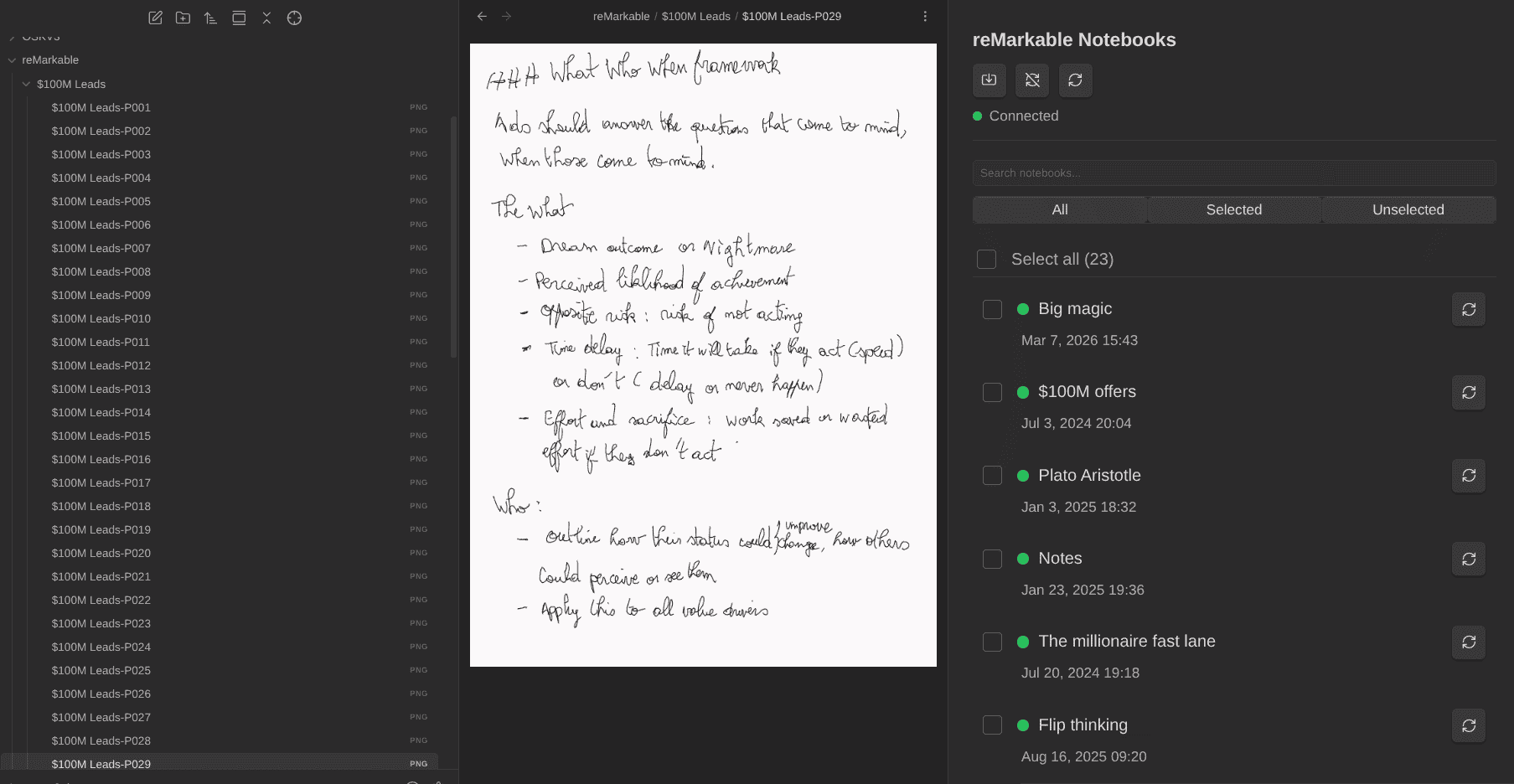
- Handwriting and paper: I own a remarkable, and have created the reMarkable Sync plugin to import my handwritten notes into Obsidian (as images). Then, I use my Transcriber plugin for Obsidian to extract the text and convert it to Markdown. The Text Extractor plugin is another option for that
I wrote different pieces about my "paper-to-vault" process.
 Sebastien Dubois
The design principle for all ingestion: land it raw, process it later. Don't try to file, tag and link at capture time. Get the material in with its source metadata intact and let a separate pass (manual or agentic) do the thinking.
Attachments: the files everyone forgets to automate
Notes get a whole lot of automation love, but Obsidian vaults also accumulate a ton of files: images, screenshots, PDF documents, audio files, etc. Left unmanaged, that folder becomes a swamp of files named Pasted image 20260819064512.png, large files that bloat every sync and backup, and orphaned attachments that should be removed. Attachments deserve the same treatment as notes: name them, file them, prune them, ...
At Layer 1:
- Set the default attachment location (Settings > Files and links) so pasted files land in a dedicated folder instead of next to your notes.
- Paste image renamer renames images as you paste them into your note, based on the note's name and a pattern you define. It also has commands (
obsidian-paste-image-rename:batch-rename-all-images) to clean up any existing mess retroactively. - Clear unused images finds attachments no note references anymore and moves them to trash. Run it from time to time.
- Transcriber or Text extractor OCRs images and PDFs so Omnisearch can find text inside them.
- AI Image Analyzer goes one step further and uses AI to describe what an image shows.
At Layer 2, scripts take over the heavy lifting. An image optimizer (e.g., pngquant, oxipng, cwebp) can compress every image in the attachments folder and reclaim a surprising amount of space. A file watcher can grab new screenshots from your OS screenshot folder, optimize them, rename them, and file them into the vault automatically.
If your vault is a git repository, attachments are what makes it heavy: git stores every version of every binary forever, so a repeatedly-edited image multiplies its cost. Optimize images before they get committed, not after.
OS-level automation
We've already covered quite some approaches to automate actions. At the operating system level, there's actually other means you can use to automate actions and turn your knowledge base from something passive (files sitting on a disk) into something that feels "alive", reacting to events.
- File system watchers (
inotifyon Linux, Hazel on macOS) can react to vault changes: debounce for a few seconds, then auto-commit; or move dropped PDFs into an inbox folder and create a stub note. - Launchers (e.g., Raycast, Alfred, Rofi) plus the URI scheme give you global capture from anywhere on your machine.
- Keyboard Maestro on macOS handles the more elaborate multi-app sequences.
Another app I really want to mention is Espanso. It's a text expander that automatically replaces some text with some replacement value. For example, if I type ":website" on my computer, Espanso replaces it by "https://dsebastien.net". It's a HUGE time saver for me. I use it to quickly type URLs, my contact details, my address, etc. And it works everywhere, including in Obsidian of course.
Physical buttons: controlling your vault from a physical device
If you want to take things further, you can even give your vault a physical control surface. A Stream Deck (or any programmable macro pad) is a grid of LCD buttons that can trigger anything on your machine. Streamers use them for scene switching; knowledge workers can use them as a hardware remote for their vault.
I bought one a long while ago, and it collected dust for a long time. Now I have a lot of fun with it and my Obsidian vault (among other things).
There are three ways to wire buttons to Obsidian:
- Hotkeys. Bind an Obsidian command to an exotic key combination nothing else uses, and have the physical button send that keystroke. Zero dependencies, but it only works while Obsidian has focus.
- URIs. Point a button at an Advanced URI link like
obsidian://advanced-uri?vault=notes&commandid=periodic-notes%3Aopen-daily-note. This works from anywhere on your machine, brings Obsidian to the front, and can run any command by its ID. - Scripts. Point a button at a shell script. The script can call the Obsidian CLI (
obsidian command id=...), hit the Local REST API's REST API, or do anything else you fancy, without Obsidian even needing focus. And you can even launch an AI agent with it.
Some examples:
- Daily note: jump to today's note from any application, mid-thought.
- Quick capture: fire a QuickAdd capture so the idea lands in the vault before it evaporates.
- Focus: start a pomodoro on the current task (
tasknotes:start-pomodorowith TaskNotes) and start time tracking in one press. - Publish: send the current note to your social media queue (
typefully:publish-note). - Meeting mode: A single Multi Action can create a meeting note from a template, start an audio recording, and open your agenda, all in one press.
The same logic applies to cheaper alternatives: a $20 macro pad, spare keys on a programmable keyboard, or launcher hotkeys (Raycast, Rofi) if you'd rather keep it software-only.
Mobile
Automation options are much more limited on mobile devices.
On iOS, Shortcuts plus Advanced URI enables a number of the scenarios I've discussed earlier in this article. And the Actions for Obsidian app adds a large set of native Shortcut actions. Siri capture is interesting to explore. I can't comment much on that one because I don't use Obsidian on an iOS device.
On Android, Tasker and Termux + git is the power-user route.
IMHO, mobile usage should mostly focus on quick capture and consultation. Processing is better handled elsewhere.
Batch operations on a large vault
At some point you might want or need to change many notes at once. For instance to add/remove/rename properties, normalize your tags, fix date formats, etc.
The approach I recommend when approaching bulk/batch operations:
- Commit first. Make sure you have a clean state and a backup at your disposal in case something goes wrong.
- Dry run. Write the script/program so it prints what it would change, and read the output. Ensure it will do what you expect.
- Run on ten notes. Verify by hand.
- Run on everything.
- Read the diff before committing. If you use git, then make sure to review the diff.
Oftentimes, issues arise when your notes are not uniform (e.g., incorrectly named files, properties, duplicate properties, etc).
Regarding the tooling, there are again infinite choices. You can use a shell like Bash and classic command-line tools like grep, ripgrep, ls, sed etc for simple cases. For frontmatter, you can use Python and libraries such as python-frontmatter, etc. If you prefer Node.js, or TypeScript there are also many libraries that can help you find, create, modify, and update files and metadata properties.
Note that usually, when I have to perform a simple refactoring of existing notes, I tend to use Visual Studio Code (VSCode)'s powerful search and replace feature. It supports Regular Expressions (Regex), is super efficient, and works at scale.
Inside of Obsidian, you can use Omnisearch to find the candidate notes. It's more efficient than the built-in search panel.
Part IV: Layer 3, AI agents on the vault
Everything so far has been deterministic. Rules, triggers, scripts, services, etc. This layer is different: you're handing over judgment, not just execution.
Up to now I've shared ideas about how you can create reliable automations through various means. Those automations are the most reliable. They do exactly what you want; as many times as you want/need.
What I'm going to cover next is "less reliable" (generally speaking), but also far more powerful. From here we'll specify the expected outcomes and we will let AI decide the steps. To be clear, everything that follows implies a different kind of trust. Trust in the AI models capabilities, trust in security and privacy guarantees from AI inference providers, ... There's a lot to discuss about AI inference providers, AI models and their capabilities, options for using Local LLMs, etc. But this is for another day.
I'm coming back to my earlier advice, but for this layer, it's more important than ever: DO NOT embark on implementing any of this without a proper backup/restore strategy in place. AI can truly screw up your knowledge base. You've been warned; better safe than sorry!
AI Coding tools vs AI Agents vs Chatbots
Among the people who use AI today, most rely on chatbots like ChatGPT or Claude. And while the lines are blurring over time, those are far less powerful than AI Coding tools / AI Agents (those two are closely related but different, as we'll see shortly).
To leverage your knowledge base and automate tasks/processes/workflows in and around it, you need to forget chatbots, and start using coding agents and/or AI Agents. This is something I've discussed in my article about Agentic Knowledge Management (AKM). The core idea is that you'll point AI coding tools and/or agents at your vault's root directory. And the difference is that they can do a gazillion more things than answering your questions. They can read and write files in your vault, interact with the Obsidian CLI, improve the metadata on your notes, create websites based on your notes, etc. Possibilities are... you guessed it: endless!
Coding agents include tools such as Claude Code, OpenAI Codex, Gemini CLI, OpenCode, GitHub Copilot, Copilot CLI, and many many others. AI Agents on the other hand are tools such as Hermes Agent, OpenClaw, Pi Mono, etc. There are more and more of those, and the list keeps growing. Another name for both categories (broadly speaking) is "AI Agent Harnesses". See AI Agent Harnesses (MoC) for a (forever incomplete) list.
Both AI coding tools and AI agents can read/write files, write code, create websites, create applications, control web browsers, send e-mails, etc. Specific features vary a lot for tool to tool, but this is the core set of common capabilities. In addition, most of those tools also support using AI Agent Skills and MCP servers, which both aim to extend their capabilities. AI skills describe how to do "something", possibly with examples, templates and deterministic scripts. On the other hand, MCP servers enable AI coding tools and agents to interact with other tools and platforms. Check out the note I linked for a large number of examples. Note that the community is hard at work, and there are already thousands of skills and MCP servers out there. It's basically impossible to follow. I have a lot more to say about these, but I'll keep that for other articles.
To put it simply, the major difference between an AI Coding tool, and an AI agent is that a AI agent is "alive". It wakes up regularly; a heartbeat wakes it up at regular intervals, and when it wakes up, it "thinks" and performs actions. In addition, AI agents generally have more means to communicate, for instance via WhatsApp, Telegram, Discord and the like. Also, consider that you can actually use AI coding tools like AI agents. It just requires a bit more work/thinking to create the system, while AI agents such as OpenClaw or Hermes Agent tend to come with batteries included. This explanation is almost a caricature, but at least you now get the idea ;-)
Importantly, the lines get blurred over time, because "agentic" features also get added to AI Coding tools such as Claude Code and others. Consider that within a few years, both categories will more than likely merge.
There are TONS of plugins that integrate AI into Obsidian. I will discuss some of those in the next section, but know this: I'm not a fan! To me, many of those are mostly useless. They seem nice until you learn how to use AI coding tools and AI agents directly, and realize how much power you left on the table. Sorry to disappoint here, but if you really want to feel the true power of AI, you need to get OUT of Obsidian.
The fact is that AI coding tools and AI agents LOVE Markdown and Markdown is what your entire Obsidian vault is made of. Isn't that wonderful? We should all be thankful to the fact that the Obsidian team cares so much about the File over app principle!
Here are some additional examples of things AI coding tools and agents can do that chatbots can't:
- Grep and glob across your entire vault. It can find things by content, not by embedding similarity.
- Your actual writing, in your voice, with your opinions, from years back.
- Structure: properties, types, folders, links. It can navigate rather than guess.
- Tools: it can run the CLI, run git, run scripts, hit APIs.
- Persistence: it writes what it learns back into files, so the next session starts where the last one ended.
That last one is quite important; it's why I keep calling the vault an AI operating system. And I've actually been building my own agentic system ON TOP of Obsidian, so that I can go even further with automation without ever leaving Obsidian. But it's not yet ready for prime time ;-)
A Word About Costs and Dependencies
Keep in mind that what goes in Layer 3 is COSTLY. Tokens aren't cheap, far from it. Costs scale with usage and model/token prices evolution. This can quickly add up. In addition, any automation you build using AI is going to have dependencies that can bite you too.
AI within Obsidian
Before going deeper, let's discuss a few plugins that are worth exploring if you really want to use AI from within Obsidian. As I said, I'm generally not a fan of this and use very few of those. But there are exceptions. Those are the ones that help while you think and write and use help augment your thinking/efficiency. Also, keep in mind that in most cases, such plugins only enable "basic" things, not advanced workflows like the ones I'll hint at further in this article.
Retrieval and chat over your notes:
- Smart Connections by Brian Petro computes local Embeddings and surfaces semantically related notes as you write. Local model, nothing leaves your machine. Excellent for re-discovery in a large vault. Brian is also expanding his Obsidian ecosystem over time, and Smart Connections is "only" the tip of the iceberg. He also offers paid options with more advanced capabilities.
- Copilot for Obsidian gives you RAG chat over your vault with your choice of model, local or hosted. Smart Second Brain does the same with a stronger local-first bias, and Local GPT runs actions against a model on your own machine, which is the option to reach for when the notes in question are the ones you'd never send anywhere. Local LLM Hub is the newest entrant in that local-only corner: chat with vault tools, RAG, MCP servers and workflow automation in one plugin, with nothing leaving your machine.
- Smart Composer is the writing-side counterpart: chat with context from specific notes, then apply the result as an edit rather than copying out of a sidebar.
Generation inside your existing workflow:
- Text Generator does templated generation inline, and Smart Templates plus AI for Templater put model calls inside the templates you already use, which is the cheapest way to add AI without changing how you work.
- AI Tagger and Auto Classifier suggest tags and classifications from note content. Treat both as suggestion engines, not authorities, and keep a human in the loop or your taxonomy drifts.
- Note Companion (previously File Organizer 2000) is another take on the same kind of ideas: drop anything into an inbox folder and it renames, tags, files and formats it for you, including images and audio. It's the flagship example of stage 4 applied to housekeeping, and the caveat is the same as for every AI janitor: run it against an inbox, not against your whole vault, and review before you trust it.
Visual workflows:
- Cannoli deserves more attention than it gets. You draw a workflow on an Obsidian canvas (nodes are prompts, arrows are the flow of data) and run it. Branching, loops, parallel calls, notes as input and output. It's the only tool I know that makes multi-step LLM pipelines legible to someone who doesn't want to write code, and because the workflow is a canvas file in your vault, it's versioned, diffable and portable.
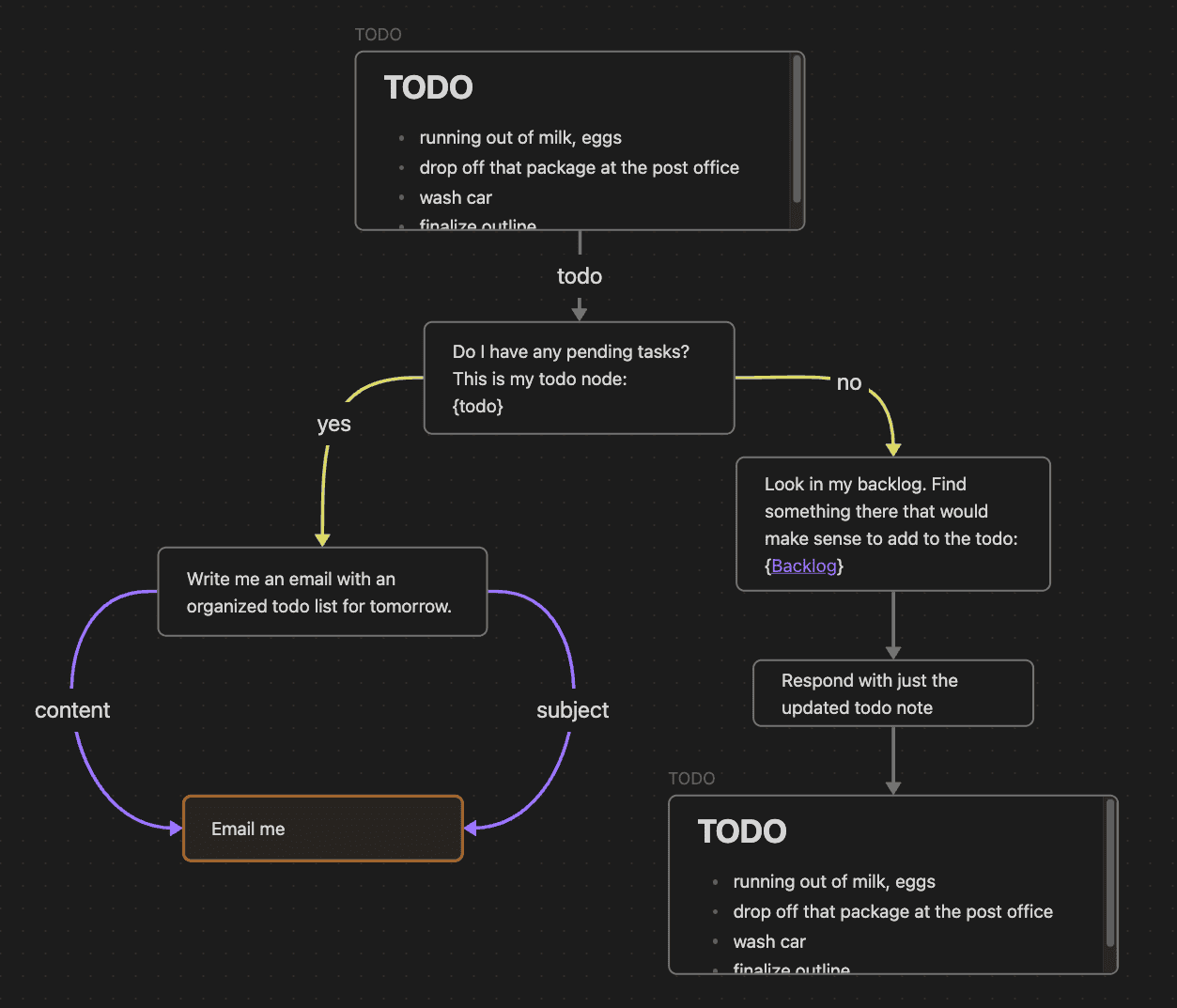
Another one is Claudian embeds Claude Code and Codex CLI directly inside Obsidian, with inline diffs, slash commands, @-mentions for files and plan mode. Interesting if you'd rather use a terminal.
Oh and since this is my blog and I've been mentioning many of my own plugins, here's one that I think IS a valuable addition to Obsidian: AI Editor. Why? Because it empowers YOU while thinking/writing, instead of trying to replace your thinking. This plugin is very different from tools such as Claudian. It takes the opposite approach to a chat sidebar. It puts a bench of AI editors/reviewers in your notes: Devil's Advocate, Fact Checker, Researcher, Ghostwriter, etc, and whatever personas you define. They analyze, highlight problems inline and propose edits as diffs you accept or reject. Nothing is ever written without your approval, and each editor can learn from your accept/reject decisions over time. This is the kind of AI integration that I find valuable: it augments your thinking instead of replacing it, and it helps improve your creations.
For semantic search outside the app, I use qmd, a local Markdown search engine that runs BM25 keyword matching, vector similarity and a hybrid mode with re-ranking, entirely on my machine, exposed to my agents through the CLI, but also over MCP. Keyword search finds what you named; semantic search finds what you meant. You want both, and an agent that has both stops guessing based on file paths/names and starts finding the right things.
I discussed various use cases for leveraging AI with an Obsidian knowledge base:
 Sebastien Dubois
Instructions files: teaching the agent your vault
The problem I see with people creating the hype around AI + Obsidian is that they treat the Obsidian vault as something magic. As if AI would be consistent in naming files, tagging notes, adding metadata, and structuring the content. The reality is that without conventions and proper guidance, AI will do whatever. And if you use it for long enough that way, you'll quickly notice how messy it all gets. An agent dropped into your vault knows nothing about your conventions. It will invent folders, invent tags, and write notes that don't match anything.
The solution to this consists in providing enough information and rules to AI so that it understands and respects your vault's structure and conventions.
As a starting point, you need an AGENTS.md file (cfr AGENTS.md (File Convention)). That file will be read by AI coding agents at the start of every session. Claude Code reads CLAUDE.md, but you don't have to duplicate the content; in that file you can just write something like "@AGENTS.md", and it will go read the other file.
What should be in that file:
- Vault structure: what the folders mean and where things live (or better: how to ask what the structure is, rather than a hardcoded list that will drift).
- Note types and their schemas: what a task note needs, what a permanent note needs, what a meeting note should look like, etc.
- Hard rules: never delete notes unless asked specifically, never invent tags, append rather than overwrite, always link new notes from the daily note.
- Conventions: naming, casing, property formats, ...
- Routing: which specialized instructions to load for which kind of work.
Keep it short and point outward. Ideally, the instructions in AGENTS.md should refer to other notes in your system, describing your system (i.e., meta notes). Having such notes is valuable both for AI and for yourself. For instance, I have a note describing my system: My PKM System Handbook (if you're interested, I also created a template you can use as a starting point: PKM System Handbook Template). If I point AI to it, it will know almost everything that matters to me; how it's organized, how it works, the rules, etc.
In practice though, I don't point AI to that note anymore, because I've evolved my approach and built a plugin for my Obsidian Starter Kit in which all my note types, properties, templates, folders etc are documented. I've also created an OSK command-line utility that AI can directly use to find all that information, validate notes against the schemas, etc. It's far more powerful and maintainable. When I want to edit existing note types or create new ones, my AI coding agent just uses the OSK command-line tool through a dedicated AI skill. That works beautifully and is highly reliable.
Skills: reliable recipes for AI
AI Agent Skills are a way to document processes and workflows so that AI can understand those and perform those efficiently/reliably.
An AI skill is a simple folder with a SKILL.md file containing: a name, a description of when to use it, and the procedure. The agent loads it automatically when the task matches. There are many benefits to AI skills; one of which being that lazy loading aspect. While the content of the AGENTS.md file is loaded at the start of every session, "cluttering" the context window, AI skills only get loaded when needed.
In addition, AI skills improve reliability because they can not only contain instructions, but also templates, references/documentation/examples, and scripts/programs. This is awesome because the scripts/programs are deterministic. For instance, the AI skill I've created for publishing articles/newsletters to my Ghost website include an actual program that does the bulk of the work. As long as AI gives the right parameters to that program, it does the job perfectly. So there's less room for AI to make mistakes. That's why I've ended up creating literally hundreds of AI skills (most of which are included in my Obsidian Starter Kit). Each and every one of my AI skills are documented procedures I would otherwise have to re-explain every time. They make my system much more reliable.
Three principles I've settled on after a lot of iteration:
- Skills over agents. A few agents with many skills beats many narrow agents. I argued this at length in Heavy AI Agents Are an Anti-Pattern.
- Progressive disclosure. The AI skill description is always loaded, while the skill itself is only loaded when needed. Also, the description is used to determined if the skill is relevant for the task at hand. So, it must be concise, but also precise.
- Portability is critical. No hardcoded paths, no assumed operating system, clearly defined dependencies, etc. Making AI skills portable is very important if you use those on multiple devices. I personally use my vault on my Windows desktop and on my Linux laptop. If my skills weren't portable, then AI would keep wasting tokens depending on where I use those. I wrote about this and gave recommendations in Why Your AI Skills Break on Other Machines.
 Sebastien Dubois
 Sebastien Dubois
If you dive into AI, whether for knowledge management automation or otherwise, you should definitely learn about and use AI skills. Importantly though, be wary of the AI skills you find online. Just like prompts, people share a ton of garbage online. And also consider the risks; one Prompt injection, and you might get hacked. Some AI models are more resistant against malicious instructions, but there's nothing bulletproof, even if you're using the latest and greatest. So be careful! My recommendation is to take inspiration from what you find online, but to avoid installing/using AI skills created by people you don't trust.
Hooks: deterministic control around a non-deterministic system
Hooks are the part of agentic automation I find quite underrated. They're shell commands that AI agents execute at defined lifecycle events, and they are fully deterministic. You can use those to put guardrails around a system that is, by nature, non-deterministic/unpredictable.
The three I run:
- SessionStart: load my AI routing skill, so every session begins knowing how to dispatch work to my agents/sub-agents.
- PreToolUse: inspect what the agent is about to do and warn or block. Mine catches attempts to explore the vault structure by listing directories, and redirects to the authoritative note type registry instead.
- PreCompact: when the conversation history is about to be compacted, back up the raw transcript into the vault. Sessions become searchable notes.
Use hooks to enforce the things you cannot rely on the model to remember. Prompts are suggestions. Hooks are valuable to protect your knowledge base.
MCP: the AI integration standard
MCP is how agents talk to tools and platforms. It's a specification that is supported by most AI tools and AI agents. Think of it as a universal adapter. You install an MCP server for X, then AI can interact with X efficiently. For instance, if you install the Readwise MCP Server, then your AI agents will be able to fetch the content you curated in there, your highlights, etc.
There are thousands of MCP servers already available. Some are great, some aren't. Some are very efficient, some aren't. Some are secure, some aren't. It's a melting pot, so you need to find the right ones. But once you'll have them, your agents will be much more capable.
Specifically for Obsidian, there are quite a few interesting ones:
- The Local REST API plugin's built-in MCP endpoint
- Obsidian CLI REST MCP: my own plugin, exposing the entire Obsidian CLI over MCP (useful if you want a remote machine to be able to interact with Obsidian on your machine)
- Filesystem MCP, which needs no plugin at all since a vault is just a folder
- My OSK plugin's MCP server (note types, schemas, validation) and CLI REST MCP plugin (every CLI command). This one is part of the Obsidian Starter Kit
If you have custom needs, then you can also easily use AI to create new MCP servers. If you do, then I recommend using the Code Mode MCP Pattern.
Data freedom: pulling the world into your vault
MCP goes both ways. Your agents can reach out through MCP servers to fetch data from the outside world, and a skill can then write that data straight into your vault.
Here's an example:
Every morning, a scheduled task starts on my server, and an AI skill of mine pulls my Garmin data: training sessions, sleep duration and stages, resting heart rate, HRV, body battery, training readiness, stress, etc. It writes all of it into my daily note as frontmatter properties. Then, I can use my Life Tracker plugin to visualize it all. I don't need the Garmin apps anymore, and my data is where it belongs: in my knowledge base.
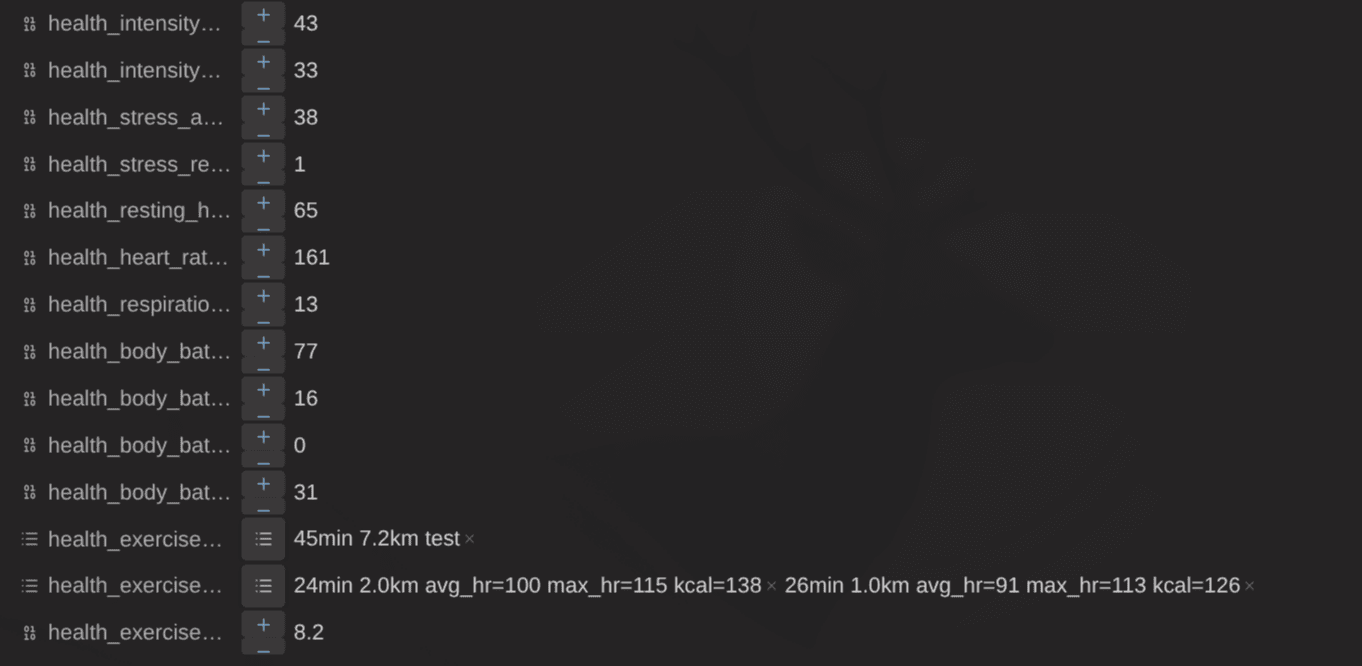
Which means it's queryable. It's chartable, in the way I want, not the way they want. It sits next to my journal entries, so I can ask why a rough week was rough and get an answer that combines how I slept with what I was working on. It's available to every other automation and every other agent I run. And it will still be there, readable, in twenty years, whether or not the company that sold me the watch still exists.
That's data freedom, and it matters. It's not only a question of control/ownership; it's also an enabler for combining different pieces of information together easily. Any service with an API, and increasingly any service with an MCP server, can have its data pulled into your vault, out of its silo, next to everything else you know. Your calendar. Your reading. Your health. Your tasks. Anything you want! :)
Multi-agent workflows
This is where things get really fun and potentially messy, depending on how you approach it all.
Once you get used to using AI on a daily basis, you'll get a feel for the versatility of AI agents. You can ask those almost anything you want. Write, research, analyze, summarize, create images & videos, build websites, build plugins, troubleshoot issues, etc. Agents can do many many things. Once you get to that point, you'll quickly want more. That's where multi-agent workflows come into the picture.
About a year ago, I introduced multiple agents, then AI skills into my system. I want more "stable" agents with defined roles, with specific knowledge etc. It took me a while to figure out best practices around this, but I'm now quite happy with what I put in place.
Here are some patterns you can reuse:
Agents with identity. Give each agent a soul file (who it is, its voice, its expertise, its boundaries) and a memory file. Identity is what makes an agent's output consistent across sessions. But don't overdo it. Agents can actually reduce quality rather than improve it. AI models keep getting better, and they need less and less guidance. I think it's much more interesting to stick with few agents, having access to many AI skills and tools.
One entry point that routes. Rather than picking an agent yourself when you start a session, introduce a sort of butler. In my system, I call it the AI receptionist. Its job is to match your intent against a capability registry, and redirect you to the right agent.. I described this here: Receptionist AI Design Pattern. Note that this can either be an agent or a skill; it doesn't make much of a difference in this case because you want to load it explicitly when the session start (i.e., add instructions for loading it first in AGENTS.md).
Handoffs with limits. Agents can suggest the next agent when they hit work outside their scope, in a structured format the router validates. Maximum three per request, no duplicates, no cycles. Without those limits you get infinite delegation, which is expensive and useless.
Memory that persists in the vault. Agent memory lives as Markdown, not in some tool's private storage. Append-only, dated. Which means I can read it, search it, edit it, version it, and diff it. It's notes all the way down. Similarly, you can also add hooks to capture session logs in your knowledge base. Those tend to be deleted by AI agents (e.g., Claude Code keeps its sessions for ~30 days then deletes those). Sessions logs are very valuable; they contain all the mistakes agents did, the things they did right, etc. By analyzing those, you can (1) find skills to create or improve (2) identify instructions that were not effective (3) identify rules you need to document, etc.
Simple workflows you can implement with agents:
- Filing and tagging: process the inbox, suggest a note type, ask before moving.
- Daily note enrichment: a morning brief pulling calendar, tasks and open loops; an evening pass summarizing what happened.
- Research pipelines: a question goes in, an agent searches the vault, your highlights and the web, and produces a structured brief with sources.
- Content: draft, humanize (i.e., reduce AI slop), review with a panel, publish.
- Maintenance: fix broken links, orphan notes, schema drift, stale content.
- Operations: customer records, meeting prep, health data analysis.
You can start by creating a few agents, then building your AI skills library. Identify repeatable steps, then turn those into skills. Then combine skills to build entire workflows.
How to organize work in a multi-agent system
When several agents are running concurrently, they need to claim tasks atomically, and respect dependencies. A checklist in a file doesn't work well in that case.
Let's take an example to make this issue clearer. Suppose you create a note called TODO.md and fill it with today's task list. Now you want to use multiple agents to do all the work for you. You kickstart multiple sessions, each loading specific agents, specific skills, etc (e.g., you open multiple terminals, or a terminal multiplexer, ...). But if all those agents use the same todo list, you might run into concurrency issues where multiple agents pick up the same task, or try to edit the file at the same time, etc. That will probably end up fine, but you'll waste tokens needlessly.
Beads (bd) is an issue tracker for AI agents built by Steve Yegge. Issues get stored in a database in a .beads/ directory, versioned like code. Agents get dependency tracking between tasks, automatic detection of which work is unblocked, and semantic summaries of completed work.
Beads works great as a task management plane for AI Agents. You don't necessarily need to use use, but it's important to keep potential concurrency issues in mind. The problem is the same if multiple agents need to work on the same files in general. Try to avoid that when you can, and make sure you have a proper way to isolate work so that they don't step on each other's toes. In the software development world, we mainly rely on Git, branches, forks, worktrees and Pull Request (PR) for isolating changes and avoiding conflicts. That works great for knowledge work too, and it scales well. But that's a topic for another article ;-)
Agents on a schedule
At first, you'll run the AI workflows "manually", telling your agents things like "hey, do research on X", "Review this article, then publish a draft preview on X". Later, you might also want some workflows to happen on a schedule, so they get executed without you having to even think about it.
We discussed some options for scheduling work earlier: cron jobs, scheduled tasks on Windows, services, CI/CD pipelines, etc. And of course you can also invoke AI agents from any of those. It's the same automation story, but with an agentic twist ;-)
The benefit (and drawback!) with automated agentic work is that it's much more capable, much more versatile... and also much more fuzzy. It's a double-edged sword. You get capabilities and flexibility that you would never get with deterministic code, but you also get pseudo-randomness that you have to keep under control.
You can also use this approach to really get to Agentic Knowledge Management (AKM), where your knowledge base feels alive. Schedule a maintenance agent to tidy up your knowledge base, and you now have a janitor waking up at regular intervals, keeping everything clean. Do that for different workflows, and your static knowledge base becomes a dynamic AI assistant.
Tools like OpenClaw and Hermes Agent build out this vision of an always-on, proactive AI agent. Not something you always have to invoke yourself, but an assistant that does things for you while you sleep. Those are interesting because they include all the tools you need: scheduled jobs, agents, support for AI skills, MCP servers, as well as support for various communication channels (e.g., WhatsApp, Telegram, Signal, Discord, Slack, e-mail, etc). And then a TON of additional features too: heartbeats, triggers, hooks, permission management, gateways, etc.
Right now, those are the most powerful, but simpler AI Agents can already go a long way. For instance, Claude Code supports defining scheduled tasks (cfr Claude Code Tasks) with /loop and /schedule. So you can start with that, but just keep in mind that if you don't deploy an AI agent to its own machine, then your computer needs to stay always on for the system to remain functional. IMHO if you really go down the AKM path, you will want a dedicated Virtual Private Server (VPS) running your assistant 24/7. It's more challenging to setup, but much more interesting in the long run.
Combine all this with MCP and the picture is complete: a scheduled agent, running on a server, working with your vault, reaching the outside world through MCP servers/Web browsers/etc, listening and reporting to you through different means.
Multiplayer Agentic Systems
Going even further, we can think about "multiplayer scenarios". What happens if you want an AI assistant (or a set of assistants!) for your team(s) and organization(s)? Well then you need to think about agentic collaboration, and means for team/organization members to interact with agents at scale. It's not 1:1 anymore, it's n:n.
As I'm writing this, I feel like the vision for this is getting clearer, and different players are building solutions, but we're still at a very early stage.
Anthropic has released Claude Tag, a way to have Claude as a teammate in Slack. It lets Claude join Slack. Admins grant it access to selected channels, tools, data and codebases. Then, anyone in a channel can @Claude to delegate tasks while they focus on other work. Anthropic frames it as the next evolution of Claude Code: more proactive, and built for a full team rather than a single user. The idea is that it learns over time and builds context from the channels it follows, so you don't need to re-explain things. To be honest, this is the aspect I'm least enthusiastic about. I think there's a lot more value in creating a shared knowledge base that you and your team controls. Delegating knowledge management entirely to AI feels like a very bad deal.
Another project that I find interesting is Buzz. It's a self-hosted workspace where agents are first-class members. You and your team members join. Agents are just non-human members. You chat with your colleagues, with agents, you collaborate. You initiate a thread to do some work, the agent listens, does things for you, and your colleagues can see it all, chime in, etc. To me, this is a already a much more interesting version of the idea.
But that's just a first step in this new multiplayer agentic world. It's nice, but I already had pretty much the same with my OpenClaw server months ago. I connected it to my Discord server and had different agents in different channels, and my son and I could both use it to do tons of things.
I think this is bound to evolve a whole lot in 2027. I know that people at GitHub are building toward this vision. Maggie Appelton gave a talk about it a while ago. Microsoft will certainly bring the same kind of stuff to Teams, and many others will also build their own things. Unfortunately, I think that most will want the knowledge and memory to be automatically handled by the agents, while I would rather have all the agents leverage/feed a shared knowledge base ultimately owned by humans.
Anyways. If this is a direction you're interested in, then my advice is to build a shared knowledge base for your teams. This has tremendous value. It can be as simple as an Obsidian vault backed by a shared Git repository. Later on, Obsidian will have first-class support for multiplayer too (it's on their roadmap). As a team, having a shared knowledge base enables documenting processes, workflows, rules, goals, projects, plans, decisions, meetings, etc. And the idea is that if you build this, then all your team members can start AI sessions within the shared knowledge base and have it understand and leverage the shared knowledge. Anyways, again a topic for another day. But IMHO it's worth mentioning here, because this will be an enabler for much more interesting automation in organizations.
Vault maintenance: the garden that weeds itself
A vault is a garden. It needs weeding. Links break when you rename things. Notes end up orphaned, with nothing pointing to them and nothing pointed at. Tags multiply until you have #productivity, #Productivity and #produtivity all in use. Properties drift. Naming conventions decay. Finished projects sit in the active folder because you forgot archiving those; it was never urgent.
None of that is hard. All of it is tedious, unbounded, and permanently deferred. Thus is rarely gets done. And there's a gazillion little things that add to the maintenance burden. It's death by a thousand paper cuts. Every little detail you delay keeps adding to the decay of your system. And ultimately, your vault becomes a mess where you can't find what you need. That's the Broken windows theory in action.
But AI is actually GREAT at doing tedious work. It never gets bored. It never gets tired. It can work relentlessly forever and ever. And it's more than capable of dealing with the little maintenance tasks that are required to keep a vault in good shape.
In my own system, I've delegated most of the boring work to AI. I have dedicated skills for each of these, and they run on demand or on a schedule:
- Link health: find broken wikilinks across the vault, group them by source file, and either report or propose fixes.
- Orphan rescue: find notes with no incoming and no outgoing links, then use semantic search to suggest where each one actually belongs in the graph. That second half is the part only AI can do; a script can find orphans, but it can't find what a note should be connected to.
- Tag harmonization: merge duplicates, fix casing, flag inconsistencies, propose a cleaner hierarchy.
- Schema conformance: validate every note against its type definition and backfill missing required fields.
- Filing validation: check that every note lives where it should, and surface the ones that don't.
- Archival: sweep completed tasks, projects and goals into the archive on a cadence.
- Staleness review: surface notes that haven't been touched in a year and might be wrong now, especially the ones making claims about fast-moving tools.
Weeding used to be a chore I scheduled and then skipped. Now it's a background process that I don't even need to think about much. My general approach is that agents propose, I dispose.
The risks
I can't discuss agentic workflows without mentioning any of the risks and failure modes.
Sync conflicts. An agent editing two hundred files in ten minutes while a sync client watches the same folder is a conflict generator. If you synchronize notes across devices, you need to make sure your setup is solid, ignoring what should be ignored, and making sure your agents don't cause "sync storms".
Silent damage. An agent that "cleans up" your frontmatter can strip properties you needed or introduce drift. You may not notice for weeks. It's important to regularly review changes made by AI. My rule: no agent touches the vault unless the working tree is clean, and I review the changes before committing.
Overwrites instead of appends. The most common destructive mistake. Encode "append, never overwrite" as a hard rule in your instructions file and, where you can, enforce it with a hook rather than a request.
Privacy. A hosted model that reads your vault reads your vault: journals, health data, client work, financials. Decide deliberately. Options in increasing order of paranoia: exclude folders from agent access; use a provider with a no-training policy you've actually read (cfr my AI Providers LLM Wiki: AI Wiki - AI Providers - Index). Run local models via Ollama for anything sensitive so data remains safe. Also consider using a separate vault for highly sensitive information.
I wrote an article about AI and privacy:
 Sebastien Dubois
Permission scope. Agents with shell access can do anything you can do. Blocklist the destructive commands, require confirmation for anything external (emails, posts, deletions), and never let one automated action trigger another external write without returning to you first.
Noisy history. Agentic sessions produce large sets of changes. If your vault is a git repository, then use dedicated branches for big automated operations, or at least commit before and after so the boundary is visible.
Prompt injection. If your agent reads web pages, emails or clipped articles, it's reading text written by strangers, and some of that text may contain instructions that AI will follow. Treat all external content as data, never as commands. This is not theory, it's a huge risk vector when using AI; cfr Prompt injection & Lethal Trifecta.
Cost. Agents that read a large vault burn tokens. Token costs quickly add up. Use the right models for the right tasks; no need for the best frontier models when editing properties. Apply the Prompt Lazy Loading AI Design Pattern (PLL) where you can; for instance through skills, which get loaded lazily. And if you go multi-agent with an always up AI assistant, make sure to set budget limits and to keep an eye on costs.
Last but not least, I recommend against running AI agents on your own machine or network. If you do, they'll have way too much access and you might get hacked. Tools such as OpenClaw have flaws, vulnerabilities, and get attacked constantly. Many have already been "p0wned". Instead, use a dedicated machine. I recommend a Virtual Private Server (VPS). I wrote an article with some practical recommendations here:
 Sebastien Dubois
The same applies whether you decide to use OpenClaw, Hermes Agent, Pi Mono or something else.
Keep AI out of your vault
There's a serious argument against all of this, made most clearly by Simon Späti in Keep AI Out of Your Vault.
The argument runs roughly like this. The value of a knowledge base is not the notes; it's the thinking behind them. Writing is how you find out what you think. If you delegate summarizing, connecting and phrasing to a model, you keep the artifact and lose the understanding. Worse, you end up with a vault full of text you never actually processed, which looks like knowledge but is mostly clutter. Bianca Pereira is right when she says that "PKM is not a system, it is a practice".
I'm personally enthusiastic about using AI with my vault, but not using the same mindless approach that some people recommend, where the vault is just mess fully maintained by AI that you never look at. That's the worst possible version of an AI-enabled knowledge base. A vault containing only AI-generated content is worthless. You should not remove yourself from the practice. And the practice requires writing things, and thus thinking for yourself. I prefer thinking of Agentic Knowledge Management (AKM) as a way to augment my practice. Using AI to eliminate the tedious work so I can do more of what really matters: thinking and leveraging my knowledge, turning it into wisdom.
My vault has an enormous amount of work in it that involves no thinking whatsoever: filing, formatting, timestamping, cross-linking to some extent, publishing, backing up, chasing broken links, syncing my health/exercise data, converting queries to Markdown. None of that is where understanding happens. All of it eats time and attention I'd rather spend on the part that does.
So the line I draw, and the one I'd recommend:
> Automate the plumbing. Never automate the thinking.
An agent that files a note is doing plumbing. An agent that writes the permanent note for you is doing your thinking, and you should refuse that trade even when the output looks good. Especially when the output looks good. I do create notes with AI, especially for low-value things (e.g., explaining what a specific tool does), but never for the things I really care about. That's why I've built the AI Editor. It helps me with grammar, rephrasing, summarizing and things like that. It accelerates and improves my writing, but does not replace my thinking.
I wrote a full response to this position in Don't Keep AI Out of Your Vault, if you want the longer version of the argument.
 Sebastien Dubois
Part V: An overview of my setup
Alright. I think we've discussed enough ideas for today (probably too many to be honest). Now let's take a look at what I'm actually doing with my own vault.
Scale. Around 20,000 notes, built up over 20 years.
My system went through many iterations, and evolved a lot over the years. Right now I'm using Obsidian, on top of my Obsidian Starter Kit, with many plugins I've built (discussed earlier in this article), as well as OpenClaw, Hermes Agent and various other tools.
Layer 1.
- Periodic Notes creates my daily note; Templater fills it; Rollover Daily Todos brings yesterday's open items along.
- My TPL Dispatcher template routes every new note to the right template through the a note type recognition API I've baked into my OSK plugin.
- My OSK plugin manages all my note types with recognition rules, folders, templates, required/optional properties, lists of allowed values, mandatory tags, etc. It supports my entire system by codifying its schema and rules.
- Linter formats my notes on save; Update Time keeps
createdandupdatedcurrent. - Kanban Action Planner renders my task and project notes as boards, calendars and timelines, with automation rules on status transitions.
- Dataview Serializer keeps my queries up to date and serialized as real Markdown. I use it for all my Maps of Content (MoCs), and in many other places (e.g., person notes, meeting notes, project notes, etc).
- Life Tracker charts the health properties in my daily notes.
Layer 2.
- My vault is a Git repository hosted on GitHub. It's one safety layer. I use the Git plugin for Obsidian to automate synchronization. I also use the Local backup plugin for Obsidian to backup my notes locally. I also use Google Drive to synchronize my notes to the cloud, to my NAS, etc. I synchronize my notes across devices using Syncthing. I backup my notes multiple times, on different devices (3-2-1 approach); additional safety net. And on a daily basis, I rely on my Time Machine plugin for Obsidian to recover from small mistakes.
- I use shell and Node.js/Bun scripts at the vault root for the little jobs.
- I use n8n on a VPS to automate some parts of my business. I intend to get rid of this soon though.
- My Obsidian Publish to publish my notes to https://notes.dsebastien.net and my Ghost Publish plugin to publish news posts to my website over at https://dsebastien.net/news. I also use my Typefully plugin to post notes, threads, images and videos to social media. I use my Book Exporter to convert sets of notes to books in PDF & EPUB.
- Readwise sync to synchronize curated content and highlights to my vault.
- Voicenotes Sync to import my transcribed voice notes to Obsidian.
- My reMarkable Sync plugin gets my handwritten notes taken on my reMarkable to Obsidian, then my Transcriber plugin for Obsidian to convert those into Markdown.
- I also use my Knowii Voice AI app to write. This one saves me an enormous amount of time, and works in all apps.
Layer 3.
- I use Claude Code, Codex and OpenCode with OpenRouter and other AI inference providers, as well as Ollama on my desktop and laptop.
- I use three main AI hooks: session start loads routing, pre-tool-use blocks dangerous actions, pre-compact saves AI session transcripts into the vault as searchable notes
- I have a VPS with OpenClaw and Hermes Agent running 24/7 with tons of scheduled/recurring tasks, and connected to my vault, to my repositories, to my providers, to my communication channels (e.g., Discord, WhatsApp, etc). It's on a separate network, but I can access it anytime using Tailscale.
- I have automated various actions through GitHub Actions CI/CD pipelines.
- AI skills, agent memory, journals and session logs are all part of my vault.
- I use my Obsidian CLI REST MCP to expose the Obsidian CLI to my AI assistant. And only enable access when I want through Tailscale.
- I use qmd for semantic search.
- AI skills automatically pull my Garmin data into my daily note's frontmatter every morning: sleep, HRV, body battery, training readiness, stress, activities. I don't type any of it.
The AI assistant that lives my vault
Everything below is stored as Markdown files inside the vault. Not in a vendor's database, not in a config directory somewhere on one machine. In the knowledge base, versioned in git, readable by me and by every agent I use.
How it's built.
- A bootstrap layer:
CLAUDE.mdpoints atAGENTS.md, which carries the behavior rules, the vault conventions, and the routing hints every session starts with. - A receptionist: one routing skill maps what I asked for to a capability, and falls through to an agent, a panel, a team or a council when a single capability doesn't fit.
- Various AI agents with identity. Each has a soul file (who it is, its voice, its expertise, its boundaries), a memory file, a dependencies manifest listing which skills it may load, and an optional state file for multi-session work.
- Over 400 agent skills (most are currently included in my Obsidian Starter Kit). Each skills is a folder with a
SKILL.mddeclaring what it does, when to use it, what it's allowed to touch, and which model tier it should run on. - Panels, teams and councils on top: independent multi-angle review, parallel work toward one deliverable, and multi-round deliberation respectively.
Because all of it is Markdown my system works with any AI coding tool or agent. The same agents answer from a terminal, from a chat app through OpenClaw, or from whatever interface arrives next. The assistant isn't tied to the window I happen to be talking through. They all have access to my knowledge base. They can all leverage my notes and documented processes.
Here are some examples of things my AI assistant helps me with (the list keeps growing):
- Action management: goals, plans, projects, tasks, reviews, prioritzation.
- Writing: researching, drafting, editing, voice/style checks, humanizing, headline testing, cover image testing.
- Software development: my plugins, apps and repos, resolved from the vault's project notes.
- Communication and social: newsletters, threads, cross-platform posts, scheduling, community announcements, etc.
- CRM and business: customer records, purchases, lifecycle changes, revenue analysis.
- Analytics: traffic, sales, search performance, YouTube.
- Publishing: blog, social, community, landing pages.
- Media creation: images, audio, podcasts, and video through Remotion, where a video is React code and therefore something an agent can actually write.
- Sales copy: pages, launches, product positioning.
- Discuss: my assistant transcribes my voice using Knowii Voice AI, whether I recorded in WhatsApp or Discord. And through those channels, I can ask anything I want to my assistant; write a note, research a topic, build a feature for one of my projects, schedule work, review my priorities, etc.
- And a ton more!
Almost everything I do starts in/with my knowledge base! I'm a solo creator, and I run my entire thinking and my entire business from one knowledge base. Not "I take notes there and work elsewhere". The notes, the tasks, the customers, the drafts, the code projects, the analytics, the health data and the agents that operate on all of it are the same folder of Markdown files. That's what I mean when I talk about an AI "Operating System".
What it feels like day to day. I open the vault. Today's note exists, with yesterday's unfinished tasks rolled forward and last night's sleep data already in the frontmatter. I capture things during the day with one hotkey and never think about folders. When I finish something, I say so and the right agent updates the right notes. When I publish, one command does the blog and another does social. At night everything is committed and backed up without my involvement, my metadata is completed, fixed, improved, etc.
Each morning I get a recap about my sales, my analytics, a research brief, a recommended list of actions, etc. I talk to my assistant while I'm driving and I can ask it anything I want.
Moreover, each session leaves the system slightly better than it found it. A skill gets written down because I explained something twice. An agent records what it learned in its memory file. A convention gets sharpened in AGENTS.md because something went sideways. None of those are big moments. They accumulate. But what's important here is that I retain full control. I can edit any agent, rewrite their memories, adapt skills, etc. And the whole system continues to work fine.
Part VI: where this goes, and how to start today
The AI operating system
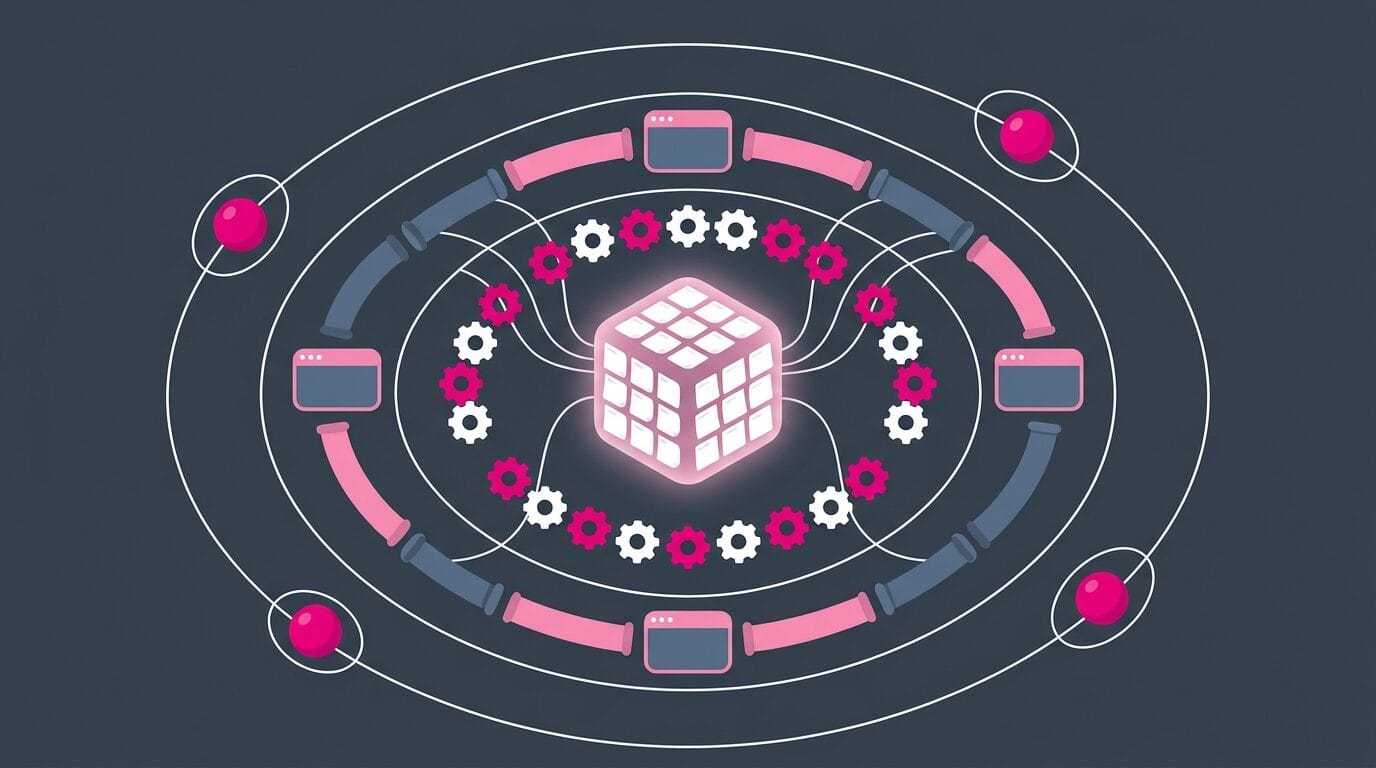
You have valuable knowledge (your notes). You have a schema (your note types). You have an interface (files, CLIs, MCP servers, etc). You have an AI assistant running 24/7, waking up regularly, listening to you and acting on your behalf. You have scheduling (cron, timers, startup hooks). You have permissions. You have secrets, API keys, etc. You have logs (git history, session transcripts). And you have programs that read the state, reason about it, and write it back (agents).
Sounds a lot like an operating system, doesn't it?
What makes it yours, is that the storage layer is a folder of text files you own. Everything above it is replaceable. The plugins will change, the agents will change, the models will certainly change. Your notes will remain.
One Knowlege Graph that rules them all
An interesting way to think about your knowledge base is as a graph of knowledge, itself containing different sub-graphs corresponding to your note types, areas of interest, goals, projects, plans, meetings, etc. And if you add AI to the mix then you should definitely add information about your agents, their identity, their memory, AI conversations/sessions etc to your knowledge graph.
Your knowledge base is the root graph. Every project/area/note type/etc is a subgraph.
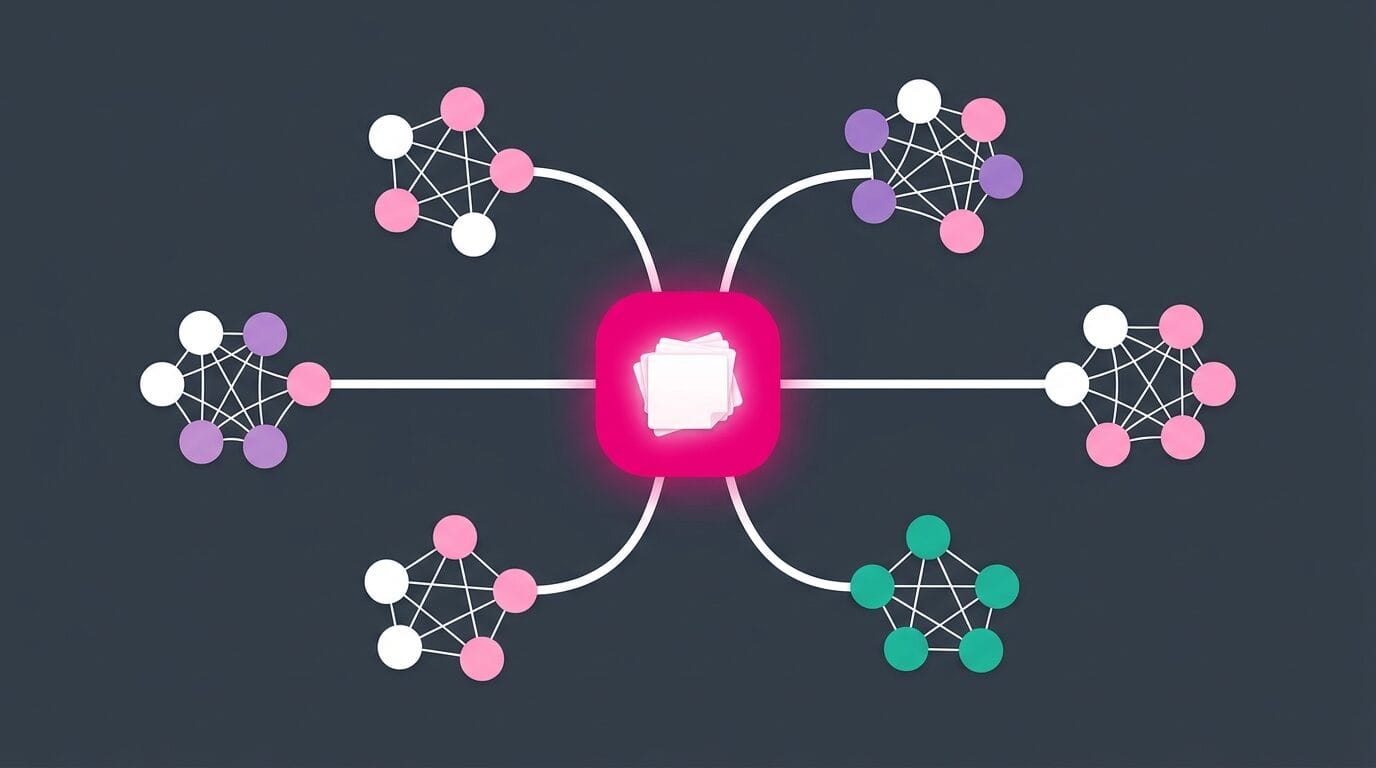
Each each goal, each project, each product, each area of interest, each note type, each client engagement, each <insert whatever here>, has its own context: its architecture, its conventions, its decisions, its history, its open questions, ...
In addition, the meta-information and the information that supports YOU as a person and/or as a business is also part of it:
- what you want to do later (goals, plans, someday items)
- what you're busy doing (active projects, tasks in flight, what's blocked)
- what you've done before (decisions, post-mortems, lessons, past work, successes & failures, ...)
- how you want things done (your manifesto, principles, processes, conventions, your voice)
- where to find information (the index to everything, including the subgraphs, maps of content, Bases, ...)
- ...
That's an information radiator for yourself. It's also a Single Source of Truth (SSOT), in both senses that matter. It holds some of the data directly, and it acts as a reliable index to the rest.
Now put an AI session on top of that, and notice what changes. Any session can start from the root: a graph that already knows your goals, your conventions, your history and where the relevant subgraph lives, instead of an empty prompt and whatever you remembered to paste. That's far more powerful than copy pasting random prompts you find on the Web. That's top notch Context Engineering, solved structurally.
Context engineering is the discipline of getting the right information, in the right format, at the right time, into a model's context window. Most people do it manually, every session, from scratch. Or worse, just relying on memory features offered by AI tools (hint: that sucks!). A knowledge graph does it as a property of the system: the context is already there, pre-assembled, because you assembled it as a side effect of working in and with your knowledge base. The receptionist pattern that routes my sessions is just a description of how to navigate over that graph.
A knowledge graph like this also makes Loop Engineering and Graph Engineering much easier to achieve. A loop needs memory outside the conversation, or it pays tokens to rediscover the same things forever. A graph of loops needs anchors: reliable state. A knowledge base is both. It's a durable spine that AI agents can write to, and it's grounded in things that actually happened rather than in reports about reports. That is if you treat your knowledge base as something valuable and not as a dump for AI slop.
That's why everything I do using AI starts from the root of my knowledge base. Every AI-enabled activity in my work benefits from the vault; not just note-taking related tasks! Writing an article, planning a quarter, building or fixing a plugin, creating a Website, answering a customer, ... Everything starts from and ends in my vault.
Why this compounds
Going further, the knowledge base isn't only what the AI reads and writes. It's where the AI system itself lives.
My agents' identities are Markdown files in the vault. Their memories are Markdown files in the vault. The 400 or so skills I've created are folders of (mostly) Markdown in the vault. The conventions that govern all of it sit in AGENTS.md at the root. Nothing about my AI setup lives in a vendor's account or a config file I'd lose when I change machines. It's all notes, next/connected to everything else.
And this is not a detail. It's a key design choice that enables the whole system to improve over time, making its value compound:
- Your thinking compounds. Standard Knowledge Management (KM). Notes link to notes, ideas collide, past work stays reachable.
- The AI's capabilities compound. Every skill you write adds value. The system can do strictly more this month than last, because the library keeps growing.
- The AI's efficiency compounds. Every session is an opportunity to improve the whole; your notes, AI skills, AI agents, your own processes, etc.
That's the difference between using AI in a basic way and building an AI operating system. The basic approach suffers from a cold start issue every single time. You explain the task, the context, and AI does what it can with that. And when the session is over, almost everything you explained evaporates. Tomorrow you explain it again.
An AI operating system is much more interesting. Every session leaves the system slightly better than it found it: a skill written down because you explained something twice, a decision recorded, an agent memory updated, a convention tightened after something went wrong. It all compounds, and it also shields you from vendor lock-in. I can easily switch providers and models without losing anything!
This is the core of what Obsidian Starter Kit v4 shipped. It's not just a folder structure, but the whole arrangement of note types, skills and agents living in the vault together. The v5 I'm building now extends it further along exactly this line.
 Sebastien Dubois
Lastly there are two reasons why Obsidian remains my top 1 recommendation for knowledge management and building an AI operating system. The first one is the fact that it's a perfect example of applying the File over app principle. Everything remains on your machine, in a file format that is universal, and extremely easy for AI to use. The second one is that Obsidian IS a Web application running in an actual Web browser, and it has a powerful extension mechanism. Anything you can build on the Web, you can build in Obsidian (and then some). And you can also go further and build your own plugins, adding all kinds of functionality. If you read this far, you understand what I mean. My own plugins offer a wide range of features. And I intend to build more.
I want my knowledge base and my AI operating system to survive the platforms and tools I'm using. And, right now, an Obsidian vault like what I've built gives me a high level of confidence that I can.
The adoption path
Do not try build what I have. It took me years, and I'd have quit if I'd tried to do it all in a month. Here's the order I'd recommend, and notice that the first level contains no automation at all.

Level 0: have something worth automating. Write notes. Real ones, in your own words, about things you actually care about. Capture what catches your attention and process it. Do this until your vault contains material you'd be upset to lose, and until you notice yourself repeating the same manual actions. If you can't name a concrete goal your knowledge base serves, no amount of tooling below will fix that.
Level 1: get a safety net. Backup your vault properly. Turn your vault in a Git repository. Set up automatic commits. Verify you can restore deleted notes. Verify you can restore your entire vault if needed.
Level 2: stop creating blank notes. Turn on daily notes with a template. Add Templater. Write one template for the note type you create most. Give it a hotkey. Live with it for a week and fix what annoys you. Explore Interstitial Journaling, and build the habit of taking notes.
Level 3: stop filing by hand. Add automatic filing, whether that's Auto Note Mover with a few rules, a smart Templater template or a full registry of note types. Add the Linter. Now every note you create arrives correct and lands in the right place without manual actions.
Level 4: make capture instant. Set up QuickAdd with one capture macro bound to a global hotkey. Add mobile capture through Shortcuts or the URI scheme. Go from thought to captured in under five seconds, from anywhere.
Level 5: query your own data. Add a few properties consistently, then build one Obsidian Base or one Dataview query. Serialize the important answers into Markdown so they're part of your files.
Level 6: leave the app. Install the Obsidian CLI. Write one script that does something useful. Schedule it.
Level 7: connect the outside world. Pick one ingestion (Readwise, calendar, RSS) and one output (Obsidian Publish site, blog, social media, static site). Automate both ends. Now your vault becomes a hub.
Level 8: bring in an AI agent. Point a coding agent at your vault. Write an AGENTS.md describing your vault's structure and hard rules. Start with read-only work: search, summarize, find gaps. Only after you trust it, let it write.
Level 9: build a library of AI skills. Every time you explain a procedure to an AI agent twice, ask it to turn it into an AI skill. The library grows from your actual repeated work, which is the only way it can be useful.
Content first, structure second, automation third, agents last. Every level exists to serve the one before it, and skipping ahead means spending time building things before you have anything for it to work on.
Add one thing at a time, and only after the manual version has annoyed you three times. Automation you don't need is complexity you'll maintain for nothing.
Run the three-part test before each addition. Frequent, low value per instance, too costly at scale. If an action fails any of the three, do it by hand.
Every automation is a liability as well as an asset. It can break silently, at the worst moment, in a way you won't notice for a long time. Prefer the boring version. Prefer the one that leaves plain files behind.
FAQ
Do I need to be a developer to automate Obsidian? No. Levels 0 through 4 above involve zero code: checkboxes, templates, and rules in plugin settings. That covers most of the daily friction. Level 5 asks you to learn a query language inside the app; everything from Level 6 on assumes a terminal.
What's the single highest-value automation? Daily notes with a template, applied automatically. It costs one setting and it changes how you capture everything (cfr Interstitial Journaling).
Templater or QuickAdd? Both, and they do different jobs. Templater builds the note. QuickAdd decides which note to build and when. Start with Templater.
Dataview or Bases? Bases for dashboards. Dataview for inline queries inside a sentence, task-level queries, and arbitrary computation. If you use Dataview queries, then consider my Dataview Serializer.
Is it safe to let an AI agent write to my vault? It's safe once you have a proper backup system, and ideally if you have turned it into a git repository. You can review diffs before committing, and destructive operations require confirmation. It is not safe without those.
Will all this break when Obsidian updates? Some of it, occasionally. Plugins break; Markdown doesn't. When a plugin dies, you lose a capability, not your content.
How do I automate on mobile? Capture only, through Shortcuts and the URI scheme on iOS, or Tasker on Android. Process on the desktop.
How many plugins is too many? When startup gets too slow for you, or when you can't remember what a plugin does, you have too many. I use almost 60 and I audit them regularly. But that's just me ;-) Don't overdo it without good reasons though! Consider that spending weeks researching is just procrastination in disguise!
Where do I put my automation config so I don't lose it? In the vault, in git. Templates, scripts, agent instructions and skills should all be versioned alongside your notes. If your automation isn't in the backup, it's a liability.
Conclusion
Obsidian automation is usually taught as little tips. Install this, try that. What I hope you take from this guide is a much broader picture.
Your notes are files, so anything can operate on them. Plugins operate on them from inside the app. Scripts, services and pipelines operate on them from outside. And now agents operate on them with judgment rather than hardcoded rules. Each layer needs the one below it to be clean, note types and templates are so important. They make the entire system manageable, understandable, maintainable, scalable and trustworthy.
The end state isn't a vault that runs itself. It's a vault where nothing manual stands between you and thinking. The filing happens. The formatting happens. The data arrives. The publishing happens. What's left is the part only you can and should do: the deep thinking!
Start with little things. A template, a query, a script, etc. Then keep removing the friction you notice (and can't stand!), one piece at a time, for years.
Prefer a PDF? Get the complete guide as a free download.
Want a system where all of this is already wired together? My Obsidian Starter Kit ships the note types, properties, templates, queries, Bases, plugins and AI skills as one coherent setup, so the plumbing is already done for you and you can spend your time where it actually counts.
 Dwayne Appleby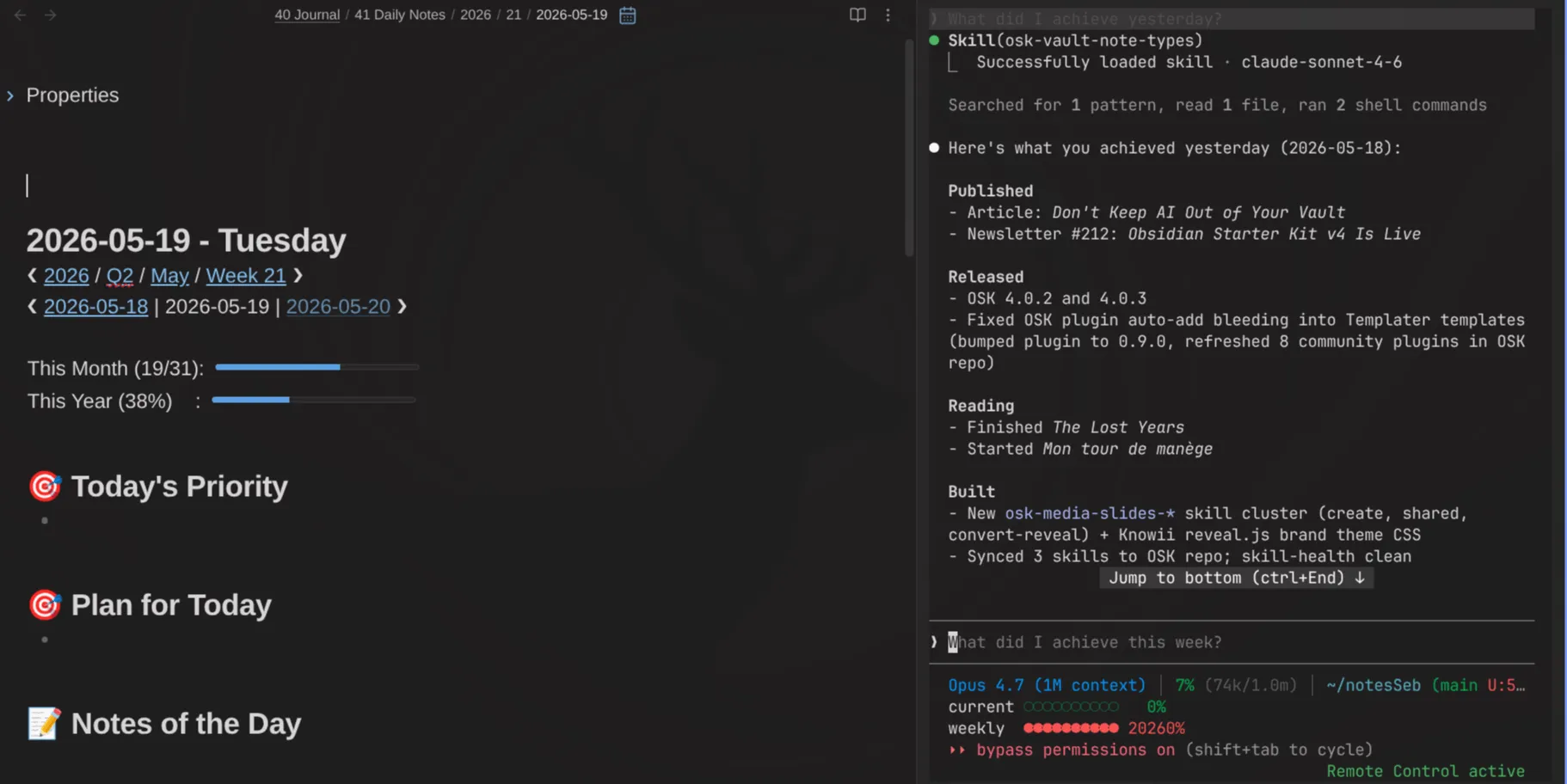
And if you want more like this, subscribe to my newsletter. I write every week about Knowledge Management, AI, and building systems that last.
 By
By
That's it for today! ✨
Sources
My own guides referenced above
- The Complete Guide to the Obsidian CLI: https://www.dsebastien.net/the-complete-guide-to-the-obsidian-cli-everything-you-can-do-from-the-terminal/
- The Complete Guide to Dataview in Obsidian: https://www.dsebastien.net/the-complete-guide-to-dataview-in-obsidian/
- The Complete Guide to Templates and Templater in Obsidian: https://www.dsebastien.net/the-complete-guide-to-templates-and-templater-in-obsidian/
- The Complete Guide to Obsidian Properties: https://www.dsebastien.net/the-complete-guide-to-obsidian-properties/
- How I Use AI With My Obsidian Vault Every Day, 16 Practical Use Cases: https://www.dsebastien.net/how-i-use-ai-with-my-obsidian-vault-every-day-16-practical-use-cases/
- Don't Keep AI Out of Your Vault: https://www.dsebastien.net/dont-keep-ai-out-of-your-vault-put-it-in-charge-of-the-plumbing/
- Your AI Doesn't Know You: https://www.dsebastien.net/your-ai-doesnt-know-you-why-pkm-is-the-missing-foundation-for-ai-agents/
- Heavy AI Agents Are an Anti-Pattern: https://www.dsebastien.net/heavy-ai-agents-are-an-anti-pattern-why-fewer-agents-with-more-skills-wins/
- Why Your AI Skills Break on Other Machines: https://www.dsebastien.net/why-your-ai-skills-break-on-other-machines/
- How I Build AI Skills That Actually Work: https://www.dsebastien.net/how-i-build-ai-skills-that-actually-work/
- The Must-Have Obsidian Plugins for 2026: https://www.dsebastien.net/the-must-have-obsidian-plugins-for-2026/
- How I Turned 20,000 Notes Into Live Dashboards With Obsidian Bases: https://www.dsebastien.net/how-i-turned-20-000-notes-into-live-dashboards-with-obsidian-bases/
- How I synchronize and backup my Obsidian Notes: https://www.dsebastien.net/how-i-synchronize-and-backup-my-obsidian-notes/
- How I Manage All My Tasks Inside Obsidian with TaskNotes: https://www.dsebastien.net/tasknotes-obsidian-plugin-task-management/
- How I use daily notes: https://www.dsebastien.net/how-i-use-daily-notes/
- How to Structure Your Daily Notes in Obsidian: https://www.dsebastien.net/my-daily-note-template-in-obsidian/
- Supercharge Your PKM Workflow with the Obsidian Web Clipper: https://www.dsebastien.net/supercharge-your-knowledge-capture-workflow-with-the-obsidian-web-clipper/
- Where Your AI Prompts Really Go, A Practical Guide to AI Privacy: https://www.dsebastien.net/where-your-ai-prompts-really-go-a-practical-guide-to-ai-privacy/
- Obsidian Starter Kit v4 Is Here: https://www.dsebastien.net/obsidian-starter-kit-v4-is-here-your-vault-is-now-a-full-ai-assistant/
- Dataview Serializer 2.0, Powerful Queries Without Sacrificing Data Portability: https://www.dsebastien.net/dataview-serializer-2-0-powerful-queries-without-sacrificing-data-portability/
- Agentic Knowledge Management, The Next Evolution of PKM: https://www.dsebastien.net/agentic-knowledge-management-the-next-evolution-of-pkm/
Official documentation
- Obsidian Help: https://help.obsidian.md/
- Obsidian CLI: https://help.obsidian.md/cli
- Obsidian Bases: https://help.obsidian.md/bases
- Obsidian URI: https://obsidian.md/help/uri
- Obsidian Web Clipper: https://obsidian.md/clipper
- Obsidian blog and roadmap: https://obsidian.md/blog/ and https://obsidian.md/roadmap/
Plugins and tools mentioned
- Templater: https://github.com/SilentVoid13/Templater
- QuickAdd: https://quickadd.obsidian.guide/
- Dataview: https://github.com/blacksmithgu/obsidian-dataview
- Tasks: https://github.com/obsidian-tasks-group/obsidian-tasks
- Linter: https://github.com/platers/obsidian-linter
- Meta Bind: https://www.moritzjung.dev/obsidian-meta-bind-plugin-docs/
- Modal Forms: https://github.com/danielo515/obsidian-modal-form
- Obsidian Git: https://github.com/Vinzent03/obsidian-git
- Advanced URI: https://github.com/Vinzent03/obsidian-advanced-uri
- Local REST API: https://github.com/coddingtonbear/obsidian-local-rest-api
- Shell Commands: https://github.com/Taitava/obsidian-shellcommands
- Excalidraw: https://zsviczian.github.io/obsidian-excalidraw-plugin/
- Post Webhook: https://github.com/Masterb1234/obsidian-post-webhook
- Readwise official plugin: https://github.com/readwiseio/obsidian-readwise
- Zotero Integration: https://github.com/mgmeyers/obsidian-zotero-integration
- Self-hosted LiveSync: https://github.com/vrtmrz/obsidian-livesync
- obsidian-export: https://github.com/zoni/obsidian-export
- Quartz: https://github.com/jackyzha0/quartz
- mcp-obsidian: https://github.com/MarkusPfundstein/mcp-obsidian
- Obsidian agent skills: https://github.com/kepano/obsidian-skills
- AI Agent Skills open specification: https://agentskills.io
- Beads: https://github.com/steveyegge/beads
- Steve Yegge, The Shape of Things to Come: https://yegge.ai/essays/the-shape-of-things-to-come/
- TypedMark Specification: https://developassion.github.io/TypedMarkSpecification
- Remotion: https://www.remotion.dev
- Espanso: https://espanso.org
- restic: https://restic.net
- Claudian (by YishenTu): https://github.com/YishenTu/claudian
- Local LLM Hub: https://github.com/takeshy/obsidian-local-llm-hub
- Unofficial Obsidian CLI: https://github.com/Yakitrak/notesmd-cli
My plugins
- Obsidian Starter Kit plugin: https://github.com/DeveloPassion/obsidian-starter-kit-plugin
- Obsidian CLI REST MCP: https://github.com/dsebastien/obsidian-cli-rest
- Dataview Serializer: https://github.com/dsebastien/obsidian-dataview-serializer
- Kanban Action Planner: https://github.com/dsebastien/obsidian-kanban-action-planner
- Ghost Publish: https://github.com/dsebastien/obsidian-ghost-publish
- Typefully: https://github.com/dsebastien/obsidian-typefully
- AI Editor: https://github.com/dsebastien/obsidian-ai-editor
- Life Tracker: https://github.com/dsebastien/obsidian-life-tracker-base-view
- Update Time: https://github.com/dsebastien/obsidian-update-time
- Expander: https://github.com/dsebastien/obsidian-expander
- Book Exporter: https://github.com/dsebastien/obsidian-book-exporter
- Time Machine: https://github.com/dsebastien/obsidian-time-machine
Community guides and perspectives
- Simon Späti, Keep AI Out of Your Vault: https://www.ssp.sh/blog/keep-ai-out-of-your-vault/
- Frank Anaya, Obsidian CLI complete guide: https://frankanaya.com/obsidian-cli/
- Integrating Obsidian with n8n: https://dev.to/airabbit/supercharging-your-knowledge-management-integrating-obsidian-with-n8n-for-automated-note-taking-workflows-38il
- Nicole van der Hoeven on Espanso: https://nicolevanderhoeven.com/
- Gage Lara, Obsidian to Quartz CI/CD: https://gagelara.com/
- Automating Obsidian Workflows for Large Academic Vaults: https://effortlessacademic.com/automating-obsidian-workflows-for-large-academic-vaults/
- Obsidian Hub: https://publish.obsidian.md/hub/
- Obsidian Forum: https://forum.obsidian.md/
About Sébastien
Ready to get to the next level?
Found this valuable? Share it with someone who needs it.