
A project is a promise with a finish line


"Project" gets stuck on almost anything. A quick fix. A vague ambition. The report you send every Friday. A product you've maintained for years. Once everything is a project, the word means nothing, and your project list can't tell you what you've promised, what's late or what's done.
In this article, I want to give you a simple definition of what a project is, show you what to keep off your project list, and give you a one-pager every project needs. It works whether you run your own projects, manage them for others, or work inside someone else's.
A promise with a finish line
A project is a promise with a finish line. And every project needs one home that holds its why, its scope, its status and its next action.
The Project Management Institute (PMI) says the same thing in more formal terms. In its PMBOK Guide, a project is "a temporary endeavor undertaken to create a unique product, service, or result". Temporary is the finish line. Unique is why routine work doesn't qualify: doing the same thing again and again is an activity, as we'll see below.
Getting Things Done (GTD), the method created by David Allen, sets a much lower bar: anything that takes more than one action is a project. That's why GTD project lists get so long. My definition adds two requirements: a finish line and a why.
What doesn't belong on your project list
Before you look at what a project needs, clear out what isn't one:
- A task is a single piece of work you can finish in a day or less. If it takes longer, it's a project in disguise.
- An idea is something you might do. You haven't committed to it yet, so it isn't a promise.
- A goal describes an outcome you want to be true, like "lead a team within two years". Projects are how you get there, one deliverable at a time. Give your goals at least a time horizon, so they don't stay parked forever and you feel a sense of urgency.
- An activity is ongoing work with no finish line: your weekly reporting, your health, a product you keep alive. It has a cadence and a standard instead of a deadline.
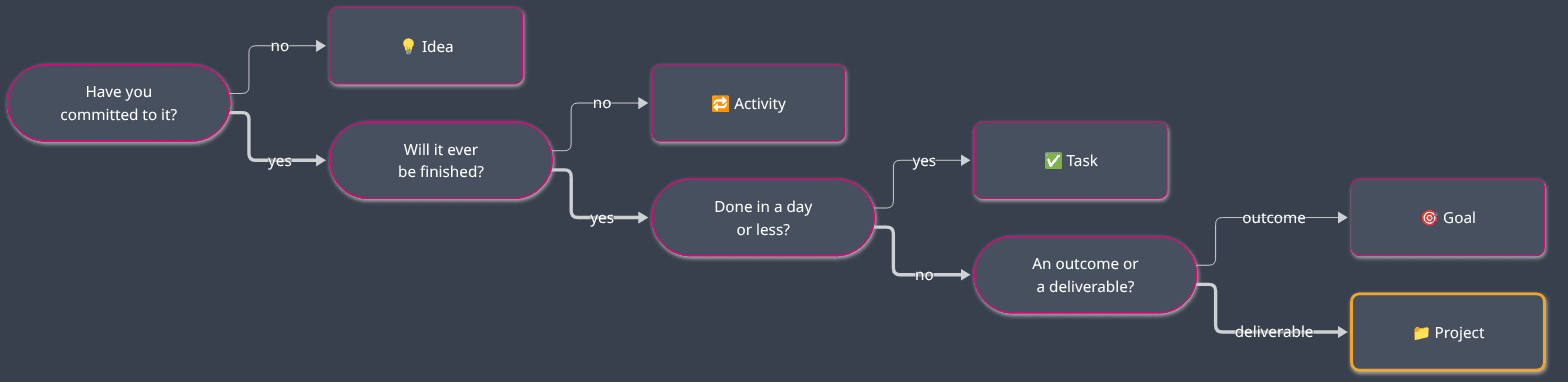
I explain the full model (ideas, goals, plans, projects, activities and tasks) in this article.
 Sebastien Dubois
Assets are activities, changes to them are projects
Activities cause the most confusion.
I used to call these evergreen projects. I now call them activities, because calling them projects made my project list lie. My Obsidian Starter Kit was my favorite example of an evergreen project: never "done", always getting another update. The idea still holds (launch early, keep improving). The label was wrong. Evergreen projects never end, and a project has to.
I use one rule of my own to settle most cases: assets are activities, and changes to them are projects. Anything you own and keep alive (a product, a website, your team's tooling, a community) is an activity. Every bounded change to it (a new version, a migration, a redesign) is a project. The project ends; the asset carries on.
Keep your project list honest
The PARA method, created by Tiago Forte, makes the same cut. It gives projects their own container, separate from areas, because projects have a goal and a time frame while areas don't. Areas are close to what I call activities. (I explain the method itself in this article.) When you open your projects, you should only see things that can be finished.
Mix them up and your backlogs die. An activity filed as a project never closes, so tasks keep piling into it, and its backlog turns into a dumping ground for everything related to that area. Ideas filed as projects do the opposite: the backlog looks full, yet nobody ever decided to do any of it. Either way, you stop trusting the list. Then you stop opening it.
The anatomy of a project
So what does a project need to stay organized? Seven things:
- A finish line: the objective (what you want to achieve, in a sentence or two) and the success criteria (how you'll know it's done). Make the criteria checkable. "The new version is live and the documentation is updated" can be checked; "improve the product" can't.
- Deliverables: what the project produces. A release, a report, a migrated system, a signed contract.
- A why: the goal or activity the project serves. Link to it. My rule: a project without a goal is a hobby, and a goal without a project is a dream. Hobbies are fun, but they don't move you forward; dreams inspire, but they have no path to realization. If you can't name a why, ask yourself whether the project deserves your time at all.
- A scope, in and out: what's included, and what's explicitly excluded. The out-of-scope list is the easiest one to skip. It's also the one that protects you when someone asks for "just one more thing" (that's how scope creep starts).
- An owner: one person accountable for getting it done. "The team" doesn't count.
- A status: where it stands right now (planned, active, on hold, completed, abandoned).
- A next action: the very next concrete step. A project without one stalls, even when everybody agrees it matters.
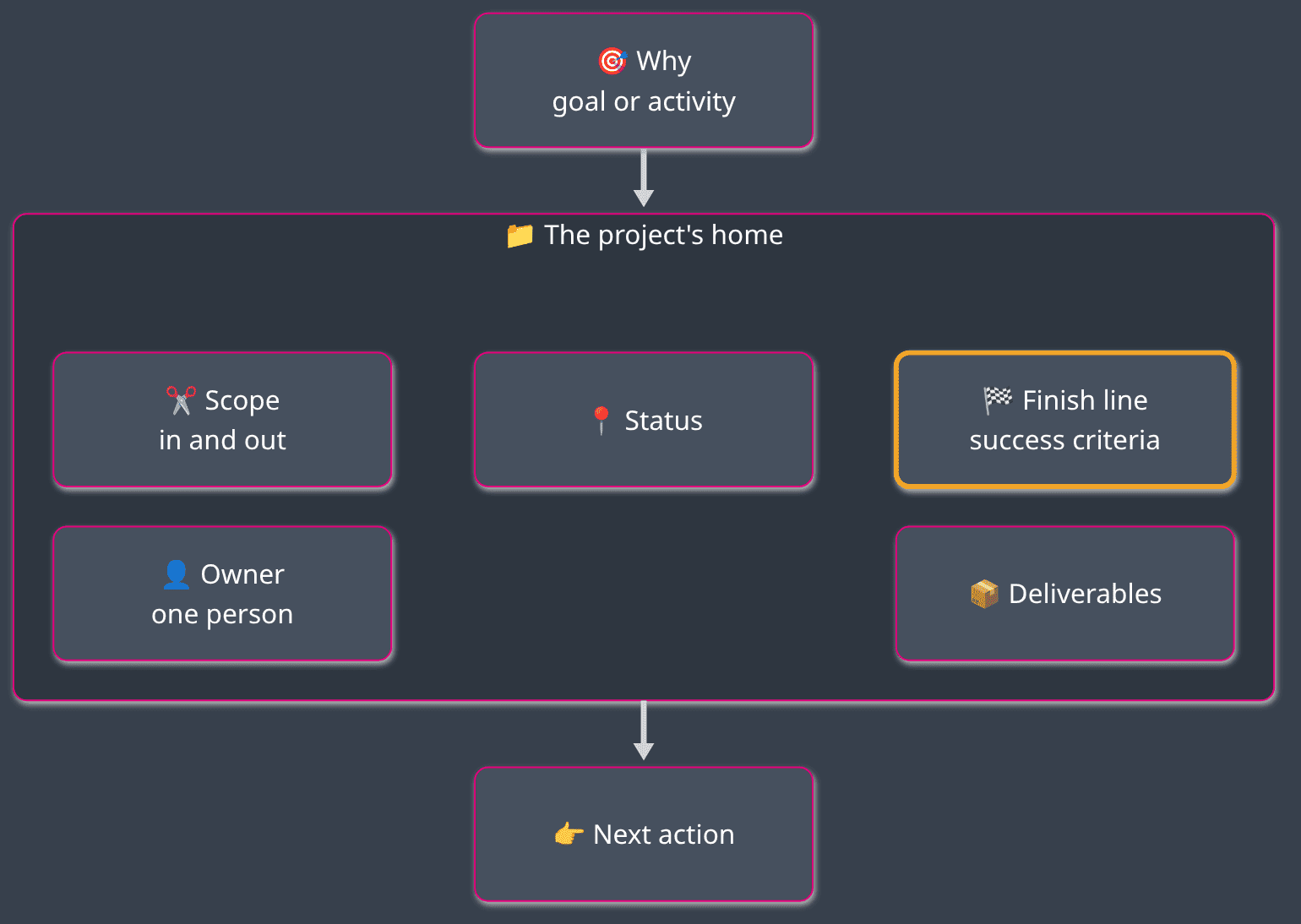
That's the minimum. Projects produce a lot more information: stakeholders, milestones, decisions, risks, dependencies, progress, lessons learned, and a backlog of tasks. You don't need any of it to start.
One home per project
All of this lives in one place. One note, one document, one page per project. Not half in an email thread, a quarter in a slide deck and the rest in someone's head. When anyone asks where a project stands, including you three months from now, the answer should be one click away. That's a single source of truth for the project.
One home doesn't mean everything is stored in one location. It means there's a single place where you can go and find anything, whether it's right there or somewhere else. In larger projects at work, we often have a wiki, a Jira project, a SharePoint folder and a Teams channel. The information is scattered across them, but each piece has one home, and the project's home knows where every other piece of the puzzle lives.
Writing it down also forces you to think it through, and gives you a snapshot to compare against reality later (Write down your plans).
Three angles on the same definition
A project looks different depending on where you sit. The anatomy stays the same, but what you own and what you should demand change.
If you're a solo creator
You're the owner, the manager and the team. Nobody will ask you for success criteria or push back on scope, so you have to do it yourself.
Here's how I apply this at DeveloPassion. The Obsidian Starter Kit is an activity: a product I keep alive. Each release is a project with a finish line. The release ends. The product doesn't.
What you own: everything on the anatomy list.
What to demand from yourself: a finish line written down before you start, an out-of-scope list (nobody else will say no for you), and one next action per active project.
If you're a project or program manager
From 2011 to 2014, I was the IT Project Leader of a large IT infrastructure project at the National Bank of Belgium. The job was scheduling, planning and organizing the team, in addition to my technical leader role.
When you manage projects for others, the project's home is yours to maintain. Others contribute to it, but you keep it current.
What you own: the finish line as agreed with the sponsor, the scope and its changes, an up-to-date status, and making sure every open piece of work has an owner and a next action. If you run a program, each project inside it needs its own finish line and owner; the program itself is closer to a goal that several projects serve.
What to demand: from your sponsor, a why and success criteria agreed before the work starts, plus a clear answer to "who decides when the scope changes?" From your team, deliverables that match the scope, and early warnings when they don't.
If you're a project team member
For a long time, I worked inside other people's projects at the Bank: as a developer, as a Scrum Master, as an IT architect and as a system engineer.
You don't own the project, but you own your part of it. You can't do good work toward a finish line nobody showed you. Oftentimes, it's up to you to define what the target state looks like.
What you own: your deliverables, your part of the scope, and the next action on your side.
What to demand: the objective and success criteria, what's in and out of scope, who owns the project, and where its home is. If nobody can answer these questions, raise it early. It's much cheaper to raise it in the first week than to discover it at the end.
And don't expect all the answers to be given to you. Depending on your background, it may also be up to you to inform, influence, define or propose alternatives, and explain the pros and cons of each.
Your project one-pager
Here's the minimal one-pager. Copy it into a note or a document whenever you start a project:
# <Project name>

- Objective: <what you want to achieve, in one or two sentences>
- Success criteria: <how you'll know it's done; make them checkable>
- Deliverables: <what the project produces>
- Why: <the goal or activity it serves>
- In scope: <what's included>
- Out of scope: <what's explicitly excluded>
- Owner: <one person>
- Status: <planned, active, on hold, completed, abandoned>
- Next action: <the very next concrete step>
For teams, Atlassian's Project Poster is a public one-page format built on similar questions (the problem, the why, what success looks like, the scope).
Pay attention to the lines you can't fill. They're telling you something:
- No success criteria? Then it's probably an activity or a goal.
- No why? Question whether it deserves your time.
- No owner? Then nobody is going to finish it.
- No next action? It's stalled, whatever its status says.
It takes five minutes to fill in. Those five minutes save you from weeks of work on something nobody cares about.
Conclusion
A project is a promise with a finish line. Keep your project list for things that can be finished, and it'll stay worth opening.
Give every project one home holding its finish line, deliverables, why, scope, owner, status and next action. Whether you're working solo, running the project or contributing to it, start with the one-pager. Everything else can come later.
This article is the starting point. The Knowledge Worker Kit has a whole part on organizing projects, and others on planning and prioritization and on task management:
 Richard Elliott
That's it for today! ✨
Go Further
Sebastien Dubois Sebastien Dubois
About Sébastien
Ready to get to the next level?
Found this valuable? Share it with someone who needs it.