
DeveloPassion's Newsletter #217 - Design the Week You Actually Want


Edition 217 of my newsletter, discussing Knowledge Work, AI, Knowledge Management, Zen Productivity, Personal Organization, and more!
Hello everyone! I'm Sébastien Dubois, your host. You're receiving this email because you signed up for DeveloPassion's Newsletter, or bought one of my products. Thank you for being here with me ✨
If you enjoy this, please forward it to your friends ❤️. If this email was forwarded to you, then don't forget to subscribe and become a supporter

Welcome
Welcome to all the new readers ❤️
This one is going to be shorter than usual (at least that's the plan, we'll see how it goes 😅). The wedding is 5 days. My bachelor party was this weekend, and apparently we survived ;-)
I've been running DeveloPassion at about ten hours a week to keep my head above water. A lovely reason to be busy.
Good news on the hardware front: the RTX 5080 saga from the last edition is over. It was not the GPU. The culprit was the RAM's XMP profile, which the new card refused to live with on my motherboard. One BIOS toggle later, no more crashes. Of course I had to "verify" the fix thoroughly. Red Dead Redemption 2, Cyberpunk 2077, Path of Exile 2. Purely for science 😉
On the reading side, I'm still in Dimensions (Book) by Nathalie A. Cabrol. Slow going, but I'm enjoying it.
Alright, let's gooooo 🚀
Highlights
- 📅 Design the week you actually want. Kanban Action Planner now holds your Ideal Week: decide where your hours should go to serve your goals, then compare it with where they actually went
- ✍️ Can you prove you wrote it? Daniel Prindii featured my Time Machine plugin for Obsidian in his newsletter, in a piece about proving authorship in the age of AI. It got me thinking, and I'm writing an article about it
- 🎁 A new free resource: The Complete Guide to Obsidian Automation as a 62-page PDF. Plus a brand new page listing everything I give away for free
- 🗺️ Knowii Learning Paths launched: https://learn.knowii.net tells you what to do first with everything you bought from me
- 📦 Obsidian Starter Kit v5 is about two weeks away. The release is almost ready. I'm holding it until after the wedding so I can be fully there for you when it lands
- 🎥 Knowii Video AI is now a working app.
- 🧩 The Obsidian Starter Kit gained Quick Actions, Activities and Ideas in the Action System, time budgets, and periodic notes with one shape at every level
- 🔌 The Obsidian Starter Kit plugin evolved a lot: status configuration, automation rules, template sections, validate and retype commands, object properties, ...
Before You Go Any Further
Help me reach more people; share the link with someone in your circle who'd benefit from joining us. And don't forget to mention the Knowii Community ❤️
And if you bought some of my products or courses? Please leave a rating/review. It really helps ❤️
📅 Design the Week You Actually Want
The Kanban Action Planner plugin for Obsidian continued to evolve a lot since the last edition. The feature I'm most excited about is the Ideal Week mode.
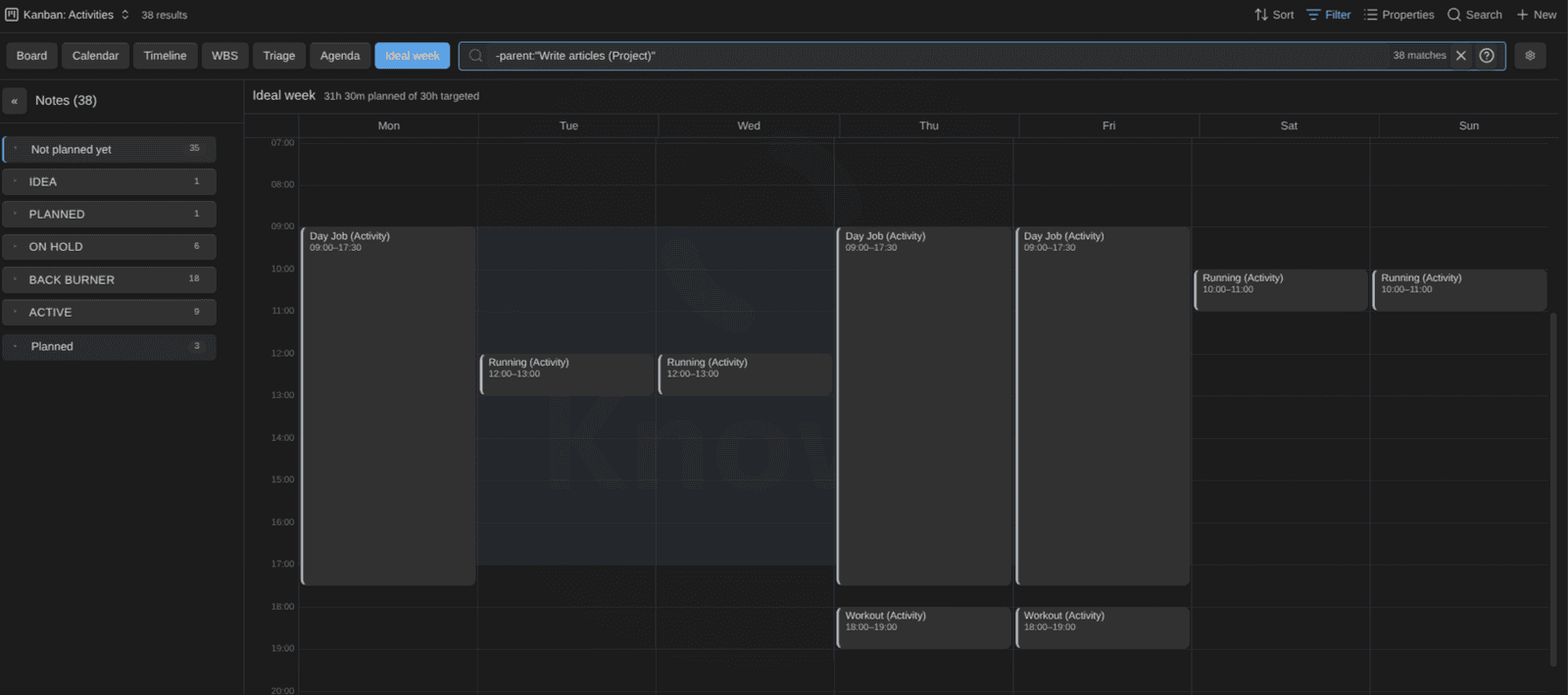
Ask yourself: if you could design a week from scratch, where would your hours go? What would the week that would actually move your goals forward look like? Most of us never answer that question. We react. The calendar fills up, the urgent eats the important, and at the end of the month we wonder where the time went.
The Ideal Week mode is a place to answer it. It's a grid of a week with no dates on it. You take your activities and projects (the ones linked to your goals), and you lay them out. Drag, resize, stretch across days, copy a block to another day, undo when you change your mind.
The point isn't to follow it to the minute. Reality will disagree with your ideal week every single week; that's fine. The point is to have designed it. To have sat down once, looked at your goals, and decided deliberately where your time would be best spent. That's what mindful time allocation looks like in practice.
Combined with the time tracking and Pomodoro support (added in v1.24), you can capture where your time went, and compare with how you wanted to spend it. This is valuable because it enables adjusting course as you go. Instead of reacting to whatever happens, you can step back and think "is this really what I should spend my precious time on right now?".
Try it this week: open the Ideal Week, place your three most important activities first, and only then let everything else fill the gaps.

✍️ Can You Prove You Wrote It?
Two weeks ago, Daniel Prindii published the 15th edition of his newsletter, titled "Can you prove your writing is your own, and it wasn't AI-generated?". In it, he featured a screenshot of my Time Machine plugin as one of the ways to keep a trace of how a text came to be. Thank you, Daniel! That made my day ❤️
 Daniel Prindii
Go read it. It's a good piece. Daniel cites a study where AI detectors flagged 60+% of essays written by non-native English speakers as machine-generated. If you write in your second language (like I do), the tools are biased against you. And watermarking won't save us either, because every AI company ships its own scheme, and none of them recognizes the others.
His conclusion: stop hoping for a detector, and keep an archive of your research and a journal of your progress instead. Drafts, sources, version history. The process becomes the proof.
I couldn't agree more.
The process is already there. You just have to keep it.
If you write in a local-first tool like Obsidian, with your vault in Git and something like File Recovery or Time Machine on top, you already have what Daniel asks for. Every version of every note. When it changed, how much, in which order. My own vault has years of that history. My daily notes describe what I worked on each day. My weekly notes list what I published, and where the ideas came from. And most of it is public: https://notes.dsebastien.net. In addition, I recently improved the Time Machine plugin for Obsidian to provide more ways to look at past versions of my notes, side-by-side with the current one. That's super useful, because it surfaces a very valuable but often hidden/ignored part of knowledge management: not only the current state of things, but the whole evolution over time!
I don't publish my notes to prove anything to anyone. Writing is thinking, and it's just how I learn, and how I grow. Making it all public has the benefit of serving others, which I find truly wonderful. I'm just applying the Feynman technique. By sharing my thinking, I also get to verify if my understanding is sharp enough.
Metadata: mark it at the source
There's a second layer: metadata in the notes themselves.
Every note type in my vault has an ai_generated property. When my AI assistant drafts a note, that flag is set to true. Today, 357 notes in my vault carry it. That includes drafts of articles, research briefs, session summaries, and yes, the first draft of this very newsletter, which my ghostwriter assembles from my weekly notes before I rewrite it. The flag means one thing: a machine touched this first, look twice.
That's useful to me, right now, without any external verification. It tells me which notes deserve attention before publishing. It tells me which notes I should re-read with a skeptical eye, because a model summarized a source I haven't fully read myself. And it keeps me honest about how much of my thinking is actually mine.
🎁 A Free 62-Page Guide, and a Page for Everything Free
Last month I published a long deep dive article: The Complete Guide to Obsidian Automation. Many of you asked for a version you could read offline. So here it is: the guide is now a free 62-page PDF, from your first template all the way to AI agents running on your vault.
The complete map of Obsidian automation, as a free 62-page PDF you can read offline, annotate, and keep.
What it is
The PDF edition of The Complete Guide to Obsidian Automation. Obsidian automation is three layers stacked on one idea: your notes are plain files, so anything can operate on them. The guide covers all three layers, in the order to adopt them:
- Part I: the mental model. Your vault as an operating system for knowledge, the four stages of automation, and the biggest mistake (automating too early).
- Part II, Layer 1: automation inside Obsidian. The seven jobs plugins should do for you: notes that are born correct (see Templater plugin for Obsidian), capture under three seconds, filing you never think about, formatting, queryable notes, state machines in frontmatter, buttons and commands.
- Part III, Layer 2: automation around the vault. Git, the command line, REST and MCP, URIs, backup and sync, scheduled jobs, publishing pipelines, ingestion, attachments, OS-level automation, mobile, batch operations.
- Part IV, Layer 3: AI agents on the vault. Instruction files, skills, hooks, MCP, multi-agent workflows, agents on a schedule, vault maintenance that runs itself, and the risks.
- Part V: a real setup. How a vault of 20,000+ notes runs with an AI assistant living inside it.
- Part VI: where this goes. The AI operating system, why it compounds, and the adoption path to start today.
Plus a FAQ and the full list of plugins and tools mentioned. The living version stays on the blog and is updated as the tooling evolves; the PDF is the edition you keep.
Who it is for
Obsidian users with a working vault who feel the daily friction: the same manual steps every day, notes that drift out of shape, ideas that never get filed, and no clear picture of where AI fits without handing their notes to a chatbot. Beginners should start with the free Beginner's Guide to Obsidian first, then come back. Everything in the guide is pre-built in the Obsidian Starter Kit.
How to get it
- Landing page (enter your email, the PDF arrives by email): https://www.dsebastien.net/free-complete-guide-to-obsidian-automation
- Store page (free download): https://www.store.dsebastien.net/product/obsidian-automation-guide/
- Online version: https://www.dsebastien.net/the-complete-guide-to-obsidian-automation/
Subscribing also adds you to DeveloPassion's Newsletter (unsubscribe anytime).
 Sebastien Dubois
And while I was at it, I finally created a page I should have written months ago: a single place listing everything I give away for free. Guides and downloads, free AI skills, videos, public notes, tools, etc. It's in the main navigation of my website now, under "🎁 Free".
 Sebastien Dubois
If you've ever wondered where to start with my stuff without spending a cent, start there.
🗺️ Knowii Learning Paths
Here's a problem I've had for a long time. When someone buys the Everything Knowledge Bundle, or joins the Knowii Community as a Knowledge Master, they get a dozen products and a ton of information at once. Courses, kits, workshops, guides, tools, etc. And that can be overwhelming: too many doors, no idea which one to open first.
That's why I built Knowii Learning Paths: https://learn.knowii.net
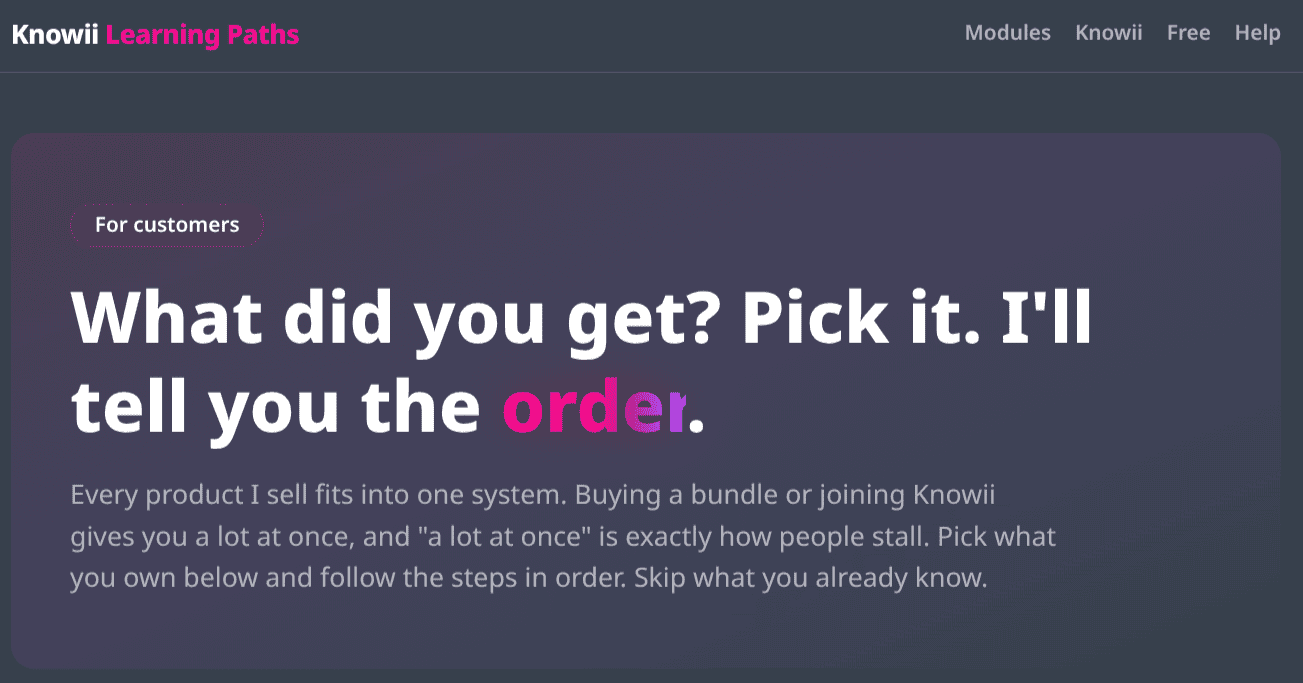
Pick what you own, and you get a step-by-step path: phases, time estimates, where each thing lives (your Gumroad library or a Knowii space), what to do first, what you can skip, and checkboxes that remember your progress. There's a path for every purchase: the bundle, each Knowii tier, each Obsidian Starter Kit variant, the Knowledge Worker Kit, the courses, every workshop, Knowii Voice AI, etc.
The site also explains how the Knowii community is organized, and has a help page for access questions.
If you own anything from me, go check your path. And tell me if something's missing or wrong. This is v1.

📦 Obsidian Starter Kit v5: Two More Weeks
In the last edition, I said mid-September. I'm going to retract that, and I want to explain why.
The v5 release is actually ready: the kit, the release notes, the migration guide, the launch article.
What's not ready is me. My wedding is next week. A release like this one generates questions, edge cases, and "it doesn't work on my machine" emails during the first days, and I want to be fully available to answer them. Shipping v5 and then disappearing for a week would be a disservice to my customers, and I don't want that.
So: v5 will land about two weeks from now, once I'm back and rested.
What changed in the kit since last time, beyond what I described in the previous edition:
- Quick Actions: a one-click layer built into the kit with Meta Bind, QuickAdd and Templater scripts. It wraps things OSK could already do (plugin commands, templates, captures) into buttons and hotkeys, so the most common operations stop requiring the command palette. Meta Bind and QuickAdd do the work; the scripts ask the OSK plugin where each note type lives, so nothing is hardcoded. It comes in three parts:
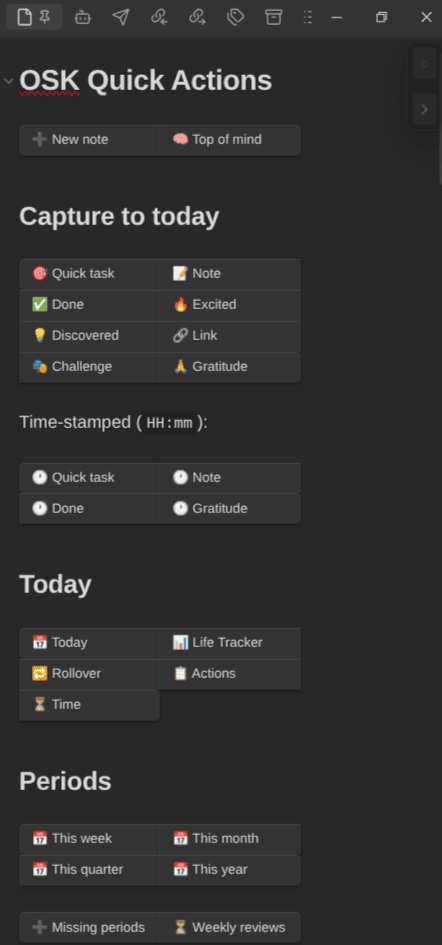
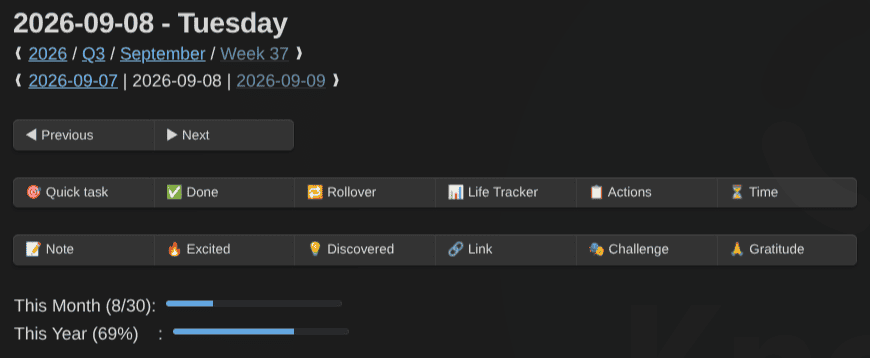
- The OSK Quick Actions note, meant to be pinned in a sidebar. As the name implies, it provides easy access to different actions: create a typed note, capture to today (a task, a note, something done, something you're excited about, a discovery, a link, a challenge, something you're grateful for, etc), open today's note or the Life Tracker, roll over yesterday's tasks, open your actions or your time views, jump to the current week, month, quarter or year, create the missing period notes, and the maintenance row: validate, retype, move to the type's folder, open the Time Machine. Buttons clicked from the sidebar act on the note you were last working in
- Quick actions in periodic notes: ◀ ▶ navigation and the capture row in every daily, weekly, monthly, quarterly and yearly note, so the actions are right where you are
- New Commands: every quick action can be invoked through the Obsidian Command Palette, and you can also bind those to hotkeys
The Quick Actions note:
In daily notes:
I recorded a short video of the "Quick task" action to show how efficient it is:
The whole thing is documented in the user guide, with a tutorial on creating your own buttons.
- Activities and Ideas joined the Action System. Activities are ongoing areas of responsibility (akin to the Areas in PARA) with no end date (writing this newsletter is one). Ideas are candidate actions captured before they become a goal, a project or a task. I migrated 37 activities and 65 ideas in my own vault, and it feels good because it's much clearer this way.
- Time budgets and lifecycle dates on every action system type: how many minutes a week you want to give something, when it was committed, started, completed, ...
- The bundled OSK plugin and osk-cli evolved a lot too. Status configuration, automation rules, template sections configuration, validate and retype commands, object properties. More details in the Lab section below
- Periodic notes with one shape at every level: intentions at the top, captures in the middle, a Closing section at the bottom. Same section names in daily, weekly, monthly, quarterly and yearly notes. The old "Last Week Review" block at the top of the weekly note is gone; it was last week's closing, so it now lives at the bottom of last week
- Meeting notes slimmed down:
decisionsandactionsare properties now, the body is Participants and Minutes, and the Meetings view shows both columns - Many improvements to the included Obsidian Bases
- A new Foundation page on customizing the kit: what each change touches, what to adapt per plugin, the pitfalls, and the eject button if you want to leave the OSK structure behind, along with the pros and cons of doing so
The price reminder still stands: OSK's price will go up when v5 ships. Buying now means v5 as a free update at today's price, with the lifetime upgrades offer still in place.
 Dwayne Appleby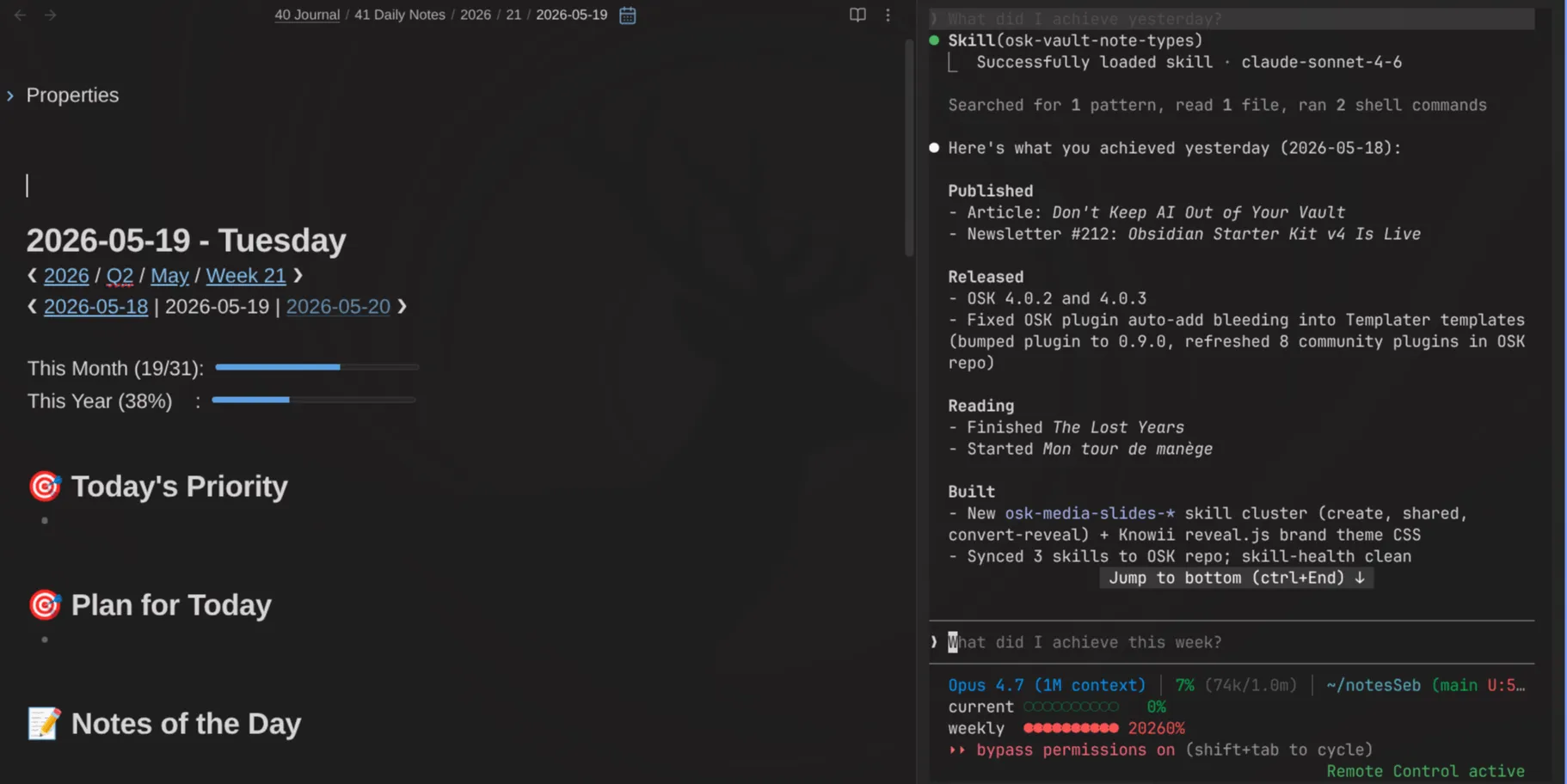
🎥 Knowii Video AI: It Works
Two editions ago, Knowii Video AI was a plan. It's now an app I can actually record with. Still rough. Still tons to do. But the core loop is there:
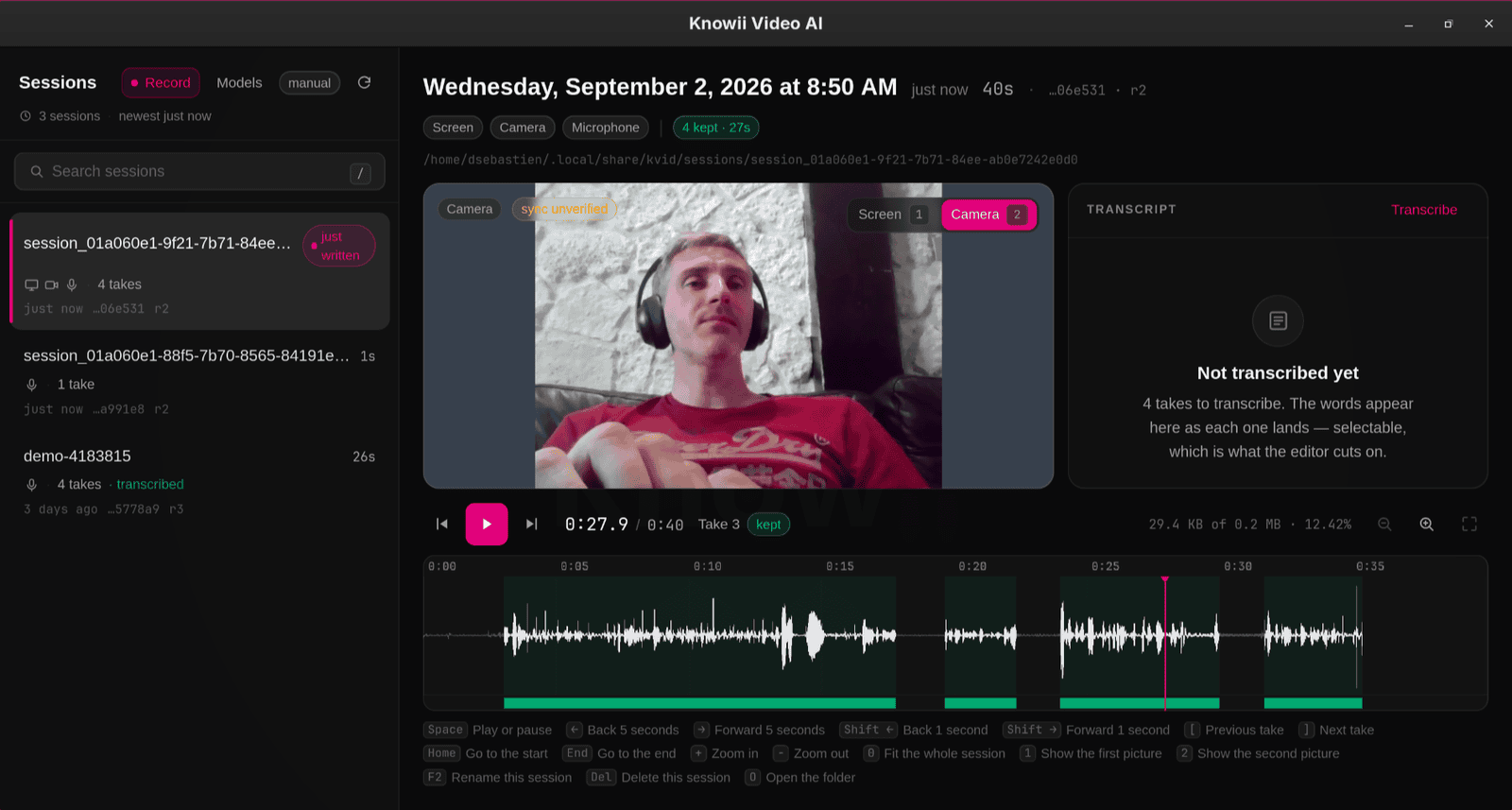
The workflow is smooth; Stop talking and the clip stops. Talk again, and a new clip starts. Finish the session and the transcript can be generated easily. Edit the transcript to edit the video. And there's a ton more.
The part I'm most excited about is that AI Agents can drive all of it through the included MCP server. Every feature has to work on three surfaces: the window, the command line, and the agent.
I still need a few things before I use it for real videos (the first-run setup, better messages, a few window gaps). But I'm close. And I can't wait to record the OSK v5 launch video with it 🔥
The Lab 🧪
🧩 Obsidian Starter Kit Plugin Evolution
The Obsidian Starter Kit plugin for Obsidian evolved a lot. I released twelve versions in the past week. Here's what's coming with OSK v5:
Status configuration per note type. Each note type now declares its status property, its values, which values count as done, the outcome of each. Skills, boards and the CLI read that configuration instead of hardcoding values.
Automation rules. This is something I wanted to build for a while. A note type can now carry rules: when the status becomes X, stamp date Y. When a creation is published, flip published to true. When a book moves to Reading, stamp date_started; when a note has been done for N days, move it to its archive folder.
Headings. The plugin now knows the headings of every note type, with a description per heading. Rename a heading in the settings and the template is rewritten. Or just edit the template, and the plugin also knows. The osk-cli sections <type> exposes the structure, which is very useful for AI: my skills now ask the CLI where the Done section is instead of hardcoding "## ✅ Done".
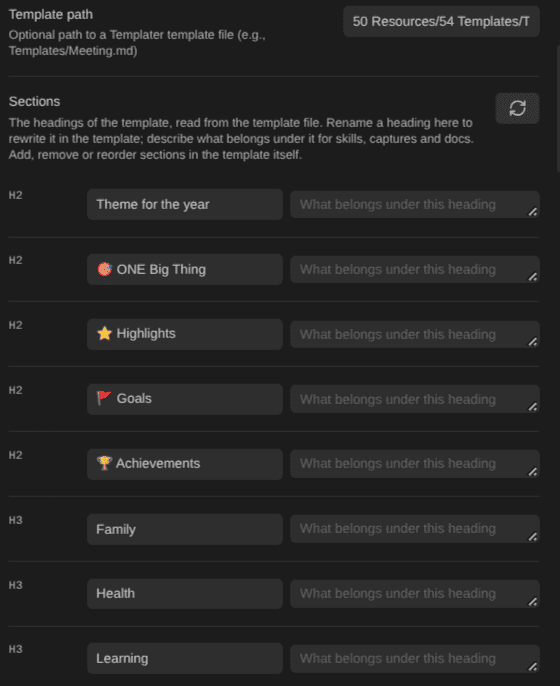
This is the next level. Having clearly defined note types and property schemas was already a huge win for my system. Now, having clearly defined body structures is even nicer.
Validate and Retype as commands. I've added various commands that act on the note you were last editing: validate & fix it if needed, validate a complete folder, validate the whole vault, recognize the note type, insert missing sections, rename the note to respect the type's pattern, etc. And I've also added an easy way to "retype"; change a note's type, migrating all the metadata and structure without losing anything. The retype action also moves the note where it belongs. And all of that is also available through the API, MCP and the Command Line Interface (CLI).
⏳ Time Machine: Side by Side
The Time Machine plugin for Obsidian now has a side-by-side view: open a note as it was in a pane next to the live editor, so you can look at previous versions on the left while the note stays editable on the right.
 dsebastien
🔌 Agentic Resource Discovery Improvements
Agentic Resource Discovery: subagent definitions are now a second catalog next to skills. I've also improved hybrid search using local embeddings. In my own setup, replacing my skill registry with the Agentic Resource Discovery search cut my session boot from 98K to 48K tokens. Half the context, same capabilities.
Knowii Voice AI Improvements
Knowii Voice AI: A big batch is waiting for the next release: AI post-processing of your dictation (an optional cleanup pass through a local or cloud model, dictation only, off by default), light and dark themes, auto-submit after paste, trailing space after paste, GPU support for Whisper, improved audio capture quality. Also, about about 3x faster inference on Vulkan and fast models loading. Again, I'm just waiting for the wedding to be over before I release the new version!
🧠 Tip of the Week
If you file weekly notes by year and week, use the ISO week-year. Not the calendar year.
Two weeks ago I found a bug that had been in my setup for a long time. My daily notes are filed under <year>/<week>. The week number was ISO (correct), but the year was the calendar year. Those two don't agree around New Year: December 30, 2024 is week 1 of 2025. So every year, one week got split across two folders.
Worse: my Periodic Notes weekly format used locale-based week tokens, where the week starts on Sunday. So every single Sunday resolved to the following week. Oops...
🧠 Quotes of the Week
Making a good decision is about the process, not the outcome - Shane Parrish
If writing is thinking then what happens if AI is doing the writing and reading - a Hacker News commenter
The best talent has proof of work, not memorisation - Tim Denning
Until Next Time
Thanks for reading. Reply to this email if something resonated, something annoyed you, or you just want to say hi. I read everything.
The next edition will probably come from a married man 💍
That's it for today! ✨
Ready to dive in?
- 🚀 Get the Obsidian Starter Kit before v5 and the price increase: https://www.store.dsebastien.net/product/obsidian-starter-kit/
- 🎁 Grab the free Complete Guide to Obsidian Automation: https://www.dsebastien.net/free-complete-guide-to-obsidian-automation/
- 🧠 Join Knowii: https://www.store.dsebastien.net/product/knowii-community/
- 🎙️ Try Knowii Voice AI: https://voice-ai.knowii.net
- 📺 Subscribe on YouTube: https://www.youtube.com/@dSebastien
- 🔌 All my free tools: https://tools.dsebastien.net
- 📰 More content at https://dsebastien.net
Talk to you again soon ❤️
— Sébastien
About Sébastien
Ready to get to the next level?
Found this valuable? Share it with someone who needs it.