
DeveloPassion's Newsletter #216 - My AI Assistant Is Turning Into an Operating System


Edition 216 of my newsletter, discussing Knowledge Work, AI, Knowledge Management, Zen Productivity, Personal Organization, and more!
Hello everyone! I'm Sébastien Dubois, your host. You're receiving this email because you signed up for DeveloPassion's Newsletter, or bought one of my products. Thank you for being here with me ✨
If you enjoy this, please forward it to your friends ❤️. If this email was forwarded to you, then don't forget to subscribe and become a supporter
Welcome
Welcome to all the new readers!
It's been four weeks since the last issue, and August was BUSY. I've published multiple deep dives about Obsidian. New free tools and AI skills. Improved many of my Obsidian plugins, and recorded a new video. I've also worked on other cool projects. I'll share some details about those in this edition.
Let me start with life outside the screen. Wedding preparations are ongoing. We aren't ready yet, but we're almost there. And we better be, the wedding is in less than a month! Quite stressful, but it's a lovely project (pun intended) :)
My son Raphaël just started his third year of kindergarten. He'll be five soon, and watching him grow is a real pleasure. My soon-to-be-wife started working in a new school (after 16 years at her previous one), with a new class to set up and a new interactive whiteboard to tame. That required quite some time, and I tried to help as much as I could. Such life transitions are impactful; different habits, new people, new place, etc. Quite the change! Plus the road to get there was far from easy. She had ups and downs during summer, and it was nerve wracking for both of us. But Monday she came home from her first day happy and calm. I'm really happy for her ❤️
On the running side, I went out one morning planning to do 15 or 20K and came home with almost 22. I'm proud of that one.
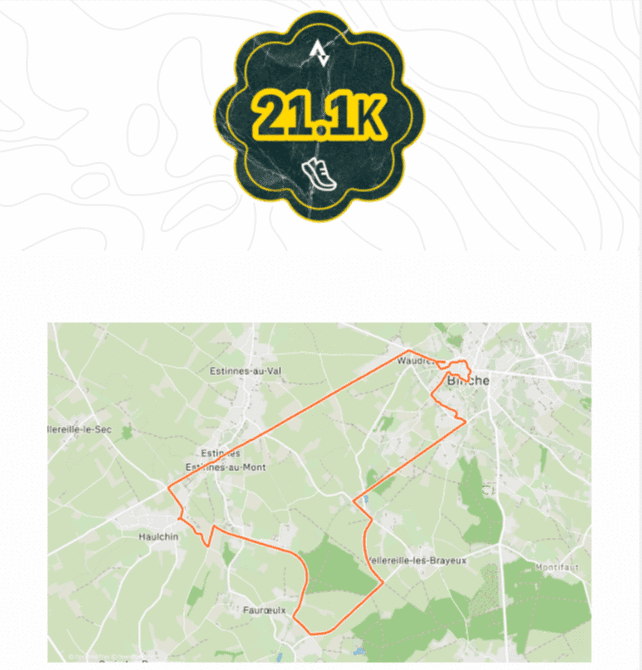
I had already ran half marathons before, but it felt great to finally be able to run such a long distance. Next challenge: the marathon! I'm still a few months away from being able to, but I feel more and more confident. I'll get there, I just have to double the distance 😂
I did some interval runs with my son Matthieu. That was HELL. Matthieu is 16 and runs... much faster than I can. Trying to follow his pace was probably a bad idea. But I'm glad because I managed to beat my PR on 400m (1:25). We also played some Padel; I really love that sport and need to play more.
On the reading side, I finished Dreamcatcher (Book). I loved the movie many years ago, but never read the book (★★★★★, King remains King). I also read Écrits et châtiments (Book), written by Yann Slône, an indie writer I met recently. I wouldn't say I loved it, but the storyline was fun. I've now started Dimensions (Book) by Nathalie A. Cabrol.
One low point: I ordered a new GPU (an RTX 5080) and it has been driving me completely nuts. Random crashes, cryptic hardware errors, etc. I wasted an entire weekend trying to fix the problem(s). Driver reinstalls, BIOS flashes and fiddling with the config, etc. It's better than it was, but it's still not fixed. It's wasted a lot of time I would rather have spent building. But hey, when it doesn't crash my computer, I can feel it's a great GPU 😅
Alright, let's get to the good stuff 🚀
Highlights
- 📦 Obsidian Starter Kit v5 is coming, around mid-September. The biggest alignment release yet: new plugins, my AI skills, my AI assistant system, and a much stronger OSK plugin
- 🧠 I'm building an AI operating system. My assistant outgrew "a tool I use" and became a system I run. I'm now turning that into a real product: Knowii AI OS
- 🎥 A new project: Knowii Video AI. An AI-first recording and editing studio where the transcript is the editing interface. Building starts soon
- 🤖 The Complete Guide to Obsidian Automation published. My longest guide ever, from templates all the way to running an army of AI agents on top of your vault
- 📊 The Complete Guide to Dataview published, with around 50K views on Reddit alone
- 🧩 Kanban Action Planner went from 1.12 to 1.17, and I recorded a complete video tour of it
- 📈 Life Tracker got goals, progress rings, personal records and range charts, closing more than twenty community issues across 2.21 → 2.23
- 📄 reMarkable Sync 1.16.0: PDF export, annotated PDFs, highlights and typed-text extraction, thanks to a huge community contribution
- 🎙️ Knowii Voice AI 0.8.0 and 0.9.0: drop a file, get the text
- 💬 A brand new free tool: Discord Sync CLI, to export, archive and actually use everything buried in Discord servers
- 🎬 A complete Remotion video pipeline: branded videos, vertical shorts and Instagram carousels, generated from my articles
- 🔒 A security and quality sweep across my whole plugin fleet, taking several repos from dozens of vulnerabilities down to zero
Before You Go Any Further
Help me reach more people; share the link with someone in your circle who'd benefit from joining us. And don't forget to mention the Knowii Community ❤️
And if you bought some of my products or courses? Please leave a rating/review. It really helps ❤️
📦 Obsidian Starter Kit v5 Is Coming
Let me start with the one that's closest: I'm targeting around mid-September for Obsidian Starter Kit v5.
v5 is an alignment release. Everything I've changed in my own vault over the past months, brought back into the kit.
New plugins in the kit. Six additions: Kanban Action Planner, AI Editor, Agentic Resource Discovery, Copy Image, Claudian and Terminal. Four retired plugins removed. And all 32 bundled community plugins bumped to the versions & configuration I actually run today.
My AI skills. Over the past months I've built a large library of AI skills that drive my vault: writing, reviewing, publishing, research, task management, reviews, health tracking, and much more. A good chunk of that is already in the kid, and new ones are coming along with v5, so you get a working AI assistant on top of your vault from day one.
The improvements to my AI assistant system. The structure around the skills: how agents are defined, how they remember things, how they hand work to each other, how the vault tells them where notes belong. That structure is what makes the whole thing work, and it's the hardest part to figure out on your own.
A stronger OSK plugin. The Obsidian Starter Kit plugin for Obsidian comes with various improvements and bug fixes:
- Property type sync. The plugin now registers every defined property's type in Obsidian's own property registry, so the property editor and Bases finally render the right control everywhere. 289 properties synced in my vault. It only ever removes assignments it made itself, and conflicting definitions get skipped and reported rather than silently overwritten
- A new
osk-selectwidget. Properties with allowed values get a real dropdown: every value listed until you type, the default marked, invalid values shown in red with a tooltip explaining why. Because Bases renders cells through the same widget registry, it works inside Bases tables too - A rewritten Bases integration. The new validation service highlights invalid values across table rows (allowed values, number ranges, list items, expressions) and enforces global properties even on notes it doesn't recognize
- A de-hacked property editor. I removed a pile of ugly workarounds while keeping the icons, number steppers, input hardening and mandatory tags menu
- Generate a
.basefile per note type, with filters derived from that type's tag and folder mappings, display-named columns and a table view. It never overwrites without asking - Fixed the MCP server port leaking on plugin reloads, and fixed note type auto-detection so an explicit type value falls back to the match rules when it isn't registered
And more: updated bases, new note types, etc.
One thing worth mentioning: OSK's price has gone up several times over the years as it grew, and it will very likely go up again when v5 lands. If you've been considering it, buying now means you get v5 as a free update at today's price. For now I'm keeping the lifetime upgrades offer; don't miss it while it's still exists.
 Dwayne Appleby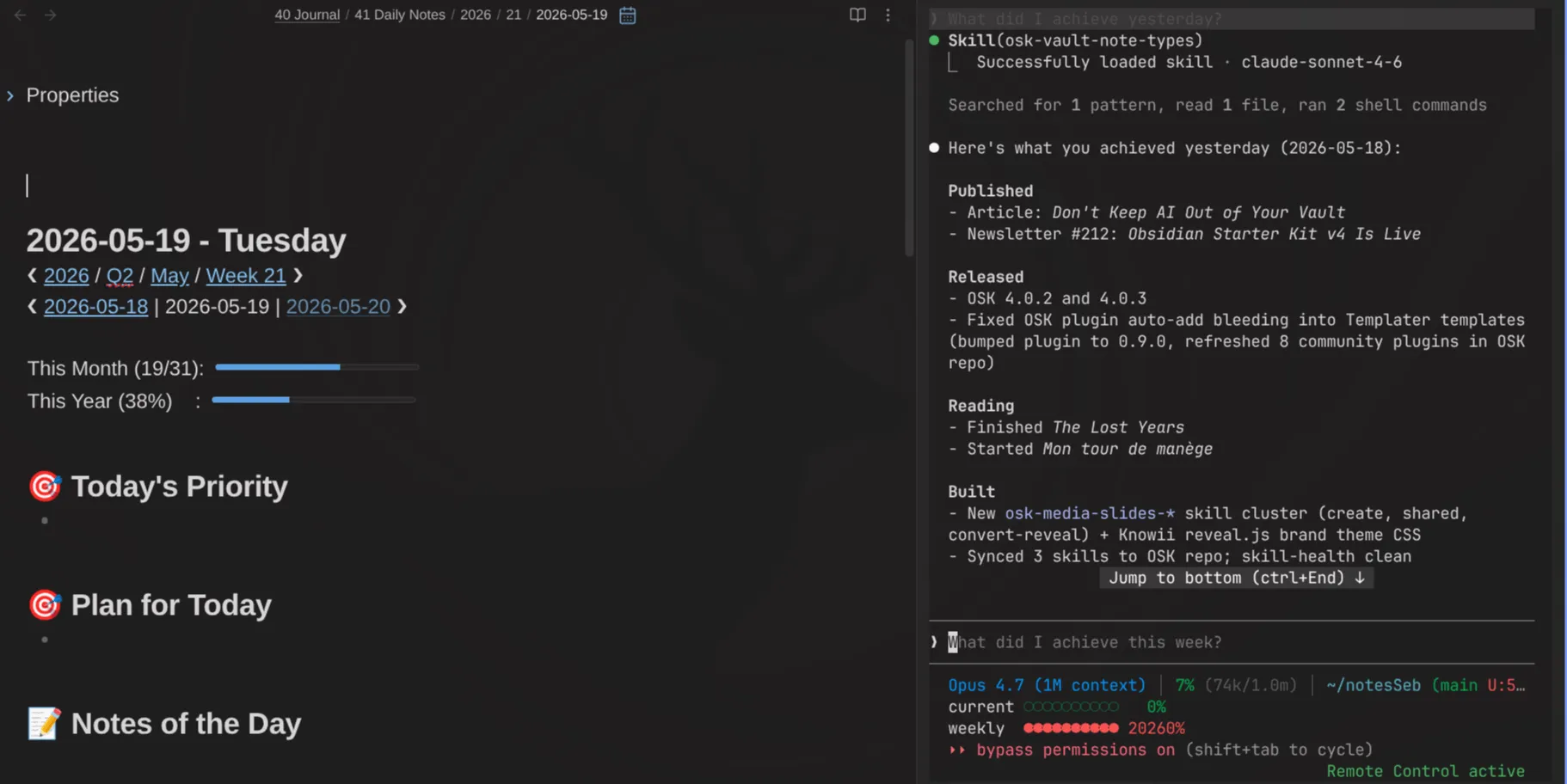
Not convinced yet? Just check out the testimonials: https://www.store.dsebastien.net/testimonials?product=obsidian-starter-kit
🧠 My AI Assistant Is Turning Into an Operating System
In the last edition of this newsletter, I argued that Obsidian is a platform, and that your notes are "just" the data layer. This month, that idea continued to circle around in my mund, and I want to walk you through it because it's now a big project I'm working on.
Quite a while ago, I stopped randomly asking AI to help me with tasks, and started giving it a place to live. That place is my vault. Every AI session I run starts from my notes, instead of from a blank chat window and a prompt I retype for the hundredth time. My identity, my voice, my products, my customers, my projects, my processes, my note type definitions, my ideas, my tasks, etc. All of it sits in plain Markdown files that any agent can read. When I ask for a newsletter draft, the agent doesn't guess at my style. It reads the note that describes my style. When I refine that note, every future session gets better. That compounds, session after session.
Agents that can read the vault can also write to it, and agents that can write to it can maintain it. At which point the system starts doing the bookkeeping I used to do by hand: filing notes in the right folder, updating statuses, rolling up progress, logging what I published, reconciling my boards with reality. At that point you're not using AI as a tool anymore. You're running a small operating system, and your vault is its filesystem; albeit a limited one.
Consider what an operating system actually provides: a place to store things, a way to name and find them, processes that run, permissions about what those processes may touch, and a shell to drive it all. My vault has all five. Files and folders for storage. Note types and properties as the naming scheme. Agents and skills as the processes. Privacy exclusions and writes I have to approve as permissions. The Obsidian CLI as the shell.
Your vault should be the starting point of every AI session, not an afterthought you paste into one.
But actually, I consider what I currently use as nothing but a limited first iteration on the whole idea.
Where this is going: Knowii AI OS
Using my system for long enough made me feel all the gaps and limitations. That why I've started designing a real product around it. It's called Knowii AI OS (KAOS), and I've spent a big part of this month defining what it's actually going to be.
Let me give you the high level version of what I want to create.
One central place for everything AI. Right now my agents run in terminals on my laptop/desktop, within or outside Obsidian, on a server, in different tools. What I want to create is a single place where I can see and manage everything: every AI session, every agent, and every piece of work in flight: what's running and where, what finished, what it cost, what it changed. Today that information is scattered across a dozen surfaces and mostly invisible, hard to maintain, hard to track and hard to manage. That's the first thing I want to fix. What I want is a knowledge work factory, with many workers focused on serving me and my business. I want to manage the factory itself, the machines, the tools, the security, the environments. Everything.
A Chief of Staff. The default agent, always present, always in charge when I'm not around. Its job is to run the place. It routes work to the right agents, answers when nobody specific is addressed, and writes me an overnight digest: what happened while I slept, what it decided, what it spent. When something fails, it triages: retry the transient stuff, re-plan the recoverable stuff, and park the hard ones with an actual diagnosis I can see and act upon. When I describe something I want in plain language, it figures out what kind of work that is and comes back with a proposal I can approve, adjust, or reject. Nothing runs until I say go. It's an evolution of my current AI receptionist (cfr Receptionist AI Design Pattern).
I also want Feedback and steering, from anywhere. An inbox that holds everything needing me: questions, approvals, failures, budget alerts. That inbox then projects into the channels I actually use during the day (Discord, WhatsApp, email, whatever), so I can approve something from my phone while walking, or reply to an agent's question without opening my laptop. Replies flow back in and wake the agent up. The channels are just windows into the overall system. Same for AI agents; they operate within a whole, not in isolation anymore (e.g., OpenClaw, Hermes Agent, etc). Same thing for "simpler" harnesses like Claude Code, OpenAI Codex and the like.
Scheduled, recurring work. A lot of what I want from an assistant isn't a one-off request; it's factory work. Check this every morning. Review that every Friday. Watch this thing and tell me when it changes. Prepare that draft every month. I want to define recurring work once and have it run reliably, with each run visible and reviewable rather than happening invisibly in a cron job I forget exists. All managed centrally. All happening on different computers and servers.
Everything stays in Markdown files I own. Tasks are notes. The inbox is notes. Decisions are notes. Agents' memory is notes. No proprietary database holding my system hostage. If I stop using the product tomorrow, I keep everything, and it's all still readable.
I've been running this design through a lot of "day in the life" scenarios rather than jumping to code, because I want something that can truly serve me (and hopefully others). There are still many high-level architectural and design questions I need to explore. But the shape is clear, and I'm genuinely excited about it 🔥
I'll have much more to say soon. If any of this resonates, please let me know.
🎥 Knowii Video AI: My Next Project
One are where I've been wanting to improve and accelerate is VIDEO. I've been growing my YouTube channel for quite a while. And it's HARD. What I find especially time-consuming is not so much recording. It's everything that comes after that: assembling, editing, adding effects & transitions, generating subtitles, creating descriptions, pinned comments, thumbnails, social media posts, etc.
I've already automated many of those tasks through AI skills integrated into my Obsidian vault. But it's still way too slow.
As an example, recording the Kanban Action Planner tour took me about 1h30 min (preparing the high-level script, recording, redoing some takes because my mouth didn't manage to follow my brain, etc). And that's just a third of the work I had to do. After that I spent about the same time exporting to mp4/m4a then importing those into Adobe Premiere, then editing, adding transitions, etc. Finally, once I finished the final cut and exported it, I used AI to generate the video note, the thumbnails, etc. One more hour later and it was finally online.
All in all, it took me about 4 hours (probably more) to go from the idea to the published video. And that one didn't even require doing additional research. It's just way too much. And that's one reason why I have a hard time getting more videos out, while my backlog of video ideas keeps growing like crazy. There's a TON more things I want to record, explain, showcase, etc. And so little time available.
So I've made up my mind. I need to make my life easier. I need better tools. And I'm going to build my own. We now live in the "software for one" era, so why wouldn't I? I did it for voice (that one serves me all day long!), so why not do it for video?
What I've started working on is called Knowii Video AI, and I've spent the last two days researching, defining and planning it.
Here's the idea.
Record continuously, and let silence do the cutting. Camera, screen and microphone captured together. While you're still recording, silences longer than a threshold automatically split the take into clips. Screwed up a sentence? Hit a hotkey and the last take is rejected on the spot, and later a voice command will do it too, since Knowii Voice AI is right there. No scrubbing through a timeline afterwards hunting for your own mistakes.
Then the transcript becomes the editing interface. Every clip gets transcribed locally with word-level timings, with a dictionary pass so my own vocabulary comes out right instead of becoming nonsense. From that point on, I edit by selecting words. Cut a sentence by deleting it from the transcript. Tighten a passage. Remove the filler words. Add a zoom on a a part of the screen. Switch the layout so my face moves to a corner.
With an AI agent that can actually understand and act on it all. The whole feature set is exposed over MCP, so AI agents can drive the session: read the transcript, look at the exact frame that will render on export, and come back with proposed cuts and improvements. Propose-only by default. Nothing is applied until I approve it, and checkpoints make batch edits reversible. AI takes care of all the tedious work; the recording part simplifies the 80% that bores me to tears; I do the last 5%.
Every export lands in my vault. File over app, applied to video. When a video is exported, a note gets written or updated with the transcript, the metadata and the links. So I can search what I said in a video, link to it, and find it again two years later, the same way I do with everything else I keep. Today that content is already in my vault, but again, the way I currently do it is too slow and time-consuming.
A few more things I want in there: multi-select some clips and extract them into a vertical Short in one action, brand-styled captions, Remotion overlays for title and definition cards reusing the templates I just built, and export of the master plus subtitles plus the transcript as JSON.
This will NOT be a general video editor. I don't need that. I have no interest in chasing after Adobe. That would be nonsensical. What I'm building is a piece of software that matches and accelerates my own workflow.
It'll be built like Knowii Voice AI: a cross-platform desktop app, local-first, with the core loop working fully offline. It'll only support Windows and Linux at launch because that's what I use, but feel free to change my mind if you want this on Mac.
I didn't make all of this up. I've actually been inspired by multiple people like Juri Strumpflohner (Ciak), Matt Pocock (Course Video Manager), and Kent C. Dodds who has also built something similar. They all arrived at pretty much the same approach independently. I studied what they've shared carefully, and arrived at the conclusion that their workflows and mine are very similar, and most of their ideas resonated with me. And it's quite obvious actually; they're all YouTubers and course creators, creating tons of video content. So they share the pains I feel.
So what's next? First, I'm building this for myself. I need this to exist. I'm the guinea pig. I need to build it now, and I need to build it right. And once I'm satisfied with it, I'll consider adding it to my offers.
If you record video (or want to) and this sounds like it would help you, please reply to this mail. I'd love to hear what your own recording/editing challenges are.
The Lab 🧪
📝 New Obsidian Deep Dives
The Complete Guide to Obsidian Automation. This is the big one, and I think it's the most comprehensive article I've written this year. It walks through three layers: what you can automate inside Obsidian (templates, Templater, QuickAdd, and friends), what you can automate around Obsidian (the CLI, scripts, services, hooks), and what becomes possible once AI agents sit on top of both. It ends with the vault-as-AI-operating-system model I described above (the "weak" version, but still quite powerful).
It's a very long read. I hope you'll enjoy it.
 Sebastien Dubois
The Complete Guide to Dataview. Query everything in your vault, then make those queries last. People who start using Dataview usually realize their notes are a database. The guide covers the query language, the patterns I use and recommend, the traps, how to serialize results so they survive outside Obsidian (or outside Dataview itself, which matters a ton), and more.
 Sebastien Dubois
🧩 Kanban Action Planner: A Complete Tour
The Kanban Action Planner has been getting a LOT of my attention. It went from 1.12 all the way to 1.17 over these four weeks, and I finally sat down and recorded a tour of it.
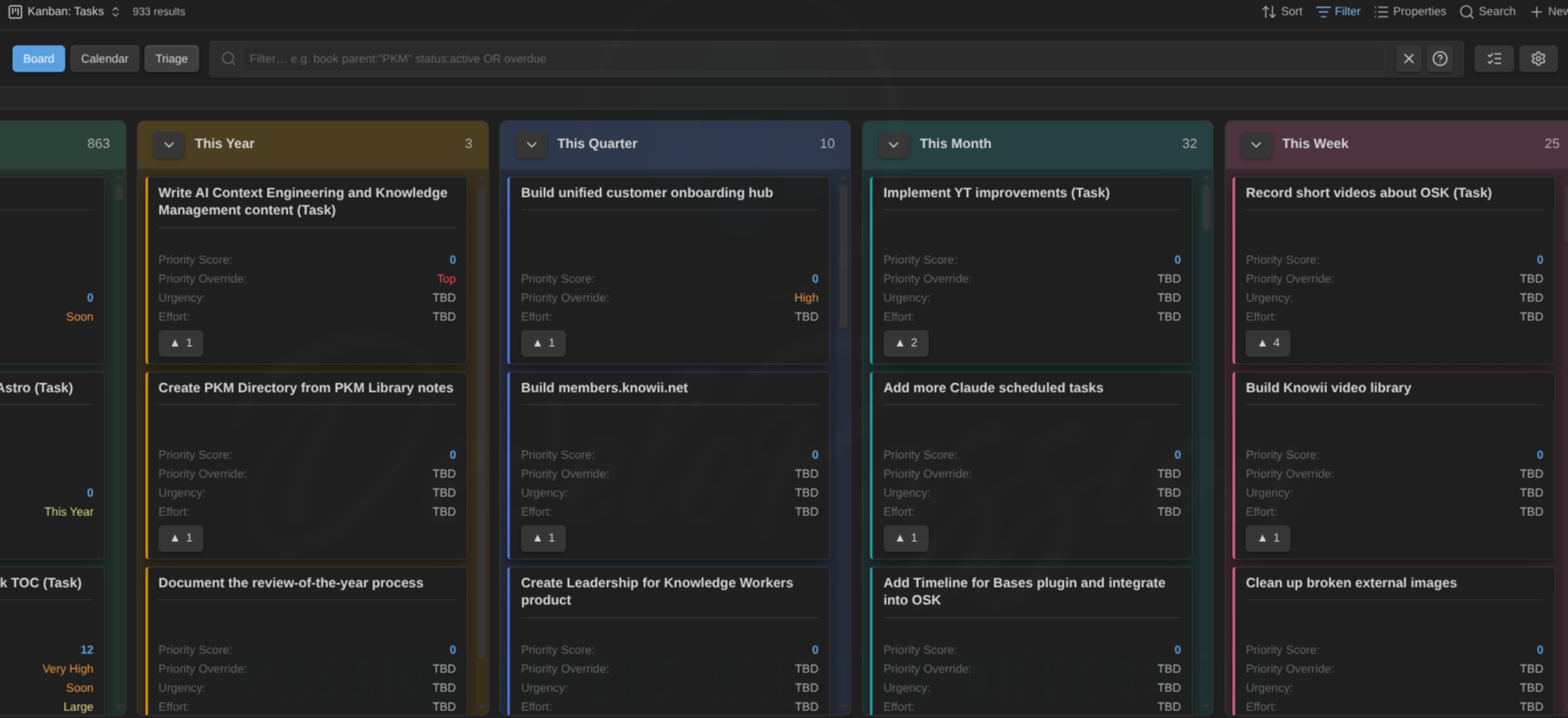
The video walks through many of the features: boards, calendar, timeline, triage, the Work Breakdown Structure (WBS) view, and live boards embedded anywhere in your vault. Everything saved straight into your notes, not into a plugin database. The video was long enough, so I stopped at some point, but there's actually more to discover.
If you find this useful, please subscribe to my YouTube channel ❤️ I'm investing more into video this year and every subscriber really helps: https://www.youtube.com/@dSebastien
What's new in the plugin:
Agenda mode (1.14.0). A sixth view mode listing Overdue, Today and Upcoming, with a Today/Week window switch and an "available only" toggle that tells you how many items it's hiding. Rows open notes and carry the full card menu, so it's a real working view rather than a read-only summary.
Defer dates and availability (1.14.0). A new "can't start until" property, resolvable globally, per note type, or per view. Deferred cards render muted, and there's a new is:available filter meaning "not deferred, not blocked, not done". If you run any flavour of Getting Things Done (GTD), this piece was missing.
Much sharper embed control. You can now restrict an embedded board to specific columns (columns=) or specific swimlanes (lanes=).
Column aggregates and countdowns (1.16.0). Aggregates in the column header, plus a per-view countdown source.
Bulk actions on multi-selection (1.14.0). Right-clicking a card inside a multi-card selection used to open the single-card menu and silently act on the clicked card only. Now you get a proper bulk menu (set status, archive, open, clear) labelled with the selection count, acting on everything you selected. The keyboard menu follows the same rule.
Boards inside Canvas (1.16.1). Boards embedded in an Obsidian Canvas are now fully interactive, with drag and drop working properly, and the canvas card's size driving the board.
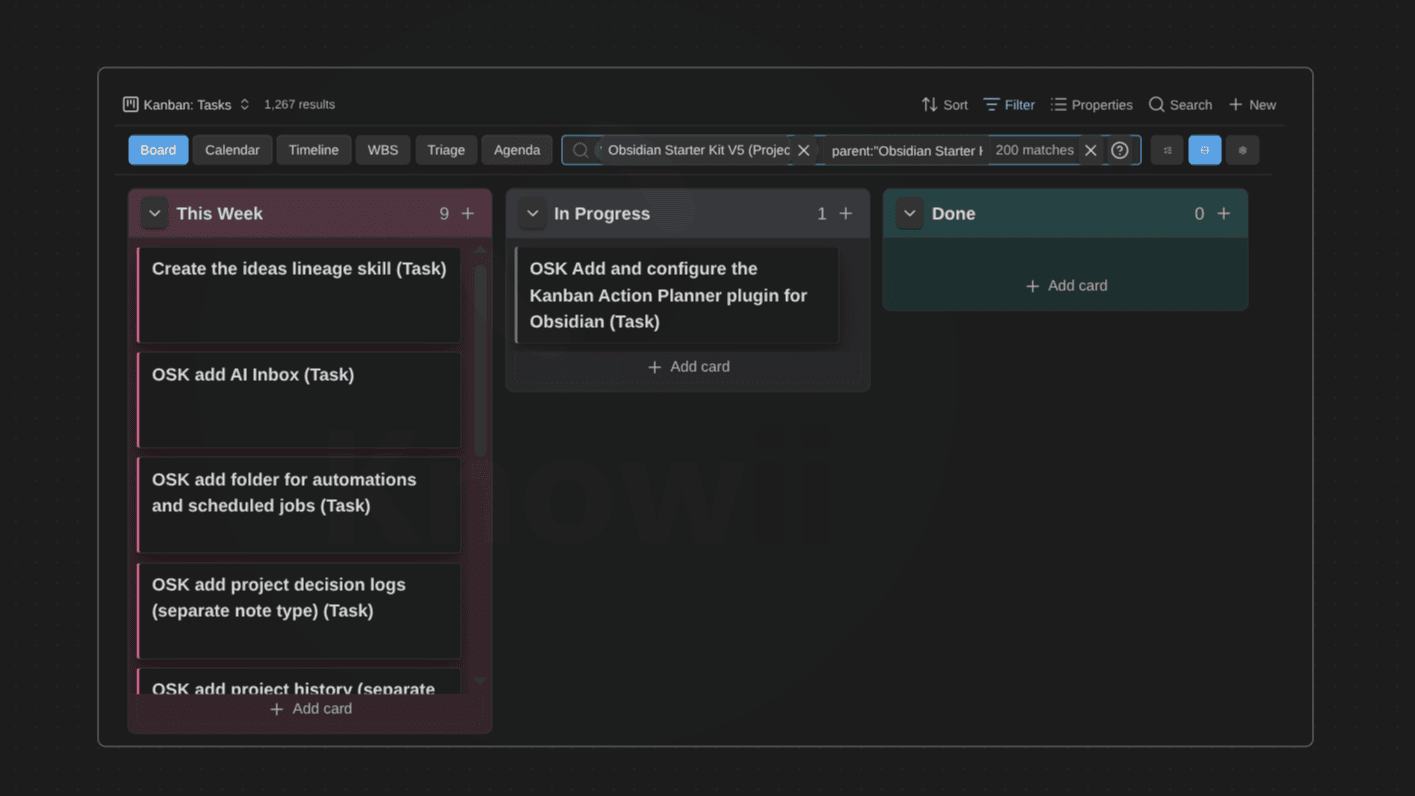
Filter qualifiers and WBS polish (1.17.0). A new filter qualifier, ghosted context row chips in the WBS view, and a fix for expand/collapse-all icons that had gone invisible.
Plus a batch of bug fixes (1.13.0): send-to-top/bottom no longer jumps the column scroll position, deleting a note elsewhere in Obsidian no longer leaves a ghost card on the board, and dragged cards no longer snap back to their old column.
I also spent a few hours researching some issues and ideas. And thanks to that, I discovered that native Kanban support is coming to Obsidian Bases, probably sooner than later. I knew the Obsidian team had that on their roadmap, but I didn't know they actually started working on it. In reality they've already added some related internal APIs in Obsidian. That's great news. But to be honest, I think this plugin will remain far ahead; especially because it cares about note types whereas Obsidian itself doesn't.
Now, over to you: do you have questions, feedback, or features you'd like to see in this plugin? Reply to this email or open an issue on GitHub. I read everything, and a lot of what shipped this month came directly from user requests.

 dsebastien
📈 Life Tracker: Goals, Rings and Records
I've also worked on the Life Tracker plugin for Obsidian.
I've added support for defining goals and targets, with a new ring visualization. A target reads as one plain sentence: <measure> per <period> must be at least (or at most) <value>. It lives per visualization rather than per property, so one property can carry two different goals, and cartesian charts draw the target as a reference line.
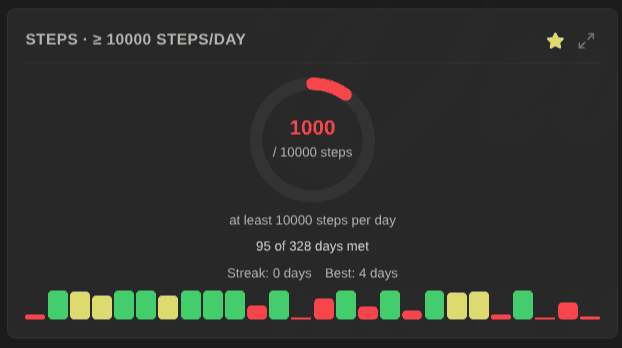
Ring colours follow the goal's direction. An "at least" goal runs red → yellow → green as it fills up. An "at most" budget runs green → yellow → red. Small change, but I like it a lot. It builds upon the support I added recently for marking properties as either positive/good or negative/bad (aka "polarity").
I then set different goals for myself in my own health dashboard: three days a week doing squats, abs, push-ups, lunges and toe tips, 150 reps a week on squats, 10,000 steps a day, and at most 80 kg.
I've also added support for keeping track of Personal records. Properties with a polarity now show a 🏆 record chip carrying your best raw entry (not a period aggregate), on charts and in the heatmap streak row, plus a "New record!" notice when you strictly beat it. Neutral properties show nothing, because not everything you track deserves judgement.
Range charts. An overlay type drawing one floating bar per period, from a start property to an end property. My use case: To Bed → Wake Up, on a clock-time axis, with spans crossing midnight drawn continuously into the next day and late-evening bedtimes clustered on one band. I now have a sleep window chart running over ~100 days of data.
X-axis source. Line, bar and area charts can plot one point per note, labelled with the note name and following the Base view's own sort order, instead of grouping by date. That finally makes Life Tracker useful on Bases of books, projects or people.
High contrast mode. An opt-in setting swapping chart and heatmap palettes for maximum-contrast ones, thickening borders, removing dimming and strengthening focus outlines. Custom value-to-colour mappings are deliberately left alone, since those colours encode meaning.
Running totals. A new option on line and area charts plotting the cumulative total, so 20, 15, 30 pages read reads as 20 → 35 → 65. I kept it separate from the Aggregation setting rather than making it a third value, so "average per week, cumulative" stays expressible.
And a long list of fixes...
Thank you to BramManuel, who reported different issues; the exact kind of feedback I need to make plugins better. All of those are now fixed.
 dsebastien
📄 reMarkable Sync: PDF Export and Typed Text
This release exists because of a contributor, and I want to be clear about that.
Andrew Doering created a PR adding support for PDF export and typed-text extraction to reMarkable Sync plugin for Obsidian. I reviewed the whole thing with AI, manually and adversarially with another AI. Those reviews identified some issues, which were easily fixed, and I could then merge these new features. Thank you, Andrew !
The result, shipped as 1.16.0: PDF export, annotated source PDFs, text highlights, and typed-text extraction from your reMarkable straight into your vault.
1.15.0 also brought panel sorting, stroke colour mapping, automatic background sync, searchable settings, a hover tooltip on the sync status dot, better error reporting when a page fails to render, and graceful recovery from a corrupt authentication token (it now just asks you to re-authenticate instead of breaking at load time).
 dsebastien
🎙️ Knowii Voice AI 0.8.0 and 0.9.0
The release I teased last time landed 🎉
File transcription is the main new feature. Drag and drop a file, pick one from the tray, or queue several with skip and cancel. Long recordings get silence-cut chunking so they don't choke. And there's now a bundled transcribe CLI in every installer, so you can script the whole thing (or use it with AI).
In addition, everything I described last time shipped alongside it: word replacements for terms that always come out wrong, phonetic replacements that map a transcribed sound to the right term even across alphabets, opt-in filler word removal, a Whisper prompt to hint the model about your vocabulary, digit sequences written as numbers, --toggle-transcription / --cancel / --start-hidden / --no-tray for scripting and keybinds, an in-app log viewer, a reworked audio pipeline recording at your microphone's native quality, and checksum-verified model downloads for safety.
0.9.0 followed quickly, fixing a serious Windows issue that crashed the app after two or three seconds. If you're on Windows, make sure you're on 0.9.0.
I'm now experimenting with "instant" transcription, where transcribed text is pasted as you go, and not only at the end of the recording. Not yet ready for prime time though ;-)
 Sebastien Dubois
 Sébastien Dubois
💬 A New Free Tool: Discord Sync CLI
Yesterday I also created a new little tool that I then open sourced.
Years of community knowledge live imprisoned in Discord servers, and exploring it all is HARD. You can only scroll back up so many times, and it's hard to keep track of what you've explored already. This frustrated me, and so I decided to ask Claude Code to help me build a little utility: Discord Sync CLI.
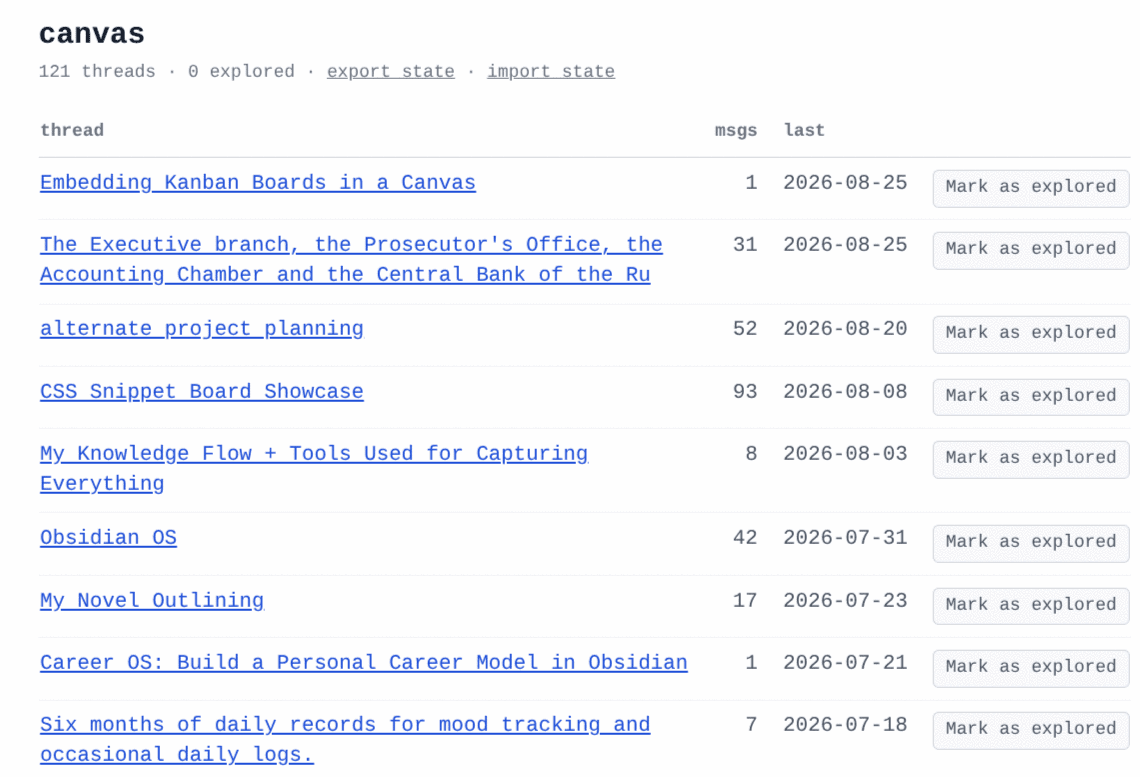
Discord Sync CLI turns any server/channel you have access to into a local archive you own. Once the data is exported, you get it as JSON, HTML, and Markdown. In addition, all the assets (images, embeds, etc) are downloaded so you have it all forever.
This tool also creates an index, lets you navigate from thread to thread, and mark each one as explored. This way, you know exactly what you've already looked at.
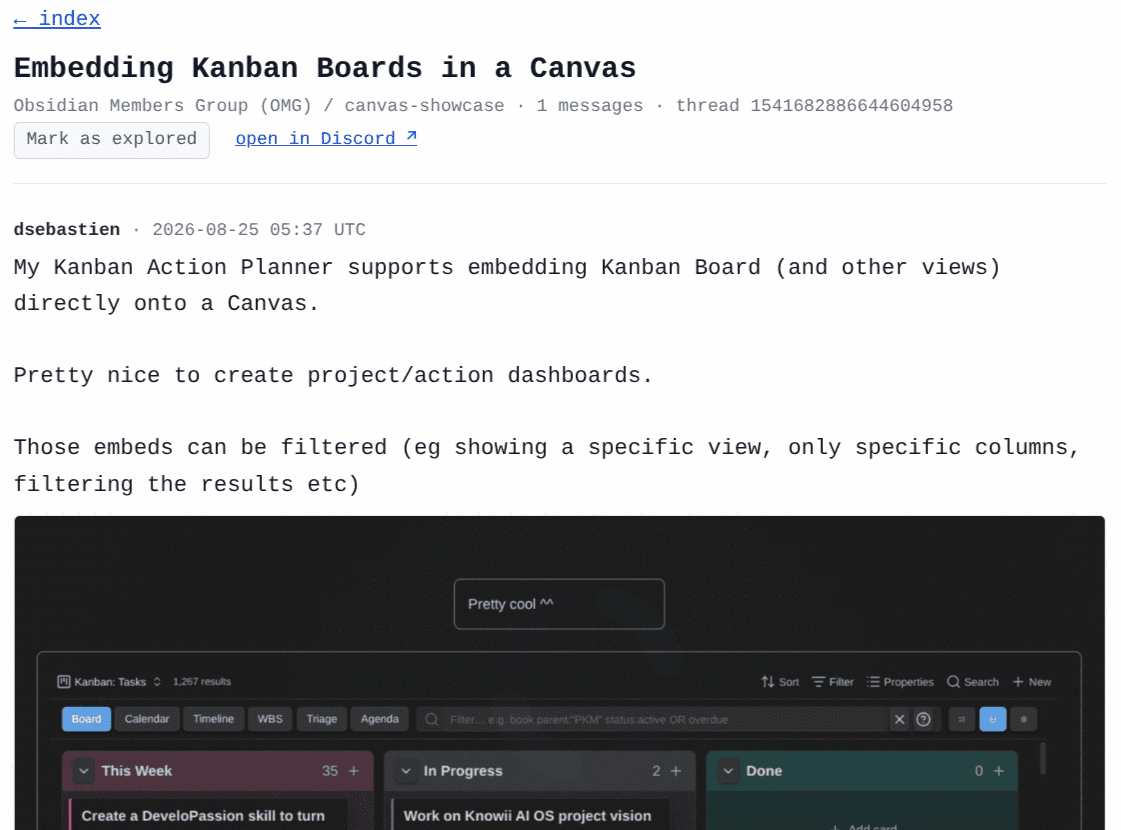
There are also deep links back to every message within Discord (assuming those still exist when you'll click on them).
Here's what it looks like:
Discord Sync CLI has a Command Line Interface (CLI) and a Terminal User Interface (TUI).
When you run the TUI, you have to provide a valid Discord token (explanations are available in the documentation). Then, you can browse every server you have access to, drill into channels, mark what you want (✓ synced, ◇ selected), and queue syncs. So it's not just a one-time thing. You can synchronize whatever you don't have yet over time. Only messages newer than the last recorded message ID get fetched, then merged into the master exports. So you sync once properly, then top it up.
The output is also generated in Markdown, meaning that it's a breeze to then import it in tools such as Obsidian. In my case, this all goes directly into the content curation system in my Obsidian vault.
Under the hood, Discord Sync CLI leverages the excellent DiscordChatExporter through Docker, then adds everything that makes archiving practical over time: sync-state tracking, incremental updates, asset preservation and readable output.
One warning: automating a user token violates Discord's Terms of Service and can get your account terminated. Use a bot token wherever you can. And don't blame me if you get banned ;--)
 dsebastien

🤖 AI Editor: Grammar, Fixes and Field Reports
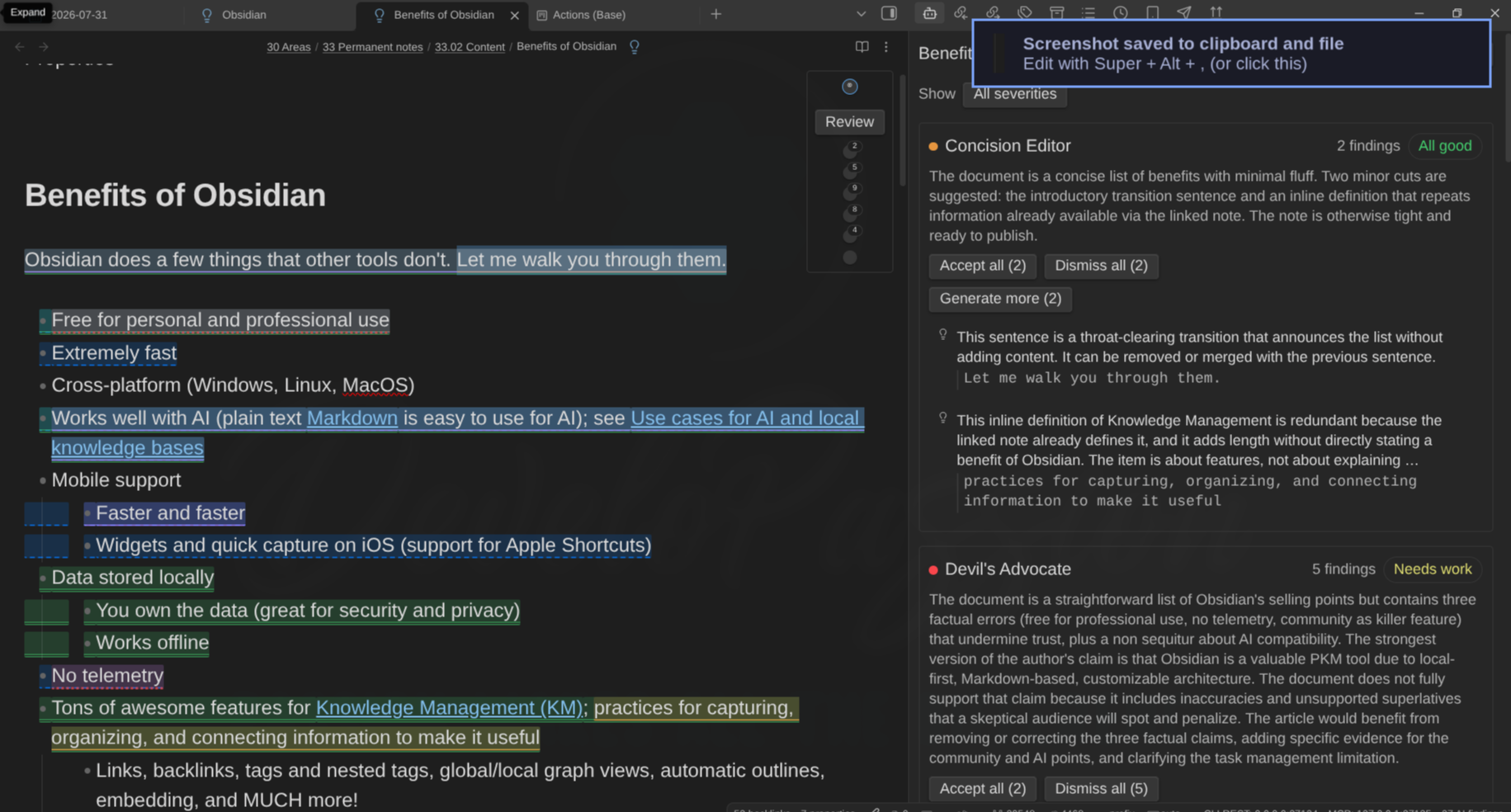
AI Editor, the plugin I announced last time, kept moving.
I implemented the Grammar Editor (a revised starter pack of editors), and shipped a much better experience for exploring findings, plus a Continue/expand action and a better UI for the rail (the editors list displayed at the top right of a note). I also fixed different little bugs to iron things out. Note renames now don't lose the findings anymore.

🔌 Other Project Updates
I've updated my Obsidian Plugin Template (Bun); what I use as basis for creating all my plugins. I ported it to Obsidian 1.13's declarative settings API, moved to Bun 1.4.0, added a CI audit gate, made tests run isolated, patched five high advisories, etc.
Then I started a systematic "fleet review", applying those template fixes plugin by plugin and running reviews using different AI models. I also updated the dependencies, fixing dozens of issues and vulnerabilities along the way.
Dataview Serializer plugin for Obsidian 2.15.0 and 2.15.1. Steven Carter sent performance improvements: vault file names indexed once per file instead of scanned per link, links rewritten in a single pass, cheap comment-marker gates before parsing, widget DOM reuse, DataviewJS timeout issues, etc. Cool stuff! Thank you, Steven ❤️ I also restored debugLogging, which had been a silent no-op since 2.6.0, and added live progress reporting plus a summary to the "scan and serialize all queries" command.
Typefully plugin for Obsidian 3.10.0 and 3.11.0. You can now publish a note or a selection as a branded image, with configurable link colors, using your note's H1 as the image title. In 3.11.0 I added direct image and video publishing: right-click an image or video in the file explorer to publish it as a draft, no note needed. Multi-select attaches every file to a single draft in selection order. MOV and WebM now supported alongside MP4.
Time Machine plugin for Obsidian 1.4.0: a "Compare with: Current file / Next version" diff mode, a fix for the initial diff never rendering until you touched the slider, and a fix for cursor-following resolving to the wrong pane in splits. I've also drafted a plan to integrate time machine features right into your notes. This is going to be epic! I'll share more details in the next edition!
Claude Epic Status Line v2.0.0 and v2.0.1. My free status line for Claude Code got a full rebuild: a hybrid layout with a permanent rate-limit dashboard underneath the status line, one semantic color escalation scale driving every percentage (yellow at 70%, orange at 80%, red at 90%), a real configuration system with a documented config file plus environment variable overrides, etc. I also built it a proper documentation site and created an intro video for it using Remotion.
 dsebastien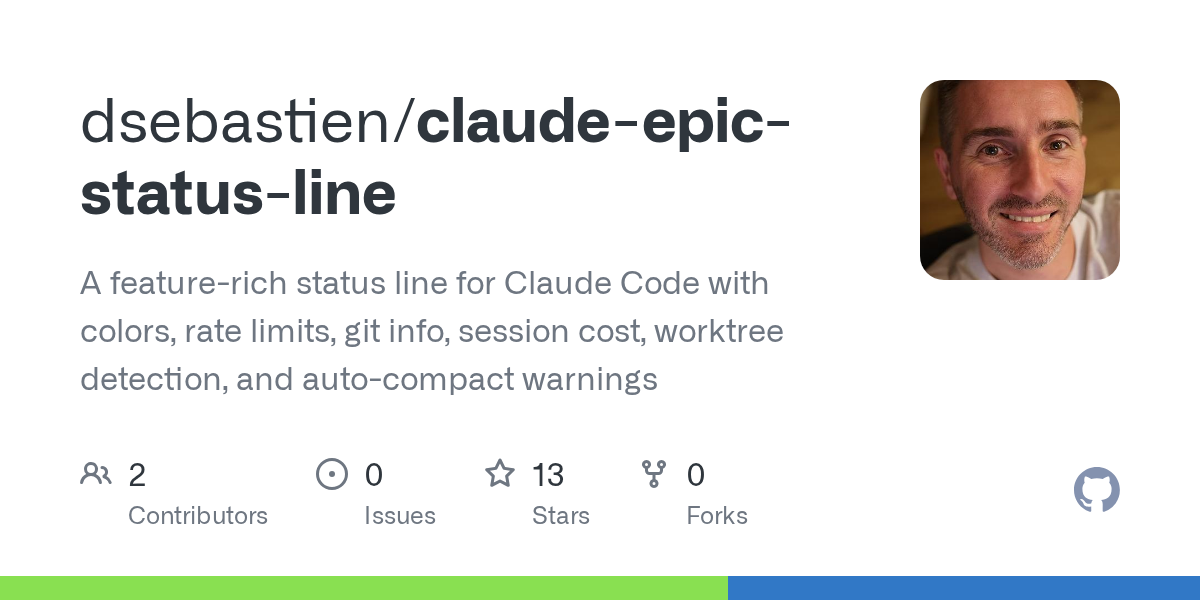
Everything is listed on my tools website: https://tools.dsebastien.net
🎬 AI Videos and Carousels with Remotion
I've wanted to explore creating branded videos for a long time. This month I finally took the plunge. I created a set of Remotion templates. I can now use those to easily create videos that respect the Knowii brand: colors, typography, etc.
I then created AI skills to make it a breeze for me to create such videos, either based on a grilling session, an article, a video transcript, or anything else I fancy. Great for creating explanatory shorts.
Two examples:
I've also used the same approach to create image carousels like the following one:
🔗 https://www.instagram.com/p/DcRXShEiALz
On top of that, I've created a Web user interface I now use to review and edit the scripts. Pretty neat. There's of course room, but this is going to serve me a ton!
🧩 Other Bits
- I'm preparing an AI development workshop for the National Bank of Belgium in September. The materials are public: https://nationalbankbelgium.github.io/ai-dev-workshop-2026-09. We approached it as a game: each team is going to pick and build a random app with some constraints: single-file HTML, no dependencies. Perfect for exploring AI capabilities. Go try one out!
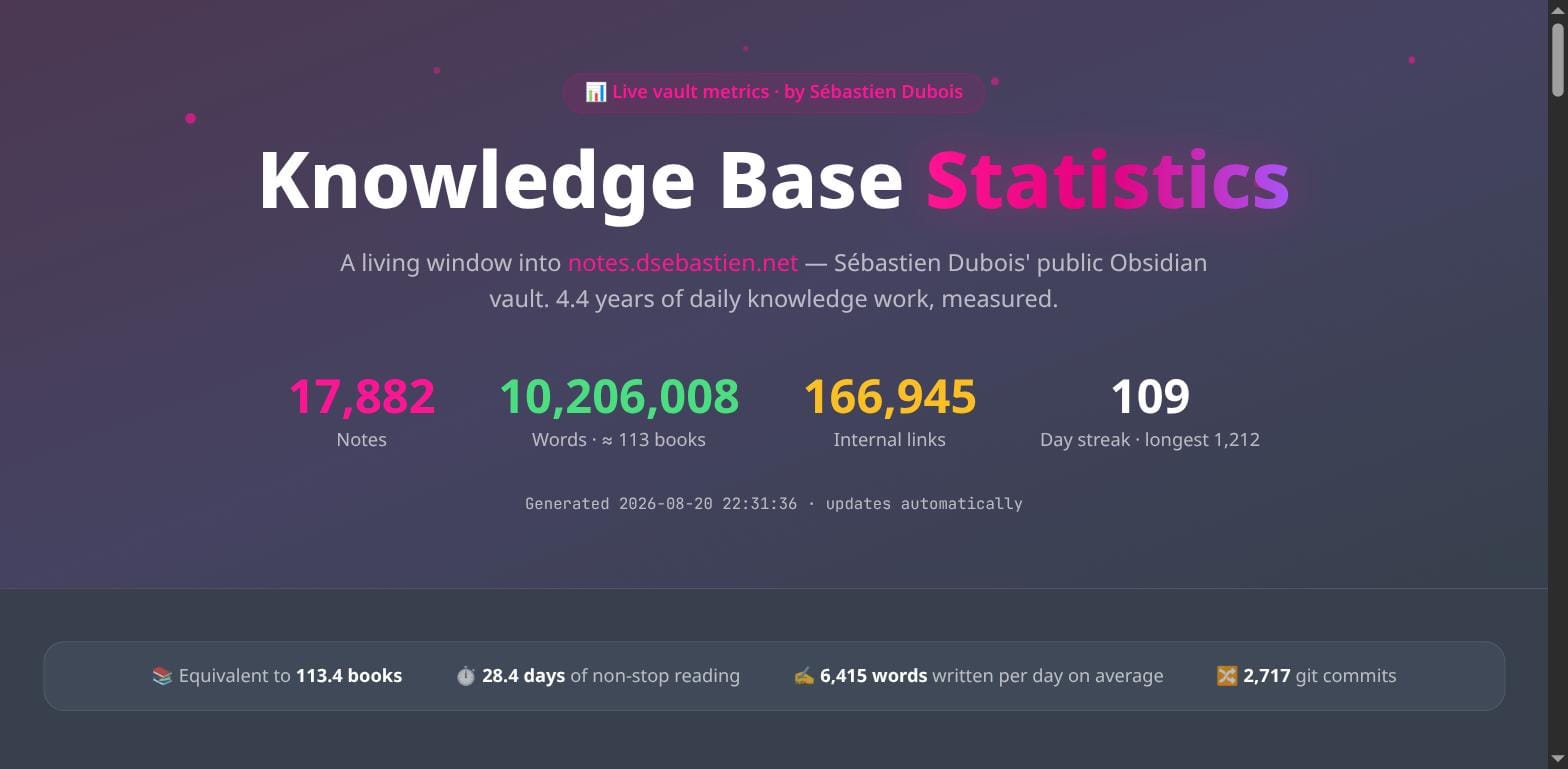
- I updated my public knowledge base stats site: https://stats.notes.dsebastien.net, finally giving it a better look and feel.
- The Concepts Website passed 4,000 concepts: https://concepts.dsebastien.net
- I upgraded my laptop to Omarchy 4.0 (Quattro). Wonderful OS! I've been using it for months, and really enjoy it.
- I also built Omarchy themes for DeveloPassion and Knowii
- I published Plan de Tables Mariage, a small tool for organizing wedding table seating. Sometimes a real problem shows up in your life and the fastest fix is to build the thing 😄: https://dsebastien.github.io/plan-de-tables-mariage. Who knows, it might help someone else ;-)
- I also published Template Livret de Messe, a template for creating beautiful looking booklets for religious ceremonies.
🔗 Cool Finds
A few things that caught my attention over these four weeks:
- Notebook Navigator is now Obsidian's most popular plugin.
- GitHub Copilot got sandboxing (cfr GitHub Copilot Sandboxes), local through a Microsoft execution container and cloud through ephemeral VMs. Agent isolation is quickly becoming table stakes, and it should
- IntelliJ IDEA MCP Server: it gives agents the IDE's index and its debugger. A far more interesting surface than plain filesystem access
- The AI gateway space is crowding fast: LiteLLM, Portkey, Ramp Router, Cloudflare AI Gateway, Not Diamond. Routing between models for cost is a market of its own
- Hammock Driven Development by Rich Hickey: on the difference between your waking mind and your background mind, and why the hard problems get solved away from the keyboard
- The Act of Creation (book) by Arthur Koestler: slow, dense, and worth the effort
💡 Business Updates
- Obsidian Starter Kit v5 lands around mid-September. Its price will likely go up with the release, so now is a good moment if you've been hesitating: https://www.store.dsebastien.net/product/obsidian-starter-kit/
- A reminder about the Knowii Affiliate Program: if you already use and recommend my stuff, you can earn 40% commission on everything in the Knowii ecosystem: https://www.dsebastien.net/knowii-affiliate-program/
🧠 Tip of the Week
Give your AI a note to read, not a prompt to repeat.
I used to build my AI context by typing it. Every session opened with "I'm a developer working on X, my style is Y, my constraints are Z", and every session threw that away at the end. It worked fine. It never accumulated.
Try it the other way round. Take the context you keep retyping (your role, your preferences, your projects, your voice, the rules you always repeat) and write it down once, in a note. Then start every session by pointing at that note instead of describing it. Better yet: use an AGENTS.md file to point to it.
With this in place, the context gets better, because you're editing a document instead of improvising under pressure. It gets consistent, because every session reads the same thing. And it becomes an asset, because every minute you spend improving those notes pays off in the next AI sessions.
Start with one. Then add more!
🧠 Quote of the Week
Avoiding stupidity is easier than seeking brilliance - Shane Parrish
Until Next Time
Thanks for reading. Reply to this email if something resonated, something annoyed you, or you just want to say hi. I read everything.
That's it for today! ✨
---
Ready to dive in?
- 🚀 Get OSK before v5 and the price increase: https://www.store.dsebastien.net/product/obsidian-starter-kit/
- 🧠 Join Knowii: https://www.store.dsebastien.net/product/knowii-community/
- 🎙️ Try Knowii Voice AI: https://voice-ai.knowii.net
- 🧩 Try Kanban Action Planner: https://dsebastien.github.io/obsidian-kanban-action-planner
- 💬 Grab Discord Sync CLI: https://github.com/dsebastien/discord-sync-cli
- 📺 Subscribe on YouTube: https://www.youtube.com/@dSebastien
- 🔌 All my free Obsidian tools: https://tools.dsebastien.net
- 📰 More content at https://dsebastien.net
Talk to you again soon ❤️
— Sébastien
About Sébastien
Ready to get to the next level?
Found this valuable? Share it with someone who needs it.