
Findability stack

Canonical version: Findability stack.
The findability stack is my own model of the different layers of findability in a personal knowledge base. I couldn't find any published model that describes them, so I made one. Each layer is a fallback for the one above it, and resurfacing runs across all of them.
| Layer | What it is | Obsidian examples | Effort spent… |
|---|---|---|---|
| 1. Structure and location | Where a note lives, what type it is | A few folders, note types, PARA | At capture time |
| 2. Names | Titles, aliases, prefixes and suffixes | Quick switcher, [[ suggester |
At capture time |
| 3. Metadata | Properties and tags you can recall: type, project, people, dates, status | Search [property:value], tag:, Bases |
At capture time |
| 4. Links and maps | Wikilinks, backlinks, Maps of Content, the daily-note timeline | Backlinks, local graph, MoCs | At capture and review time |
| 5. Full-text search | Exact words and phrases | Search view, Omnisearch, ripgrep | At retrieval time |
| 6. Semantic and AI search | Meaning, vague memories, synonyms | qmd, Smart Connections, AI agents | At retrieval time (plus index upkeep) |
| Across all layers: resurfacing | Notes come back to you without a query | Random note, on-this-day, review queues | Continuously |
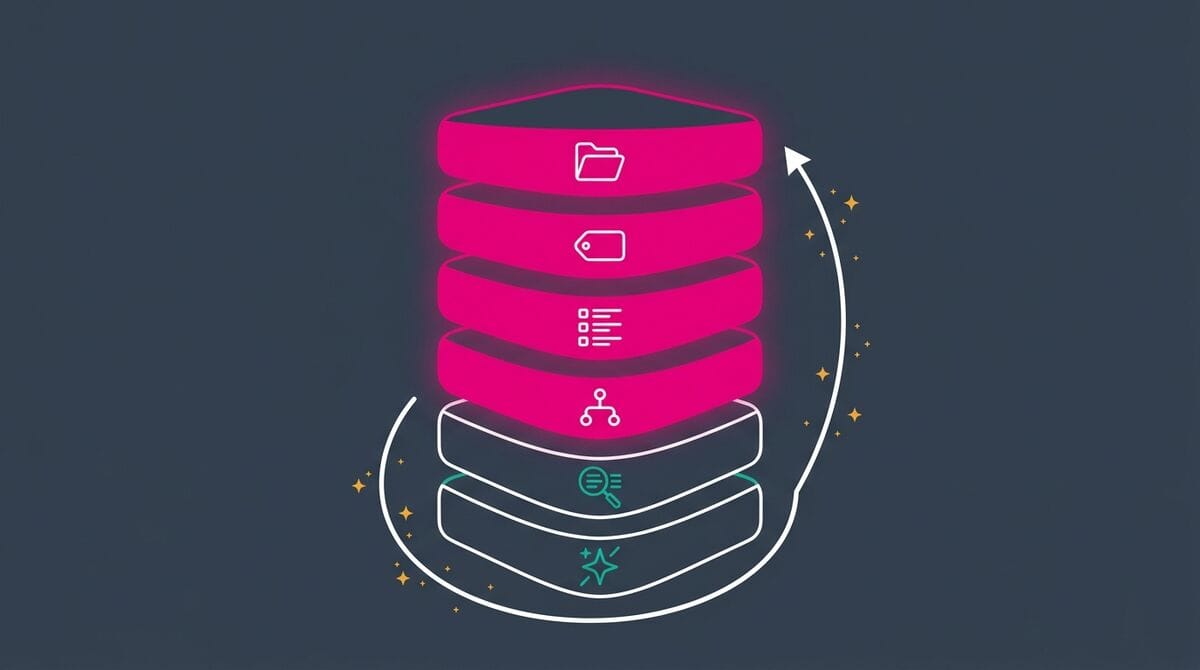
Caption: The findability stack: structure, names, metadata and links are built at capture time; full-text and semantic search are spent at retrieval time; resurfacing runs across all layers.
Capture time vs retrieval time
The top layers are investments you make when you create a note. The bottom layers are effort you spend when you look for it. AI makes the bottom layers much cheaper, but it works much better when the top layers exist.
That's the encoding specificity principle applied to a vault: the cues you store at capture time (names, properties, links) decide what you'll be able to find later. If you capture fast and organize later (deferred classification), the top layers get built during that later processing step.
Notice that layers 1 to 4 are about navigation, and 5 and 6 about search. That matches the research: navigate when you can, search when you must. It also matches Peter Morville's two levels of findability: names, aliases and properties make each note findable, while folders, tags, links and the daily-note timeline make the vault as a whole navigable.
The stack tells you when you invest in findability. LATCH answers another question: in which ways can information be organized?
A debugging tool
When you finally find a note after a frustrating search, ask yourself which layer should have caught it, and fix that layer on the spot:
- You found it through full-text search after three attempts? The title was probably the problem. Rename it (layer 2)
- You found it, but only by remembering the person it was about? Add a link to that person's note, or a property (layers 3 and 4)
- You needed AI to find it because you only remembered the idea? Add an alias with the words you used, and link it from the relevant Map of Content
Each fix takes seconds, and the next search for that note (or any note like it) will hit a higher layer. Over time, you'll need the bottom layers less and less.
References
Related
- Findability
- Encoding specificity principle
- Deferred classification
- LATCH
- Obsidian Search
- Semantic Search
- Peter Morville
- The Complete Guide to Obsidian Search - Find Any Note When You Need It (Article)
- Why You Can't Find Your Notes - The Science of Re-finding Information (Article)
About Sébastien
Ready to get to the next level?
Found this valuable? Share it with someone who needs it.