
Capture Anything to Your Obsidian Daily Note in One Click


In this article, I want to show you the Quick Actions I've added to version 5 of the Obsidian Starter Kit: a small panel that lets me capture anything to today's note, and open my periodic notes, in a single click.

Introduction
My daily note is my inbox. Tasks, things I've done, ideas, discoveries, links I find useful, challenges, things I'm grateful for: everything lands there first. I explained that approach in How I Use Daily Notes as My Capture System in Obsidian.
The approach works. The mechanics didn't. Every single capture meant the same routine:
- Open the daily note
- Scroll down
- Find the right section (is this "Done"? "Discoveries"? "Notes"?)
- Only then, write
It sounds like nothing. But when you capture 20 or 30 things a day, that routine adds up. And worse, it's just enough Friction to make you skip the capture when you're busy. That's exactly when you need it most.
So I removed it. Here's the video walkthrough (5 minutes):
One panel, pinned in the sidebar
Everything lives in a single note called "OSK Quick Actions", pinned in Obsidian's right sidebar. It's always visible, whatever I'm working on.
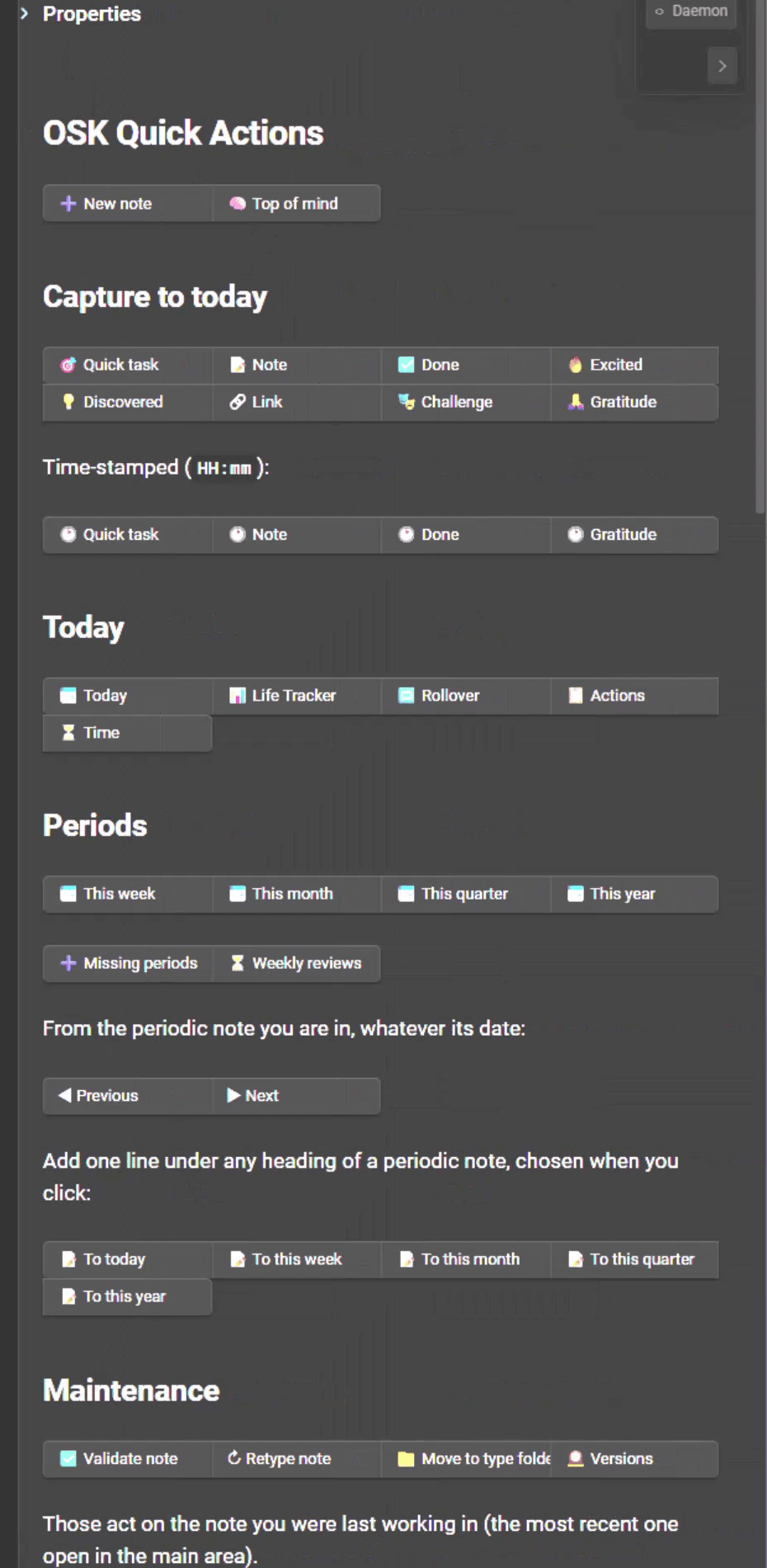
The panel has four groups of buttons:
- Capture to today: one button per section of the daily note
- Time-stamped: the same captures, with the time added
- Today: open today's note and the main dashboards
- Periods: open (or create) this week's, month's, quarter's and year's notes
Capture without opening the note
Let's say I want to add a task. I click "Quick task", type "want to do this", and press Enter. That's it. I never left the note I was working on.
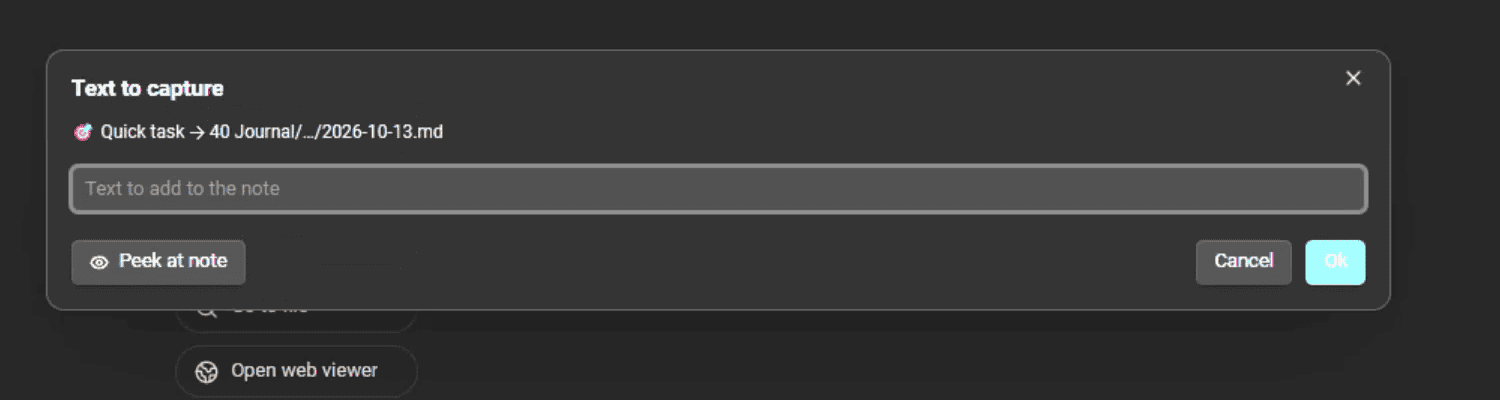
The line is added under the right heading of today's daily note. The dialog even tells you where it's going, and you can peek at the note if you want to check.
The same goes for everything else I capture regularly:
- Done: what I've finished ("published the article this morning")
- Note: anything worth writing down
- Excited: what I'm excited about
- Discovered: what I've discovered today
- Link: a link I find relevant or useful
- Challenge: what's hard right now
- Gratitude: what I'm grateful for
I don't have to think about where something goes anymore. Each kind of capture has its own button, and each button knows its heading. That's one less decision, 30 times a day.
Time-stamped captures
There's a second row of buttons for the captures where when matters. Click "Quick task" in the time-stamped row, and the task lands as "11:51 do this now" instead of just "do this now".
It's a small detail, but I really like it. During my evening review, I know exactly when I captured each thing, which makes it much easier to reconstruct the day.
Open what you need, in one click
The panel isn't only about capturing. It also opens the notes and views I use all the time:
- Today: opens today's note, or creates it from the template if it doesn't exist yet
- Life Tracker: logs my health and life stats with the Life Tracker plugin for Obsidian
- Actions: opens my Kanban board with the tasks of all my projects (Kanban Action Planner plugin for Obsidian)
- Time: opens my Time base, where I do my periodic reviews (Journal Bases plugin for Obsidian)
- This week / month / quarter / year: opens the matching periodic note, and creates it if it's missing
No searching, no "where did I put that note?". Click, and it's there.
The same buttons inside your periodic notes
Finally, every periodic note has its own buttons. Weekly notes have Previous, Next and "To this week". Daily notes have Previous and Next, plus the full set of capture buttons.
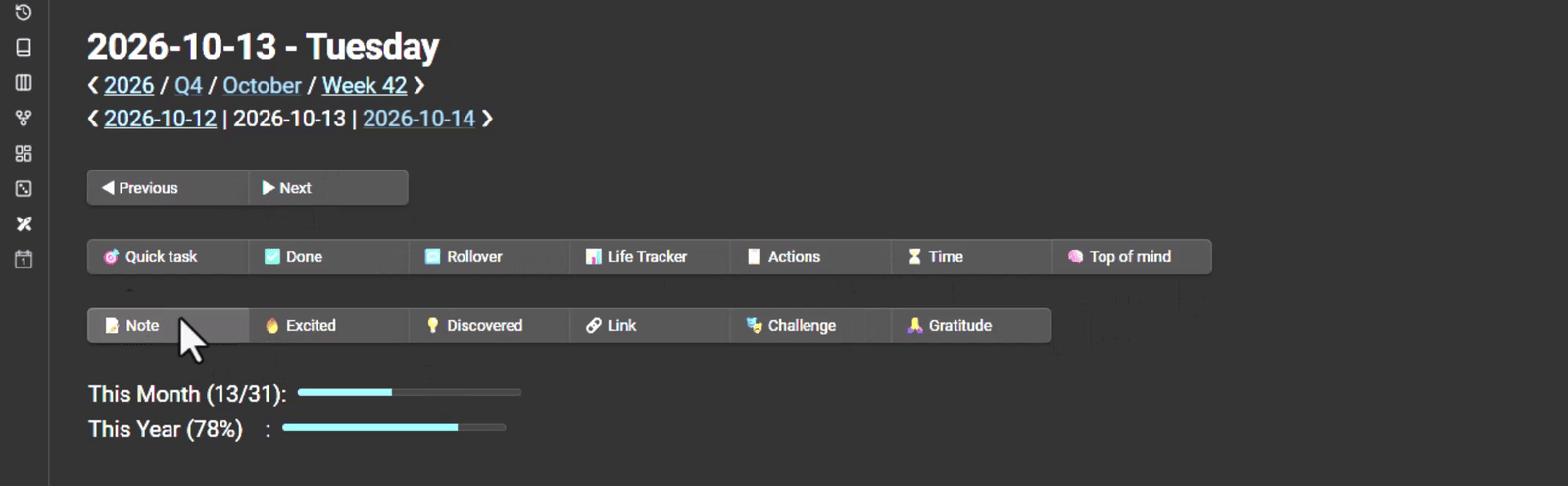
So if I want to go back to yesterday's note, it's one click. And if I'm already in today's note, I can capture from there too, without scrolling down to the right section.
Why this matters
In my experience, capture habits die because of friction far more often than because of a lack of motivation. If saving a thought takes five steps, you'll save fewer thoughts. Remove the steps, and capturing becomes automatic.
That's what Quick Actions do for me. Combined with all the automations I already have in my vault, they make my Journaling practice and my periodic reviews really pleasant to use. And I can't say that about most productivity tricks.
How to get it
Quick Actions ship with the Obsidian Starter Kit v5. If you already have the kit, they're in your vault. If not, here's where to get it: https://obsidianstarterkit.com
If you're curious about everything else that's in v5, I covered it in Give your AI superpowers with the Obsidian vault I run my whole business from.
Conclusion
The best capture system is the one you actually use. For me, that meant removing every step between "I want to write this down" and "it's written down, in the right place".
Which button would you add to the panel? Let me know!
That's it for today! ✨
About Sébastien
Ready to get to the next level?
Found this valuable? Share it with someone who needs it.