
Give your AI superpowers with the Obsidian vault I run my whole business from

Version 5 of the Obsidian Starter Kit is out. It's the vault I run my whole business from, and it's 100% ready for AI. Open Claude Code in it and your AI already knows your goals, your projects, the people you work with and how you write. It comes with a whole library of AI skills and a team of agents to do the work with you. One knowledge base, and your AI can run anything from it.
In this article, I'll show you what that looks like, what the vault does for you even without AI, and why today is the best moment to get it.
TL;DR
- Your AI knows your whole context. Goals, projects, tasks, people, notes, and even how you write: it all lives in one vault, structured so Claude Code or Codex can read it. You stop re-explaining yourself every session.
- Your AI does the work. A library of AI skills and a team of agents write, plan, research, review and file notes for you, and they remember what they did from one session to the next.
- It works on day one. Note types, templates, skills and MCP servers come wired together. Open Claude Code in the vault and it's already connected. AI knows everything there is to know.
- I run my whole business from it. The newsletter, the articles, the Knowii Community, my Obsidian plugins, product launches, source code, customers, goals and the week ahead: planned, written and tracked here, every single day. v5.0.0 is that vault. You get the entire system.
- It does the boring work even without AI. Finished work files itself, your daily routines are one click away, every commitment gets a home, and you plan the week you want before it starts.
- Buy once, get every update. Every future version is included at no extra cost, and there's a 30-day money-back guarantee.
- Now's the time. v5 is the last release at the current price. If you want the kit at the best price, get it before it goes up.
Why this release exists
I don't maintain this system as a separate thing. I use my vault every day, for writing, for the community, for shipping plugins, for running the business with AI agents, for software development, ... The kit lags behind my vault by design: I only ship what I've used long enough to trust.
Recently, my action system grew a dependency layer. Statuses started stamping their own dates. Buttons replaced half of my command palette habits. The OSK plugin learned to automate actions (e.g., archive done tasks), modify note types and validate notes. At some point "a few updates" becomes "a new version".
So v5 brings the kit back in line with the vault I currently use. Everything that proved itself in my daily work is in the box.
Finished work files itself
A board full of done cards hides the work that's left. Most systems leave that cleanup to you, so you do it by hand, or you don't, and your lists slowly turn into archives.
In the kit, each note type declares its statuses once: which ones count as done. Seven days after its done date, a finished goal, plan, project, task, activity or idea moves to its archive folder, links intact. Books get their reading dates, and creations flip to published when you publish them. Every rule is listed in the settings, where you can change the delay, switch it off or add new ones.
I don't do any of this by hand anymore. Neither should you.
The things you do every day are one click away
Most of what happens in a daily note is the same handful of moves: add a task, mark one done, roll yesterday's over. Those should always be at your fingertips. So the daily note carries a set of buttons: add a task, mark something done, roll unfinished tasks over, log in Life Tracker, jump to the previous or next day. Captures write to the right section of today's note without you even opening it.
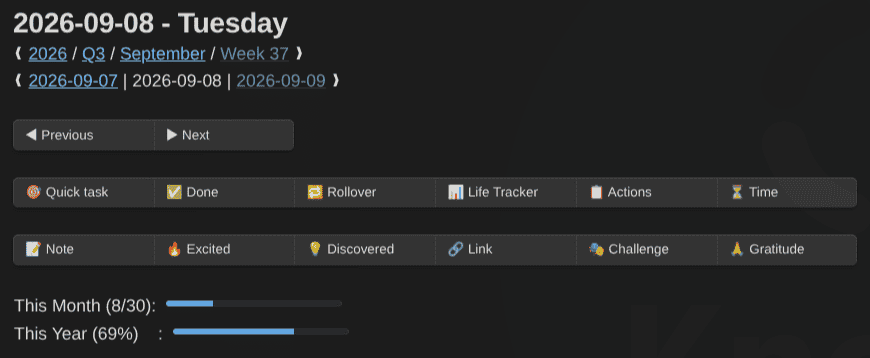
Weekly, monthly, quarterly and yearly notes get previous and next buttons plus a capture that writes into that period's note, and a panel in the right sidebar holds every button. All periodic notes also share one shape: intentions first, captures during the period, and a Closing at the end. A weekly review feels like a daily one, just zoomed out. This makes it easier to scan.
Every commitment gets a home
If you've ever had a "project" that stayed Active for two years, you had an activity in disguise! Projects end. The newsletter, the side business, your health: those never do.
Now, the action system has a place for each. Activities hold the work that "never" ends. Ideas hold what you might do but haven't committed to yet. Goals, plans, projects, tasks, activities and ideas link to each other across the whole hierarchy, including what blocks what and which milestones matter, and they all get Kanban boards.
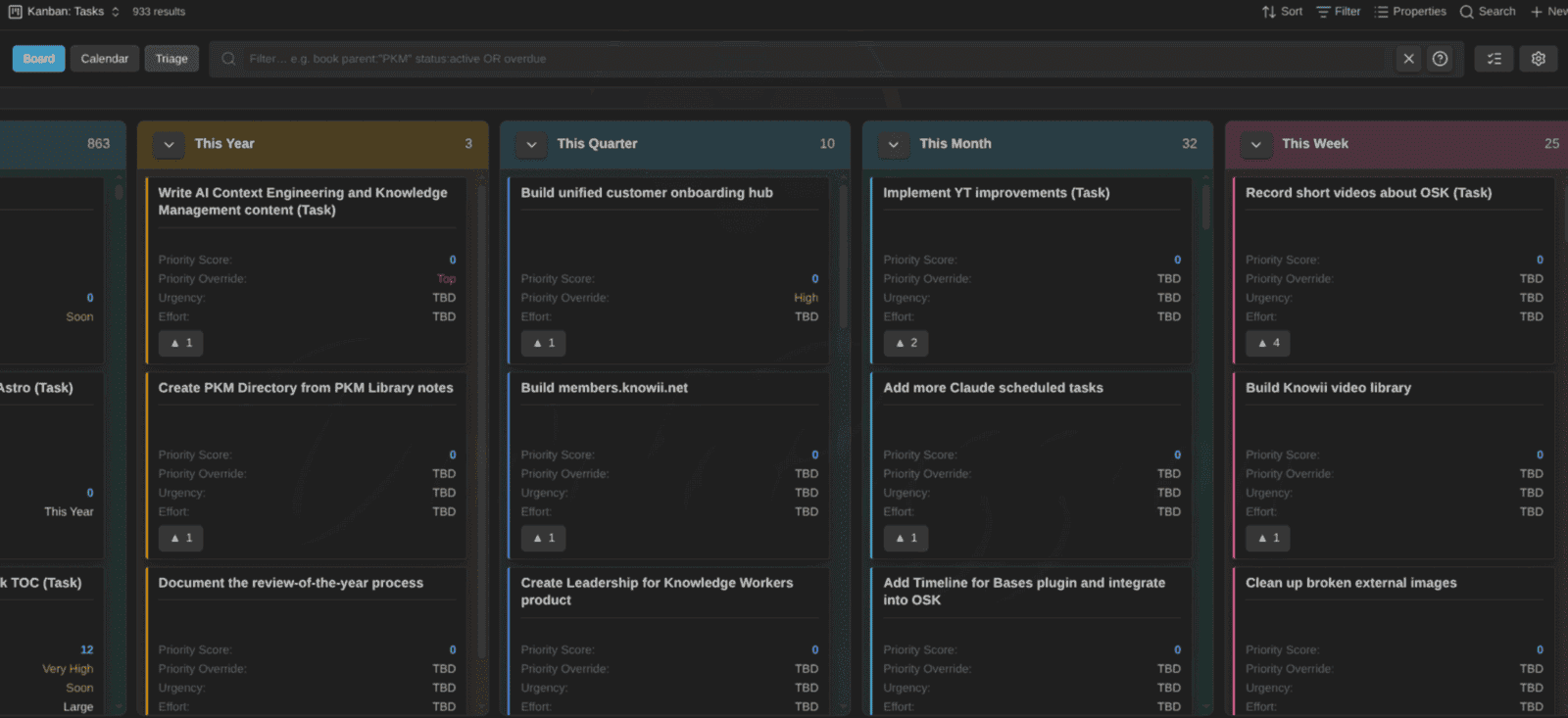
Every project note shows its tasks three ways: a Board, a Schedule (calendar) and a Breakdown. Here's a tour of the Kanban Action Planner that powers the boards:
A tour of the Kanban Action Planner, the plugin behind the boards, calendars and project views
The Kanban Action Planner documentation covers the rest (hint: there's a ton more and it keeps evolving!).
Plan the week you want
A weekly target with no time blocked for it is a wish.
Open Kanban: Activities and it shows your ideal week: a week grid with no dates, where every active activity gets its recurring time blocks (e.g., deep work on weekday mornings, the newsletter on Thursday evening). Draw a block, drag it, stretch it across days, undo when you change your mind. A rail next to the grid lists each activity against its weekly target, and a targets table shows what's left of your available week. You see which targets have real time behind them before the week even starts.
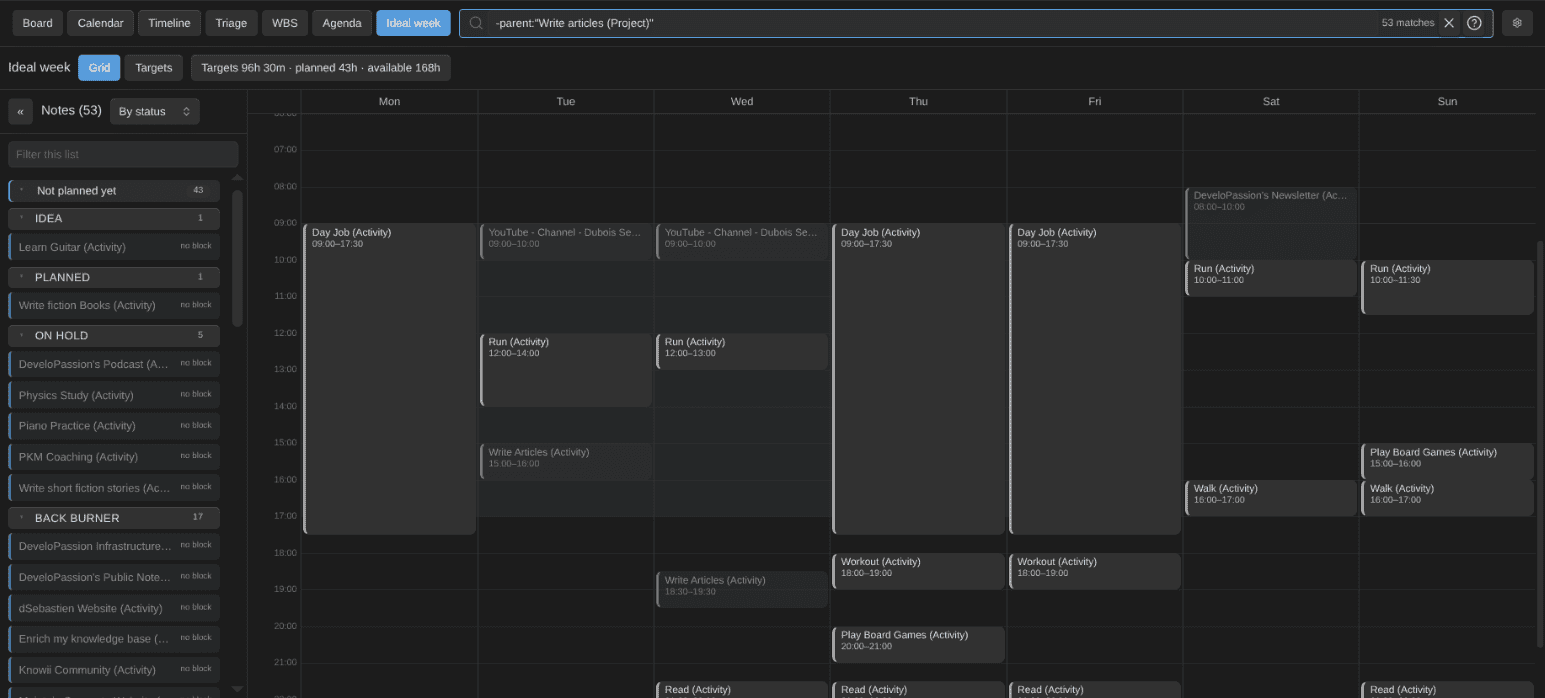
Planning an ideal week for your activities in the Obsidian Starter Kit
See where your time really goes
Decide how many hours a week each activity or project deserves, then compare target, planned and tracked time side by side, per activity and per area of life. Once work is done, the dates the plugin stamps give you your delivery stats for free: cycle time (how long it took), lead time (how long it waited after you said yes) and your on-time rate.
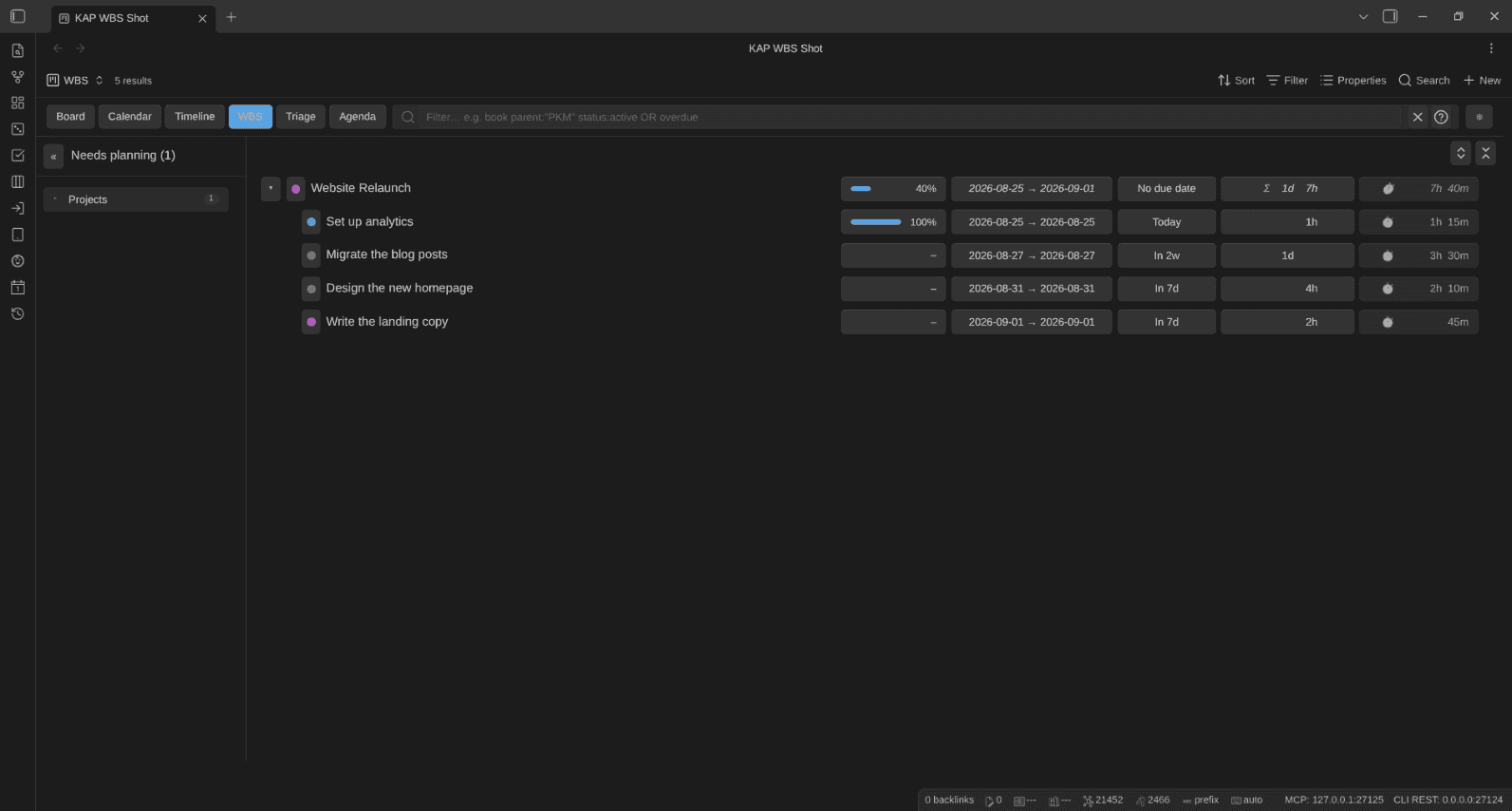
These views are plain Obsidian Bases, so they work without AI.
An AI assistant with limitless power
Most people use AI like a stranger. Every chat starts from zero, and you spend the first minutes explaining who you are, what you're working on and how you like things done. In the kit, your AI starts from everything you know.
Your goals, projects, tasks, the people you work with, the books you read, ideas you care about, your values, your notes, your writing voice. It all lives in one vault, in plain Markdown, with note types the AI understands and can use perfectly. Ask Claude Code to plan your week, and it works from your goals, your projects and your time targets. When you need a draft, it writes like you. Before a meeting, it pulls up what you know about the people in it.
It doesn't stop at answering, either. The kit ships a whole library of AI skills and a team of agents that do the work with you, right in your vault:
- a personal assistant and a project manager that plan your days and keep your projects moving
- a coach for your weekly reviews, and a mentor for the long view
- a researcher that turns your notes, your Readwise highlights and the web into structured briefs
- an editor and a review panel that go through your writing before it goes out
- a wiki curator that builds a knowledge base on any topic you want to master
And the agents remember. After every session, each one writes down what it was asked, what it did and what it learned, so the next session starts where the last one stopped.
Everything is wired on day one. Start Claude Code or Codex in the vault and it's already connected: note types and validation through the OSK plugin, reading and writing notes, tasks and time tracking through TaskNotes, your skills through the ARD server, plus Readwise and qmd if you install them. Claude Code gets all of it; Codex, Gemini CLI and GitHub Copilot get part of it (the FAQ lists what each tool gets).
And that's just the tip of the iceberg. Various points above are "handled" by generic Obsidian setups created by AI. But it's just sub-par compared to what Obsidian Starter Kit enables. Notes don't have random metadata. AI doesn't generate notes and metadata randomly. Everything is clearly documented, validated, etc. This system is on a completely different level. With this, you can build yourself a knowledge base for life. Not just a drawer full of junk.
All that power doesn't cost you your AI context window. Loading every skill up front would burn tens of thousands of tokens before you type a word, so the kit is very smart when it comes to loading skills. Claude Code (or another AI Agent Harness you prefer) searches the skill catalog and loads only finds the skill(s) a task needs.
Rather keep AI out of your vault? That's fine. The system is made for humans FIRST, and AI second. If you don't use AI, then you still have a world-class system at your disposal!
The vault I actually work in
The note types, templates, plugins, Bases, skills and agents are the ones I use every day.

v5 adds new plugins I found to be valuable. Each one has earned its place in my vault. You get 50+ note types, from books and people to goals and ideas, each with its template, its properties and its place in the vault. The user guide covers everything in detail.
The full list is in the release notes (there's a LOT).
I've been using and growing my system over four years. I use it daily. As I said, this is not a toy; it's at the very core of everything I do.
Buy once, keep getting updates
When you buy the kit, you get every future version at no extra cost. That's how it has always worked, and v5 doesn't change it. The vault is yours. Plain Markdown files on your machine, with or without me. It's not a system you rent. It's a system you own.
Get it now, at this price
v5 is the last release at the current price. Right now, that's €199.99 for Essentials, or €249.99 for Premium, which adds the Obsidian Starter Course (2h20m of video). If you want the best price, now's the time.
To be clear, only the price changes. The kit keeps getting updates after v5, and if you buy now, you get every one of them at no extra cost. And if it's not for you, there's a 30-day money-back guarantee.
👉 Get the Obsidian Starter Kit: https://www.store.dsebastien.net/product/obsidian-starter-kit
 Dwayne Appleby
Conclusion
The Obsidian Starter Kit is the system I use every day to write, publish, build products, run a community and plan my weeks, think, research, and much more. v5 is that system as it runs today. If you've been looking for a vault that works from day one, this is it.
Want to see everything that's in v5? The release notes list it all. Questions? Ask me in the Knowii Community.
Already own the kit? The update is free: download v5.0.0 from your Gumroad library or the Knowii Obsidian Starter Kit space (https://learn.knowii.net explains both), back up your vault, and follow the migration guide.
That's it for today! ✨
About Sébastien
Ready to get to the next level?
Found this valuable? Share it with someone who needs it.