
Every movie, show and game I care about now lives in my Obsidian vault


10,000+ movies, shows, anime, video games and board games. Plain Markdown files
Introduction
On July 15, 2026, TV Time shut down. I had been tracking every TV show and anime I watched there; about 15 years of history. Every show, every season, every episode, every rating. Gone. I never had a copy of any of it (oops!).
Media is an area of my life where I've spent a TON of hours. Movies, TV shows, anime, manga, comic books, video games, board games... Sooo many memories. And all of that history was scattered across a dozen websites and apps. TV Time's shut down woke me up...
I don't want this to EVER happen again. So I took my media back. Every movie, show and game I care about now lives in my Obsidian vault, as a plain Markdown note. As I'm writing this, I have 10,260 media notes (plus my books), with covers, statuses, ratings, ownership, prices, play dates and much more. And I can browse, query, publish and ask AI about all of it.
In this article, I want to explain why I set this up, show you how I now manage my media, how the system is built, and what it lets me do. It's going to be technical, with real code from my vault. I hope you'll enjoy it as much as I enjoyed building it 😄
All of this will very soon be part of the Media Management System of the Obsidian Starter Kit. More on that at the end.
TL;DR
- ✅ Why: TV Time shut down in July 2026 and took 15 years of my TV history with it. Never again: my vault is now the source of truth for all my media, versioned in Git, synced and backed up multiple times a day
- ✅ Connected: media notes are an integral part of my knowledge base
- ✅ One note per work, one note type per medium: books, movies, TV shows, TV seasons, anime, manga, comic series, comic albums, video games, board games, board game items and music albums
- ✅ Parents and children: a show and its seasons, a comic series and its albums, a board game with its expansions, promos and accessories
- ✅ Multiple Obsidian Bases with many views: galleries, Kanban boards, wishlist by priority, time spent, pile of shame, leaving soon, Year in Media, ...
- ✅ One Map of Content per medium + a hub + Year in Media, rendered as plain Markdown, so they're published on my site (and my wishlist doubles as a gift list)
- ✅ Metadata for free: Media DB, Boardgame Search, 16 Web Clipper templates and importers for IMDb, BoardGameGeek, Steam, and other sources
- ✅ One-click buttons on every note: log a session, add playtime, mark episodes watched, rate, lend, track a Kickstarter pledge, fetch the cover
- ✅ Various AI skills on top, because AI can read and write everything in my vault: imports ("import my IMdb collection"), captures and logs ("I just watched X, 7/10, and on IMDb", "we played Azul tonight"), new seasons, recommendations, deals, resale values, lending, analytics, ...
- ✅ Build anything with the data: it's just files, so any idea is one prompt (or one script) away
- ✅ Coming soon in Obsidian Starter Kit v5.1
Why I stopped renting my own history
TV Time: 15 years of history, gone
As I wrote in 25+ Years of Personal Knowledge Management, as online platforms matured, I relied more and more on them. It was a tradeoff between ownership/control and user experience, and I chose the user experience... But I should have been more careful with my data!
TV Time launched back in 2011 as TVShow Time. It was a great app: you marked the episodes you watched, it told you when new ones aired, and over time it became the memory of everything you'd ever watched. I used it for about 15 years. Whip Media acquired it in 2016, and by 2018 it had over a million daily users.
On July 1, 2026, TV Time announced that its app and website would be discontinued. Two weeks later, on July 15, it was over. Today, tvtime.com is a thank-you page.
And my data? I never exported it. Why would I have? It was "in the cloud", it was always there, it just worked. Until it didn't. Fifteen years of TV shows and anime, the order I watched them in, the dates, my ratings... gone with the service. I never saw the announcements, so by the time I heard about the shut down, it was already too late!
It's not the first time a company decides to shut down a product that people rely on, and it won't be the last. But it's the first time it cost me that much information.
Never again
I've been a huge fan of Data Portability for the longest time, and TV Time was a painful reminder that I hadn't applied it to this part of my life. So I set a simple rule: from now on, my media history lives in my vault, as plain Markdown files that I own, on my disks, backed up with the rest of my notes. The online services can stay, as sources of metadata, recommendations and community. But they're not the source of truth anymore. My vault is. And it should have been that way years ago!
With that rule, a service that shuts down costs me a metadata source, not my history. And since every media note is a file like any other, I can link it, query it, publish it, or move it to another tool later. What's mine stays mine (cfr File over app principle).
And now it's going to be like Pokémon: I need to find back and rebuild my lost TV show history 😂. My IMDb ratings bring back about 120 series and mini-series. But I know I had a ton more recorded on TV Time, and it's not coming back. That's the price I'm paying for trusting a platform with my history.
The thing is, while I was at it, I didn't just want a list of titles. I wanted something that works for a collector like me (I'm a board game hoarder, and I'm not ashamed of it... OK, maybe a little 🙈), and for every medium I care about. So I built a full system for myself.
Owning the files is only half of it
Owning my data means nothing if a dead SSD can do to me what TV Time did. Files on my disk are only safe if they survive my disk. So my vault (and thus my whole media library) is protected through multiple layers:
- Git: the vault is a Git repository, pushed to a remote location. Every change is versioned (I've made more than 100 commits since the beginning of October alone), so I can go back to any previous state of any note. Plus I also have the File recovery core plugin for Obsidian and my Time Machine plugin for Obsidian to recover easily
- Cloud storage: my vault is also synchronized across multiple devices using Google Drive, and my Google Drive is backed up in the cloud and on my NAS
- Syncthing: the vault syncs between my devices, with file versioning turned on, so an overwritten file can be recovered from the
.stversionsfolder. It's not a backup since synchronization also synchronizes mistakes, but the file versioning also enables me to recover files if needed - Local Backup: the Local Backup plugin zips the whole vault every 6 hours (with 7-Zip) into a backup folder outside the vault
- Remote backups: In addition, my machines are backed up, meaning that I have one more option to recover content from
Even the covers are covered (pun intended 😂): local_cover points to a copy inside my vault, so my ~10,000 cover images (267 MB) are backed up with everything else. If a website changes its image URLs, or disappears like TV Time, my shelf stays intact.
And since everything is plain text, I'll still be able to read all of it in 30 years, with or without Obsidian.
I shared more details about my backup/synchronization system here:
 Sebastien Dubois
What's in my vault right now
Here's where things stand as I write this, a few days after the first imports:
| Medium | Notes | Some details |
|---|---|---|
| 🎬 Movies | 4,885 | 2,052 watched, 2,060 rated, 2,825 in my watchlist |
| 📺 TV shows | 713 | 93 watched, 15 on hold, 4 waiting for a new season |
| 🌸 Anime | 227 | 44 watched |
| 🎮 Video games | 1,953 | 1,418 owned, 307 on my wishlist |
| 🎲 Board games | 2,331 | 1,307 owned, 670 on my wishlist, 604 with their purchase price |
| 🧷 Board game items | 151 | Promos, playmats, sleeves, inserts, upgrades... |
| Total | 10,260 | Nearly all of them with a downloaded cover |
Manga, comics and music albums are next on my list. The system supports them already; I just haven't imported mine yet.
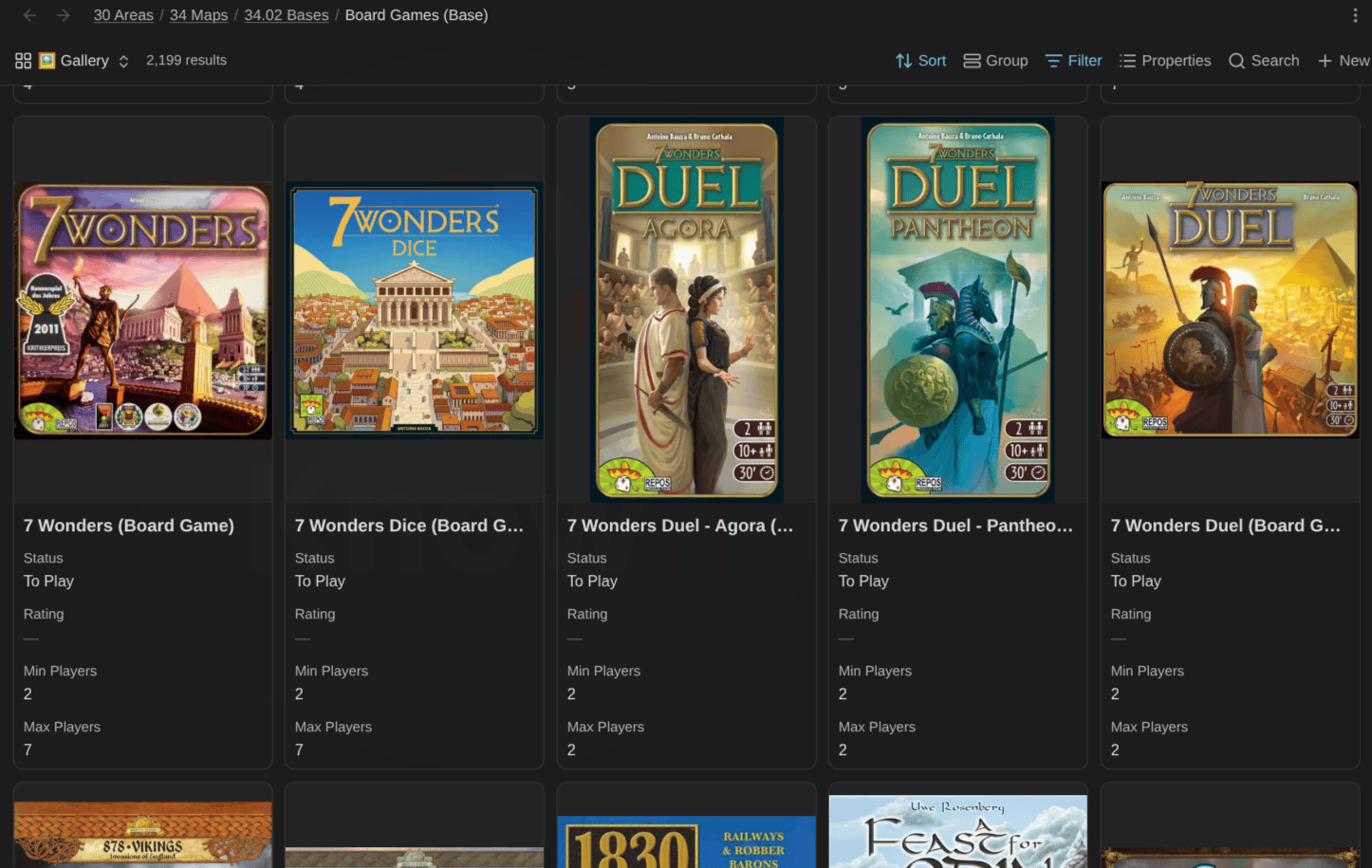
The first time I opened the board games Gallery view after the import, I just sat there scrolling for a while:
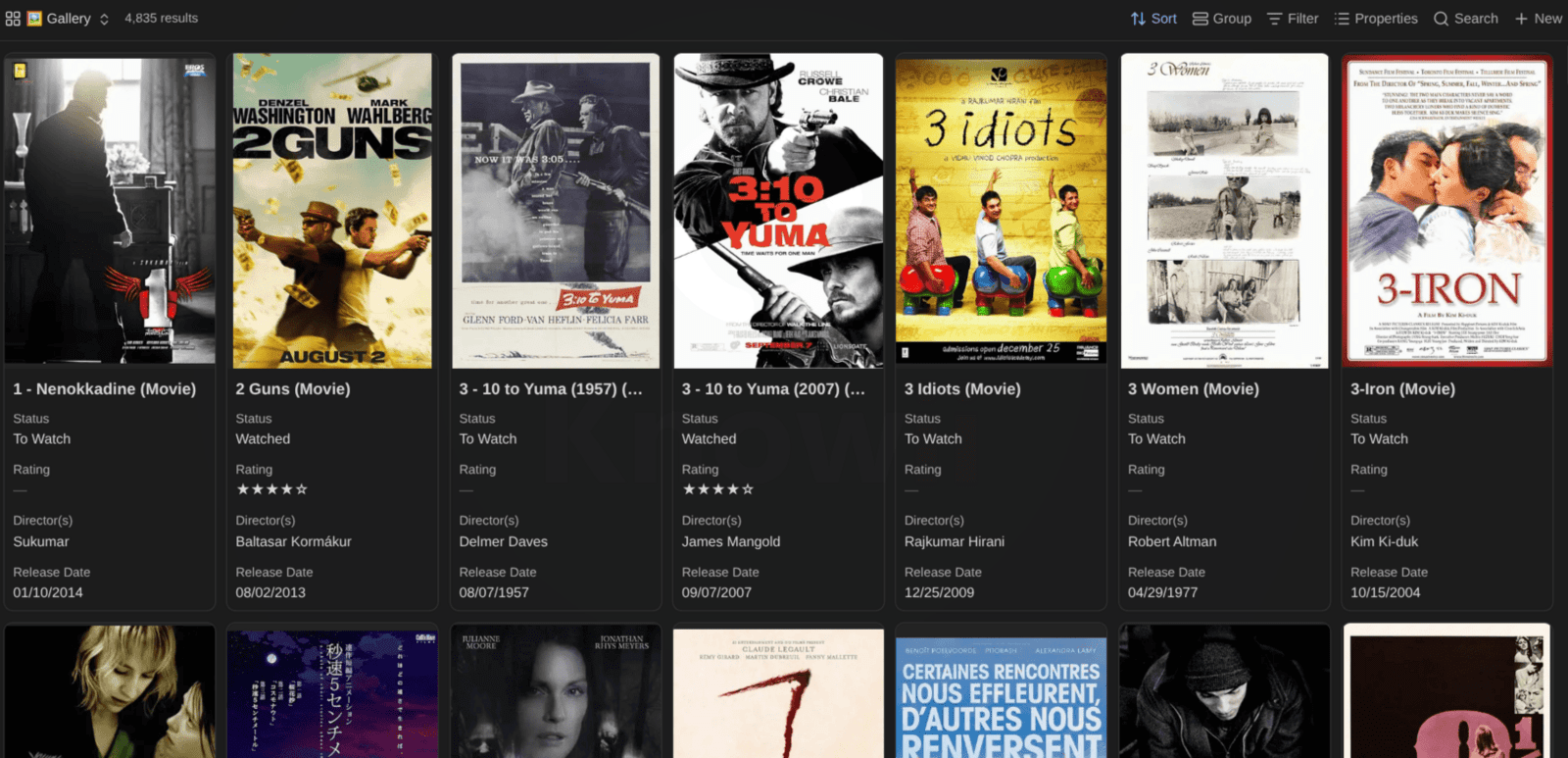
Same for the movies:
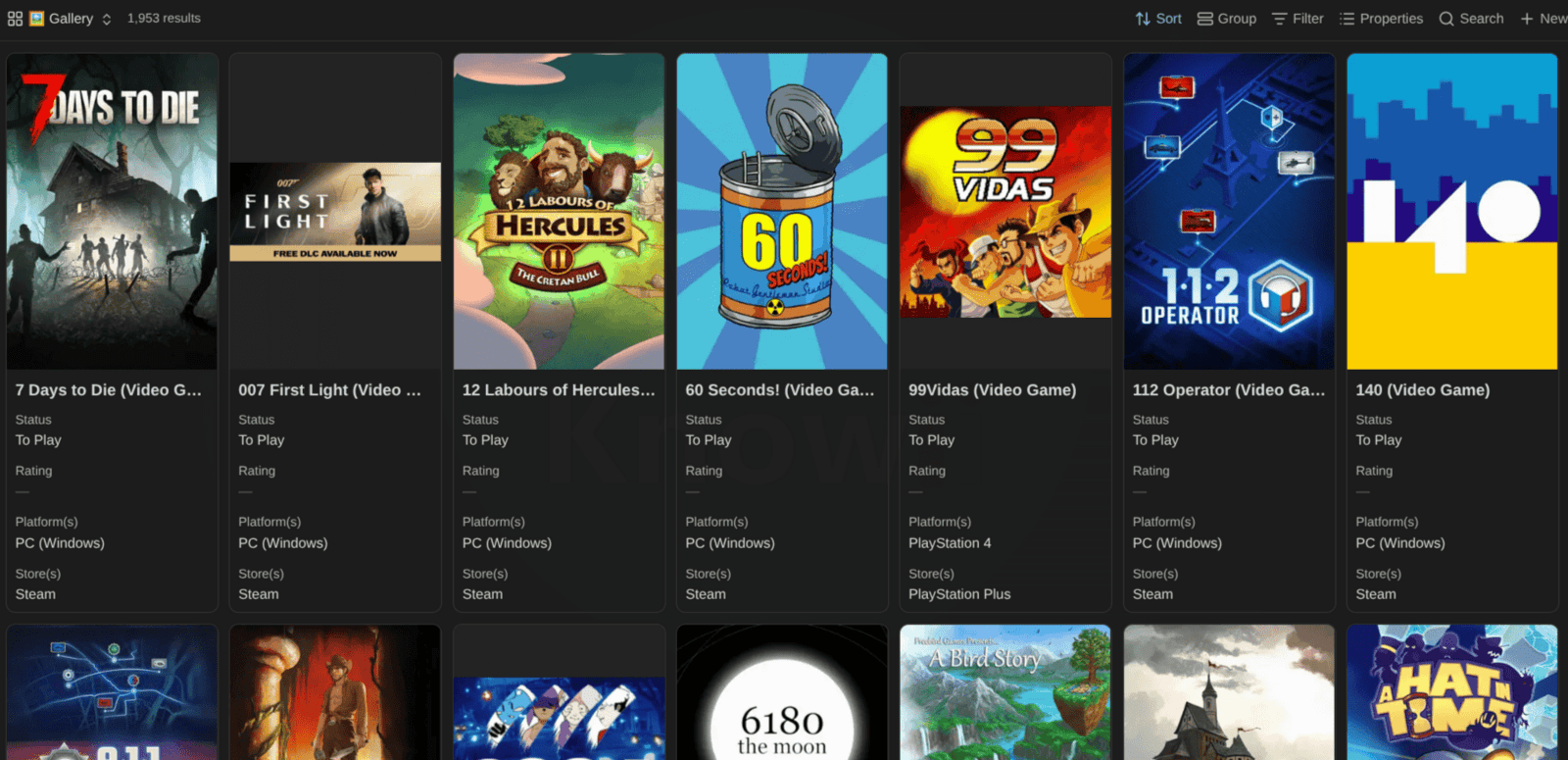
The video games:
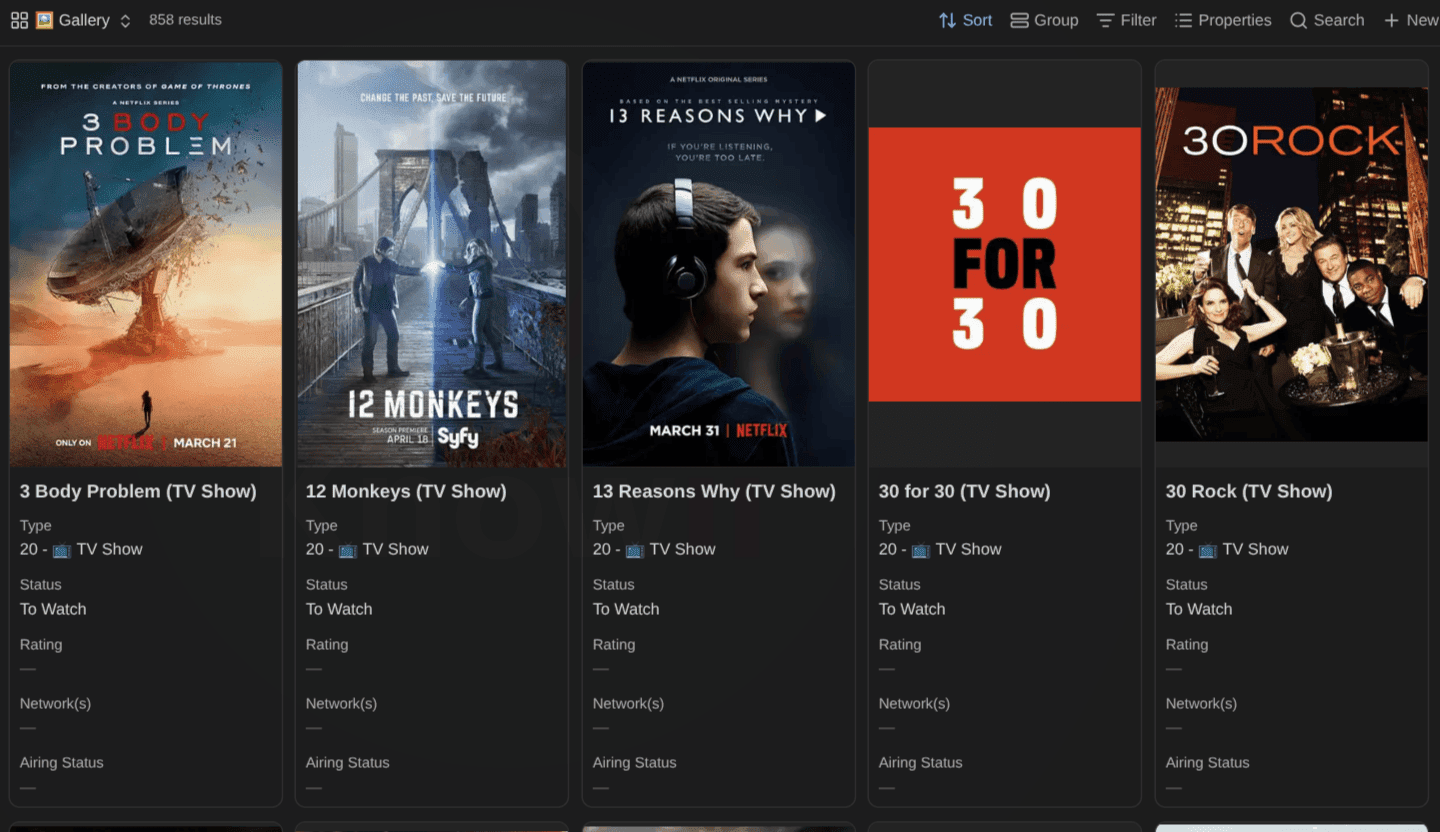
And (a very little part of) my TV shows:
A friend from the Knowii Community reacted to those screenshots with "Now you just need to find the time to play or watch them all". Fair point. We'll get to that 😅
The big picture
Before we dive into the details, here's how the pieces fit together:
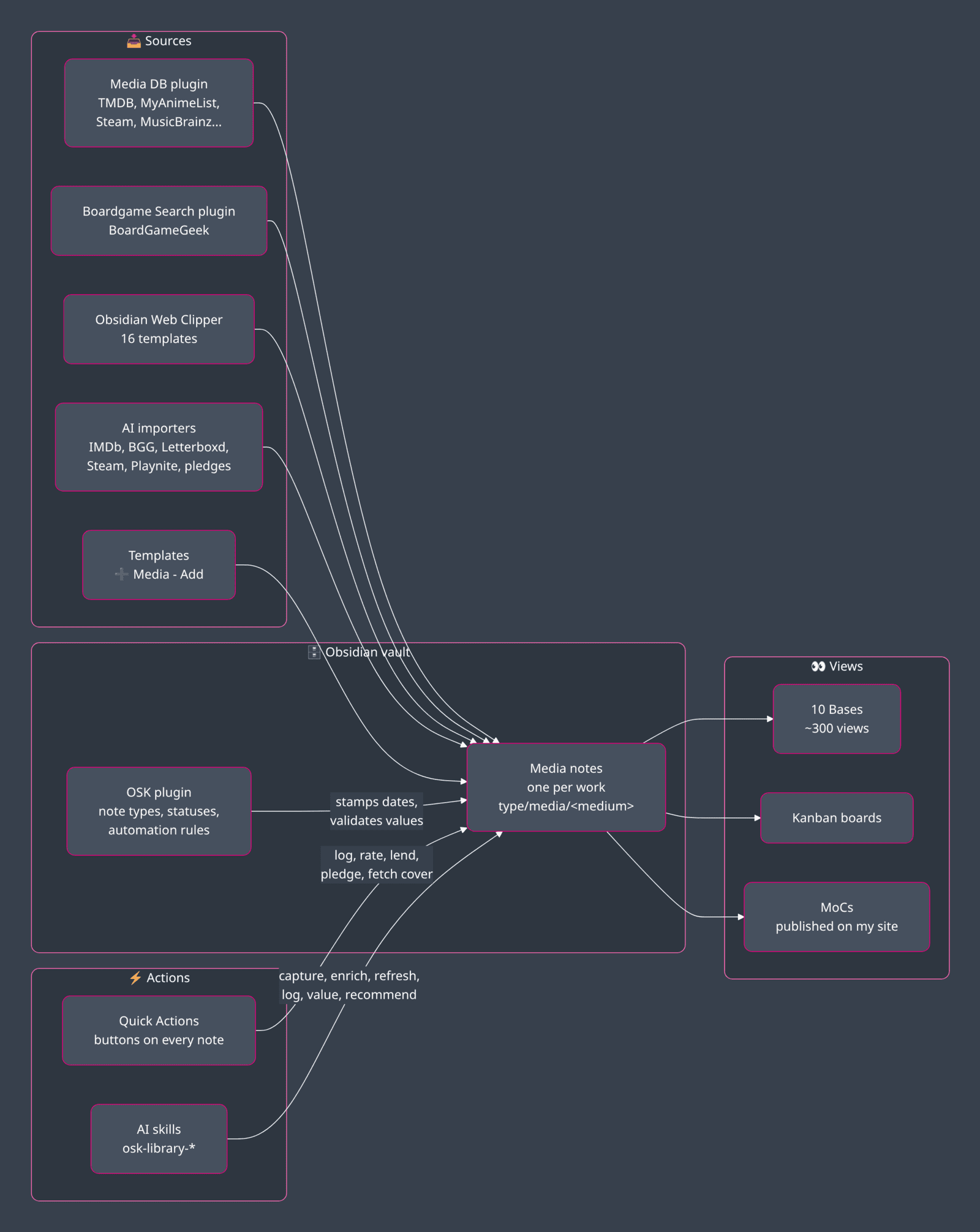
Everything revolves around the notes. The plugins, templates and importers create them; the Obsidian Starter Kit plugin for Obsidian defines what a valid note looks like; the Bases, boards and MoCs show them; the Quick Actions and AI skills update them. No database, no server, no account. Just files.
Let's go through each layer. But first, the full picture.
The whole system on one page
That's the short version. Here's a more detailed one: every part of my new Media system, and how data flows between them.
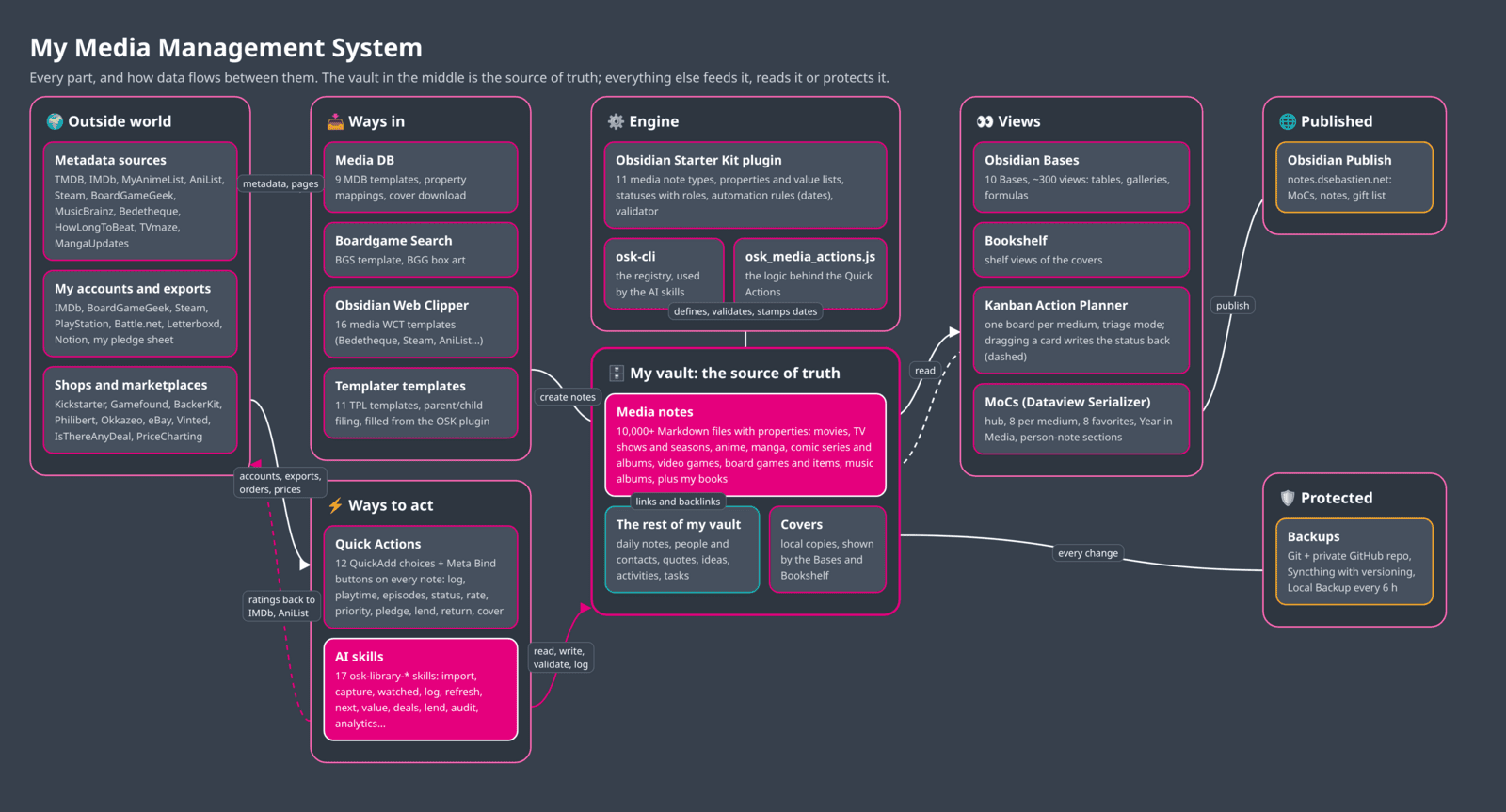
Let me walk you through it, from left to right.
🌍 The outside world. This is where my media history used to live, and where metadata still comes from. Three kinds of places: the metadata sources (TMDB, IMDb, MyAnimeList, AniList, Steam, BoardGameGeek, MusicBrainz, Bedetheque, HowLongToBeat, TVmaze, MangaUpdates, etc), my accounts and exports (IMDb, BGG, Steam, PlayStation, Battle.net, Letterboxd, Notion, ...), and the shops/marketplaces (Kickstarter, Gamefound, Philibert, Okkazeo, eBay, price trackers...). They're all data sources, but I won't count on those to be the source of truth anymore.
📥 The ways in. Four tools create media notes: Media DB (9 MDB templates, with property mappings and cover downloads), Boardgame Search (the BGS template, with the box art), the Obsidian Web Clipper (16 media templates for the sites without an API) and the Templater templates (11 TPL templates, which handle the parent and child filing). Whatever tool I use, the result is the same: a valid typed note, with the right name, in the right folder.
⚙️ The engine. The Obsidian Starter Kit is the brain. It defines the 10+ media note types, their properties and value lists, the statuses and their roles, and automation rules. It validates every note against its type. The CLI included in the Obsidian Starter Kit exposes that same registry to scripts and AI, and there's a little script that holds the logic behind the Quick Action buttons (cfr QuickAdd plugin for Obsidian). Nothing in the system hardcodes a folder, a status or a medium: everything asks the engine.
🗄️ The vault: the source of truth. In the middle, the 10,000+ media notes, the covers (local copies, so they survive URL changes and get backed up), and the rest of my vault: daily notes, people, quotes, ideas, goals, activities, projects, tasks, etc. Media notes and the rest of the vault can of course easily link to each other.
⚡ The ways to act. Two ways to change things once the notes exist. The Quick Actions (QuickAdd choices, exposed as Meta Bind buttons on every note) for one-click updates: log a session, add playtime, mark episodes watched, change the status, rate, lend, track a pledge, fetch the cover. And the dedicated AI skills to do things such as import media, publish information to different platforms, find recommendations, etc. AI can read and writes the notes, synchronize my ratings back to IMDb, etc.
👀 The views. Multiple ways to look at the same notes: Obsidian Bases, views and formulas (e.g., gallery views, kanban boards using my Kanban Action Planner plugin for Obsidian, ...); and the various Maps of Content (MoCs), serialized to Markdown by my Dataview Serializer plugin for Obsidian.
Now that I have this in place, every box outside my vault can disappear tomorrow; I'd lose a supplier or a convenience, never my data or history.
One note per type of media
Eleven note types
Each medium gets its own note type, with its own tag, folder, template and properties:
| Medium | Note type | Tag | Suffix | How notes are filed |
|---|---|---|---|---|
| Movies | movies | type/media/movie | (Movie) | Flat |
| TV shows | tv-shows | type/media/tv_show | (TV Show) | Own folder per show |
| TV seasons | tv-seasons | type/media/tv_season | (TV Season) | In the show's folder |
| Anime | anime | type/media/anime | (Anime) | Flat, or in a franchise subfolder |
| Manga | manga | type/media/manga | (Manga) | Flat |
| Comic series | comic-series | type/media/comic_series | (Comic Series) | Own folder per series |
| Comic albums | comic-albums | type/media/comic | (Comic) | In the series' folder |
| Video games | video-games | type/media/video_game | (Video Game) | Flat |
| Board games | board-games | type/media/board_game | (Board Game) | Own folder per base game |
| Board game items | board-game-items | type/media/board_game_item | (Board Game Item) | In the base game's folder |
| Music albums | music-albums | type/media/album | (Album) | In an artist subfolder |
Books keep their own type (book-notes), but they show up in the media Bases, the media MoCs and Year in Media too. So everything I read, watch, play and listen to is in one place.
Two modeling choices are worth explaining:
- Manga are tracked per series, with counters (
volumes_total,volumes_owned,volumes_read,chapters_read). One note per volume would mean hundreds of near-identical notes for a single series - Comics are split in two: a series note, and one note per album. Comic collectors (BD is a big thing here in Belgium 🇧🇪) buy, rate, lend and sell albums one by one, often in different editions. So an album needs its own ISBN, edition, condition and estimated value
One naming rule
Every media note is named <title> (<suffix>), whatever created it: the templates, Media DB, Boardgame Search, the Web Clipper or AI. Thanks to this, media such as Dune (Movie) and Dune (Book) can't collide, and a note's name tells you what it is, even in a plain list of search results or backlinks.
If needed, I also add (<year>) before the suffix, for disambiguation.
Parents and children
Three media come in parent/child pairs. The parent gets a folder; the children are filed inside it and link back to it:
38 Media/
├── 38.01 Movies/
│   └── Dune - Part Two (Movie).md
├── 38.02 TV Shows/
│   └── Severance/
│       ├── Severance (TV Show).md
│       ├── Severance - S01 (TV Season).md
│       └── Severance - S02 (TV Season).md
├── 38.05 Comics/
│   └── Blacksad/
│       ├── Blacksad (Comic Series).md
│       └── Blacksad - T01 - Quelque part entre les ombres (Comic).md
├── 38.07 Board Games/
│   └── Arkham Horror - The Card Game/
│       ├── Arkham Horror - The Card Game (Board Game).md
│       ├── Arkham Horror - The Card Game – Edge of the Earth - Campaign Expansion (Board Game).md
│       └── ... (73 more)
└── 38.08 Music/
    └── Daft Punk/
        └── Daft Punk - Discovery (Album).md
Yes, my Arkham Horror: The Card Game folder has 75 notes in it. I might have overdone it with this game... But I can't help it, it's my favorite of all time 😂
Parent notes list their children automatically. A base game has an Expansions & Items table: everything I own for that game, in one place, with covers:
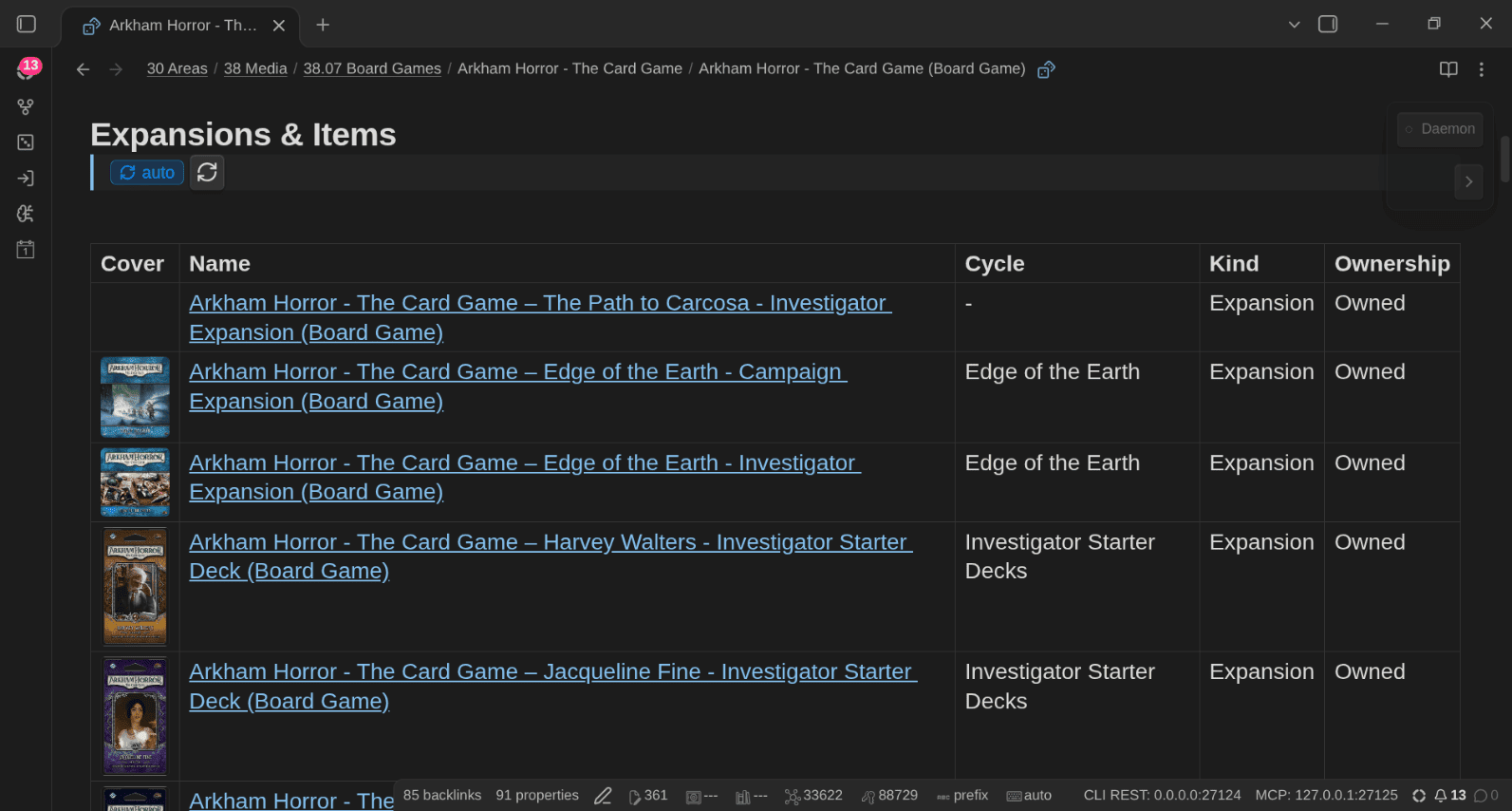
That table is a Dataview Serializer query. The query lives in an HTML comment, and the plugin writes its result as a real Markdown table right below it:
## Expansions & Items
<!-- QueryToSerialize: TABLE WITHOUT ID
choice(local_cover, embed(link(local_cover, "60")), choice(cover, "", "")) AS "Cover",
file.link AS "Name",
choice(item_kind, "", cycle) AS "Cycle",
choice(item_kind, item_kind, choice(game_kind, game_kind, "Expansion")) AS "Kind",
join(ownership, ", ") AS "Ownership"
FROM (#type/media/board_game OR #type/media/board_game_item) AND [[]]
WHERE base_game = this.file.link
SORT choice(item_kind, 1, 0) ASC, cycle ASC, file.name ASC -->FROM ... AND [[]] means "notes that link to this one", and this.file.link is the base game itself: the same query works in every base game note, because the template puts it there. Because the result is plain Markdown, it renders on my published site, it shows up in the graph, and AI can read it. That's the whole point of the Dataview Serializer.
You can see the result live: here's my Arkham Horror: The Card Game note) on my public notes.
The other parent notes work the same way: a TV show gets a Where Am I line (the season I'm in, the episode I stopped at, the next one) and a Seasons table; a comic series gets an Albums table; an anime in a franchise gets a Franchise table.
One important rule: children are the source of truth. When a show has season notes, its progress comes from its seasons. The Bases and Year in Media count such parents through their children, so nothing is counted twice.
Anatomy of a media note
Here's what a real note looks like. This is my Arkham Horror note again (trimmed: the full one has 90+ properties):
---
title: "Arkham Horror: The Card Game"
status: In Rotation
rating: ★★★★★
online_rating: 8.12
link: https://boardgamegeek.com/boardgame/205637
release_date: 2016-01-01
cover: https://cf.geekdo-images.com/.../pic3122349.jpg
local_cover: 50 Resources/51 Attachments/51.03 Public/Arkham Horror - The Card Game (Board Game).webp
date_started: 2019-09-17
date_last_session: 2022-03-06
dates_played:
  - 2019-09-17
  - 2022-02-20
  - 2022-02-27
  - 2022-03-03
  - 2022-03-06
ownership:
  - Owned
date_acquired: 2020-08-16
purchase_price: 35.95
purchase_currency: EUR
acquired_from: Philibert
lent_to:
pledge_status:
designers:
  - Nate French
  - MJ Newman
min_players: 1
max_players: 2
best_players:
  - "2"
playtime: 120
weight: 3.57
language_dependence: 4 - Extensive Text
mechanics:
  - Cooperative Game
  - Deck Construction
  - Scenario / Mission / Campaign Game
game_kind: Base Game
edition_language: French
bgg_id: "205637"
bgg_rank: 33
bgg_synced: 2026-10-07T06:47
public_note: true
tags:
  - type/media/board_game
---
And here's how it looks in Obsidian, with the two rows of buttons under the title (more on those later):
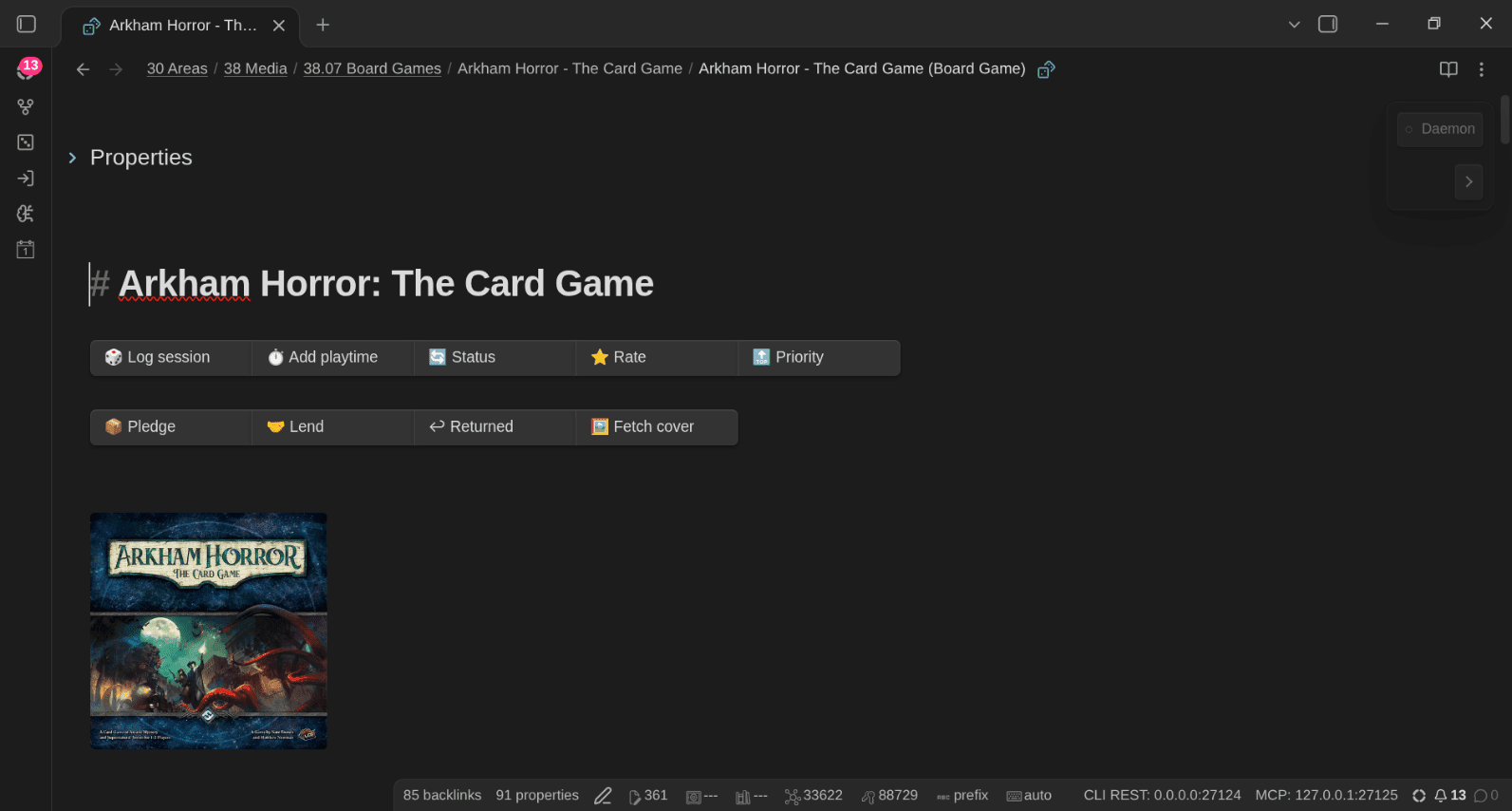
Every medium shares the same core: status, ownership, formats, dates, covers, priority, rating, money and provenance, wishlist, lending, pledges and time spent. On top of that, each type adds its own: runtime and directors for movies, episodes_total and current_episode for TV, platforms, stores and HowLongToBeat hours for video games, player counts, weight and mechanics for board games, ISBN, edition and condition for comic albums...
Every value list (statuses, platforms, stores, formats, conditions...) is declared in the OSK plugin, so the notes stay consistent, and the validator tells me when something's off.
The data model on one page
Here's how all the note types relate to each other, and to the rest of the vault:
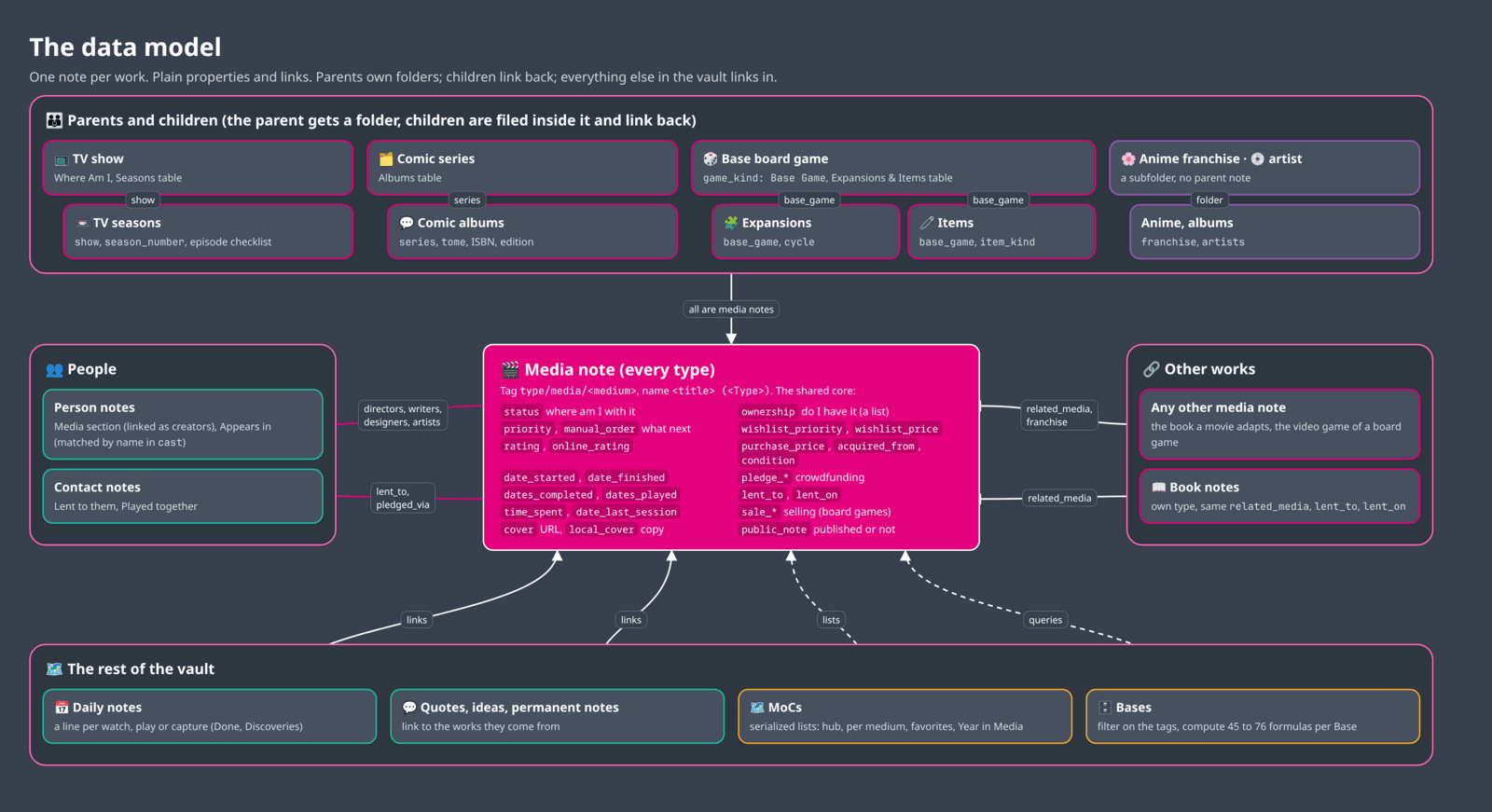
- At the center, the media note. Every type (movie, show, season, anime, manga, comic series and album, video game, board game and item, music album) shares the same core properties:
status,ownership,priority,rating, the dates, the money, the pledge and lending fields, the covers andpublic_note. That shared core is why one Base can show everything, and why Quick Actions work on every medium - At the top, the parents and children. A TV show owns a folder with its seasons (
show), a comic series with its albums (series), a base board game with its expansions and items (base_game). The children link back to their parent, and the parent's tables are computed from its children. Anime and music albums are grouped by folder only (franchise,artists), without a parent note - On the left, the people. Creators are links (
directors,writers,creators,designers,artists), so person notes list their works automatically. The cast stays plain text, matched by name. Loans and pledges point to contact notes (lent_to,pledged_via) - On the right, the other works.
related_medialinks a note to related works in any medium, andfranchisegroups a saga. Books keep their own type, but sharerelated_media,lent_toandlent_on, so they join the same views - At the bottom, the rest of the vault.. Bases filter to only list the notes tagged with
type/media/<medium>
No relation in this model lives in a database or in a plugin's private storage. They're all properties and wikilinks, in plain Markdown files.
Ownership VS Status
Two properties answer two different questions:
status: where am I with it?To Watch,Watching,On Hold,Watched,Abandoned... The wording follows the medium (watch, read, play, listen), but the meaning is the same everywhereownership: do I have it? A list, because several values can be true at once:Wishlist,Preordered,Owned,Previously Owned,Borrowed,Subscription,For Sale,Sold,Duplicate
A movie I saw at the cinema is Watched. A board game still in its shrink wrap is Owned and To Play. A comic album I own twice is Owned and Duplicate (and maybe For Sale too).
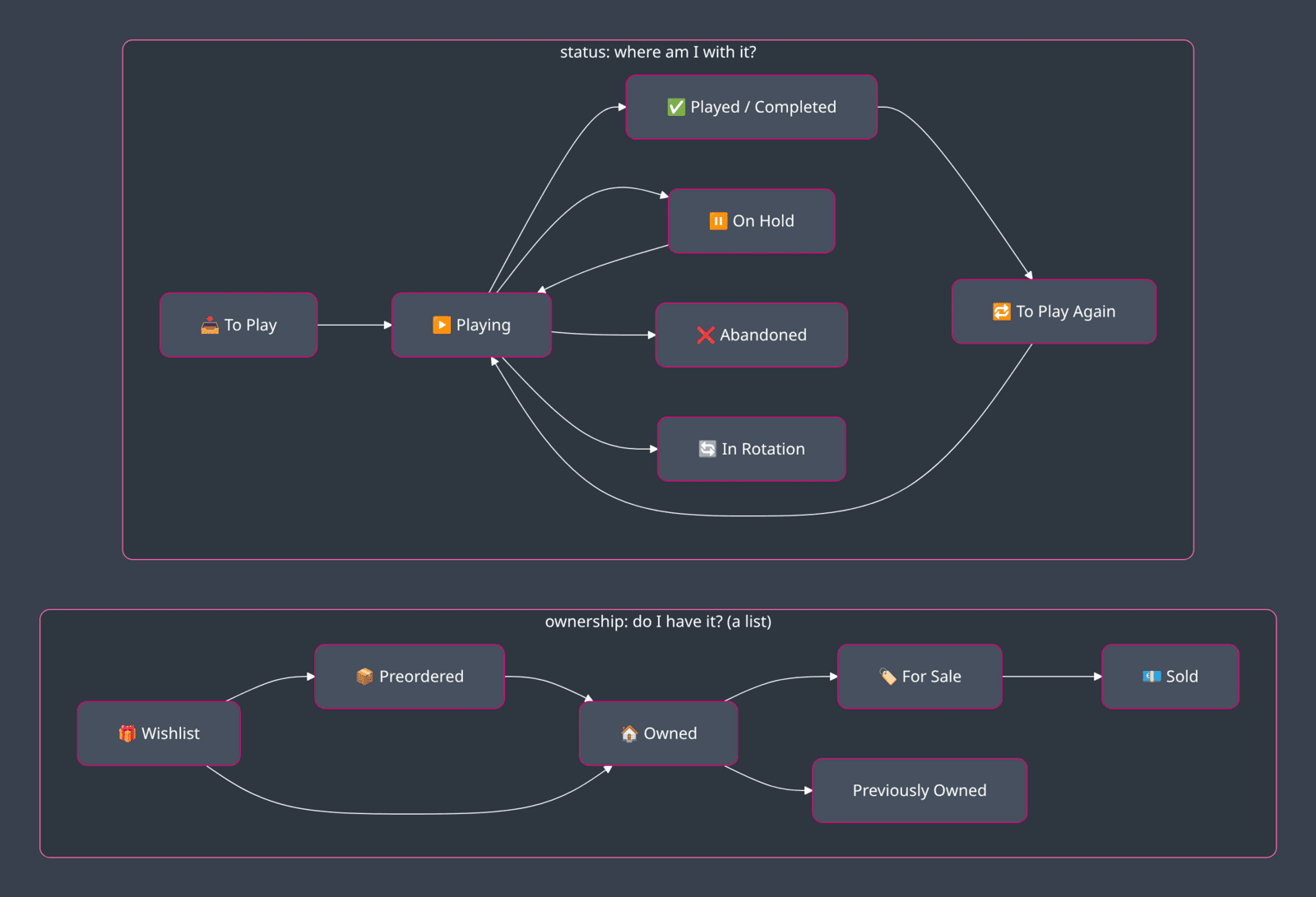
Every type also has a few statuses that only make sense for that medium: Waiting for New Season (TV shows, anime), Caught Up (manga, comic series), Endless (video games you never "finish", like online or sandbox games) and In Rotation (board games I keep bringing to the table, as opposed to Played, which means I'm done with it). Behind the scenes, each status value also has a role (e.g., backlog, scheduled, active, waiting, done) and a success or failure outcome.
Dates that fill themselves
Nobody wants to type dates. So I've setup automation rules to do the work for me:
date_startedis stamped when a note enters an active status (Watching,Reading,Playing...)date_finishedis stamped when it enters a done one- Add
Ownedtoownership:date_acquired= today, andwishlist_prioritygoes away - Add
SoldorPreviously Owned:date_disposed= today - Fill
lent_to:lent_on= today. Clear it:lent_ongoes away pledge_statusbecomesDelivered:date_acquired= today
The rules only fill empty dates, so a date I typed always wins. And they run whether I change the status in the Properties panel, inline in a Base table, or by dragging a card on a Kanban board.
Getting data in without typing it
Typing a release date, a cast and a cover URL by hand is very tedious work. With 10,000 notes, it's simply impossible. So each medium has at least one source that does it for me:
| Medium | Plugin | Web Clipper templates |
|---|---|---|
| Movies | Media DB (TMDB or OMDb) | TMDB Movie, IMDb Movie |
| TV shows and seasons | Media DB (TMDB or OMDb) | TMDB TV Show, IMDb TV Show |
| Anime | Media DB (MyAnimeList, no key) | AniList Anime, MyAnimeList Anime |
| Manga | Media DB (MyAnimeList, no key) | AniList Manga, MyAnimeList Manga, MangaUpdates |
| Comic series and albums | Media DB (Comic Vine) for series | Bedetheque and Stripinfo (series and albums) |
| Video games | Media DB (Steam without a key, RAWG, IGDB) | Steam, Backloggd |
| Board games | Boardgame Search (BoardGameGeek) | BoardGameGeek |
| Music albums | Media DB (MusicBrainz, no key) |
Media DB queries many databases from one search box.
Also, in my system, each type of media maps to a specific type of note, each with its own template, folder, suffix, set of properties, ...
Boardgame Search is the main source for board games. The template fills every board game property it can (players, best and recommended player counts, playtime, age, language dependence, weight, mechanics, categories, the BGG rank...).
Obsidian Web Clipper templates cover the sites without an API (e.g., Bedetheque and Stripinfo for comics, Backloggd for games) and create valid typed notes with the right names and folders. Those also enable me to easily capture content from my Web browser. I will create more such templates for content curation (topic for another day).
Covers: cover holds the remote URL, local_cover the copy in my vault. Bases show local_cover and fall back on cover. The downloaded copy is what keeps my shelf intact when a website changes its image URLs or goes down.
Under the hood: Media DB, wired to the note types
Media DB is a great plugin, but out of the box it creates notes with its own property names. I've customized the configuration to use specific templates. For instance, here are the settings I use for movies:
{
  "movieTemplate": "50 Resources/54 Templates/Media DB/MDB Movie.md",
  "movieFolder": "30 Areas/38 Media/38.01 Movies",
  "movieFileNameTemplate": "{{ title }} (Movie)",
  "imageDownload": true,
  "imageFolder": "50 Resources/51 Attachments/51.03 Public"
}
And I have property mappings that ensure that the right properties are used to store information. For instance:
| Media DB field | Mapping | OSK property |
|---|---|---|
url | remap | link |
image | remap | local_cover |
plot | remap | description |
genres | remap | categories |
director, writer, studio | remap | directors, writers, studios |
actors | remap | cast |
onlineRating | remap | online_rating |
premiere | remap | release_date |
englishTitle / japaneseTitle | remap | aliases / original_title |
boxOffice, ageRating, personalRating... | remove |
Under the hood: a Web Clipper template
Here's an excerpt of my Obsidian Web Clipper template for bedetheque.com, that I use to capture comic album pages to album notes in my vault:
{
  "name": "Bedetheque Album",
  "behavior": "create",
  "triggers": ["https://www.bedetheque.com/BD-", "https://bedetheque.com/BD-"],
  "noteNameFormat": "{% set s = selector:article.bdt-page-album h1 a|first|trim|safe_name %}... {{s}} - T{{n}} - {{t}} (Comic)",
  "path": "30 Areas/38 Media/38.05 Comics/{{selector:article.bdt-page-album h1 a|first|trim|safe_name}}",
  "properties": [
    { "name": "status", "value": "To Read" },
    { "name": "priority", "value": "99 - TBD" },
    { "name": "online_rating", "value": "{{selector:article.bdt-page-album [itemprop=ratingValue]|first|calc:\"*2\"}}" },
    { "name": "release_date", "value": "{{selector:article.bdt-page-album meta[itemprop=datePublished]?content|first}}" },
    { "name": "cover", "value": "{{meta:property:og:image}}" }
  ]
}
A few things are happening here:
- The trigger picks this template automatically when I open the clipper on an album page
- The note name is computed from the page: series, tome number (zero-padded) and album title, plus the
(Comic)suffix. So I getBlacksad - T01 - Quelque part entre les ombres (Comic), exactly like the template would have named it - The path is the series' folder, so the album lands right next to its series note
- The rating is converted from Bedetheque's 0-5 scale to the 0-10 scale of
online_rating - The note body adds the button rows and a link to the series note (
[[Blacksad (Comic Series)]])
And I also have an AI skill called osk-obsidian-web-clipper that makes it easy for me to create such Obsidian Web Clipper templates, ensuring that they respect my conventions, use my note types, etc.
Importing 10,000 notes
The plugins are great for adding one item at a time. For my existing history, I had to use AI to do it at scale. I used multiple AI skills that I created for this purpose, such as:
osk-library-bggimports and syncs a BoardGameGeek account: collection, wishlist (with its priority), ratings, accessories (as board game items) and recorded plays, onedates_playedentry per playosk-library-imdbimports and syncs IMDb ratings, watchlist, lists and reviewsosk-library-importhandles everything else: Letterboxd exports, Steam (through the Steam Web API), Playnite, ...
The importers always show a plan first (how many notes they'll create, update, skip, or want me to review), and nothing is written before I confirm. They merge, they never overwrite: a film I already have gets its empty fields filled and its watch dates appended, but my status and rating stay as they are.
Before this system, my media history was spread over BoardGameGeek, IMDb, Steam, PlayStation, Battle.net, EPIC Games, Netflix, Google Sheet sheets, Notion Databases, ...
Now it's all in Obsidian. And it's where I'll record everything first moving forward.
Bases: where the fun starts
This is where it gets a lot more fun to have all this data in Obsidian. Obsidian Bases lets you explore your vault like a database. Create a base, create views, filter the notes you want to see in each view, display specific properties, create formulas, groupings, etc. It's like Notion databases, but far more powerful. And you can create as many bases and views you want. It's even possible to create dynamic bases, that show content matching the note you're currently looking at!
By the way, AI is actually great at creating and improving Obsidian Bases. Steph Ango created a set of skills for Obsidian, including one for Obsidian Bases. And I went all in with my media system. I've create various Bases, and each of those includes many different views.
Media (Base) shows every medium (and my books) in one place. Here's its list of views:
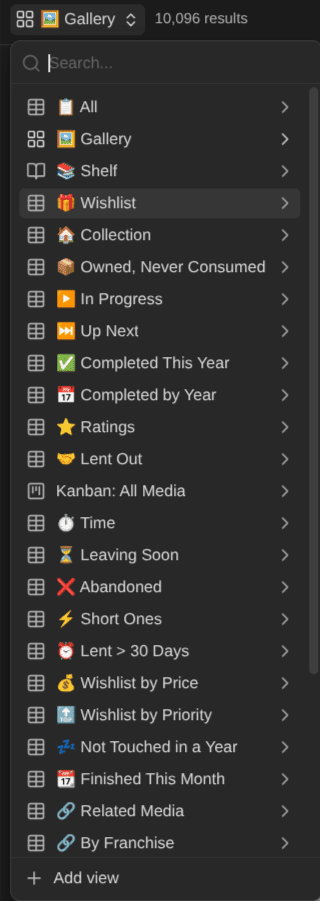
In addition, each medium has its own Base, with the shared views in its own words (📦 Owned, Never Watched / Read / Played / Listened) plus its own: 🎬 By Director and 🌍 By Country for movies, 📡 Airing and ⏭️ Next Season for TV shows, 🕹️ By Platform and ⏳ Leaving Soon for video games, 👥 By Player Count and 🏋️ By Weight for board games, 💎 Collector Value for comics...
Let me show you some of my favorites.
▶️ In Progress: everything I'm into right now
One table, every medium, with where I am, my progress, what's left and how long it'll take to finish:
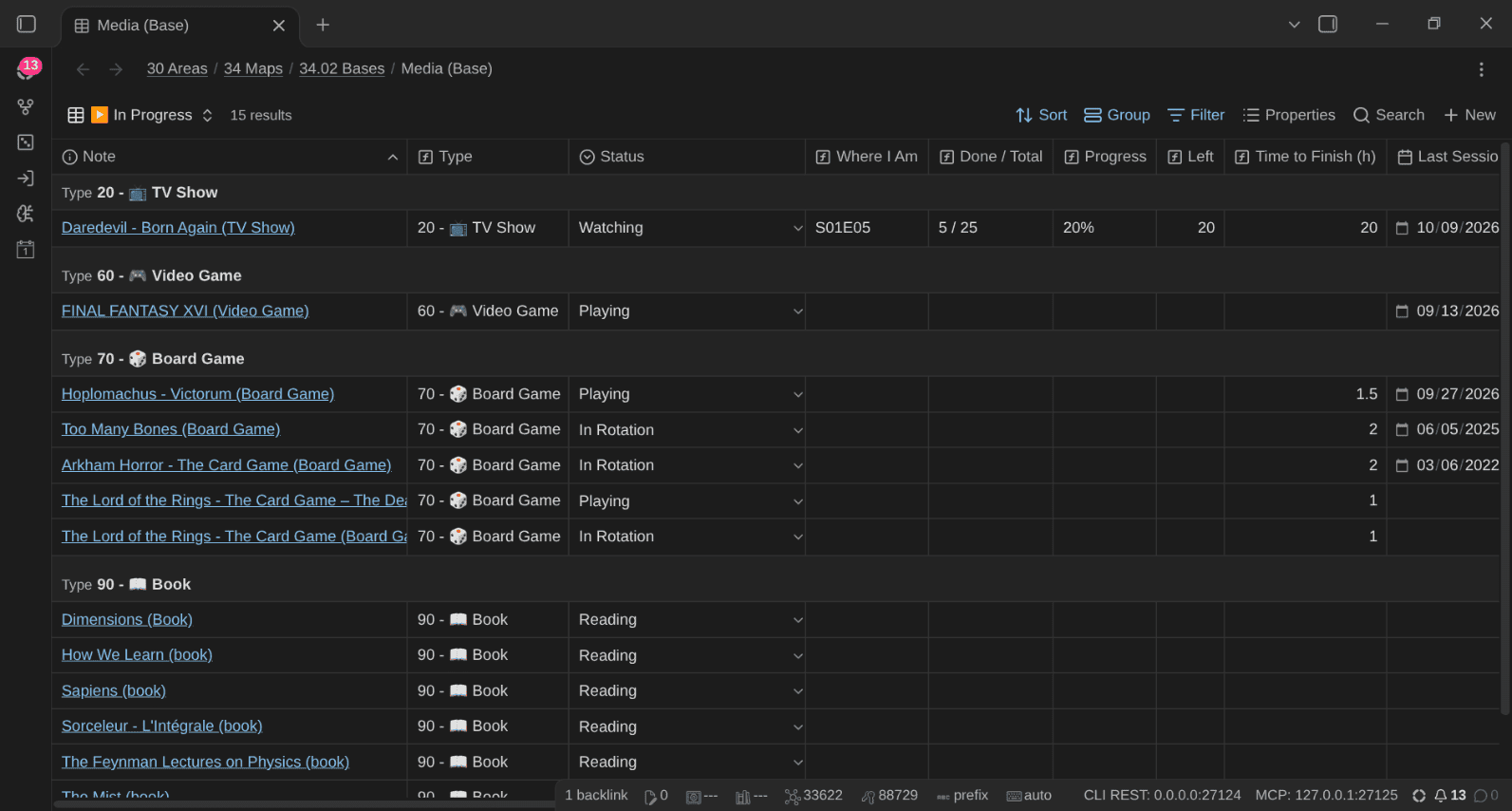
Getting a single view to list "in progress" items across media with different status wordings requires one small trick: a formula that maps every medium's wording onto the same roles.
formulas:
  status_role: >-
    if(status == "Watching" || status == "Reading" || status == "Playing"
       || status == "Endless" || status == "In Rotation" || status == "Listening",
      "30 - ▶️ In Progress",
    if(status == "To Watch" || status == "To Read" || status == "To Play" || status == "To Listen",
      "10 - 📥 Backlog",
    if(status == "To Watch Again" || status == "To Read Again"
       || status == "To Play Again" || status == "To Listen Again",
      "20 - 🔁 Again",
    if(status == "On Hold" || status == "Waiting for New Season" || status == "Caught Up",
      "40 - ⏸️ Waiting",
    if(status == "Watched" || status == "Read" || status == "Completed"
       || status == "Played" || status == "Listened",
      "50 - ✅ Done",
    if(status == "Abandoned", "60 - ❌ Abandoned", "99 - ❔ Unknown"))))))
The "Where I Am" column is another formula: the current episode for a show (S01E05), the volume and chapter for a manga (Vol. 12 · Ch. 104), the tome for a comic album, the completion level for a video game. Same column, different meaning per medium.
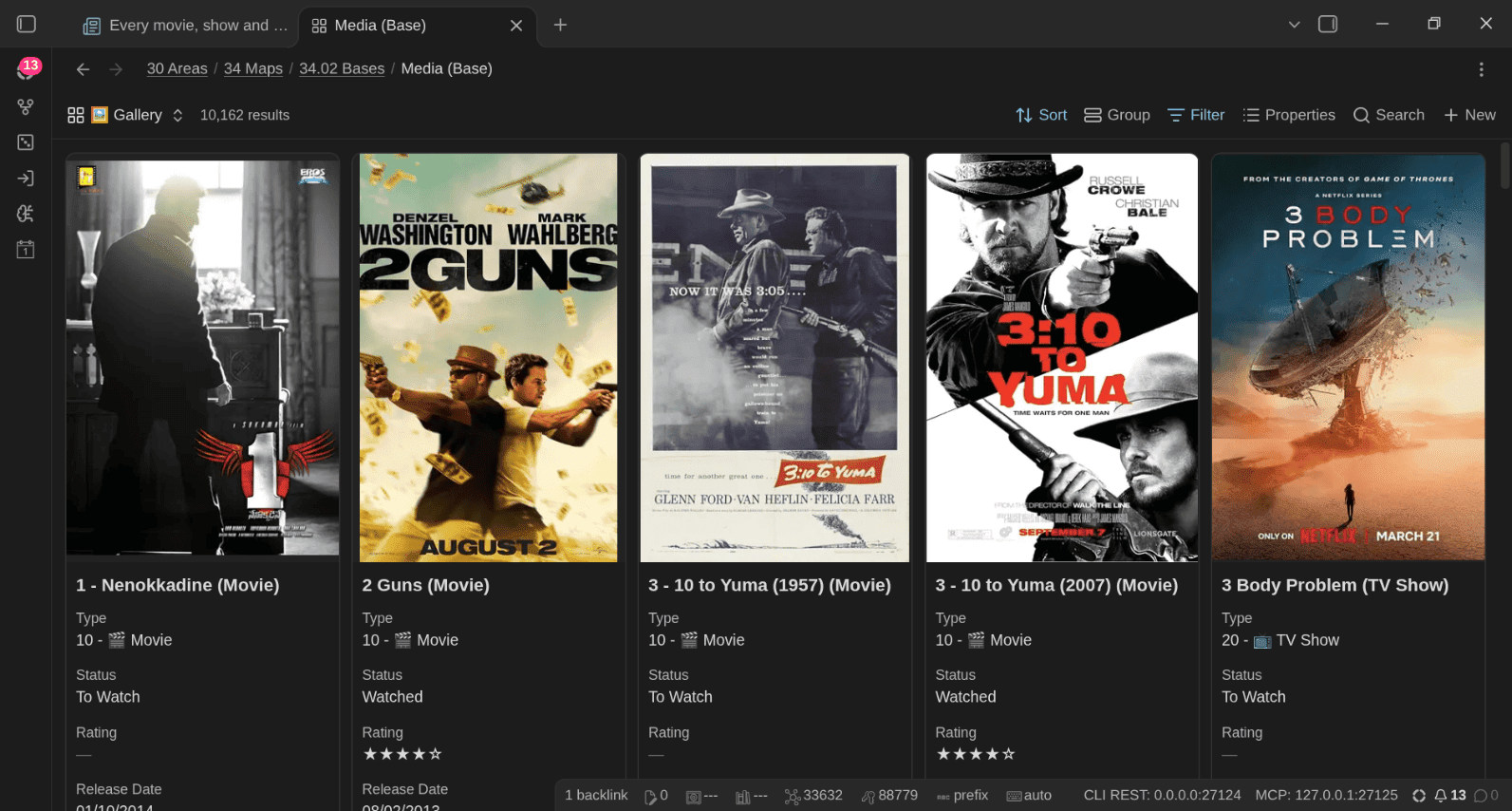
🖼️ Gallery
Covers, covers everywhere. The Gallery view is a native Bases cards view: one card per item, with its cover, type, status, rating and release date. Across all thousands of entries:
⏭️ Up Next: what do I start next?
The backlog (and the things I want to revisit), sorted by priority, then by the manual order I set by dragging cards on the dedicated Kanban board:
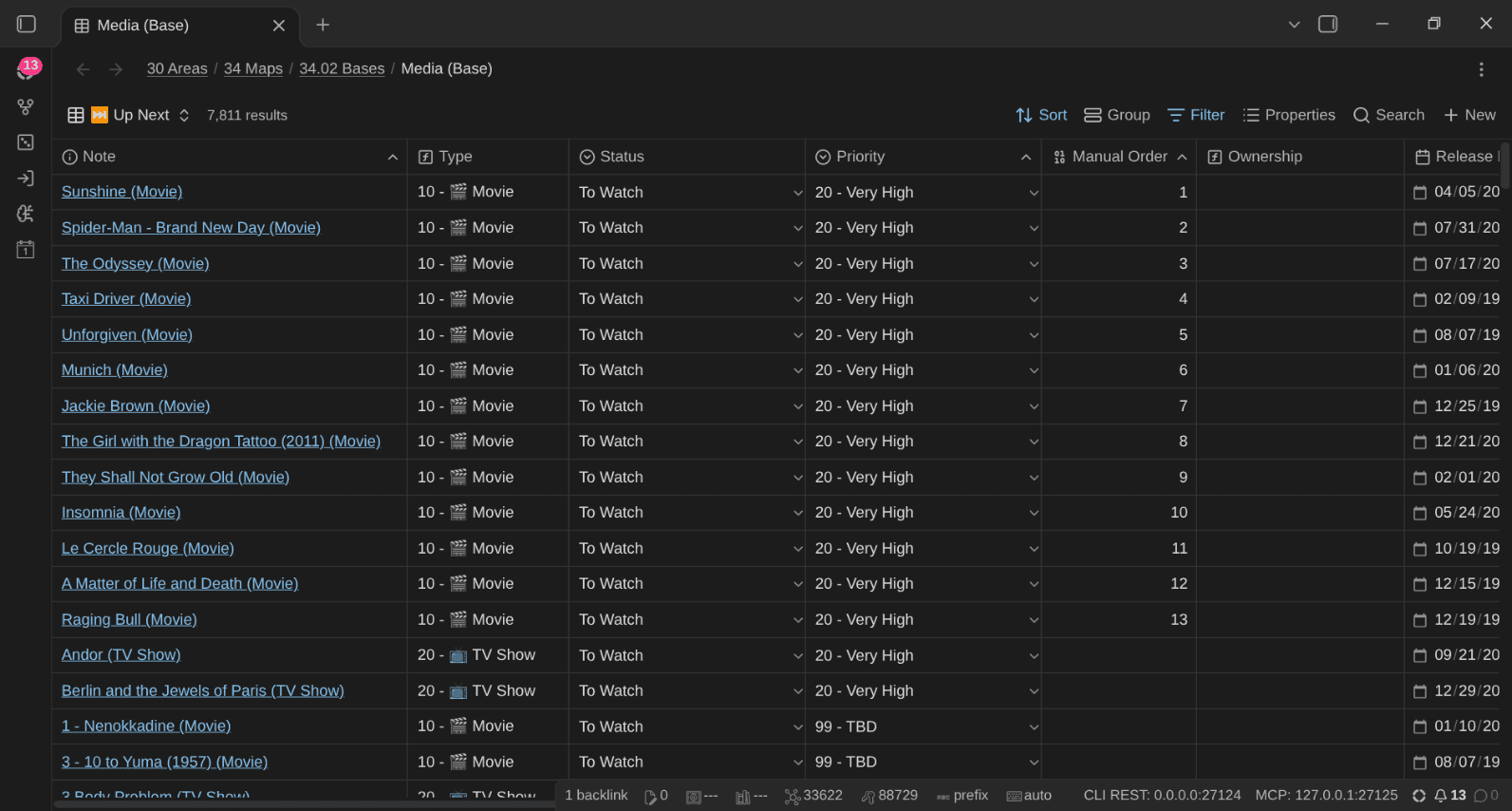
Priority uses the same scale as my tasks and projects (10 - Top to 60 - Very Low, 99 - TBD by default). I can set priorities and ratings inline in any table, with the 🔝 and ⭐ buttons, in the triage mode of the Kanban boards (it walks through the 99 - TBD cards one by one), or in bulk with AI.
Kanban boards
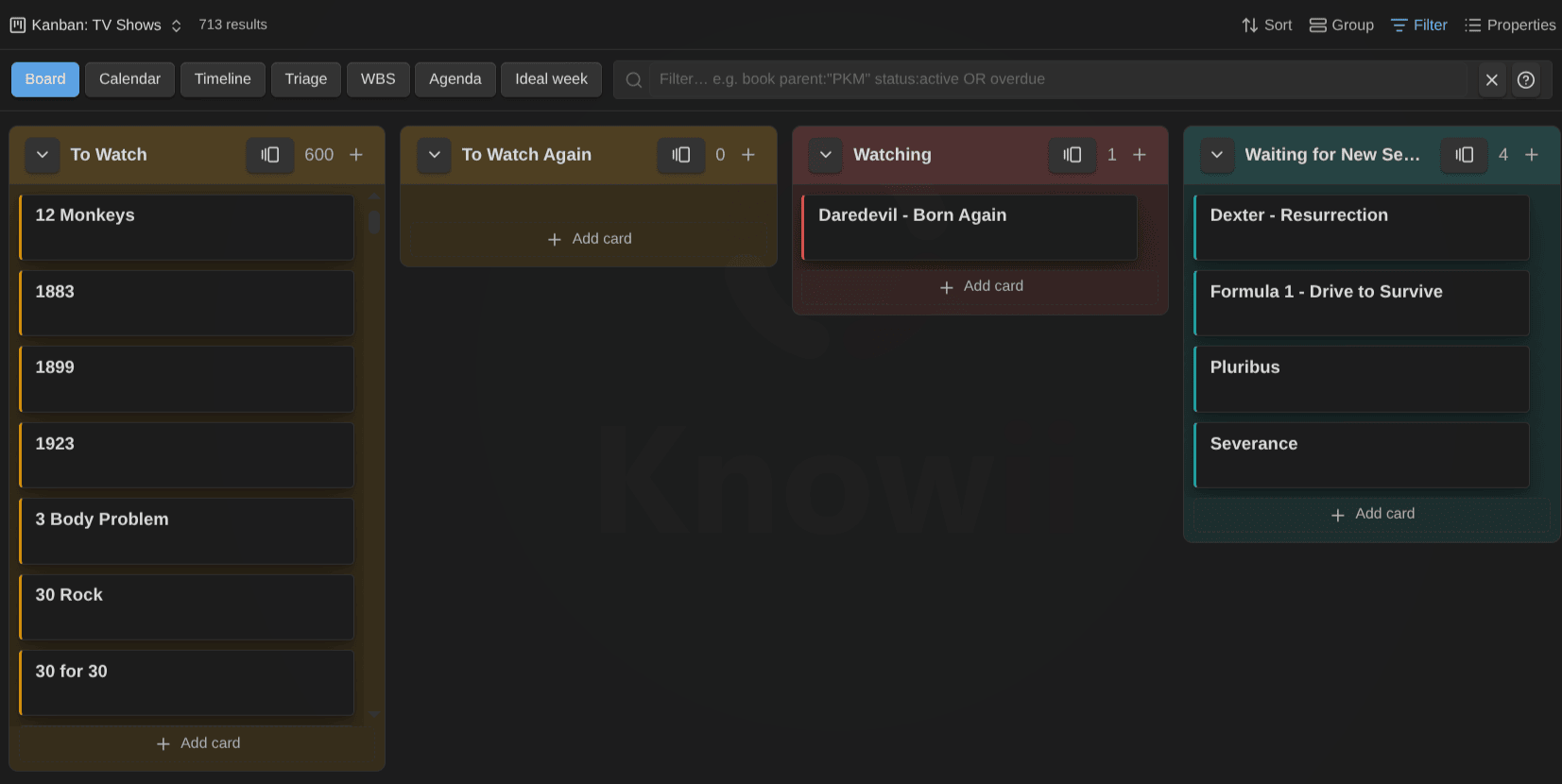
Every Base has a Kanban Action Planner view, with one column per status. Drag a card from To Watch to Watching and the OSK plugin stamps date_started:
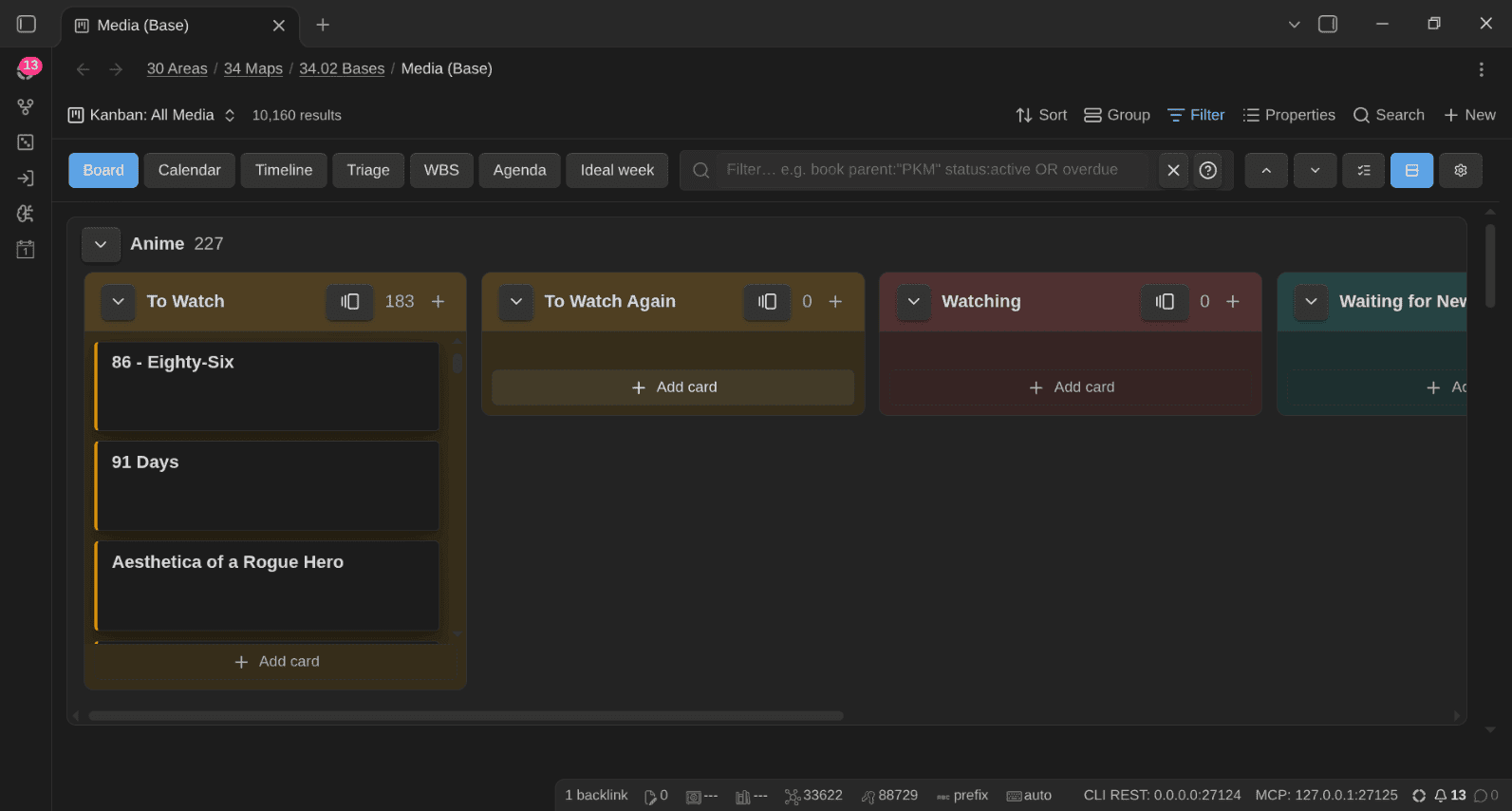
Kanban: All Media puts every medium on one board, with one swimlane per note type, each with its own columns:
 Dwayne Appleby
🎁 Wishlist by Priority
wishlist_priority uses the BoardGameGeek scale (1 - Must Have to 5 - Don't Buy This), separate from priority (which is about when I'll watch or play something). Next to it, wishlist_price is the price I'd pay:
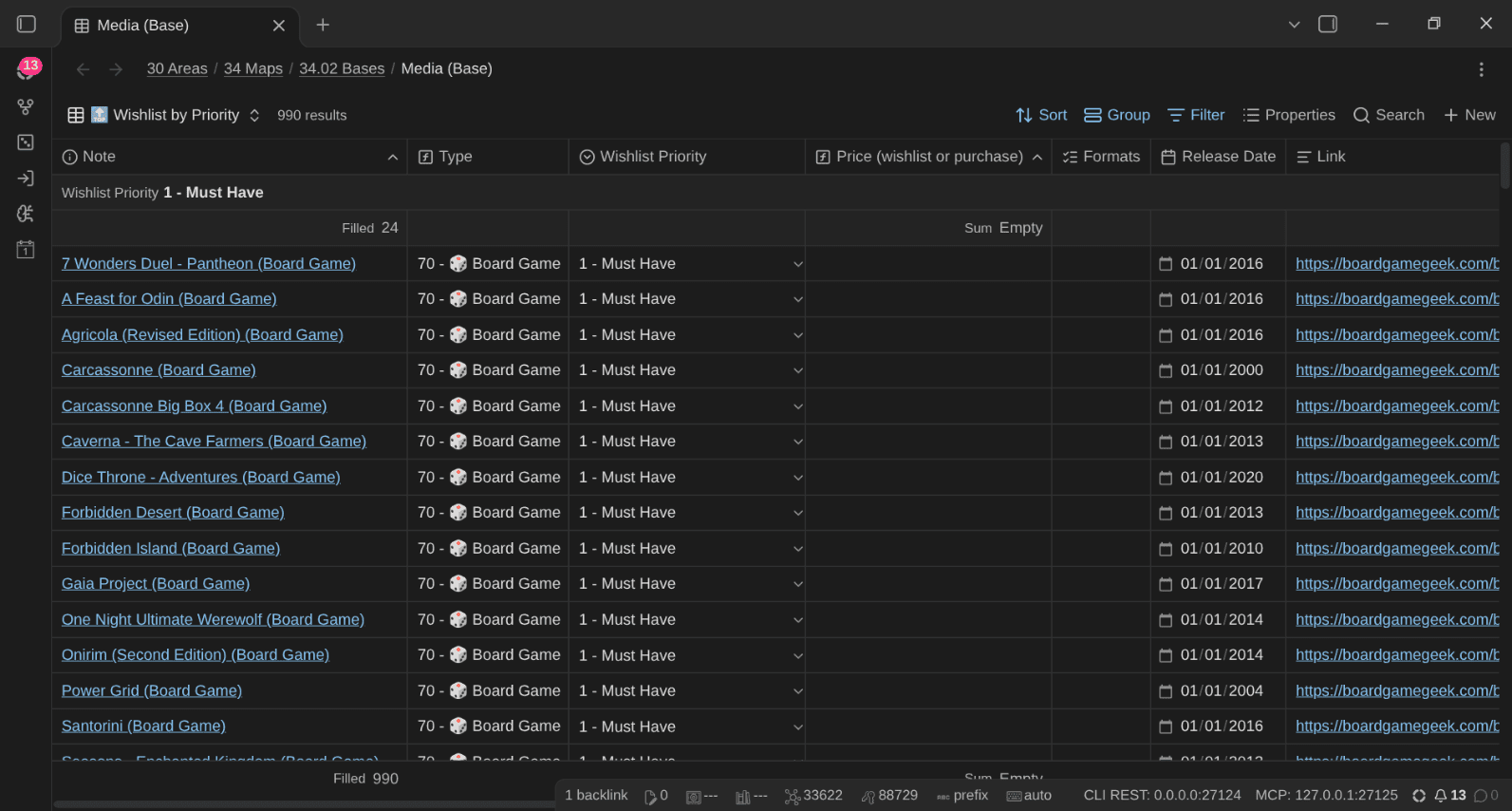
When my family will ask for gift ideas, I won't need to think much. More on that in the MoCs section.
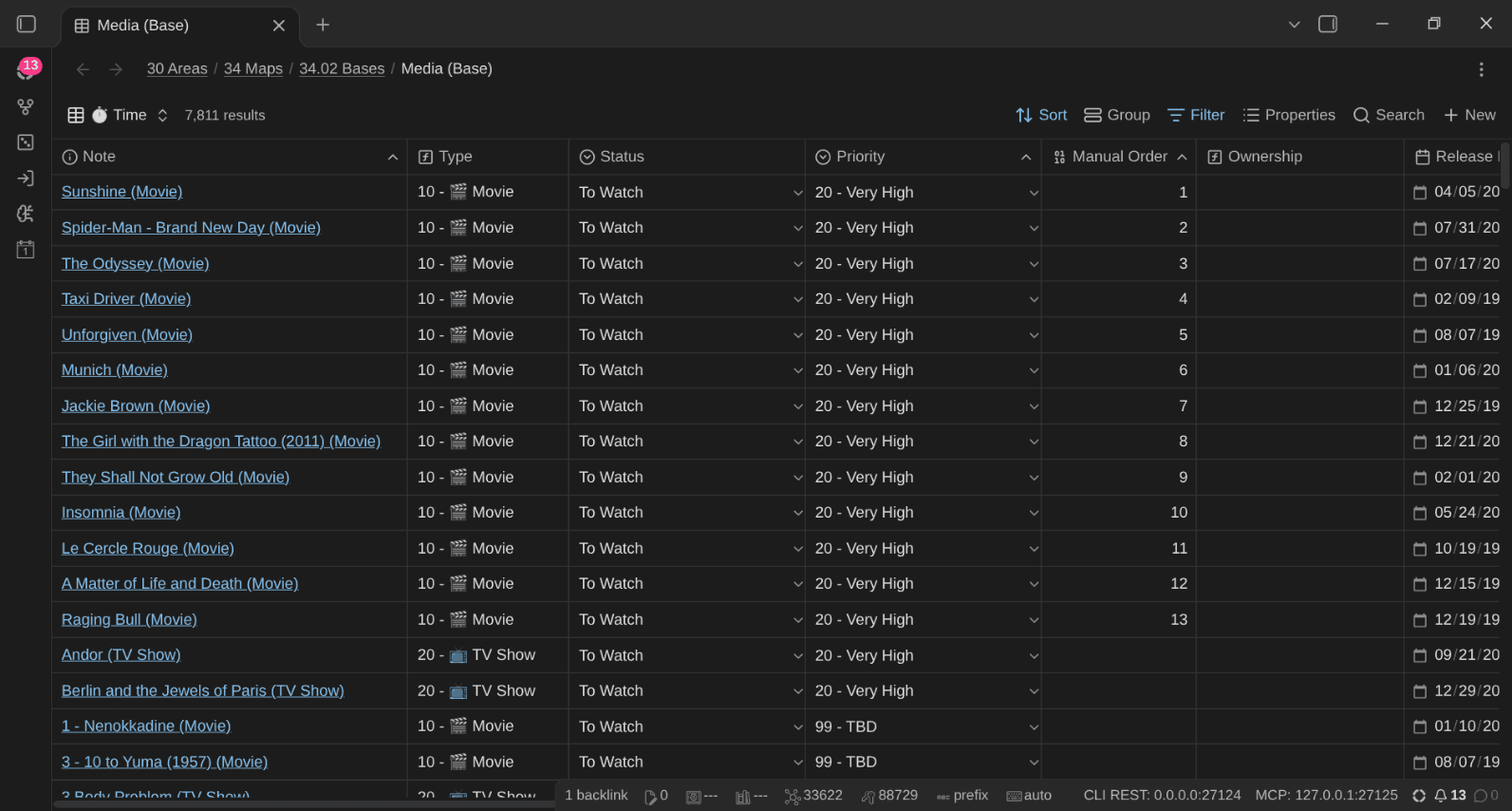
⏱️ Time: how many hours did all this take?
I don't log time for everything (who does?). So the Base estimates it from what each note already knows, multiplied by the number of times I completed it: a movie's runtime, the episodes I've seen × episode_runtime, a board game's plays × playtime, an album's duration. For a video game, it uses time_spent when I logged it, else the HowLongToBeat hours matching my completion level.
formulas:
  estimated_time: >-
    if(formula.child_count > 0, "",
    if(file.hasTag("type/media/movie"), if(runtime, runtime * formula.play_count, 0),
    if(file.hasTag("type/media/tv_show") || file.hasTag("type/media/tv_season") || file.hasTag("type/media/anime"),
      if(episode_runtime, formula.episodes_seen * episode_runtime, 0),
    if(file.hasTag("type/media/board_game"), if(playtime, formula.play_count * playtime, 0),
    if(file.hasTag("type/media/video_game"),
      if(time_spent, time_spent, formula.game_hours * 60 * formula.play_count),
    if(file.hasTag("type/media/album"), if(duration, duration * formula.play_count, 0), ""))))))
  estimated_hours: if(formula.estimated_time, (formula.estimated_time / 60).round(1), "")
Notice the first line: parents with child notes return nothing, because their time is counted through their children.
Per-medium views
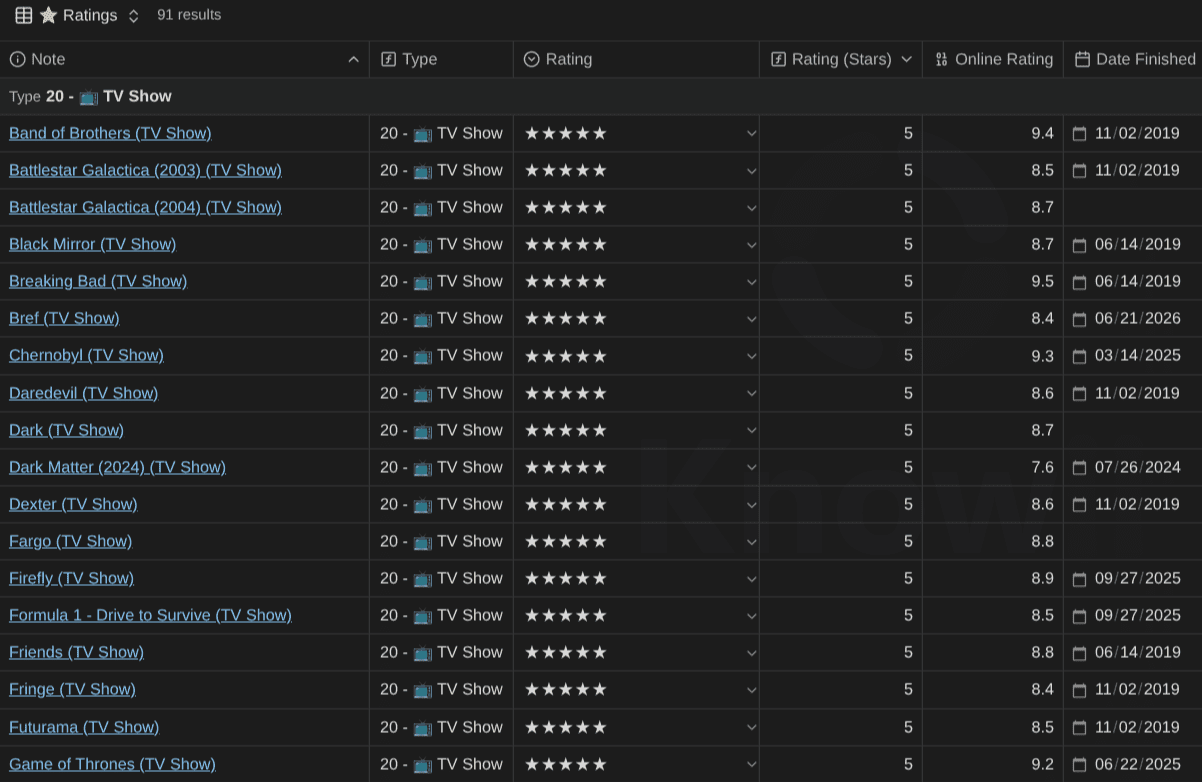
A few more from the per-medium Bases. TV shows I rated 5 stars, with the online rating next to mine:
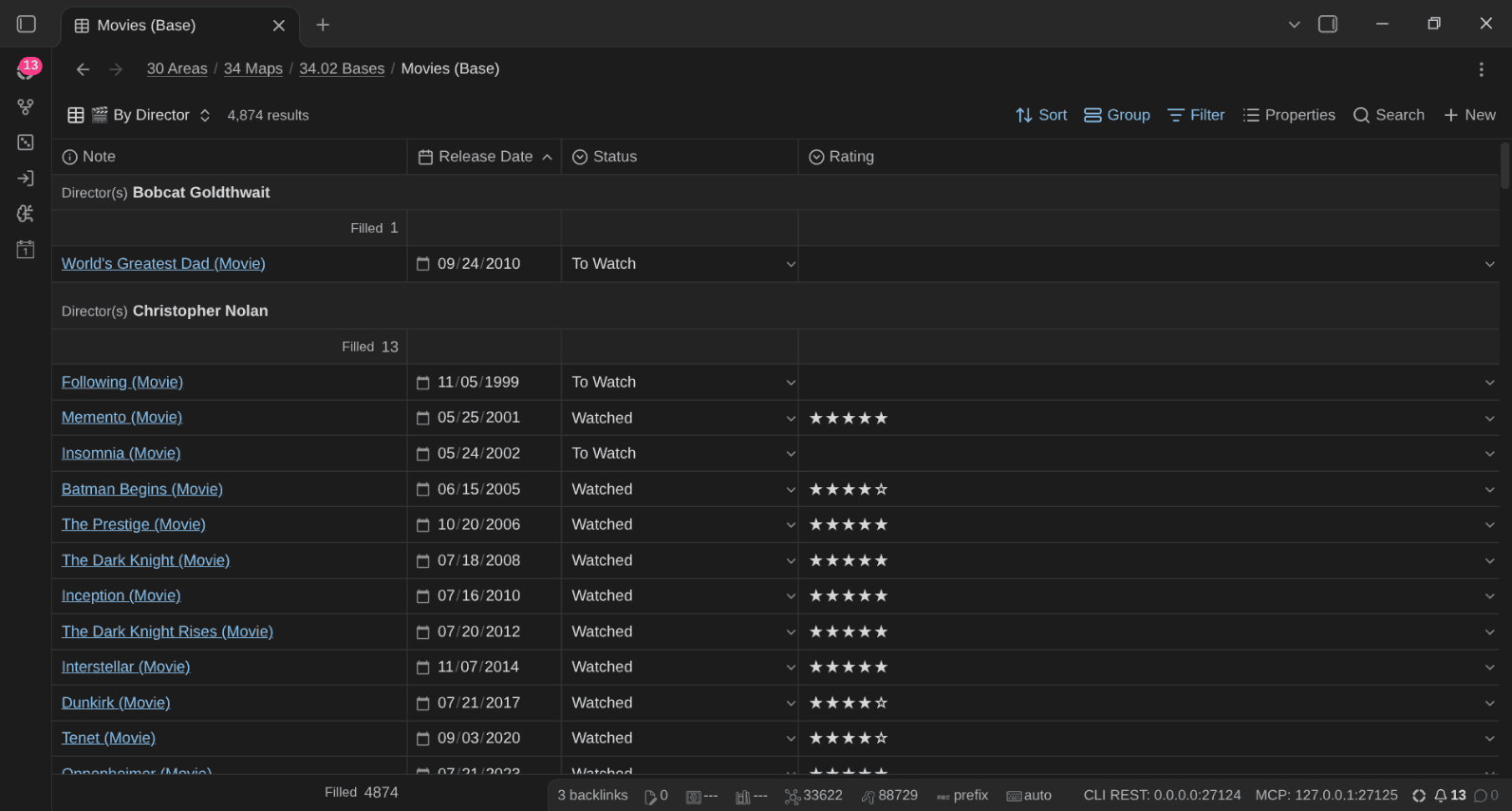
Movies grouped by director (yes I'm a fan of Christopher Nolan):
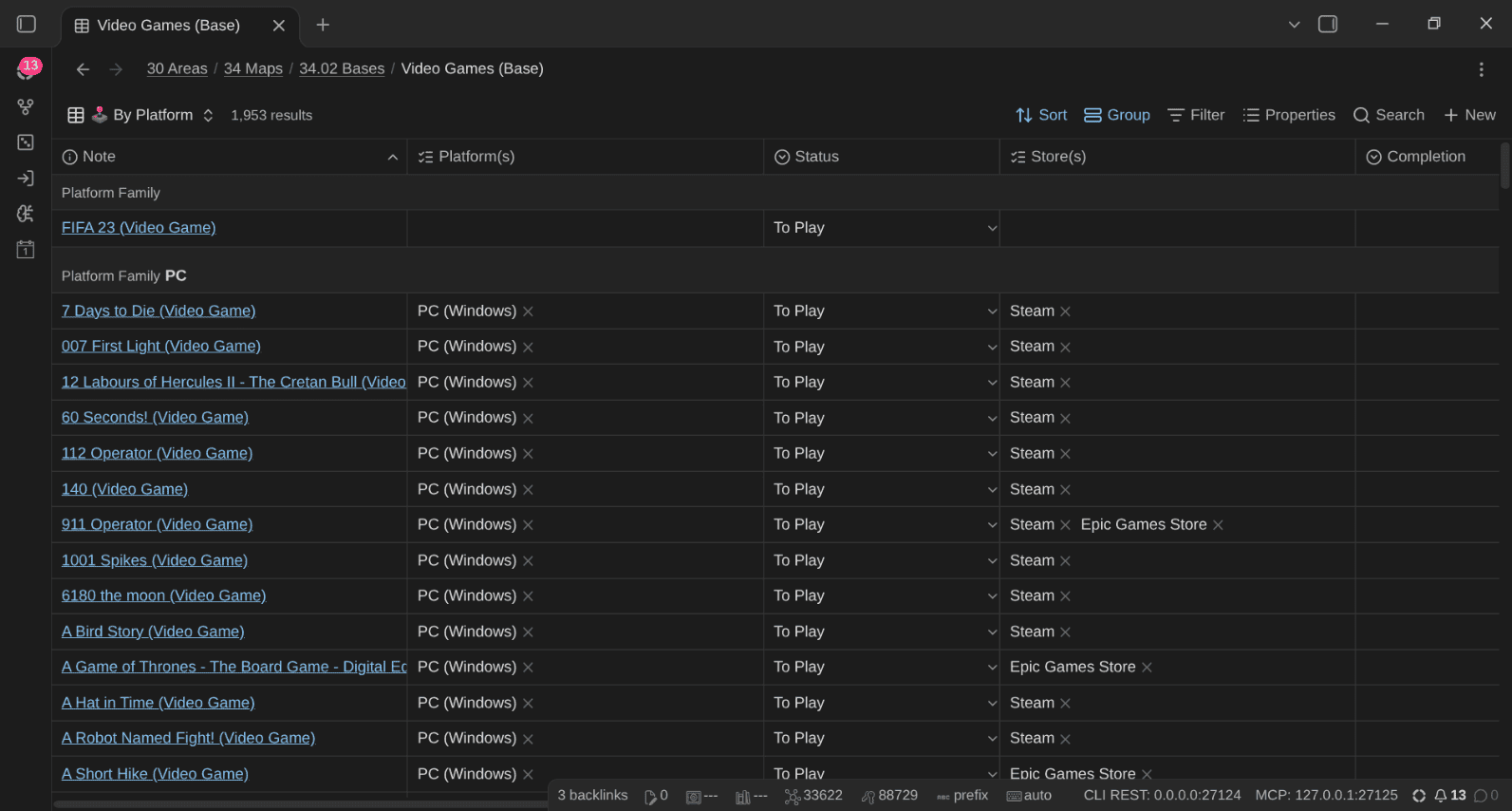
Video games grouped by platform family and store:
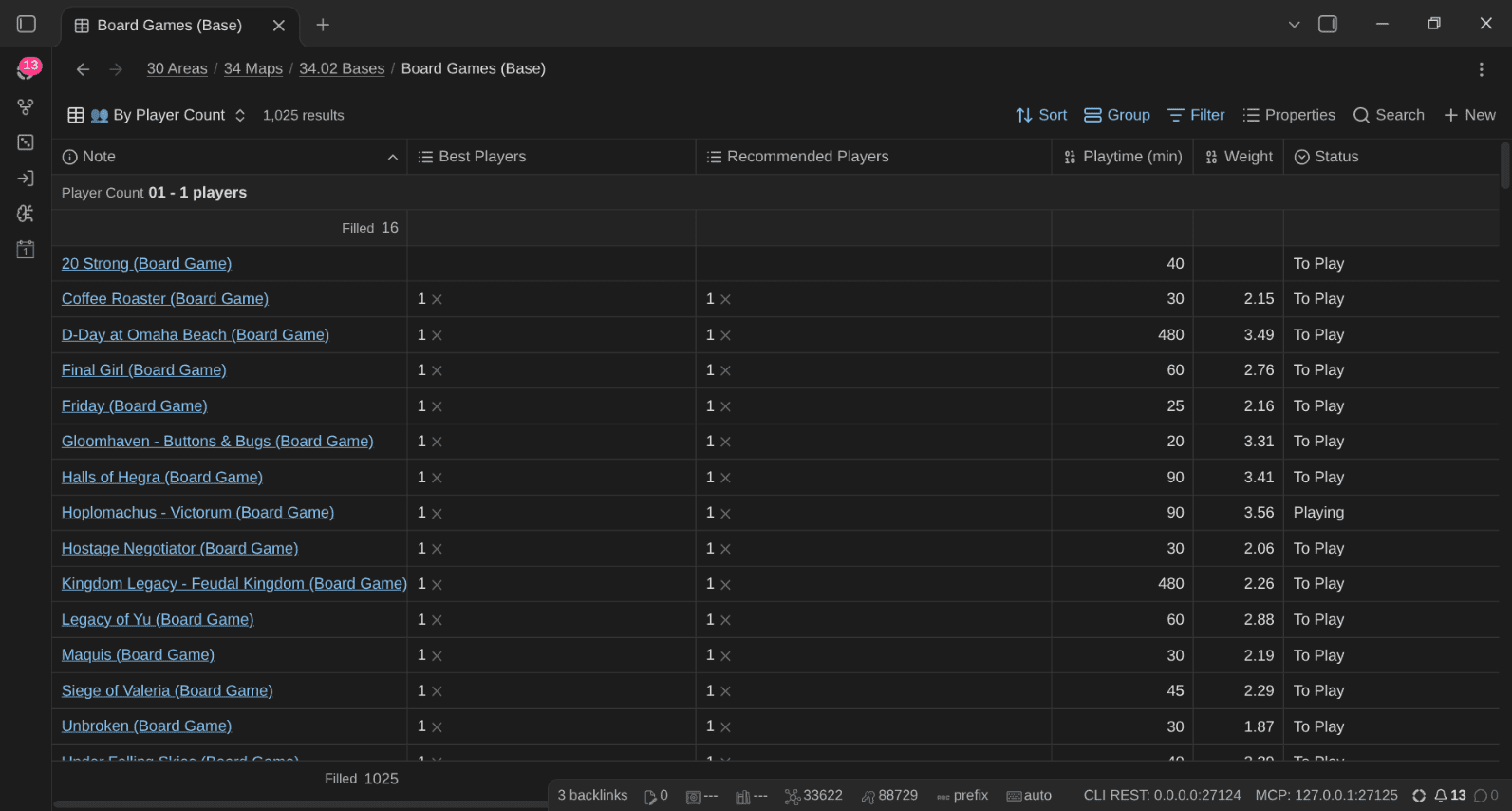
And board games by player count:
Video games: platforms, stores and subscriptions
Video games deserve a closer look, because they're scattered across more places than any other medium. My 1,953 video game notes span 1,618 PC games, 378 PlayStation 4 games and 164 PlayStation 5 games, bought or claimed on Steam (1,097), the Epic Games Store (253), PlayStation Plus (272), the PlayStation Store (161), Ubisoft Connect, Battle.net, the EA app, GOG... And my list is far from complete; there are PS1, PS2, PS3, Nintendo Switch and games for many older platforms that I still need to import... Good luck getting that overview from any single launcher
Three properties help around this:
platforms: where it runs (PC (Windows),PlayStation 5,Nintendo Switch...)stores: where I got it (Steam,Epic Games Store,PlayStation Plus...)physical_on: the platforms I own a physical copy for (andeditionandregionfor collectors)
Both lists are documented in my Obsidian Starter Kit plugin, so duplicate names like "PS5", "Playstation 5" and "PlayStation5" will not be allowed. I also added a storage property to my own notes, to know which disk each game is stored on (because, of course, I have games stored on tons of old hard drives 🙈).
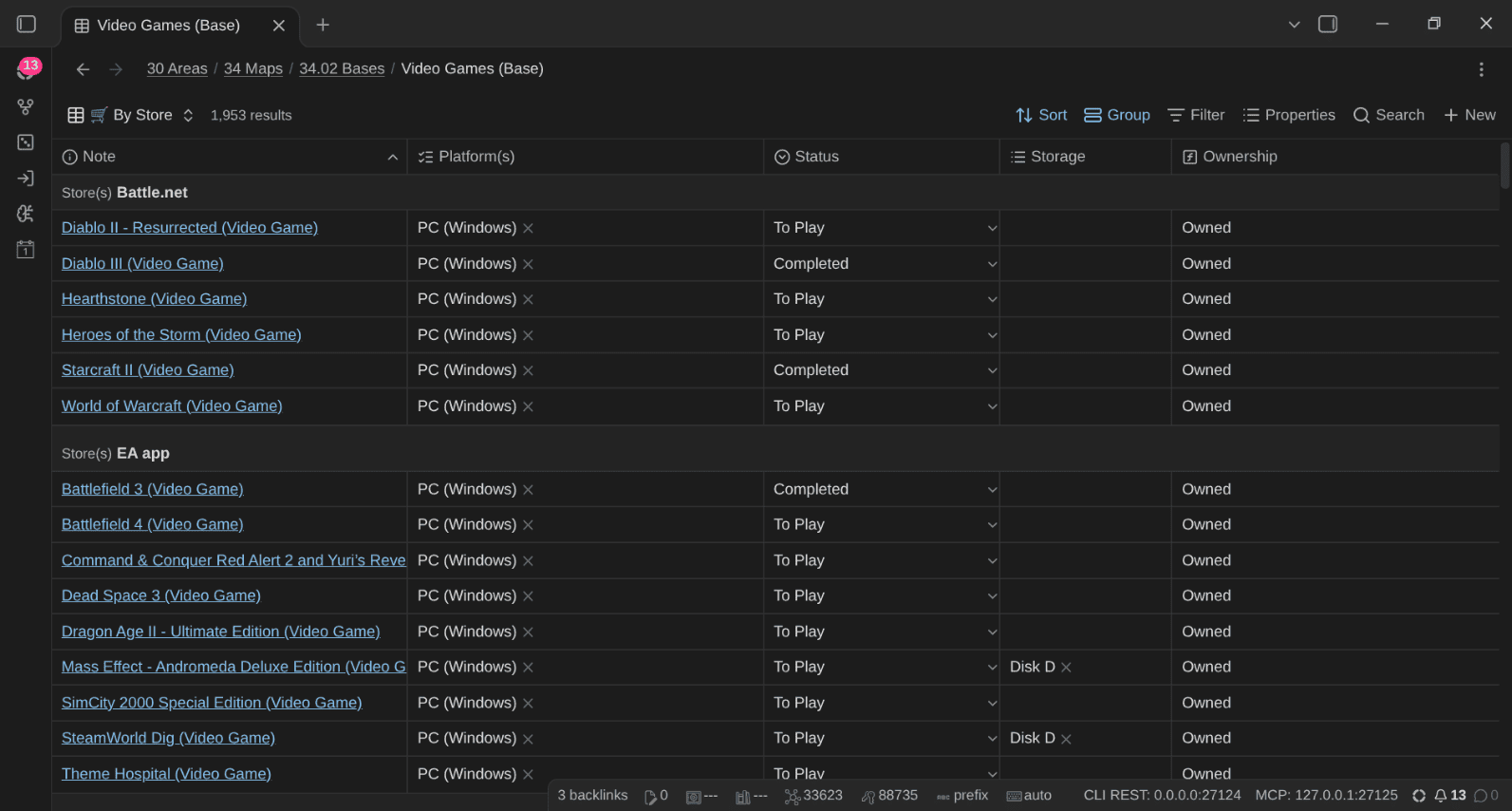
The 🛒 By Store view groups everything by store, with the platforms and the disk:
The ➕ Subscription Catalog view lists what I can play through a subscription (PlayStation Plus, Game Pass...), with catalog_until (the date a game leaves the catalog), the number of days left and the HowLongToBeat time. Combined with ⏳ Leaving Soon, it will let me know when it's time to play a game before it vanishes (I miss the days where we actually owned all of our games!)
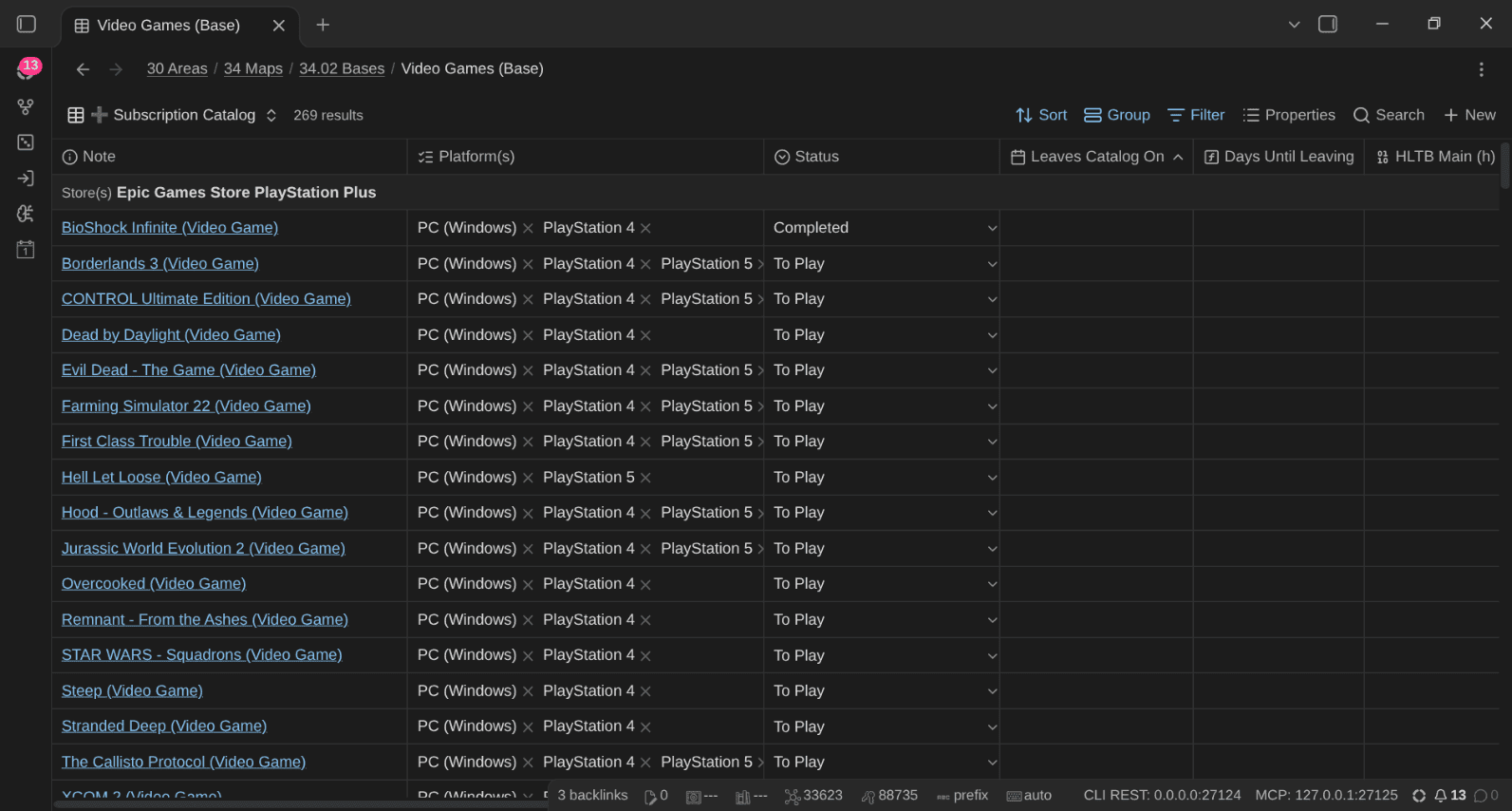
Then there's time. My Steam import brought back 2,237 hours of logged playtime across 126 games, straight into time_spent. I actually spent a lot more time on various other platforms (Hi Diablo & WoW!). For the games I haven't played yet, I've created a skill to fetch data from HowLongToBeat, which feed the 📏 Backlog by HLTB view ("what can I finish this weekend?"), the "short ones" filter, the time estimates and the recommendations.
The remaining views follow the same logic: 🕹️ By Platform, 💻 PC, 🎮 PlayStation, 🍄 Nintendo, ❎ Xbox, 📀 Physical vs Digital, 🌐 By Region and 🏆 Completion.
TV shows: seasons, episodes and Where Am I
A TV show can be tracked on its own (with episodes_total, episodes_watched and current_episode, e.g. S03E04), which is enough for a mini-series. For longer shows, each season gets its own note, created from TPL TV Season: it asks which show, the season number and the number of episodes, then creates <Show> - S<NN> (TV Season) in the show's folder, links it to the show, and adds an Episodes checklist with one box per episode:
## Episodes
- [x] E01
- [x] E02
- [x] E03
- [x] E04
- [x] E05
- [ ] E06
- [ ] E07
- [ ] E08
- [ ] E09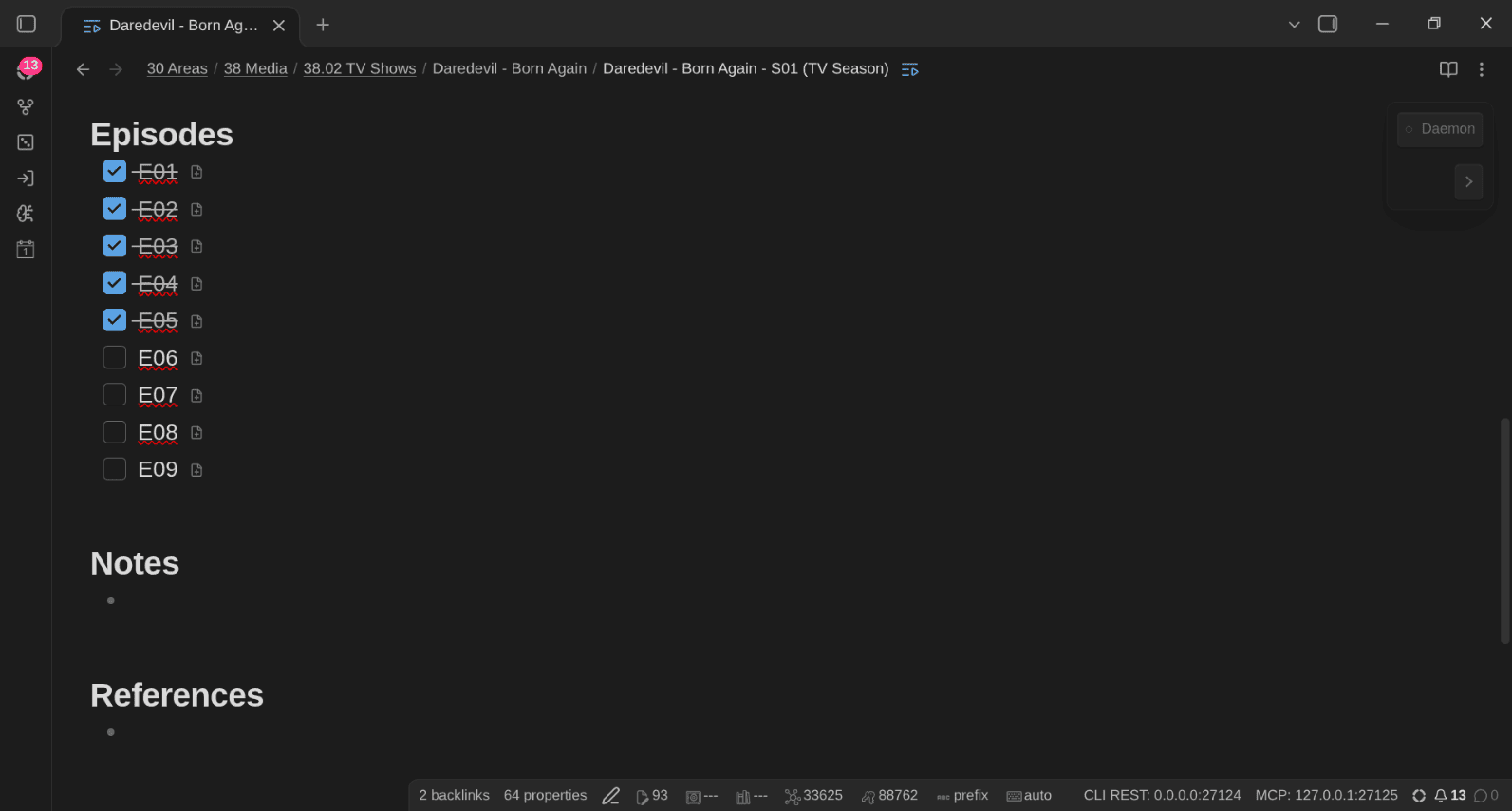
The 📺 Watched episodes button does the bookkeeping: "2" moves episodes_watched up by 2 (never past episodes_total), sets current_episode to E05 on the season and S01E05 on the show, ticks the next two boxes, and offers the done status when I reach the last episode. Run it on a show with season notes, and it logs in the season I'm in.
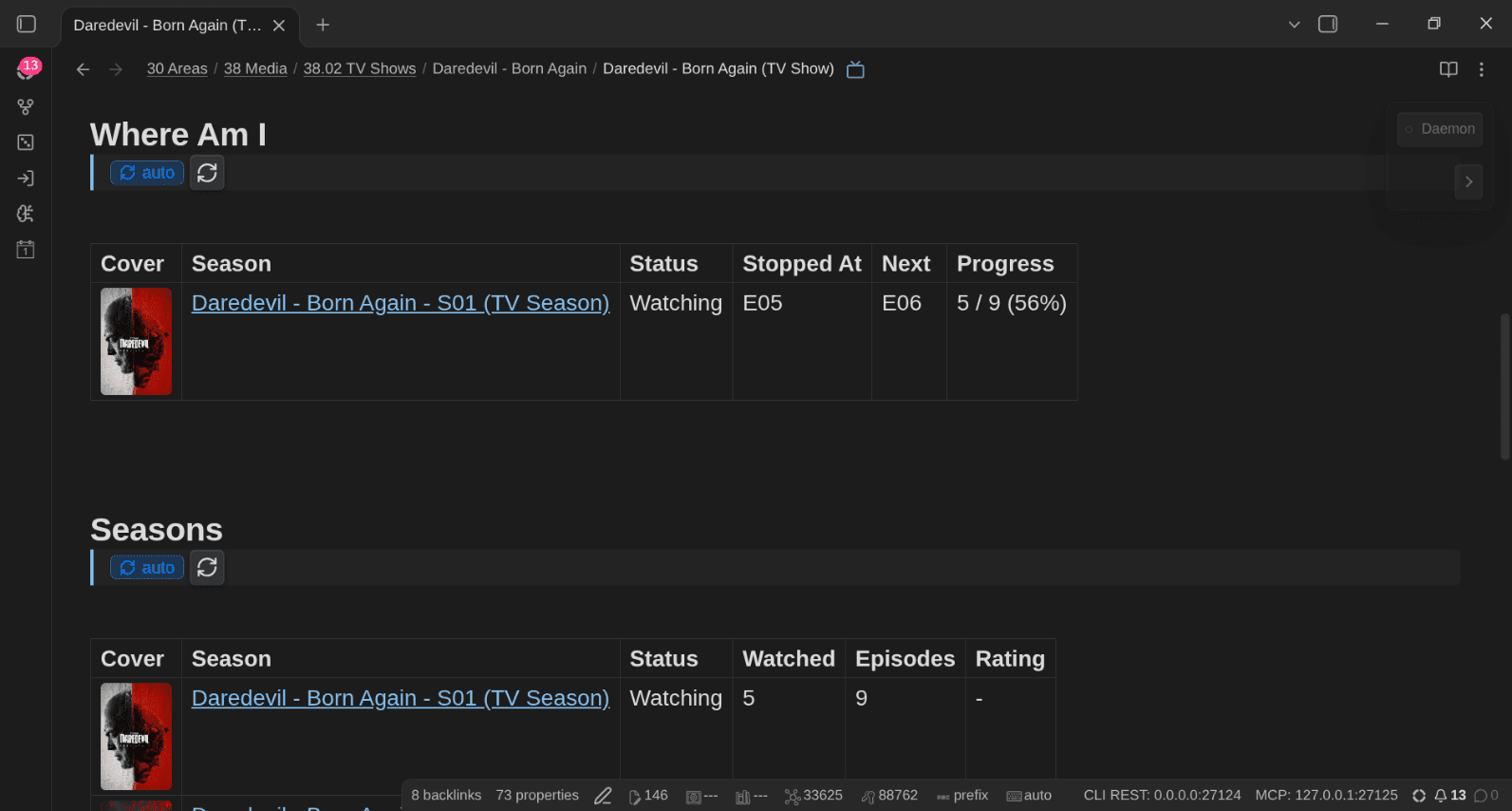
The show note then answers the question: where am I? Its Where Am I line shows the season I'm in, the episode I stopped at, the next one and my progress; its Seasons table lists every season with its cover, status, episodes watched and rating.
In the TV Shows Base, the 📺 Seasons by Show view groups the seasons under their show, with the progress and the estimated time left:
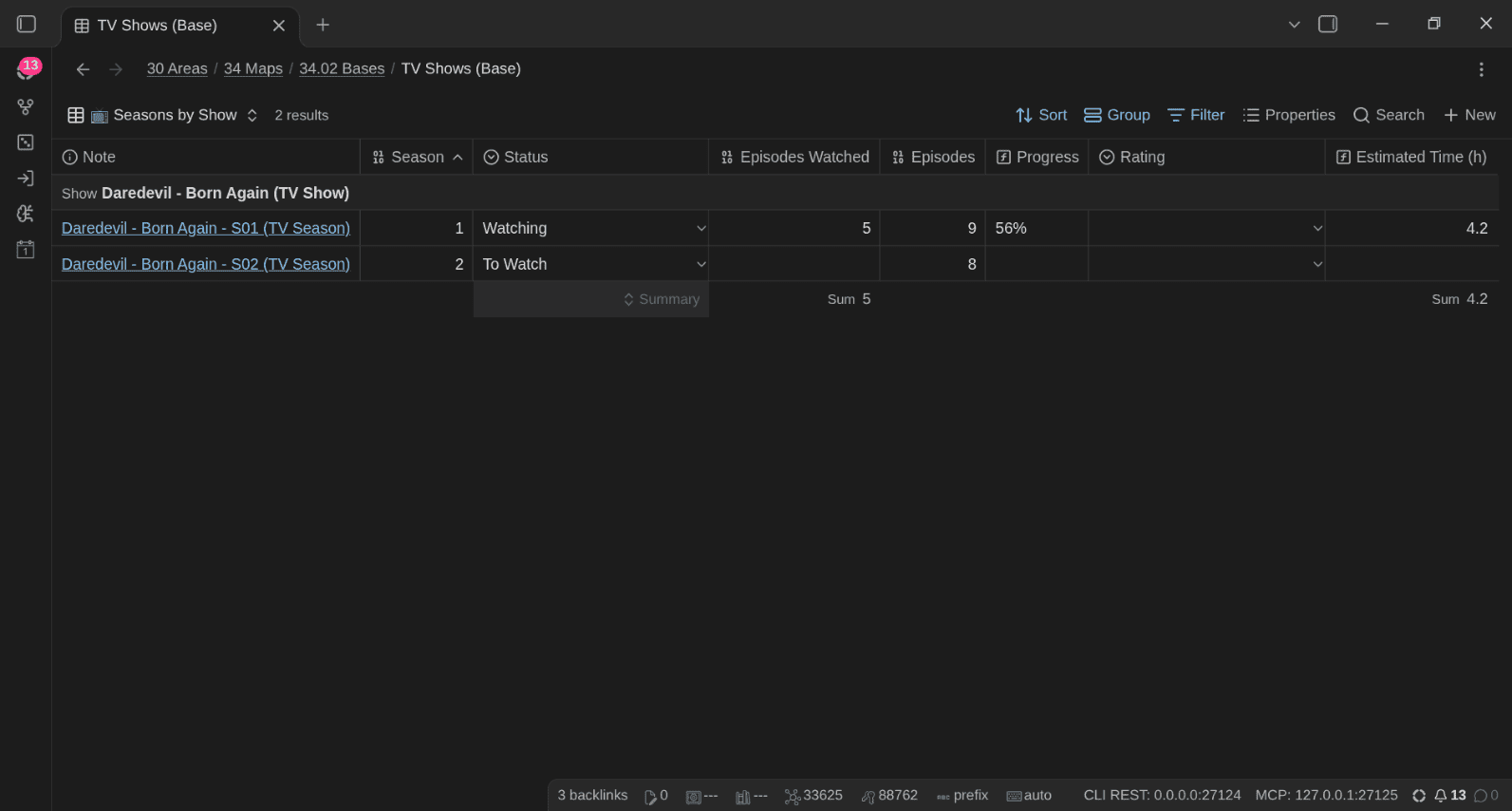
And when a show I finished gets a new season, I don't need TV Time's notifications anymore; I have an AI skill that checks my shows against TMDB (or TVmaze), creates the missing season notes with their episode checklists, and moves the show back to To Watch. The TV Shows Base adds 📺 Seasons by Show, 📡 Airing, ⏭️ Next Season and a second Kanban board for seasons.
Movies by decade
Every movie note has a release_date, and the Movies Base has a 🗓️ By Decade view built on a one-line formula:
formulas:
  decade: if(release_date, ((date(release_date).year / 10).floor() * 10).toString() + "s", "")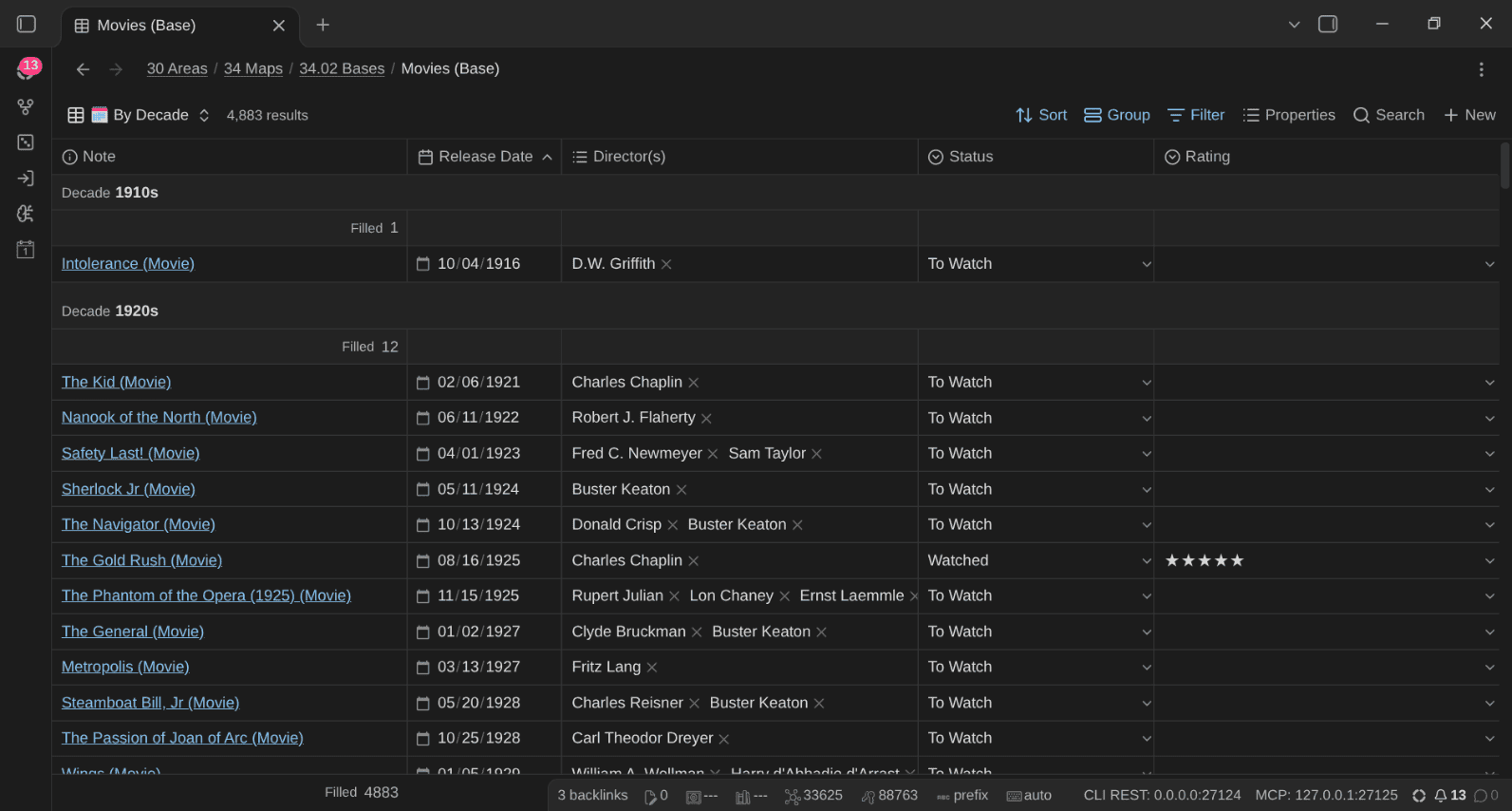
Makes it a breeze to visualize things like this:
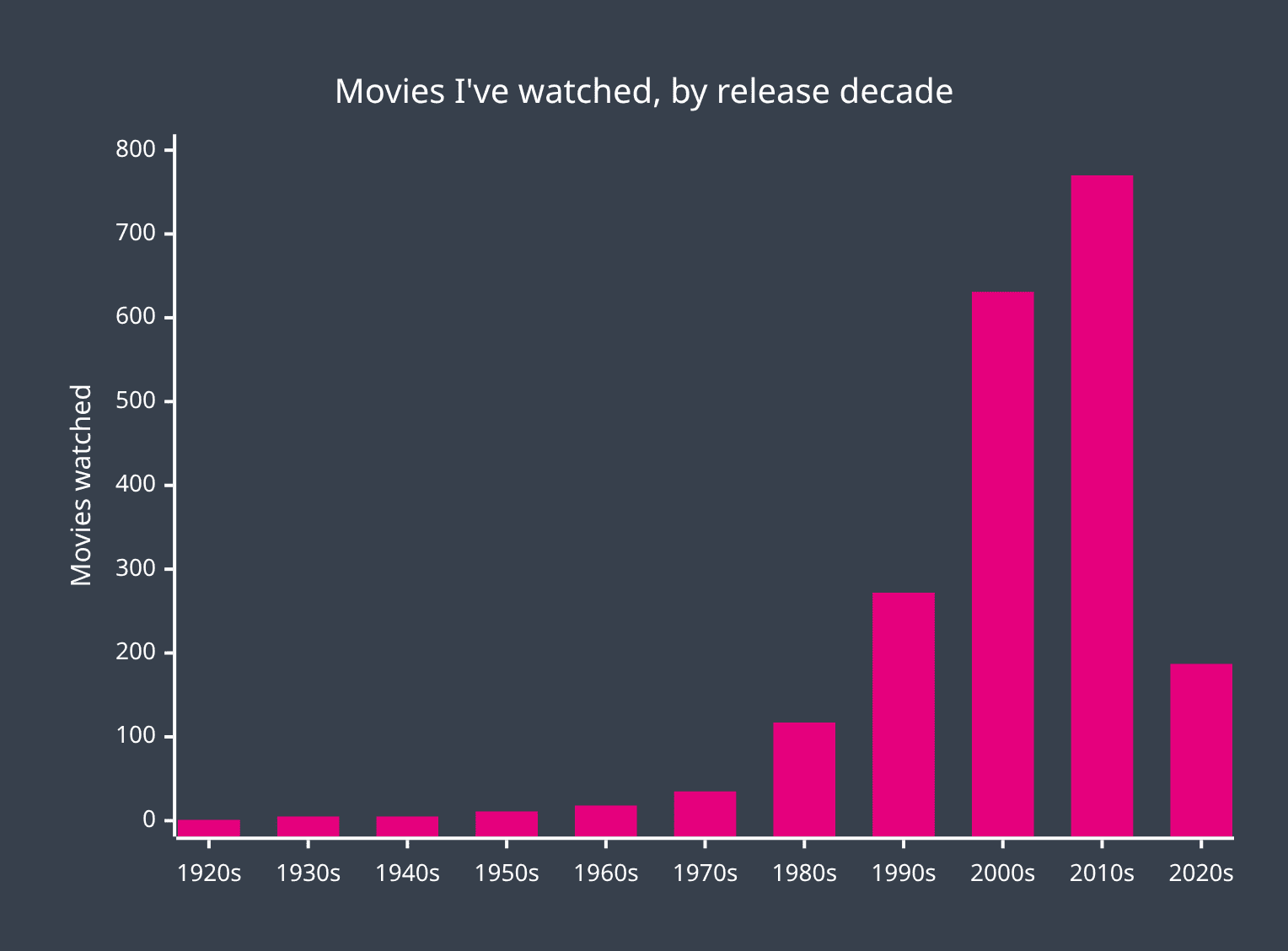
So yeah, I have a ton of older movies to watch ^^
Selling board games with a few equations
This one is very specific to me, but I love it. I'm a hoarder, and I need to recover some (physical) space. Selling board games takes time: photos, listing, messages, meeting the buyer or shipping the box. Is it worth it for a 20€ game? Probably not.
So board games and board game items carry a small sales pipeline:
sale_stage:KeepandMaybe(the triage decision),To SellandTo Give Away, thenListed,Reserved,To Ship, and finallySoldorGiven Awaysale_platform,sale_url,sale_asking_price,sale_sold_price,sale_listing_expires,sale_buyersale_lot: games often sell as a lot (a base game with its expansions). Every item of the lot gets the same lot name, and only the lead item carries the prices, so totals don't count a lot twice
With automation rules on, ownership follows the stage: Listed adds For Sale, Sold replaces Owned with Sold and stamps date_disposed.
Then come the equations. I put a value on my time, and the Base compares what a sale would earn per hour of handling to that rate:
formulas:
  sale_hourly_rate: "100"
  sale_handling_hours: "1"
  sale_value: if(sale_sold_price, sale_sold_price, if(sale_asking_price, sale_asking_price, if(estimated_value, estimated_value, "")))
  sale_eur_per_hour: if(formula.sale_value, (formula.sale_value / formula.sale_handling_hours).round(0), "")
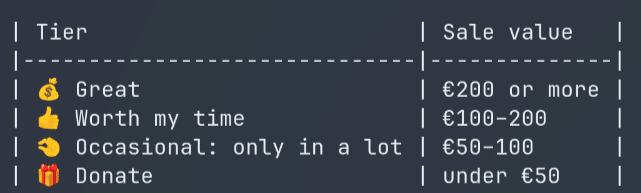
  sale_tier: >-
    if(!formula.sale_value, if(sale_lot, "50 - 🧺 Priced with its lot", "99 - ❔ Unpriced"),
    if(formula.sale_eur_per_hour >= formula.sale_hourly_rate * 2, "10 - 💰 Great (2x my rate or more)",
    if(formula.sale_eur_per_hour >= formula.sale_hourly_rate, "20 - 👍 Worth my time",
    if(formula.sale_eur_per_hour >= formula.sale_hourly_rate / 2, "30 - 🤏 Occasional: only in a lot",
      "40 - 🎁 Donate (under half my rate)"))))
Which gives me tiers like these:
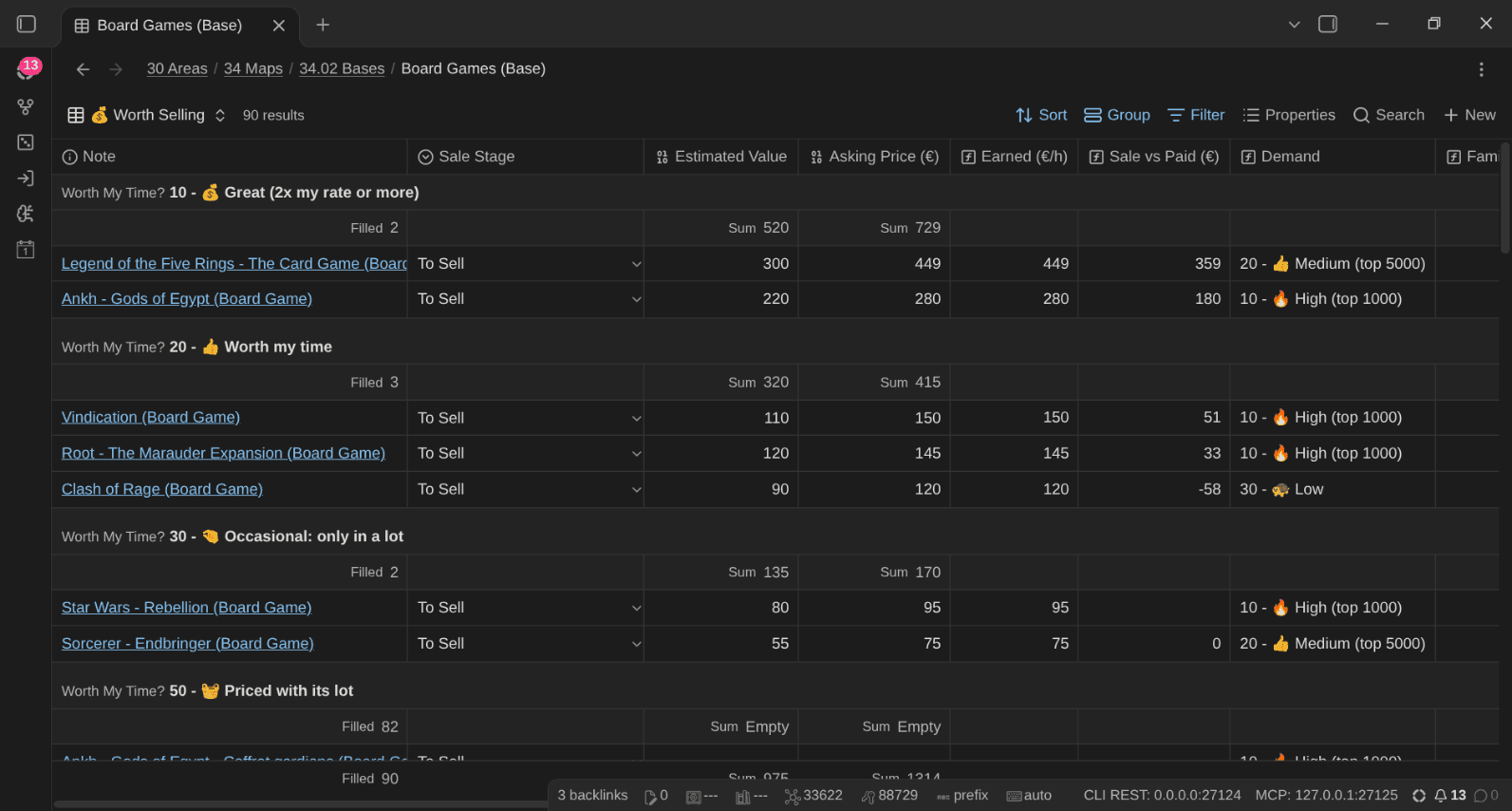
And the 💰 Worth Selling view, grouped by tier, with the estimated value, the asking price, what I'd earn per hour, the difference with what I paid, and the demand (based on the BGG rank):
But which games should go in the first place? Another formula, sale_candidate_score, adds points for duplicates, orphan expansions (an expansion whose base game I don't own anymore), games I never played after two years, very long or heavy games, and removes points for games I rated highly, played recently or keep in rotation. The 🔍 Sale Triage view sorts my collection by that score:
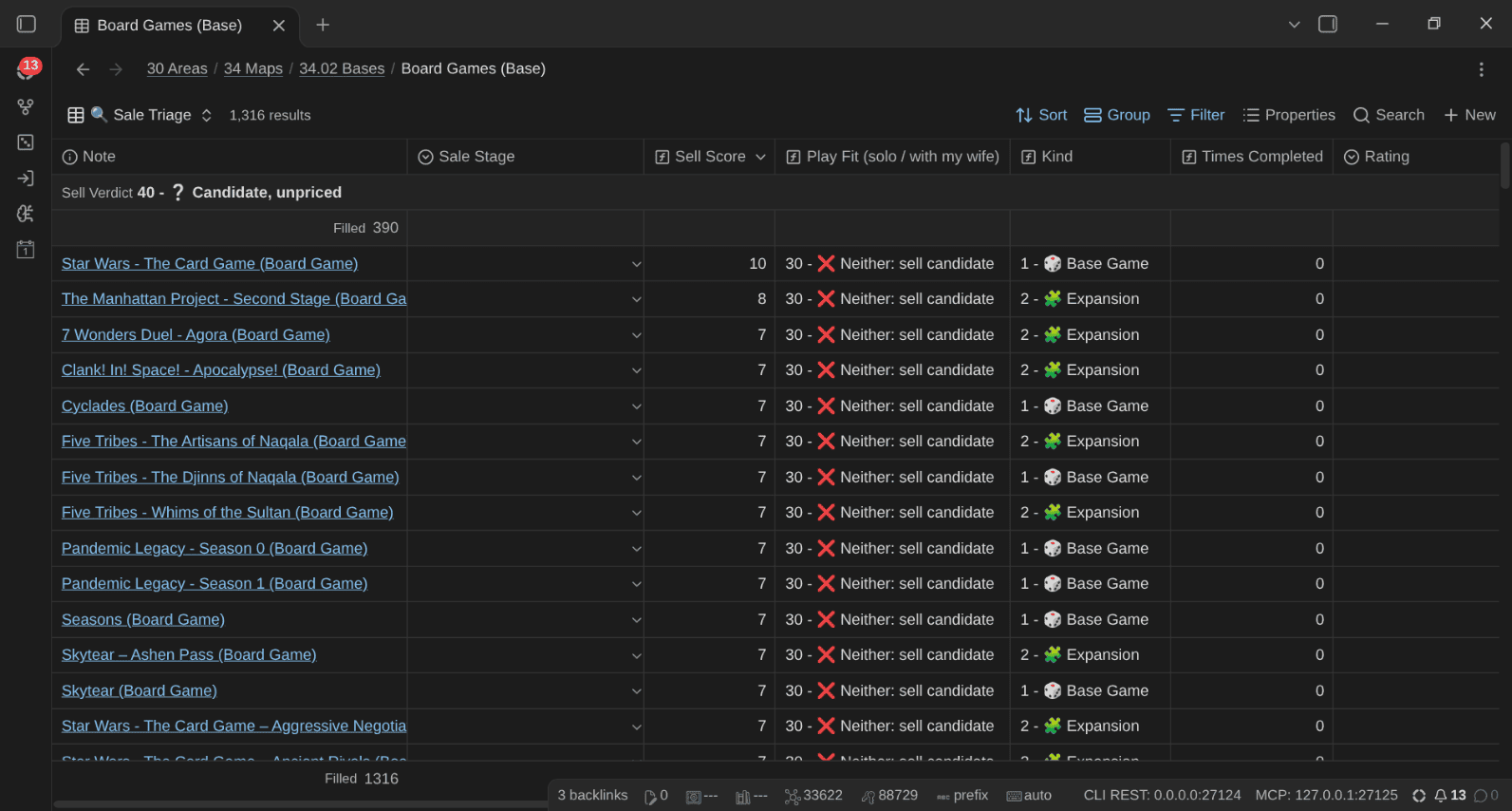
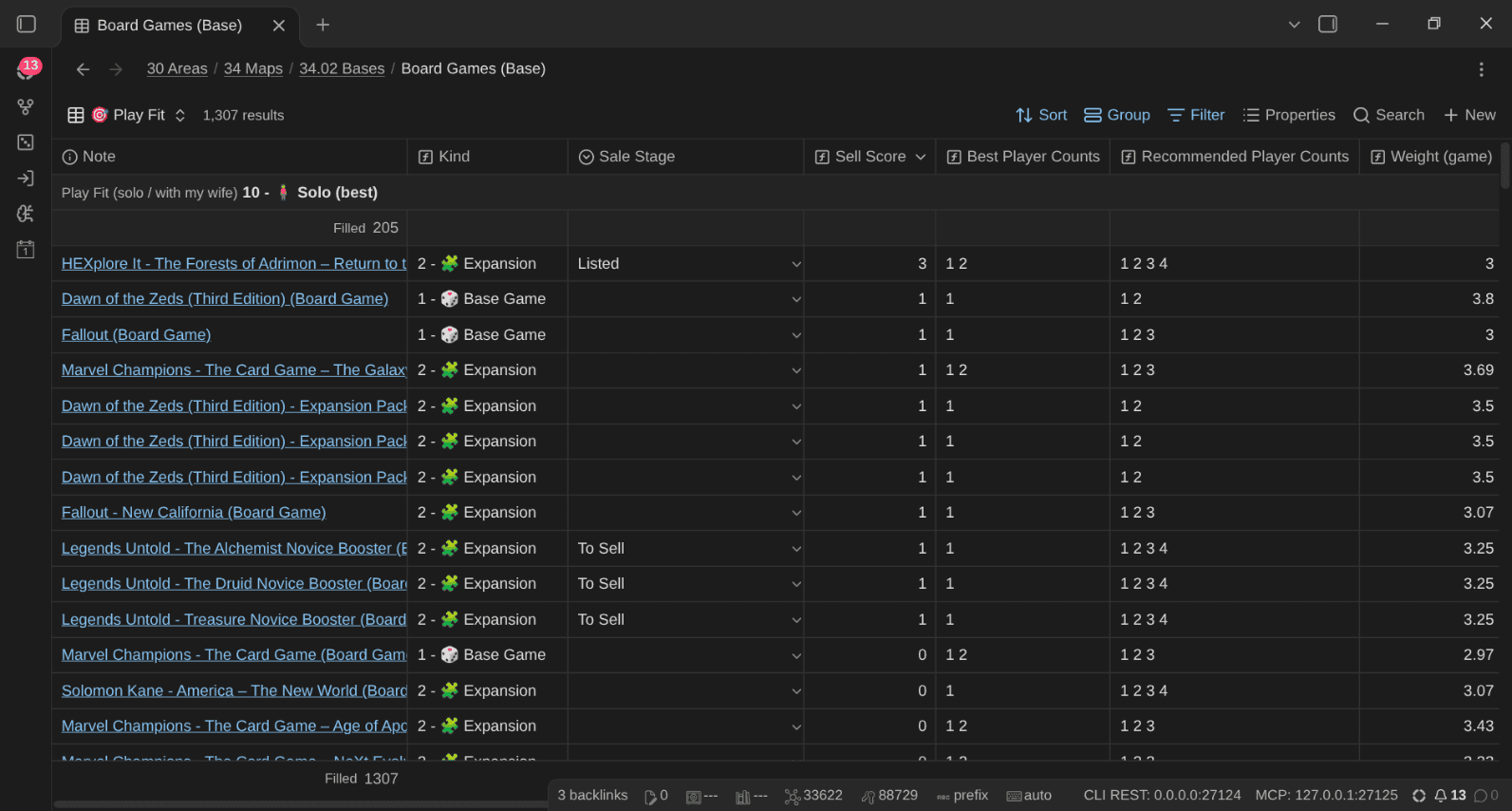
And the 🎯 Play Fit view checks each game against how I actually play (mostly solo or with my wife), using the best and recommended player counts from BoardGameGeek. A game that's only good at 5 players isn't a great fit for a two-person household:
When it's time to list a game, I have another AI skill that I can use to research the game's second-hand value from sold and listed prices and suggests an asking price. Then ⏰ Sale Alerts tells me which listings are about to expire, which ones have been listed for more than 60 days (time to lower the price) and which buyers I need to follow up with.
No spreadsheet. No separate app. Just properties and formulas on the notes I already have.
And while it can feel daunting with all these properties, consider that AI is, again, perfectly able to understand and do all this for me.
Pledges and lending
Two more things that apps never handled well for me.
Crowdfunding. Kickstarter and Gamefound campaigns can take a year or two to deliver (sometimes longer!). The media note tracks the pledge itself: pledge_platform, campaign_url, pledge_url (the pledge manager), pledge_date, expected_delivery, shipping_cost and pledge_status (Pledged, Paid, Shipping Due, Shipped, Delivered, Late, Refund Requested, Refunded, Lost). Ownership follows: Preordered until it arrives, then Owned. The Bases have 📦 Waiting for Delivery, ⏰ Late, 💶 Pledged Total (per platform) and 💶 Pledged by Year views.
Lending. One click on 🤝 Lend, pick the person, done: lent_to links their note and lent_on is today. The item shows up in 🤝 Lent Out (with the number of days it's been away) and ⏰ Lent > 30 Days. And the person's note gets a Lent to them section listing what they have. "Who has my copy of Dune?" is now a question with an answer.
Thanks to this, I could finally get rid of the Excel sheets I used to track all this.
Connected to the rest of my life
Importantly, another huge benefit of having all this information in my vault is that since it's just notes, I can link those to/from any other note in my system. Thus it's one more aspect of my life that I can finally connect with all the rest.
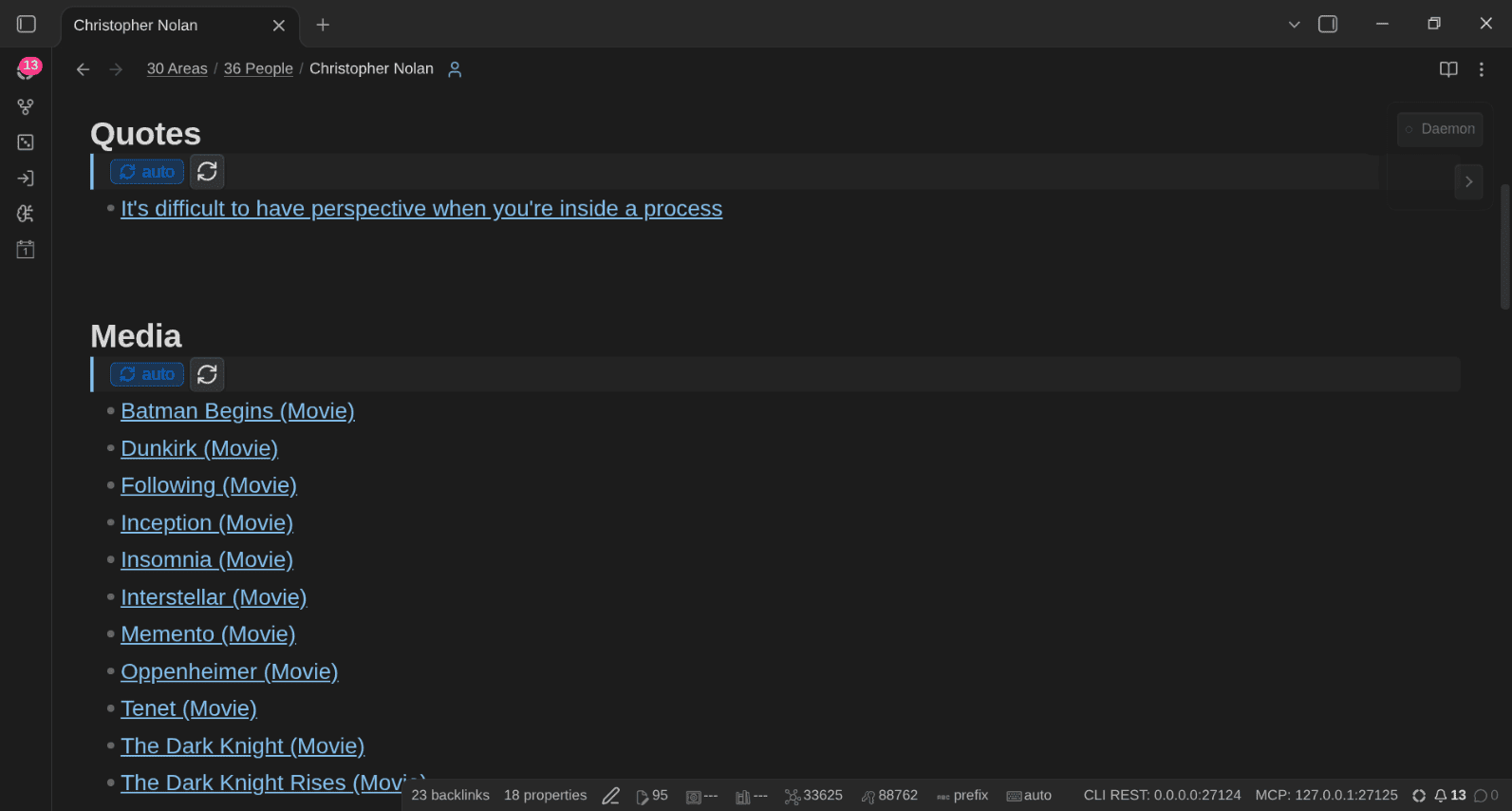
People. Directors, writers, creators, authors, artists and designers are stored as links (directors: ["[[Christopher Nolan]]"]). The person and contact notes created from TPL Person have three sections that collect what links to them:
## Media
<!-- QueryToSerialize: LIST FROM #type/media AND [[]] WHERE public_note = true SORT file.name ASC -->
## Appears in
<!-- QueryToSerialize: LIST FROM #type/media WHERE contains(cast, this.file.name) AND public_note = true SORT release_date DESC -->
## Lent to them
<!-- QueryToSerialize: LIST FROM (#type/media OR #type/book) AND [[]] WHERE lent_to = this.file.link SORT lent_on ASC -->So Christopher Nolan's note lists his films I track, an actor's note lists what they appear in, and a friend's contact note lists what they borrowed from me.
My days. Every time I log something, a line lands in my daily note: - Watched [[I Still See You (Movie)]] (★★★☆☆, 6/10 on IMDb), - Played Hoplomachus Victorum. Beat my first Primus. Those lines are backlinks: open a movie, and its backlinks tell me every day I watched it or talked about it. Open a day, and I know what I watched that evening.
My ideas. A quote from a movie, an idea a game gave me, a permanent note about a concept a show illustrated: they all link to the media note. Each MoC has Notes and Quotes sections that collect the notes and quotes linking to items of that medium.
Other works. related_media links a note to related works in any medium (the book a movie adapts, the video game of a board game, the expansion an item belongs to), and franchise groups a whole saga.
My activities and projects. Playing board games and video games are activities in my vault, like writing or sports. I'm experimenting with session notes for board games and video games (who played, what happened, the score), ...
TV Time knew which episodes I'd watched. My vault knows who recommended the show, what I thought about it, which day I finished it, which quotes I kept, and who borrowed it from me. Much more interesting!
Maps of Content (MoCs)
Bases are great inside Obsidian. But Bases don't render on a published site (yet). So I've decided to create new Maps of Content (MoCs) to list my media.
There are three levels:
Media (MoC)is the hub. It links the MoC and the Base of every medium (books included), and lists my wishlist, what's in progress and what I completed this year- One MoC per medium:
Movies (MoC),TV Shows (MoC),Anime (MoC),Manga (MoC),Comics (MoC),Video Games (MoC),Board Games (MoC)andMusic (MoC). Each has a Want to Watch (Read, Play, Listen to) section, a Wishlist sorted bywishlist_priority, the in-progress list, Completed by Year (with the number of times), Ratings, and the notes and quotes that link to items of that medium. Some add their own sections: Where Am I for TV shows, By Platform and By Store for video games, Accessories & Items for board games Year in Media (MoC)sums up each year across every medium
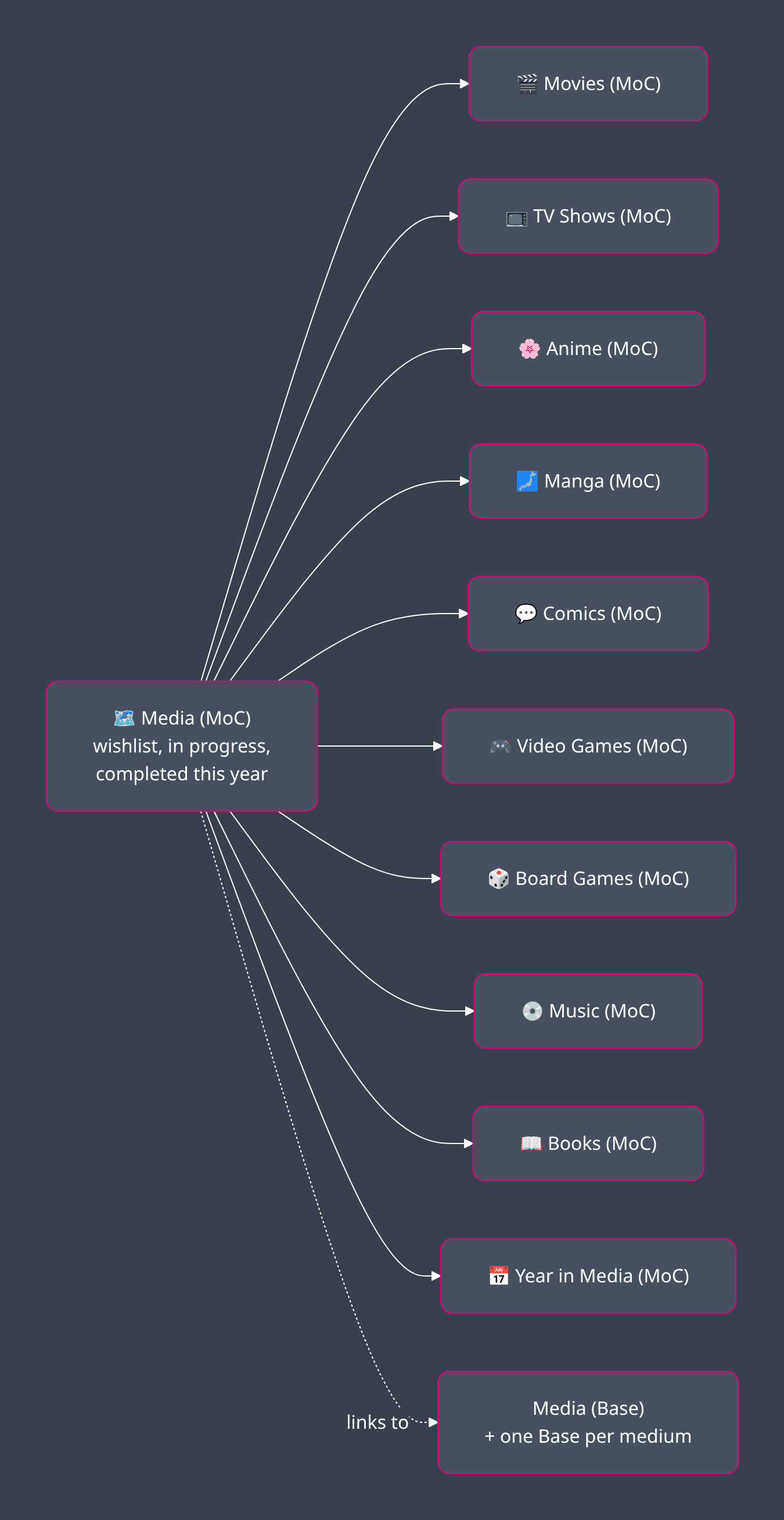
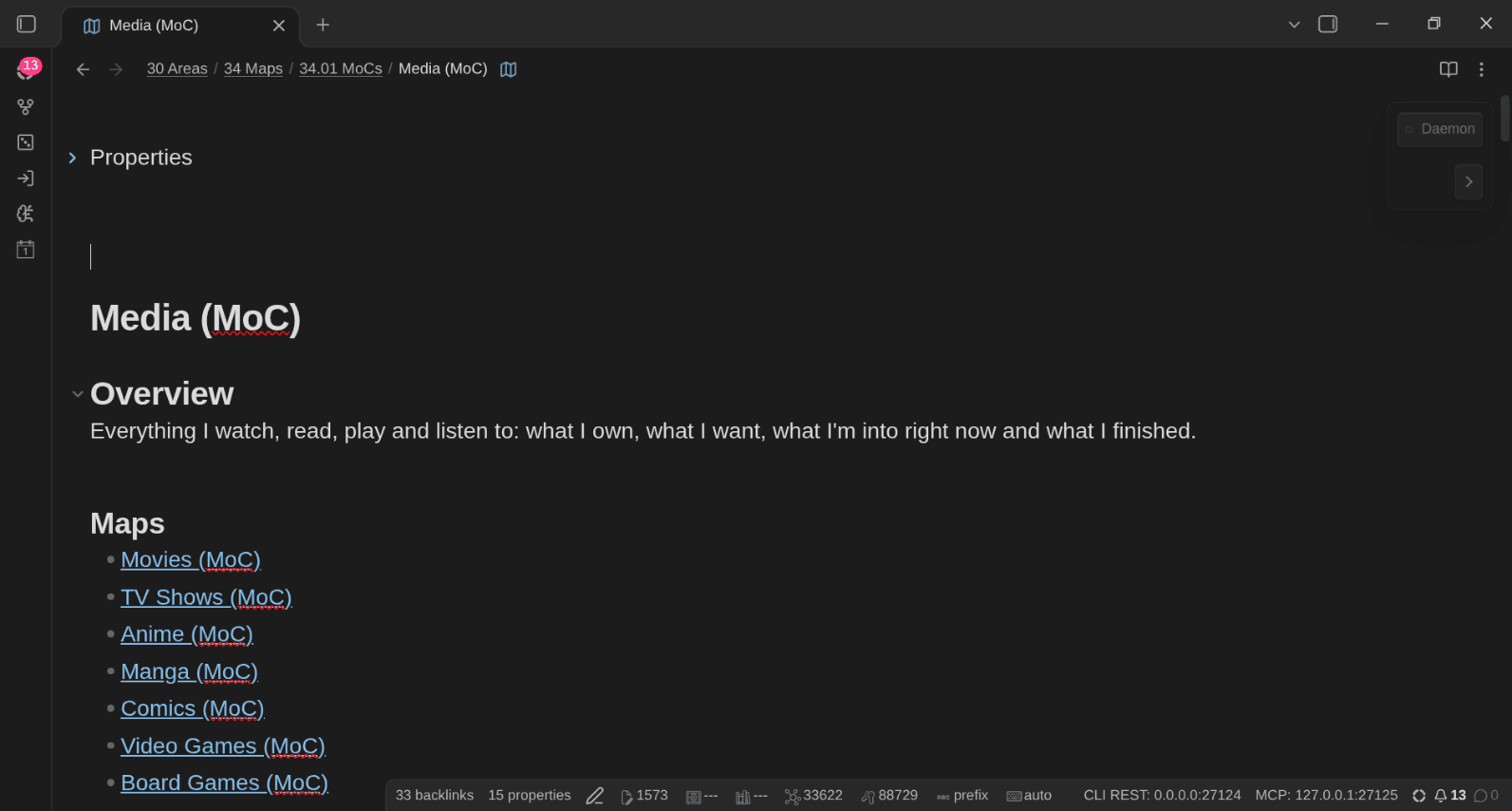
The MoCs use Dataview Serializer queries so that the results do appear once published. Here's the Board Games MoC on my public notes):
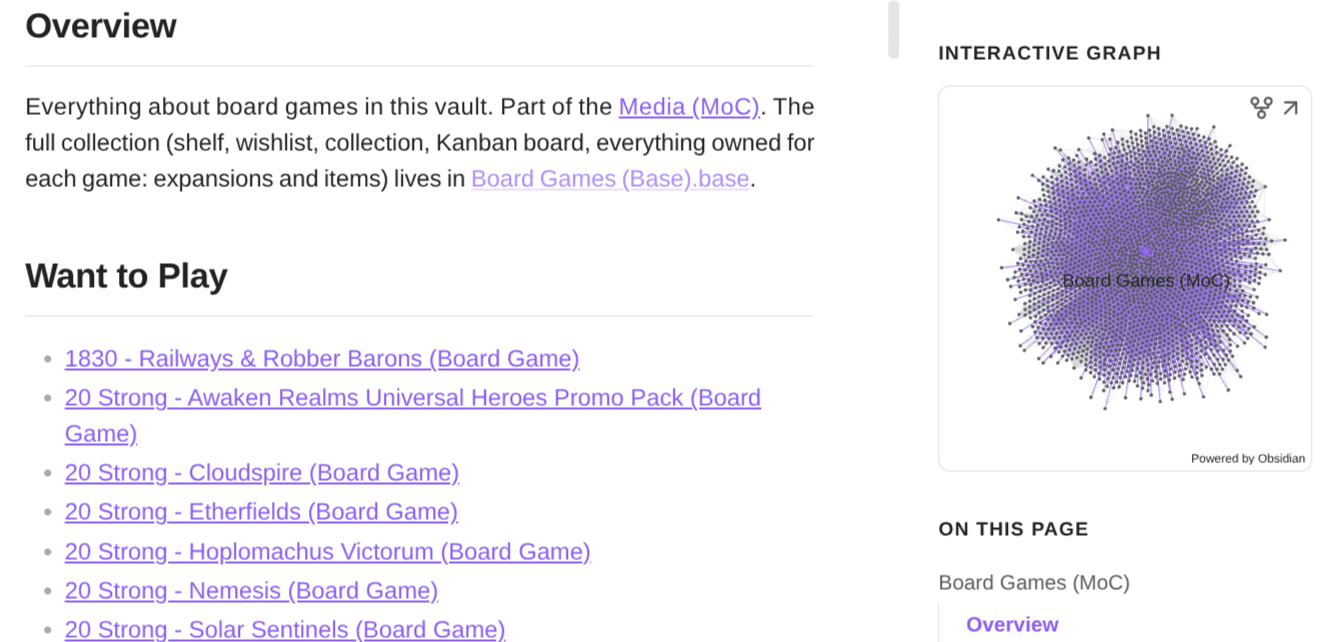
Look at that graph 🤯
Year in Media
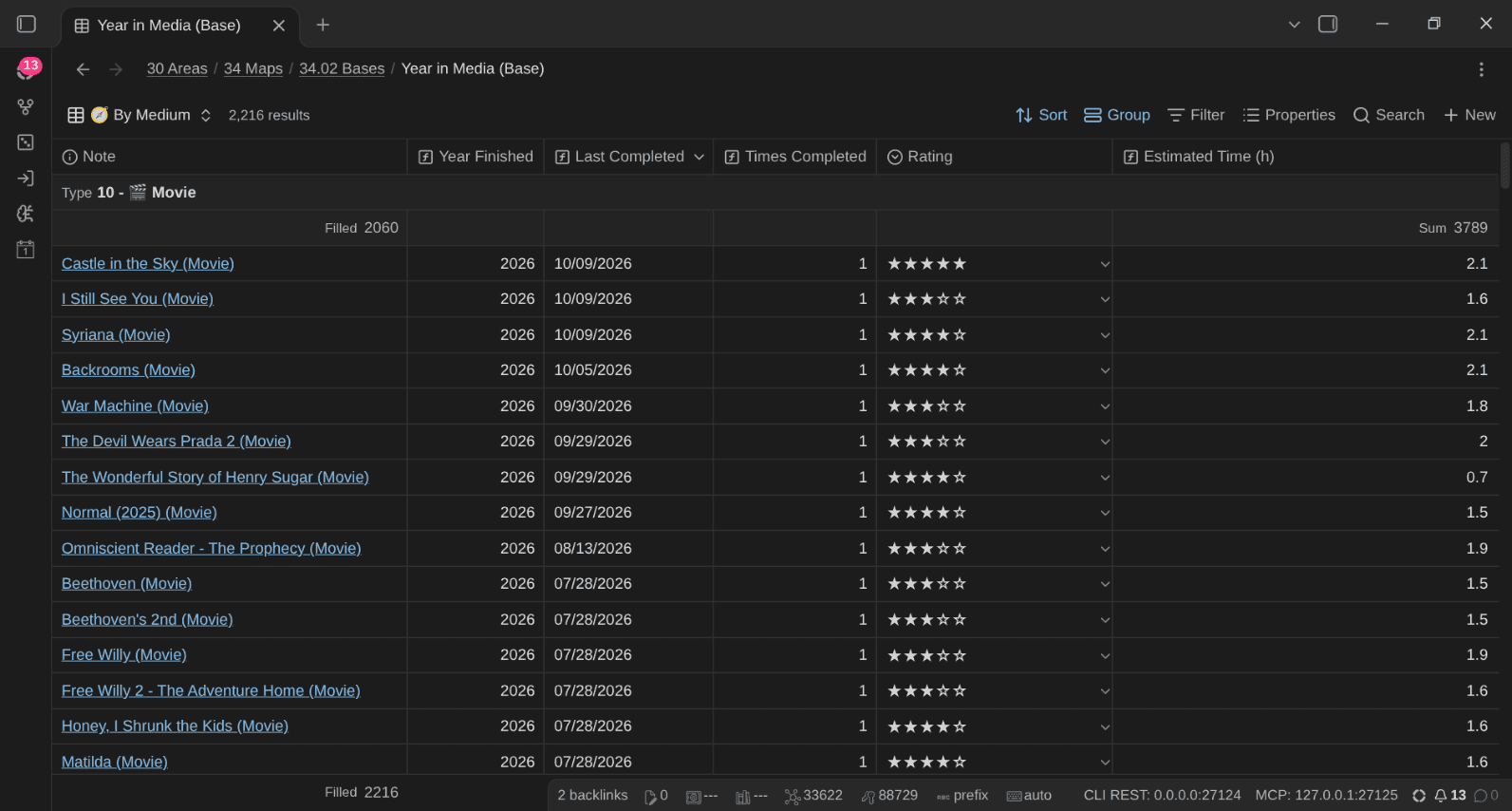
This one is pretty cool. Year in Media (MoC) has a Count per Year table: items finished, completions, one column per medium, logged hours and pages read. Rewatches, rereads, replays and board game plays count in each year they happened:
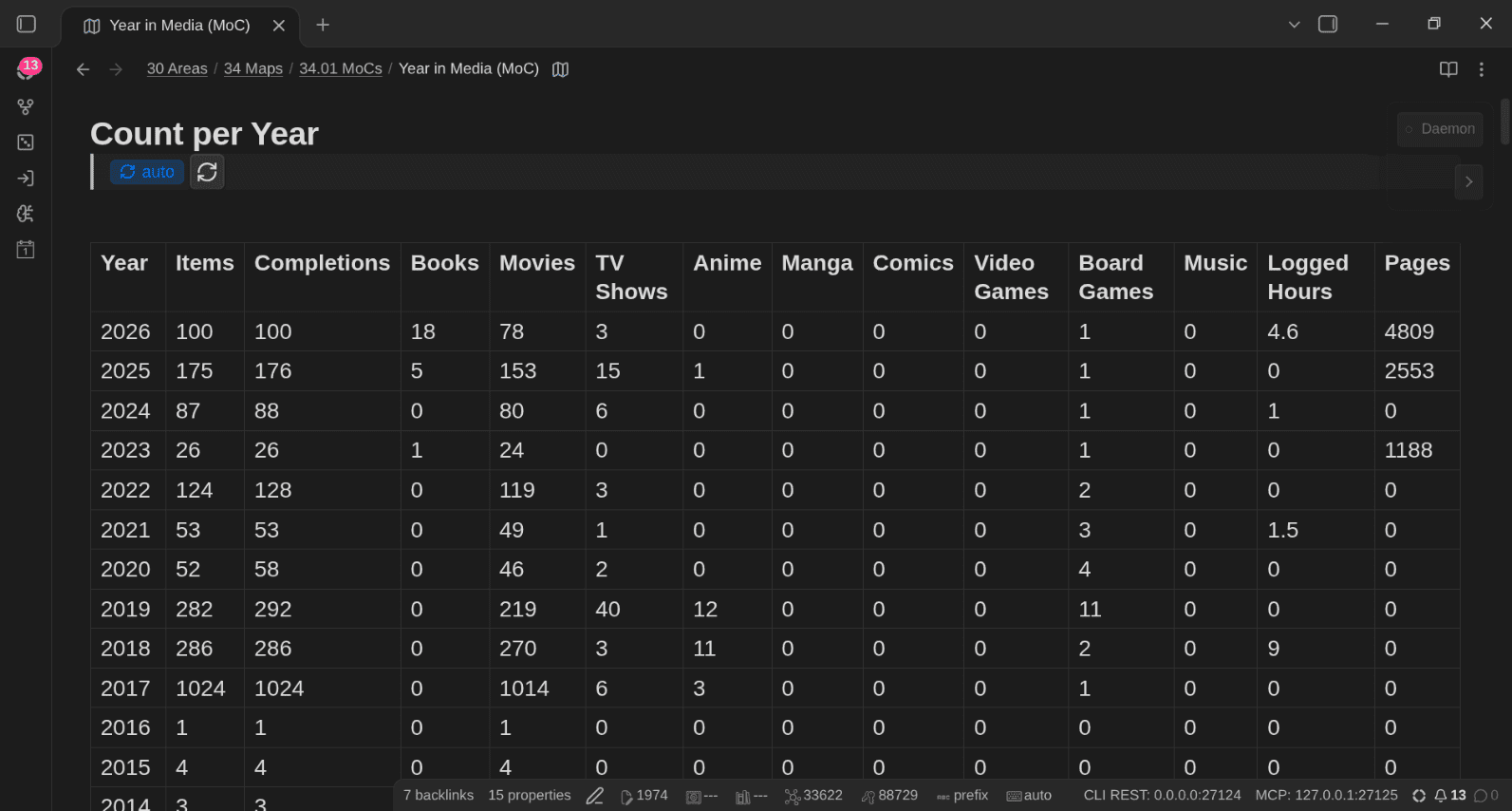
The query behind it is a beast. It gathers every completion date of every note (dates_completed, dates_played, and date_finished for done items), flattens them into years, skips the parents that are counted through their children (shows with season notes, series with album notes), then groups and counts per medium:
<!-- QueryToSerialize: TABLE WITHOUT ID key AS "Year", length(rows) AS "Items",
sum(map(rows, (r) => length(filter(r.cd, (d) => startswith(d, r.y))))) AS "Completions",
length(filter(rows, (r) => econtains(r.file.etags, "#type/book"))) AS "Books",
length(filter(rows, (r) => econtains(r.file.etags, "#type/media/movie"))) AS "Movies",
...
round(sum(map(rows, (r) => default(r.time_spent, 0))) / 60, 1) AS "Logged Hours",
sum(map(rows, (r) => default(r.pages, 0))) AS "Pages"
FROM (#type/media OR #type/book)
FLATTEN list(unique(map(filter(flat(list(dates_completed, dates_played,
choice((status = "Watched" OR status = "Read" OR status = "Completed" OR status = "Played" OR status = "Listened"), date_finished, null))),
(d) => d), (d) => dateformat(date(d), "yyyy-MM-dd")))) AS cd
FLATTEN unique(map(cd, (d) => substring(d, 0, 4))) AS y
WHERE public_note = true
WHERE !any(choice(econtains(file.tags, "#type/media/tv_show"), file.inlinks, list()), (l) => econtains(l.file.tags, "#type/media/tv_season"))
AND !any(choice(econtains(file.tags, "#type/media/comic_series"), file.inlinks, list()), (l) => econtains(l.file.tags, "#type/media/comic"))
GROUP BY y
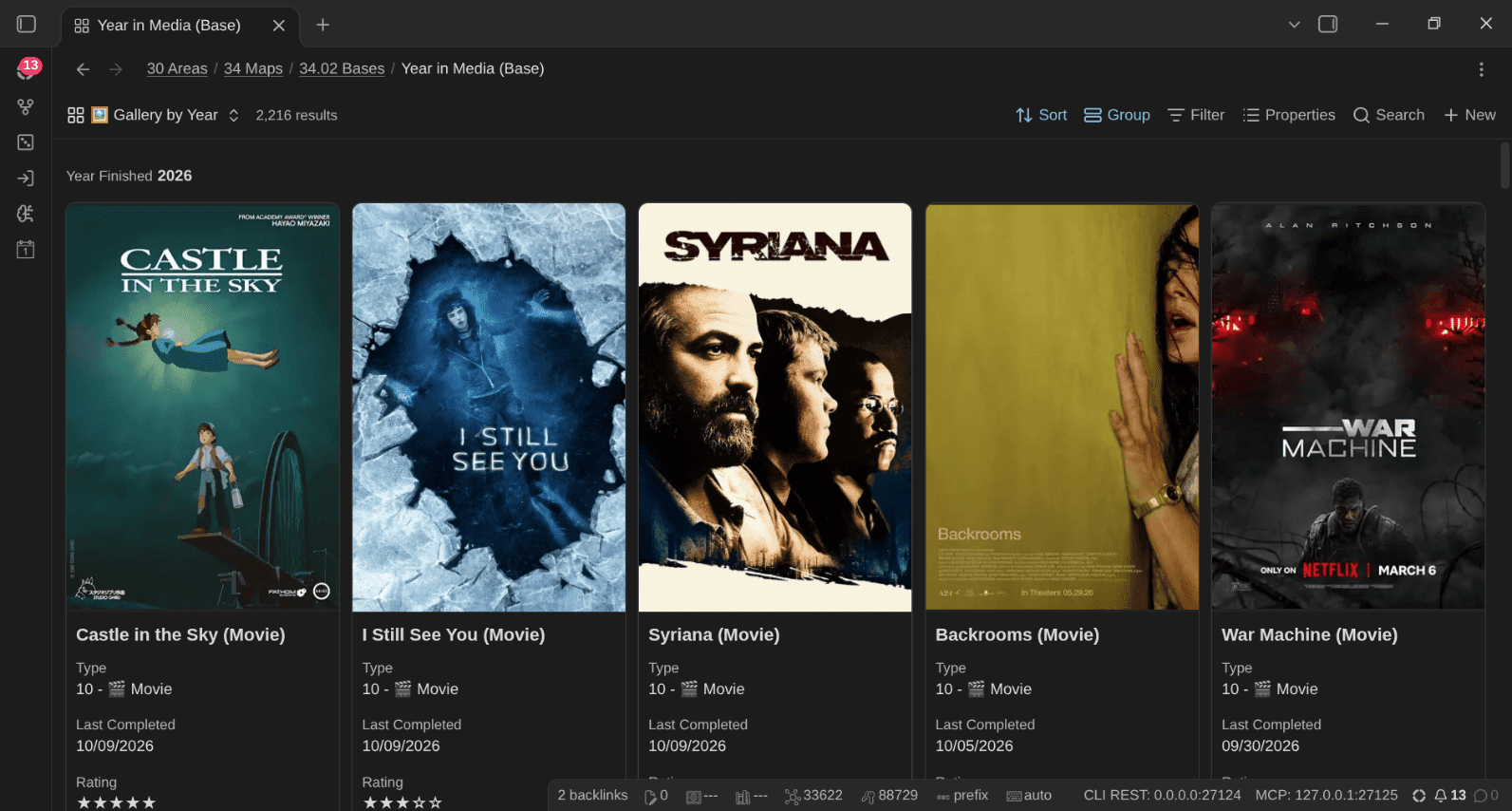
SORT key DESC -->You can browse my Year in Media) on my public notes. And in Obsidian, Year in Media (Base) has the interactive version, with a Gallery by Year that's just lovely to scroll through (tons of good memories!):
Quick Actions: one click per action
I've also created a set of QuickAdd choices, exposed as Meta Bind buttons under the title of every media note:
`BUTTON[osk-media-log, osk-media-playtime, osk-media-status, osk-media-rate, osk-media-priority]`

`BUTTON[osk-media-pledge, osk-media-lend, osk-media-return, osk-media-cover]`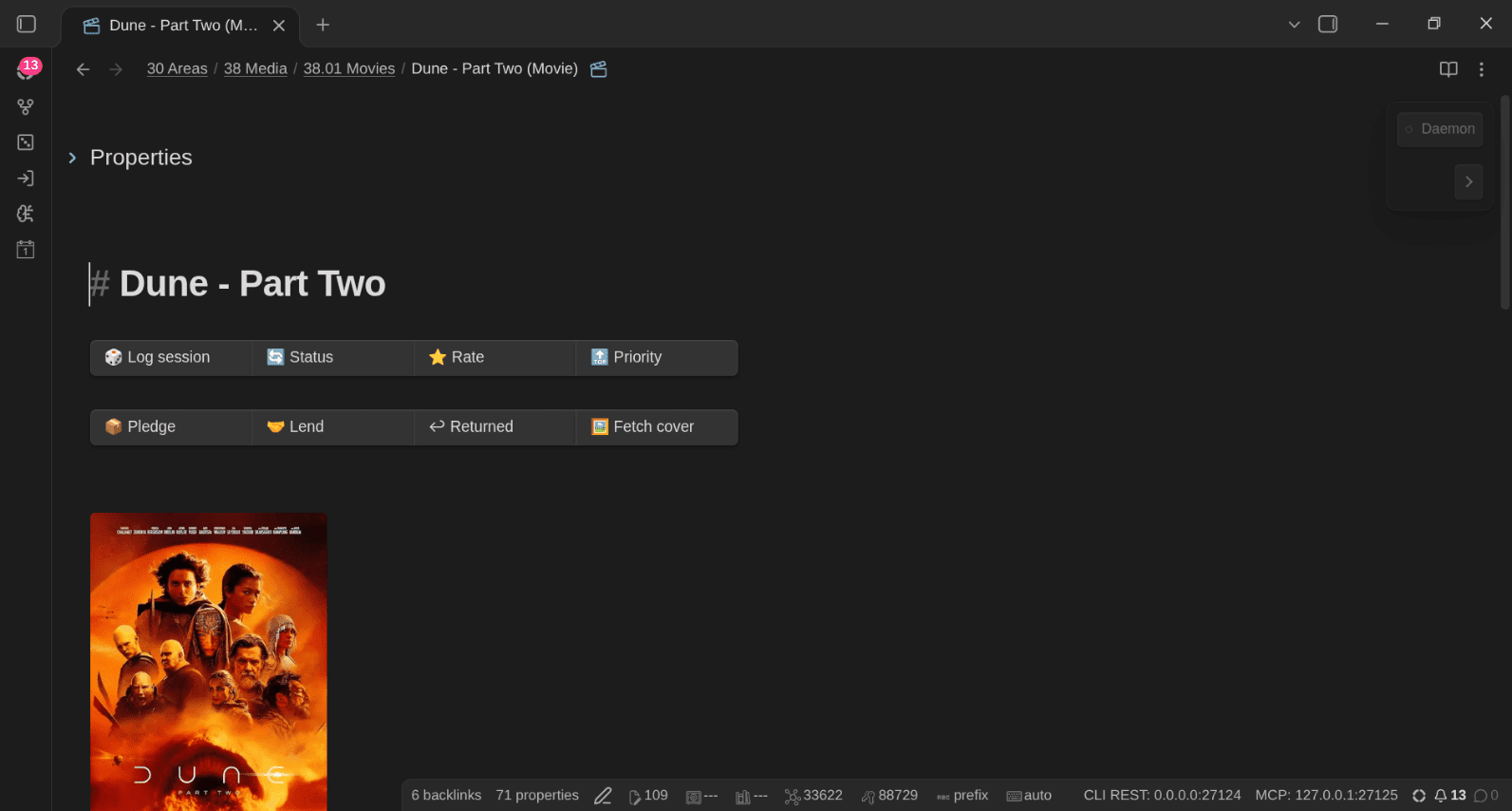
| Action | What it does |
|---|---|
| ➕ Media - Add | Pick a medium and a title, get the note from that medium's template |
| 🔄 Media - Change status | Pick from the type's own statuses; a done status records the completion |
| 🎲 Media - Log session | Logs today's session and the minutes spent; "and I finished it" appends to dates_completed; on a board game, a play goes to dates_played |
| ⏱ Media - Add playtime | Adds minutes to time_spent (90, 1h30 and 1:30 all work) |
| 📺 Media - Watched episodes | Moves episodes_watched and current_episode forward, ticks the episode checklist, offers the done status at the last episode |
| 📦 Media - Pledge update | Moves a pledge forward; ownership follows |
| 🤝 Media - Lend / ↩ Media - Return | Sets or clears lent_to and lent_on |
| 🔝 Media - Set priority / ⭐ Media - Rate | Pick from the type's values |
| 🖼 Media - Fetch cover | Downloads cover into the vault and sets local_cover |
| 🏷 Media - Fix name | Adds the missing type suffix (links updated) |
Each one is also a command, so I can bind hotkeys, or run them from the command palette.
AI on top: my media, my data, my algorithm
Now we get to my favorite part, and the one I'm most excited about.
When my TV history lived in TV Time, I could only do what TV Time's developers decided I could do. I couldn't ask it a question it wasn't designed to answer, I couldn't connect it to anything, and I couldn't build anything on top of it. My data was there, but it wasn't really mine.
Now that everything lives in my vault as plain Markdown files with consistent properties, AI can read all of it and write to it. No API to beg for, no scraping, no export to request, no rate limit, no permission needed.
I've created 20 or so AI skills for getting data in, logging what I've watched/read/played, check for new available seasons for my TV shows, etc. Now it's super easy for me to just ask AI "hey, what movies are missing in my collection?", "Find a movie I haven't seen from my favorite director", ...
The sky's the limit now ;-)
Logging what I watch and play
"I just watched I Still See You, 6/10, and add my rating to IMDb": it finds the movie (or creates the note, with its metadata and cover), logs the viewing, converts my 6/10 to ★★★☆☆, adds a line to my daily note, then opens IMDb in my browser, sets my rating there and removes the movie from my IMDb watchlist.
Here's the line this added to my daily note that evening:
- Watched [[I Still See You (Movie)]] (★★★☆☆, 6/10 on IMDb)"Watched episode 5 of Daredevil: Born Again": it logs the episode, moves current_episode forward and adds the time:
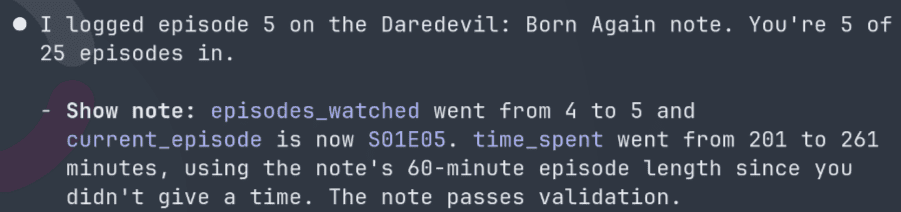
Ain't this nice? 😄
"Played Hoplomachus Victorum tonight, 90 minutes, beat my first Primus" adds a play to dates_played, the time to time_spent, the players and scores to the note, and a line to my daily note.
Keeping the library fresh
- "Any new seasons of my shows?": checks my TV shows against TMDB, my anime against AniList (sequels included), my manga against MangaUpdates.
- "Clear the TBD queue": walks through the items still at
99 - TBD, 4 at a time, with their length, online rating and ownership, so I can set priorities fast. "Rank my backlog" writes the manual order behind the Up Next view, and "stalled shows" finds what I started and forgot - "Audit my media": missing metadata, invalid values, missing covers or suffixes, contradictions (owned AND sold, delivered but still preordered), stale items, and duplicates graded by confidence.
Deciding what's next or looking back
"I have 2 hours, what should I watch tonight?" or "what board game for 4 players, something light?". It gives me 3 to 5 picks.
I can also ask about the past easily: "How many movies did I watch in 2025?", "hours played this year", "my year in media": and I just get the information I want; board game plays, time spent vs estimated, ratings distribution, ...
Because it's all in my vault, I'm not limited in any way. I can ask just about anything, and add new skills to do whatever I fancy.
Two days ago, I simply asked which well-known films I was missing, based on what I rate highly. The AI checked about 130 films against my vault, found that I already had nearly all of them, and suggested these:
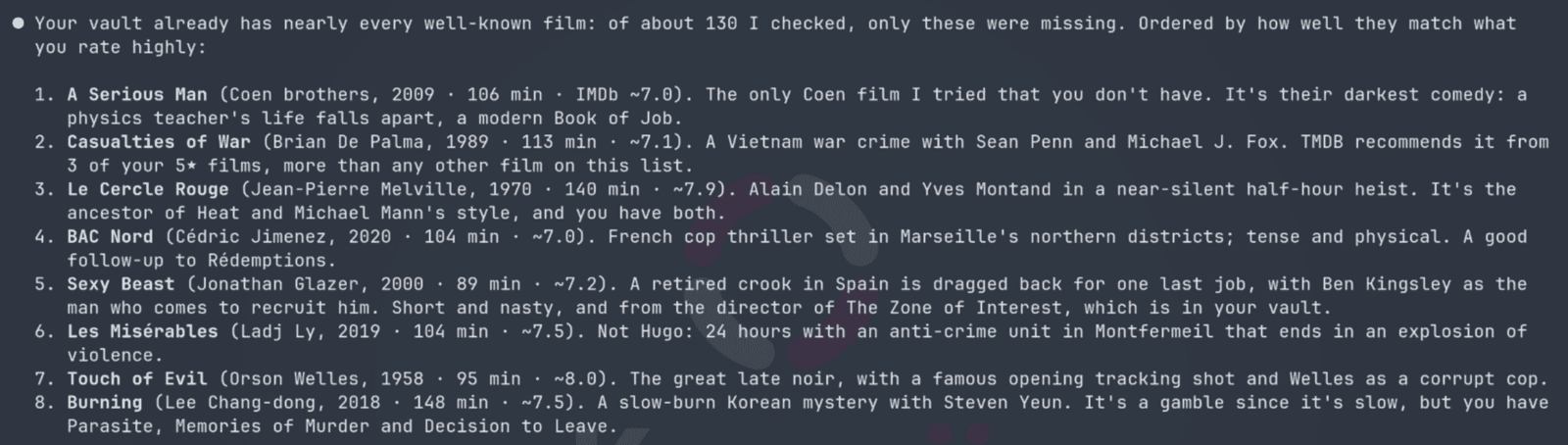
New algorithms are out ^^ But at least those are rooted in what I actually like, not in what a platform wants me to watch to keep me subscribed. And they can cross media: related shows, the video game of a movie, the board game of a video game, seasons I've missed...
Build anything you want with the data
The AI skills are only the beginning. Because my media library is a folder of Markdown files with structured properties, I can build anything I want on top of it. I don't need anyone's permission, and I don't need to wait for a feature request to be accepted.
Most of what you've seen in this article was built that way, in conversation with AI. When I want a new Base, a new view, a new MoC, a new skill or whatever, I just describe it, and AI knows what to do. Because my system is highly structured and provides means for AI to know the rules and verify its work, it's also maintainable and scalable, which is a huge difference compared to just letting AI do whatever in a folder. People who do that will end up with a huge mess in no time.
Some ideas I have (or that you could steal):
- "Plan a game night for 4 people with 2 hours to spare: games we own, language-independent, not played in 6 months"
- "Which directors do I rate the highest, with at least 5 movies watched?"
- "Write my year in media as a blog post, with my top 10 and my biggest surprises"
- "Which games in my pile of shame are shorter than 10 hours on HowLongToBeat?"
- "Which franchises do I follow across media, and what am I missing in each?"
- "Make a canvas of the Arkham Horror LCG campaigns in release order, with what I own and what I've played"
And you don't even need AI for that. The data is just files. Here's a tiny Python script that ranks directors by my average rating, with nothing but the standard library and PyYAML:
import pathlib, statistics, yaml
from collections import defaultdict

ratings = defaultdict(list)
for f in pathlib.Path("30 Areas/38 Media/38.01 Movies").glob("*.md"):
    text = f.read_text(encoding="utf-8")
    if not text.startswith("---"):
        continue
    fm = yaml.safe_load(text.split("---", 2)[1]) or {}
    stars = str(fm.get("rating") or "").count("★")
    for director in fm.get("directors") or []:
        if stars:
            ratings[str(director).strip("[]")].append(stars)

top = sorted(((statistics.mean(r), len(r), d) for d, r in ratings.items() if len(r) >= 5), reverse=True)
for avg, count, director in top[:10]:
    print(f"{avg:.2f} ★  {count:>3} movies  {director}")
Here's what it prints on my vault:
4.70 ★   10 movies  Christopher Nolan
4.60 ★    5 movies  Francis Ford Coppola
4.44 ★    9 movies  Quentin Tarantino
4.40 ★    5 movies  Lee Unkrich
4.40 ★    5 movies  Joe Russo
4.40 ★    5 movies  Anthony Russo
4.33 ★    9 movies  Peter Jackson
4.33 ★    9 movies  Hayao Miyazaki
4.25 ★    8 movies  Martin Scorsese
4.25 ★    8 movies  James Cameron
No surprise there, I guess 😄 Try that with TV Time.
Isn't there a plugin for that?
I'm not the first person who wants to track media in Obsidian, far from it. Before building this, I went through what others do. Two Reddit threads I saved (and one commenter) are a good summary:
- Tracking all my media consumption in Obsidian: a custom CLI that fetches metadata from TMDB, ComicVine, Google Books and RAWG and creates notes with front matter, browsed through Bases. Half the comments said "try Media DB", so I did
- WatchLog: a dedicated plugin for TV shows, movies and anime, with a dashboard and episode checklists. In the comments, someone introduces themselves as a "TV Time refugee". I'm clearly not alone 😅
- One commenter tracks everything with Trakt, Hardcover and a self-hosted *arr stack, and feels that Obsidian isn't the right tool for this.
Those are valid choices (to each their own!). Here's why I went a different way:
- Trakt, Letterboxd, Hardcover and friends are another TV Time waiting to happen. Great services, until they aren't. They can be my metadata sources and my community, not my source of truth
- A dedicated plugin is better than a web service, but it's still a single point of failure. When a plugin owns the data model, the dashboard and the logic, its future is your future. Here, the data is plain properties, the views are core Obsidian Bases, the logic lives in templates and small scripts, and the plugins (Media DB, Boardgame Search, Web Clipper) are only on-ramps. If one of them disappears tomorrow, I lose a way to create notes, not my notes. That being said, I've built many plugins and I'm not excluding creating ones dedicated to media management. But if I do, I'll make sure that properties are front and center.
- Most tools cover movies, shows and anime. I needed board games with expansions and accessories, video games across a dozen stores and launchers, comics album by album, pledges, prices, lending and selling. So I needed a model, not an app
- No tool connects my media to the rest of my life: people, days, ideas, quotes, projects. That only happens in my vault. Linking to other platforms is a big no-no for me. Data consistency over time matters a lot to me!
- No tool lets AI work on all of it.
Does Obsidian cope with 10,000 media notes?
Short answer: Yes!
My vault has 30K+ Markdown files, 10K of which are media notes (46 MB of Markdown), plus about 10,000 cover images (267 MB).
Here's how long the Bases take to compute some of their views, measured by querying them with the Obsidian CLI (every formula included):
| Base / view | Rows | Time |
|---|---|---|
| Board Games / 💰 Worth Selling | 90 | 0.35 s |
| Movies / 🎬 By Director | 4,874 | 0.38 s |
| Media / ▶️ In Progress | 15 | 0.72 s |
| Year in Media / 📅 By Year | 2,216 | 1.49 s |
| Media / 📋 All | 10,160 | 6.86 s |
What costs time is the number of rows times the number of formulas. A filtered view over one medium is instant, even with thousands of rows. The 📋 All view of Media (Base), which computes dozens of formulas over every media note and book in the vault, takes a few seconds.
A few things keep it fast:
- Filter on tags first: every Base starts by filtering on
type/media/<medium>tags, so Obsidian only evaluates formulas on relevant notes - Keep heavy formulas out of the default views: formulas that walk backlinks (a show's seasons, a base game's expansions) are the most expensive ones
- Small covers: resize images to keep them at a reasonable size (disk space wise). I resized most of mine to 800px wide at most, so the Gallery view doesn't choke on 4K posters
What this enables
Let me sum up what I can do now that I couldn't before:
- See everything I own, want, am into and have finished, across every medium, in one place
- Answer "what do I own and never played?", "who has my copy?", "what can we play at 4 tonight?" in seconds
- Track a Kickstarter from pledge to delivery, and a board game from purchase to sale
- Decide what to sell based on actual numbers, not guilt
- Look back at any year of my life through what I watched, read and played
- Publish my media library and share a gift list
- Link any movie, game or show to my daily notes, people, quotes and ideas
- Import, capture and log anything by just saying it, and keep other platforms up to date (e.g., IMDb, AniList, BGG, ...)
- Ask AI about all of it, with recommendations grounded in my own ratings
- Build any view, analysis or tool I can think of on top of my own data
- Move all of it anywhere, anytime: it's just Markdown
- Never lose it again when a service shuts down
It's an entire area of my life that I now get control, ownership and leverage on.
Conclusion
TV Time taught me a lesson I should have learned a long time ago: if you don't own your data, you're only renting it, and the landlord can leave whenever they want. My TV show history is gone. My movies, shows, anime, games and board games won't be next.
What I ended up with is not a fancy watchlist. It's a personal media library that knows about every medium I care about, follows the same model as the rest of my vault, and gets more useful with every note I add. My media are no longer locked in a dozen silos owned by companies that don't care about me or my history.
If you want this for yourself (all of it; the note types, the templates, properties and statuses, automation rules, Bases, Web Clipper templates, QuickAdd actions, AI skills, etc), then grab a copy of my Obsidian Starter Kit now. This will all be part of the next version: v5.1, which is coming soon. It's a free update for everyone who already owns the kit. Get it now, and you'll receive v5.1 as soon as it ships.
The Starter Kit is a 1:1 copy of the setup I use every day: dozens of note types and their templates, the property schema, the automation, the Bases, pre-configured plugins, AI agents and skills, a detailed user guide, and so much more. More than a thousand Obsidian users have built their own systems on top of it! And as you can see, it keeps getting better.
Dwayne ApplebyIf you enjoyed this, subscribe to my newsletter for more on Obsidian, Knowledge Management, and AI-augmented knowledge work.
And if you want to see what I'm building as I build it (this whole system started as a thread there), come join the Knowii Community.
 Sofia
Sofia
That's it for today! ✨
About Sébastien
Ready to get to the next level?
Found this valuable? Share it with someone who needs it.