
Claude Epic Status Line: A Better Status Bar for Claude Code

If you spend hours in Claude Code, you know the feeling. You're deep into a session, the context window is quietly filling up, and somewhere a rate limit is waiting to ruin your flow. You check the clock and realize you've been at it for two hours. Sound familiar?
In this article, I want to share the tool I built to fix exactly that: Claude Epic Status Line, a status bar replacement for Claude Code. I just released v2, a complete redesign, and it now shows you numbers that Claude Code itself doesn't display anywhere.
 dsebastien
Introduction
Claude Code's default status line is... minimal. It shows the basics, but when you're running long sessions, juggling git worktrees, or trying not to burn through your weekly quota on a Monday, you need more. Much more.
Video introduction
I wanted a status line that answers every question I have during a session, at a glance, without running commands or opening dashboards. So I built one. And I'm sharing it with you 🚀
TL;DR
- Drop-in replacement for Claude Code's default status line
- Quiet when everything is healthy, loud exactly where something needs attention
- Context usage with token counts and a bold
⚠before auto-compact hits - Git branch with staged/unstaged/untracked counts, ahead/behind arrows, worktree detection
- A rate-limit dashboard: 5-hour window, 7-day window, per-model weekly limits (numbers Claude Code doesn't show you), and extra-usage credits
- Session cost, duration, lines added/removed, effort level, and badges for subagents, fast mode, and more
- Fully customizable: thresholds, colors, glyph sets, per-segment toggles — or zero config at all
- Works on Linux and macOS, plain bash, only needs
jq,curl, andgit
The Problem
When you're working in Claude Code, there's a lot you care about:
- How much context have I used? — You don't want to hit the wall mid-task
- Am I close to rate limits? — Nothing worse than getting throttled during a productive session
- What branch am I on? — Especially when juggling multiple worktrees
- How long have I been at this? What did it cost? — Time flies when Claude does the heavy work
- How much of my weekly quota is left for the big model? — This one is sneaky. Anthropic tracks per-model weekly limits, and you only find out when you hit one
The default status line answers almost none of these. You end up running /cost, checking external dashboards, or just... guessing.
What Claude Epic Status Line Shows
The display has two parts: one line of session info, and a small dashboard of rate-limit bars underneath.
Line 1: The Session at a Glance
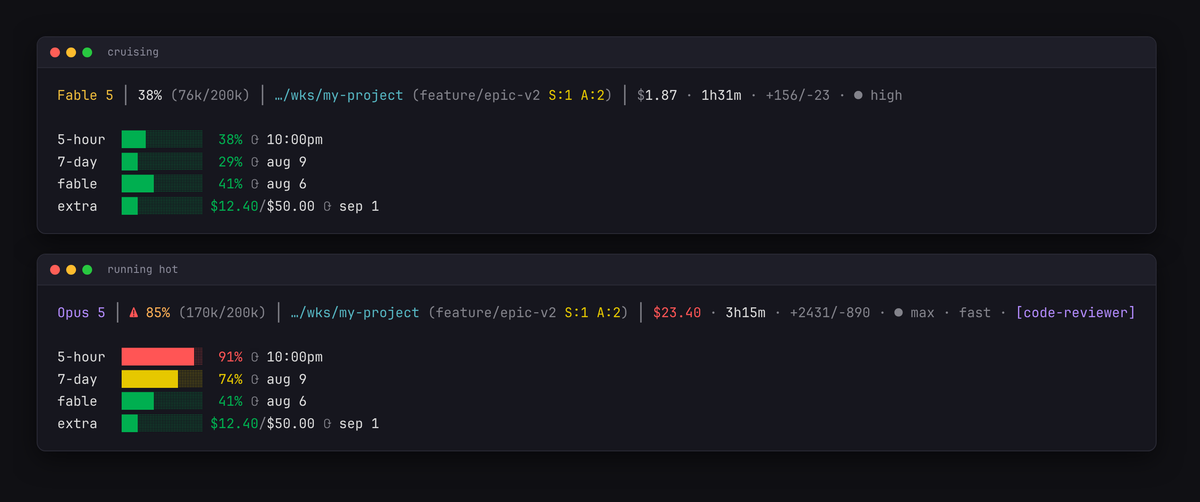
Fable 5 │ 38% (76k/200k) │ …/wks/my-project (feature/epic-v2 S:1 A:2) │ $1.87 · 1h31m · +156/-23 · ● high- Model name — Shortened, and colored by model family: Opus gets one hue, Sonnet another, Haiku, Fable... You always know what you're talking to
- Context usage — Percentage AND token counts. Quiet while healthy; turns yellow at 70%, orange at 80% with a steady bold
⚠(your cue to/compact), red at 90%. A separate⚠200k+alert fires if you cross the 200k token line - Directory + git — Last two path components, branch, staged (
S:2), unstaged (U:1), untracked (A:3) counts,⇡2⇣1ahead/behind arrows, and a⎇wtmarker inside worktrees. Really useful when running several Claude sessions in parallel - Session cost — With warn and critical thresholds. When a session crosses your pain point, the number turns red. You decide where that point is
- Duration and lines changed —
1h31m,+156/-23. A quick honesty check on what the session actually produced - Effort level and badges —
● high, plus small markers when you're in fast mode, thinking mode, a subagent is running, or a non-default output style is active
The design principle behind all of it: dim when healthy, colored when it needs you. No rainbow soup. When something lights up, it means something.
The Rate-Limit Dashboard
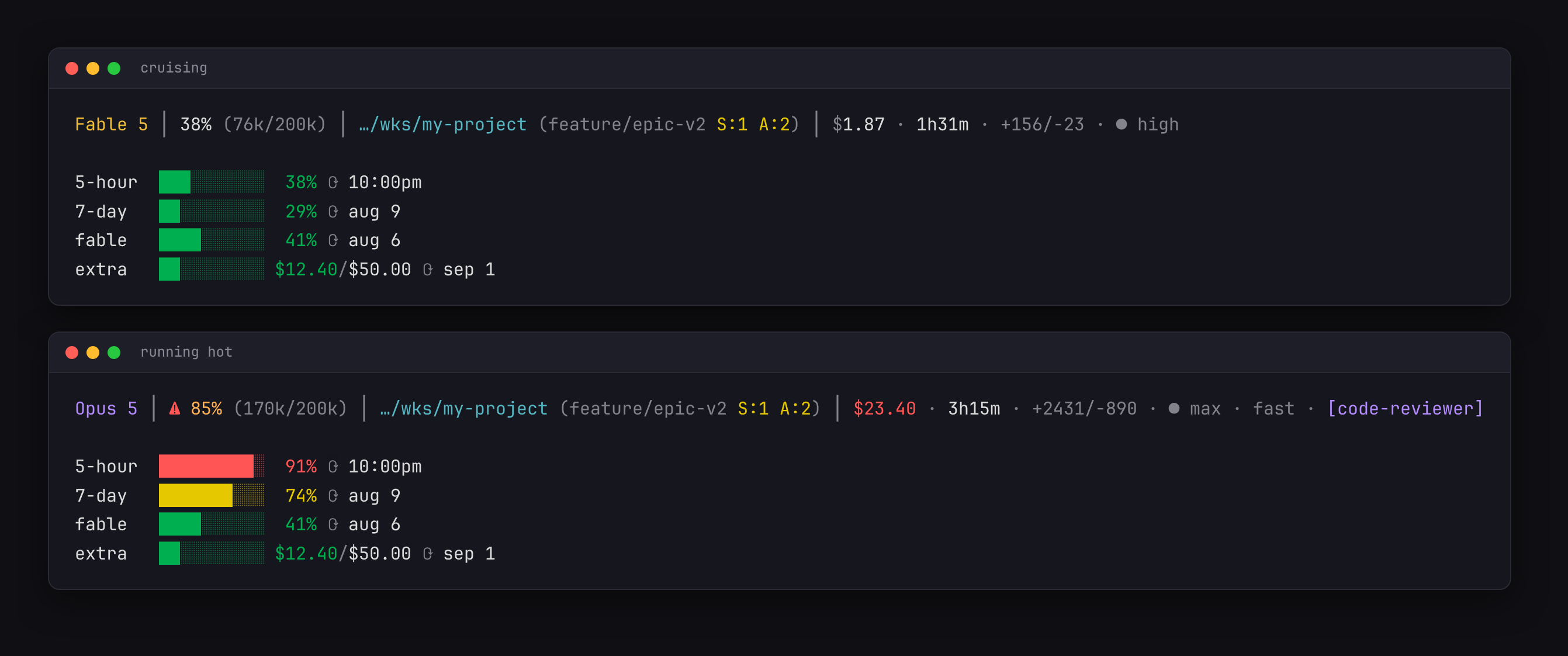
Each row is a progress bar with the same color escalation, plus the exact reset time. No more guessing when your quota refreshes.
Make It Yours
v2 ships with a full configuration system, and none of it is required.
Settings layer simply: script defaults, then ~/.config/claude-epic-status-line/config.sh (scaffolded by the installer with every knob commented out), then CESL_* environment variables on top.
What you can tune:
- Thresholds — when yellow/orange/red kick in, for context, rate limits, and session cost
- Colors — the full palette, including the per-model-family hues
- Bars — width and fill characters
- Glyph sets —
unicode(default),nerdif you run Nerd Fonts, orasciifor maximum compatibility - Per-segment toggles — hide anything you don't care about (
CESL_SHOW_COST=0, etc.) - Currency — display costs in EUR or anything else with a conversion rate
How It Works
Claude Code pipes a JSON payload to your status line command on every refresh: model, context window, cost, git directory, effort, and since recent versions: your rate limits. The script parses all of it in a single jq call and renders from there. Warm render takes about 60 milliseconds.
The usage API is only contacted for what the payload can't provide: extra-usage credits and those per-model weekly limits. Your OAuth token is resolved automatically (environment variable, credentials file, secret-tool on Linux, or the macOS Keychain), responses are cached per-user, and concurrent sessions share a single fetch instead of hammering the API. No token? Those rows simply don't render, and everything else works.
Installation
You need jq, curl, and git. Then:
git clone https://github.com/dsebastien/claude-epic-status-line.git
cd claude-epic-status-line
bash install.sh
The installer backs up any existing status line, scaffolds your config file, and wires up ~/.claude/settings.json. Restart Claude Code and you're done. Upgrading later is just git pull && bash install.sh; your config is never touched.
Prefer doing it manually? Copy statusline.sh to ~/.claude/statusline-command.sh and add this to your settings:
{
  "statusLine": {
    "type": "command",
    "command": "bash '~/.claude/statusline-command.sh'"
  }
}
Uninstalling
bash uninstall.shIt restores your previous status line and settings from backup. Your config directory stays unless you pass --purge. Clean and simple.
Going Further
- The repo: https://github.com/dsebastien/claude-epic-status-line
- The v2.0.0 release notes: https://github.com/dsebastien/claude-epic-status-line/releases/tag/v2.0.0
- Inspired by kamranahmedse/claude-statusline and the excellent CShip
- Claude Code status line configuration in the official docs
Conclusion
If you spend serious time in Claude Code, a rich status line is a real productivity boost. You compact before it hurts, you plan around your actual quotas instead of discovering them the hard way, and you keep an eye on cost without leaving your flow.
Give it a try, and let me know what you think. PRs are welcome if you want more segments, and the config system means your version doesn't have to look like mine 🎉
That's it for today! ✨
About Sébastien
Ready to get to the next level?
Found this valuable? Share it with someone who needs it.