
DeveloPassion's Newsletter #215 - Obsidian as a Platform


Edition 215 of my newsletter, discussing Knowledge Work, AI, Knowledge Management, Zen Productivity, Personal Organization, and more!
Hello everyone! I'm Sébastien Dubois, your host. You're receiving this email because you signed up for DeveloPassion's Newsletter, or bought one of my products. Thank you for being here with me ✨
If you enjoy this, please forward it to your friends ❤️. If this email was forwarded to you, then don't forget to subscribe and become a supporter. And if you enjoy my work, please let me know (just reply to this mail)!
Welcome
Welcome to all the new readers ❤️
These past weeks have been chaotic, as usual for me during summer. Days on, weeks off, kids to keep busy, family activities, heat waves (that is new for us!), ...
Somehow I still shipped a lot. A brand new plugin, releases across my whole plugin "fleet", three long Obsidian guides, and a revamped website. I'll tell you all about it below.
On the family side, one small thing made my week: Raphaël can ride a bike now 🎉. He got on, wobbled for about two minutes, and then just... went. Magical. I knew he'd quickly manage to ride a bike, but I didn't think it would be so natural for him :)
On the reading side, I finished The Institute (book) by Stephen King, then Fahrenheit 451 (Book) by Ray Bradbury. Going from King to Bradbury is fun, and Bradbury's book is one I wanted to read for a long time. It felt like reading a book by René Barjavel (which I'm a huge fan of). I've now started Dreamcatcher (Book), so I'm right back in King territory. Fiction remains my favorite way to disconnect. And the next ones I intend to read are the "Dark Tower" series (also by Stephen King).
Aside from that, I'm back to early morning runs. 15K at the Belgian coast a week ago, 10 more this week. Up at 5h45, out the door at 5h50. Good tempo (far from great though ^^), but my heart rate is still too high for the pace. I keep struggling to actually go slower. My watch keeps telling me so, and I keep ignoring it 😅
Highlights
- 🤖 A brand new Obsidian plugin: AI Editor. AI personas that review your notes and propose inline edits, right in the editor. Four releases in four days
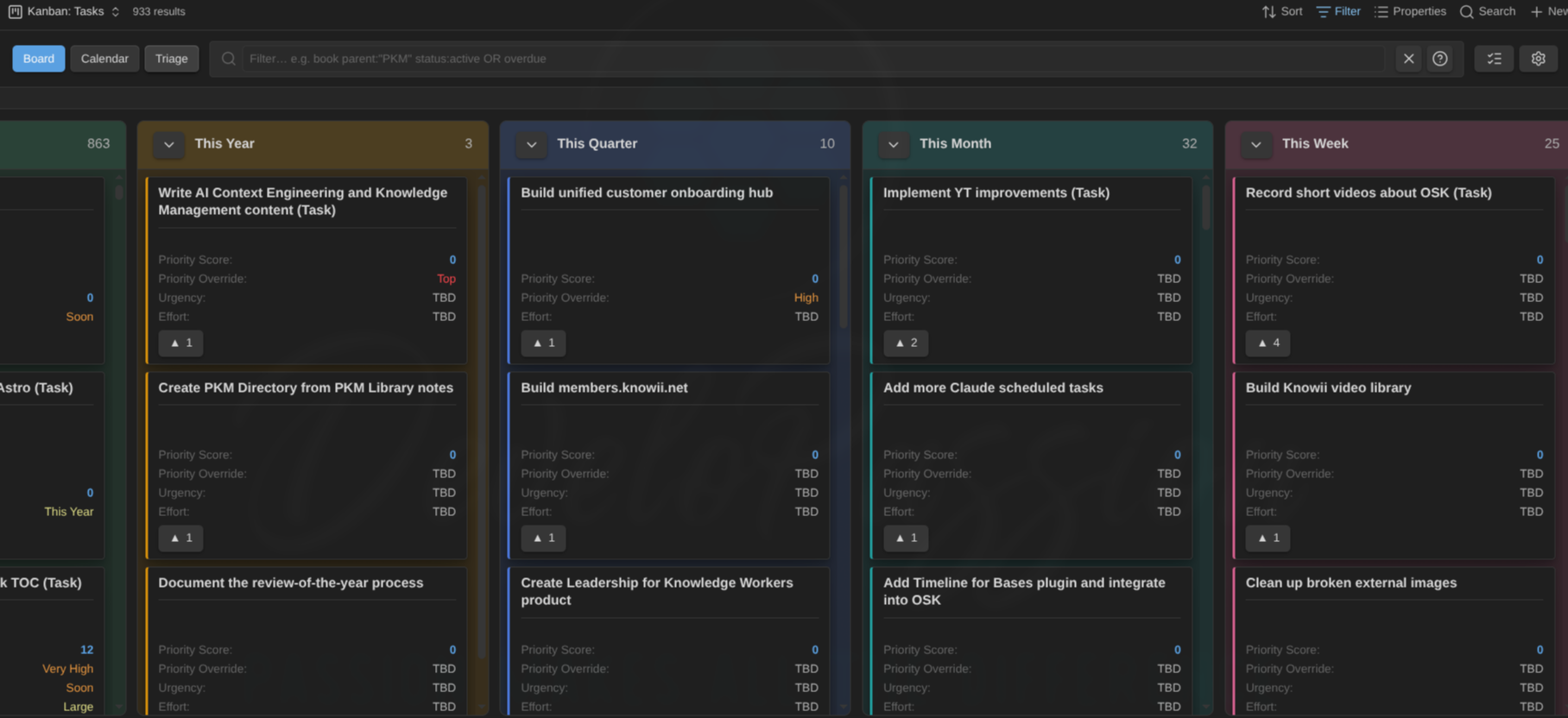
- 🧩 Kanban Action Planner went from 1.2.0 to 1.12.0: WBS view, per-note-type automation rules, embeddable boards, GTD contexts, and quick capture from the board itself (with full support for note types)
- 📝 Three complete guides published: Obsidian Properties, Templates and Templater, and the Obsidian CLI
- 🔗 My Obsidian plugins started talking to each other: Life Tracker now reads its note types and properties from the Obsidian Starter Kit plugin
- 🛠️ My whole Obsidian plugin fleet moved forward, and every plugin now tells you what changed after an update
- 📊 Claude Epic Status Line v2.0.0: a full rebuild of my free status line for Claude Code, with a permanent rate-limit dashboard and a real configuration system
- 🎙️ Knowii Voice AI, new release coming soon
- 🌐 dsebastien.net got a revamp: 113 commits in six days. Content pillars, a guided five-layer start path, series, a "recently updated" channel, and a serious pass at making my articles citable by AI
- ☀️ The Summer Sale ended on July 30. Thank you to everyone who jumped in ❤️
Before You Go Any Further
Help me reach more people; share the link with someone in your circle who'd benefit from joining us. And don't forget to mention the Knowii Community ❤️
And if you bought some of my products or courses? Please leave a rating/review. It really helps ❤️
🧩 Obsidian as a Platform
I wrote something on LinkedIn recently that I want to expand on here, because I think it's the most underrated thing about Obsidian.
Most people install Obsidian to take notes. That's a good starting point. But Obsidian is way more than a note-taking tool. It's a platform, and the notes are "just" the data layer.
Consider what my own vault does today. It manages my work tasks. It tracks my health and my habits. It publishes my articles. It generates images. It transcribes my voice notes. It converts my written notes to Markdown. It renders dashboards, boards, calendars, timelines, graphs. It supports my marketing, my customer relationship management (CRM); my entire business actually. And SO MUCH MORE! None of that is note-taking; yet it all runs on top of my notes.
Why is that even possible? Two reasons.
First, Obsidian's UI runs on the Web platform. You may not know, but Obsidian sits on top of an actual Web browser running JavaScript, CSS & HTML. When you look at the user interface of Obsidian, you're looking at a web page! So you have all the power of the Web at your disposal to build real experiences on top of your own data. Anything you can build for a browser, you can build inside your Obsidian vault.
Second, the File over app principle principle. Whatever I build, the underlying data stays in plain Markdown files on my disk. That's a key principle that the Obsidian team fully supports, and that I also care a lot about when building my plugins. No vendor lock-in. No proprietary database. No hidden state. If I abandon a plugin tomorrow, my notes are still there, still readable, still mine. That's what makes it safe to build on top.
Other apps offer one or the other. Some are extensible. Some are file-based. None has the maturity level of Obsidian on both axes at once. And that's why I consider Obsidian to be so special. It's really an operating system for knowledge work.
The Lab 🧪
🤖 AI Editor: A Brand New Obsidian Plugin
Let me start with the newest thing, because I've been completely absorbed by it for the last few days.
I'm building a new Obsidian plugin called AI Editor. It puts AI inside the editor, not in a chat sidebar next to it.
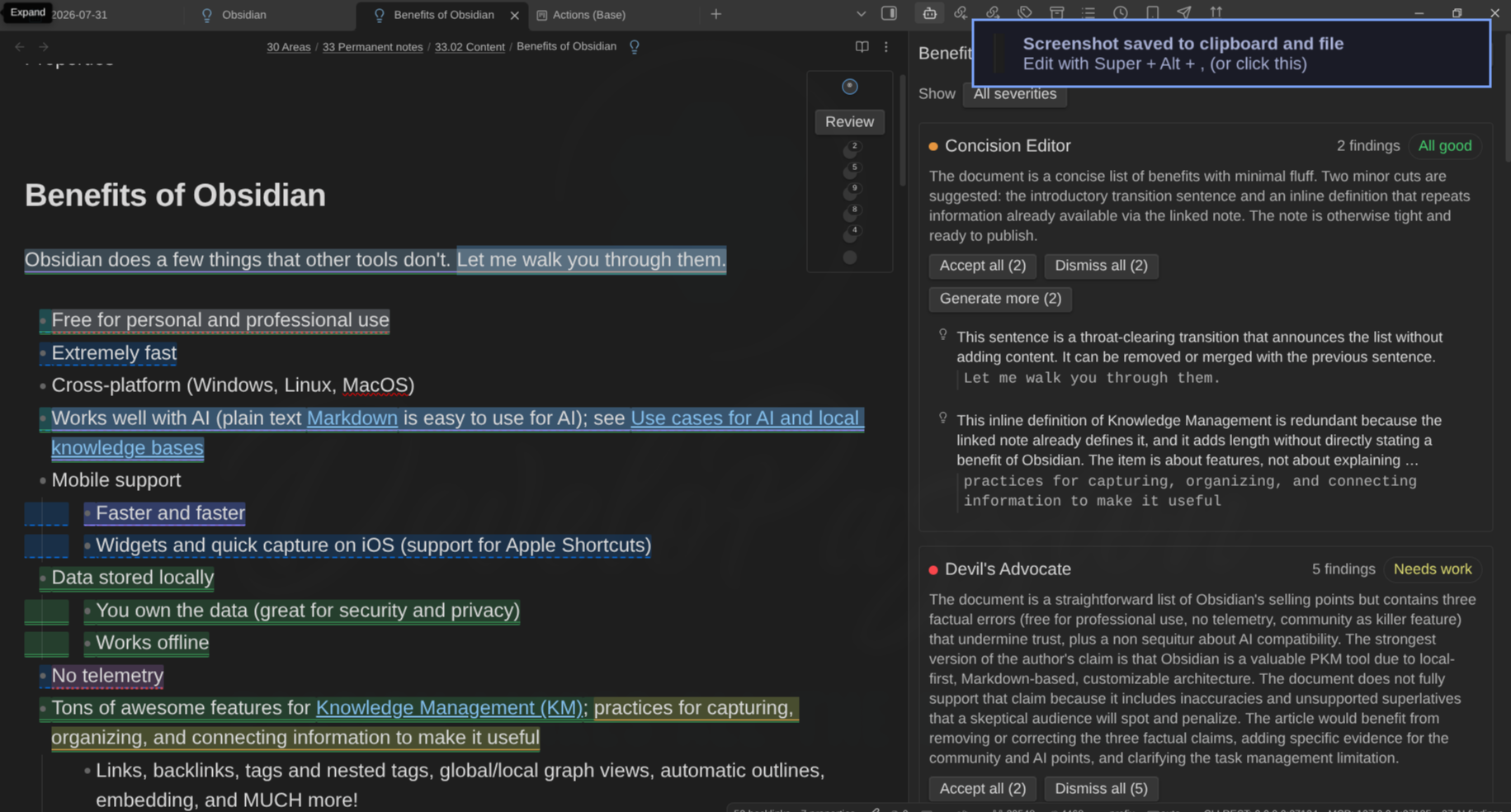
Here's the idea. You define AI personas, which I call Editors. Each one has a name, a color, and a prompt describing what it cares about. Six ship with the plugin; all of those are editable: Concision Editor, Devil's Advocate, Fact Checker, Flow & Structure Editor, Humanizer, and Beginner Reader. And you can also create your own. You summon one (or several) on a note, and they read it and highlight the exact words they take issue with, right in your text, in their own color.
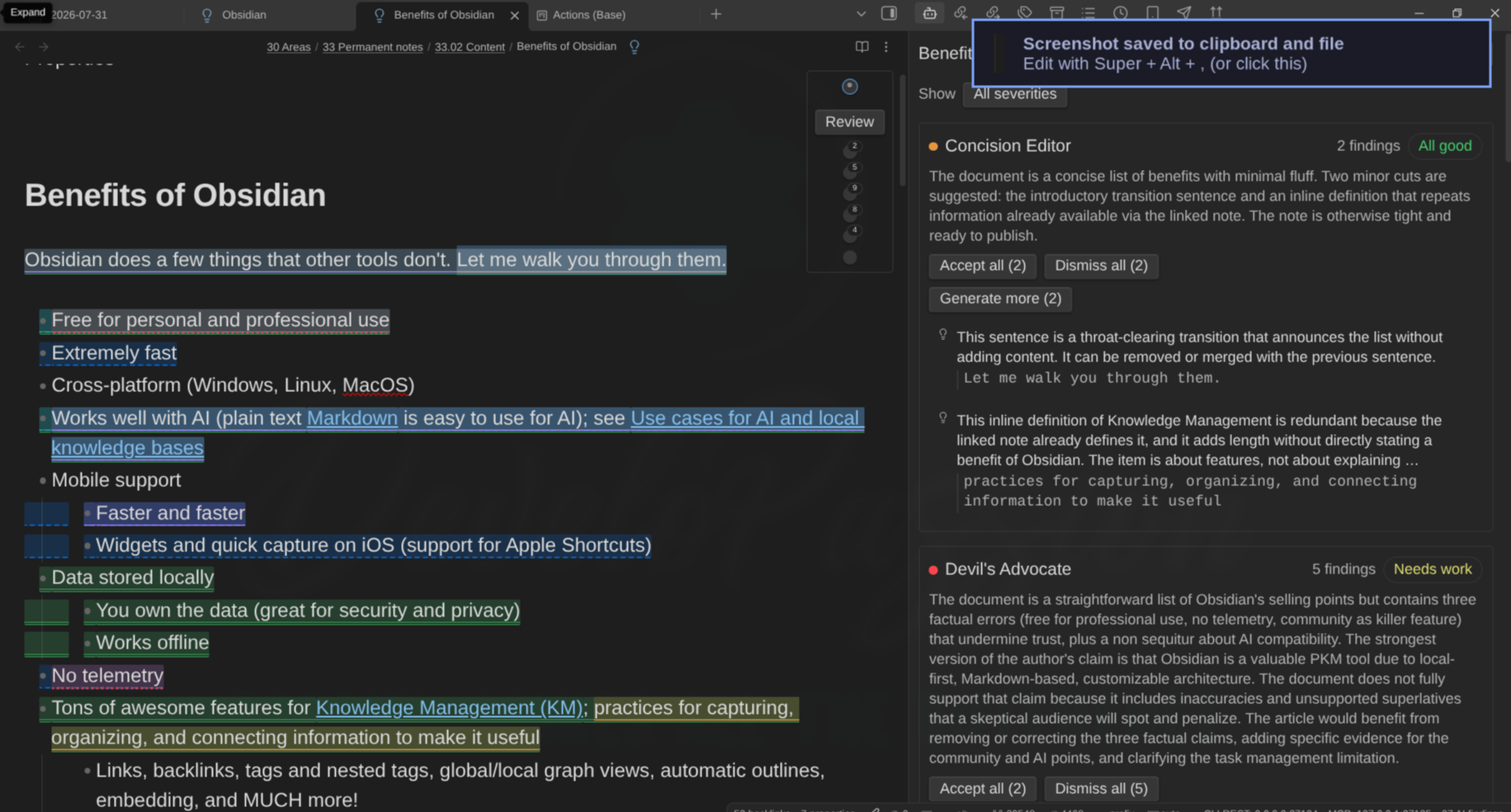
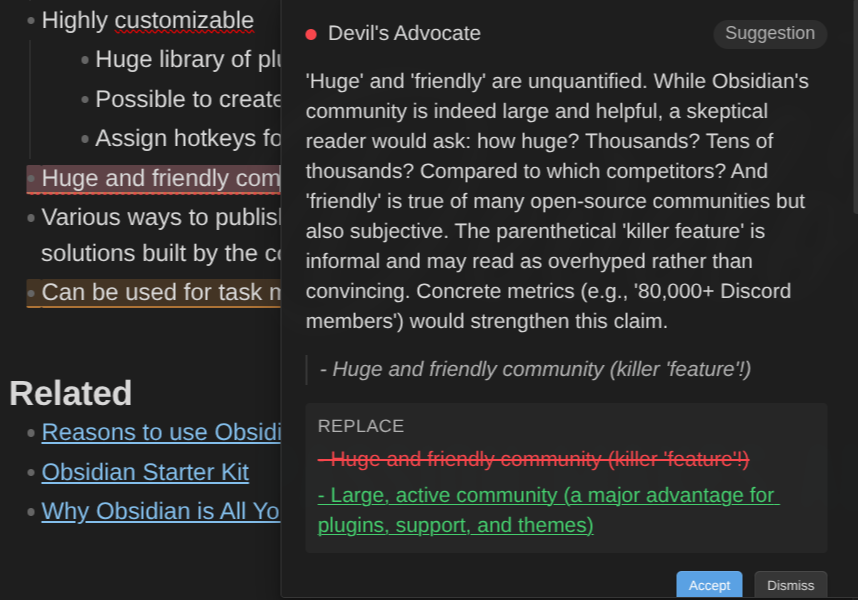
Click a highlight and you get the critique, the quoted passage, and a proposed edit with Accept and Reject. And if you disagree, you can push back. Reply to a finding and the editor either withdraws it or holds its ground and sharpens its argument. It's a conversation about one specific sentence, not a chat window where you paste your whole note and hope.
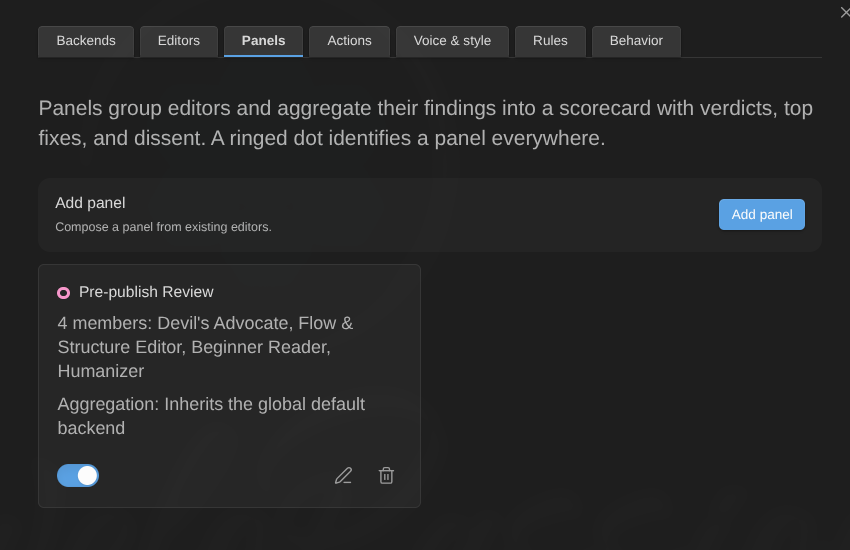
You can also group editors into Panels that review together and produce a single scorecard: an overall verdict, a verdict per member, ranked top fixes, and where the members disagreed.
Two important principles govern the way this plugin works:
- Nothing runs unless you ask. There's one exception, an opt-in Daemon mode that refreshes recommendations after you pause typing, and it's off by default.
- Nothing gets written without a visible diff you accept. AI doesn't drive. You always do.
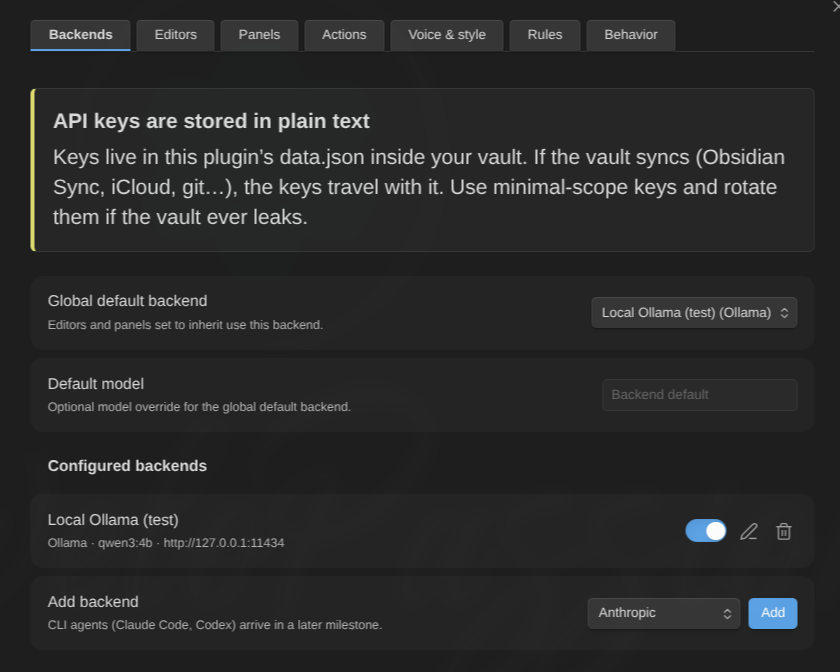
You also have full freedom to use any AI you want. Hosted APIs (Anthropic, OpenAI, OpenRouter, Azure OpenAI, Ollama, and anything OpenAI-compatible like LM Studio or Groq) or an agent CLI running on your own machine (Claude Code or OpenAI Codex).
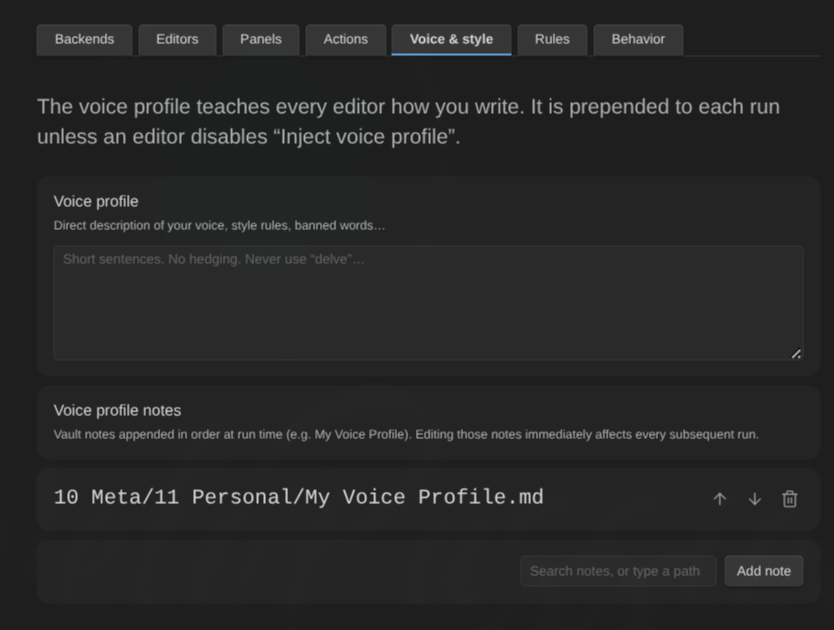
And of course, your vault is the configuration. Every prompt field accepts direct text or references to your own notes, resolved at run time. As an example "Ghostwriter" editor points at my actual voice profile note, knows my style, my preferences, etc. When I refine that note, the editor gets better. No need to copy/paste.
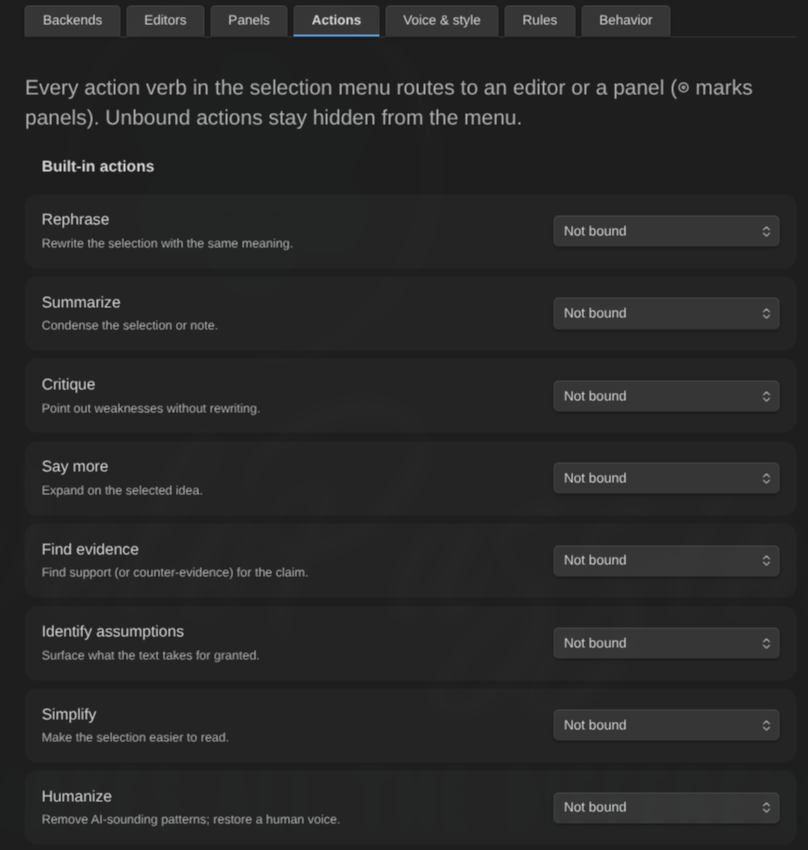
There's a lot more in there: actions you run on a selection (rephrase, summarize, simplify, humanize, critique, find evidence, identify assumptions, find references), margin comments you add to a passage while you keep writing, a history tab, privacy exclusions by folder/tag/frontmatter so certain notes are never sent anywhere, and a "preview what will be sent" modal so you can see the exact payloads.
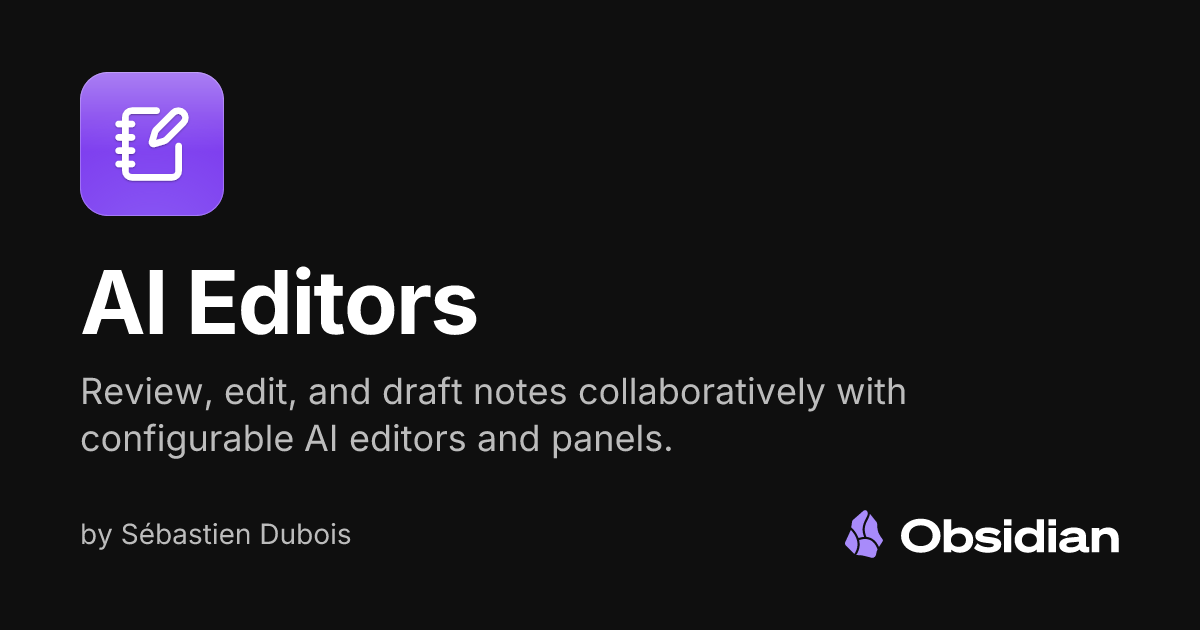
You can install the plugin directly from the Obsidian Community site:

This plugin is directly by Maggie Appelton's Language Model Sketchbook work on daemons, and by Juri Strumpflohner's own implementation. I'm grateful for both.

 dsebastien
🧩 Kanban Action Planner: WBS, Automations, Embeds, and Contexts
The Kanban Action Planner plugin for Obsidian got a LOT of love. I've release many improvements during the last weeks, going from 1.2.0 all the way to 1.8.0. I've been a fan of the TaskNotes plugin, but it can only work with one set of statuses. This limitation was too annoying for me. That's why I've built this plugin. Also, I wanted a full suite of tools for project management and creation/publishing pipelines.
The Work Breakdown Structure (WBS) view. Organize your work as a hierarchy: goals contain projects, projects contain tasks, and so on. Just like the rest of the plugin it works with any note type, not just tasks. Estimates and progress roll up (and down) automatically, so you can see how far along an entire goal really is at a glance. You can drag to re-parent, set due dates, and detach items by dragging them out. It also stays usable on single-type, filtered, and flat views.
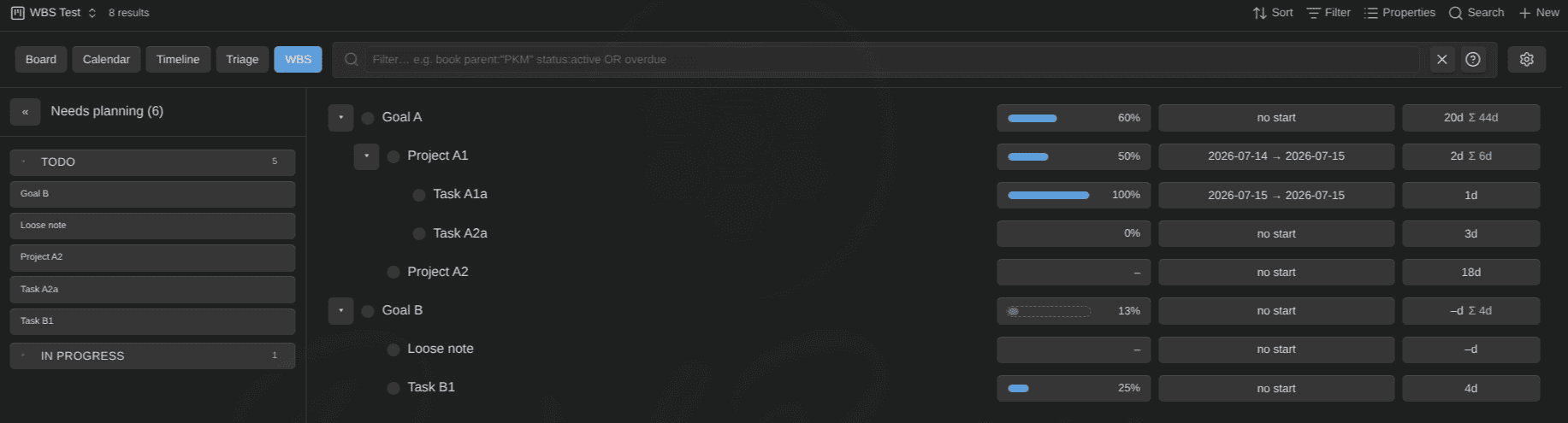
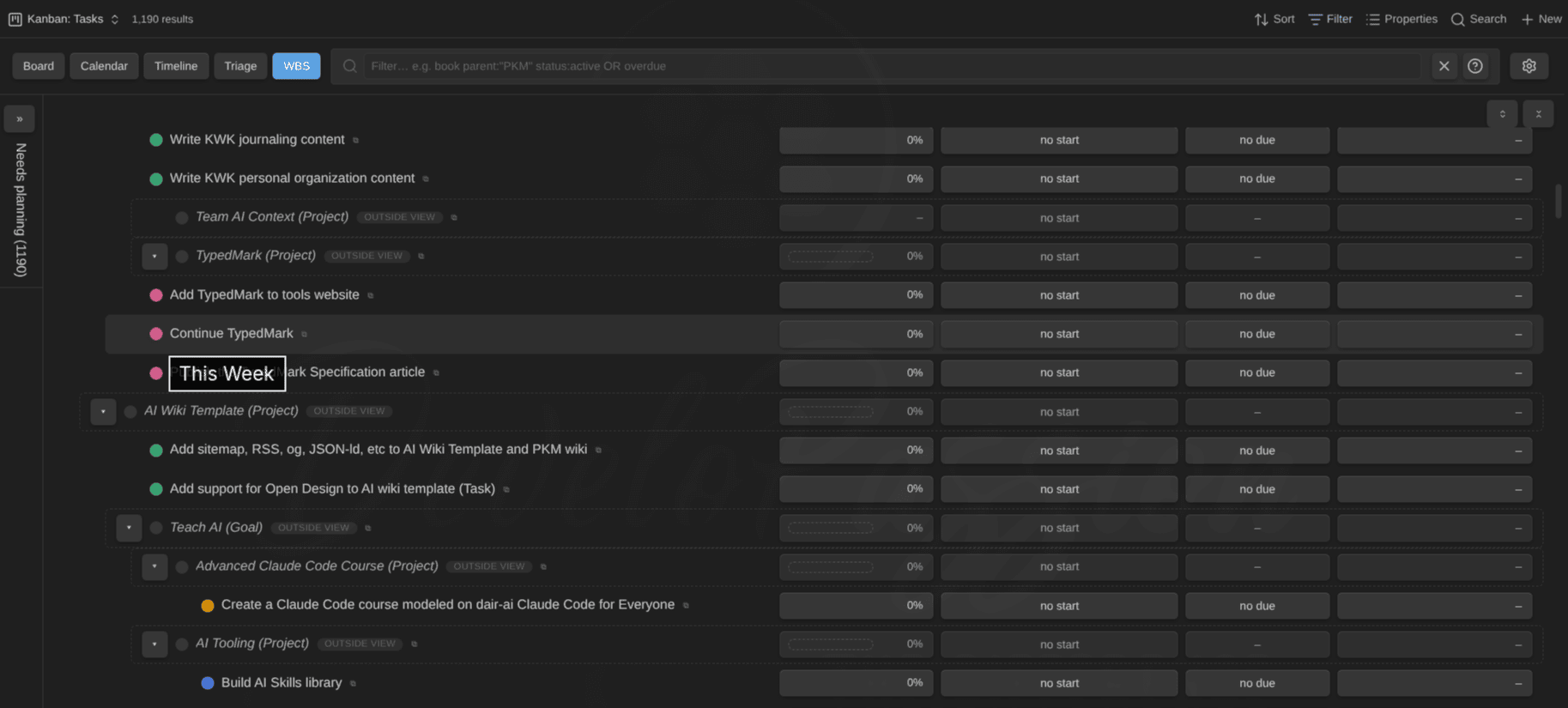
Estimates. Visual consistency is something I care a LOT about. All columns now align. Estimates use one composite duration format everywhere (e.g. xx d yy h zz m), and the units sit in fixed slots so nothing jumps around as you scan a column. You also get a per-note-type estimate property and unit, so a goal can be estimated in days while a task is estimated in minutes.

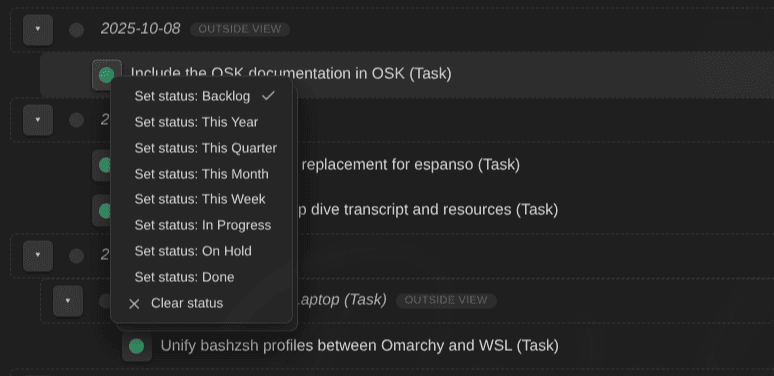
Inline status changes. Changing the status of an item used to mean opening it. Now you do it right where you are, in any mode, and it works for every configured note type.
Per-note-type automation rules. This is the one I'm most excited about. It's an IF this THEN that system, configured per note type. A few examples of what you can set up:
- If done, then set the progress property to 100
- If done or abandoned, then archive the note to a specific folder
- If some condition, then add or remove a tag
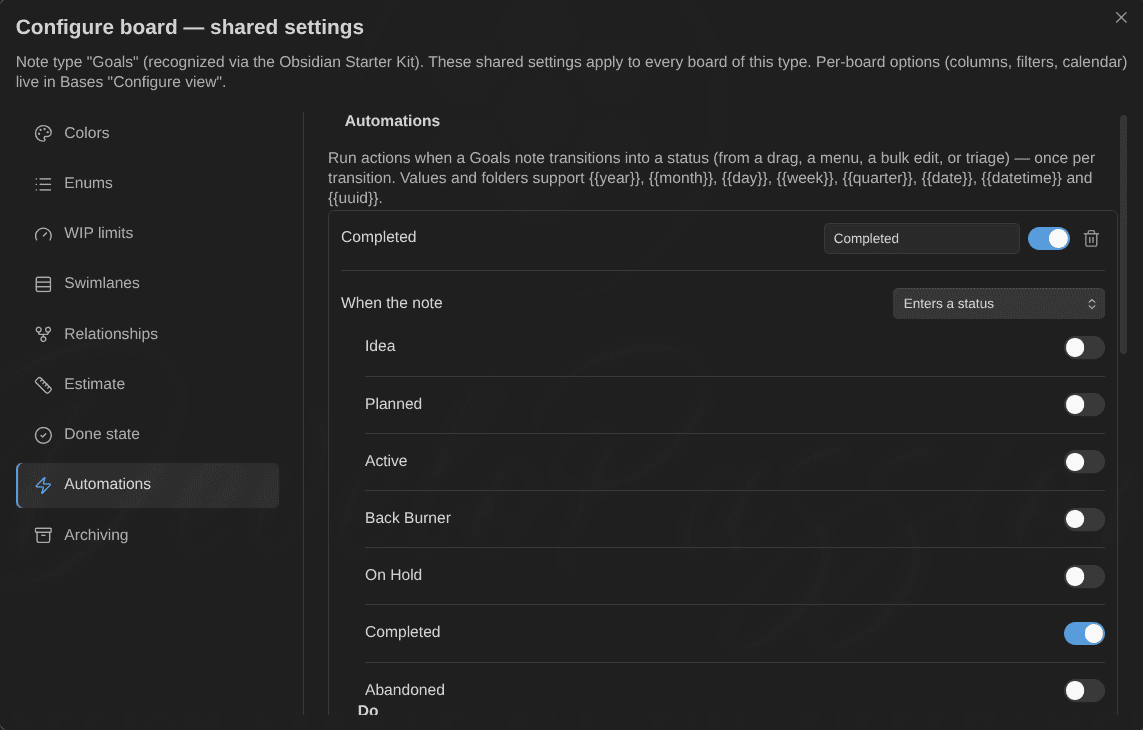
It means your board isn't just a view anymore; it's a workflow engine sitting on top of your notes.
Embeddable boards. I found a way to pass information to an Obsidian Bases view when embedding it inside another note. So now you can embed the plugin's views anywhere, with per-embed overrides for mode, filter, and height:
![[Actions (Base).base#Kanban: Tasks|mode=kanban height=400 filter=parent:"Obsidian Starter Kit (Project)"]]The alias becomes accessible to the base view, which can then do interesting things with that input.
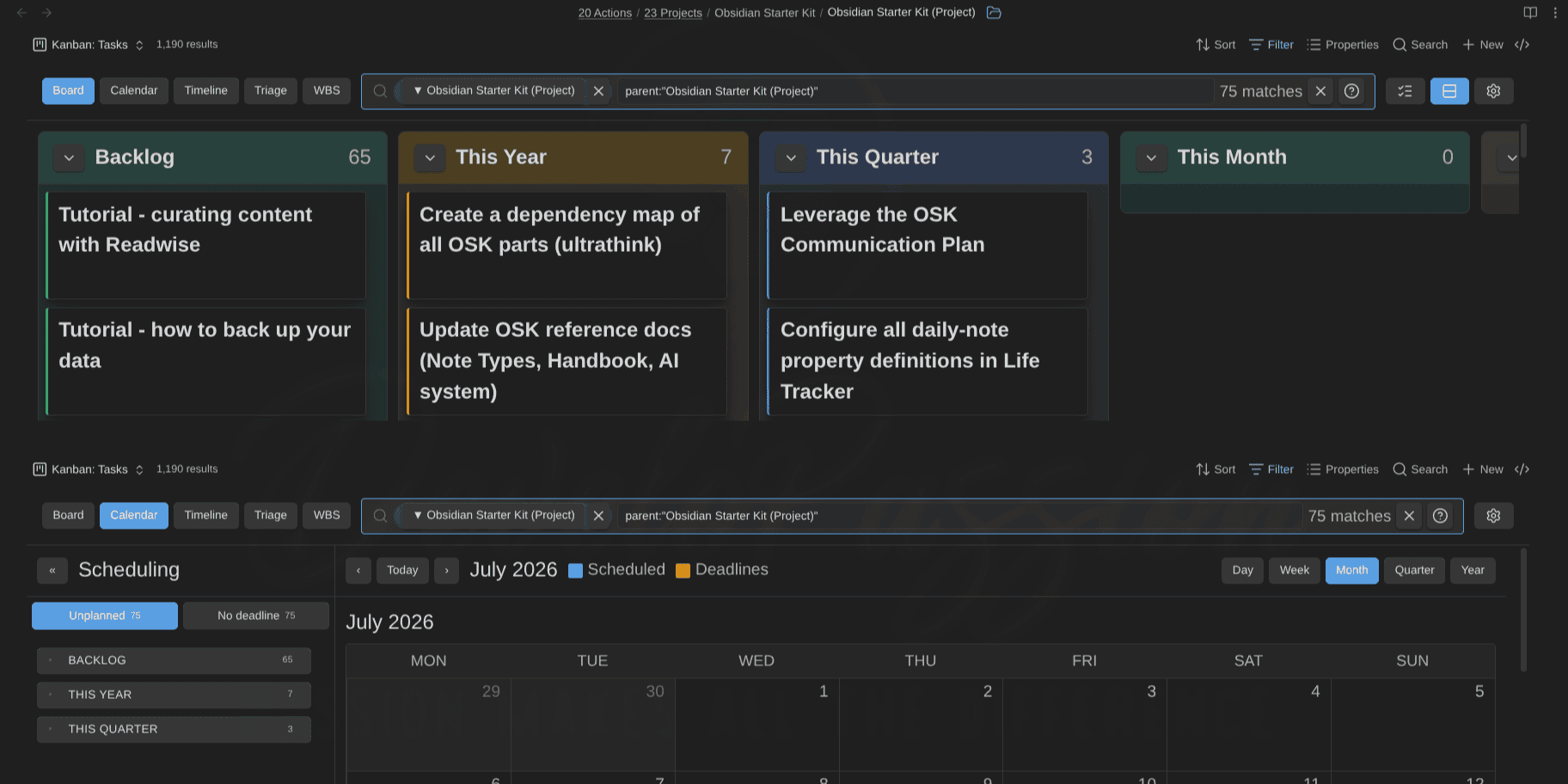
My project notes are much more interesting thanks to this. I can add a filtered view of the associated tasks. Imagine opening a project note and seeing its own board, its own timeline, and its own WBS, inline, all driven by the same notes.
In that release, I've also added inline estimate editing directly on the chip, and hover page-previews in calendar, timeline, and WBS modes. I also added support for touch-friendly drag gestures and drag support in popout windows.
GTD contexts. Cards can now document their context(s), get colored by them, be filtered by them, and be embedded by them (context=). If you run any flavor of GTD or simply mix personal and professional items, then you'll probably enjoy this!
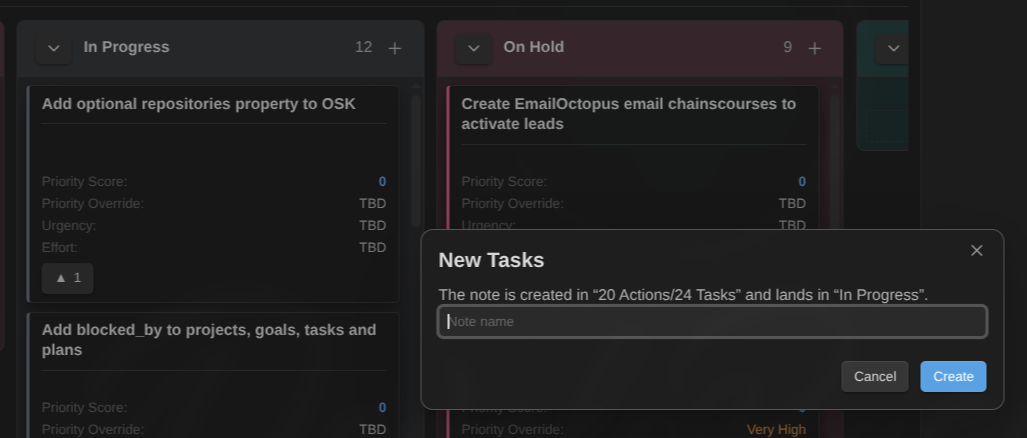
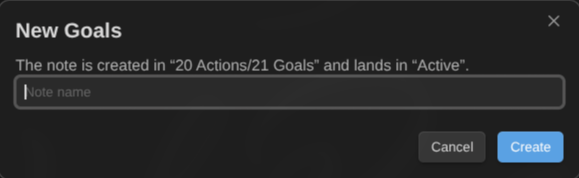
I've also added natural-language date entry, and quick capture: create a new card directly from a board column, with a + button in each column header. It's fully note-type aware, so the new note lands in the right folder, with the right template, and with whatever properties the board's filter requires. Click "add" under an "In Progress" column and you get an in progress task, not a task you then have to move.
Documentation and releases:

 dsebastien
📝 Three Obsidian Deep Dives
I've published multiple in-depth guides about Obsidian.
The Complete Guide to Obsidian Properties. Properties are how you turn a pile of Markdown files into queryable data. This one covers the whole model: types, conventions, pitfalls, and what to do when your vault has drifted.
 Sebastien Dubois
The Complete Guide to Templates and Templater in Obsidian. Templates are key to maintaining a vault at scale. This guide goes from the core Templates plugin all the way to real Templater automation: generated content, prompts, scripts, and the patterns I rely on.
 Sebastien Dubois
The Complete Guide to the Obsidian CLI. Obsidian ships a CLI, and I'd bet a lot of you have never opened it. You can read notes, append to them, search, list tags, inspect backlinks and orphans, set frontmatter properties, and more, all from your terminal. Which also means: from scripts, from services, from other applications, and of course from your AI agents. This CLI is very important for my own AI assistant.
 Sebastien Dubois
And there's more coming: I'm busy preparing one about the Dataview plugin for Obsidian, covering how to query everything in your vault and then make those queries last. It should land soon.
🌐 Website Revamp
I spent about a week improving my Website (dsebastien.net) in various ways. 113 commits landed between July 17 and July 22. My site had roughly 800 articles/newsletters and really needed navigation improvements. People landed on an article, read it, then left, and I probably lost many sales because of that.
Here's what changed.
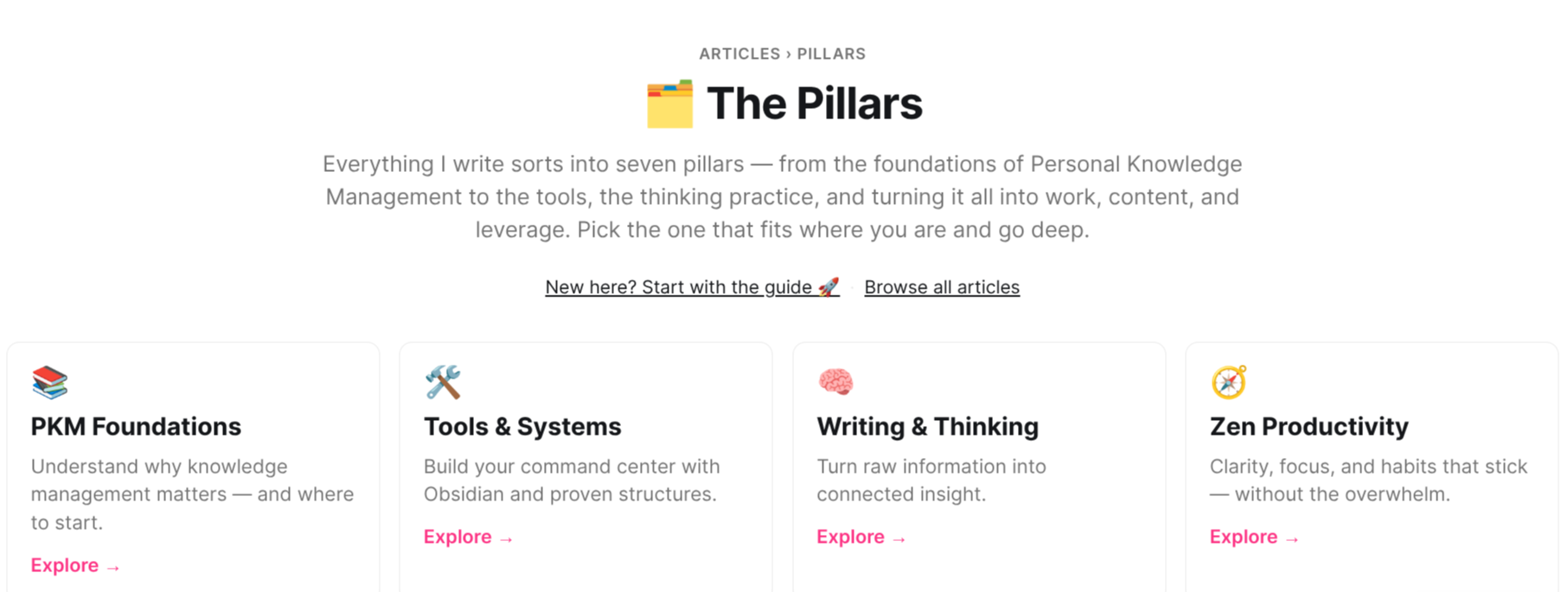
Content pillars. I've been organizing my content around seven pillars: PKM Foundations, Tools & Systems, Writing & Thinking, Zen Productivity, Knowledge Work, Content Systems, and Creator Systems. Now, each of those has its own page on my Website, its own article feed, and its own RSS feed. There's an index at /pillars/ tying them together. Instead of browsing by date, you can now browse by theme.
The Knowledge Master's Journey. The /start/ page (my sales funnel's entry point) now routes into one of five layers of my system: Foundation, System, Practice, Application, and Creation. Each layer has its own page with its own reading path and its own next step. Also, each layer pulls its articles live from the pillars. Also, at the bottom of every article, you now get a pointer into the layer that article belongs to.
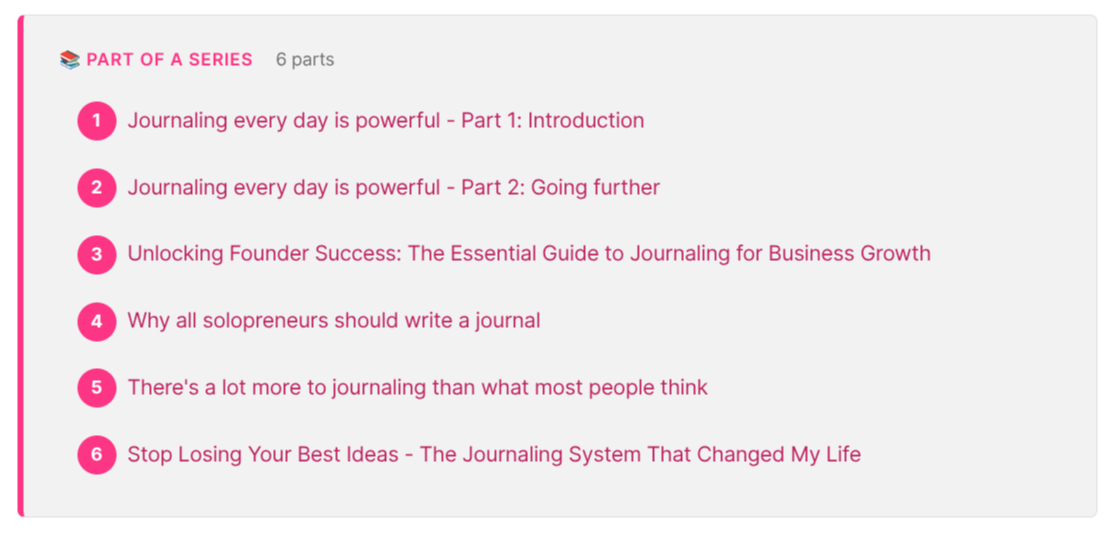
Series. Multi-part content is finally grouped. Six series are live: my Git tutorial, my pieces about Journaling, Obsidian (20+ parts), AI workflows, team management, TypeScript, and more. In addition, each article now shows its position in the corresponding series, with previous/next navigation, and long series collapse to keep things readable.
A "recently updated" channel. I regularly refresh old articles. But until now that work was completely invisible. There's now an /updated/ page, with its own RSS feed, showing what I've recently refreshed.

A vastly better blog page. The /blog/ page became a magazine: a set of featured pieces, a latest row, and a sticky topic bar that follows you as you scroll (it becomes a jump-to-topic dropdown on mobile). I also audited all 292 blog articles so each appears in exactly one section instead of several.
A tags hub at /tags/, listing all 170+ tags, plus /all-articles/ converted into a proper paginated page with cards and a sidebar.
Subscription, cleaned up. My homepage was asking for the sale four times, with four different interfaces. Now the tiers render once, and only for people who aren't already members. Members get routed, not re-pitched.
I've also simplified the options. The Supporter tier is gone (nothing changes for current members), replaced by the three Knowii Community tiers (Explorer, Knowledge Builder, Knowledge Master) directly on the site. I also replaced Ghost's default subscription modal with my own, so signing up doesn't feel like leaving the site.


Prices are now loaded live from my store, so they can't drift apart anymore.
Contextual offers. I've built a small engine that picks one product and one free resource based on the topic.
Findability for AI. More and more people meet my writing through an AI summary rather than my actual page, so I optimized for being quoted correctly. Articles now open with a boxed "In short" summary. The most-read ones got answer-first intros and real FAQ sections. Table-of-contents anchors are readable slugs (#how-to-build-a-pkm-system), so a link to a section stays valid and quotable. And there's a proper structured data graph across the site: Organization, Person, WebSite, BlogPosting, HowTo, FAQPage, breadcrumbs, all connected. All hidden under the hood, but quite important in practice.
Smaller things, I added CTRL + K (and /) to search from anywhere, , redesigned the footer, added a better looking author card at the end of my posts, "keep reading" suggestions, redirects for retired pages, etc.
Why bother? Because many of my pages had a bounce rate of >=80%. And that hurts! People arrived, got their answers, and left. My hope is that they'll spend more time discovering my work, and hopefully decide to join our community. Now I'll wait for a few weeks to have enough data to be able to judge the results.
If you want to poke at it:
🎙️ Knowii Voice AI: What's Coming
I haven't shipped a Knowii Voice AI release since 0.7.0, but a big one is coming, and I want to tell you more about it.
The bulk of what's coming goes into transcription quality and reliability. Voice tools are usually great until they meet your vocabulary, and then they mangle every product name you own:
- Word replacements: a find-and-replace list for terms that always come out wrong. Fix it once, never think about it again
- Phonetic replacements: map a transcribed sound to the right term, even across alphabets (my favorite test case: "эн восемь эн" becoming "N8N")
- Filler word removal (opt-in): strips the uh, um, and hmm, and collapses stutters like "doc doc doc" into "doc". Language aware, with your own custom list
- Digit sequences written as numbers: "one one two two" becomes "1122" for runs of three or more. Account numbers, phone numbers, codes
- A Whisper prompt you can set to hint the model about punctuation, capitalization, and vocabulary
- Silent recordings get ignored instead of being handed to a model
Audio capture got reworked too: recording happens at your microphone's native quality, a lot more devices now just work (USB and Bluetooth ones that only support a single rate), nothing gets cut off at the end, and recordings no longer bleed into each other.
Also, you'll be able to drive a running instance from the command line with --toggle-transcription and --cancel, which means Hyprland keybinds, Waybar buttons, and scripts can all trigger dictation without needing a global keyboard shortcut. There's also a cancel hotkey (Escape by default) that throws away the current recording.
Last but not least, I've fixed many bugs that were reported: recovery from stuck transcriptions, surviving a microphone disconnect mid-recording, a missing system tray icon, a corrupted settings file, a startup crash on older CPUs. I've also added an in-app log viewer so you can actually see what happened, and on Linux specifically, wireless mice no longer freezing the cursor and Hyprland/Sway trackpad gestures no longer breaking after a paste.
I don't have a date for you yet, but it's close. If you already own it, you'll get it as a normal update.
 Sébastien Dubois
🔌 Plugin Ecosystem
The rest of my Obsidian plugins have evolved as well.
Life Tracker plugin for Obsidian: quicker daily capture in the modal, better chart tooltips, a real time axis on scatter charts, configurable step size on number sliders, and number properties now accept decimals.
I've also added support for starred visualizations, custom heatmap colors with colorblind-friendly palettes, value polarity (walking is positive, smoking is not), quick number entry, swipe gestures on mobile, and date placeholders in filename patterns.
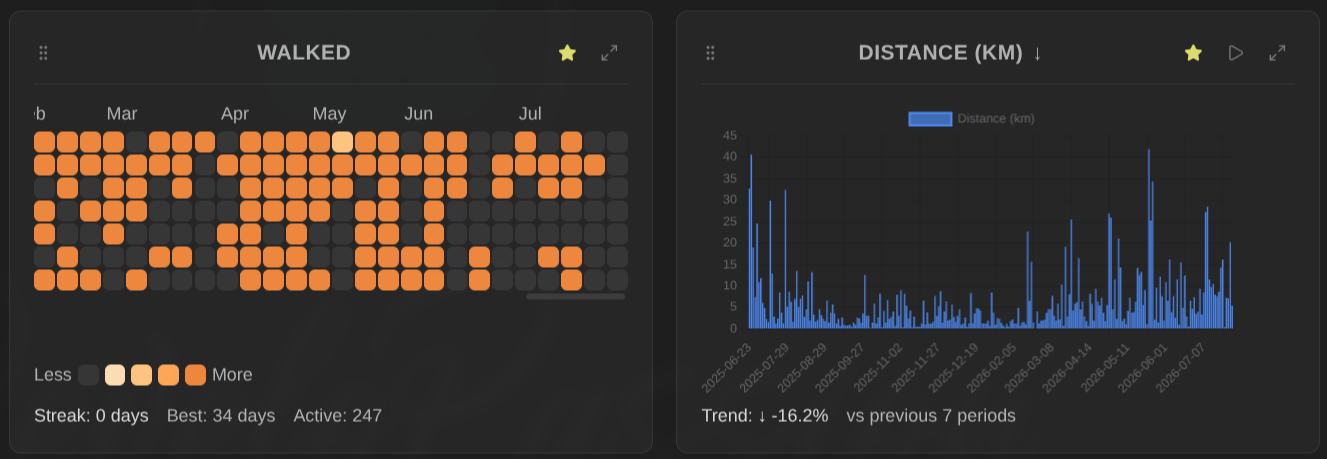
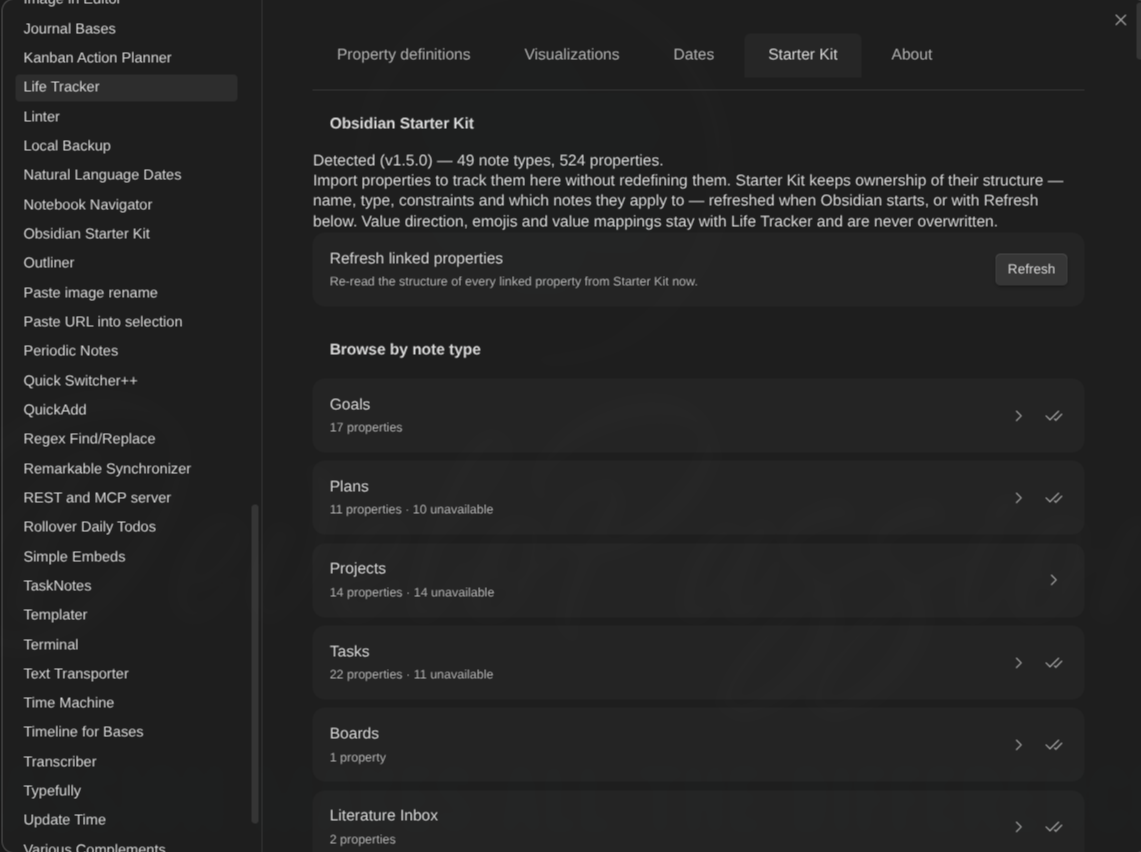
Also, Life Tracker can now import note types and property definitions straight from the Obsidian Starter Kit, linked by id, so renaming a property doesn't break anything. No more duplicating definitions across plugins.
Journal Bases plugin for Obsidian (1.12.1 → 1.12.4): frontmatter now stays folded after you mark a period as done, instead of jumping back open, and periodic-note detection was hardened for custom date formats.
reMarkable Sync plugin for Obsidian (1.4.4 → 1.8.0): settings are now searchable from Obsidian's own settings search, the notebook sync status dot got a hover tooltip explaining what it means, and a corrupt authentication token no longer breaks the plugin at load time (it just asks you to re-authenticate). I've also added an automatic background sync feature and better error reporting when a page fails to render.
Dataview Serializer plugin for Obsidian: a device-local "disable on this device" toggle. Serialization can now be turned off on a specific machine (a phone, a slow laptop) without touching your synced settings. Also, I've finally added support for callouts and blockquotes. Plus date placeholders in folder paths.
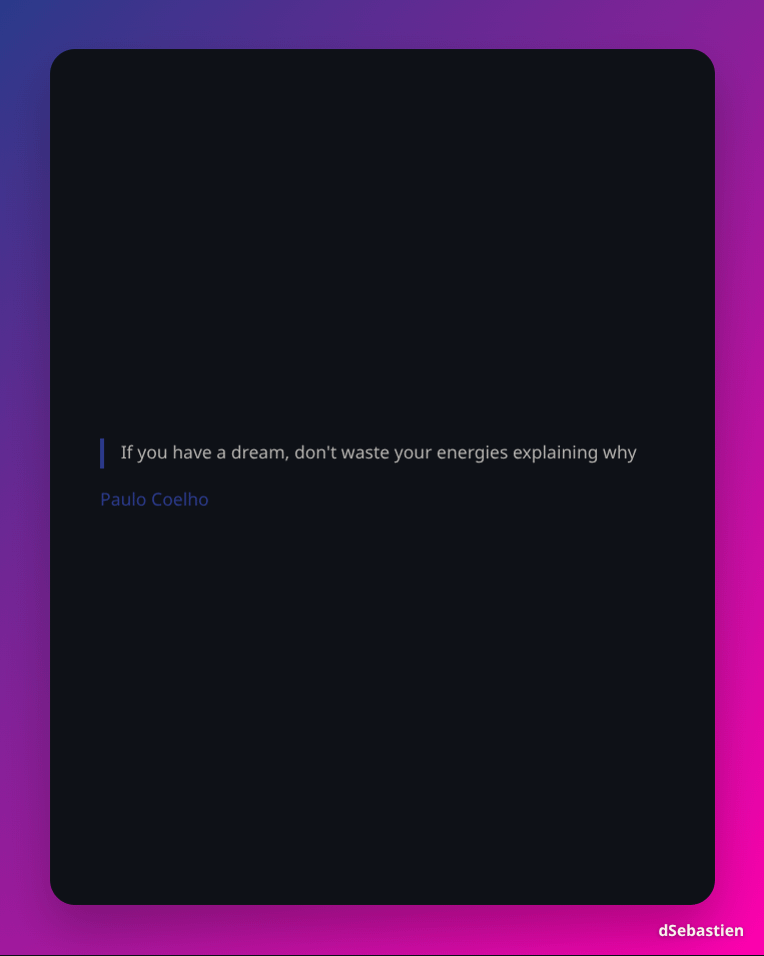
Typefully plugin for Obsidian (up to 3.10.0) can now publish a note or a selection as a branded image, with configurable link colors, and it uses your note's H1 as the image title. Handy for turning a paragraph into something shareable without opening a design tool.
Replicate plugin for Obsidian went to 2.0.0, which is a breaking change: the command id moved from generate-image-using-replicate to generate-images. If you had a custom hotkey bound to it, you'll need to re-bind it.
Book Exporter plugin for Obsidian (0.2.3 → 0.2.5): absolute-path image references now get copied into _resources correctly, and the book title stays out of the table of contents while sections get properly outdented.
Time Machine plugin for Obsidian (1.0.7 → 1.0.8): the view now stays fixed while you interact with the history slider.
Update time plugin for Obsidian (1.2.3): the excluded folders list was broken. Entries wouldn't add reliably. Fixed, and blank entries are ignored now.
Obsidian Starter Kit plugin for Obsidian, which is part of the Obsidian Starter Kit 1.0.0 🎉. This one will be part of the next OSK release. This new version includes a template drift health check: it detects when a note type's definition and its template have drifted apart. There's a matching osk-cli template-drift command for scripting it. Settings also got much friendlier (alphabetical sorting everywhere, a Sort A → Z button for note type properties), and 1.1.0 taught the folder validator to respect the mdbase.yaml exclude list and skip hidden directories.
Agentic Resource Discovery Server plugin for Obsidian (0.0.2) got its documentation site completed. This is the newest and most experimental thing I'm building: an MCP server running inside Obsidian, with hybrid semantic search so AI agents can find the right resources by meaning instead of keywords. I'll have much more to say about it soon. I expect this plugin to become quite important in order to avoid the AI skills context bloat that happens when many skill descriptions clutter the AI context window.
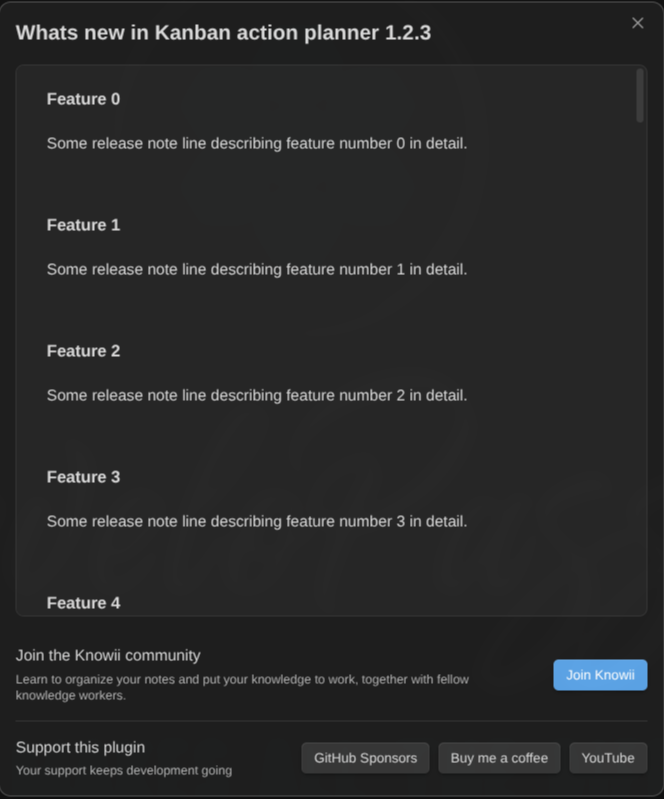
I've also added a "What's new" dialog once after an update to ALL my plugins. No more shipping features nobody notices because they'd have to go read a GitHub releases page. Those update dialogs also link to the Knowii Community, my "GitHub Sponsors" and "Buy Me a Coffee" pages, and my YouTube channel. I hope that this will motivate more users to support my work on this growing ecosystem of plugins.
Last but not least, I've continued adding integrations between my different plugins, and I intend to add more. My goal is not to force anyone to use all the plugins together, but to improve the user experience when it is the case.
Under all of this sits the Obsidian Plugin Template (Bun) (2.7.0), which is the scaffold every one of my plugins is built from.
Everything is listed on my tools website: https://tools.dsebastien.net
📊 Claude Epic Status Line v2.0.0
Claude Epic Status Line is a status line for Claude Code. It's free and open source, and if you spend your days in an AI coding terminal, it replaces the default status bar with something that actually tells you where you stand: model, context usage with token counts, directory, git status with staged/unstaged/untracked counts and ahead/behind arrows, session cost, duration, lines added and removed, effort level, and a set of badges.
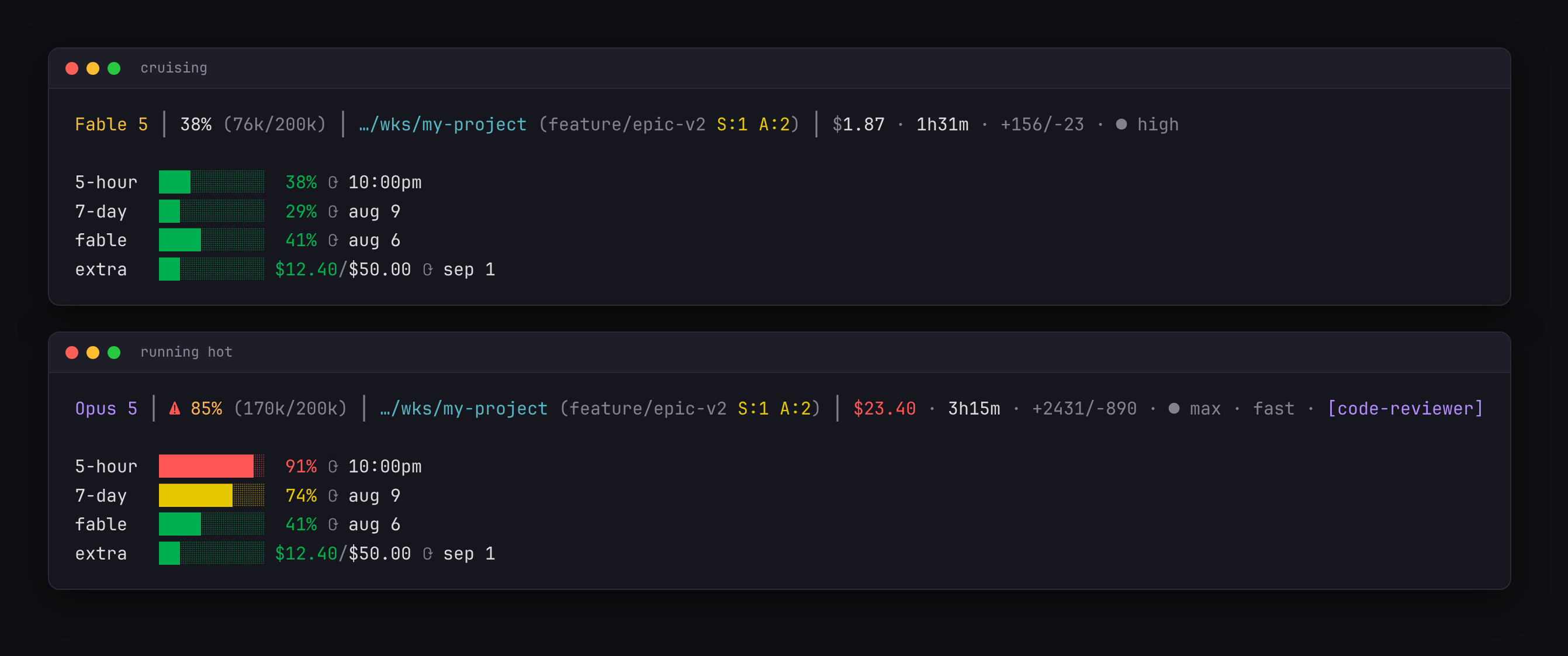
The part I use most is the rate-limit dashboard: always-visible bars for your 5-hour window, your 7-day window, per-model weekly limits, and extra-usage credits, each with its reset time.
v2.0.0 is a full rebuild, and here's what changed:
- A new hybrid layout: one refined status line, plus that permanent rate-limit dashboard underneath
- Semantic color everywhere: one escalation scale (yellow at 70%, orange at 80%, red at 90%) driving every percentage, model names colored by family, and a steady bold warning instead of a blinking one (sorry about that 😅)
- A real configuration system: zero-config by default, but there's now a config file with every knob commented out at its default, plus environment variable overrides. Thresholds, palette, bar width, glyph set (unicode, nerd font, or plain ASCII), per-segment toggles, currency conversion, cache TTL
- stdin-first data: cost, duration, rate limits, effort and badges now come from Claude Code's own status JSON instead of being fetched. The API is only queried to enrich, and it's cached per user
- ...
 dsebastien
 dsebastien
Random Bits
- I've added a batch of new concepts to the Concepts Website: https://concepts.dsebastien.net. There are now more than 4K!
- I published Plan de Tables Mariage, a little tool for organizing wedding table seating. Sometimes a real problem shows up in your life and the fastest fix is to build the thing 😄. And this is definitely easier now that AI is here to help! Check it out here: https://dsebastien.github.io/plan-de-tables-mariage
💡 Business Updates
- The Summer Sale ended on July 30. Thank you to everyone who grabbed something ❤️ If you missed it, the Obsidian Starter Kit and the Knowii Community are still the two best entry points into everything I build
- A reminder about the Knowii Affiliate Program: if you already use and recommend my stuff, you can earn 40% commission on everything in the Knowii ecosystem: https://www.dsebastien.net/knowii-affiliate-program/
🧠 Tip of the Week
Automate the rule, not the task.
The instinct is always to automate the doing. That's the hard part, and usually the wrong target. Automate the bookkeeping instead: the status that should have been updated, the tag that should have been removed, the note that should have been archived, the progress that should have rolled up.
Too much manual upkeep is an antipattern. Discipline doesn't scale, automation does. Look at your own system this week and find the one piece of upkeep you do over and over without thinking. Then make it happen by itself.
🧠 Quote of the Week
A bad system will beat a good person every time
W. Edwards Deming. Worth remembering the next time you blame yourself for something your system made inevitable.
Until Next Time
Thanks for reading. Reply to this email if something resonated, something annoyed you, or you just want to say hi. I read everything.
That's it for today! ✨
Ready to dive in?
- 🚀 Get OSK: https://www.store.dsebastien.net/product/obsidian-starter-kit/
- 🧠 Join Knowii: https://www.store.dsebastien.net/product/knowii-community/
- 🎙️ Try Knowii Voice AI: https://voice-ai.knowii.net
- 🤖 Try the new AI Editor plugin: https://dsebastien.github.io/obsidian-ai-editor/
- 📊 Grab Claude Epic Status Line v2: https://github.com/dsebastien/claude-epic-status-line
- 🔌 All my free Obsidian plugins: https://tools.dsebastien.net
- 📰 More content at https://dsebastien.net
Talk to you again soon ❤️
— Sébastien
About Sébastien
Ready to get to the next level?
Found this valuable? Share it with someone who needs it.