
Obsidian now has native Kanban boards and I'm not switching yet


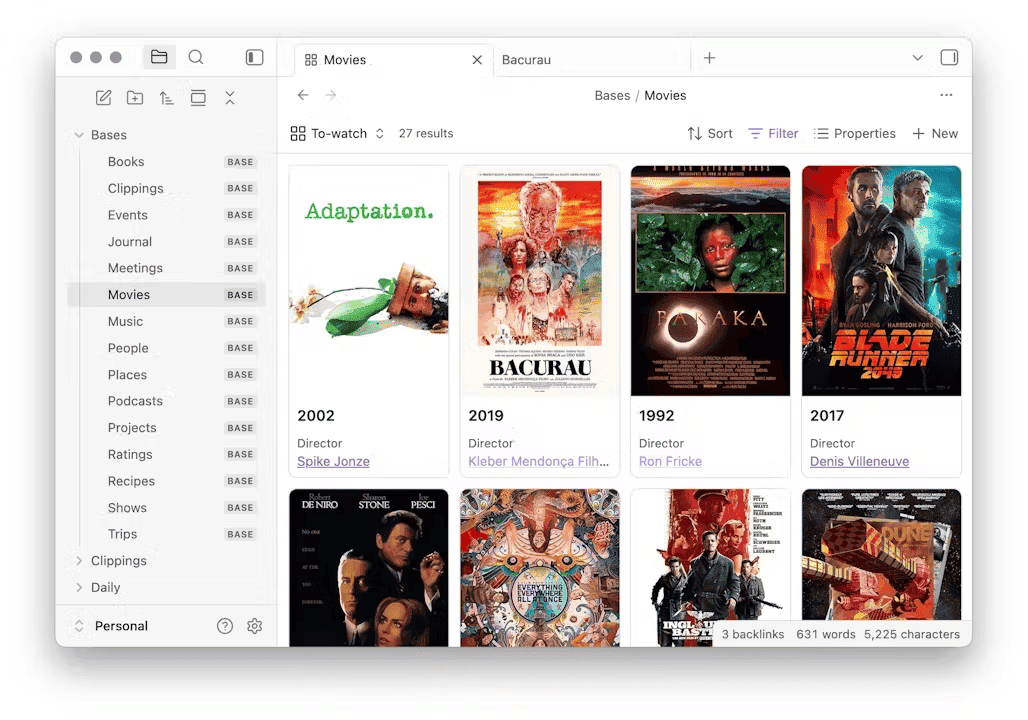
On October 5th, the Obsidian team announced Obsidian 1.14. The release has five headline features: editing Markdown files outside your vault, macOS Quick Look previews, Quick Capture on iOS, highlight colors, and the one that made me smile: Kanban and new grouping options in Bases.
Yes, Obsidian now has native Kanban boards 🎉
In this article, I want to explain why I think this is really cool, then compare the new view in depth with the Kanban Action Planner plugin for Obsidian, the plugin I built and use every single day to run my own system. I love the new feature. So, should you drop your Kanban plugin and go native? For most people, yes. For me, not for a while. Let me explain why.
Why native Kanban boards matter
I've been a huge fan of Kanban Boards for the longest time. A board turns a pile of work into something you can see at a glance: what's waiting, what's in progress, what's done. And if you're serious about it, you can set limits on work in progress.
Until now, managing work through Kanban boards in Obsidian required installing a community plugin. The historical Kanban plugin for Obsidian stores a whole board in a single Markdown file, with cards as list items. Newer plugins (mine included) build boards on top of Bases, where every card is a real note with properties. Both approaches work, but both require you to find the plugin, trust it, and hope it keeps being maintained.
With 1.14, you can now just open Obsidian, open a Base, pick the "Kanban" view type (aka layout), select the properties you want to see, done. And because it's built on Obsidian Bases, the cards are your notes. Drag a card from one column to another and Obsidian updates the property in that note's frontmatter. No hidden database, no proprietary format. Just files. That's the File over app principle applied to project/task management, and it's great to see the Obsidian team go in that direction.
There's more. The view comes with neat features:
- Create notes from a column: the + in the column header (or "New" at the bottom) creates a note that already carries that column's value
- Cover images on cards, using any image property, with cover/contain fit and a configurable aspect ratio
- Manual column ordering: drag column headers around, hide columns, add empty ones from the new Group menu
- Folder columns: group by
file.folder, and dragging a card actually moves the file to that folder. Clever! - Mobile support out of the box
- Embeds: boards can be embedded in notes, and since 1.14.3 they size to their content
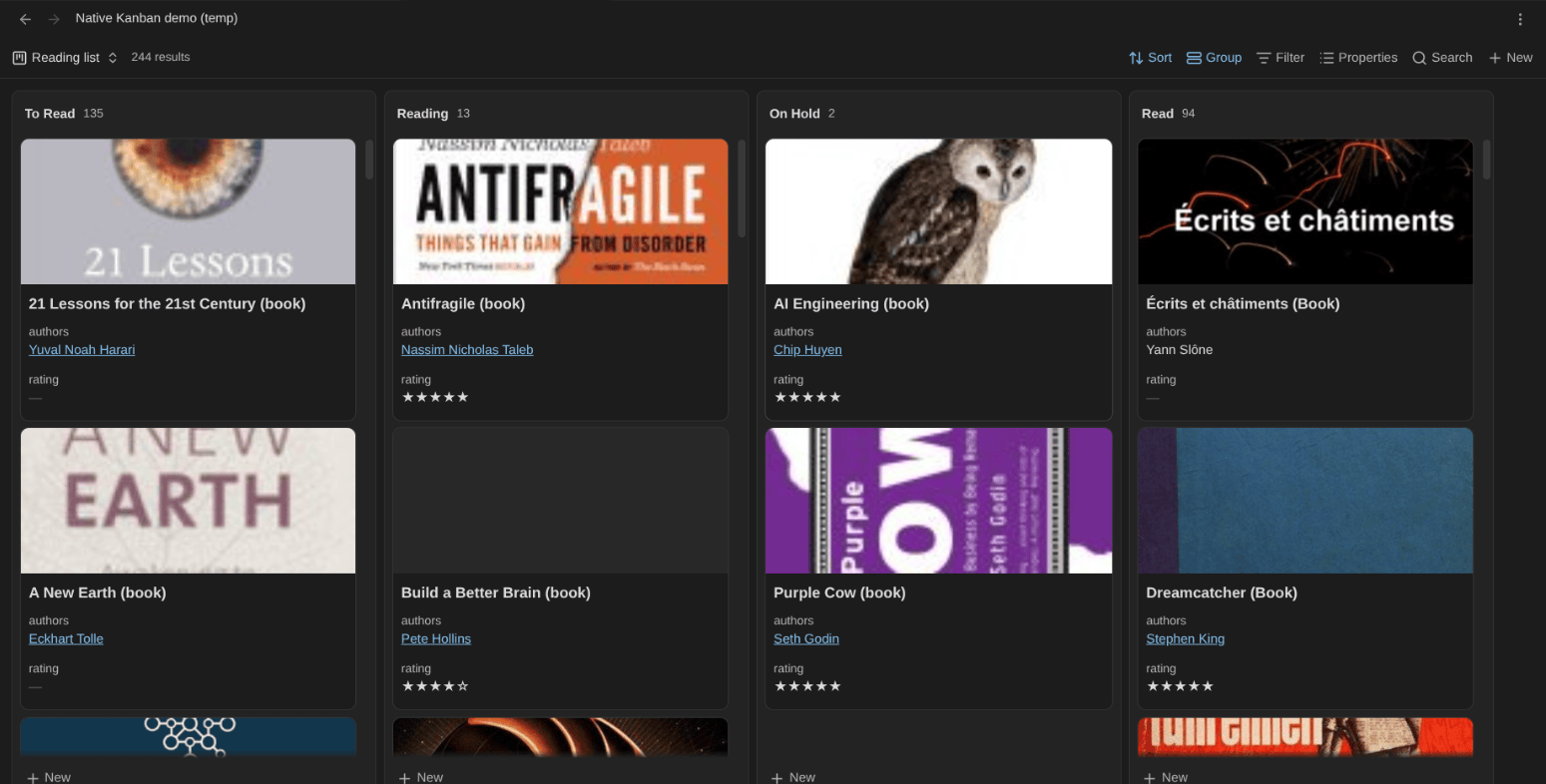
The new grouping options aren't limited to Kanban either. Groups are now collapsible in the table, cards, and list layouts, and the Group menu works across all views. That alone makes Bases much nicer to use.
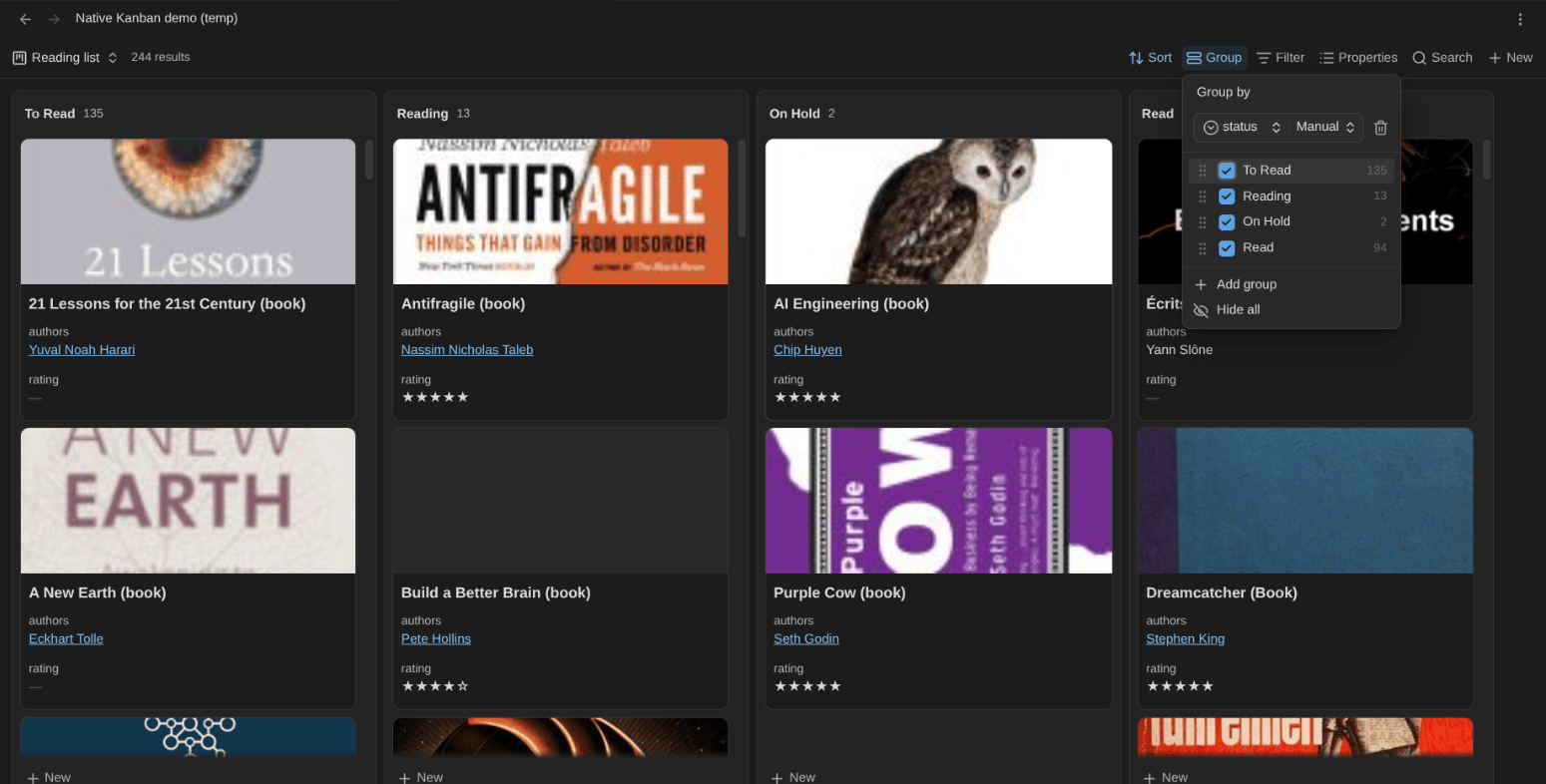
For the vast majority of Obsidian users, this is exactly what they need. If you just want a board for a side project, a reading list, or a content pipeline, use the native view. Really. One less plugin is one less thing to maintain.
Why I'm not switching
Now, I'm not the vast majority of users 😅
I built the Kanban Action Planner plugin for Obsidian because I hit the limits of every Kanban solution I tried. My vault holds goals, projects, tasks, activities, books, articles, videos... Each of those note types has its own lifecycle, its own statuses, its own "done". A board is the entry point, but what I actually need is a planning/management system that works across all my note types. And that's where most solutions show their limitations.
Here's the comparison at a glance, then the details:
| Native Kanban (Obsidian 1.14) | Kanban Action Planner | |
|---|---|---|
| Install | Built in | Community plugin (free, open source) |
| Cards | Your notes | Your notes |
| Columns | One per value found in the property, plus "None" | Defined per note type, plus a self-hiding "Unmapped" column |
| Allowed values | None: any text becomes a new column | Defined per note type; menus only offer valid values |
| Mixed note types on one board | One grouping property for all | Each type has its own columns |
| Swimlanes | No | By note type or any property |
| WIP limits, column totals | No | Soft WIP limits; sum, average, min, max |
| Card order in a column | The view's sort (no manual order documented) | Manual, or any property or formula |
| Cover images | Yes | Yes |
| Create a note from a column | Yes, with the column's value | Yes, with the note type's folder, template and name |
| Other views on the same notes | Bases' other layouts (table, cards, list) | Calendar, timeline, WBS, agenda, triage, focus, ideal week |
| Relationships (parent, blocked by) | No | Yes, editable from the card |
| Automation rules, archiving | No | Yes, per note type |
| Time tracking, pomodoros | No | Yes, TaskNotes-compatible |
| Filtering | Bases filters | Bases filters, plus a query language, GTD contexts and defer dates |
| Embeds | Yes | Yes, with per-embed display mode, columns and filter |
| Mobile | Every layout | Touch-friendly board; the other modes keep desktop layouts |
Let me go through the most important differences.
Columns come from your note types
The native view creates one column per value it finds in the grouped property, plus a "None" column for notes without a value. That's simple and flexible. But it also means that a typo in a status (60 - In progres) spawns a new column, and the board's structure depends on whatever happens to be in your notes.
In the Kanban Action Planner plugin, columns come from note type definitions: which property drives the columns, which values are allowed, in which order, with which colors. A note with an unknown value lands in an "Unmapped" column that hides itself when empty. And one board can mix several note types (goals, projects, and tasks), each moving through its own set of columns, with a swimlane per type.
When your vault is your operating system, that strictness is a feature.
The native board doesn't know which values are valid
I want to insist on this one, because it's the weakness that bothers me the most.
Obsidian properties have no notion of allowed values. A status is just a piece of text. The native Kanban view inherits that: it doesn't know that your tasks can only be Backlog, This Week, In Progress or Done. It only knows the values it finds in your notes.
Dragging a card between existing columns is safe, since you can only drop it on a value that already exists. But the moment you edit a status anywhere else (in the properties panel, in the source, through a bulk edit, a script, or an AI agent), nothing stops you from writing In progress, In Progres or Doing. And Obsidian's property autocomplete suggests the values already used in your vault, so once a typo exists, it gets suggested back to you. The board doesn't complain: it quietly adds a new column, and your card disappears from the column where you expected it.
With a handful of notes, you'll spot it. With hundreds of tasks spread over months, you won't. That's how a system slowly rots.
In the Kanban Action Planner, the valid values are part of the note type. When I configure a note type, I tell the plugin which property drives the columns and which values it accepts. From then on, every place where the plugin lets me change a value only proposes valid ones: right-click a card and you get "Set status: Backlog", "Set status: This Week", and so on. The same goes for priority, urgency, effort, or any other property with a defined list of values. I pick from a list, I never type. So mistakes simply can't happen.
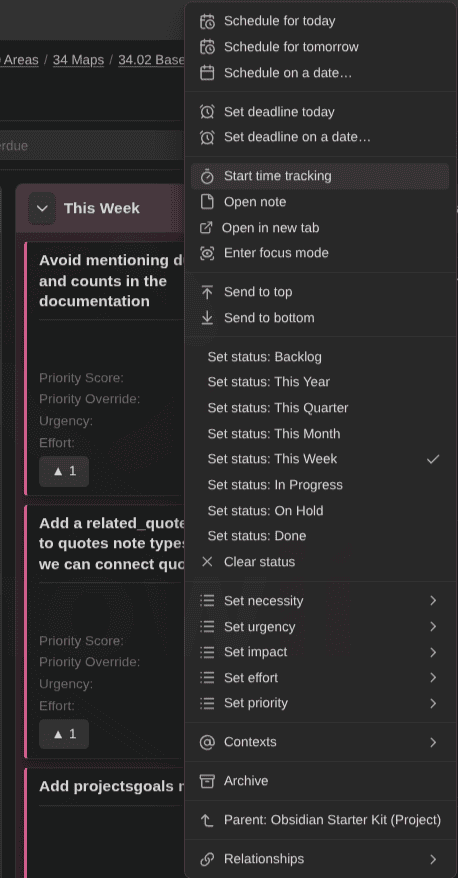
And if a bad value still sneaks in from outside (a manual edit, an import), the card lands in the "Unmapped" column instead of inventing a new one. The problem is visible, and fixing it takes one click.
To me, this is the difference between a view and a system: a view displays whatever your data says, a system protects your data from you.
Swimlanes, WIP limits, aggregates
The native view has columns. That's it, for now.
My plugin adds:
- Swimlanes by note type or any property, and dragging across lanes rewrites the grouping property
- Soft WIP limits per column
- Column aggregates: Σ, average, min, or max of any numeric property, unit-aware for estimates (
1d 2h), so I can see how much work sits in "This Week" before I commit to more - Manual reordering within a column, or sorting by any property or base formula (e.g., a
priority_score) - Multi-select and bulk actions, keyboard moves, compact mode, due countdowns (
In 3d,2d overdue), and color-coded enum values that turn the board into a heatmap - Sort order maintained in note properties
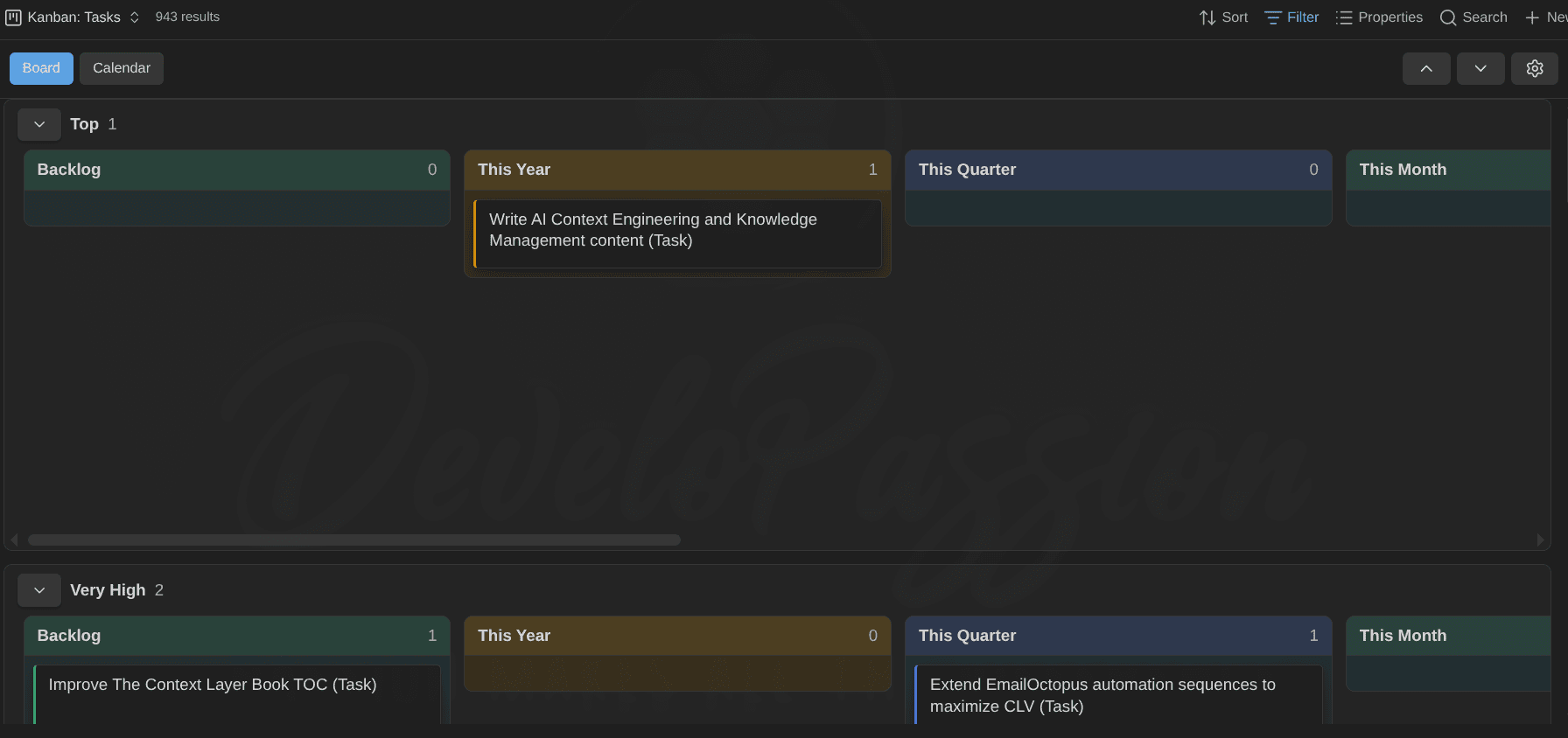
One board, many views
This is the biggest difference. The native Kanban is one layout among others in Bases. Useful, but a board is all it is.
In the Kanban Action Planner, a single Base view provides a complete project management/planning system for the included notes. The same Base view flips into:
- Calendar: day to year, plotting scheduled dates and deadlines; drag a card onto a day to schedule it
- Timeline: a Gantt-style view by start date and estimate, with milestones and deadline lines
- WBS: the goal → project → task tree, with progress, estimates, and tracked time rolling up
- Agenda: Overdue, Today, Upcoming
- Triage: clarify a backlog one card at a time, with keyboard shortcuts and swipes
- Focus: one card full screen, with a timer
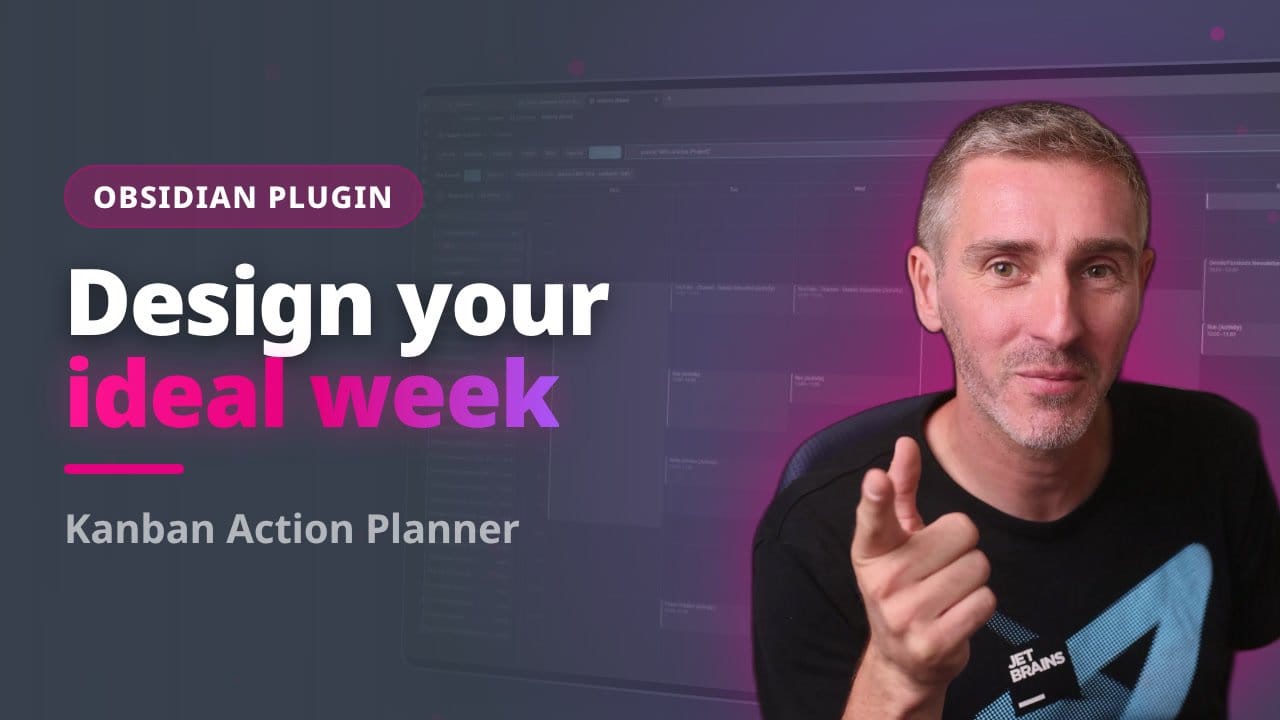
- Ideal week: the recurring time blocks I want to dedicate to my activities, with weekly targets per area
Planning isn't only about "what's the status of this?". It's also "when?", "how much?", "what does it belong to?" and "what should I do right now?".
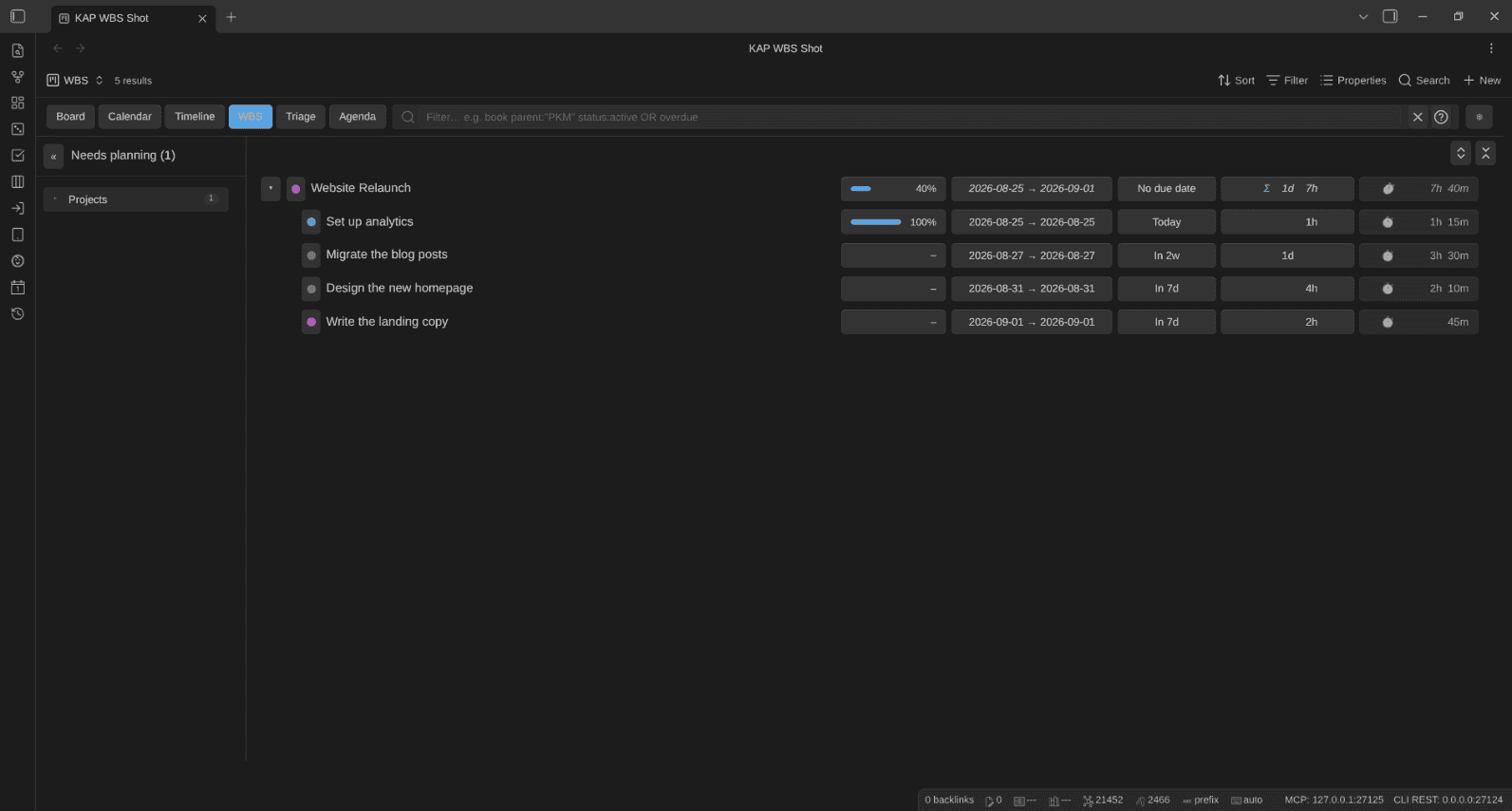
I covered those views in this video:
And I explained how I turned my notes into Kanban boards in a previous article:
 Sebastien Dubois
Relationships
Cards in my system aren't isolated. A goal is the parent of projects, projects are parents of tasks, and task B can be blocked by task A. The plugin understands parent, child, sibling, and blocked_by relationships/links. I can edit them from a card's menu, zoom into a project to see only its children, and see blocked items at a glance.
The native Kanban layout has no notion of relationships. You can filter a Base on a parent link, but that's a static filter you edit by hand. You can't zoom from a goal into its projects, or see at a glance what's blocked.
Automation and archiving
When I mark a task as Done, its progress jumps to 100, the due date clears, and date_completed stamps itself. Whatever the write path: drag, menu, triage, bulk edit. Finished cards can move to an Archive/{{year}} folder automatically (configurable per note type), and a done column has a one-click Archive button.
The native view updates one property when you drag a card (or moves the file, when you group by folder). Everything else is up to you.
Time tracking and pomodoros
The plugin tracks time on any note in TaskNotes' format (time_entries), so both tools read the same ledger. Pomodoros land in the daily note, there's a sidebar and full-screen timer, and the WBS rolls tracked time up next to the estimates. That's how I know whether a project took the time I planned, or twice as long.
Nothing like this exists in the native view. And it shouldn't: a core Kanban layout has no business shipping a time tracker. That's plugin territory. The core Kanban feature is focused, and that's a great thing. My plugin is different simply because I need more out of it.
Filtering, contexts, and embeds
Bases filters work in both. On top of that, my plugin has a filter-as-you-type box with a compact query language (status:active OR due:overdue, is:available, estimate:>4h, parent:"YouTube (Project)", ...), GTD contexts (@work, @home) with a toolbar switcher, and defer dates that turn any board into a next-actions list.
Embeds go further too. One ![[Actions (Base).base#Kanban: Tasks|mode=kanban columns="This Week" filter=parent:"My Project"]] line can change the mode, the visible columns, the lanes, the context, and the filter for that one embed, without touching the saved view. I currently have two embedded boards in my daily notes: one with my active goals, and one with my short-term tasks. I also have such embeds in my project notes; one with a calendar for the project and another with the list of tasks. And I also embed boards inside Obsidian Canvas cards; that way I can have a complete Business dashboard on an infinite canvas. Quite powerful.
Creating cards
Both the core Kanban Base view and my plugin let you create a note from a column. My plugin goes one step further: it knows the note type the board/swimlane is about, so it uses the right folder, the right template (optionally applied with the Templater plugin for Obsidian), and the right name prefix/suffix (optional) before setting the column's status. The + on a goals board creates a goal, on a tasks board a task. With the Obsidian Starter Kit, all of that is configured out of the box.
 Dwayne Appleby
Where the native view wins
The native view has clear advantages, though:
- It's core. Zero install, maintained by the Obsidian team, and it will improve
- Mobile everywhere. Every native layout works on phones. The Kanban Action Planner supports iPhone, iPad and Android since version 2.1, with a touch-friendly board (one column per screen, long-press to drag), but its calendar, timeline, WBS and ideal week still use desktop layouts there.
- Folder grouping that moves files on drag. Neat trick for folder-based workflows
- Simplicity. No note types to configure, no settings to learn. Pick a property, done
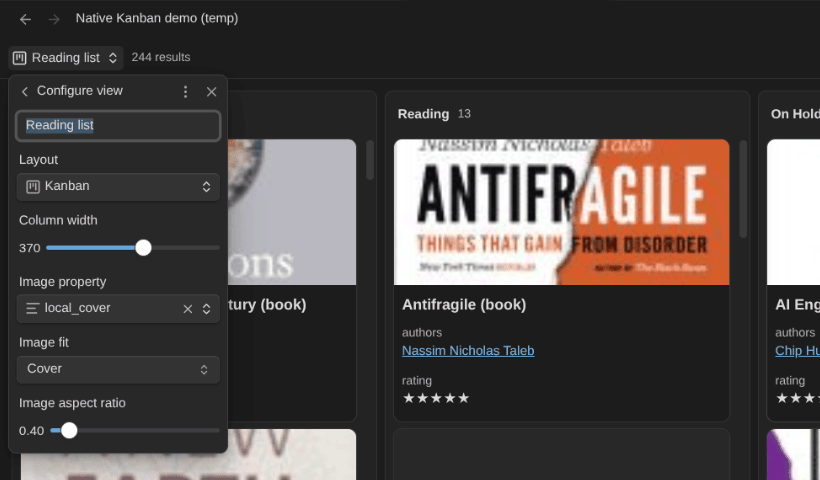
One caveat on the native side: when you group by a formula, or by a file property other than the folder, you can't drag cards or columns, or create notes from the columns anymore (the Group menu still lets you order and hide them). Group by a regular property if you want to drag things around.
The feature set will also grow. The 1.14.x point releases already added drag & drop improvements, the hide-column action, and mobile fixes within a month.
Which one should you use?
You don't have to pick one for your whole vault. Both store everything in your notes, so you can use each where it fits:

FAQ
Does Obsidian have native Kanban boards?
Yes. Since Obsidian 1.14 (early access on September 2, 2026, public on October 5), Bases has a Kanban layout. Each column is one value of the property you group by, and dragging a card to another column updates that property in the note. Cards are regular Markdown notes, so nothing is stored outside your files.
Does the native Kanban view support swimlanes or WIP limits?
Not in 1.14. The documentation covers columns, card properties, cover images and column ordering, but no swimlanes, WIP limits or per-column totals. Community plugins like the Kanban Action Planner add those on top of Bases.
Can I use the native Kanban view and the Kanban Action Planner on the same notes?
Yes. They're two view types on the same Base (or different ones), each with different identifiers, so they don't collide. Both write to the same frontmatter, so you can open one board in the native layout and another in the plugin. Nothing to worry about.
Does the native Kanban view work on mobile?
Yes. It works on phones and tablets; you set the grouping from Display → Group. The Kanban Action Planner also runs on mobile since version 2.1, but not all display modes are mobile-friendly yet.
Conclusion
Native Kanban boards in Obsidian are great news. Anyone can now put their notes on a board without installing anything, and every drag still lands in plain Markdown. Bases keeps growing into the place where structured work happens in Obsidian, and I expect this view to get better quickly.
But a board was never what I needed. I needed a system that understands my note types, their relationships, their dates, their effort, and the time I spend on them. That's what the Kanban Action Planner does, and the gap is still wide at this point in time. So I'll keep watching the native view closely. But, for now, my boards stay where they are.
If you want to try the plugin, it's free and open source:

And if you want all of it pre-configured (note types, statuses, colors, boards), that's what the Obsidian Starter Kit gives you:
Dwayne ApplebyThat's it for today! ✨
Go Further
 Sébastien Dubois
 Sébastien Dubois
 Sébastien Dubois
About Sébastien
Ready to get to the next level?
Found this valuable? Share it with someone who needs it.