
DeveloPassion's Newsletter #221 - Two Months, One Book, One Kit and a Guitar

Edition 221 of my newsletter, discussing Knowledge Work, AI, Knowledge Management, Zen Productivity, Personal Organization, and more!
Hello everyone! I'm Sébastien Dubois, your host. You're receiving this email because you signed up for DeveloPassion's Newsletter, or bought one of my products. Thank you for being here with me ✨
If you enjoy this, please forward it to your friends ❤️. If this email was forwarded to you, then don't forget to subscribe and become a supporter
Welcome
Welcome to all the new readers ❤️
Two months. 100 km of running in October, a book, a new version of my kit, a community platform coming back to life, and a guitar. I'm very very late with the newsletter, and it's more than time to catch-up with you all! 😅
My last regular edition went out on September 29th. Since then, you received two special editions (six search tips for the launch of my book, then the Obsidian Starter Kit v6 launch), but no real news. A LOT happened since then.
Life outside the screen first.
I ran 100 km in October. Again! And on November 8th, I went out for a long run and came back 28 km later, with a new personal record on the half-marathon along the way 🏃
I also started playing guitar again. It's been YEARS since I last played, and I wanted to get back to it. This time I decided to start with an electric guitar, even though I later want to buy an electro-acoustic one (Gibson J-45 if I become rich, or an Epiphone clone otherwise ^^).
For now, I'll be learning with this wonderful Fender Stratocaster:
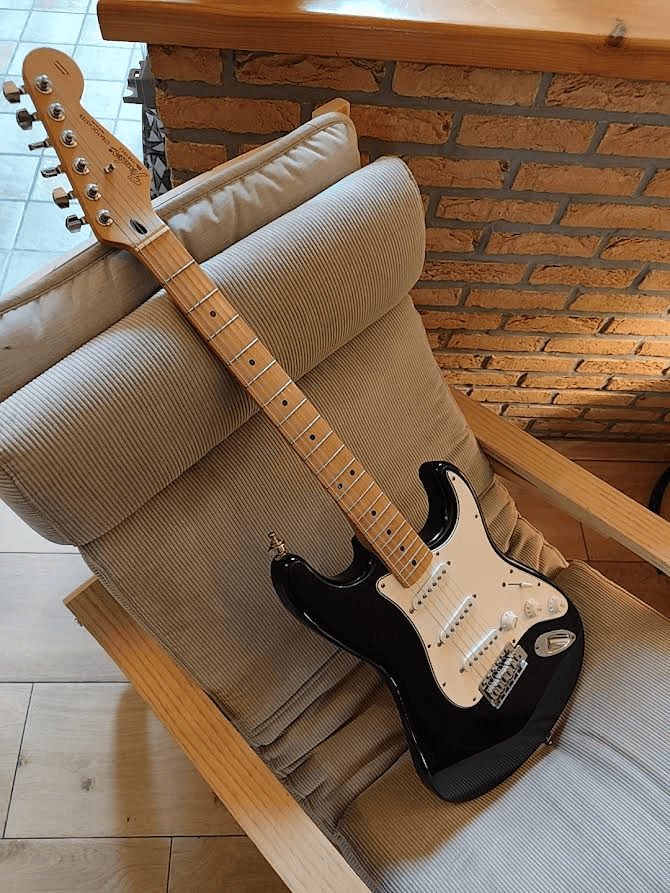
So far, I re-learned a handful of open chords (A, D, E, G, Am, C and Em), and I'm working on simplified versions of Seven Nation Army, Smoke on the Water, Nothing Else Matters and Do I Wanna Know. My fingertips hurt, my chord changes are SLOW, and strings are buzzing like crazy. What's not to love? ;-)
Of course, I couldn't just learn the guitar. Every practice session is now a note in my vault: what I practiced, for how long, and how it went. And I've built an amazing new Obsidian plugin for music practice. You'll see where that led in the Obsidian Starter Kit section below 😅
On the couch, I watched Silo (seasons 1 to 3) and really enjoyed it. I loved Hugh Howey's books, and the show is really good too. Now I'm waiting for the next season 📺
More recently, on November 17th, I gave a two-hour AI workshop to the direction team of a school: how to use AI in their daily work, with a good understanding of key concepts & attention points. And of course with a knowledge base at the center of it. The slides are public (in French): https://developassion.github.io/atelier-ia-ecole-direction
And then came November 19th: the release of GTA VI 🎮
The day before, I picked up the kids, and my oldest son, Matthieu, told me he had something to ask me. He explained it in the car. He wanted me to write a note for school, so that he could stay home on release day and play instead of going to class 😂
I of course said no. I'm a cool dad, but not THAT cool ;-). He then got frustrated and angry (to say the least). I couldn't care less. It made me laugh at first, then it made me mad. So mad that I told him he would of course go to school anyway, that he wouldn't play when he came back, and that he'd be lucky if he could play before the end of the year. (woopsie)
When we got home, he presented his excuses (a tactical move of course ^^), hoping I'd let go and let him play at midnight (lol). Of course.... I refused. He tried to negotiate, then gave up once he understood it was a no-no.
Release day came. He woke up frustrated, sad and quiet. I brought the kids to school, and in the evening, he realized he REALLY wouldn't play. He sat on the sofa until I came back from work (7 PM), and stayed quiet during dinner. After putting Raphaël to bed, I decided to play with him ;-)
My hope was that this would teach him a lesson about shiny new things, and about the importance of things and events in life versus what really counts.
Now, GTA is a series I've ALWAYS loved. I played the very first one when I was a teenager, and almost every game in the series since then. With a LOT of play time. So yes, I really wanted to try it out too. But not playing it on release day didn't matter one bit to me. I've taken a lot of distance from such things in life, and FOMO doesn't hit me that much.
Since that evening, I've kept playing on my own, a little here and there, and it's been really cool. GTA VI is quite amazing. The story is pretty cool, and the sandbox is really, REALLY impressive. The graphics are amazing given how old and weak the PS5 is compared to my PC (I don't own the Pro), and given that the game is limited to 30 FPS. Quite a feat; they've been cooking 🤯
Alright, let's gooooo 🚀
Highlights
- 🖤 Black Friday week: 20% off all my products with the code BLACKFRIDAY2026, until Monday, November 30th, 23:59 CET
- 📦 Obsidian Starter Kit v6 is out: your movies, games, music practice and workouts move in. The full tour, with screenshots
- 📘 My free Obsidian search series is complete: all 12 parts are online
- 💬 Knowii gets its own platform: the project I paused two years ago is back
- 🧠 AI Kit for Obsidian is coming, with two French editions for schools
- 🎸 A new Obsidian plugin to learn music, plus TypedMark, Knowii Voice AI, Knowii Video AI and my upcoming notes website
Before You Go Any Further
Help me reach more people; share the link with someone in your circle who'd benefit from joining us. And don't forget to mention the Knowii Community ❤️
And if you bought some of my products or courses? Please leave a rating/review. It really helps ❤️
🖤 Black Friday week is on
Until Monday, November 30th, 23:59 CET, you get 20% off all my products with the code BLACKFRIDAY2026. The same code takes 20% off your first billing period on Knowledge Master, in the Knowii Community.
There's no extension: on December 1st, the code stops working. It's also the last sale on the kit, the Knowledge Worker Kit and the Everything Knowledge Bundle this year.
My top picks:
- Obsidian Starter Kit: my own vault, packaged so you can start from it. Every future update is included, and there's a 30-day money-back guarantee: https://store.dsebastien.net/osk
- Knowledge Worker Kit: the Obsidian Starter Kit, my Obsidian Starter Course, plus my guide to knowledge work, the PKM Library and workshop recordings: https://store.dsebastien.net/kwk
- Everything Knowledge Bundle: the kit, the Knowledge Worker Kit, my courses and guides, the workshop recordings and The Obsidian Search Handbook (Complete edition), in one purchase: https://store.dsebastien.net/ekb
- Knowledge Master on Knowii: 20% off your first billing period (the yearly and two-year plans include my products). Renewals at the regular price: https://store.dsebastien.net/knowii
Already own the kit? The code works on what you don't have yet: the Search Handbook, the Obsidian Starter Course if you're on Essentials, and the two bundles.
The full offer, and how to use the code:
 Sebastien Dubois

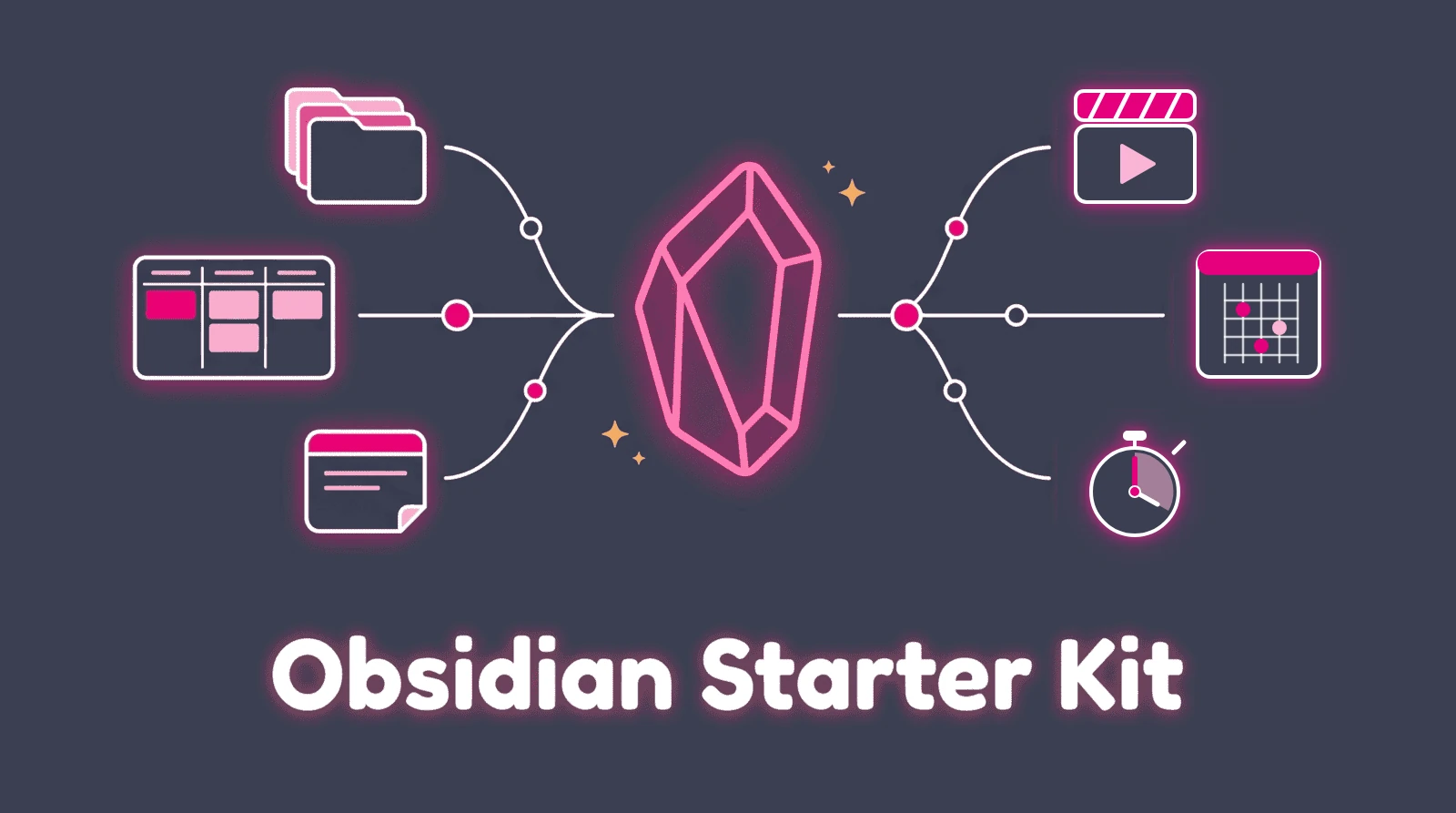
📦 A tour of Obsidian Starter Kit v6
Version 6 of the Obsidian Starter Kit shipped on November 14th. This time, I want to show you what's inside.
Over the past months, my movies, board games, guitar practice and running sessions moved into my vault. Why put hobbies in the same place as work? Because one app per hobby means one more place to check, and one more part of your life your AI can't see. v6 brings all of that to you.
🎬 Your movies, shows and games
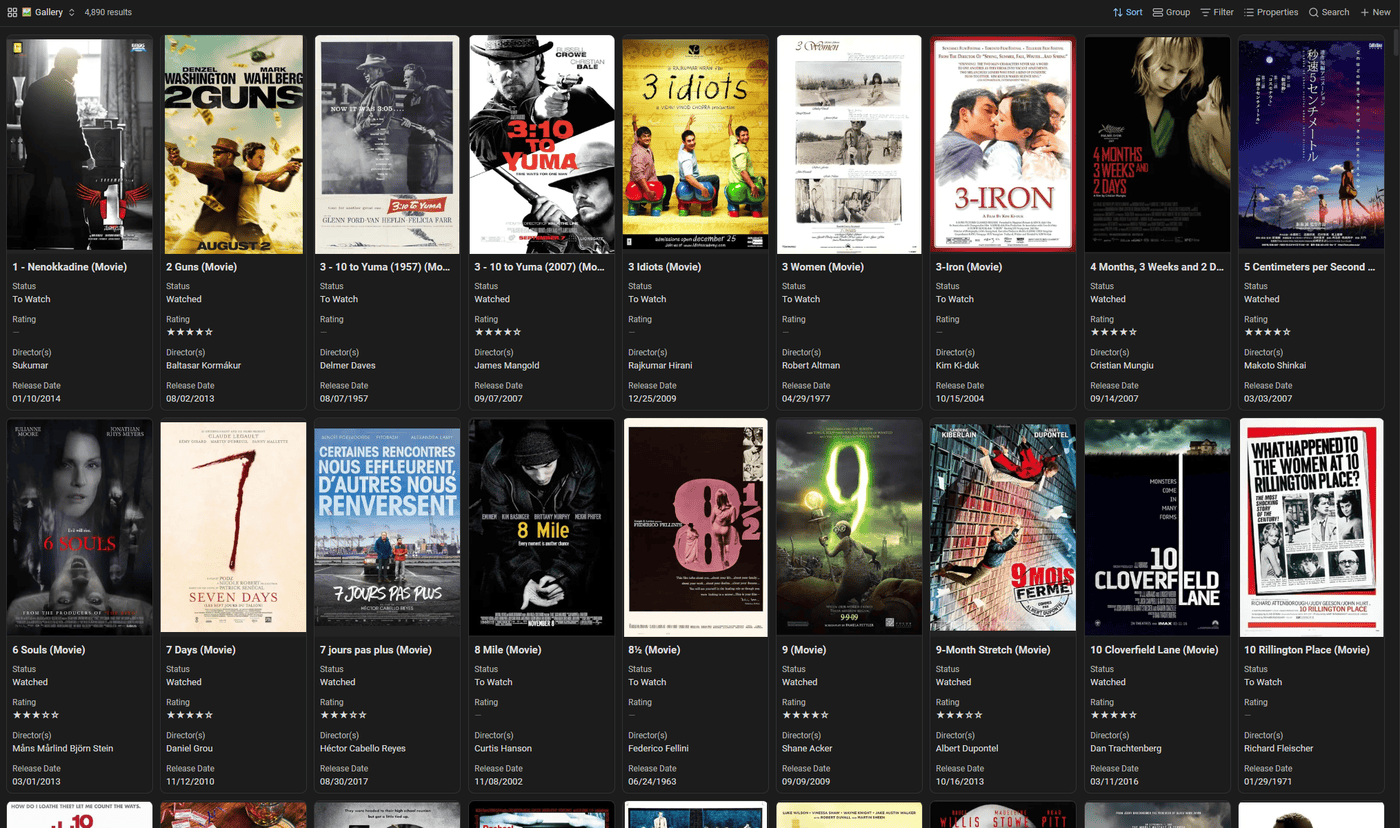
The Media Management System handles movies, TV shows, anime, manga, comics, video games, board games and music albums, right next to your books. Each one is a note like any other. You see what you own, what you want, who borrowed your copy and which Kickstarter pledge is still on its way.
My movie collection alone is about 4,890 notes:
And here are my board games, on a shelf:
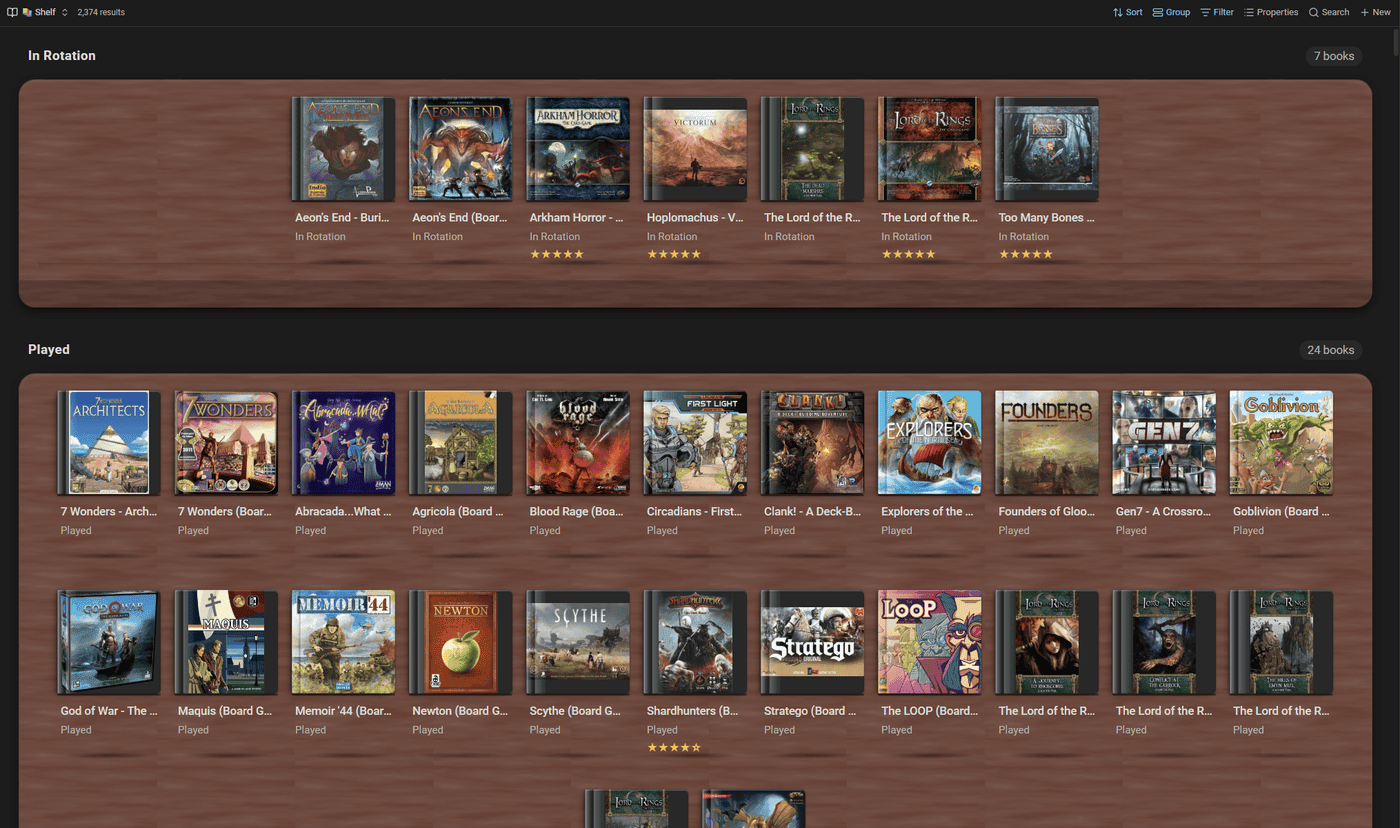
The demo shows how it all works:
What's awesome with this is that I can now manage/explore it all using AI. Watched a movie? AI can create the note, add the cover, fetch ratings and any info I want. And I can capture my own rating, etc. Want to track where I'm at with TV series? Done. Want to know how long it will take to finish some videogame? Done. Want to track a long board game campaign? Done. Want to improve my running sessions? All the data is there to analyze.
It's all a ton of fun, and actually useful!
🎸 Learning music
The Music Learning System of the Obsidian Starter Kit is what I use for the guitar. Every chord, scale, technique, exercise and song you learn on guitar or piano is a note with a mastery level, from "Want to learn" to "Mastered" (and "Rusty" when it slips). Your vault tells you what to practice next and what's due for review.
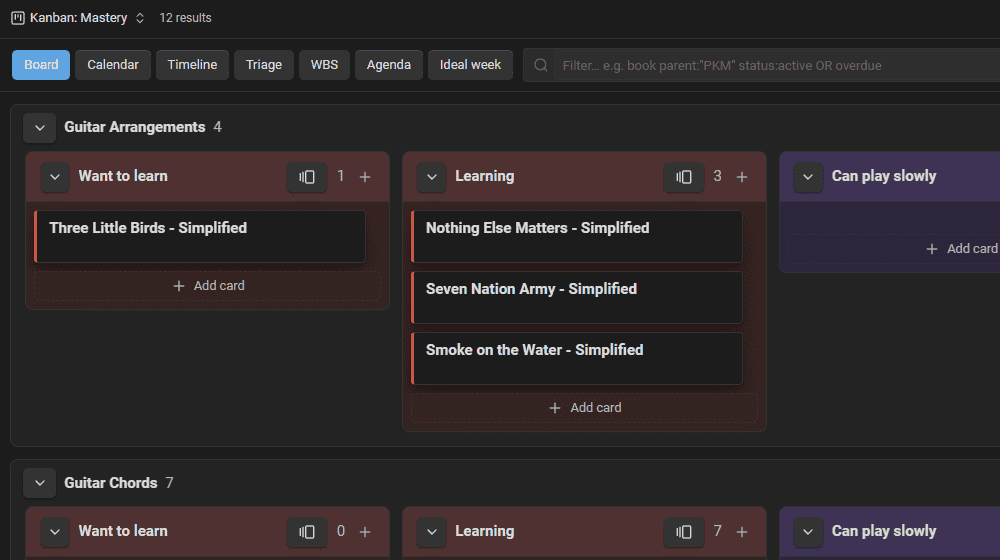
It also includes the Music Practice plugin which leverages my Music Notation library, adds a timer, a metronome, playable notation, practice sessions, and way more.
For example, a chord note draws its own diagram, and you can listen to it:
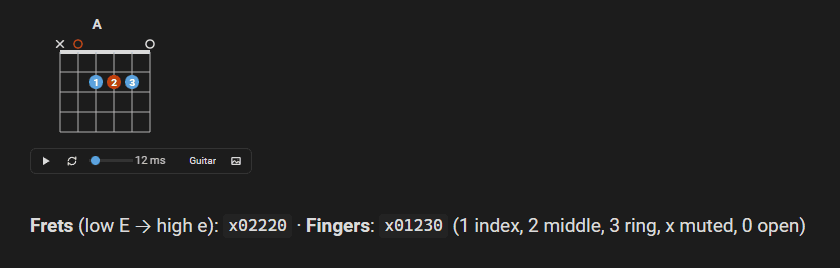
Just take a look at the documentation of the music notation library to get an idea about all it can do:

I'm curious BTW; are there actual musicians here? What do you think about this??
🧾 One note per session
Each practice, run, gym session, video game or board game play gets its own note in your journal. Your Garmin workouts and a Strava export can become session notes too, and views show you how your training is going. My guitar log is built on it:
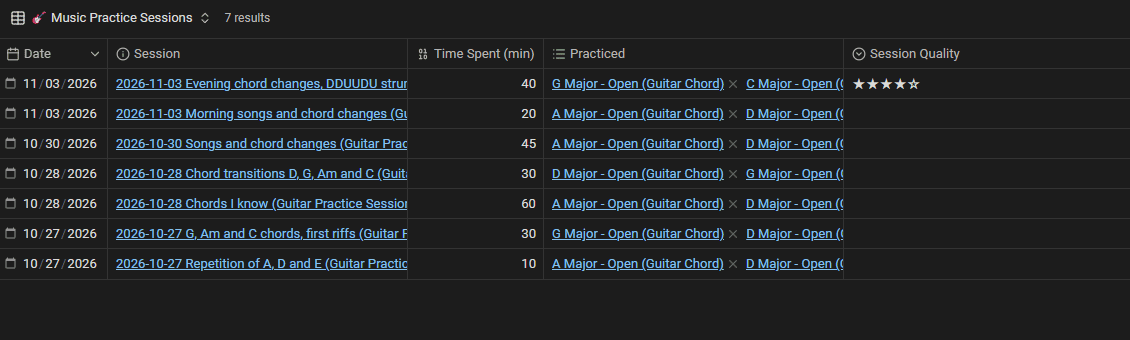
I converted my own history too: 821 Garmin sessions since June 2025, 210 older runs and rides from my Strava export going back to 2019 (with 196 photos), and 49 board game plays from Board Game Geek (BGG). That's about 1,080 session notes,
⚡ Faster, everywhere
- Big boards open fast. My movie board used to take 8 to 9 seconds to open. Now it takes under 3
- Boards on your phone. The Kanban boards now work on phones and tablets
- Note type changes save instantly. Saving one took about 40 seconds on my vault. Now it takes a fraction of a second
- French. The OSK plugin's interface follows Obsidian's language
- More for your AI. Your AI can manage note types and rename notes without breaking links, and your MCP server key stays out of your vault files
🧩 Under the hood: the OSK plugin
The OSK plugin keeps improving too:
- Hand note creation to another plugin. For example, "New note" on book notes opens the Book Search plugin
- Automations on list items, with rule conditions
- Templates follow property changes
- A conformance report finds the notes that don't match their type, and repairs them in bulk
- Renames keep the required name prefix or suffix of a note type
- Settings in tabs
osk-clirecognizes notes exactly like Obsidian does
There's a LOT more. The launch article has more details, and links to the complete list of changes:
 Sebastien Dubois

Already own the kit? The update is free, as always. Download v6 from your Gumroad library or from the OSK space on the Knowii Community (https://learn.knowii.net explains both), back up your vault, then follow the migration guide.
Don't own it yet? The kit's price went up with v6 on Monday, November 16th. The Black Friday code takes 20% off the new price, until Monday, November 30th, 23:59 CET. Every future update is included, and there's a 30-day money-back guarantee.
 Dwayne Appleby
📘 Book News
The Obsidian Search Handbook came out on October 22nd. Many of you bought it since then. Thank you ❤️
My free series on finding notes in Obsidian is complete. The last part, Resurfacing in Obsidian - Find the Notes You Forgot You Had, went live on November 9th. It covers the notes that come back to you without a search: random notes, on-this-day views, review queues.
New to the series? Start with the overview. It has the map of all 12 parts, and you can read them in any order.
Prefer one file? The same text is in my book, The Obsidian Search Handbook (PDF and EPUB). The Complete edition adds the Findability Starter Pack and 6 worksheets.
Here's what readers wrote about it:
"You can tell a lot of homework was put into writing this book. He breaks down the steps in a way that they can be followed, especially using the worksheets. This book is full of useful information and definitely worth having." — Vicki Berg
"Thanks for your great work! This book is a must read for Obsidian users." — Sebastian Kamilli
More reader feedback: https://www.store.dsebastien.net/testimonials?product=obsidian-search-handbook
If a few pages are enough, the free cheat sheet has the search escalation ladder.
💬 Knowii gets its own platform
About a year and a half ago, in edition 192, I told you I was pausing the open source Knowii platform because I couldn't fund its development. So I launched the community first, on Circle, and put the platform on hold. Since then, I've done my best to keep to community alive, and to make it grow.
Meanwhile, I kept thinking about rebooting the Knowii platform project, because I still believe in it. Not just as a space for the Knowii Community itself, but as a Community Knowledge Management and Personal Knowledge Management platform. Think Reddit but for people who care about not losing their knowledge.
Guess what? The platform is back. I'm building it now, and the Knowii Community will move from Circle to it as soon as it's stable enough, which should be quite soon
What changed? AI agents let me build at a pace that wasn't possible two years ago. So the funding I needed isn't required anymore. At least clearly not at the same level. Before, I needed to fund my own time. Now I just need to be able to afford the AI tokens.
What's built so far:
- Community creation
- Spaces and space groups, with posts in Markdown, comments, reactions, mentions and image uploads
- Resources: spaces where what you share gets its content captured
- Chat with threads, direct messages, presence and live updates
- Notifications, so you know when someone replies to you or mentions you
- Courses with sections, videos, materials, quizzes and progress tracking
- Events, with calendar files to add them to your agenda
- A member directory, roles and moderators, and invitations
- Security: two-factor authentication and API tokens. Every feature has an API route, so your scripts and your AI agents can use it too
- Privacy first: a GDPR review, published legal pages, no Google Fonts, and a robots.txt that refuses AI crawlers
- Public spaces, for what a community wants to share with the world
- API: I'm building the API along with the product
Later, I want to add a personal knowledge layer, a bit like Readwise, but fully integrated in the whole community platform.
Once you sign up to the Knowii Platform, you will be able to create and join communities. And you'll have your own personal space that you can use to curate content, explore/dissect it, share it with your communities, etc. Consider that on the platform, knowledge will flow between communities and users.
Note that what I'm building is an open platform, not a walled garden. Anyone will be able to host their own instance if they fancy. And I intend to build solid integrations between the platform and tools such as Obsidian (eg a "Save to Obsidian" action, or "Publish to Knowii Community" from Obsidian), as well as means to easily curate content from anywhere. I have TONS of ideas.
Want to be part of it? Join the Knowii Community now. When the platform is ready, the community moves to it, and you move with us. Until Monday, November 30th, 23:59 CET, the code BLACKFRIDAY2026 takes 20% off your first billing period on Knowledge Master. Check out https://store.dsebastien.net/knowii
And if you want to contribute, you're more than welcome to. It's an open source project:

🧠 AI Kit for Obsidian, and two French editions
The Obsidian Starter Kit is my vault. But what if your work looks nothing like mine?
For that, I'm building AI Kit for Obsidian, a modular AI system built on Obsidian: a core, plus modules for what you do. You start from an empty vault, tell the builder what you want to manage, and your AI designs and builds that system with/for you.
- English and French editions
- Works on Windows, Linux, MacOS
- Works with Claude Code and Claude Desktop (and with other AIs too)
- User guides in English and in French (~ 100 pages)
The first version exists and is in use, but I don't sell it (yet). This is all coming soon.
Two derived products are built on top of it:
- Ma Classe IA is an AI system for teachers. It started as a version I built for my wife, who's an elementary school teacher: her lessons, her classes, her planning, tasks, etc, in a vault AI understands
- Ma Direction IA is for school directors: organize and track their work, projects, budgets, teams, paperwork, etc
Both are coming soon as well. Currently in beta with schools around my place. If you know a French-speaking teacher or school director, tell them about this 😉
The Lab 🧪
🎸 Music Practice, my new Obsidian plugin
Learning the guitar made me want better tools in my vault. So I built them 😂 (software for one)
The Music Practice plugin is in the Obsidian community directory. It's built on my open source Music Notation library, which draws and plays everything. What it does:
- Practice next and practice plans, based on your mastery levels and reviews
- Log practice into session notes, with a timer, a metronome and a speed trainer
- Chord change drills, to get faster between two chords
- Playable diagrams for chords and scales, and every voicing of a chord, ranked by ease
- Tabs and scores with playback, and a play-along player with an A-B loop that slows the music down without changing the pitch
- Ear training: intervals, chords and scales
- Four guitar sounds (steel, nylon, clean and overdrive), with a room and an amplifier
- Full screen, and a French translation

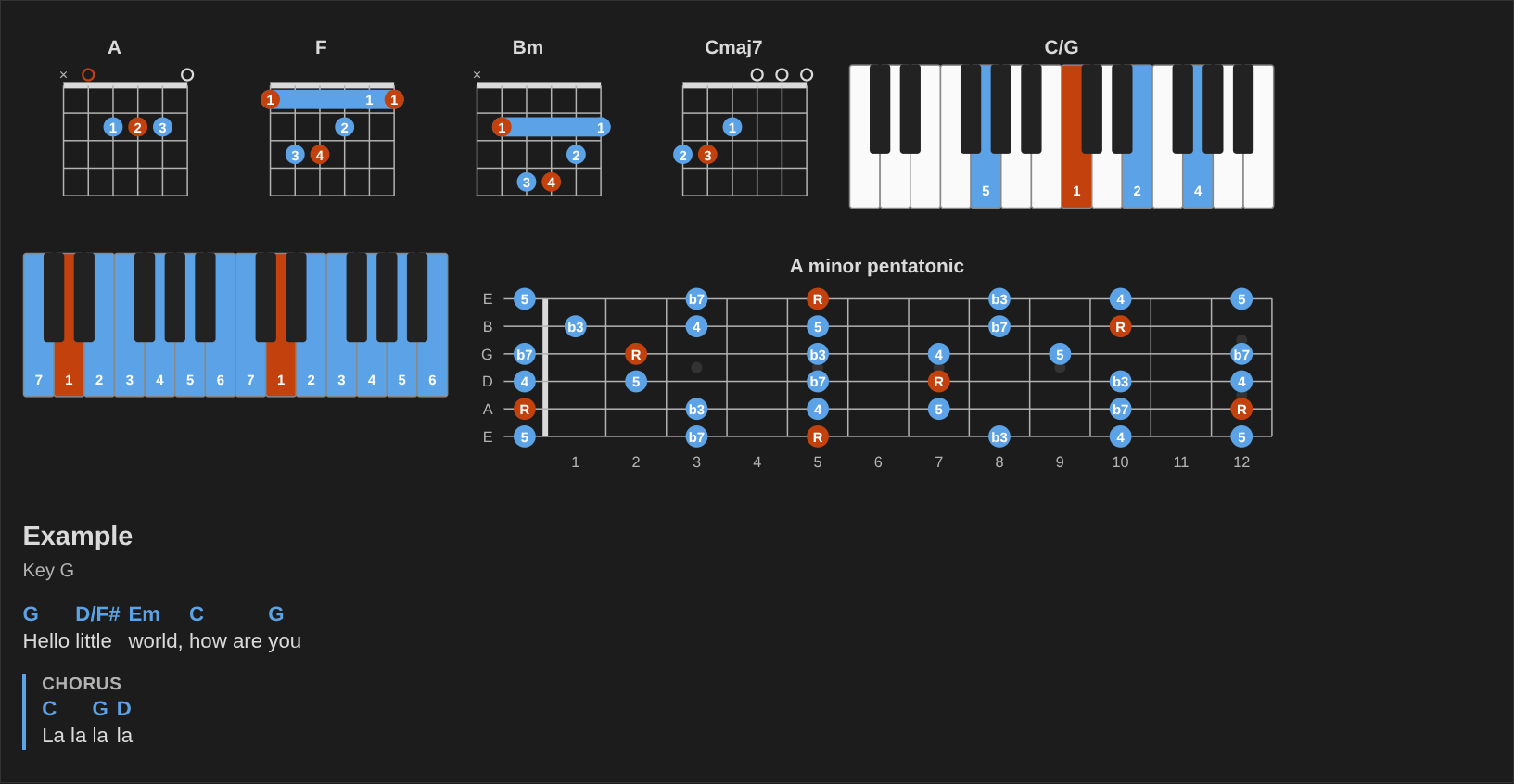
To explore music theory, guitar and piano, I also built an LLM Wiki in my vault: a knowledge base that AI maintains, where every article has its sources and a confidence level. And I've actually published it; it's called the Music LLM Wiki. It contains ~140 articles (about 300K words) in 11 sections: Theory, Ear Training, Guitar, Guitar Types, Fingerpicking, Piano, Practice, Making Music, Genres, Reggae, and Tips and Tricks. Parallel research agents wrote them. And it heavily leverages my Music Notation library, meaning that it's full of playable examples (e.g., chords, strumming patterns, arpeggios, etc).
For example, check out this wiki page about the Circle of fifths:
Isn't it beautiful?
🌐 Leaving Obsidian Publish
My public notes (https://notes.dsebastien.net) currently run on Obsidian Publish. Before it shows you a note, Obsidian Publish downloads a cache of the whole site: about 13 MB for mine, on every first visit. And tools that only read the HTML (search engines, AI tools) see an empty page. I've reached a point where it really becomes unusable. So it's time for me to switch to another solution.
That's why I'm now building my own notes website. I explained why in this news post. And as usual I have tons of ideas about what I want the UI/UX to be like. This is going to be awesome!
No date yet. I'll switch when it's ready.
📐 TypedMark
For quite a long time now, the OSK plugin's note types have kept my vault in order: each type comes with its own template and folder. TypedMark takes that idea out of Obsidian. It's my open specification for typed Markdown note systems (MIT), with reference tooling.
You define note types with schemas, your notes stay plain Markdown with YAML properties, and tools can validate them. Whole systems can be shared and composed, and migrated safely when they change.
It's still very early. The spec is substantive; the tooling and the example systems are still in progress. I'm dogfooding it on my vault's goals, projects and tasks, with views over thousands of notes in seconds.
The end goal is for this to become the engine at the core of my Knowledge Management practice. I dream about a tool that could/would replace Obsidian for me, a bit similar to what Tolaria did, just with my own twist and much more "type safety".

🎙️ Knowii Voice AI
The next release of Knowii Voice AI is a big one:
- Presets, each with its own layout (a task, a list item, a quote...) and shortcut, started from a Stream Deck or a button in a note
- AI modes switched from the tray, and the AI run again from History
- Spoken routing ("..., add this to Deep Work under Ideas"), and spoken tasks that become task notes linked to their project
- Windows support, and an Obsidian integration through the Local REST API or CLI REST plugins, with specific support for the Obsidian Starter Kit
The release should hopefully come before the end of the year.
🎥 Knowii Video AI
My video editor keeps growing:
- Agents propose, you decide: approve or reject their edits from a Proposals panel
- Takes: split, merge, trim, clean up the ums, uhs and long pauses, and "cut at the natural pause"
- Chapter markers exported as YouTube timestamps, screen zoom, transitions, and takes extracted to a vertical Short
- Voice commands while recording: "Jarvis, bad take" 😂
- Captions in my brand styles with a karaoke highlight, title, definition and bullet cards, and picture or clip inserts
- Noise reduction, smooth playback, and one Obsidian note per video
The Windows port is in progress. I'd like to launch it in Q1 2027.
📚 Bookshelf gets beautiful covers
Books without a cover image now get a real hardcover in the Bookshelf plugin, drawn in pure CSS (nothing to download), with the title and author lettered in foil. Pick one of five styles: cloth hardcover (the default), leather with a label, library binding, mixed (each book gets one, picked from its title, so your shelf looks like an old library) or the classic spine. The lettering comes in gold, silver, copper or blind, and a title gets the same look in every view.
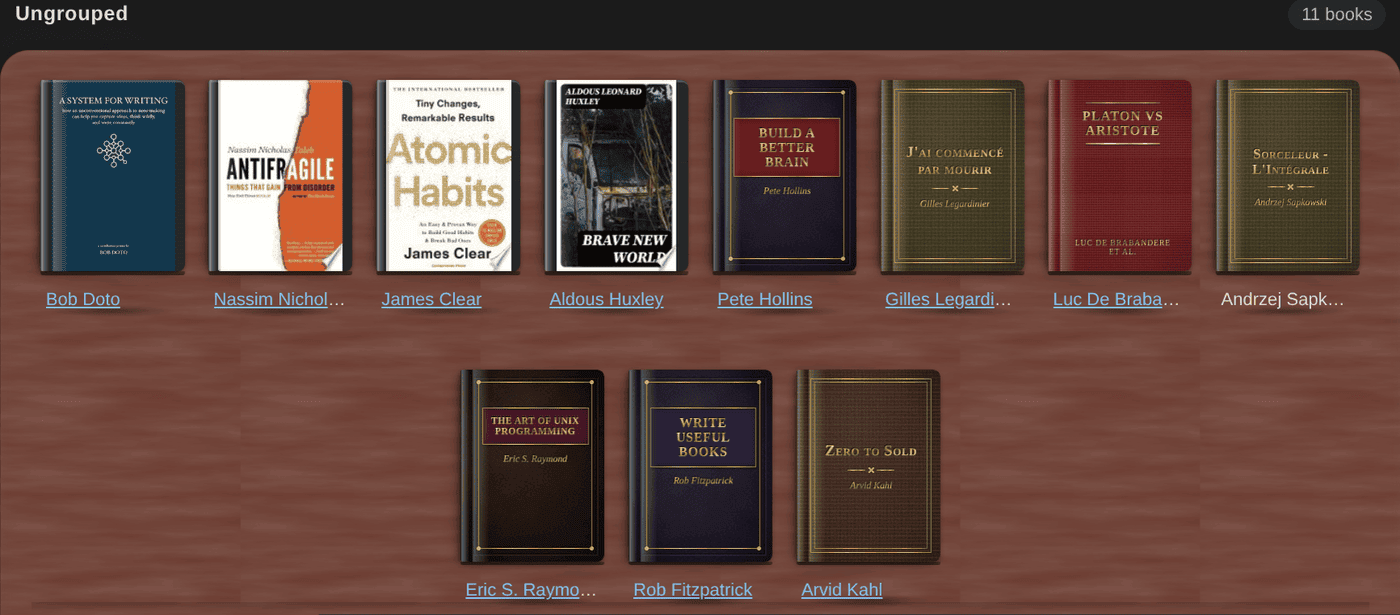
Also new: covers turn into spines at narrow aspect ratios, a dead cover link gets a default cover instead of a gray block, and the default shape is 2:3, like printed books. Covers with an apostrophe in their file name show up again, and covers accept bare file names, wikilinks and Windows paths. Every style is in the docs: https://dsebastien.github.io/obsidian-bookshelf/configuration.html#default-covers

🔌 Plugins and small tools
- Kanban Action Planner: a mobile-first board on phones, hotkeys for time tracking, filters on any property, time computed from linked session notes, and retention (done notes deleted after a number of days, with a review list)
- Life Tracker: a new quick add panel, links for your phone's home screen, and Saturday as the first day of the week
- Dataview Serializer: hide the query text (yay, no more HTML comments all around the place), periodic full serialization, queries that follow your renames, and a command that validates all your queries
- reMarkable Sync: many reliability fixes
- Secrets: my plugins now keep their keys and tokens in Obsidian's secret storage instead of their settings files. Yay for security!
- Hidden Folders Access: my Obsidian froze for about 9 minutes at start, because the plugin made it read every hidden note again. It now saves their metadata and restores it at start, about 30 times faster
- Session Flags: my first Claude Code Mod, open source (MIT). It's a side panel that collects the questions, issues and follow-ups raised during a session, so they don't get lost in the scrollback: https://github.com/dsebastien/session-flags
- GitHub Radar: I added a repository filter and a collapsible side panel. Kanban board coming soon
- Claude Epic Status Line: Improved it after the release of Fable 5.2. I'm so frustrated I don't have this at work (where we use GitHub Copilot)
- Transcriber (turns images into Markdown with local Ollama vision models): choose an output folder and a file name prefix, or insert the text into the note right after the image
- Graph Explorer: choose where the edges come from (all links, frontmatter links only, or body links only)
Thank you to the people who sent pull requests: demrom (Dataview Serializer, four contributions), andriyor (Life Tracker fixes) and delize (reMarkable Sync) ❤️
🔗 Cool Finds
What I published
- Every movie, show and game I care about now lives in my Obsidian vault: the story behind the Media Management System: https://www.dsebastien.net/media-management-system-obsidian/
- Capture Anything to Your Obsidian Daily Note in One Click: https://www.dsebastien.net/capture-anything-to-your-obsidian-daily-note-in-one-click/
- Obsidian now has native Kanban boards and I'm not switching yet: https://www.dsebastien.net/obsidian-native-kanban-vs-kanban-action-planner/
- My 5,000-movie Kanban board in Obsidian now opens in under 3 seconds: https://www.dsebastien.net/kanban-action-planner-2-5-big-boards-covers-colors/
- Sort your work by what it is and your lists will stop lying: https://www.dsebastien.net/sort-your-work-by-what-it-is/
- A project is a promise with a finish line: https://www.dsebastien.net/what-counts-as-a-project/
- If it isn't in the project's home, it doesn't exist: https://www.dsebastien.net/organize-project-information/
New on my concepts website
I keep adding concepts to my Concepts Website (https://concepts.dsebastien.net). We have now >4.1K concepts in there! The latest ones come in clusters:
- Around the Ovsiankina effect (the urge to go back to a task you didn't finish): Resumption Lag, Hemingway Bridge, Endowed Progress Effect, Intention Superiority Effect
- From Shape Up: Appetite, Fixed Time Variable Scope, Betting Table, Hill Charts
- Linked to Little's Law: Kingman's Formula, Resource Efficiency Trap, Small Batches
- On attention residue: Ready-to-Resume Plan, Task-Set Inertia, Plan-Making Effect, Psychological Detachment, Self-Interruption
Try the Hemingway Bridge tonight: stop in the middle of something you know how to continue. Tomorrow, getting started again will be MUCH easier.
Found on the web
- Agent Experience (AX): how easily AI agents can discover, operate and recover in a product (a term coined by Mathias Biilmann of Netlify in January 2025). If an agent can't use your product, it picks another one. It's one of the reasons why every Knowii feature has an API route: https://biilmann.blog/articles/introducing-ax/
- Learning interactives (Google Research): a teacher asks for a STEM simulation, and the model builds the whole interface on the spot, for the teacher to approve. With a teacher at home, this one caught my eye: https://research.google/blog/the-future-of-practice-enabling-teachers-to-create-learning-interactives-with-generative-ui/
- Prism plugin for Obsidian: charts, diagrams and dashboards in code blocks, designed so that AI agents can render what they wrote and fix it: https://github.com/floorianmb/prism-viz
🧠 Tip of the Week
Give five note types a home.
Your head holds every small decision you haven't made yet, starting with "where do I put this note?". Each one takes a bit of attention, all the time.
Pick five note types you create every week (for example: task, project, meeting, person, idea). Give each one a template and a folder. Then capture everything in today's daily note, and sort it during your weekly review.
You stop deciding where things go, and your head gets lighter. Start simple: you can always add types later.
I explain the why (open loops, and what the research actually says about the Zeigarnik effect) in this article:
 Sebastien Dubois

Bonus tip 1: get your Templater hotkeys back. A recent Templater update removed its default hotkeys (Alt+E to insert a template, Alt+R, Alt+N and Alt+Tab), with no announcement. Open Settings → Hotkeys, search for "Templater", and set Alt+E (and the others you use) yourself. Hotkeys you set explicitly live in your vault's settings, so future updates can't remove them. Do it in each vault. More details here.
Bonus tip 2: stop putting the note title in your Dataview queries. Write [[]] (the current file) instead of [[Note name]], for example LIST FROM #type/idea AND [[]], or use this.file.link. When you rename a note, Obsidian doesn't update the links inside HTML comments or code blocks, so your lists empty themselves without a warning (18 notes in my vault had lost theirs). Before migrating 4,788 notes, I ran 12,778 queries both ways: 0 differences. Since then, Dataview Serializer queries also follow your renames, and there's a "Validate all queries" command. The whole story: Stop putting the note title in your Dataview queries.
🧠 Quote of the Week
An expert is someone who, over many years, manages to remain confident enough to keep trying and humble enough to keep learning - James Clear
Learning the guitar reminded me what being a beginner feels like. Clumsy fingers, slow chord changes, songs that sound nothing like the record. It's humbling, and it's good for me. Whatever you're learning right now, keep trying. The awkward phase is part of it 💪
Until Next Time
Tons of things happened, and this is really just the tip of the iceberg. And much more is coming!
What are YOU learning/doing/creating right now? Hit reply and tell me. I read everything.
That's it for today! ✨
Want more?
- 🖤 Black Friday: 20% off all my products with the code BLACKFRIDAY2026, until Monday, November 30th, 23:59 CET: https://www.dsebastien.net/black-friday-2026/
- 🚀 Get the Obsidian Starter Kit v6: https://store.dsebastien.net/osk
- 🔍 Grab the free Obsidian Search Cheat Sheet: https://www.dsebastien.net/free-obsidian-search-cheat-sheet/
- 🧠 Join Knowii: https://www.store.dsebastien.net/product/knowii-community/
- 🎙️ Try Knowii Voice AI: https://voice-ai.knowii.net
- 📺 Subscribe on YouTube: https://www.youtube.com/@dSebastien
- 🔌 All my free tools: https://tools.dsebastien.net
- 📰 More content at https://dsebastien.net
Talk to you again soon ❤️
— Sébastien
About Sébastien
Ready to get to the next level?
Found this valuable? Share it with someone who needs it.